trailer CADILLAC ESCALADE 2021 Owner's Guide
[x] Cancel search | Manufacturer: CADILLAC, Model Year: 2021, Model line: ESCALADE, Model: CADILLAC ESCALADE 2021Pages: 492, PDF Size: 7.92 MB
Page 271 of 492
Cadillac Escalade Owner Manual (GMNA-Localizing-U.S./Canada/Mexico-
13690472) - 2021 - CRC - 8/10/21
270 DRIVING AND OPERATING
Increased Height
Increased Height is 25 mm (1 in)
higher than Normal Height. This ride
height raises the vehicle for off-road
use, allows for higher speeds than
Maximum Height, and is only
available with specific optional
content.
Increased Height can be selected in
the Ride Height Menu while vehicle
speed is less than 80 km/h (50 mph).
If vehicle speed exceeds 80 km/h
(50 mph), the vehicle will
automatically lower to Normal Height.
Off-Road Driver Mode and Terrain
Driver Mode will automatically set
Increased Height when vehicle speed
is less than 80 km/h (50 mph).
If vehicle speed exceeds 80 km/h
(50 mph), the vehicle will lower to
Normal Height. Normal Height will be
maintained until vehicle speed is
slowed to less than 16 km/h (10 mph)
and then the vehicle will
automatically raise back to Increased
Height.The vehicle will automatically lower
from Increased Height to Normal
Height to provide improved stability if
aggressive maneuvers are detected.
Maximum Height
Maximum Height is 50 mm (2 in)
higher than Normal Height. This ride
height raises the vehicle for off-road
use and is only available with specific
optional content.
To raise the vehicle to Maximum
Height, first shift the transfer case to
4
n. Once the transfer case is in 4n
and vehicle speed is less than
48 km/hr (30 mph), select Maximum
Height in the Ride Height Menu.
If vehicle speed exceeds 48 km/h, the
vehicle will automatically lower to
Increased Height.
The vehicle will automatically lower
from Maximum Height to Normal
Height to provide improved stability if
aggressive maneuvers are detected.
Aerodynamic Height
Aerodynamic Height is 20 mm
(0.75 in) lower than Normal Height.
This ride height lowers the vehicle at
higher vehicle speeds to improve
aerodynamics.
The vehicle will lower to Aerodynamic
Height when vehicle speed exceeds
105 km/h (65 mph) for a period of
time. The vehicle will raise to Normal
Height when the vehicle slows to less
than 48 km/h (30 mph).
Aerodynamic Height is automatically
disabled when a trailer is connected to
the vehicle or Tow/Haul Driver Mode
is active.
Suspension Modes
The air suspension has two special
modes, Service Mode and Alignment
Mode, located in the infotainment
screen under Settings/Vehicle/
Suspension.
Page 275 of 492

Cadillac Escalade Owner Manual (GMNA-Localizing-U.S./Canada/Mexico-
13690472) - 2021 - CRC - 8/10/21
274 DRIVING AND OPERATING
Adaptive Cruise Control
(Advanced)
If equipped, Adaptive Cruise Control
(ACC) allows the cruise control set
speed and following gap to be
selected. Read this entire section
before using this system. The
following gap is the following time (or
distance) between your vehicle and a
vehicle detected directly ahead in your
path, moving in the same direction.
If no vehicle is detected in your path,
ACC works like regular cruise control.
ACC uses camera and radar sensors.
SeeRadio Frequency Statement 0467.
If a vehicle is detected in your path,
ACC can speed up the vehicle or apply
limited, moderate braking to maintain
the selected following gap. To
disengage ACC, apply the brake. If the
Traction Control System (TCS) or
StabiliTrak/Electronic Stability Control
(ESC) activates while ACC is engaged,
ACC may automatically disengage. See
Traction Control/Electronic Stability
Control 0264. When road conditions
allow ACC to be safely used, ACC can
be turned back on. Turning off the TCS or StabiliTrak/
ESC system will disengage the cruise
control.
ACC can reduce the need for you to
frequently brake and accelerate,
especially when used on expressways,
freeways, and interstate highways.
When used on other roads, you may
need to take over the control of
braking or acceleration more often.
{Warning
ACC has limited braking ability and
may not have time to slow the
vehicle down enough to avoid a
collision with another vehicle you
are following. This can occur when
vehicles suddenly slow or stop
ahead, or enter your lane. Also see
“Alerting the Driver”
in this section.
Complete attention is always
required while driving and you
should be ready to take action and
apply the brakes. See Defensive
Driving 0231.
{Warning
ACC will not detect or brake for
children, pedestrians, animals,
or other objects.
Do not use ACC when:
.On winding and hilly roads or
when the sensors are blocked by
snow, ice, or dirt. The system
may not detect a vehicle ahead.
Keep the entire front of the
vehicle clean.
.Visibility is low, such as in fog,
rain, or snow conditions. ACC
performance is limited under
these conditions.
.On slippery roads where fast
changes in tire traction can
cause excessive wheel slip.
.When towing a trailer.
Page 283 of 492
Cadillac Escalade Owner Manual (GMNA-Localizing-U.S./Canada/Mexico-
13690472) - 2021 - CRC - 8/10/21
282 DRIVING AND OPERATING
Other Vehicle Lane Changes
ACC will not detect a vehicle ahead
until it is completely in the lane. The
brakes may need to be manually
applied.
Objects Not Directly in Front of Your
Vehicle
The detection of objects in front of
the vehicle may not be possible if:
.The vehicle or object ahead is not
within your lane.
.The vehicle ahead is shifted, not
centered, or is shifted to one side of
the lane.Driving in Narrow Lanes
Vehicles in adjacent traffic lanes or
roadside objects may be incorrectly
detected when located along the
roadway.
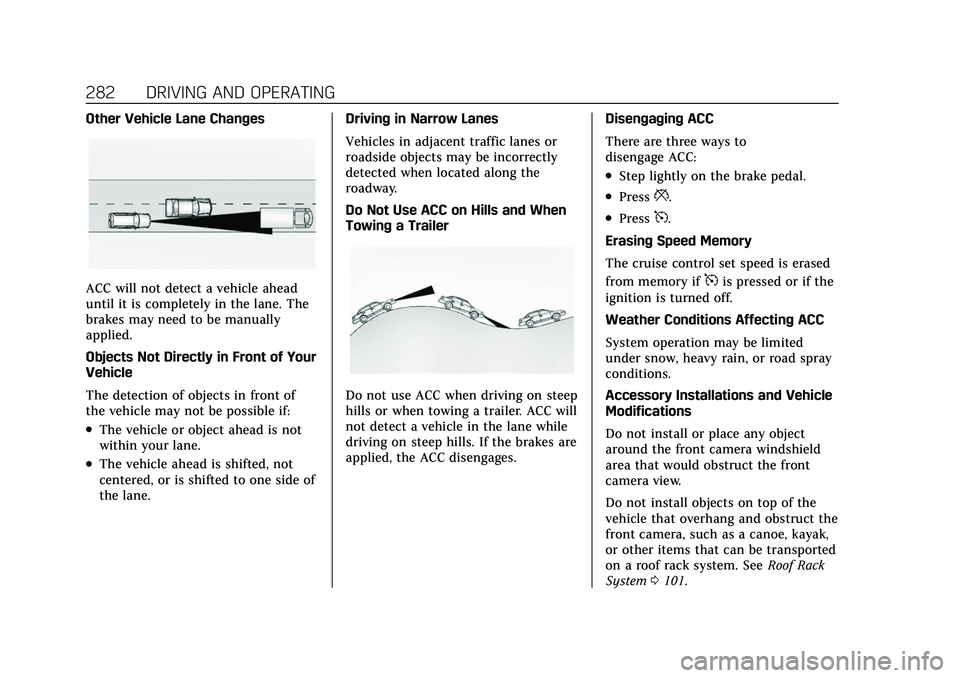
Do Not Use ACC on Hills and When
Towing a Trailer
Do not use ACC when driving on steep
hills or when towing a trailer. ACC will
not detect a vehicle in the lane while
driving on steep hills. If the brakes are
applied, the ACC disengages.
Disengaging ACC
There are three ways to
disengage ACC:
.Step lightly on the brake pedal.
.Press*.
.Press5.
Erasing Speed Memory
The cruise control set speed is erased
from memory if
5is pressed or if the
ignition is turned off.
Weather Conditions Affecting ACC
System operation may be limited
under snow, heavy rain, or road spray
conditions.
Accessory Installations and Vehicle
Modifications
Do not install or place any object
around the front camera windshield
area that would obstruct the front
camera view.
Do not install objects on top of the
vehicle that overhang and obstruct the
front camera, such as a canoe, kayak,
or other items that can be transported
on a roof rack system. See Roof Rack
System 0101.
Page 286 of 492

Cadillac Escalade Owner Manual (GMNA-Localizing-U.S./Canada/Mexico-
13690472) - 2021 - CRC - 8/10/21
DRIVING AND OPERATING 285
Warning (Continued)
.Never remove your hands from
the steering wheel when Super
Cruise is not operating.
.Always make sure traffic
conditions are safe before using
Super Cruise.
.Always keep the entire vehicle
and the sensors clean. Sensors
are on the front, sides, and rear
of the vehicle.
.Always observe posted speed
limits. Only use Super Cruise at
or below the posted speed limit.
Super Cruise should not be used in
complex or uncertain driving
conditions, including:
.Not in construction zones.
.Not when approaching or exiting
toll plazas.
.Not when approaching an
intersection that is controlled
with a traffic light, stop sign,
or other traffic control device. (Continued)
Warning (Continued)
.Not when lane markings are not
present or cannot be detected.
For example, there is too much
glare, weather conditions are
poor, or lanes are poorly marked.
.Not on slippery or icy roads.
.Not in adverse weather
conditions, including rain, sleet,
fog, ice, or snow.
.Not on winding or hilly roads.
.Not for city driving.
.Not during heavy or emergency
braking.
.Not on surface streets.
.Not on a road shoulder, service
drive, or under an elevated
freeway.
.Not when towing a trailer.
.Not in a highway exit lane. When Super Cruise is Available
Super Cruise Indicator
Super Cruise is designed to operate
only when:
.ACC is on. See Adaptive Cruise
Control (Advanced) 0274.
.Teen Driver is not active.
.The GPS detects the vehicle is on a
compatible highway.
.Both the camera and the radar
sensors are functioning and not
covered, obstructed, or damaged.
.The Driver Attention System (DAS)
detects the driver's head and eyes
are directed toward the road.
.The lane markings are clearly visible
and able to be detected by the
system.
Page 293 of 492

Cadillac Escalade Owner Manual (GMNA-Localizing-U.S./Canada/Mexico-
13690472) - 2021 - CRC - 8/10/21
292 DRIVING AND OPERATING
Other Vehicles Entering Your Lane
Super Cruise may not detect a vehicle
that enters your lane, or may not
brake fast enough to avoid a crash.
You must manually brake and steer
the vehicle.Intersections; Vehicles Crossing the
Road Ahead
Super Cruise will not brake the vehicle
when approaching an intersection that
is controlled by a traffic light or stop
sign. Super Cruise will not detect
vehicles crossing the road ahead,
including at intersections, and will not
automatically steer or brake to
prevent a collision. You must
manually brake and steer the vehicle.
Towing a Trailer
Do not use Super Cruise when towing
a trailer. For towing capability, see
Trailer Towing
0334.
Super Cruise on Hills
Do not use Super Cruise while driving
on steep hills. Super Cruise Indicator Light
SummaryThe steering wheel light bar and
instrument cluster light provide the
following important information about
Super Cruise operation:
Page 303 of 492
Cadillac Escalade Owner Manual (GMNA-Localizing-U.S./Canada/Mexico-
13690472) - 2021 - CRC - 8/10/21
302 DRIVING AND OPERATING
Menu Three
Menu Four
Camera Views
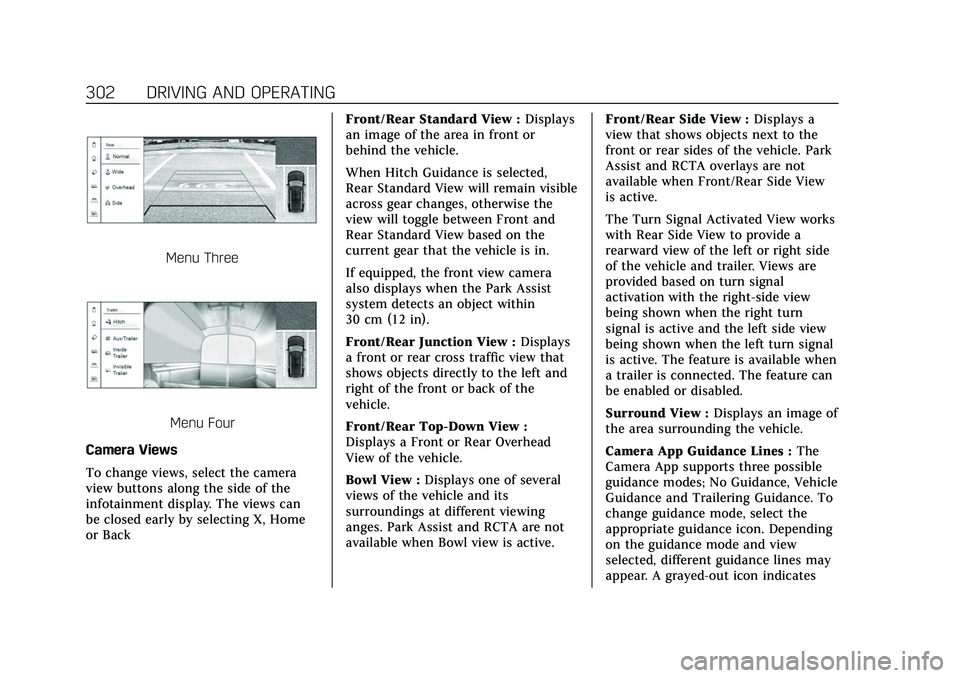
To change views, select the camera
view buttons along the side of the
infotainment display. The views can
be closed early by selecting X, Home
or Back Front/Rear Standard View :
Displays
an image of the area in front or
behind the vehicle.
When Hitch Guidance is selected,
Rear Standard View will remain visible
across gear changes, otherwise the
view will toggle between Front and
Rear Standard View based on the
current gear that the vehicle is in.
If equipped, the front view camera
also displays when the Park Assist
system detects an object within
30 cm (12 in).
Front/Rear Junction View : Displays
a front or rear cross traffic view that
shows objects directly to the left and
right of the front or back of the
vehicle.
Front/Rear Top-Down View :
Displays a Front or Rear Overhead
View of the vehicle.
Bowl View : Displays one of several
views of the vehicle and its
surroundings at different viewing
anges. Park Assist and RCTA are not
available when Bowl view is active. Front/Rear Side View :
Displays a
view that shows objects next to the
front or rear sides of the vehicle. Park
Assist and RCTA overlays are not
available when Front/Rear Side View
is active.
The Turn Signal Activated View works
with Rear Side View to provide a
rearward view of the left or right side
of the vehicle and trailer. Views are
provided based on turn signal
activation with the right-side view
being shown when the right turn
signal is active and the left side view
being shown when the left turn signal
is active. The feature is available when
a trailer is connected. The feature can
be enabled or disabled.
Surround View : Displays an image of
the area surrounding the vehicle.
Camera App Guidance Lines : The
Camera App supports three possible
guidance modes; No Guidance, Vehicle
Guidance and Trailering Guidance. To
change guidance mode, select the
appropriate guidance icon. Depending
on the guidance mode and view
selected, different guidance lines may
appear. A grayed-out icon indicates
Page 304 of 492
Cadillac Escalade Owner Manual (GMNA-Localizing-U.S./Canada/Mexico-
13690472) - 2021 - CRC - 8/10/21
DRIVING AND OPERATING 303
that guidance lines are not available.
Certain views do not support guidance
lines.
.Standard Guidance lines are
available in Front/Rear Standard
Views, Front/Rear Top-Down Views,
and Surround View when the
vehicle guidance mode is selected.
Standard guidance lines show the
current and intended vehicle path.
.Hitch Guidance lines are available
in Rear Standard View when the
Trailering Guidance Mode is
selected. Hitch Guidance displays a
single, centered, guidance line on
the infotainment display to assist
with aligning the vehicle’s hitch
with a trailer coupler by
continuously steering the vehicle to
keep the guidance line centered
with the coupler when backing. Park
Assist overlays will not display
when Hitch Guidance is active.
.Rear Trailer Guidance lines are
available in Rear Trailer View when
Trailering Guidance Mode is
selected, and the rear camera
calibration has been successfully
completed. Rear Trailer Guidance
lines show the intended path(yellow), and the current path (blue)
of the trailer. The current path
guidance lines will converge with
the intended path guidance lines.
Hitch View : Displays a magnified
view of the hitch area to assist with
aligning the vehicle’s hitch ball with
the trailer coupler, and for monitoring
the trailer connection. Shifting into
P (Park) will automatically engage the
Electronic Parking Brake (EPB).
{Warning
Use Hitch Guidance only to help
back the vehicle to a trailer hitch
or, when traveling above 12 km/h
(8 mph), to briefly check the status
of your trailer. Do not use for any
other purpose, such as making lane
change decisions. Before making a
lane change, always check the
mirrors and glance over your
shoulder. Improper use could result
in serious injury to you or others.
Interior Trailer View : Displays a
view of the interior of the trailer. The
feature is available when a trailer is
connected. The feature requires user installation of an accessory trailer
camera on the interior of the trailer
per the accessory trailer camera
installation instructions (see your
dealer for accessory trailer camera(s)
and information).
Rear Trailer View :
Displays a view
of the area behind the trailer when a
trailer is connected. The feature
requires user installation of an
accessory trailer camera on the rear
exterior surface of the trailer per the
accessory trailer camera installation
instructions (see your dealer for
accessory trailer camera(s) and
information).
Aux/Trailer View : Displays a
rearward split view of the left and
right sides of the vehicle and trailer,
when a trailer is connected. The view
will automatically pan to show more
of the left or right side based on the
position of the trailer when a
compatible profile is configured and
selected via the Trailering App.
Picture-in-Picture Side View :
Displays a rearward split view of the
left and right sides of the vehicle and
trailer with an overlay view of the area
Page 305 of 492
Cadillac Escalade Owner Manual (GMNA-Localizing-U.S./Canada/Mexico-
13690472) - 2021 - CRC - 8/10/21
304 DRIVING AND OPERATING
behind the trailer when a trailer is
connected. The feature requires user
installation of an accessory trailer
camera on the rear exterior surface of
the trailer per the accessory trailer
camera installation instructions (see
your dealer for accessory trailer
camera(s) and information).
HD Surround Vision with Trailer
Camera Provisions
If equipped, this system provides
additional views to aid in trailer and
towing. The system shows multiple
views in the infotainment display
using four cameras mounted and the
vehicle, and two additional accessory
cameras. The front camera is under
the front emblem, the side cameras
are on the bottom of the outside
mirrors, and the rear camera is in the
liftgate. Up to two accessory cameras
can be mounted to the rear and/or the
interior of the trailer. See your dealer
for accessory trailer cameras.
To view the Camera App, select
CAMERA on the infotainment screen
or shift to R (Reverse). To return tothe previous screen when not in
reverse, select X or Back on the
infotainment display.
Certain trailer views require a
compatible trailer profile be
configured and selected. A compatible
trailer is a box type trailer (cargo,
camper, etc.) with a conventional
hitch.
Available Camera Views:
.Front/Rear Standard View
.Front/Rear Junction View
.Front/Rear Top-Down View
.Bowl View
.Front/Rear Side View
.Hitch View
.Rear Trailer View
.Aux/Trailer View
.Picture-in-Picture Side View
.Interior Trailer View
.Surround View
.Standard Guidance Lines
.Hitch Guidance
.Rear Guidance Lines
Surround Vision (360 Degrees)
If equipped, the Surround Vision
system can display various views
surrounding the vehicle in the
infotainment display using four
cameras mounted around the vehicle.
The front camera is in the grille under
the front emblem, the side cameras
are on the bottom of the outside
mirrors, and the rear camera is in the
liftgate.
To view the Camera App, select
CAMERA on the infotainment display
or shift to R (Reverse). To return to
the previous screen when not in
reverse, select X or Back on the
infotainment display. To return to the
home screen when not in reverse,
select Home.
Available camera views:
.Front/Rear Standard View
.Front/Rear Junction View
.Front/Rear Top-Down View
.Bowl View
.Front/Rear Side View
.Hitch View (if equipped)
.Surround View
Page 306 of 492

Cadillac Escalade Owner Manual (GMNA-Localizing-U.S./Canada/Mexico-
13690472) - 2021 - CRC - 8/10/21
DRIVING AND OPERATING 305
.Standard Guidance Lines
.Hitch Guidance
Troubleshooting
The Trailer Camera calibration may
take longer than expected or not
calibrate if:
.The vehicle is driven too fast during
calibration. Speed should be
maintained below 50 km/h
(31 mph).
.The vehicle is not driven straight
during calibration. Steering should
be maintained as straight as
possible, excessive steering during
calibration may extend
calibration time.
.The calibration is attempted in low
light conditions. Calibration should
be attempted when there is enough
light.
.The calibration is attempted during
poor weather conditions. Calibration
during conditions such as snow or
heavy rain should be avoided.
.The road surface is not ideal for
calibration. Calibration should be
attempted on an alternate road
surface.
.The accessory trailer cameras are
swapped at the hitch connector.
Ensure that the camera mounted to
the rear of the trailer is connected
to the rear trailer camera input.
.The accessory trailer camera is
mounted, angled or rotated outside
of the defined mounting location
(see camera installation
instructions).
.The vehicle or accessory trailer
camera is obstructed by dirt or
debris. Check cameras and clean as
needed.
.The accessory trailer camera is
mounted such that obstructions are
visible in the view (spare tire, bike/
cargo racks, etc.). Calibration should
be attempted with obstruction
temporarily removed. Shadows
resulting from driving toward the
sun may be perceived as
obstructions, attempt to calibrate
driving in an alternate direction if
possible.
.The entered trailer profile
dimensions are inaccurate.
Measurements are expected to be
made to the nearest 1 inch (25 mm). Enter accurate
measurements and reattempt
calibration.
Distortion or inaccuracy may be
observed in a rear trailer camera
view if:
.The accessory trailer camera is
mounted, angled or rotated outside
of the defined mounting location
(see camera installation
instructions).
.The entered trailer profile
dimensions are inaccurate.
Measurements are expected to be
made to the nearest 1 inch
(25 mm). Enter accurate
measurements and reattempt
calibration.
The preview may not display or the
wrong preview may be displayed if:
.The accessory cameras are not
recognized. Ensure that the
accessory camera(s) are connected
and power cycle the vehicle.
.The accessory trailer cameras are
swapped at the hitch connector.
Ensure that the accessory camera(s)
are connected to the correct camera
input.
Page 307 of 492

Cadillac Escalade Owner Manual (GMNA-Localizing-U.S./Canada/Mexico-
13690472) - 2021 - CRC - 8/10/21
306 DRIVING AND OPERATING
.The accessory trailer camera(s) are
not installed according to the
installation instructions.
A feature may be unavailable or not
activating as expected if:
.The trailer is not compatible. See
“HD Surround Vision with Trailer
Camera Provisions” above.
.The customization is disabled.
Check the customization settings
where applicable.
.The accessory trailer cameras are
swapped at the hitch connector.
Ensure that the accessory camera(s)
are connected to the correct camera
input.
.A trailer profile is not configured
and selected.
.The entered trailer profile
dimensions are inaccurate.
Measurements are expected to be
made to the nearest 1 inch
(25 mm). Enter accurate
measurements and reattempt
calibration.
Certain viewing features may
experience degraded performance if:
.Ride height is adjusted beyond the
standard ride height. See Four
Corner Air Suspension System 0268
for more info on selecting ride
height or disabling automatic ride
height adjustment.
.The entered trailer profile
dimensions are inaccurate.
Measurements are expected to be
made to the nearest 1 inch
(25 mm). Enter accurate
measurements and reattempt
calibration.
Special note regarding trailers with
outboard wheels:
Performance for Rear Trailer Guidance
Lines and Trailer Length Indicator
Overlays are optimized when the
entered value for trailer width reflects
the total width of the trailer including
outboard wheels. If the trailer box
width is entered:
.The Rear Trailer Guidance Lines will
appear narrower than the actual
path of the trailer.
.The Trailer Length Indicator
Overlays will appear closer and
possibly overlap with the trailer.
Park Assist
The vehicle may be equipped with
Rear Park Assist (RPA) or Front and
Rear Park Assist (FRPA). Under
certain conditions, the Park Assist
system can assist the driver during
backing and parking maneuvers when
the vehicle is driven at no more than
9 km/h (6 mph). An illuminated
indicator in the Park Assist button
indicates the system is ready.
Sensors located in the bumpers
measure the distance between the
vehicle and objects using sonar
technology. These sensors are
designed to detect certain objects up
to 1.8 m (6 ft) behind and 1.3 m (4 ft)
in front of your vehicle that are taller
than 25 cm (10 in).
Different environmental conditions
may affect whether and how far the
Park Assist system can detect objects.
Keep the sensors clean of mud, dirt,
snow, ice, and slush; and clean
sensors after a car wash in freezing
temperatures. Sensors that are not
clean may not detect objects or may
cause the system to alert when not
required.