trailer CADILLAC ESCALADE 2021 User Guide
[x] Cancel search | Manufacturer: CADILLAC, Model Year: 2021, Model line: ESCALADE, Model: CADILLAC ESCALADE 2021Pages: 492, PDF Size: 7.92 MB
Page 250 of 492

Cadillac Escalade Owner Manual (GMNA-Localizing-U.S./Canada/Mexico-
13690472) - 2021 - CRC - 8/10/21
DRIVING AND OPERATING 249
2. Press the button on top of the shiftlever to shift into P (Park). See
Automatic Transmission 0251.
3. The P indicator on the shift lever will turn red when the vehicle is in
P (Park).
Leaving the Vehicle with the
Engine Running
{Warning
It can be dangerous to leave the
vehicle with the engine running.
It could overheat and catch fire.
It is dangerous to get out of the
vehicle if the vehicle is not in
P (Park) with the parking brake set.
The vehicle can roll.
Do not leave the vehicle when
the engine is running. If you have
left the engine running, the vehicle
can move suddenly. You or others
could be injured. To be sure the
vehicle will not move, even when
you are on fairly level ground,
always set the parking brake and
(Continued)
Warning (Continued)
shift to P (Park). SeeShifting Into
Park 0248. If you are towing a
trailer, see Driving Characteristics
and Towing Tips 0330.
If you have to leave the vehicle with
the engine running, be sure the
vehicle is in P (Park) and the parking
brake is set before you leave it.
Shifting out of Park
This vehicle is equipped with an
electronic transmission. The shift lock
release button is designed to prevent
inadvertent shifting out of P (Park)
unless the ignition is on, the brake
pedal is applied, and the shift lock
release button is pressed.
The shift lock control is always
functional except in the case of an
uncharged or low voltage (less than
9-volt) battery.
If the vehicle has an uncharged
battery or a battery with low voltage,
try charging or jump starting the
battery. See Jump Starting - North
America 0425. To shift out of P (Park):
1. Ensure the engine is running.
2. Apply the brake pedal.
3. Press and hold the shift lock release button.
4. Move the shift lever to the desired position.
5. The P indicator will turn white and the gear indicator on the shift lever
will turn red when the vehicle is no
longer in P (Park).
6. After releasing the shift lever, it will return to the center position.
If the vehicle cannot be shifted from
P (Park), a Driver Information
Center (DIC) message, such as
CONDITIONS NOT CORRECT FOR
SHIFT, will be displayed. Ensure the
ignition is on, the engine is running,
and the brake pedal is applied. If the
vehicle still will not shift out of
P (Park), see your dealer for service.
Page 252 of 492
Cadillac Escalade Owner Manual (GMNA-Localizing-U.S./Canada/Mexico-
13690472) - 2021 - CRC - 8/10/21
DRIVING AND OPERATING 251
Warning (Continued)
If unusual fumes are detected or if
it is suspected that exhaust is
coming into the vehicle:
.Drive it only with the windows
completely down.
.Have the vehicle repaired
immediately.
Never park the vehicle with the
engine running in an enclosed area
such as a garage or a building that
has no fresh air ventilation.
Running the Vehicle While
Parked
It is better not to park with the engine
running.
If the vehicle is left with the engine
running, follow the proper steps to be
sure the vehicle will not move. See
Shifting Into Park 0248 and
Engine Exhaust 0250.
If parking on a hill and pulling a
trailer, see Driving Characteristics and
Towing Tips 0330.
Automatic Transmission
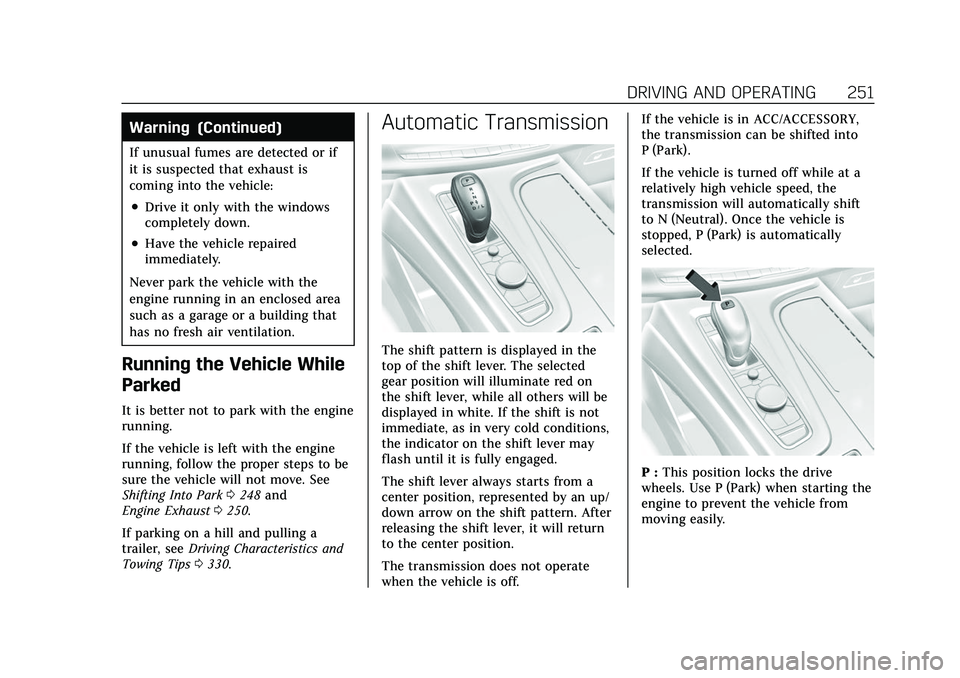
The shift pattern is displayed in the
top of the shift lever. The selected
gear position will illuminate red on
the shift lever, while all others will be
displayed in white. If the shift is not
immediate, as in very cold conditions,
the indicator on the shift lever may
flash until it is fully engaged.
The shift lever always starts from a
center position, represented by an up/
down arrow on the shift pattern. After
releasing the shift lever, it will return
to the center position.
The transmission does not operate
when the vehicle is off. If the vehicle is in ACC/ACCESSORY,
the transmission can be shifted into
P (Park).
If the vehicle is turned off while at a
relatively high vehicle speed, the
transmission will automatically shift
to N (Neutral). Once the vehicle is
stopped, P (Park) is automatically
selected.
P :
This position locks the drive
wheels. Use P (Park) when starting the
engine to prevent the vehicle from
moving easily.
Page 256 of 492
Cadillac Escalade Owner Manual (GMNA-Localizing-U.S./Canada/Mexico-
13690472) - 2021 - CRC - 8/10/21
DRIVING AND OPERATING 255
D :This position is for normal driving.
If more power is needed for passing,
press the accelerator pedal down.
To shift into D (Drive):
1. Bring the vehicle to a complete stop.
2. From the center position, move the shift lever back.
.If the vehicle is in P (Park) press
the shift lock release button
while pulling the shift
lever back.
.D will illuminate in red.
.After releasing the shift lever, it
will return to the center
position.
To shift out of D (Drive): 1. Bring the vehicle to a complete stop.
2. Shift to the desired gear.
3. After releasing the shift lever, it will return to the center position.
Downshifting the transmission on a
slippery road could result in skidding.
See “Skidding” underLoss of Control
0 233.
Caution
Spinning the tires or holding the
vehicle in one place on a hill using
only the accelerator pedal may
damage the transmission. The
repair will not be covered by the
vehicle warranty. If the vehicle is
stuck, do not spin the tires. When
stopping on a hill, use the brakes to
hold the vehicle in place.
Manual Mode
Electronic Range Select (ERS)
Caution
Driving with the engine at a high
rpm without upshifting while using
Tap Shift, could damage the vehicle.
Always upshift when necessary
while using Tap Shift.
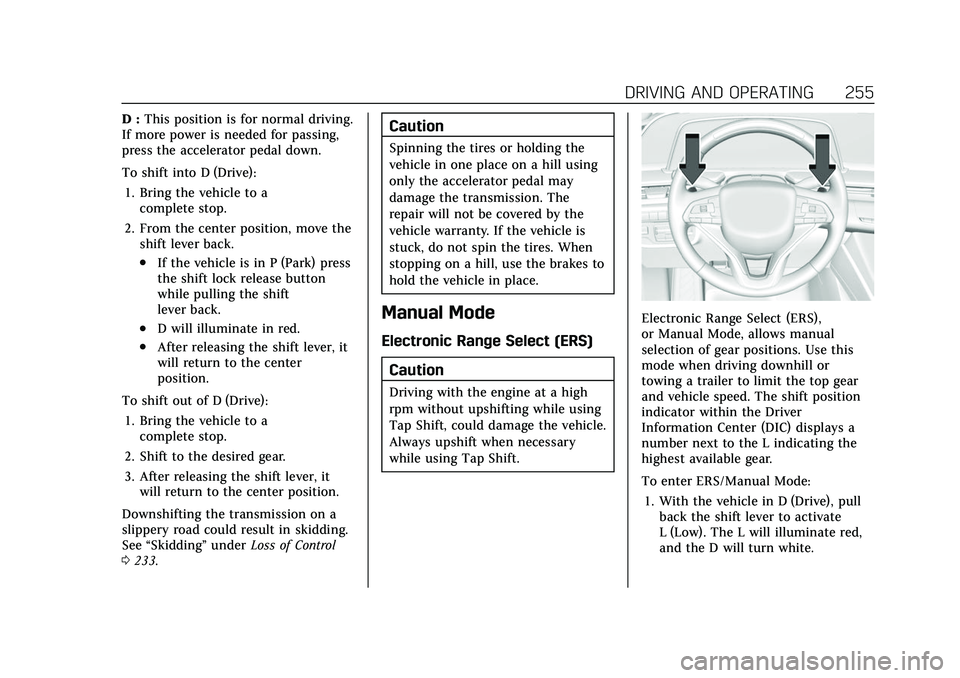
Electronic Range Select (ERS),
or Manual Mode, allows manual
selection of gear positions. Use this
mode when driving downhill or
towing a trailer to limit the top gear
and vehicle speed. The shift position
indicator within the Driver
Information Center (DIC) displays a
number next to the L indicating the
highest available gear.
To enter ERS/Manual Mode:1. With the vehicle in D (Drive), pull back the shift lever to activate
L (Low). The L will illuminate red,
and the D will turn white.
Page 257 of 492

Cadillac Escalade Owner Manual (GMNA-Localizing-U.S./Canada/Mexico-
13690472) - 2021 - CRC - 8/10/21
256 DRIVING AND OPERATING
2. Tap the left steering wheel controlto reduce the highest gear
available, or the right control to
increase the highest gear available.
3. To exit, pull back the shift lever a second time. The D will illuminate
red, and the L will turn white.
When shifting to L (Low), the
transmission shifts to a preset lower
gear range. The highest gear available
while in this range will be displayed
next to the L (Low) in the DIC. See
Driver Information Center (DIC) 0132.
All gears below are available to use.
For example, when 4 (Fourth) is
shown next to the L, 1 (First) through
4 (Fourth) gears are shifted
automatically. To shift to 5 (Fifth)
gear, tap the right steering wheel
control or shift into D (Drive).
L (Low) prevents shifting to a lower
gear range if the engine speed is too
high. If the vehicle speed is not
reduced within the allotted time, the
lower gear range shift will not
complete. Slow the vehicle, then tap
the left steering wheel control to the
desired lower gear range. Cruise control can be used while
in ERS.
Tow/Haul Mode
Use this mode when hauling heavy
loads to provide increased
performance and vehicle control. Tow/
Haul Mode adjusts the transmission
shift pattern, steering, 4WD,
Electronic Stability Control (ESC)
performance and brake feel. If the
vehicle is turned off with Tow/Haul
Mode active and then restarted within
four hours or less, Tow/Haul will
remain active. Otherwise, the vehicle
will start in Tour Mode. See
Driver
Mode Control 0266 to activate Tow/
Haul Mode.
If equipped with a diesel engine,
exhaust braking is automatically
activated when Tow/Haul Mode is
selected. It maintains vehicle speed by
automatically implementing a shift
pattern that uses the engine and the
transmission to slow the vehicle. The
system will command down shifts to
reduce vehicle speed when the brake
is applied. The normal tow/haul shift
pattern will return once the vehicle is
on a low grade or when the accelerator pedal is pressed. While in
the Electronic Range Select (ERS)
mode (see
Manual Mode 0255), grade
braking is deactivated, allowing the
driver to select a range and limiting
the highest gear available.
For more information on trailer
weight specifications, See Towing
Equipment 0338.
Drive Systems
Four-Wheel Drive
If equipped, four-wheel drive engages
the front axle for extra traction.
Four-wheel drive engages the front
axle for extra traction.
Caution
Do not drive on clean, dry
pavement in 4
mand 4n(if
equipped) for an extended period of
time. These conditions may cause
premature wear on the vehicle’s
powertrain.
Page 263 of 492
Cadillac Escalade Owner Manual (GMNA-Localizing-U.S./Canada/Mexico-
13690472) - 2021 - CRC - 8/10/21
262 DRIVING AND OPERATING
Before leaving the vehicle, check the
red parking brake status light to
ensure that the parking brake is
applied.
EPB Apply
To apply the EPB:1. Be sure the vehicle is at a complete stop.
2. Press the EPB switch momentarily.
The red parking brake status light will
flash and then stay on once the EPB is
fully applied. If the red parking brake
status light flashes continuously, then
the EPB is only partially applied or
there is a problem with the EPB.
A DIC message will display. Release
the EPB and try to apply it again.
If the light does not come on, or keeps
flashing, have the vehicle serviced. Do
not drive the vehicle if the red parking
brake status light is flashing. See your
dealer.
If the amber service parking brake
warning light is on, press the EPB
switch. Continue to hold the switch
until the red parking brake status light remains on. If the amber service
parking brake warning light is on, see
your dealer.
If the EPB is applied while the vehicle
is moving, the vehicle will decelerate
as long as the switch is pressed. If the
switch is pressed until the vehicle
comes to a stop, the EPB will remain
applied.
The vehicle may automatically apply
the EPB in some situations when the
vehicle is not moving. This is normal,
and is done to periodically check the
correct operation of the EPB system,
or at the request of other safety
functions that utilize the EPB.
If the EPB fails to apply, block the rear
wheels to prevent vehicle movement.
EPB Release
To release the EPB:
1. Turn the ignition on or to ACC/ ACCESSORY.
2. Apply and hold the brake pedal.
3. Press the EPB switch momentarily.
The EPB is released when the red
parking brake status light is off. If the amber service parking brake
warning light is on, release the EPB by
pressing and holding the EPB switch.
Continue to hold the switch until the
red parking brake status light is off.
If either light stays on after release is
attempted, see your dealer.
Caution
Driving with the parking brake on
can overheat the brake system and
cause premature wear or damage to
brake system parts. Make sure that
the parking brake is fully released
and the brake warning light is off
before driving.
If you are towing a trailer and parking
on a hill, see Driving Characteristics
and Towing Tips 0330.
Automatic EPB Release
The EPB will automatically release if
the vehicle is running, placed into
gear, and an attempt is made to drive
away. Avoid rapid acceleration when
the EPB is applied, to preserve parking
brake lining life.
Page 265 of 492

Cadillac Escalade Owner Manual (GMNA-Localizing-U.S./Canada/Mexico-
13690472) - 2021 - CRC - 8/10/21
264 DRIVING AND OPERATING
from moving during the transition
from brake pedal release to accelerator
pedal apply. The brakes release when
the accelerator pedal is applied. The
brakes may also release under other
conditions. Do not rely on AVH to
hold the vehicle.
If the accelerator pedal is not applied
within a few minutes, the Electric
Parking Brake will apply. The parking
brake will also apply if the driver door
is opened or the driver seat belt is
unfastened while AVH is holding the
vehicle.
AVH can be turned on by pressing
AUTO HOLD. The indicator light on
the switch will come on. The AVH
light on the instrument panel will
come on while AVH is actively holding
the vehicle. SeeAutomatic Vehicle Hold
(AVH) Light 0125.Ride Control Systems
Traction Control/Electronic
Stability Control
System Operation
The vehicle has a Traction Control
System (TCS) and StabiliTrak/
Electronic Stability Control (ESC).
These systems help limit wheel spin
and assist the driver in maintaining
control, especially on slippery road
conditions.
TCS activates if it senses any of the
drive wheels are spinning or beginning
to lose traction. When this happens,
TCS applies the brakes to the spinning
wheels and reduces engine power to
limit wheel spin.
StabiliTrak/ESC activates when the
vehicle senses a difference between
the intended path and the direction
the vehicle is actually traveling.
StabiliTrak/ESC selectively applies
braking pressure to one or more of the
vehicle wheel brakes to assist the
driver in keeping the vehicle on the
intended path. Trailer Sway Control (TSC) is also on automatically when
the vehicle is started. See
Trailer Sway
Control (TSC) 0347.
If cruise control is being used and
traction control or StabiliTrak/ESC
begins to limit wheel spin, cruise
control will disengage. Cruise control
may be turned back on when road
conditions allow.
Both systems come on automatically
when the vehicle is started and begins
to move. The systems may be heard or
felt while they are operating or while
performing diagnostic checks. This is
normal and does not mean there is a
problem with the vehicle.
It is recommended to leave both
systems on for normal driving
conditions, but it may be necessary to
turn TCS off if the vehicle gets stuck
in sand, mud, ice, or snow. See If the
Vehicle Is Stuck 0240 and “Turning
the Systems Off and On ”later in this
section.
When the transfer case (if equipped)
is in Four-Wheel Drive Low, the TCS
and StabiliTrak/ESC are automatically
Page 267 of 492
Cadillac Escalade Owner Manual (GMNA-Localizing-U.S./Canada/Mexico-
13690472) - 2021 - CRC - 8/10/21
266 DRIVING AND OPERATING
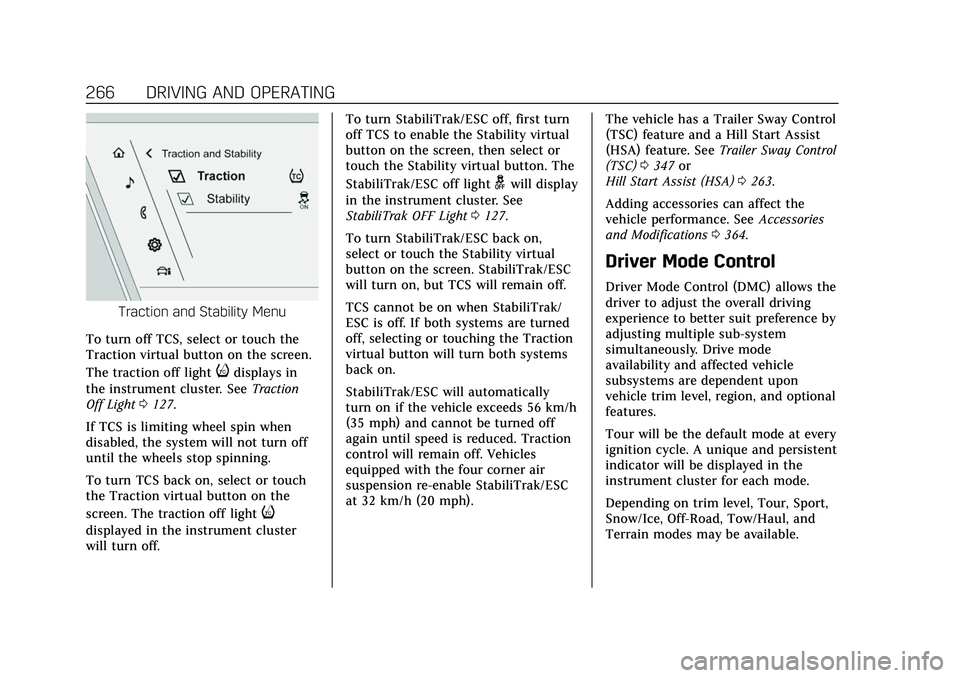
Traction and Stability Menu
To turn off TCS, select or touch the
Traction virtual button on the screen.
The traction off light
idisplays in
the instrument cluster. See Traction
Off Light 0127.
If TCS is limiting wheel spin when
disabled, the system will not turn off
until the wheels stop spinning.
To turn TCS back on, select or touch
the Traction virtual button on the
screen. The traction off light
i
displayed in the instrument cluster
will turn off. To turn StabiliTrak/ESC off, first turn
off TCS to enable the Stability virtual
button on the screen, then select or
touch the Stability virtual button. The
StabiliTrak/ESC off light
gwill display
in the instrument cluster. See
StabiliTrak OFF Light 0127.
To turn StabiliTrak/ESC back on,
select or touch the Stability virtual
button on the screen. StabiliTrak/ESC
will turn on, but TCS will remain off.
TCS cannot be on when StabiliTrak/
ESC is off. If both systems are turned
off, selecting or touching the Traction
virtual button will turn both systems
back on.
StabiliTrak/ESC will automatically
turn on if the vehicle exceeds 56 km/h
(35 mph) and cannot be turned off
again until speed is reduced. Traction
control will remain off. Vehicles
equipped with the four corner air
suspension re-enable StabiliTrak/ESC
at 32 km/h (20 mph). The vehicle has a Trailer Sway Control
(TSC) feature and a Hill Start Assist
(HSA) feature. See
Trailer Sway Control
(TSC) 0347 or
Hill Start Assist (HSA) 0263.
Adding accessories can affect the
vehicle performance. See Accessories
and Modifications 0364.
Driver Mode Control
Driver Mode Control (DMC) allows the
driver to adjust the overall driving
experience to better suit preference by
adjusting multiple sub-system
simultaneously. Drive mode
availability and affected vehicle
subsystems are dependent upon
vehicle trim level, region, and optional
features.
Tour will be the default mode at every
ignition cycle. A unique and persistent
indicator will be displayed in the
instrument cluster for each mode.
Depending on trim level, Tour, Sport,
Snow/Ice, Off-Road, Tow/Haul, and
Terrain modes may be available.
Page 268 of 492
Cadillac Escalade Owner Manual (GMNA-Localizing-U.S./Canada/Mexico-
13690472) - 2021 - CRC - 8/10/21
DRIVING AND OPERATING 267
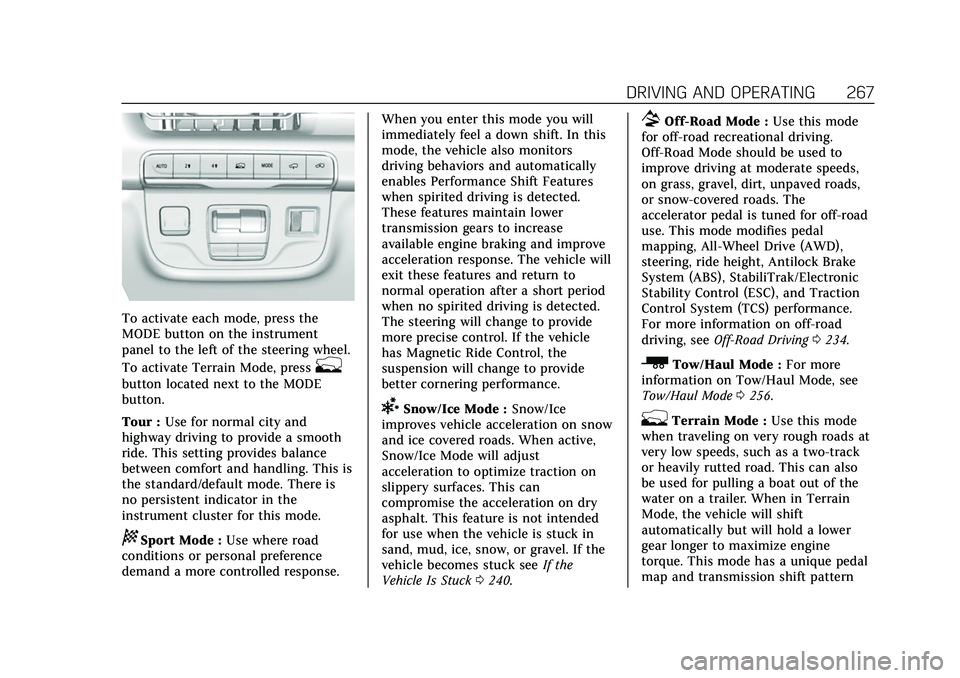
To activate each mode, press the
MODE button on the instrument
panel to the left of the steering wheel.
To activate Terrain Mode, press
g
button located next to the MODE
button.
Tour :Use for normal city and
highway driving to provide a smooth
ride. This setting provides balance
between comfort and handling. This is
the standard/default mode. There is
no persistent indicator in the
instrument cluster for this mode.
8Sport Mode : Use where road
conditions or personal preference
demand a more controlled response. When you enter this mode you will
immediately feel a down shift. In this
mode, the vehicle also monitors
driving behaviors and automatically
enables Performance Shift Features
when spirited driving is detected.
These features maintain lower
transmission gears to increase
available engine braking and improve
acceleration response. The vehicle will
exit these features and return to
normal operation after a short period
when no spirited driving is detected.
The steering will change to provide
more precise control. If the vehicle
has Magnetic Ride Control, the
suspension will change to provide
better cornering performance.
6Snow/Ice Mode :
Snow/Ice
improves vehicle acceleration on snow
and ice covered roads. When active,
Snow/Ice Mode will adjust
acceleration to optimize traction on
slippery surfaces. This can
compromise the acceleration on dry
asphalt. This feature is not intended
for use when the vehicle is stuck in
sand, mud, ice, snow, or gravel. If the
vehicle becomes stuck see If the
Vehicle Is Stuck 0240.
7Off-Road Mode : Use this mode
for off-road recreational driving.
Off-Road Mode should be used to
improve driving at moderate speeds,
on grass, gravel, dirt, unpaved roads,
or snow-covered roads. The
accelerator pedal is tuned for off-road
use. This mode modifies pedal
mapping, All-Wheel Drive (AWD),
steering, ride height, Antilock Brake
System (ABS), StabiliTrak/Electronic
Stability Control (ESC), and Traction
Control System (TCS) performance.
For more information on off-road
driving, see Off-Road Driving 0234.
_Tow/Haul Mode : For more
information on Tow/Haul Mode, see
Tow/Haul Mode 0256.
gTerrain Mode : Use this mode
when traveling on very rough roads at
very low speeds, such as a two-track
or heavily rutted road. This can also
be used for pulling a boat out of the
water on a trailer. When in Terrain
Mode, the vehicle will shift
automatically but will hold a lower
gear longer to maximize engine
torque. This mode has a unique pedal
map and transmission shift pattern
Page 269 of 492

Cadillac Escalade Owner Manual (GMNA-Localizing-U.S./Canada/Mexico-
13690472) - 2021 - CRC - 8/10/21
268 DRIVING AND OPERATING
for better control at lower speeds and
over rough terrain. This mode
modifies accelerator pedal mapping,
transmission shift pattern, ride height,
suspension, steering, AWD, Electronic
Limited-Slip Differential (eSLD), ESC
performance and TCS performance.
When the vehicle comes to a stop on
an upward grade, Automatic Vehicle
Hold is engaged until the driver
presses the accelerator pedal. Stop/
Start and cruise control are disabled
in Terrain Mode.
Active Braking during lift throttle will
be engaged. This feature automatically
applies light braking to simulate
heavy engine braking of
four-wheel-dive low. It also applies
light braking in D (Drive) until the
vehicle is at idle speeds. In M1 and
M2 light braking will typically bring
the vehicle to a stop. Active Braking
during lift throttle will also reduce
trailer braking.
Terrain Mode will automatically exit
to Tour Mode if the brake
temperatures become too hot,electronic parking brake becomes
inoperable or the vehicle cannot
perform braking or vehicle hold.
For more information on off-road
driving, see
Off-Road Driving 0234 and
Hill and Mountain Roads 0238.
Magnetic Ride Control
This vehicle may have a semi-active
damping system called Magnetic Ride
Control. With this feature, improved
vehicle ride and handling is provided
under a variety of passenger and
loading conditions.
Locking Rear Axle
Vehicles with a locking rear axle can
give more traction on snow, mud, ice,
sand, or gravel. It works like a
standard axle most of the time, but
when traction is low, this feature will
allow the rear wheel with the most
traction to move the vehicle.
Four Corner Air Suspension
System
The Four Corner Air Suspension
feature provides full time load leveling
capability along with the benefit of
adjusting ride height for increased
convenience and capability.
{Warning
To help avoid personal injury or
death, make sure the area
underneath the vehicle and inside
the wheel wells is clear when
lowering the vehicle.
{Warning
To help avoid personal injury or
death, always select the lowest ride
height for the current driving
conditions. Higher ride heights raise
the vehicle's center of gravity,
increasing the chance of a rollover
during extreme maneuvers.
Page 270 of 492
Cadillac Escalade Owner Manual (GMNA-Localizing-U.S./Canada/Mexico-
13690472) - 2021 - CRC - 8/10/21
DRIVING AND OPERATING 269
{Warning
Heavy loads on the roof rack will
make the vehicle's center of gravity
higher, increasing the possibility of
a rollover. To avoid losing control of
the vehicle, always select the
normal height setting and avoid
high speeds, sudden starts, sharp
turns, sudden braking, or abrupt
maneuvers when carrying cargo on
the roof rack.
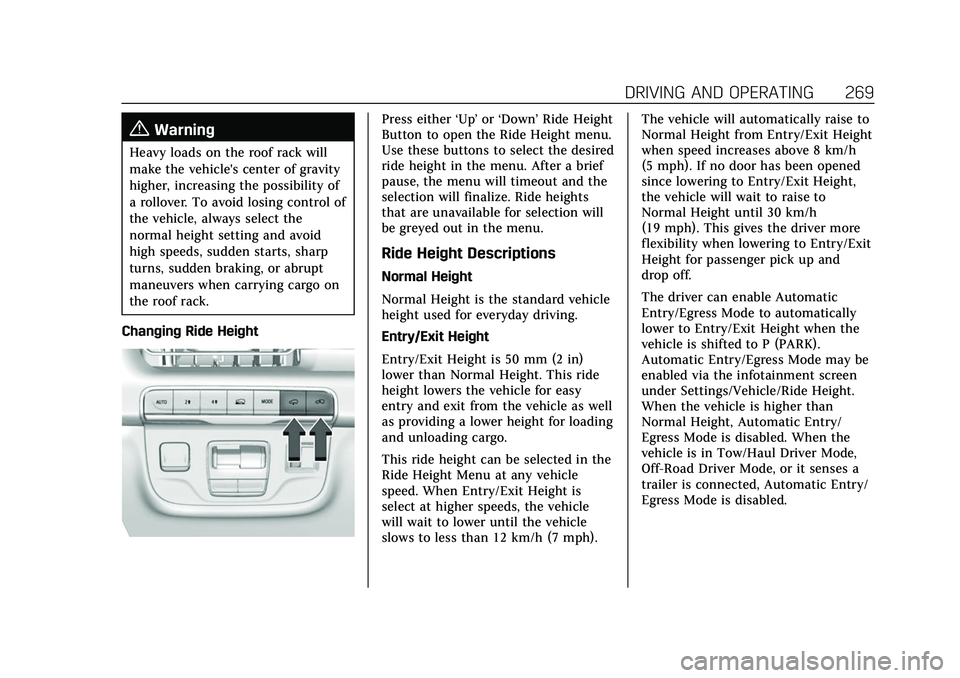
Changing Ride Height
Press either ‘Up’or‘Down’ Ride Height
Button to open the Ride Height menu.
Use these buttons to select the desired
ride height in the menu. After a brief
pause, the menu will timeout and the
selection will finalize. Ride heights
that are unavailable for selection will
be greyed out in the menu.
Ride Height Descriptions
Normal Height
Normal Height is the standard vehicle
height used for everyday driving.
Entry/Exit Height
Entry/Exit Height is 50 mm (2 in)
lower than Normal Height. This ride
height lowers the vehicle for easy
entry and exit from the vehicle as well
as providing a lower height for loading
and unloading cargo.
This ride height can be selected in the
Ride Height Menu at any vehicle
speed. When Entry/Exit Height is
select at higher speeds, the vehicle
will wait to lower until the vehicle
slows to less than 12 km/h (7 mph). The vehicle will automatically raise to
Normal Height from Entry/Exit Height
when speed increases above 8 km/h
(5 mph). If no door has been opened
since lowering to Entry/Exit Height,
the vehicle will wait to raise to
Normal Height until 30 km/h
(19 mph). This gives the driver more
flexibility when lowering to Entry/Exit
Height for passenger pick up and
drop off.
The driver can enable Automatic
Entry/Egress Mode to automatically
lower to Entry/Exit Height when the
vehicle is shifted to P (PARK).
Automatic Entry/Egress Mode may be
enabled via the infotainment screen
under Settings/Vehicle/Ride Height.
When the vehicle is higher than
Normal Height, Automatic Entry/
Egress Mode is disabled. When the
vehicle is in Tow/Haul Driver Mode,
Off-Road Driver Mode, or it senses a
trailer is connected, Automatic Entry/
Egress Mode is disabled.