climate settings CADILLAC ESCALADE 2021 Owner's Manual
[x] Cancel search | Manufacturer: CADILLAC, Model Year: 2021, Model line: ESCALADE, Model: CADILLAC ESCALADE 2021Pages: 492, PDF Size: 7.92 MB
Page 15 of 492
Cadillac Escalade Owner Manual (GMNA-Localizing-U.S./Canada/Mexico-
13690472) - 2021 - CRC - 8/10/21
14 KEYS, DOORS, AND WINDOWS
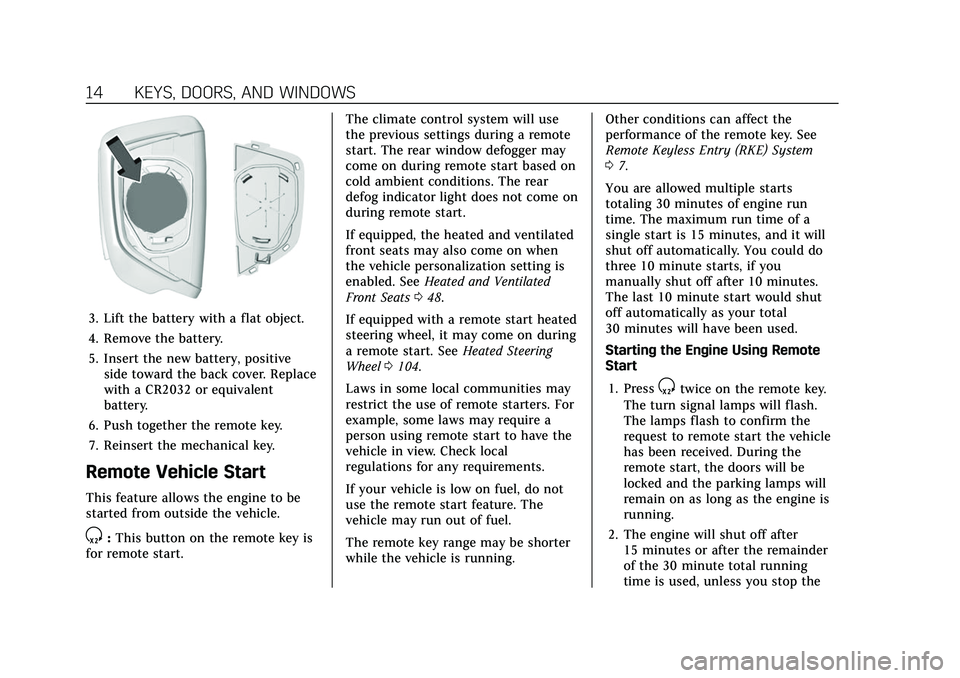
3. Lift the battery with a flat object.
4. Remove the battery.
5. Insert the new battery, positiveside toward the back cover. Replace
with a CR2032 or equivalent
battery.
6. Push together the remote key.
7. Reinsert the mechanical key.
Remote Vehicle Start
This feature allows the engine to be
started from outside the vehicle.
S: This button on the remote key is
for remote start. The climate control system will use
the previous settings during a remote
start. The rear window defogger may
come on during remote start based on
cold ambient conditions. The rear
defog indicator light does not come on
during remote start.
If equipped, the heated and ventilated
front seats may also come on when
the vehicle personalization setting is
enabled. See
Heated and Ventilated
Front Seats 048.
If equipped with a remote start heated
steering wheel, it may come on during
a remote start. See Heated Steering
Wheel 0104.
Laws in some local communities may
restrict the use of remote starters. For
example, some laws may require a
person using remote start to have the
vehicle in view. Check local
regulations for any requirements.
If your vehicle is low on fuel, do not
use the remote start feature. The
vehicle may run out of fuel.
The remote key range may be shorter
while the vehicle is running. Other conditions can affect the
performance of the remote key. See
Remote Keyless Entry (RKE) System
0
7.
You are allowed multiple starts
totaling 30 minutes of engine run
time. The maximum run time of a
single start is 15 minutes, and it will
shut off automatically. You could do
three 10 minute starts, if you
manually shut off after 10 minutes.
The last 10 minute start would shut
off automatically as your total
30 minutes will have been used.
Starting the Engine Using Remote
Start
1. Press
Stwice on the remote key.
The turn signal lamps will flash.
The lamps flash to confirm the
request to remote start the vehicle
has been received. During the
remote start, the doors will be
locked and the parking lamps will
remain on as long as the engine is
running.
2. The engine will shut off after 15 minutes or after the remainder
of the 30 minute total running
time is used, unless you stop the
Page 140 of 492
Cadillac Escalade Owner Manual (GMNA-Localizing-U.S./Canada/Mexico-
13690472) - 2021 - CRC - 8/10/21
INSTRUMENTS AND CONTROLS 139
To access the vehicle
personalization menu:1. Touch the Settings icon on the Home Page of the infotainment
display.
2. Touch Vehicle to display a list of available options.
3. Touch to select the desired feature setting.
4. Touch the options on the infotainment display to disable or
enable a setting.
The menu may contain the following:
Valet Mode
This will lock the infotainment system
and steering wheel controls. It may
also limit access to vehicle storage
locations, if equipped.
To enable valet mode: 1. Enter a four-digit code on the keypad.
2. Select Enter to go to the confirmation screen.
3. Re-enter the four-digit code. Touch Lock or Unlock to lock or
unlock the system. Touch Back to go
back to the previous menu.
Teen Driver
See
Teen Driver 0207.
Rear Seat Reminder
This allows for a chime and a message
when the rear door has been opened
before or during operation of the
vehicle.
Touch Off or On.
Climate
Touch and the following may display:
.Auto Fan Speed
.Auto Cooled Seats
.Auto Heated Seats
.Rear Climate On Startup
.Auto Defog
.Auto Rear Defog
.Ionizer
.Auto Air Distribution Auto Fan Speed
This setting controls the amount of
airf low when the climate control is set
to Auto.
Touch Low, Medium, or High.
Auto Cooled Seats
This feature will automatically turn on
seat cooling at vehicle start up when
the cabin temperature is significantly
warmer than desired. See
Heated and
Ventilated Front Seats 048.
Touch Off or On.
Auto Heated Seats
This feature will automatically turn on
seat heating at vehicle start up when
the cabin temperature is significantly
cooler than desired. See Heated and
Ventilated Front Seats 048.
If equipped with Auto Heated Steering
Wheel, this feature will turn on when
the Auto Heated Seats turn on.
Touch Off or On.
Page 141 of 492

Cadillac Escalade Owner Manual (GMNA-Localizing-U.S./Canada/Mexico-
13690472) - 2021 - CRC - 8/10/21
140 INSTRUMENTS AND CONTROLS
Rear Climate on Startup
This setting controls the rear climate
system behavior at vehicle startup.
Mimic Front will sync the rear
settings with the front driver climate
settings.
Touch Off or Mimic Front.
Auto Defog
This setting automatically directs air
to the windshield to assist in
defogging, based on temperature and
humidity conditions.
Touch Off or On.
Auto Rear Defog
This setting automatically turns on
the rear window defogger on based on
temperature and humidity conditions.
Touch Off or On.
Ionizer
If equipped and on, this feature helps
clean the air inside the vehicle and
remove contaminants such as pollen,
odors, and dust. SeeDual Automatic
Climate Control System 0220.
Touch Off or On. Auto Air Distribution
This setting controls the way air flows
in the vehicle when using Auto
Climate Control.
Touch Direct Airflow, Normal Airflow,
or Diffuse Airflow.
Collision/Detection Systems
Touch and the following may display:
.Alert Type
.Forward Collision System
.Front Pedestrian Detection
.Intersection Stop Alert
.Adaptive Cruise Go Notifier
.Side Blind Zone Alert
.Lane Change Alert
.Seat Belt Tightening
.Park Assist
.Park Assist Towbar
.Rear Camera Park Assist Symbols
.Rear Cross Traffic Alert
.Rear Pedestrian Detection
.Super Cruise Lane Change
Alert Type
This feature sets the type of alert from
the driver assistance systems to help
avoid crashes.
Touch Beeps or Safety Alert Seat.
Forward Collision System
This setting can alert of a potential
crash with a detected vehicle ahead
and can apply brakes to help reduce a
collision’s severity.
Touch Off, Alert, or Alert and Brake.
Front Pedestrian Detection
This feature may help avoid or reduce
the harm caused by front-end crashes
with nearby pedestrians. See
Front
Pedestrian Braking (FPB) System 0317.
Touch Off, Alert, or Alert and Brake.
Intersection Stop Alert
This feature alerts the driver when the
vehicle is about to go through a red
light or when the vehicle enters an
intersection and detects a potential
crash with a vehicle crossing ahead.
Touch Off or Alert.
Page 205 of 492
Cadillac Escalade Owner Manual (GMNA-Localizing-U.S./Canada/Mexico-
13690472) - 2021 - CRC - 8/10/21
204 INFOTAINMENT SYSTEM
if equipped. For instructions, in the
U.S. see my.cadillac.com or in Canada
see mycadillac.ca or moncadillac.ca.
Refer to the User Terms and Privacy
Statement for important details. To
view, touch the Settings icon on the
Home Page of the infotainment
display.
The settings menu is organized into
three categories. Select the desired
category by touching System, Vehicle,
or Search.
For Vehicle settings, seeVehicle
Personalization 0138.
To access the System menus: 1. Touch the Settings icon on the Home Page of the infotainment
display.
2. Touch System to display a list of available options.
3. Touch to select the desired feature setting.
4. Touch the options on the infotainment display to change a
setting.
The menu may contain the following:Display
Touch and the following may display:
Head Up Display
.Head Up Display: Projects
information and updates on the
windshield. Select Off or On.
.Adjustment: Changes the display
position and brightness on the
windshield.
.Head Up Display Contents: Select
the content shown on the Head Up
Display (HUD).
Instrument Cluster
.Layout: Select what information is
displayed on the instrument cluster.
.Left View: Select what information
is displayed on the left side of the
instrument cluster. This is only
available when gauge layout is
selected.
.Right View: Select what information
is displayed on the right side of the
instrument cluster. This is only
available when gauge layout is
selected.
.Speed Information: Select the speed
related information and features
displayed on the instrument cluster.
Radio Display
.Rear Climate Status: Select whether
rear climate information is
displayed on the radio.
.Turn Display Off: Select to shut off
the radio display.
Sounds
Touch and the following may display:
.Maximum Startup Volume: Adjust
the volume limit of audio sources
when the vehicle is started.
Voice
Touch and the following may display:
.Confirm More/Less: Select Confirm
More or Confirm Less. Selecting
Confirm More may improve voice
recognition system accuracy.
.Prompt Length: Select the style
used by the voice recognition
system when interacting with it.
.Audio Feedback Speed: Select how
quickly the voice recognition system
speaks.
Page 222 of 492
Cadillac Escalade Owner Manual (GMNA-Localizing-U.S./Canada/Mexico-
13690472) - 2021 - CRC - 8/10/21
CLIMATE CONTROLS 221
Automatic Operation
The system automatically controls the
fan speed, air delivery, air
conditioning, and recirculation in
order to heat or cool the vehicle to the
desired temperature.
When AUTO is underlined, the system
is in full automatic operation. If the
air delivery mode or fan setting is
manually adjusted, the auto indicator
turns off and the display will show the
selected settings. Auto operation can
be turned off individually for climate
settings.
For automatic operation:1. Press AUTO.
2. Set the temperature. Allow the system time to stabilize. Then
adjust the temperature as needed
for best comfort.
To improve fuel efficiency and to cool
the vehicle faster, recirculation may be
automatically selected in warm
weather. The recirculation light will
not come on. Press
@to select
recirculation; press it again to select
outside air. English units can be changed to
metric units through the instrument
cluster. See
“Cluster Options Menu ”
under Instrument Cluster 0114.
OFF : Press OFF to turn the fan on or
off. When off is selected, the system
will stop air from flowing into the
cabin. If on is selected or any other
buttons are pressed, the climate
control system will turn on and
operate at the current setting.
y/z: The temperature can be
adjusted separately for the driver and
the passenger. Press to decrease or lift
to increase the temperature. Press or
lift and hold to rapidly increase or
decrease the temperature.
SYNC : Touch SYNC on the climate
control display to link all climate zone
settings to the driver settings. Adjust
the driver side temperature control to
change the linked temperature. When
the passenger setting is adjusted, the
SYNC underline turns off.
Rear : Touch Rear on the
infotainment screen to open the rear
climate control screen. The rear climate control settings can now be
adjusted from the front
passenger area.
Manual Operation
z 9 y:
Press to decrease or lift to
increase the fan speed. Press or lift
and hold the fan controls to adjust
speed more quickly. The fan speed
setting displays. Any adjustment of
the fan speed cancels automatic fan
control and the fan can be controlled
manually. Press AUTO to return to
automatic operation.
To turn off the fan and climate
control system, press OFF on the
center stack climate controls. The
airf low will be blocked from entering
in all air delivery modes, except
defrost.
The maximum automatic fan speed
can be set to low, medium, or high. To
adjust Auto Fan Speed, see “Climate
and Air Quality” underVehicle
Personalization 0138.
Air Delivery Mode Control : When
the climate information is displayed,
press the desired air delivery mode on
the climate control display to change
Page 224 of 492
Cadillac Escalade Owner Manual (GMNA-Localizing-U.S./Canada/Mexico-
13690472) - 2021 - CRC - 8/10/21
CLIMATE CONTROLS 223
started in cold weather and turns off
when the vehicle is warmed. To turn
Auto Rear Defog on or off, see
“Climate and Air Quality”under
Vehicle Personalization 0138.
The heated outside rearview mirrors
turn on when the rear window
defogger button is on and help to
clear fog or frost from the surface of
the mirrors.
Caution
Do not try to clear frost or other
material from the inside of the
front windshield and rear window
with a razor blade or anything else
that is sharp. This may damage the
rear window defogger grid and
affect the radio's ability to pick up
stations clearly. The repairs would
not be covered by the vehicle
warranty.
Driver and Passenger Heated and
Cooled Seats : Press
Ior+to heat
the driver or passenger seatback only.
Press
Jorzto heat the driver or
passenger seat cushion and seatback. Press
Cor{to cool the driver or
passenger seat.
There are also auto heated and cooled
seats, for more information see Heated
and Ventilated Front Seats 048.
Remote Start Climate Control
Operation : The climate control
system may run when the vehicle is
started remotely. The system uses the
driver’s previous settings to heat or
cool the inside of the vehicle. The rear
defog may come on during remote
start based on cold ambient
conditions. The rear defog indicator
light does not come on during a
remote start. If equipped with heated
or cooled seats, they may come on
during a remote start. See Remote
Vehicle Start 014 and
Heated and Ventilated Front Seats 048.Sensor
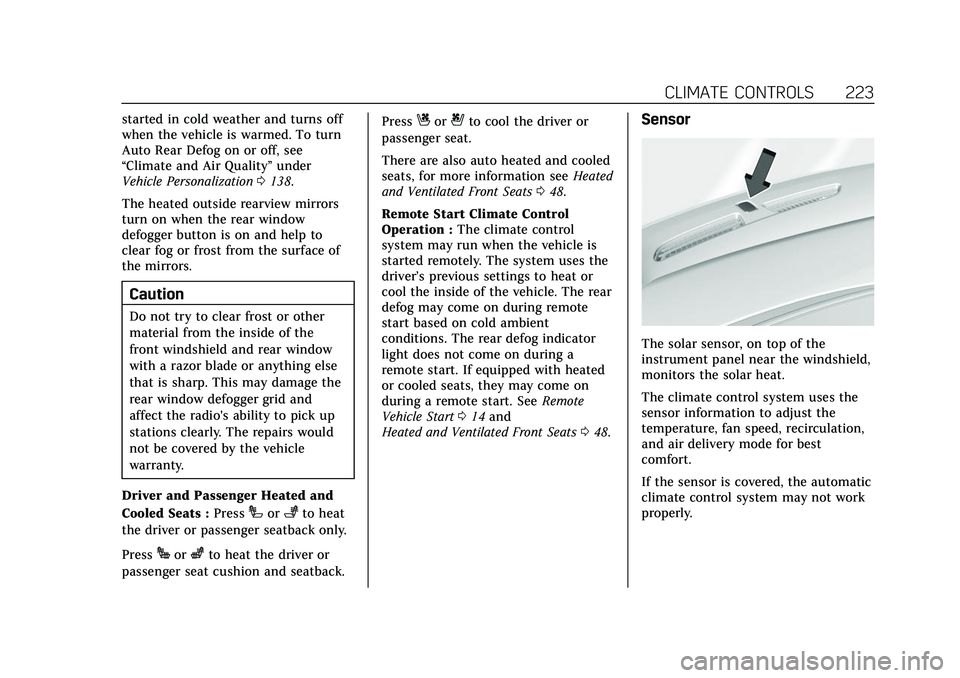
The solar sensor, on top of the
instrument panel near the windshield,
monitors the solar heat.
The climate control system uses the
sensor information to adjust the
temperature, fan speed, recirculation,
and air delivery mode for best
comfort.
If the sensor is covered, the automatic
climate control system may not work
properly.
Page 225 of 492
Cadillac Escalade Owner Manual (GMNA-Localizing-U.S./Canada/Mexico-
13690472) - 2021 - CRC - 8/10/21
224 CLIMATE CONTROLS
Rear Climate Control System
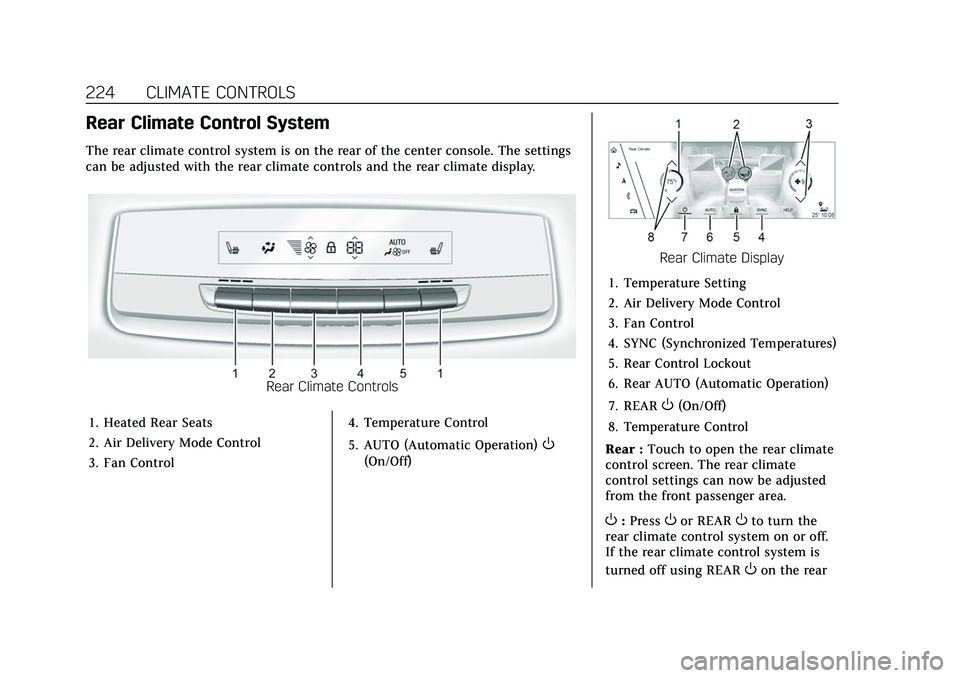
The rear climate control system is on the rear of the center console. The settings
can be adjusted with the rear climate controls and the rear climate display.
Rear Climate Controls
1. Heated Rear Seats
2. Air Delivery Mode Control
3. Fan Control 4. Temperature Control
5. AUTO (Automatic Operation)
O
(On/Off)
Rear Climate Display
1. Temperature Setting
2. Air Delivery Mode Control
3. Fan Control
4. SYNC (Synchronized Temperatures)
5. Rear Control Lockout
6. Rear AUTO (Automatic Operation)
7. REAR
O(On/Off)
8. Temperature Control
Rear : Touch to open the rear climate
control screen. The rear climate
control settings can now be adjusted
from the front passenger area.
O: PressOor REAROto turn the
rear climate control system on or off.
If the rear climate control system is
turned off using REAR
Oon the rear
Page 232 of 492

Cadillac Escalade Owner Manual (GMNA-Localizing-U.S./Canada/Mexico-
13690472) - 2021 - CRC - 8/10/21
DRIVING AND OPERATING 231
.Become familiar with vehicle
features before driving, such as
programming favorite radio stations
and adjusting climate control and
seat settings. Program all trip
information into any navigation
device prior to driving.
.Wait until the vehicle is parked to
retrieve items that have fallen to
the floor.
.Stop or park the vehicle to tend to
children.
.Keep pets in an appropriate carrier
or restraint.
.Avoid stressful conversations while
driving, whether with a passenger or
on a cell phone.
{Warning
Taking your eyes off the road too
long or too often could cause a
crash resulting in injury or death.
Focus your attention on driving.
Refer to the infotainment section for
more information on using that
system and the navigation system,
if equipped, including pairing and
using a cell phone.
Defensive Driving
Defensive driving means “always
expect the unexpected.” The first step
in driving defensively is to wear the
seat belt. See Seat Belts058.
.Assume that other road users
(pedestrians, bicyclists, and other
drivers) are going to be careless and
make mistakes. Anticipate what
they may do and be ready.
.Allow enough following distance
between you and the driver in front
of you.
.Focus on the task of driving.
Impaired Driving
Death and injury associated with
impaired driving is a global tragedy.
{Warning
Drinking alcohol or taking drugs
and then driving is very dangerous.
Your reflexes, perceptions,
attentiveness, and judgment can be
affected by even a small amount of
alcohol or drugs. You can have a
(Continued)
Warning (Continued)
serious—or even fatal —collision
if you drive after drinking or taking
drugs.
Do not drive while under the
influence of alcohol or drugs,
or ride with a driver who has been
drinking or is impaired by drugs.
Find alternate transportation home;
or if you are with a group, designate
a driver who will remain sober.
Control of a Vehicle
Braking, steering, and accelerating are
important factors in helping to control
a vehicle while driving.
Braking
Braking action involves perception
time and reaction time. Deciding to
push the brake pedal is perception
time. Actually doing it is
reaction time.
Average driver reaction time is about
three-quarters of a second. In that
time, a vehicle moving at 100 km/h
Page 249 of 492
Cadillac Escalade Owner Manual (GMNA-Localizing-U.S./Canada/Mexico-
13690472) - 2021 - CRC - 8/10/21
248 DRIVING AND OPERATING
To maintain vehicle performance,
other conditions may cause the engine
to automatically restart before the
brake pedal is released.
Auto Stops may not occur and/or Auto
Starts may occur because:
.The climate control settings require
the engine to be running to cool or
heat the vehicle interior.
.The vehicle battery charge is low.
.The vehicle battery has recently
been disconnected.
.Minimum vehicle speed has not
been reached since the last
Auto Stop.
.The accelerator pedal is pressed.
.The engine or transmission is not at
the required operating temperature.
.The outside temperature is not in
the required operating range.
.The vehicle is shifted out of D
(Drive) to any gear other than
P (Park).
.Certain driver modes have been
selected. SeeDriver Mode Control
0 266 and
Four-Wheel Drive 0256.
.The vehicle is on a steep hill or
grade.
.The driver door has been opened or
the driver seat belt has been
unbuckled.
.The hood has been opened.
.The Auto Stop has reached the
maximum allowed time.
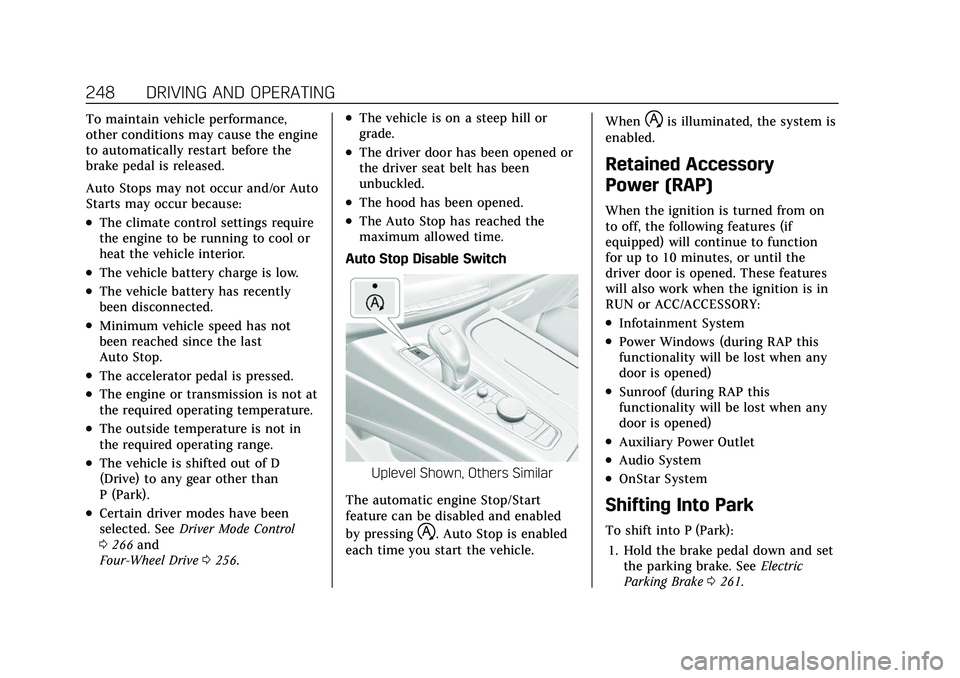
Auto Stop Disable Switch
Uplevel Shown, Others Similar
The automatic engine Stop/Start
feature can be disabled and enabled
by pressing
h. Auto Stop is enabled
each time you start the vehicle. When
his illuminated, the system is
enabled.
Retained Accessory
Power (RAP)
When the ignition is turned from on
to off, the following features (if
equipped) will continue to function
for up to 10 minutes, or until the
driver door is opened. These features
will also work when the ignition is in
RUN or ACC/ACCESSORY:
.Infotainment System
.Power Windows (during RAP this
functionality will be lost when any
door is opened)
.Sunroof (during RAP this
functionality will be lost when any
door is opened)
.Auxiliary Power Outlet
.Audio System
.OnStar System
Shifting Into Park
To shift into P (Park):
1. Hold the brake pedal down and set the parking brake. See Electric
Parking Brake 0261.