lights CADILLAC ESCALADE 2021 Owner's Manual
[x] Cancel search | Manufacturer: CADILLAC, Model Year: 2021, Model line: ESCALADE, Model: CADILLAC ESCALADE 2021Pages: 492, PDF Size: 7.92 MB
Page 30 of 492
Cadillac Escalade Owner Manual (GMNA-Localizing-U.S./Canada/Mexico-
13690472) - 2021 - CRC - 8/10/21
KEYS, DOORS, AND WINDOWS 29
3. After 30 seconds the alarm systemwill arm, and the indicator light
will begin to slowly flash. Pressing
Qon the remote key a second time
will bypass the 30-second delay
and immediately arm the alarm
system.
The vehicle alarm system will not arm
if the doors are locked with the
mechanical key.
If the driver door is opened without
first unlocking with the remote key,
the horn will chirp and the lights will
flash to indicate pre-alarm. If the
vehicle is not started, or the door is
not unlocked by pressing
Kon the
remote key during the 10-second
pre-alarm, the alarm will be activated.
The alarm will also be activated if a
passenger door, the liftgate, or the
hood is opened without first
disarming the system. When the
alarm is activated, the turn signals
flash and the horn sounds for about
30 seconds. The alarm system will
then re-arm to monitor for the next
unauthorized event.
Disarming the Alarm System
To disarm the alarm system or turn
off the alarm if it has been activated:
.PressKon the remote key.
.Unlock the vehicle using the Keyless
Access system.
.Start the vehicle.
To avoid setting off the alarm by
accident:
.Lock the vehicle after all occupants
have exited.
.Always unlock a door with the
remote key, or use the Keyless
Access system.
Unlocking the driver door with the
mechanical key will not disarm the
system or turn off the alarm.
How to Detect a Tamper
Condition
IfKis pressed on the remote key and
the horn chirps three times, an alarm
occurred previously while the alarm
system was armed.
If the alarm has been activated, a
message will appear on the DIC.
Power Sounder, Inclination
Sensor, and Intrusion Sensor
In addition to the standard
theft-deterrent system features, this
system may also have a power
sounder, inclination sensor, and
intrusion sensor.
The power sounder provides an
audible alarm which is distinct from
the vehicle’s horn. It has its own
power source, and can sound an alarm
if the vehicle’s battery is
compromised.
The inclination sensor can set off the
alarm if it senses movement of the
vehicle, such as a change in vehicle
orientation.
The intrusion sensor monitors the
vehicle interior, and can activate the
alarm if it senses unauthorized entry
into the vehicle’s interior. Do not
allow passengers or pets to remain in
the vehicle when the intrusion sensor
is activated.
Before arming the theft-deterrent
system and activating the intrusion
sensor:
Page 50 of 492

Cadillac Escalade Owner Manual (GMNA-Localizing-U.S./Canada/Mexico-
13690472) - 2021 - CRC - 8/10/21
SEATS AND RESTRAINTS 49
PressCor{, if available, to ventilate
the driver or passenger seat.
A ventilated seat has a fan that pulls
or pushes air through the seat. The air
is not cooled.
When this feature is off, the heated
and ventilated seat symbols on the
buttons are white. When a heated seat
is turned on, the symbol turns red.
When a ventilated seat is turned on,
the symbol turns blue.
Press the button once for the highest
setting. With each press of the button,
the seat will change to the next lower
setting, and then to the off setting.
The indicator lights next to the
buttons indicate three for the highest
setting and one for the lowest. If the
heated seats are on high, the level
may automatically be lowered after
approximately 30 minutes.
The passenger seat may take longer to
heat up. Auto Heated and Ventilated Seats
When the vehicle is on, this feature
will automatically activate the heated
or ventilated seats at the level
required by the vehicle’s interior
temperature.
The active high, medium, low, or off
heated or ventilated seat level will be
indicated by the manual heated or
ventilated seat buttons on the door
panel. Use the manual heated or
ventilated seat buttons on the door
panel to turn auto heated or
ventilated seats off. If the passenger
seat is unoccupied, the auto heated or
ventilated seats feature will not
activate that seat. The auto heated or
ventilated seats feature can be
programmed to always be enabled
when the vehicle is on.
See
Vehicle Personalization 0138.
Remote Start Heated and Ventilated
Seats
During a remote start, the heated or
ventilated seats, if equipped, can be
turned on automatically. When it is
cold outside, the heated seats turn on,
and when it is hot outside the ventilated seats turn on. If the auto
heated or ventilated seats feature,
if equipped, is not turned on, the
heated or ventilated seats may be
canceled when the ignition is turned
on. If necessary, press the heated or
ventilated seat button to use the
heated or ventilated seats after the
vehicle is started.
The heated or ventilated seat
indicator lights may turn on during a
remote start.
The temperature performance of an
unoccupied seat may be reduced. This
is normal.
The remote start heated or ventilated
seats may be enabled or disabled in
the vehicle personalization menu. See
Remote Vehicle Start
014 and
Vehicle Personalization 0138.
Page 52 of 492

Cadillac Escalade Owner Manual (GMNA-Localizing-U.S./Canada/Mexico-
13690472) - 2021 - CRC - 8/10/21
SEATS AND RESTRAINTS 51
The buttons are on the rear of the
center console.
With the engine running, press
Mor
Lto heat the left or right outboard
seat cushion. An indicator on the rear
climate control display appears when
this feature is on.
Press the button once for the highest
setting. With each press of the button,
the seat will change to the next lower
setting, and then to the off setting.
The indicator lights next to the
buttons indicate three for the highest
setting and one for the lowest. If the heated seats are on high for an
extended time, their level may
automatically be lowered.
Second Row Seats
Rear Seat Adjustment
To adjust the seat position:
1. Remove objects on the floor in front of or on the second row seat,
or in the seat tracks on the floor.
2. Lift the lever on the side of the seat cushion and slide the seat
forward or backward.
Reclining Seatbacks
To recline the seatback:
1. Lift the lever on the outboard sideof the seat.
2. Move the seatback to the desired position, and then release the lever
to lock the seatback in place.
3. Push and pull on the seatback to make sure it is locked.
Page 101 of 492
Cadillac Escalade Owner Manual (GMNA-Localizing-U.S./Canada/Mexico-
13690472) - 2021 - CRC - 8/10/21
100 STORAGE
To use in freezer mode, press the
button twice. Two lights on the button
will be lit. The operating temperature
is -5°C (23°F).
To turn off the refrigerator or freezer,
press the button until its lights are off.
The bin light can turn on when the
refrigerator/freezer is off.
The bottom mat is removable. Clean
with water and mild soap.
Clean the refrigerator/freezer bin while
the vehicle and the feature are turned
off. Use a damp, soft rag and wipe the
bin carefully. Do not scratch or
puncture the bin surfaces.Rear Console Storage
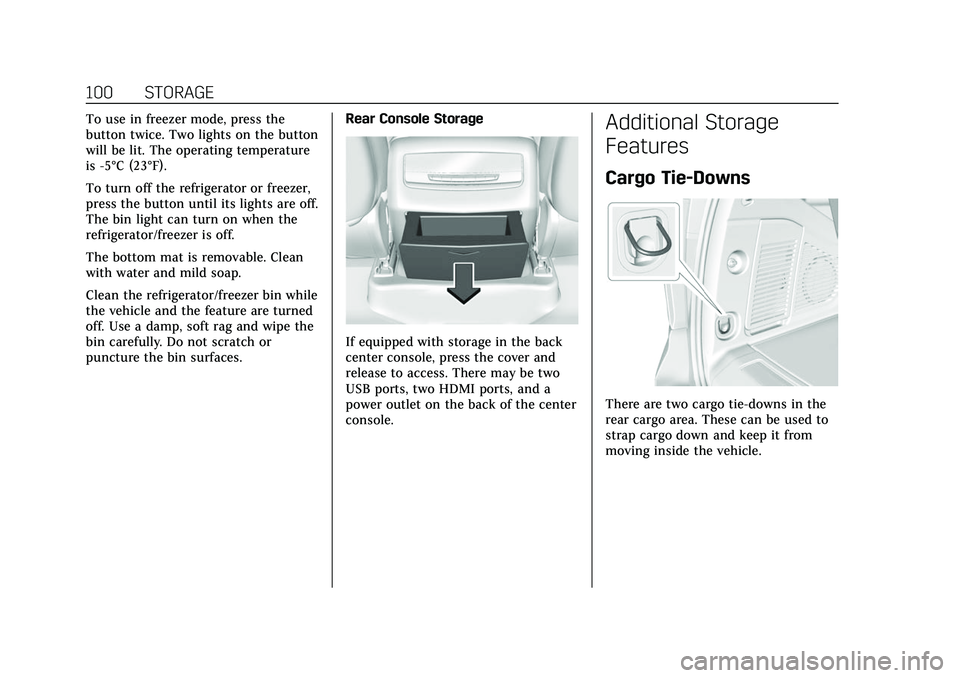
If equipped with storage in the back
center console, press the cover and
release to access. There may be two
USB ports, two HDMI ports, and a
power outlet on the back of the center
console.
Additional Storage
Features
Cargo Tie-Downs
There are two cargo tie-downs in the
rear cargo area. These can be used to
strap cargo down and keep it from
moving inside the vehicle.
Page 104 of 492
Cadillac Escalade Owner Manual (GMNA-Localizing-U.S./Canada/Mexico-
13690472) - 2021 - CRC - 8/10/21
INSTRUMENTS AND CONTROLS 103
Instruments and
Controls
Controls
Steering Wheel Adjustment . . . . . 104
Steering Wheel Controls . . . . . . . . . 104
Heated Steering Wheel . . . . . . . . . . 104
Horn . . . . . . . . . . . . . . . . . . . . . . . . . . . . . . . 104
Windshield Wiper/Washer . . . . . . . 105
Rear Window Wiper/Washer . . . . 107
Compass . . . . . . . . . . . . . . . . . . . . . . . . . . 108
Clock . . . . . . . . . . . . . . . . . . . . . . . . . . . . . . 108
Power Outlets . . . . . . . . . . . . . . . . . . . . . 108
Wireless Charging . . . . . . . . . . . . . . . . 111
Warning Lights, Gauges, and
Indicators
Warning Lights, Gauges, andIndicators . . . . . . . . . . . . . . . . . . . . . . . 113
Instrument Cluster . . . . . . . . . . . . . . . 114
Speedometer . . . . . . . . . . . . . . . . . . . . . . 115
Odometer . . . . . . . . . . . . . . . . . . . . . . . . . 116
Trip Odometer . . . . . . . . . . . . . . . . . . . . 116
Tachometer . . . . . . . . . . . . . . . . . . . . . . . 116
Fuel Gauge . . . . . . . . . . . . . . . . . . . . . . . . 116
Engine Oil Pressure Gauge . . . . . . . 116
Engine Coolant Temperature Gauge . . . . . . . . . . . . . . . . . . . . . . . . . . . . 117 Transmission Temperature
Gauge . . . . . . . . . . . . . . . . . . . . . . . . . . . . 118
Voltmeter Gauge . . . . . . . . . . . . . . . . . 119
Seat Belt Reminders . . . . . . . . . . . . . . 119
Airbag Readiness Light . . . . . . . . . . 120
Passenger Airbag Status Indicator . . . . . . . . . . . . . . . . . . . . . . . . . 121
Charging System Light . . . . . . . . . . . 122
Malfunction Indicator Lamp (Check Engine Light) . . . . . . . . . . . 122
Brake System Warning Light . . . . 124
Electric Parking Brake Light . . . . . 124
Service Electric Parking Brake Light . . . . . . . . . . . . . . . . . . . . . . . . . . . . . 125
Antilock Brake System (ABS) Warning Light . . . . . . . . . . . . . . . . . . 125
Automatic Vehicle Hold (AVH) Light . . . . . . . . . . . . . . . . . . . . . . . . . . . . . 125
Lane Keep Assist (LKA) Light . . . 125
Automatic Emergency Braking (AEB) Disabled Light . . . . . . . . . . . 126
Vehicle Ahead Indicator . . . . . . . . . 126
Pedestrian Ahead Indicator . . . . . . 126
Traction Off Light . . . . . . . . . . . . . . . . 127
StabiliTrak OFF Light . . . . . . . . . . . . 127
Traction Control System (TCS)/ StabiliTrak Light . . . . . . . . . . . . . . . . 127
Engine Coolant Temperature Warning Light . . . . . . . . . . . . . . . . . . 128
Driver Mode Control Light . . . . . . . 128 Four Corner Air Suspension
Light . . . . . . . . . . . . . . . . . . . . . . . . . . . . . 128
Tire Pressure Light . . . . . . . . . . . . . . . 129
Engine Oil Pressure Light . . . . . . . . 130
Low Fuel Warning Light . . . . . . . . . 130
Security Light . . . . . . . . . . . . . . . . . . . . . 130
High-Beam On Light . . . . . . . . . . . . . 130
Lamps On Reminder . . . . . . . . . . . . . 131
Cruise Control Light . . . . . . . . . . . . . . 131
Door Ajar Light . . . . . . . . . . . . . . . . . . . 132
Information Displays
Driver Information Center (DIC) . . . . . . . . . . . . . . . . . . . . . 132
Vehicle Information . . . . . . . . . . . . . . 134
Head-Up Display (HUD) . . . . . . . . . 135
Vehicle Messages
Vehicle Messages . . . . . . . . . . . . . . . . . 138
Engine Power Messages . . . . . . . . . . 138
Vehicle Speed Messages . . . . . . . . . 138
Vehicle Personalization
Vehicle Personalization . . . . . . . . . . 138
Universal Remote System
Universal Remote System . . . . . . . . 145
Universal Remote System Programming . . . . . . . . . . . . . . . . . . . 146
Universal Remote System Operation . . . . . . . . . . . . . . . . . . . . . . . . 148
Page 114 of 492
Cadillac Escalade Owner Manual (GMNA-Localizing-U.S./Canada/Mexico-
13690472) - 2021 - CRC - 8/10/21
INSTRUMENTS AND CONTROLS 113
THIS SOFTWARE IS PROVIDED BY
THE COPYRIGHT HOLDERS AND
CONTRIBUTORS "AS IS" AND ANY
EXPRESS OR IMPLIED WARRANTIES,
INCLUDING, BUT NOT LIMITED TO,
THE IMPLIED WARRANTIES OF
MERCHANTABILITY AND FITNESS
FOR A PARTICULAR PURPOSE ARE
DISCLAIMED. IN NO EVENT SHALL
THE COPYRIGHT HOLDER OR
CONTRIBUTORS BE LIABLE FOR ANY
DIRECT, INDIRECT, INCIDENTAL,
SPECIAL, EXEMPLARY, OR
CONSEQUENTIAL DAMAGES
(INCLUDING, BUT NOT LIMITED TO,
PROCUREMENT OF SUBSTITUTE
GOODS OR SERVICES; LOSS OF USE,
DATA, OR PROFITS; OR BUSINESS
INTERRUPTION) HOWEVER CAUSED
AND ON ANY THEORY OF LIABILITY,
WHETHER IN CONTRACT, STRICT
LIABILITY, OR TORT (INCLUDING
NEGLIGENCE OR OTHERWISE)
ARISING IN ANY WAY OUT OF THE
USE OF THIS SOFTWARE, EVEN IF
ADVISED OF THE POSSIBILITY OF
SUCH DAMAGE.Warning Lights, Gauges,
and Indicators
Warning lights and gauges can signal
that something is wrong before it
becomes serious enough to cause an
expensive repair or replacement.
Paying attention to the warning lights
and gauges could prevent injury.Some warning lights come on briefly
when the engine is started to indicate
they are working. When one of the
warning lights comes on and stays on
while driving, or when one of the
gauges shows there may be a problem,
check the section that explains what
to do. Waiting to do repairs can be
costly and even dangerous.
Page 121 of 492

Cadillac Escalade Owner Manual (GMNA-Localizing-U.S./Canada/Mexico-
13690472) - 2021 - CRC - 8/10/21
120 INSTRUMENTS AND CONTROLS
Front Passenger Seat Belt
Reminder Light
The vehicle may have a front
passenger seat belt reminder light
near the passenger airbag status
indicator. SeePassenger Sensing
System 071.
When the vehicle is started, this light
flashes and a chime may come on to
remind passengers to fasten their
seat belt.
Then the light stays on solid until the
belt is buckled. This cycle continues
several times if the front passenger
remains or becomes unbuckled while
the vehicle is moving.
If the front passenger seat belt is
buckled, neither the chime nor the
light comes on. The front passenger seat belt reminder
light and chime may come on if an
object is put on the seat such as a
briefcase, handbag, grocery bag,
laptop, or other electronic device. To
turn off the reminder light and/or
chime, remove the object from the
seat or buckle the seat belt.
Second and Third Row
Passenger Seat Belt Reminder
Light
The vehicle may have second and
third row passenger seat belt reminder
lights.
When the vehicle is started, these
lights come on solid to remind rear
passengers to fasten their seat belt.
Then each light may stay on solid or
flash, and a chime may come on if the
rear passenger remains unbuckled,
or becomes unbuckled, when thevehicle is moving. An X indicates the
seat belt is not buckled. A check mark
indicates the seat belt is buckled.
If the all rear passenger seat belts are
buckled, neither the chime nor the
lights come on.
For information on the front seat belt
reminder lights, see "Driver Seat Belt
Reminder Light" and "Front Passenger
Seat Belt Reminder Light" listed
previously.
The rear passenger seat belt reminder
light and chime may come on if an
object is put on the seat such as a
briefcase, handbag, grocery bag,
laptop, or other electronic device. To
turn off the reminder light and/or
chime, remove the object from the
seat or buckle the seat belt.
Airbag Readiness Light
This light shows if there is an
electrical problem with the airbag
system. It is located on the center
stack, below the infotainment screen.
The system check includes the airbag
sensor(s), the passenger sensing
system, the pretensioners, the airbag
modules, the wiring, and the crash
Page 122 of 492

Cadillac Escalade Owner Manual (GMNA-Localizing-U.S./Canada/Mexico-
13690472) - 2021 - CRC - 8/10/21
INSTRUMENTS AND CONTROLS 121
sensing and diagnostic module. For
more information on the airbag
system, seeAirbag System 065.
The airbag readiness light comes on
for several seconds when the vehicle is
started. If the light does not come on
then, have it fixed immediately.
{Warning
If the airbag readiness light stays
on after the vehicle is started or
comes on while driving, it means
the airbag system might not be
working properly. The airbags in the
vehicle might not inflate in a crash,
or they could even inflate without a
crash. To help avoid injury, have
the vehicle serviced right away.
If there is a problem with the airbag
system, a Driver Information Center
(DIC) message may also come on.
Passenger Airbag Status
Indicator
The vehicle has a passenger sensing
system. See Passenger Sensing System
0 71 for important safety information.
The overhead console has a passenger
airbag status indicator.
United States and Canada
When the vehicle is started, the
passenger airbag status indicator will
light ON and OFF, and the symbols for
on and off, for several seconds as a
system check. Then, after several more
seconds, the status indicator will light
either ON or OFF, and the symbol for
on or off, to let you know the status of
the front outboard passenger frontal
airbag. If the word ON, and the on symbol,
are lit on the passenger airbag status
indicator, it means that the front
outboard passenger frontal airbag is
allowed to inflate.
If the word OFF, and the off symbol,
are lit on the passenger airbag status
indicator, it means that the passenger
sensing system has turned off the
front outboard passenger frontal
airbag.
If, after several seconds, both status
indicator lights remain on, if there are
no lights at all, or if the airbag
readiness light is on, there may be a
problem with the lights or the
passenger sensing system. See your
dealer for service right away.
{Warning
If the airbag readiness light ever
comes on and stays on, it means
that something may be wrong with
the airbag system. To help avoid
injury to yourself or others, have
(Continued)
Page 143 of 492
Cadillac Escalade Owner Manual (GMNA-Localizing-U.S./Canada/Mexico-
13690472) - 2021 - CRC - 8/10/21
142 INSTRUMENTS AND CONTROLS
.Remote Mirror Folding
.Rain Sense Wipers
.Auto Wipe in Reverse Gear
.Extended Hill Start Assist
Chime Volume
This sets the chime volume level.
Touch the controls on the
infotainment display to adjust the
volume.
Power Liftgate
This allows the driver to decide what
happens when pressing the Power
Liftgate switch. .
Touch Open Fully, Open to Custom
Height, or Off.
Hands Free Liftgate/Trunk Control
This allows the liftgate to be operated
hands free. See Liftgate020.
Touch Off, Open and Close,
or Open Only.
Reverse Tilt Mirror
When on, the driver, passenger,
or both driver and passenger outside
mirrors will tilt downward when the
vehicle is shifted into R (Reverse) to improve visibility of the ground near
the rear wheels. They may move from
their tilted position when the vehicle
is shifted out of R (Reverse) or turned
off. See
Reverse Tilt Mirrors 033.
Touch Off, On - Driver and Passenger,
On - Driver, or On - Passenger.
Remote Mirror Folding
This allows the outside mirrors to be
folded in when the remote key
Q
button is pressed and held. Pressing
Kunfolds the mirrors. See Folding
Mirrors 032.
Touch Off or On.
Rain Sense Wipers
This setting automatically turns on
the windshield wipers when moisture
is detected and the wiper switch is in
intermittent mode.
Touch Disabled or Enabled.
Auto Wipe in Reverse Gear
This setting automatically turns on
the rear window wiper when the
vehicle is shifted to R (Reverse) and
moisture is detected.
Touch Off or On. Extended Hill Start Assist
This setting prevents the vehicle from
rolling backward on a steep hill if the
brake pedal is not depressed.
Touch Extended Hold or
Standard Hold.
Lighting
Touch and the following may display:
.Ambient Lighting
.Vehicle Locator Lights
.Exit Lighting
.Left or Right Hand Traffic
.Advanced Forward Lighting
.Daytime Tail Lights
.Automatic High Beam Assist
.Surround View Lighting
Ambient Lighting
This setting provides the ability to
customize the color and intensity of
the interior accent lighting.
Touch Off or On.
Page 144 of 492

Cadillac Escalade Owner Manual (GMNA-Localizing-U.S./Canada/Mexico-
13690472) - 2021 - CRC - 8/10/21
INSTRUMENTS AND CONTROLS 143
Vehicle Locator Lights
This setting briefly turns on the
exterior lights when
Kis pressed on
the remote key.
Touch Off or On.
Exit Lighting
This setting specifies how long the
headlamps stay on after the vehicle is
turned off and exited.
Touch Off, 30 Seconds, 60 Seconds,
or 120 Seconds.
Left or Right Hand Traffic
This setting specifies the behavior of
the Advanced Forward Lighting
system based on which side of the
road the vehicle drives on.
Touch Left Hand Traffic or Right
Hand Traffic.
Advanced Forward Lighting
This setting automatically adjusts
headlights at corners and curves to
provide greater road illumination.
Touch Off, Curve Lighting,
or Intelligent Low Beam Lighting. Daytime Tail Lights
This setting turns on the tail lights
during daytime driving to improve the
visibility of the vehicle to other
drivers.
Touch Off or On.
Automatic High Beam Assist
This setting specifies how the high
beams adjust based on vehicle
environment .
Touch IntelliBeam or Adaptive
Headlight System .
Surround View Lighting
This setting turns on vehicle side
lights to improve image quality when
using the Surround View camera
system.
Touch Off or On.
Power Door Locks
Touch and the following may display:
.Auto Door Unlock
.Delayed Door Lock
Auto Door Unlock
This setting allows selection of which
doors will automatically unlock when
the vehicle is shifted into P (Park).
Touch Off, All Doors, or Driver Door.
Delayed Door Lock
This setting will lock the vehicle a
short time after all the doors are
closed.
Touch Off or On.
Remote Lock, Unlock, and Start
Touch and the following may display:
.Remote Unlock Light Feedback
.Remote Lock Feedback
.Remote Door Unlock
.Relock Remotely Unlocked Doors
.Remote Start Auto Cool Seats
.Remote Start Auto Heat Seats
.Remote Window Operation
.Passive Door Unlock
.Passive Door Lock
.Remote Left in Vehicle Alert
.Remote Removed From Vehicle
Alert