power steering CADILLAC ESCALADE 2021 Owner's Manual
[x] Cancel search | Manufacturer: CADILLAC, Model Year: 2021, Model line: ESCALADE, Model: CADILLAC ESCALADE 2021Pages: 492, PDF Size: 7.92 MB
Page 7 of 492
Cadillac Escalade Owner Manual (GMNA-Localizing-U.S./Canada/Mexico-
13690472) - 2021 - CRC - 8/10/21
6 KEYS, DOORS, AND WINDOWS
Keys, Doors, and
Windows
Keys and Locks
Keys . . . . . . . . . . . . . . . . . . . . . . . . . . . . . . . . . . 6
Remote Keyless Entry (RKE)System . . . . . . . . . . . . . . . . . . . . . . . . . . . . . 7
Remote Keyless Entry (RKE) System Operation . . . . . . . . . . . . . . . . . 7
Remote Vehicle Start . . . . . . . . . . . . . . 14
Door Locks . . . . . . . . . . . . . . . . . . . . . . . . . 15
Power Door Locks . . . . . . . . . . . . . . . . . 18
Delayed Locking . . . . . . . . . . . . . . . . . . . 19
Automatic Door Locks . . . . . . . . . . . . 19
Lockout Protection . . . . . . . . . . . . . . . . 19
Safety Locks . . . . . . . . . . . . . . . . . . . . . . . . 19
Doors
Liftgate . . . . . . . . . . . . . . . . . . . . . . . . . . . . . 20
Power Assist Steps . . . . . . . . . . . . . . . . . 28
Vehicle Security
Vehicle Security . . . . . . . . . . . . . . . . . . . . 28
Vehicle Alarm System . . . . . . . . . . . . . 28
Steering Column Lock . . . . . . . . . . . . . 30
Immobilizer . . . . . . . . . . . . . . . . . . . . . . . . 31
Immobilizer Operation . . . . . . . . . . . . 31
Exterior Mirrors
Convex Mirrors . . . . . . . . . . . . . . . . . . . . 31 Power Mirrors . . . . . . . . . . . . . . . . . . . . . . 32
Folding Mirrors . . . . . . . . . . . . . . . . . . . . 32
Heated Mirrors . . . . . . . . . . . . . . . . . . . . . 33
Automatic Dimming Mirror . . . . . . . 33
Reverse Tilt Mirrors . . . . . . . . . . . . . . . 33
Interior Mirrors
Interior Rearview Mirrors . . . . . . . . . 34
Automatic Dimming Rearview
Mirror . . . . . . . . . . . . . . . . . . . . . . . . . . . . . 34
Rear Camera Mirror . . . . . . . . . . . . . . . 34
Windows
Windows . . . . . . . . . . . . . . . . . . . . . . . . . . . 36
Power Windows . . . . . . . . . . . . . . . . . . . . 36
Sun Visors . . . . . . . . . . . . . . . . . . . . . . . . . . 38
Roof
Sunroof . . . . . . . . . . . . . . . . . . . . . . . . . . . . . 38
Keys and Locks
Keys
{Warning
Leaving children in a vehicle with a
remote key is dangerous and
children or others could be
seriously injured or killed. They
could operate the power windows
or other controls or make the
vehicle move. The windows will
function with the remote key in the
vehicle, and children or others
could be caught in the path of a
closing window. Do not leave
children in a vehicle with a
remote key.
Page 47 of 492

Cadillac Escalade Owner Manual (GMNA-Localizing-U.S./Canada/Mexico-
13690472) - 2021 - CRC - 8/10/21
46 SEATS AND RESTRAINTS
If equipped, memory seats allow two
drivers to save and recall their unique
seat positions for driving the vehicle,
and a shared exit position for getting
out of the vehicle. Other feature
positions may also be saved, such as
power mirrors and power steering
wheel, if equipped. Memory positions
are linked to remote key 1 or 2 for
automatic memory recalls.
Before saving, adjust all available
memory feature positions. Turn the
vehicle on and then press and release
SET; a beep will sound. Then
immediately press and hold 1, 2,
or
B(Exit) until two beeps sound. To
manually recall these positions, press
and hold 1, 2, or
Buntil the saved
position is reached. Follow the
instructions under “Saving Memory
Positions.”
The vehicle identifies the current
driver’s remote key number (1–8). See
Remote Keyless Entry (RKE) System
Operation 07. Only remote keys 1 and
2 can be used for automatic memory
recalls. A Driver Information Center
(DIC) welcome message indicating the
transmitter number may display for the first few ignition cycles following a
transmitter change. For Seat Entry
Memory to work properly, save the
positions to the memory button (1 or
2) matching the remote key number
displayed in the DIC welcome
message. Carry the linked remote key
when entering the vehicle.
Vehicle Personalization Settings
.To have the Seat Entry Memory
movement begin when the vehicle is
started, select the Settings menu,
then Vehicle, then Seating Position,
and then Seat Entry Memory. Select
On or Off. See
“Seat Entry Memory ”
later in this section.
.To begin Seat Exit Memory
movement when the vehicle is
turned off and the driver door is
opened, or when the vehicle is
turned off with the driver door
already opened, select the Settings
menu, then Vehicle, then Seating
Position, and then Seat Exit
Memory. Select On or Off. See “Seat
Exit Memory” later in this section.
.SeeVehicle Personalization 0138 for
additional setting information. Identifying Driver Number
To identify the driver number:
1. Move your remote key away from the vehicle.
2. Start the vehicle with another remote key. The DIC should display
the driver number for the other
remote key. Turn the vehicle off
and remove the remote key from
the vehicle.
3. Start the vehicle with the initial remote key. The DIC should display
the driver number of your
remote key.
Saving Memory Positions
Read these instructions completely
before saving memory positions.
To save preferred driving positions
1 and 2: 1. Turn the vehicle on or to ACC/ ACCESSORY with remote key 1
or 2.
A DIC welcome message may
indicate driver number 1 or 2.
2. Adjust all available memory features to the desired driving
position.
Page 48 of 492

Cadillac Escalade Owner Manual (GMNA-Localizing-U.S./Canada/Mexico-
13690472) - 2021 - CRC - 8/10/21
SEATS AND RESTRAINTS 47
3. Press and release SET; a beep willsound.
4. Immediately press and hold the 1 or 2 memory button matching the
above DIC welcome message until
two beeps sound.
If too much time passes between
releasing SET and pressing 1, the
memory position will not be saved
and two beeps will not sound.
Repeat Steps 3 and 4.
1 or 2 corresponds to the driver
number. See “Identifying Driver
Number” previously in this section.
5. Repeat Steps 1–4 for a second driver using 1 or 2. Remote keys 3–
8 may not save memory positions.
To save the position for
Band Seat
Exit Memory features, repeat Steps 1–
4 using
B. This saves the position for
getting out of the vehicle.
Save preferred memory feature
positions to both 1 and 2 if you are
the only driver. Manually Recalling Memory
Positions
Press and hold 1, 2, or
Bto recall the
previously saved memory positions if
you are driver 1 or 2 identified in the
DIC welcome message. Remote keys
3–8 will not recall memory positions.
To stop Manual Memory recall
movement, release 1, 2, or
Bor press
any of the following controls:
.Power seat
.Memory SET
.Power mirror, with the driver or
passenger side mirror selected
.Power steering wheel, if equipped
Manual Memory recall movement for
1, 2 or
Bbuttons may be initiated
and will complete to the saved
memory position if the vehicle is
shifted in or out of P (Park).
Seat Entry Memory
The vehicle identifies the number of
the current driver’s remote key (1–8).
See Remote Keyless Entry (RKE) System
Operation 07. If the remote key is 1 or
2, and Seat Entry Memory is enabled
in vehicle personalization, the positions saved to the same memory
button number 1 or 2 are
automatically recalled when the
vehicle is turned on, or turned from
off to ACC/ACCESSORY. Remote keys
3–8 will not provide automatic
memory recalls.
To turn Seat Entry Memory on or off,
see
“Vehicle Personalization Settings”
previously in this section and Vehicle
Personalization 0138.
The shift lever must be in P (Park) to
start Seat Entry Memory. Seat Entry
Memory recall will complete if the
vehicle is shifted out of P (Park) prior
to reaching the saved memory
position.
To stop Seat Entry Memory recall
movement, turn the vehicle off or
press any of the following controls:
.Power seat
.Memory SET, 1, 2, orB
.Power mirror, with the driver or
passenger side mirror selected
.Power steering wheel, if equipped
If the saved memory seat position
does not automatically recall or recalls
to the wrong positions, the driver’s
Page 49 of 492

Cadillac Escalade Owner Manual (GMNA-Localizing-U.S./Canada/Mexico-
13690472) - 2021 - CRC - 8/10/21
48 SEATS AND RESTRAINTS
remote key number (1 or 2) may not
match the memory button number
that positions were saved to. Try
storing the position to the other
memory button or try the other
remote key.
Seat Exit Memory
Seat Exit Memory is not linked to an
remote key. The position saved to
B
is used for all drivers. To turn Seat
Exit Memory on or off, see "Vehicle
Personalization Settings" previously in
this section andVehicle Personalization
0 138.
If turned on, the position saved to
B
is automatically recalled when one of
the following occurs:
.The vehicle is turned off and the
driver door is opened within a
short time.
.The vehicle is turned off with the
driver door open.
To stop Seat Exit Memory movement,
press any of the following memory
controls:
.Power seat
.Memory SET, 1, 2, orB
.Power mirror, with the driver or
passenger side mirror selected
.Power steering wheel, if equipped
Obstructions
If something has blocked the driver
seat while recalling a memory
position, the recall may stop. Remove
the obstruction and try the recall
again. If the memory position still
does not recall, see your dealer.
Heated and Ventilated
Front Seats
{Warning
If temperature change or pain to
the skin cannot be felt, the seat
heater may cause burns. To reduce
the risk of burns, use care when
using the seat heater, especially for
long periods of time. Do not place
anything on the seat that insulates
against heat, such as a blanket,
cushion, cover, or similar item. This
may cause the seat heater to (Continued)
Warning (Continued)
overheat. An overheated seat heater
may cause a burn or may damage
the seat.
Heated and Ventilated Seat ButtonsShown, Heated Seat Buttons Similar
If equipped, the buttons are located
on the door panel. To operate, the
engine must be running.
Press
Jorzto heat the driver or
passenger seat back and cushion.
Press
Ior+to heat the driver or
passenger seat back.
Page 104 of 492
Cadillac Escalade Owner Manual (GMNA-Localizing-U.S./Canada/Mexico-
13690472) - 2021 - CRC - 8/10/21
INSTRUMENTS AND CONTROLS 103
Instruments and
Controls
Controls
Steering Wheel Adjustment . . . . . 104
Steering Wheel Controls . . . . . . . . . 104
Heated Steering Wheel . . . . . . . . . . 104
Horn . . . . . . . . . . . . . . . . . . . . . . . . . . . . . . . 104
Windshield Wiper/Washer . . . . . . . 105
Rear Window Wiper/Washer . . . . 107
Compass . . . . . . . . . . . . . . . . . . . . . . . . . . 108
Clock . . . . . . . . . . . . . . . . . . . . . . . . . . . . . . 108
Power Outlets . . . . . . . . . . . . . . . . . . . . . 108
Wireless Charging . . . . . . . . . . . . . . . . 111
Warning Lights, Gauges, and
Indicators
Warning Lights, Gauges, andIndicators . . . . . . . . . . . . . . . . . . . . . . . 113
Instrument Cluster . . . . . . . . . . . . . . . 114
Speedometer . . . . . . . . . . . . . . . . . . . . . . 115
Odometer . . . . . . . . . . . . . . . . . . . . . . . . . 116
Trip Odometer . . . . . . . . . . . . . . . . . . . . 116
Tachometer . . . . . . . . . . . . . . . . . . . . . . . 116
Fuel Gauge . . . . . . . . . . . . . . . . . . . . . . . . 116
Engine Oil Pressure Gauge . . . . . . . 116
Engine Coolant Temperature Gauge . . . . . . . . . . . . . . . . . . . . . . . . . . . . 117 Transmission Temperature
Gauge . . . . . . . . . . . . . . . . . . . . . . . . . . . . 118
Voltmeter Gauge . . . . . . . . . . . . . . . . . 119
Seat Belt Reminders . . . . . . . . . . . . . . 119
Airbag Readiness Light . . . . . . . . . . 120
Passenger Airbag Status Indicator . . . . . . . . . . . . . . . . . . . . . . . . . 121
Charging System Light . . . . . . . . . . . 122
Malfunction Indicator Lamp (Check Engine Light) . . . . . . . . . . . 122
Brake System Warning Light . . . . 124
Electric Parking Brake Light . . . . . 124
Service Electric Parking Brake Light . . . . . . . . . . . . . . . . . . . . . . . . . . . . . 125
Antilock Brake System (ABS) Warning Light . . . . . . . . . . . . . . . . . . 125
Automatic Vehicle Hold (AVH) Light . . . . . . . . . . . . . . . . . . . . . . . . . . . . . 125
Lane Keep Assist (LKA) Light . . . 125
Automatic Emergency Braking (AEB) Disabled Light . . . . . . . . . . . 126
Vehicle Ahead Indicator . . . . . . . . . 126
Pedestrian Ahead Indicator . . . . . . 126
Traction Off Light . . . . . . . . . . . . . . . . 127
StabiliTrak OFF Light . . . . . . . . . . . . 127
Traction Control System (TCS)/ StabiliTrak Light . . . . . . . . . . . . . . . . 127
Engine Coolant Temperature Warning Light . . . . . . . . . . . . . . . . . . 128
Driver Mode Control Light . . . . . . . 128 Four Corner Air Suspension
Light . . . . . . . . . . . . . . . . . . . . . . . . . . . . . 128
Tire Pressure Light . . . . . . . . . . . . . . . 129
Engine Oil Pressure Light . . . . . . . . 130
Low Fuel Warning Light . . . . . . . . . 130
Security Light . . . . . . . . . . . . . . . . . . . . . 130
High-Beam On Light . . . . . . . . . . . . . 130
Lamps On Reminder . . . . . . . . . . . . . 131
Cruise Control Light . . . . . . . . . . . . . . 131
Door Ajar Light . . . . . . . . . . . . . . . . . . . 132
Information Displays
Driver Information Center (DIC) . . . . . . . . . . . . . . . . . . . . . 132
Vehicle Information . . . . . . . . . . . . . . 134
Head-Up Display (HUD) . . . . . . . . . 135
Vehicle Messages
Vehicle Messages . . . . . . . . . . . . . . . . . 138
Engine Power Messages . . . . . . . . . . 138
Vehicle Speed Messages . . . . . . . . . 138
Vehicle Personalization
Vehicle Personalization . . . . . . . . . . 138
Universal Remote System
Universal Remote System . . . . . . . . 145
Universal Remote System Programming . . . . . . . . . . . . . . . . . . . 146
Universal Remote System Operation . . . . . . . . . . . . . . . . . . . . . . . . 148
Page 105 of 492
Cadillac Escalade Owner Manual (GMNA-Localizing-U.S./Canada/Mexico-
13690472) - 2021 - CRC - 8/10/21
104 INSTRUMENTS AND CONTROLS
Controls
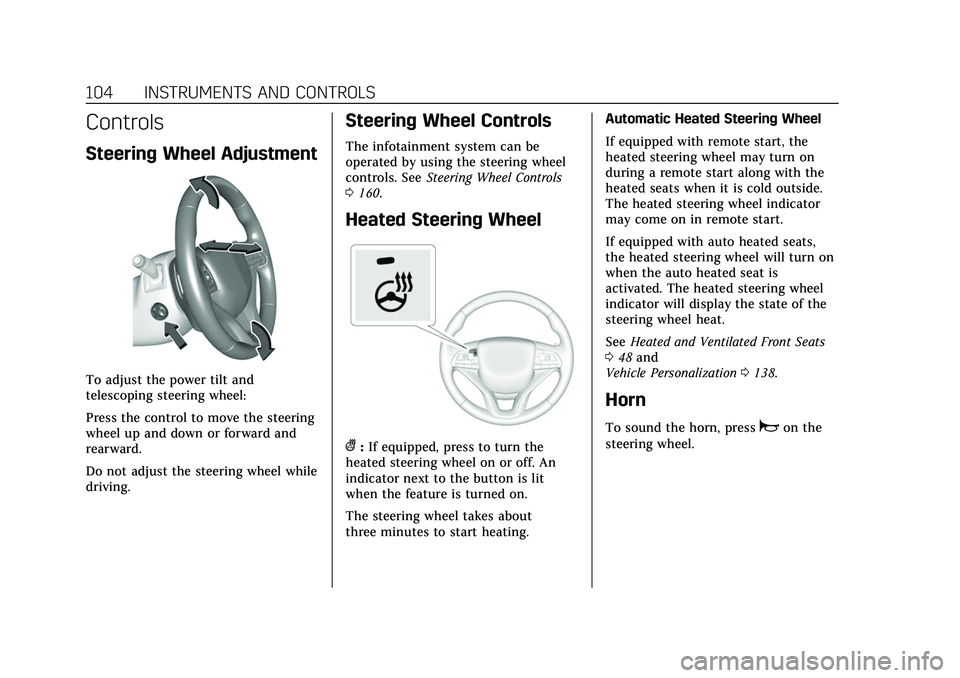
Steering Wheel Adjustment
To adjust the power tilt and
telescoping steering wheel:
Press the control to move the steering
wheel up and down or forward and
rearward.
Do not adjust the steering wheel while
driving.
Steering Wheel Controls
The infotainment system can be
operated by using the steering wheel
controls. SeeSteering Wheel Controls
0 160.
Heated Steering Wheel
(:If equipped, press to turn the
heated steering wheel on or off. An
indicator next to the button is lit
when the feature is turned on.
The steering wheel takes about
three minutes to start heating. Automatic Heated Steering Wheel
If equipped with remote start, the
heated steering wheel may turn on
during a remote start along with the
heated seats when it is cold outside.
The heated steering wheel indicator
may come on in remote start.
If equipped with auto heated seats,
the heated steering wheel will turn on
when the auto heated seat is
activated. The heated steering wheel
indicator will display the state of the
steering wheel heat.
See
Heated and Ventilated Front Seats
0 48 and
Vehicle Personalization 0138.
Horn
To sound the horn, pressaon the
steering wheel.
Page 172 of 492
Cadillac Escalade Owner Manual (GMNA-Localizing-U.S./Canada/Mexico-
13690472) - 2021 - CRC - 8/10/21
INFOTAINMENT SYSTEM 171
Composers:1. Touch to view the composers on the USB.
2. Touch a Composer to view a list of albums by that composer.
3. Touch an album or All Songs to view a list of songs.
4. Touch a song from the list to begin playback.
Folders: 1. Touch to view the directories on the USB.
2. Touch a folder to view a list of all files.
3. Touch a file from the list to begin playback.
Podcasts : Touch to view the podcasts
on the connected Apple device and
get a list of podcast episodes.
Audiobooks:
1. Touch to view the audiobooks stored on the Apple device.
2. Touch an audiobook to get a list of chapters.
3. Touch the chapter from the list to begin playback. File System and Naming
File systems supported by the USB
may include:
.FAT32
.NTFS
.HFS+
The songs, artists, albums, and genres
are taken from the file’s song
information and are only displayed if
present. The radio displays the file
name as the track name if the song
information is not available.
Supported Apple Devices
To view supported devices, see
my.cadillac.com/learn.
Media Playback and Mute
USB playback will be paused if the
system is muted. If the steering wheel
mute control is pressed again,
playback will resume.
If the source is changed while in
mute, playback resumes and audio
will unmute.
Bluetooth Audio
Music may be played from a paired
Bluetooth device. See Bluetooth
(Pairing and Using a Phone) 0197 or
Bluetooth (Overview) 0196 for help
pairing a device.
Volume and song selection may be
controlled by using the infotainment
controls or the mobile device.
If Bluetooth is selected and no volume
is present, check the volume setting
on both your mobile device and the
infotainment system.
Music can be launched by touching
Bluetooth from the recent sources list
on the left of the display or by
touching the More option and then
touching the Bluetooth device.
To play music via Bluetooth:
1. Power on the device, and pair to connect the device.
2. Once paired, touch Audio from the Home Page, then touch Bluetooth
from the recent sources list on the
left of the display.
Page 230 of 492
Cadillac Escalade Owner Manual (GMNA-Localizing-U.S./Canada/Mexico-
13690472) - 2021 - CRC - 8/10/21
DRIVING AND OPERATING 229
Driving and
Operating
Driving Information
Driving for Better FuelEconomy . . . . . . . . . . . . . . . . . . . . . . . . 230
Distracted Driving . . . . . . . . . . . . . . . . 230
Defensive Driving . . . . . . . . . . . . . . . . 231
Impaired Driving . . . . . . . . . . . . . . . . . 231
Control of a Vehicle . . . . . . . . . . . . . . 231
Braking . . . . . . . . . . . . . . . . . . . . . . . . . . . . 231
Steering . . . . . . . . . . . . . . . . . . . . . . . . . . . 232
Off-Road Recovery . . . . . . . . . . . . . . . . 233
Loss of Control . . . . . . . . . . . . . . . . . . . 233
Off-Road Driving . . . . . . . . . . . . . . . . . 234
Driving on Wet Roads . . . . . . . . . . . 237
Hill and Mountain Roads . . . . . . . . 238
Winter Driving . . . . . . . . . . . . . . . . . . . . 239
If the Vehicle Is Stuck . . . . . . . . . . . 240
Vehicle Load Limits . . . . . . . . . . . . . . 240
Starting and Operating
New Vehicle Break-In . . . . . . . . . . . . 244
Ignition Positions . . . . . . . . . . . . . . . . 245
Starting the Engine . . . . . . . . . . . . . . 246
Stop/Start System . . . . . . . . . . . . . . . . 247
Retained Accessory Power (RAP) . . . . . . . . . . . . . . . . . . . . 248
Shifting Into Park . . . . . . . . . . . . . . . . 248 Shifting out of Park . . . . . . . . . . . . . . 249
Parking over Things
That Burn . . . . . . . . . . . . . . . . . . . . . . . 250
Dynamic Fuel Management . . . . . 250
Extended Parking . . . . . . . . . . . . . . . . . 250
Engine Exhaust
Engine Exhaust . . . . . . . . . . . . . . . . . . . 250
Running the Vehicle While Parked . . . . . . . . . . . . . . . . . . . . . . . . . . . 251
Automatic Transmission
Automatic Transmission . . . . . . . . . 251
Manual Mode . . . . . . . . . . . . . . . . . . . . . 255
Tow/Haul Mode . . . . . . . . . . . . . . . . . . 256
Drive Systems
Four-Wheel Drive . . . . . . . . . . . . . . . . 256
Brakes
Electric Brake Boost . . . . . . . . . . . . . . 261
Antilock Brake System (ABS) . . . . 261
Electric Parking Brake . . . . . . . . . . . . 261
Brake Assist . . . . . . . . . . . . . . . . . . . . . . . 263
Hill Start Assist (HSA) . . . . . . . . . . . 263
Automatic VehicleHold (AVH) . . . . . . . . . . . . . . . . . . . . . 263
Ride Control Systems
Traction Control/ElectronicStability Control . . . . . . . . . . . . . . . . 264
Driver Mode Control . . . . . . . . . . . . . 266 Magnetic Ride Control . . . . . . . . . . . 268
Locking Rear Axle . . . . . . . . . . . . . . . . 268
Four Corner Air Suspension
System . . . . . . . . . . . . . . . . . . . . . . . . . . 268
Cruise Control
Cruise Control . . . . . . . . . . . . . . . . . . . . 271
Adaptive Cruise Control(Advanced) . . . . . . . . . . . . . . . . . . . . . . 274
Super Cruise . . . . . . . . . . . . . . . . . . . . . . 283
Driver Assistance Systems
Driver Assistance Systems . . . . . . . 298
Assistance Systems for Parking or Backing . . . . . . . . . . . . . . . . . . . . . . . 299
Rear Pedestrian Alert . . . . . . . . . . . . 312
Assistance Systems for Driving . . . . . . . . . . . . . . . . . . . . . . . . . . 313
Forward Collision Alert (FCA) System . . . . . . . . . . . . . . . . . . . . . . . . . . 313
Automatic Emergency Braking (AEB) . . . . . . . . . . . . . . . . . . . 315
Front Pedestrian Braking (FPB) System . . . . . . . . . . . . . . . . . . . . . . . . . . 317
Night Vision System . . . . . . . . . . . . . 319
Side Blind Zone Alert (SBZA) . . . . 321
Lane Change Alert (LCA) . . . . . . . . 321
Lane Keep Assist (LKA) . . . . . . . . . . 324
Fuel
Top Tier Fuel . . . . . . . . . . . . . . . . . . . . . 326
Page 233 of 492
Cadillac Escalade Owner Manual (GMNA-Localizing-U.S./Canada/Mexico-
13690472) - 2021 - CRC - 8/10/21
232 DRIVING AND OPERATING
(60 mph) travels 20 m (66 ft), which
could be a lot of distance in an
emergency.
Helpful braking tips to keep in mind
include:
.Keep enough distance between you
and the vehicle in front of you.
.Avoid needless heavy braking.
.Keep pace with traffic.
If the engine ever stops while the
vehicle is being driven, brake normally
but do not pump the brakes. Doing so
could make the pedal harder to push
down. If the engine stops, there will
be some power brake assist but it will
be used when the brake is applied.
Once the power assist is used up, it
can take longer to stop and the brake
pedal will be harder to push.
Steering
Caution
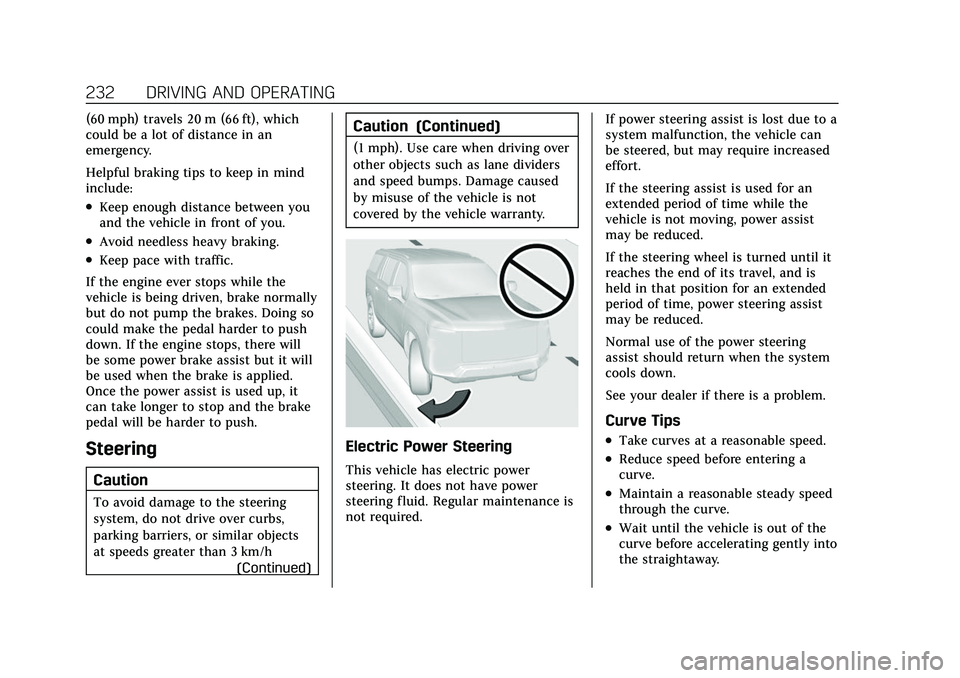
To avoid damage to the steering
system, do not drive over curbs,
parking barriers, or similar objects
at speeds greater than 3 km/h (Continued)
Caution (Continued)
(1 mph). Use care when driving over
other objects such as lane dividers
and speed bumps. Damage caused
by misuse of the vehicle is not
covered by the vehicle warranty.
Electric Power Steering
This vehicle has electric power
steering. It does not have power
steering fluid. Regular maintenance is
not required. If power steering assist is lost due to a
system malfunction, the vehicle can
be steered, but may require increased
effort.
If the steering assist is used for an
extended period of time while the
vehicle is not moving, power assist
may be reduced.
If the steering wheel is turned until it
reaches the end of its travel, and is
held in that position for an extended
period of time, power steering assist
may be reduced.
Normal use of the power steering
assist should return when the system
cools down.
See your dealer if there is a problem.
Curve Tips
.Take curves at a reasonable speed.
.Reduce speed before entering a
curve.
.Maintain a reasonable steady speed
through the curve.
.Wait until the vehicle is out of the
curve before accelerating gently into
the straightaway.
Page 246 of 492

Cadillac Escalade Owner Manual (GMNA-Localizing-U.S./Canada/Mexico-
13690472) - 2021 - CRC - 8/10/21
DRIVING AND OPERATING 245
Caution (Continued)
.Do not tow a trailer during
break-in. SeeTrailer Towing 0334
for the trailer towing capabilities
of the vehicle and more
information.
Following break-in, engine speed
and load can be gradually
increased.
Ignition Positions
Vehicles equipped with Keyless Access
have pushbutton starting. The Remote Key must be in the
vehicle for the system to operate.
If the pushbutton start is not working,
the vehicle may be near a strong radio
antenna signal causing interference to
the Keyless Access system. See
Remote
Keyless Entry (RKE) System Operation
0 7.
To shift out of P (Park), the ignition
must be on or in Service Mode, and
the brake pedal must be applied.
{Warning
Turning off the vehicle while
moving may cause loss of power
assist in the brake and steering
systems and disable the airbags.
While driving, only shut the vehicle
off in an emergency.
Stopping the Engine/LOCK/OFF (No
Indicator Lights) : When the vehicle
is stopped, press ENGINE START/
STOP once to turn the engine off.
If the vehicle is in P (Park), the
ignition will turn off, and Retained
Accessory Power (RAP) will remain
active. See Retained Accessory Power
(RAP) 0248. If the vehicle is not in P (Park), the
ignition will return to ACC/
ACCESSORY and display the message
SHIFT TO PARK in the Driver
Information Center (DIC). When the
vehicle is shifted into P (Park), the
ignition system will turn off.
The vehicle may have an electric
steering column lock. The lock is
activated when the ignition is turned
off and either front door is opened.
A sound may be heard as the lock
actuates or releases. The steering
column lock may not release with the
wheels turned off center. If this
happens, the vehicle may not start.
Move the steering wheel from left to
right while attempting to start the
vehicle. If this does not work, the
vehicle needs service.
If the vehicle must be shut off in an
emergency:
1. Brake using a firm and steady pressure. Do not pump the brakes
repeatedly. This may deplete power
assist, requiring increased brake
pedal force.