rke CADILLAC ESCALADE 2021 Owner's Manual
[x] Cancel search | Manufacturer: CADILLAC, Model Year: 2021, Model line: ESCALADE, Model: CADILLAC ESCALADE 2021Pages: 492, PDF Size: 7.92 MB
Page 7 of 492
Cadillac Escalade Owner Manual (GMNA-Localizing-U.S./Canada/Mexico-
13690472) - 2021 - CRC - 8/10/21
6 KEYS, DOORS, AND WINDOWS
Keys, Doors, and
Windows
Keys and Locks
Keys . . . . . . . . . . . . . . . . . . . . . . . . . . . . . . . . . . 6
Remote Keyless Entry (RKE)System . . . . . . . . . . . . . . . . . . . . . . . . . . . . . 7
Remote Keyless Entry (RKE) System Operation . . . . . . . . . . . . . . . . . 7
Remote Vehicle Start . . . . . . . . . . . . . . 14
Door Locks . . . . . . . . . . . . . . . . . . . . . . . . . 15
Power Door Locks . . . . . . . . . . . . . . . . . 18
Delayed Locking . . . . . . . . . . . . . . . . . . . 19
Automatic Door Locks . . . . . . . . . . . . 19
Lockout Protection . . . . . . . . . . . . . . . . 19
Safety Locks . . . . . . . . . . . . . . . . . . . . . . . . 19
Doors
Liftgate . . . . . . . . . . . . . . . . . . . . . . . . . . . . . 20
Power Assist Steps . . . . . . . . . . . . . . . . . 28
Vehicle Security
Vehicle Security . . . . . . . . . . . . . . . . . . . . 28
Vehicle Alarm System . . . . . . . . . . . . . 28
Steering Column Lock . . . . . . . . . . . . . 30
Immobilizer . . . . . . . . . . . . . . . . . . . . . . . . 31
Immobilizer Operation . . . . . . . . . . . . 31
Exterior Mirrors
Convex Mirrors . . . . . . . . . . . . . . . . . . . . 31 Power Mirrors . . . . . . . . . . . . . . . . . . . . . . 32
Folding Mirrors . . . . . . . . . . . . . . . . . . . . 32
Heated Mirrors . . . . . . . . . . . . . . . . . . . . . 33
Automatic Dimming Mirror . . . . . . . 33
Reverse Tilt Mirrors . . . . . . . . . . . . . . . 33
Interior Mirrors
Interior Rearview Mirrors . . . . . . . . . 34
Automatic Dimming Rearview
Mirror . . . . . . . . . . . . . . . . . . . . . . . . . . . . . 34
Rear Camera Mirror . . . . . . . . . . . . . . . 34
Windows
Windows . . . . . . . . . . . . . . . . . . . . . . . . . . . 36
Power Windows . . . . . . . . . . . . . . . . . . . . 36
Sun Visors . . . . . . . . . . . . . . . . . . . . . . . . . . 38
Roof
Sunroof . . . . . . . . . . . . . . . . . . . . . . . . . . . . . 38
Keys and Locks
Keys
{Warning
Leaving children in a vehicle with a
remote key is dangerous and
children or others could be
seriously injured or killed. They
could operate the power windows
or other controls or make the
vehicle move. The windows will
function with the remote key in the
vehicle, and children or others
could be caught in the path of a
closing window. Do not leave
children in a vehicle with a
remote key.
Page 8 of 492
Cadillac Escalade Owner Manual (GMNA-Localizing-U.S./Canada/Mexico-
13690472) - 2021 - CRC - 8/10/21
KEYS, DOORS, AND WINDOWS 7
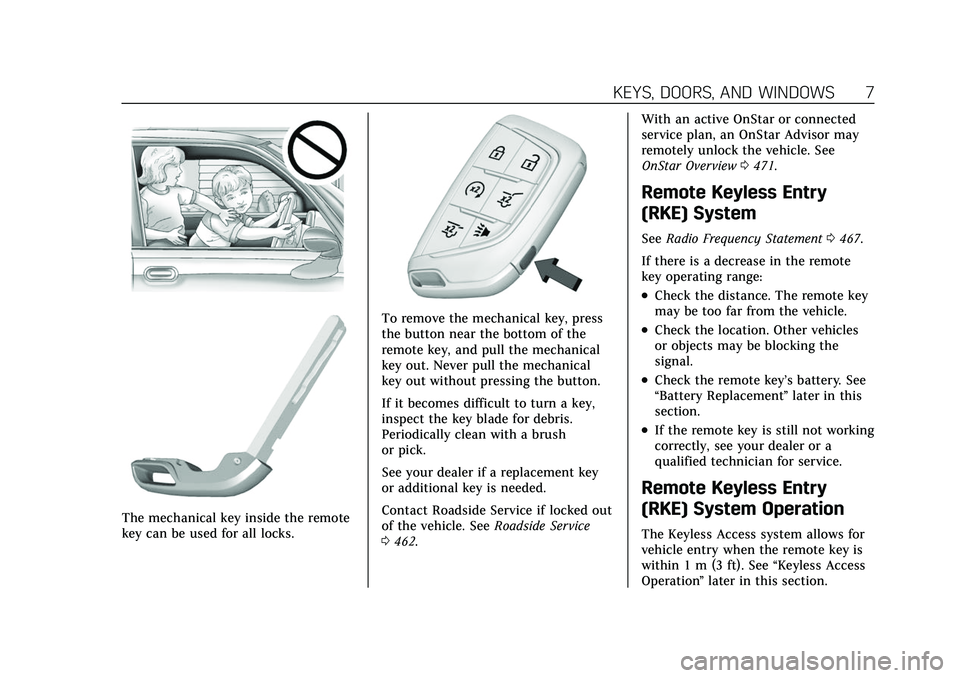
The mechanical key inside the remote
key can be used for all locks.
To remove the mechanical key, press
the button near the bottom of the
remote key, and pull the mechanical
key out. Never pull the mechanical
key out without pressing the button.
If it becomes difficult to turn a key,
inspect the key blade for debris.
Periodically clean with a brush
or pick.
See your dealer if a replacement key
or additional key is needed.
Contact Roadside Service if locked out
of the vehicle. SeeRoadside Service
0 462. With an active OnStar or connected
service plan, an OnStar Advisor may
remotely unlock the vehicle. See
OnStar Overview
0471.
Remote Keyless Entry
(RKE) System
See Radio Frequency Statement 0467.
If there is a decrease in the remote
key operating range:
.Check the distance. The remote key
may be too far from the vehicle.
.Check the location. Other vehicles
or objects may be blocking the
signal.
.Check the remote key’s battery. See
“Battery Replacement ”later in this
section.
.If the remote key is still not working
correctly, see your dealer or a
qualified technician for service.
Remote Keyless Entry
(RKE) System Operation
The Keyless Access system allows for
vehicle entry when the remote key is
within 1 m (3 ft). See “Keyless Access
Operation ”later in this section.
Page 9 of 492
Cadillac Escalade Owner Manual (GMNA-Localizing-U.S./Canada/Mexico-
13690472) - 2021 - CRC - 8/10/21
8 KEYS, DOORS, AND WINDOWS
The remote key functions may work
up to 60 m (197 ft) away from the
vehicle.
Other conditions can affect the
performance of the remote key. See
Remote Keyless Entry (RKE) System
07.
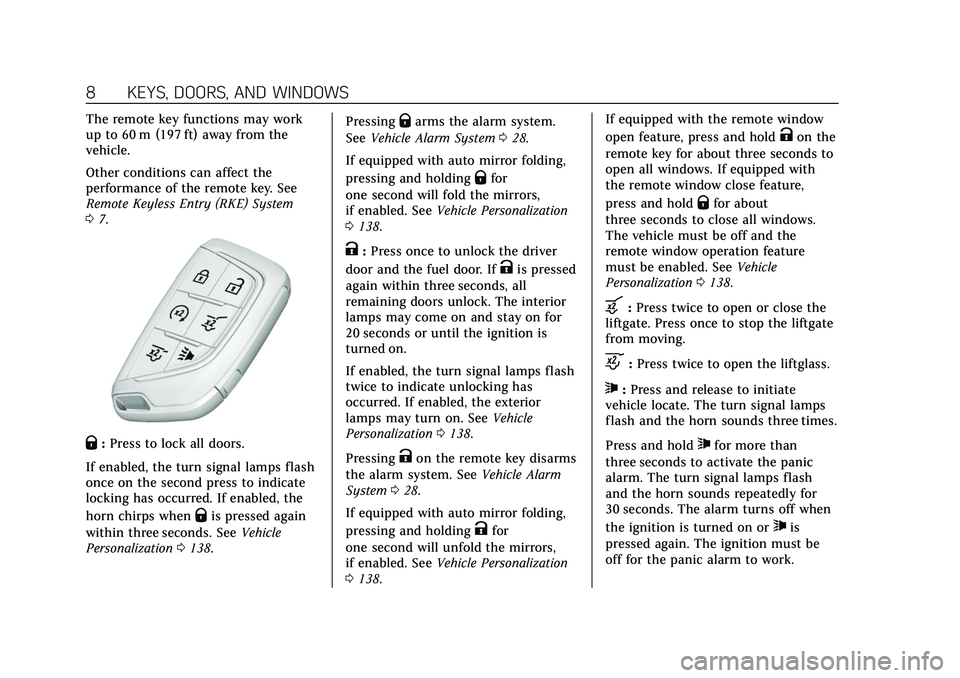
Q:Press to lock all doors.
If enabled, the turn signal lamps flash
once on the second press to indicate
locking has occurred. If enabled, the
horn chirps when
Qis pressed again
within three seconds. See Vehicle
Personalization 0138. Pressing
Qarms the alarm system.
See Vehicle Alarm System 028.
If equipped with auto mirror folding,
pressing and holding
Qfor
one second will fold the mirrors,
if enabled. See Vehicle Personalization
0 138.
K:Press once to unlock the driver
door and the fuel door. If
Kis pressed
again within three seconds, all
remaining doors unlock. The interior
lamps may come on and stay on for
20 seconds or until the ignition is
turned on.
If enabled, the turn signal lamps flash
twice to indicate unlocking has
occurred. If enabled, the exterior
lamps may turn on. See Vehicle
Personalization 0138.
Pressing
Kon the remote key disarms
the alarm system. See Vehicle Alarm
System 028.
If equipped with auto mirror folding,
pressing and holding
Kfor
one second will unfold the mirrors,
if enabled. See Vehicle Personalization
0 138. If equipped with the remote window
open feature, press and hold
Kon the
remote key for about three seconds to
open all windows. If equipped with
the remote window close feature,
press and hold
Qfor about
three seconds to close all windows.
The vehicle must be off and the
remote window operation feature
must be enabled. See Vehicle
Personalization 0138.
b:Press twice to open or close the
liftgate. Press once to stop the liftgate
from moving.
c: Press twice to open the liftglass.
7:Press and release to initiate
vehicle locate. The turn signal lamps
flash and the horn sounds three times.
Press and hold
7for more than
three seconds to activate the panic
alarm. The turn signal lamps flash
and the horn sounds repeatedly for
30 seconds. The alarm turns off when
the ignition is turned on or
7is
pressed again. The ignition must be
off for the panic alarm to work.
Page 15 of 492
Cadillac Escalade Owner Manual (GMNA-Localizing-U.S./Canada/Mexico-
13690472) - 2021 - CRC - 8/10/21
14 KEYS, DOORS, AND WINDOWS
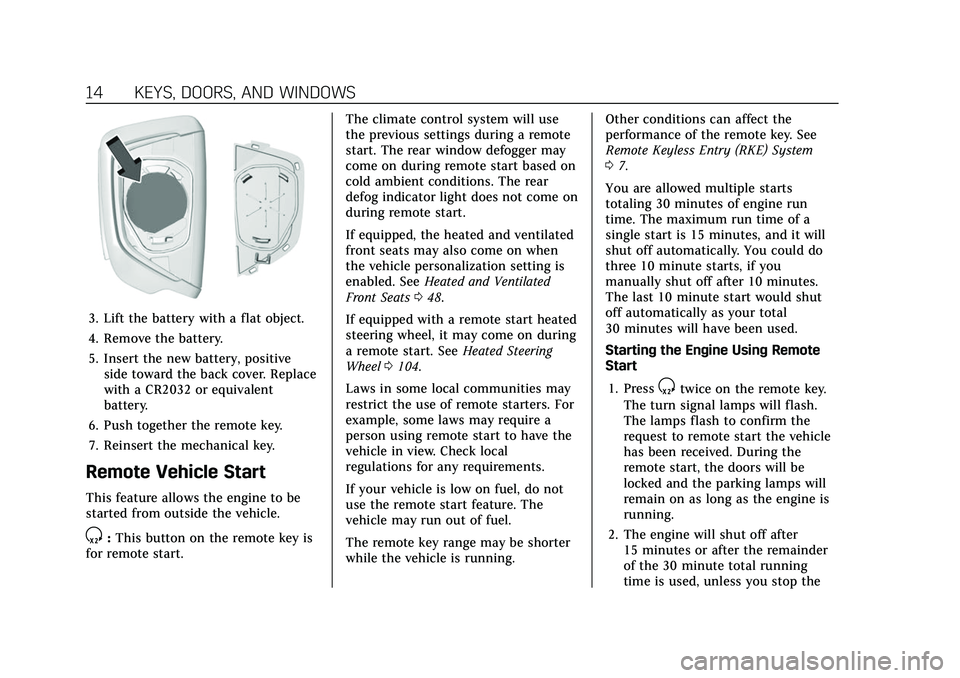
3. Lift the battery with a flat object.
4. Remove the battery.
5. Insert the new battery, positiveside toward the back cover. Replace
with a CR2032 or equivalent
battery.
6. Push together the remote key.
7. Reinsert the mechanical key.
Remote Vehicle Start
This feature allows the engine to be
started from outside the vehicle.
S: This button on the remote key is
for remote start. The climate control system will use
the previous settings during a remote
start. The rear window defogger may
come on during remote start based on
cold ambient conditions. The rear
defog indicator light does not come on
during remote start.
If equipped, the heated and ventilated
front seats may also come on when
the vehicle personalization setting is
enabled. See
Heated and Ventilated
Front Seats 048.
If equipped with a remote start heated
steering wheel, it may come on during
a remote start. See Heated Steering
Wheel 0104.
Laws in some local communities may
restrict the use of remote starters. For
example, some laws may require a
person using remote start to have the
vehicle in view. Check local
regulations for any requirements.
If your vehicle is low on fuel, do not
use the remote start feature. The
vehicle may run out of fuel.
The remote key range may be shorter
while the vehicle is running. Other conditions can affect the
performance of the remote key. See
Remote Keyless Entry (RKE) System
0
7.
You are allowed multiple starts
totaling 30 minutes of engine run
time. The maximum run time of a
single start is 15 minutes, and it will
shut off automatically. You could do
three 10 minute starts, if you
manually shut off after 10 minutes.
The last 10 minute start would shut
off automatically as your total
30 minutes will have been used.
Starting the Engine Using Remote
Start
1. Press
Stwice on the remote key.
The turn signal lamps will flash.
The lamps flash to confirm the
request to remote start the vehicle
has been received. During the
remote start, the doors will be
locked and the parking lamps will
remain on as long as the engine is
running.
2. The engine will shut off after 15 minutes or after the remainder
of the 30 minute total running
time is used, unless you stop the
Page 17 of 492
Cadillac Escalade Owner Manual (GMNA-Localizing-U.S./Canada/Mexico-
13690472) - 2021 - CRC - 8/10/21
16 KEYS, DOORS, AND WINDOWS
.Pull the front door handle once to
unlock and open it. Pull the rear
door handle once to unlock it and
again to open it.
To lock or unlock the doors from
outside the vehicle:
.PressQorKon the remote key.
.Use the mechanical key in the
driver door. The key cylinder is
covered by a cap. See “Driver Door
Key Lock Cylinder Access” later in
this section.
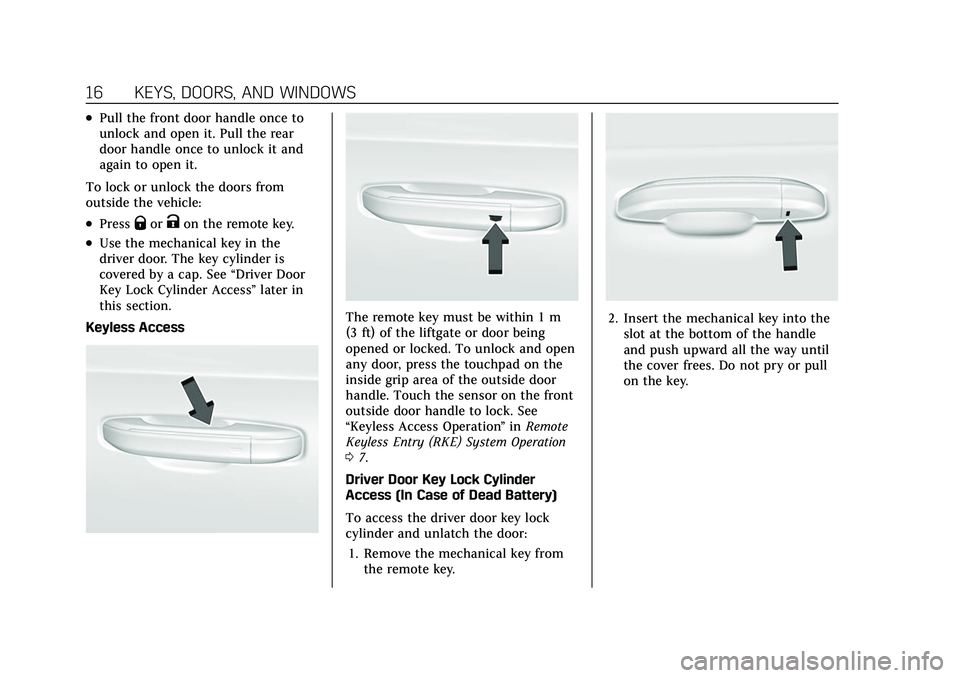
Keyless Access
The remote key must be within 1 m
(3 ft) of the liftgate or door being
opened or locked. To unlock and open
any door, press the touchpad on the
inside grip area of the outside door
handle. Touch the sensor on the front
outside door handle to lock. See
“Keyless Access Operation ”in Remote
Keyless Entry (RKE) System Operation
0 7.
Driver Door Key Lock Cylinder
Access (In Case of Dead Battery)
To access the driver door key lock
cylinder and unlatch the door: 1. Remove the mechanical key from the remote key.2. Insert the mechanical key into theslot at the bottom of the handle
and push upward all the way until
the cover frees. Do not pry or pull
on the key.
Page 19 of 492

Cadillac Escalade Owner Manual (GMNA-Localizing-U.S./Canada/Mexico-
13690472) - 2021 - CRC - 8/10/21
18 KEYS, DOORS, AND WINDOWS
way closed and latches. Pull the
handle during a soft-close to cancel
the cinching and re-open the door.
Power Door Locks
PressQorKon the remote key. See
Remote Keyless Entry (RKE) System
Operation 07.
Q:Press to lock the doors. The
indicator light in the switch will
illuminate when locked.
K: Press to unlock the doors.
The fuel door is also locked or
unlocked using these features. Security Status indicator
A light on the upper surface of the
driver's door trim is used to indicate
vehicle security status.
This light will be OFF any time the
ignition is ON, except momentarily
when vehicle doors are locking.
Solid :
Indicates securing with doors
closed.
Fast Flash : Indicates securing with
doors open.
Slow Flash : Indicates battery
conserving secured state.
No light : Indicates unsecured state.
Page 25 of 492
Cadillac Escalade Owner Manual (GMNA-Localizing-U.S./Canada/Mexico-
13690472) - 2021 - CRC - 8/10/21
24 KEYS, DOORS, AND WINDOWS
The liftgate can be opened when
locked if the remote key is within 1 m
(3 ft) of the emblem. SeeRemote
Keyless Entry (RKE) System Operation
0 7.
The liftgate has an electric latch.
If the battery is disconnected or has
low voltage, the liftgate will not open.
The liftgate will resume operation
when the battery is reconnected and
charged.
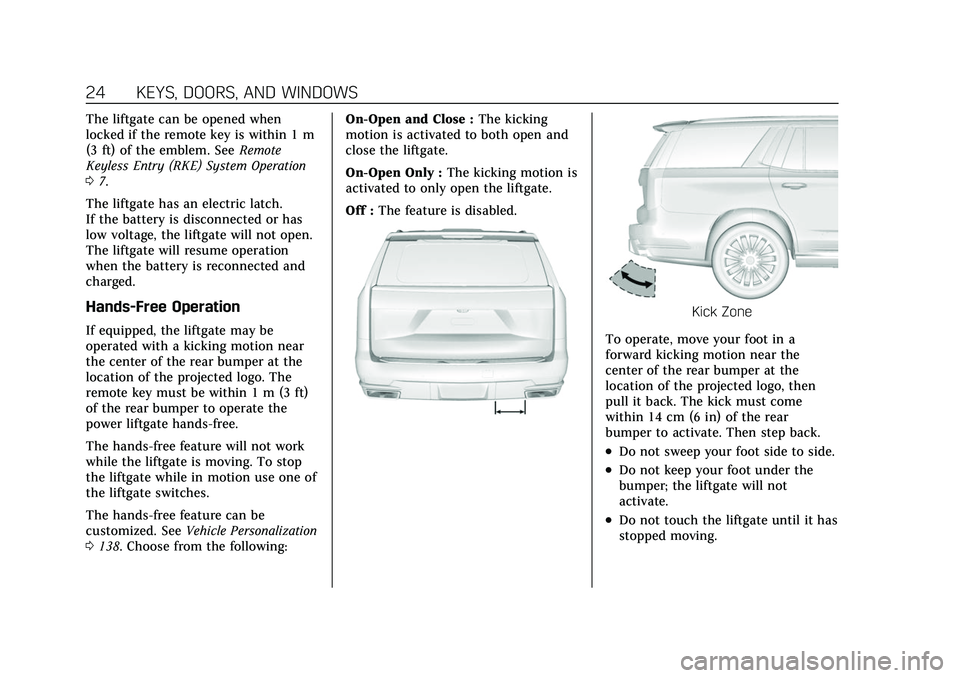
Hands-Free Operation
If equipped, the liftgate may be
operated with a kicking motion near
the center of the rear bumper at the
location of the projected logo. The
remote key must be within 1 m (3 ft)
of the rear bumper to operate the
power liftgate hands-free.
The hands-free feature will not work
while the liftgate is moving. To stop
the liftgate while in motion use one of
the liftgate switches.
The hands-free feature can be
customized. See Vehicle Personalization
0 138. Choose from the following: On-Open and Close :
The kicking
motion is activated to both open and
close the liftgate.
On-Open Only : The kicking motion is
activated to only open the liftgate.
Off : The feature is disabled.
Kick Zone
To operate, move your foot in a
forward kicking motion near the
center of the rear bumper at the
location of the projected logo, then
pull it back. The kick must come
within 14 cm (6 in) of the rear
bumper to activate. Then step back.
.Do not sweep your foot side to side.
.Do not keep your foot under the
bumper; the liftgate will not
activate.
.Do not touch the liftgate until it has
stopped moving.
Page 26 of 492

Cadillac Escalade Owner Manual (GMNA-Localizing-U.S./Canada/Mexico-
13690472) - 2021 - CRC - 8/10/21
KEYS, DOORS, AND WINDOWS 25
This feature may be temporarily
disabled under some conditions. If the
liftgate does not respond to the kick,
open or close the liftgate by another
method or start the vehicle. The
feature will be re-enabled.
When closing the liftgate using this
feature, there will be a short delay.
The taillamps will flash and a chime
will sound.
Step away from the liftgate before it
starts moving.
Projected Logo
If equipped with this feature, a vehicle
logo will be projected for one minute
onto the ground near the rear bumper
when a remote key is detected within
approximately 2 m (6 ft) from the rear
bumper. The projected logo may not
be visible under brighter daytime
conditions.
.1 m (3 ft) Hands-Free Operation
Detection Zone
.2 m (6 ft) Projected Logo
Detection Zone
The projected logo shows where to
kick towards the rear bumper.
The projected logo will not be
restarted using the same remote key
unless it has been out of range for
longer than 20 seconds.
If a remote key is again detected
within approximately 2 m (6 ft) of the
liftgate, or another kick has been
detected, the one-minute timer will be
reset. The projected logo will not work
under these conditions:
.The vehicle battery is low.
.The transmission is not in P (Park).
.Hands Free Liftgate Control is set to
off in vehicle personalization. See
Vehicle Personalization
0138.
.Power liftgate is turned off.
.The vehicle remains parked for
72 hours or more, with no remote
key use or Keyless Access operation.
To re-enable, press any button on
the remote key or open and close a
vehicle door.
The projected logo will not work for a
single remote key when a remote key:
.Has been left within approximately
5 m (15 ft) of the liftgate for several
minutes.
.Has been left inside the vehicle and
all vehicle doors are closed.
.Has approached the area outside of
the liftgate five times within
10 minutes.
Page 28 of 492
Cadillac Escalade Owner Manual (GMNA-Localizing-U.S./Canada/Mexico-
13690472) - 2021 - CRC - 8/10/21
KEYS, DOORS, AND WINDOWS 27
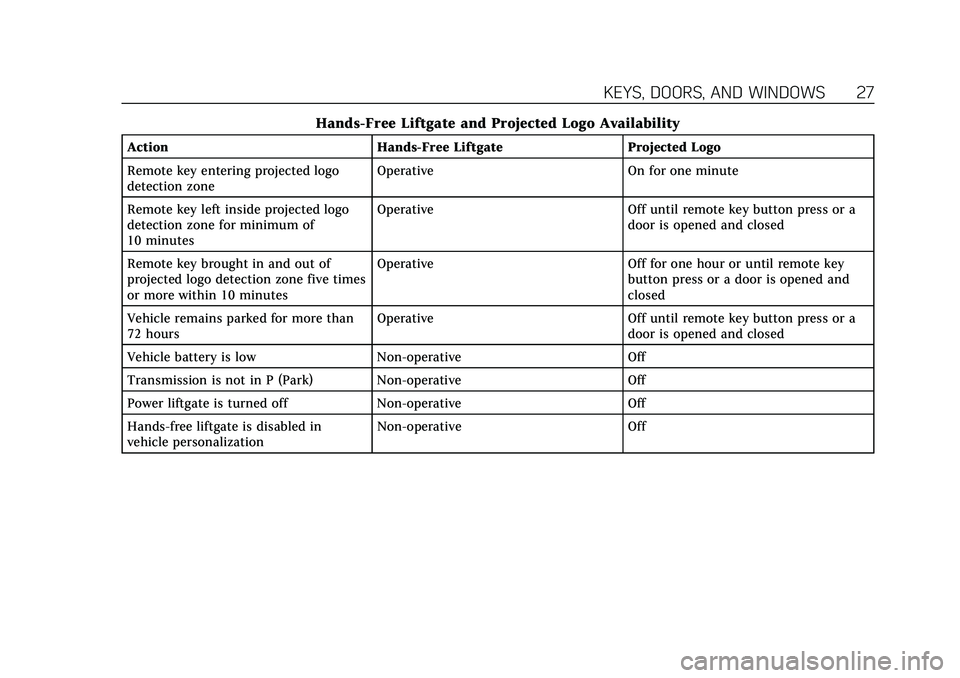
Hands-Free Liftgate and Projected Logo Availability
ActionHands-Free Liftgate Projected Logo
Remote key entering projected logo
detection zone Operative
On for one minute
Remote key left inside projected logo
detection zone for minimum of
10 minutes Operative
Off until remote key button press or a
door is opened and closed
Remote key brought in and out of
projected logo detection zone five times
or more within 10 minutes Operative
Off for one hour or until remote key
button press or a door is opened and
closed
Vehicle remains parked for more than
72 hours Operative
Off until remote key button press or a
door is opened and closed
Vehicle battery is low Non-operative Off
Transmission is not in P (Park) Non-operative Off
Power liftgate is turned off Non-operative Off
Hands-free liftgate is disabled in
vehicle personalization Non-operative
Off
Page 32 of 492
Cadillac Escalade Owner Manual (GMNA-Localizing-U.S./Canada/Mexico-
13690472) - 2021 - CRC - 8/10/21
KEYS, DOORS, AND WINDOWS 31
To keep the steering column from
binding, straighten the front wheels
before turning off the vehicle.
Immobilizer
SeeRadio Frequency Statement 0467.
Immobilizer Operation
This vehicle has a passive
theft-deterrent system.
The system does not have to be
manually armed or disarmed.
The vehicle is automatically
immobilized when the vehicle is
turned off.
The immobilization system is
disarmed when the ignition is turned
on or to ACC/ACCESSORY and a valid
remote key is present in the vehicle.
The security light, in the instrument
cluster, comes on if there is a problem
with arming or disarming the
theft-deterrent system.
The system has one or more remote
keys matched to an immobilizer
control unit in the vehicle. Only a
correctly matched remote key will
start the vehicle. If the remote key is
ever damaged, you may not be able to
start your vehicle.
When trying to start the vehicle, the
security light may come on briefly.
If the engine does not start and the
security light stays on, there is a
problem with the system. Turn the
ignition off and try again.
If the vehicle will not change ignition
modes (ACC/ACCESSORY, on, off), and
the remote key appears to be
undamaged, try another remote key.
Or, you may try placing the remote
key in the backup location. See
Remote Keyless Entry (RKE) System
Operation 07.
If the ignition modes will not change
with the other remote key or in the
backup location, the vehicle needs service. If the ignition does change
modes, the first remote key may be
faulty. See your dealer.
It is possible for the immobilizer
system to learn new or replacement
remote keys. Up to eight remote keys
can be programmed for the vehicle. To
program additional remote keys, see
“Programming Remote Keys to the
Vehicle
”under Remote Keyless Entry
(RKE) System Operation 07.
Do not leave the remote key or device
that disarms or deactivates the
theft-deterrent system in the vehicle.
Exterior Mirrors
Convex Mirrors
{Warning
A convex mirror can make things,
like other vehicles, look farther
away than they really are. If you cut
too sharply into the right lane, you
could hit a vehicle on the right.
Check the inside mirror or glance
over your shoulder before changing
lanes.