rke CADILLAC ESCALADE 2021 User Guide
[x] Cancel search | Manufacturer: CADILLAC, Model Year: 2021, Model line: ESCALADE, Model: CADILLAC ESCALADE 2021Pages: 492, PDF Size: 7.92 MB
Page 34 of 492
Cadillac Escalade Owner Manual (GMNA-Localizing-U.S./Canada/Mexico-
13690472) - 2021 - CRC - 8/10/21
KEYS, DOORS, AND WINDOWS 33
Resetting the Power Folding
Mirrors
Reset the power folding mirrors if:
.The mirrors are accidentally
obstructed while folding.
.They are accidentally manually
folded/unfolded.
.The mirrors do not stay in the
unfolded position.
.The mirrors vibrate at normal
driving speeds.
Fold and unfold the mirrors one time
using the mirror controls to reset
them to their normal position. A noise
may be heard during the resetting of
the power folding mirrors. This sound
is normal after a manual folding
operation.
Remote Mirror Folding
If equipped with power folding mirrors
and the mirrors have been folded with
the power folding mirror switch, they
may not be automatically unfolded.
If equipped with power folding mirrors
and the mirrors have not been folded
with the power folding mirror switch and the vehicle is in P (Park), they
may be automatically folded/unfolded
as follows:
1. If doors are locked by pressing
H
on the remote key, the mirrors will
fold. If doors are unlocked by
pressing
Ion the remote key, the
mirrors will unfold. See Remote
Keyless Entry (RKE) System
Operation 07.
2. If doors are locked by pressing the door handle lock/unlock button,
the mirrors will fold. If doors are
unlocked by pressing the door
handle button, the mirrors will
unfold. See “Keyless Unlocking/
Locking from the Driver Door” in
Remote Keyless Entry (RKE) System
Operation 07.
3. If passive locking is enabled and doors are locked by that feature,
the mirrors will fold. See “Passive
Locking” inRemote Keyless Entry
(RKE) System Operation 07.
This feature is turned on or off
through vehicle personalization. See
Vehicle Personalization 0138.
Heated Mirrors
The rear window defogger also heats
the outside mirrors.
K:Press to heat the outside mirrors.
See “Rear Window Defogger” under
Dual Automatic Climate Control System
0 220.
Automatic Dimming Mirror
If equipped, the driver outside mirror
automatically adjusts for the glare of
the headlamps from behind. This
feature comes on when the vehicle is
started.
Reverse Tilt Mirrors
If equipped with reverse tilt mirrors
and memory seats, the passenger and/
or driver mirror tilts to a preselected
position when the vehicle is in
R (Reverse). This allows the curb to be
seen when parallel parking.
The mirror(s) may move from their
tilted position when:
.The vehicle is shifted out of
R (Reverse), or remains in
R (Reverse) for about 30 seconds.
Page 47 of 492

Cadillac Escalade Owner Manual (GMNA-Localizing-U.S./Canada/Mexico-
13690472) - 2021 - CRC - 8/10/21
46 SEATS AND RESTRAINTS
If equipped, memory seats allow two
drivers to save and recall their unique
seat positions for driving the vehicle,
and a shared exit position for getting
out of the vehicle. Other feature
positions may also be saved, such as
power mirrors and power steering
wheel, if equipped. Memory positions
are linked to remote key 1 or 2 for
automatic memory recalls.
Before saving, adjust all available
memory feature positions. Turn the
vehicle on and then press and release
SET; a beep will sound. Then
immediately press and hold 1, 2,
or
B(Exit) until two beeps sound. To
manually recall these positions, press
and hold 1, 2, or
Buntil the saved
position is reached. Follow the
instructions under “Saving Memory
Positions.”
The vehicle identifies the current
driver’s remote key number (1–8). See
Remote Keyless Entry (RKE) System
Operation 07. Only remote keys 1 and
2 can be used for automatic memory
recalls. A Driver Information Center
(DIC) welcome message indicating the
transmitter number may display for the first few ignition cycles following a
transmitter change. For Seat Entry
Memory to work properly, save the
positions to the memory button (1 or
2) matching the remote key number
displayed in the DIC welcome
message. Carry the linked remote key
when entering the vehicle.
Vehicle Personalization Settings
.To have the Seat Entry Memory
movement begin when the vehicle is
started, select the Settings menu,
then Vehicle, then Seating Position,
and then Seat Entry Memory. Select
On or Off. See
“Seat Entry Memory ”
later in this section.
.To begin Seat Exit Memory
movement when the vehicle is
turned off and the driver door is
opened, or when the vehicle is
turned off with the driver door
already opened, select the Settings
menu, then Vehicle, then Seating
Position, and then Seat Exit
Memory. Select On or Off. See “Seat
Exit Memory” later in this section.
.SeeVehicle Personalization 0138 for
additional setting information. Identifying Driver Number
To identify the driver number:
1. Move your remote key away from the vehicle.
2. Start the vehicle with another remote key. The DIC should display
the driver number for the other
remote key. Turn the vehicle off
and remove the remote key from
the vehicle.
3. Start the vehicle with the initial remote key. The DIC should display
the driver number of your
remote key.
Saving Memory Positions
Read these instructions completely
before saving memory positions.
To save preferred driving positions
1 and 2: 1. Turn the vehicle on or to ACC/ ACCESSORY with remote key 1
or 2.
A DIC welcome message may
indicate driver number 1 or 2.
2. Adjust all available memory features to the desired driving
position.
Page 48 of 492

Cadillac Escalade Owner Manual (GMNA-Localizing-U.S./Canada/Mexico-
13690472) - 2021 - CRC - 8/10/21
SEATS AND RESTRAINTS 47
3. Press and release SET; a beep willsound.
4. Immediately press and hold the 1 or 2 memory button matching the
above DIC welcome message until
two beeps sound.
If too much time passes between
releasing SET and pressing 1, the
memory position will not be saved
and two beeps will not sound.
Repeat Steps 3 and 4.
1 or 2 corresponds to the driver
number. See “Identifying Driver
Number” previously in this section.
5. Repeat Steps 1–4 for a second driver using 1 or 2. Remote keys 3–
8 may not save memory positions.
To save the position for
Band Seat
Exit Memory features, repeat Steps 1–
4 using
B. This saves the position for
getting out of the vehicle.
Save preferred memory feature
positions to both 1 and 2 if you are
the only driver. Manually Recalling Memory
Positions
Press and hold 1, 2, or
Bto recall the
previously saved memory positions if
you are driver 1 or 2 identified in the
DIC welcome message. Remote keys
3–8 will not recall memory positions.
To stop Manual Memory recall
movement, release 1, 2, or
Bor press
any of the following controls:
.Power seat
.Memory SET
.Power mirror, with the driver or
passenger side mirror selected
.Power steering wheel, if equipped
Manual Memory recall movement for
1, 2 or
Bbuttons may be initiated
and will complete to the saved
memory position if the vehicle is
shifted in or out of P (Park).
Seat Entry Memory
The vehicle identifies the number of
the current driver’s remote key (1–8).
See Remote Keyless Entry (RKE) System
Operation 07. If the remote key is 1 or
2, and Seat Entry Memory is enabled
in vehicle personalization, the positions saved to the same memory
button number 1 or 2 are
automatically recalled when the
vehicle is turned on, or turned from
off to ACC/ACCESSORY. Remote keys
3–8 will not provide automatic
memory recalls.
To turn Seat Entry Memory on or off,
see
“Vehicle Personalization Settings”
previously in this section and Vehicle
Personalization 0138.
The shift lever must be in P (Park) to
start Seat Entry Memory. Seat Entry
Memory recall will complete if the
vehicle is shifted out of P (Park) prior
to reaching the saved memory
position.
To stop Seat Entry Memory recall
movement, turn the vehicle off or
press any of the following controls:
.Power seat
.Memory SET, 1, 2, orB
.Power mirror, with the driver or
passenger side mirror selected
.Power steering wheel, if equipped
If the saved memory seat position
does not automatically recall or recalls
to the wrong positions, the driver’s
Page 75 of 492
Cadillac Escalade Owner Manual (GMNA-Localizing-U.S./Canada/Mexico-
13690472) - 2021 - CRC - 8/10/21
74 SEATS AND RESTRAINTS
If the Off Indicator Is Lit for an
Adult-Sized Occupant
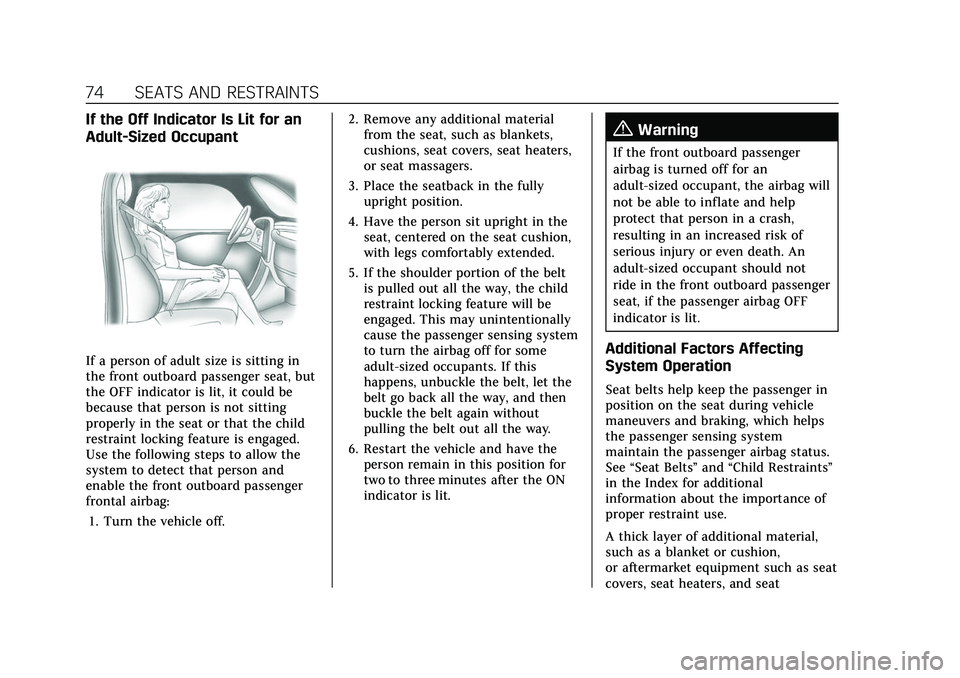
If a person of adult size is sitting in
the front outboard passenger seat, but
the OFF indicator is lit, it could be
because that person is not sitting
properly in the seat or that the child
restraint locking feature is engaged.
Use the following steps to allow the
system to detect that person and
enable the front outboard passenger
frontal airbag:1. Turn the vehicle off. 2. Remove any additional material
from the seat, such as blankets,
cushions, seat covers, seat heaters,
or seat massagers.
3. Place the seatback in the fully upright position.
4. Have the person sit upright in the seat, centered on the seat cushion,
with legs comfortably extended.
5. If the shoulder portion of the belt is pulled out all the way, the child
restraint locking feature will be
engaged. This may unintentionally
cause the passenger sensing system
to turn the airbag off for some
adult-sized occupants. If this
happens, unbuckle the belt, let the
belt go back all the way, and then
buckle the belt again without
pulling the belt out all the way.
6. Restart the vehicle and have the person remain in this position for
two to three minutes after the ON
indicator is lit.
{Warning
If the front outboard passenger
airbag is turned off for an
adult-sized occupant, the airbag will
not be able to inflate and help
protect that person in a crash,
resulting in an increased risk of
serious injury or even death. An
adult-sized occupant should not
ride in the front outboard passenger
seat, if the passenger airbag OFF
indicator is lit.
Additional Factors Affecting
System Operation
Seat belts help keep the passenger in
position on the seat during vehicle
maneuvers and braking, which helps
the passenger sensing system
maintain the passenger airbag status.
See “Seat Belts” and“Child Restraints”
in the Index for additional
information about the importance of
proper restraint use.
A thick layer of additional material,
such as a blanket or cushion,
or aftermarket equipment such as seat
covers, seat heaters, and seat
Page 76 of 492
Cadillac Escalade Owner Manual (GMNA-Localizing-U.S./Canada/Mexico-
13690472) - 2021 - CRC - 8/10/21
SEATS AND RESTRAINTS 75
massagers can affect how well the
passenger sensing system operates.
We recommend that you not use seat
covers or other aftermarket equipment
except when approved by GM for your
specific vehicle. SeeAdding Equipment
to the Airbag-Equipped Vehicle 075 for
more information about modifications
that can affect how the system
operates.
The ON indicator may be lit if an
object, such as a briefcase, handbag,
grocery bag, laptop, or other electronic
device, is put on an unoccupied seat.
If this is not desired, remove the
object from the seat.
{Warning
Stowing articles under the
passenger seat or between the
passenger seat cushion and
seatback may interfere with the
proper operation of the passenger
sensing system.
Servicing the
Airbag-Equipped Vehicle
Airbags affect how the vehicle should
be serviced. There are parts of the
airbag system in several places around
the vehicle. Your dealer and the
service manual have information
about servicing the vehicle and the
airbag system. To purchase a service
manual, see Publication Ordering
Information 0467.
{Warning
For up to 10 seconds after the
vehicle is turned off and the battery
is disconnected, an airbag can still
inflate during improper service. You
can be injured if you are close to an
airbag when it inflates. Avoid
yellow connectors. They are
probably part of the airbag system.
Be sure to follow proper service
procedures, and make sure the
person performing work for you is
qualified to do so.
Adding Equipment to the
Airbag-Equipped Vehicle
Adding accessories that change the
vehicle's frame, bumper system,
height, front end, or side sheet metal
may keep the airbag system from
working properly.
The operation of the airbag system
can also be affected by changing,
including improperly repairing or
replacing, any parts of the following:
.Airbag system, including airbag
modules, front or side impact
sensors, sensing and diagnostic
module, airbag wiring, or front
center console
.Front seats, including stitching,
seams or zippers
.Seat belts
.Steering wheel, instrument panel,
overhead console, ceiling trim,
or pillar garnish trim
.Inner door seals, including speakers
Your dealer and the service manual
have information about the location of
the airbag modules and sensors,
Page 77 of 492

Cadillac Escalade Owner Manual (GMNA-Localizing-U.S./Canada/Mexico-
13690472) - 2021 - CRC - 8/10/21
76 SEATS AND RESTRAINTS
sensing and diagnostic module, and
airbag wiring along with the proper
replacement procedures.
In addition, the vehicle has a
passenger sensing system for the front
outboard passenger position, which
includes sensors that are part of the
passenger's seat. The passenger
sensing system may not operate
properly if the original seat trim is
replaced with non-GM covers,
upholstery, or trim, or with GM
covers, upholstery, or trim designed
for a different vehicle. Any object,
such as an aftermarket seat heater or
a comfort enhancing pad or device,
installed under or on top of the seat
fabric, could also interfere with the
operation of the passenger sensing
system. This could either prevent
proper deployment of the passenger
airbag(s) or prevent the passenger
sensing system from properly turning
off the passenger airbag(s). See
Passenger Sensing System071.
If the vehicle has rollover roof-rail
airbags, see Different Size Tires and
Wheels 0409 for additional important
information. If the vehicle must be modified
because you have a disability and you
have questions about whether the
modifications will affect the vehicle's
airbag system, or if you have
questions about whether the airbag
system will be affected if the vehicle is
modified for any other reason, call
Customer Assistance. See
Customer
Assistance Offices 0460.
Airbag System Check
The airbag system does not need
regularly scheduled maintenance or
replacement. Make sure the airbag
readiness light is working. See Airbag
Readiness Light 0120.
Caution
If an airbag covering is damaged,
opened, or broken, the airbag may
not work properly. Do not open or
break the airbag coverings. If there
are any opened or broken airbag
coverings, have the airbag covering
and/or airbag module replaced. For
the location of the airbags, see
Where Are the Airbags? 067. See
your dealer for service.
Replacing Airbag System
Parts after a Crash
{Warning
A crash can damage the airbag
systems in the vehicle. A damaged
airbag system may not properly
protect you and your passenger(s)
in a crash, resulting in serious
injury or even death. To help make
sure the airbag systems are working
properly after a crash, have them
inspected and any necessary
replacements made as soon as
possible.
If an airbag inflates, you will need to
replace airbag system parts. See your
dealer for service.
If the airbag readiness light stays on
after the vehicle is started or comes
on when you are driving, the airbag
system may not work properly. Have
the vehicle serviced right away. See
Airbag Readiness Light 0120.
Page 108 of 492

Cadillac Escalade Owner Manual (GMNA-Localizing-U.S./Canada/Mexico-
13690472) - 2021 - CRC - 8/10/21
INSTRUMENTS AND CONTROLS 107
.Move the windshield wiper lever out
of the AUTO position to deactivate
Rainsense.
To turn the Rainsense feature on or
off, see “Rain Sense Wipers ”under
Vehicle Personalization 0138.
Wiper Arm Assembly Protection
When using an automatic car wash,
move the windshield wiper lever to
OFF. This disables the automatic
Rainsense windshield wipers.
With Rainsense, if the transmission is
in N (Neutral) and the vehicle speed is
very slow, the wipers will
automatically stop at the base of the
windshield.
The wiper operations return to normal
when the transmission is no longer in
N (Neutral) or the vehicle speed has
increased.Rear Window Wiper/
Washer
The rear window wiper/washer
controls are on the end of the
windshield wiper lever.
Turn the controls to adjust the
setting.
OFF : Turns the wiper off.
INT : Turns on the rear wiper with a
delay between wipes.
ON : Turns on the rear wiper.
1:Push the windshield wiper lever
forward to spray washer fluid on the
rear window. The wipers will clear the
rear window and either stop or return
to your preset speed. For more washer
cycles, push and hold the lever. The rear window wiper/washer will
not operate if the liftgate is open or
ajar. If the liftgate is opened while the
rear wiper is on, the wiper returns to
the parked position and stops.
See
“Rear Camera Washer” later in this
section.
Rear Wiper Arm Assembly
Protection
When using an automatic car wash,
move the rear wiper control to OFF to
disable the rear wiper. In some
vehicles, if the transmission is in
N (Neutral) and the vehicle speed is
very slow, the rear wiper will
automatically park under the rear
spoiler.
The wiper operations return to normal
when the transmission is no longer in
N (Neutral) or the vehicle speed has
increased.
Auto Wipe in Reverse Gear
If the rear wiper control is off, the rear
wiper will automatically operate
continuously when the transmission is
in R (Reverse), and the front
windshield wiper is performing low or
high speed wipes. If the rear wiper
Page 145 of 492
Cadillac Escalade Owner Manual (GMNA-Localizing-U.S./Canada/Mexico-
13690472) - 2021 - CRC - 8/10/21
144 INSTRUMENTS AND CONTROLS
Remote Unlock Light Feedback
This setting will flash the exterior
lamps when unlocking the vehicle
with the remote key.
Touch Off or Flash Lights.
Remote Lock Feedback
This setting provides what type of
feedback is given when locking the
vehicle with the remote key.
Touch Off, Lights and Horn, Lights
Only, or Horn Only.
Remote Door Unlock
This setting allows selection of which
doors will unlock when pressing
Kon
the remote key.
Touch All Doors or Driver Door.
Relock Remotely Unlocked Doors
This setting secures the vehicle if
doors are not opened within
30 seconds of using the remote key to
unlock doors.
Touch Off or On. Remote Start Auto Cool Seats
This setting will automatically turn on
the cooled seats when using remote
start on warm days. See
Heated and
Ventilated Front Seats 048 and
Remote Vehicle Start 014.
Touch Off or On.
Remote Start Auto Heat Seats
This setting will automatically turn on
the heated seats when using remote
start on cold days. See Heated and
Ventilated Front Seats 048 and
Remote Vehicle Start 014.
If equipped with Auto Heated Steering
Wheel, this feature will turn on when
the Remote Start Auto Heated Seats
turn on.
Touch Off or On.
Remote Window Operation
This setting enables remote operation
of the windows with the remote key.
See Remote Keyless Entry (RKE) System
Operation 07.
Touch Off or On. Passive Door Unlock
This setting specifies which doors will
unlock when using the button on the
driver door handle to unlock the
vehicle.
Touch Off, All Doors, or Driver
Door Only.
Passive Door Lock
This setting specifies if the vehicle will
automatically lock or lock and provide
an alert after all the doors are closed
while walking away from the vehicle
with the remote key. See
Remote
Keyless Entry (RKE) System Operation
0 7.
Touch Off, On with Horn Chirp, or On.
Remote Left in Vehicle Alert
This setting sounds an alert when the
remote key is left in the vehicle that is
not running.
Touch Off or On.
Remote Removed From Vehicle
Alert
This setting beeps the horn three
times if exiting a running vehicle with
the remote key.
Page 146 of 492
Cadillac Escalade Owner Manual (GMNA-Localizing-U.S./Canada/Mexico-
13690472) - 2021 - CRC - 8/10/21
INSTRUMENTS AND CONTROLS 145
Touch Off or On.
Ride Height
Touch and the following may display:
.Automatic Entry/Egress
Automatic Entry/Egress
This feature specifies if the vehicle
will automatically lower to make it
easier to enter or exit the vehicle.
Touch Off or On.
Running Boards
Touch and the following may display:
.Automatic Running Boards
.Deploy Running Boards
Automatic Running Boards
This feature specifies the position and
use of the running boards.
Touch Off or On.
Deploy Running Boards
This feature moves the running
boards to a deployed position so they
can be used with the doors closed.
Touch Off or Deploy.
Seating Position
Touch and the following may display:
.Seat Entry Memory
.Seat Exit Memory
Seat Entry Memory
This feature automatically recalls the
previously stored 1 or 2 button
positions when the ignition is changed
from off to on or ACC/ACCESSORY.
See Memory Seats 045.
Touch Off or On.
Seat Exit Memory
This feature automatically recalls the
previously stored exit button position
when the ignition is changed from on
or ACC/ACCESSORY to off and the
driver door is open. See Memory Seats
0 45.
Touch Off or On.
Suspension
Touch and the following may display:
.Service Mode
.Alignment Mode Service Mode
This feature disables the air
suspension system and is used to
prevent unintended raising or
lowering of the suspension.
Touch Off or On.
Alignment Mode
This feature will optimize the vehicle
height to provide the most accurate
wheel alignment.
Touch Off or On.
Remote Key Relearn
This sets up a new or forgotten key
for use in the vehicle. Place the key in
the transmitter pocket. Make sure
vehicle is parked and touch Start.
Universal Remote
System
See
Radio Frequency Statement 0467.
Page 152 of 492

Cadillac Escalade Owner Manual (GMNA-Localizing-U.S./Canada/Mexico-
13690472) - 2021 - CRC - 8/10/21
LIGHTING 151
Exterior Lamps Off
Reminder
If a door is open, a reminder chime
sounds when the headlamps or
parking lamps are manually turned on
and the ignition is off. To turn off the
chime, turn the exterior lamp control
to off or AUTO and then back on,
or close and re-open the door. In the
AUTO mode, the headlamps turn off
once the ignition is off or remain on
until the headlamp delay ends (if
enabled in the DIC). See“Exit
Lighting” underVehicle Personalization
0 138.
Headlamp High/Low-Beam
Changer
Push the turn signal lever away from
you and release to turn the high
beams on.
To return to low beams, push the
lever again or pull it toward you and
release.
When the high-beam headlamps are
on, this indicator light on the
instrument cluster will also be on.
Flash-to-Pass
This feature lets you use the
high-beam headlamps to signal a
driver in front of you that you want to
pass. It works even if the headlamps
are in the automatic position.
To use it, pull the turn signal lever
toward you, then release it.
The high beam headlamps will stay on
as long as you hold the lever toward
you. The high-beam indicator on the
instrument cluster will come on.
Release the lever to return to normal
operation.
Daytime Running
Lamps (DRL)
DRL can make it easier for others to
see the front of the vehicle during the
day. Fully functional DRL are required
on all vehicles first sold in Canada.
The DRL system comes on when the
following conditions are met:
.The ignition is on.
.The exterior lamp control is
in AUTO.
.The light sensor determines it is
daytime.
When the DRL system is on, only the
DRL are on. The taillamps, sidemarker
lamps, instrument panel lights, and
other lamps will not be on.
When it begins to get dark, the
automatic headlamp system switches
from DRL to the headlamps.
To turn off the DRL, turn the exterior
lamp control to
Oand then release.
For vehicles first sold in Canada, off
will only work when the vehicle is
parked.