change wheel CADILLAC ESCALADE 2022 User Guide
[x] Cancel search | Manufacturer: CADILLAC, Model Year: 2022, Model line: ESCALADE, Model: CADILLAC ESCALADE 2022Pages: 508, PDF Size: 9.18 MB
Page 175 of 508
Cadillac Escalade Owner Manual (GMNA-Localizing-U.S./Canada/Mexico-
15567102) - 2022 - CRC - 11/17/21
174 INFOTAINMENT SYSTEM
present. The radio displays the file
name as the track name if the song
information is not available.
Supported Apple Devices
To view supported devices, see
my.cadillac.com/learn.
Media Playback and Mute
USB playback will be paused if the
system is muted. If the steering wheel
mute control is pressed again,
playback will resume.
If the source is changed while in
mute, playback resumes and audio
will unmute.
Bluetooth Audio
Music may be played from a paired
Bluetooth device. SeeBluetooth
(Overview) 0198 or
Bluetooth (Pairing and Using a Phone)
0 199 for help pairing a device.
Volume and song selection may be
controlled by using the infotainment
controls or the mobile device.
If Bluetooth is selected and no volume is present, check the volume setting
on both your mobile device and the
infotainment system.
Music can be launched by touching
Bluetooth from the recent sources list
on the left of the display or by
touching the More option and then
touching the Bluetooth device.
To play music via Bluetooth:
1. Power on the device, and pair to connect the device.
2. Once paired, touch Audio from the Home Page, then touch Bluetooth
from the recent sources list on the
left of the display.
Bluetooth Sound Menu
See “Infotainment System Sound
Menu ”under AM-FM Radio 0166.
Manage Bluetooth Devices
From the Home Page: 1. Touch Audio.
2. Touch Bluetooth.
3. Touch Devices to add or delete devices. When touching Bluetooth, the radio
may not be able to launch the audio
player on the connected device to
start playing. When the vehicle is not
moving, use the mobile device to
begin playback.
All devices launch audio differently.
When selecting Bluetooth as a source,
the radio may show as paused on the
display. Press play on the device or
touch
pon the display to begin
playback.
Browse functionality will be provided
where supported by the Bluetooth
device. This media content will not be
part of the MyMedia source mode.
Some smartphones support sending
Bluetooth music information to
display on the radio. When the radio
receives this information, it will check
to see if any is available and display it.
For more information about supported
Bluetooth features, see
my.cadillac.com/learn.
Page 185 of 508

Cadillac Escalade Owner Manual (GMNA-Localizing-U.S./Canada/Mexico-
15567102) - 2022 - CRC - 11/17/21
184 INFOTAINMENT SYSTEM
.Carpool Lanes
.Toll Roads
.Tunnels
.Country Borders
Navigation Voice Control
Touch to access the voice control
setting display.
.Navigation Volume –To adjust the
volume level, use the sliding bar on
the Navigation screen. If the voice
guidance prompt is being heard,
volume can also be adjusted using
the knob on the center stack or the
volume switch on the steering
wheel.
.Directional Navigation Prompts –
Allows prompts to play on the left
or right side of the vehicle
depending on the direction of the
upcoming turn. This can be turned
on or off.
.Navigation Voice Prompt Level
during a Call. Options available are:
‐ Full Prompt (Selected by default)
‐ Tone Only
‐ None Traffic Preferences (If Equipped)
While in Map View, select Settings,
then More Settings, and then Traffic
Preferences. When Show Traffic on
Map is turned on, the feature provides
an overview of the traffic flow using
different coded colors. The following
options are available for rerouting:
.Show Traffic Flow on Map
–Toggles
whether or not the flow of traffic is
shown on the map.
.Auto Reroute –The system will
automatically reroute if the system
detects there is a traffic issue ahead.
.Ask Before Rerouting (Default) –If
the system detects there is a traffic
issue ahead, it will display a pop-up
with details about the issue. Choose
to reroute or cancel the alert.
.Never Check –The system will not
check for a better route until one of
the above options is selected.
Alert Preferences
Set alerts on or off during both
inactive and active guidance views.
The following alerts may be available:
.Road Safety Alerts –Touch to
display upcoming School Zones.
.Traffic Camera Alerts
Manage History
Touch Manage History to access the
History options:
.Clear Recent Destinations –Touch
\to clear the recent destinations.
.Clear Search History –Touch\to
clear the search history.
Navigation Privacy
Touch to change the navigation
privacy settings. The Navigation
Privacy settings are:
.Collect Data with Profile
Information –Turn this on to
enable Personalized Navigation. See
“Personalized Navigation ”earlier in
this section.
.Collect Anonymized Data –Turn
this on to enable improvement in
Nav product quality.
About
Touch to display software information,
such as:
.Telenav Terms and Conditions
.Telenav Privacy Statement
.Navigation Version
Page 193 of 508
Cadillac Escalade Owner Manual (GMNA-Localizing-U.S./Canada/Mexico-
15567102) - 2022 - CRC - 11/17/21
192 INFOTAINMENT SYSTEM
To recalibrate the vehicle's position on
the map, park with the vehicle
running for two to five minutes, until
the vehicle position updates. Make
sure the vehicle is parked in a location
that is safe and has a clear view of the
sky and away from large obstructions.
If the System Needs
Service
If the navigation system needs service,
see your dealer.
Map Data Updates
The map data in the vehicle is the
most up-to-date information available
when the vehicle was produced.
See www.gmnavdisc.com for details on
ordering, purchasing, and installing a
new or replacement SD card. Features
are subject to change. For more
information on this feature, see
my.cadillac.com/learn.
Database Coverage
Explanations
Coverage areas vary with respect to
the level of map detail available for
any given area. Some areas feature
greater levels of detail than others.
If this happens, it does not mean
there is a problem with the system. As
the map data is updated, more detail
can become available for areas that
previously had limited detail. SeeMap
Data Updates 0192.
Voice Recognition
If equipped, voice recognition allows
for hands-free operation within the
navigation, audio, and phone. This
feature can be started by pressing
g
on the steering wheel.
However, not all features within these
areas are supported by voice
commands. Generally, only complex
tasks that require multiple manual
interactions to complete are
supported by voice commands. For example, tasks that take more
than one or two touches, such as a
song or artist to play from a media
device, would be supported by voice
commands. Other tasks, like adjusting
the volume or seeking up or down, are
audio features that are easily
performed by touching one or two
options, and are not supported by
voice commands.
In general there are flexible ways to
speak commands for completing the
tasks.
If your language supports it, try
stating a one-shot command, such as
“Directions to address
Do not include
the ZIP code while stating the address
during the command. Another
example of a one-shot Destination
Entry command is, “Directions to
Place of Interest at
commands do not work, try saying,
“Take me to Place of Interest ”or “Find
address ”and the system will walk you
through by asking additional
questions.
Page 200 of 508
Cadillac Escalade Owner Manual (GMNA-Localizing-U.S./Canada/Mexico-
15567102) - 2022 - CRC - 11/17/21
INFOTAINMENT SYSTEM 199
Audio System
When using the Bluetooth mobile
device system, sound comes through
the vehicle's front audio system
speakers and overrides the audio
system. The volume level while on a
mobile device call can be adjusted by
pressing the steering wheel controls or
the volume control on the MFC. The
adjusted volume level remains in
memory for later calls. The volume
cannot be lowered beyond a certain
level.
Bluetooth (Pairing and
Using a Phone)
Pairing
A Bluetooth-enabled mobile device
must be paired to the Bluetooth
system and then connected to the
vehicle before it can be used. See the
mobile device manufacturer's user
guide for Bluetooth functions before
pairing the device.Pairing Information
.If no mobile device has been
connected, the Phone main page on
the infotainment display will show
the Connect Phone option. Touch
this option to connect.
.A Bluetooth smartphone with music
capability can be paired to the
vehicle as a smartphone and a
music player at the same time.
.Up to 10 devices can be paired to
the Bluetooth system.
.The pairing process is disabled
when the vehicle is moving.
.Pairing only needs to be completed
once, unless the pairing information
on the cell phone changes or the
cell phone is deleted from the
system.
.If multiple paired cell phones are
within range of the system, the
system connects to the paired cell
phone that is set to First to
Connect. If there is no cell phone
set to First to Connect, it will link to
the cell phone which was used last.
To link to a different paired cell
phone, see
“Linking to a Different
Phone ”later in this section. Pairing a Phone
1. Make sure Bluetooth has been enabled on the cell phone before
the pairing process is started.
2. Touch the Phone icon on the Home Page or the phone icon on the
shortcut tray near the bottom of
the display.
3. Touch Add Phone/Connect Phone.
4. Select the vehicle name shown on the infotainment display from your
cell phone’s Bluetooth Settings list.
5. Follow the instructions on the cell phone to confirm the six-digit code
showing on the infotainment
display and touch Pair. The code on
the cell phone and infotainment
display will need to be
acknowledged for a successful pair.
6. Start the pairing process on the cell phone to be paired to the vehicle.
See the cell phone manufacturer's
user guide for information on this
process. Once the cell phone is
paired, it will show under
Connected.
Page 203 of 508

Cadillac Escalade Owner Manual (GMNA-Localizing-U.S./Canada/Mexico-
15567102) - 2022 - CRC - 11/17/21
202 INFOTAINMENT SYSTEM
3. Touch#on the infotainment
display to start dialing the number.
Searching Contacts Using the
Keypad
To search for contacts using the
keypad:
1. Touch the Phone icon on the Home Page.
2. Touch Keypad and enter partial phone numbers or contact names
using the digits on the keypad to
search.
Results will show on the right side
of the display. Touch one to place
a call.
Accepting or Declining a Call
When an incoming call is received, the
infotainment system mutes and a ring
tone is heard in the vehicle.
Accepting a Call
Use the steering wheel scroll wheel to
select
#, otherwise press6on steering
wheel controls. Declining a Call
Use steering wheel scroll wheel to
select
K.
Call Waiting
Call waiting must be supported on the
Bluetooth cell phone and enabled by
the wireless service carrier to work.
Accepting a Call
Press
6on steering wheel controls to
answer.
Declining a Call
Use steering wheel scroll wheel to
select
Kto decline.
Switching Between Calls (Call
Waiting Calls Only)
To switch between calls, touch Phone
on the Home Page to display Call
View. While in Call View, touch the
call information of the call on hold to
change calls.
Three-Way Calling
Three-way calling must be supported
on the Bluetooth cell phone and
enabled by the wireless service carrier
to work.
To start a three-way call while in a
current call: 1. In the Call View, touch Add Call to add another call.
2. Initiate the second call by selecting from Recents, Contacts, or Keypad.
3. When the second call is active, touch the merge icon to conference
the three-way call together.
Ending a Call
.Press6on the steering wheel
controls.
.Touch#on the infotainment
display, next to a call, to end only
that call.
Page 232 of 508
Cadillac Escalade Owner Manual (GMNA-Localizing-U.S./Canada/Mexico-
15567102) - 2022 - CRC - 11/17/21
DRIVING AND OPERATING 231
Front Pedestrian Braking (FPB)System . . . . . . . . . . . . . . . . . . . . . . . . . . 323
Night Vision System . . . . . . . . . . . . . 325
Side Blind Zone Alert (SBZA) . . . . 327
Lane Change Alert (LCA) . . . . . . . . 327
Lane Keep Assist (LKA) . . . . . . . . . . 330
Fuel
Top Tier Fuel . . . . . . . . . . . . . . . . . . . . . 332
Recommended Fuel . . . . . . . . . . . . . . 333
Prohibited Fuels . . . . . . . . . . . . . . . . . . 333
Fuels in Foreign Countries . . . . . . . 333
Fuel Additives . . . . . . . . . . . . . . . . . . . . 333
Filling the Tank . . . . . . . . . . . . . . . . . . 334
Filling a Portable Fuel Container . . . . . . . . . . . . . . . . . . . . . . . . 335
Trailer Towing
General Towing Information . . . . 336
Driving Characteristics andTowing Tips . . . . . . . . . . . . . . . . . . . . . 336
Trailer Towing . . . . . . . . . . . . . . . . . . . . 340
Towing Equipment . . . . . . . . . . . . . . . 344
Trailer Sway Control (TSC) . . . . . . 354
Trailering App . . . . . . . . . . . . . . . . . . . . 355
Conversions and Add-Ons
Add-On Electrical Equipment . . . 367
Driving Information
Driving for Better Fuel
Economy
Driving habits can affect fuel mileage.
Here are some driving tips to get the
best fuel economy possible:
.Set the climate controls to the
desired temperature after the engine
is started, or turn them off when
not required.
.Avoid fast starts and accelerate
smoothly.
.Brake gradually and avoid abrupt
stops.
.Avoid idling the engine for long
periods of time.
.When road and weather conditions
are appropriate, use cruise control.
.Always follow posted speed limits or
drive more slowly when conditions
require.
.Keep vehicle tires properly inflated.
.Combine several trips into a
single trip.
.Replace the vehicle's tires with the
same TPC Spec number molded into
the tire's sidewall near the size.
.Follow recommended scheduled
maintenance.
Distracted Driving
Distraction comes in many forms and
can take your focus from the task of
driving. Exercise good judgment and
do not let other activities divert your
attention away from the road. Many
local governments have enacted laws
regarding driver distraction. Become
familiar with the local laws in
your area.
To avoid distracted driving, keep your
eyes on the road, keep your hands on
the steering wheel, and focus your
attention on driving.
.Do not use a phone in demanding
driving situations. Use a hands-free
method to place or receive
necessary phone calls.
.Watch the road. Do not read, take
notes, or look up information on
phones or other electronic devices.
.Designate a front seat passenger to
handle potential distractions.
Page 235 of 508
Cadillac Escalade Owner Manual (GMNA-Localizing-U.S./Canada/Mexico-
15567102) - 2022 - CRC - 11/17/21
234 DRIVING AND OPERATING
Steering in Emergencies
.There are some situations when
steering around a problem may be
more effective than braking.
.Holding both sides of the steering
wheel allows you to turn
180 degrees without removing
a hand.
.Antilock Brake System (ABS) allows
steering while braking.
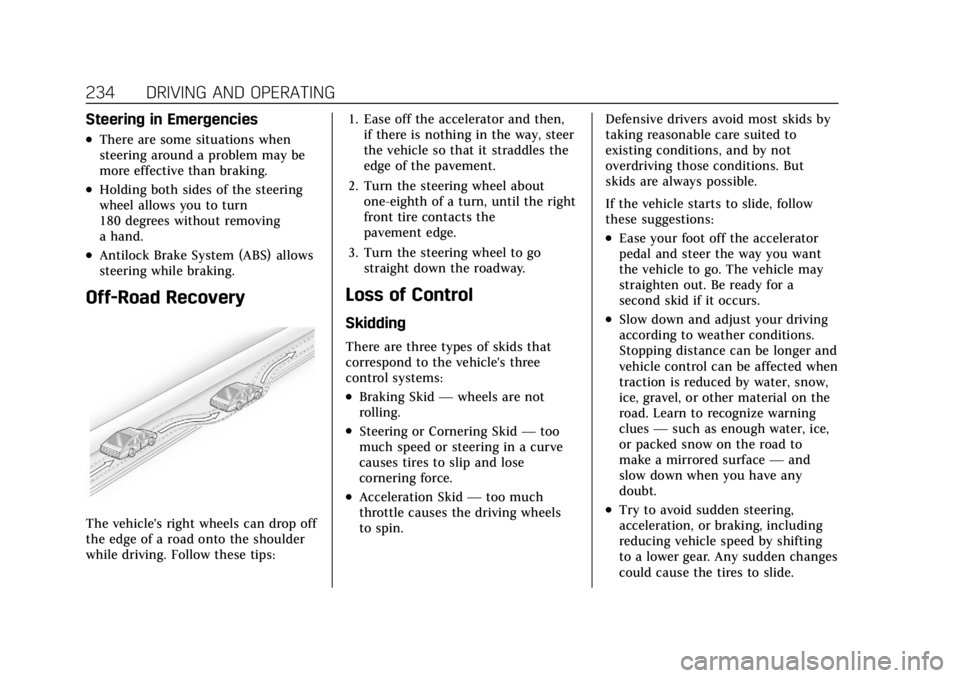
Off-Road Recovery
The vehicle's right wheels can drop off
the edge of a road onto the shoulder
while driving. Follow these tips:1. Ease off the accelerator and then,
if there is nothing in the way, steer
the vehicle so that it straddles the
edge of the pavement.
2. Turn the steering wheel about one-eighth of a turn, until the right
front tire contacts the
pavement edge.
3. Turn the steering wheel to go straight down the roadway.
Loss of Control
Skidding
There are three types of skids that
correspond to the vehicle's three
control systems:
.Braking Skid —wheels are not
rolling.
.Steering or Cornering Skid —too
much speed or steering in a curve
causes tires to slip and lose
cornering force.
.Acceleration Skid —too much
throttle causes the driving wheels
to spin. Defensive drivers avoid most skids by
taking reasonable care suited to
existing conditions, and by not
overdriving those conditions. But
skids are always possible.
If the vehicle starts to slide, follow
these suggestions:
.Ease your foot off the accelerator
pedal and steer the way you want
the vehicle to go. The vehicle may
straighten out. Be ready for a
second skid if it occurs.
.Slow down and adjust your driving
according to weather conditions.
Stopping distance can be longer and
vehicle control can be affected when
traction is reduced by water, snow,
ice, gravel, or other material on the
road. Learn to recognize warning
clues
—such as enough water, ice,
or packed snow on the road to
make a mirrored surface —and
slow down when you have any
doubt.
.Try to avoid sudden steering,
acceleration, or braking, including
reducing vehicle speed by shifting
to a lower gear. Any sudden changes
could cause the tires to slide.
Page 236 of 508
Cadillac Escalade Owner Manual (GMNA-Localizing-U.S./Canada/Mexico-
15567102) - 2022 - CRC - 11/17/21
DRIVING AND OPERATING 235
Remember: Antilock brakes help avoid
only the braking skid.
Off-Road Driving
Four-wheel-drive vehicles can be used
for off-road driving. Vehicles without
four-wheel drive and vehicles not
equipped with All Terrain (AT) or
On-Off Road (OOR) tires must not be
driven off-road except on a level, solid
surface. For contact information about
the original equipment tires, see the
warranty manual.
One of the best ways for successful
off-road driving is to control the
speed.
{Warning
When driving off-road, bouncing
and quick changes in direction can
easily throw you out of position.
This could cause you to lose control
and crash. You and your passengers
should always wear seat belts.
Before Driving Off-Road
.Have all necessary maintenance and
service work completed.
.Fuel the vehicle, fill fluid levels, and
check inflation pressure in all tires,
including the spare, if equipped.
.Read all the information about
four-wheel-drive vehicles in this
manual.
.Know the local laws that apply to
off-road driving.
Loading the Vehicle for Off-Road
Driving
{Warning
.Unsecured cargo on the load
floor can be tossed about when
driving over rough terrain. You or
your passengers can be struck by
flying objects. Secure the cargo
properly.
.Keep cargo in the cargo area as
far forward and as low as
possible. The heaviest things
should be on the floor, forward
of the rear axle.
.Heavy loads on the roof raise the
vehicle's center of gravity,
making it more likely to roll over.
You can be seriously or fatally(Continued)
Warning (Continued)
injured if the vehicle rolls over.
Put heavy loads inside the cargo
area, not on the roof.
For more information about loading
the vehicle, see Vehicle Load Limits
0 241 and
Tires 0402.
Environmental Concerns
.Always use established trails, roads,
and areas that have been set aside
for public off-road recreational
driving and obey all posted
regulations.
.Do not damage shrubs, flowers,
trees, or grasses or disturb wildlife.
.Do not park over things that burn.
See Parking over Things That Burn
0 251.
Driving on Hills
Driving safely on hills requires good
judgment and an understanding of
what the vehicle can and cannot do.
Page 238 of 508
Cadillac Escalade Owner Manual (GMNA-Localizing-U.S./Canada/Mexico-
15567102) - 2022 - CRC - 11/17/21
DRIVING AND OPERATING 237
2. Shift into P (Park) and then restartthe engine.
.If driving uphill when the
vehicle stalls, shift to
R (Reverse), release the parking
brake, and back straight down.
.Never try to turn the vehicle
around. If the hill is steep
enough to stall the vehicle, it is
steep enough to cause it to
roll over.
.If you cannot make it up the
hill, back straight down the hill.
.Never back down a hill in
N (Neutral) using only the
brake. The vehicle can roll
backward quickly and you could
lose control.
.If driving downhill when the
vehicle stalls, shift to a lower
gear, release the parking brake,
and drive straight down the hill.
3. If the vehicle cannot be restarted after stalling, set the parking brake,
shift into P (Park), and turn the
vehicle off.
3.1. Leave the vehicle and seek help. 3.2. Stay clear of the path the
vehicle would take if it rolled
downhill.
.Avoid turns that take the vehicle
across the incline of the hill. A hill
that can be driven straight up or
down might be too steep to drive
across. Driving across an incline
puts more weight on the downhill
wheels, which could cause a
downhill slide or a rollover.
.Surface conditions can be a
problem. Loose gravel, muddy spots,
or even wet grass can cause the
tires to slip sideways, downhill.
If the vehicle slips sideways, it can
hit something that will trip it —a
rock, a rut, etc. —and roll over.
.Hidden obstacles can make the
steepness of the incline more
severe. If a rock is driven across
with the uphill wheels, or if the
downhill wheels drop into a rut or
depression, the vehicle can tilt
even more.
.If an incline must be driven across,
and the vehicle starts to slide, turn
downhill. This should help
straighten out the vehicle and
prevent the side slipping.
{Warning
Getting out of the vehicle on the
downhill side when stopped across
an incline is dangerous. If the
vehicle rolls over, you could be
crushed or killed. Always get out on
the uphill side of the vehicle and
stay well clear of the rollover path.
Driving in Mud, Sand, Snow,
or Ice
Use a low gear when driving in
mud —the deeper the mud, the
lower the gear. Keep the vehicle
moving to avoid getting stuck.
Traction changes when driving on
sand. On loose sand, such as on
beaches or sand dunes, the tires tend
to sink into the sand. This affects
steering, accelerating, and braking.
Drive at a reduced speed and avoid
sharp turns or abrupt maneuvers.
Page 259 of 508
Cadillac Escalade Owner Manual (GMNA-Localizing-U.S./Canada/Mexico-
15567102) - 2022 - CRC - 11/17/21
258 DRIVING AND OPERATING
{Warning
With four-wheel drive, the vehicle
will be free to roll if the transfer
case is in N (Neutral), even when
the shift lever is in P (Park). Be
sure the transfer case is in a drive
gear—2
m, 4m, or 4n—not in
N (Neutral). See Shifting Into Park
0 250.
Caution
Extended high-speed operation in
4
nmay damage or shorten the life
of the drivetrain.
An engagement noise and bump is
normal when shifting between 4
nand
4
mor N (Neutral), with the engine
running.
Shifting into 4
nwill turn Traction
Control and StabiliTrak/Electronic
Stability Control (ESC) off. See
Traction Control/Electronic Stability
Control 0265.
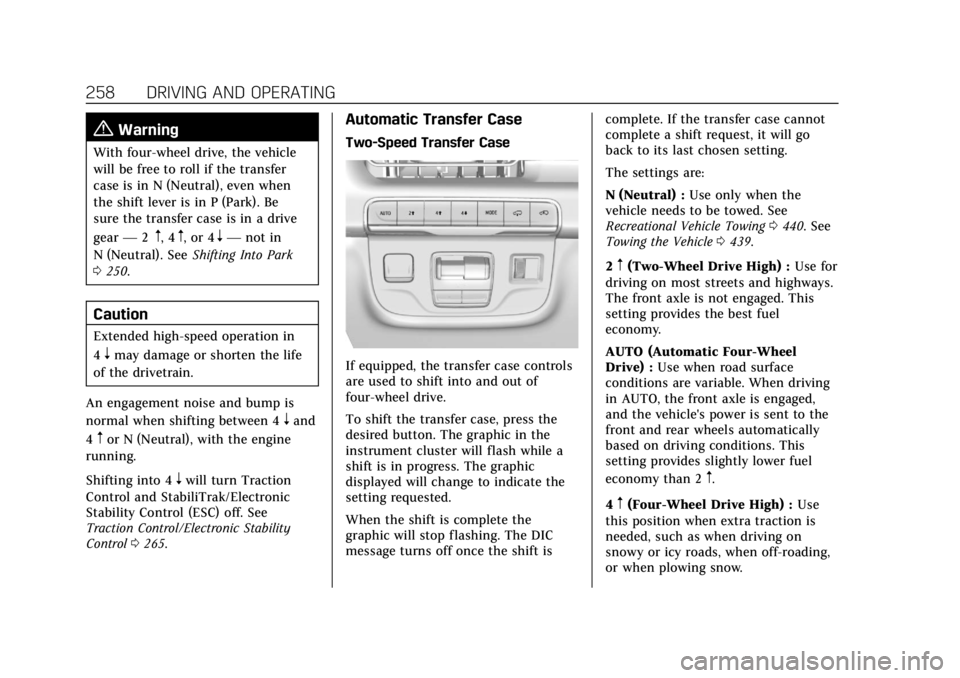
Automatic Transfer Case
Two-Speed Transfer Case
If equipped, the transfer case controls
are used to shift into and out of
four-wheel drive.
To shift the transfer case, press the
desired button. The graphic in the
instrument cluster will flash while a
shift is in progress. The graphic
displayed will change to indicate the
setting requested.
When the shift is complete the
graphic will stop flashing. The DIC
message turns off once the shift is complete. If the transfer case cannot
complete a shift request, it will go
back to its last chosen setting.
The settings are:
N (Neutral) :
Use only when the
vehicle needs to be towed. See
Recreational Vehicle Towing 0440. See
Towing the Vehicle 0439.
2
m(Two-Wheel Drive High) : Use for
driving on most streets and highways.
The front axle is not engaged. This
setting provides the best fuel
economy.
AUTO (Automatic Four-Wheel
Drive) : Use when road surface
conditions are variable. When driving
in AUTO, the front axle is engaged,
and the vehicle's power is sent to the
front and rear wheels automatically
based on driving conditions. This
setting provides slightly lower fuel
economy than 2
m.
4
m(Four-Wheel Drive High) : Use
this position when extra traction is
needed, such as when driving on
snowy or icy roads, when off-roading,
or when plowing snow.