brake light CADILLAC ESCALADE 2022 Owner's Manual
[x] Cancel search | Manufacturer: CADILLAC, Model Year: 2022, Model line: ESCALADE, Model: CADILLAC ESCALADE 2022Pages: 508, PDF Size: 9.18 MB
Page 266 of 508
Cadillac Escalade Owner Manual (GMNA-Localizing-U.S./Canada/Mexico-
15567102) - 2022 - CRC - 11/17/21
DRIVING AND OPERATING 265
When Automatic Vehicle Hold (AVH)
is turned on and the vehicle is braked
to a stop, AVH prevents the vehicle
from moving during the transition
from brake pedal release to accelerator
pedal apply. The brakes release when
the accelerator pedal is applied. The
brakes may also release under other
conditions. Do not rely on AVH to
hold the vehicle.
If the accelerator pedal is not applied
within a few minutes, the Electric
Parking Brake will apply. The parking
brake will also apply if the driver door
is opened or the driver seat belt is
unfastened while AVH is holding the
vehicle.
AVH can be turned on by pressing
AUTO HOLD. The indicator light on
the switch will come on. The AVH
light on the instrument panel will
come on while AVH is actively holding
the vehicle. SeeAutomatic Vehicle Hold
(AVH) Light 0126.Ride Control Systems
Traction Control/Electronic
Stability Control
System Operation
The vehicle has a Traction Control
System (TCS) and StabiliTrak/
Electronic Stability Control (ESC).
These systems help limit wheel spin
and assist the driver in maintaining
control, especially on slippery road
conditions.
TCS activates if it senses any of the
drive wheels are spinning or beginning
to lose traction. When this happens,
TCS applies the brakes to the spinning
wheels and reduces engine power to
limit wheel spin.
StabiliTrak/ESC activates when the
vehicle senses a difference between
the intended path and the direction
the vehicle is actually traveling.
StabiliTrak/ESC selectively applies
braking pressure to one or more of the
vehicle wheel brakes to assist the
driver in keeping the vehicle on the
intended path. Trailer Sway Control (TSC) is also on automatically when
the vehicle is started. See
Trailer Sway
Control (TSC) 0354.
If cruise control is being used and
traction control or StabiliTrak/ESC
begins to limit wheel spin, cruise
control will disengage. Cruise control
may be turned back on when road
conditions allow.
Both systems come on automatically
when the vehicle is started and begins
to move. The systems may be heard or
felt while they are operating or while
performing diagnostic checks. This is
normal and does not mean there is a
problem with the vehicle.
It is recommended to leave both
systems on for normal driving
conditions, but it may be necessary to
turn TCS off if the vehicle gets stuck
in sand, mud, ice, or snow. See If the
Vehicle Is Stuck 0241 and “Turning
the Systems Off and On ”later in this
section.
When the transfer case (if equipped)
is in Four-Wheel Drive Low, the TCS
and StabiliTrak/ESC are automatically
Page 267 of 508
Cadillac Escalade Owner Manual (GMNA-Localizing-U.S./Canada/Mexico-
15567102) - 2022 - CRC - 11/17/21
266 DRIVING AND OPERATING
disabled,gcomes on, and the
appropriate message will appear on
the Driver Information Center (DIC).
The indicator light for both systems is
to the right of the center stack and
below the screen. This light will:
.Flash when TCS is limiting
wheel spin
.Flash when StabiliTrak/ESC is
activated
.Turn on and stay on when either
system is not working
See Traction Control System (TCS)/
StabiliTrak Light 0128.
If either system fails to turn on or to
activate, a message displays in the
Driver Information Center (DIC), and
dcomes on and stays on to indicate
that the system is inactive and is not
assisting the driver in maintaining
control. Adjust driving accordingly. If
dcomes on and stays on:
1. Stop the vehicle.
2. Turn the engine off and wait 15 seconds.
3. Start the engine.
Drive the vehicle. If
dcomes on and
stays on, see your dealer as soon as
possible.
Turning the Systems Off and On
Caution
Do not repeatedly brake or
accelerate heavily when TCS is off.
The vehicle driveline could be
damaged.
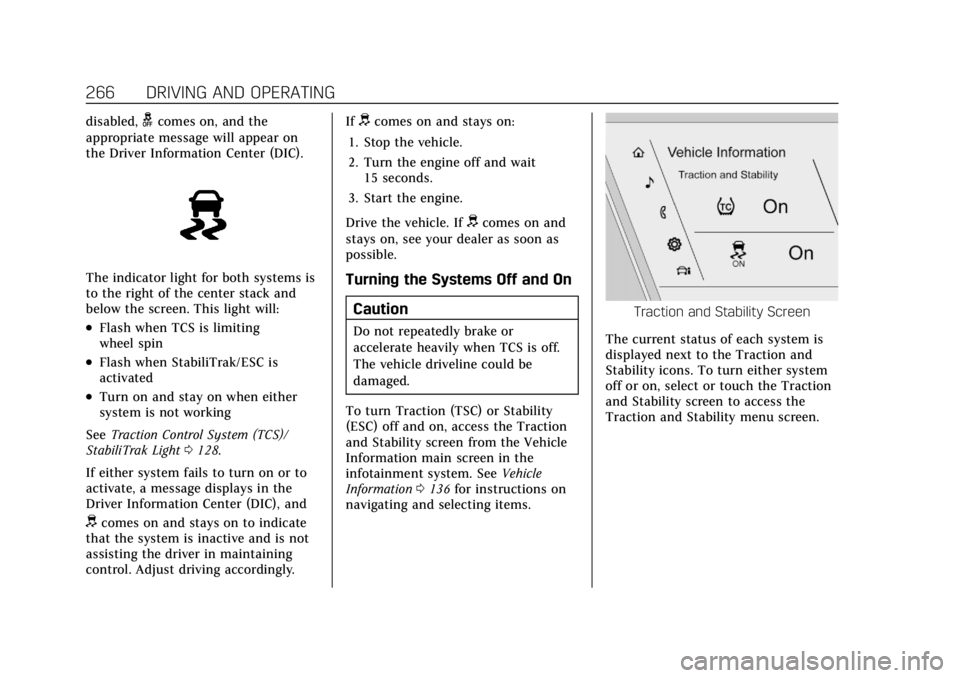
To turn Traction (TSC) or Stability
(ESC) off and on, access the Traction
and Stability screen from the Vehicle
Information main screen in the
infotainment system. See Vehicle
Information 0136 for instructions on
navigating and selecting items.
Traction and Stability Screen
The current status of each system is
displayed next to the Traction and
Stability icons. To turn either system
off or on, select or touch the Traction
and Stability screen to access the
Traction and Stability menu screen.
Page 270 of 508

Cadillac Escalade Owner Manual (GMNA-Localizing-U.S./Canada/Mexico-
15567102) - 2022 - CRC - 11/17/21
DRIVING AND OPERATING 269
remain active. Otherwise, the vehicle
will start in Tour mode. Tow/Haul
mode turns on trailer sway control.
If equipped with a diesel engine,
exhaust braking is automatically
activated when Tow/Haul mode is
selected. The system will command
down shifts to reduce vehicle speed
when the brake is applied. The normal
tow/haul shift pattern will return once
the vehicle is on a low grade or when
the accelerator pedal is pressed. While
in the Electronic Range Select (ERS)
Mode (seeManual Mode 0256), grade
braking is deactivated, allowing the
driver to select a range, and limiting
the highest gear available.
For more information on trailer
weight specifications, see Towing
Equipment 0344.
gTerrain Mode : Use this mode
when traveling on very rough roads at
very low speeds, such as a two-track
or heavily rutted road. This mode can
also be used for pulling a boat out of
the water on a trailer. When in Terrain
mode, the vehicle shifts automatically,
but will hold a lower gear longer to
maximize engine torque. This mode has a unique pedal map and
transmission shift pattern for better
control at lower speeds and over
rough terrain. This mode modifies
accelerator pedal mapping,
transmission shift pattern, ride height,
and Electronic Limited-Slip
Differential (eSLD).
When the vehicle comes to a stop on
an upward grade, automatic vehicle
hold is engaged until the driver
presses the accelerator pedal. Stop/
Start and cruise control are disabled
in Terrain mode.
Active Braking during lift throttle will
be engaged. This feature automatically
applies light braking to simulate
heavy engine braking of
four-wheel-drive low. It also applies
light braking in D (Drive) until the
vehicle is at idle speeds. In L1 and L2
light braking will typically bring the
vehicle to a stop. Active Braking
during lift throttle also reduces trailer
braking.
Terrain mode automatically exits to
Tour mode if the brake temperatures
become too hot, electronic parking
brake becomes inoperable, or the
vehicle cannot perform braking or
vehicle hold.
For more information on off-road
driving, see
Off-Road Driving 0235 and
Hill and Mountain Roads 0239.
My Mode
My mode is used to personalize
everyday driving. This mode allows
the driver to configure the vehicle
system settings to their driving
preferences. My mode will remain
active every time the vehicle is
started. To customize My mode, see
“Drive Mode Customization.”
Drive Mode Customization
The vehicle is equipped to modify the
following settings based on vehicle
content. Through the center radio
display, select Vehicle Settings>Drive
Mode Customization to customize and
personalize My mode, or turn off or
on Visualization.
My Mode
These settings will be retained over
each key cycle, and do not have to be
reset each time the vehicle is started.
Page 276 of 508
Cadillac Escalade Owner Manual (GMNA-Localizing-U.S./Canada/Mexico-
15567102) - 2022 - CRC - 11/17/21
DRIVING AND OPERATING 275
Reducing Speed While Cruise
Control is at a Set Speed
If the cruise control system is already
activated:
.Press and hold SET−down until the
desired lower speed is reached, then
release it.
.To decrease the vehicle speed in
small increments, press SET− down
briefly. For each press, the vehicle
goes about 1 km/h (1 mph) slower.
The speedometer reading can be
displayed in either English or metric
units. See Instrument Cluster 0115.
The increment value used depends on
the units displayed.
Passing Another Vehicle While
Using Cruise Control
Use the accelerator pedal to increase
the vehicle speed. When you take your
foot off the pedal, the vehicle will slow
down to the previous set cruise speed.
While pressing the accelerator pedal
or shortly following the release to
override cruise, briefly applying the
SET− control will result in cruise set
to the current vehicle speed. Using Cruise Control on Hills
How well the cruise control works on
hills depends on the vehicle speed, the
load, and the steepness of the hills.
When going up steep hills, pressing
the accelerator pedal may be
necessary to maintain vehicle speed.
When going downhill, Cruise Grade
Braking helps maintain the driver
selected speed.
Cruise Grade Braking is enabled when
the vehicle is started and cruise
control is active. It is not enabled in
Range Selection Mode. It assists in
maintaining driver selected speed
when driving on downhill grades by
using the engine and transmission to
slow the vehicle.
To disable and enable Cruise Grade
Braking for the current ignition cycle,
press and hold the Tow/Haul button
for five seconds. A Driver Information
Center (DIC) message displays.
For other forms of Grade Braking, see
Automatic Transmission
0252 and
Driver Mode Control 0267. Ending Cruise Control
There are four ways to end cruise
control:
.Step lightly on the brake pedal.
.Press*.
.Shift the transmission to
N (Neutral).
.To turn off cruise control, pressJ.
Erasing Speed Memory
The cruise control set speed is erased
from memory if
Jis pressed or if the
ignition is turned off.
Adaptive Cruise Control
(Advanced)
If equipped, Adaptive Cruise Control
(ACC) allows the cruise control set
speed and following gap to be
selected. Read this entire section
before using this system. The
following gap is the following time (or
distance) between your vehicle and a
vehicle detected directly ahead in your
path, moving in the same direction.
If no vehicle is detected in your path,
Page 284 of 508

Cadillac Escalade Owner Manual (GMNA-Localizing-U.S./Canada/Mexico-
15567102) - 2022 - CRC - 11/17/21
DRIVING AND OPERATING 283
ACC Automatically Disengages
ACC may automatically disengage and
the driver will need to manually apply
the brakes to slow the vehicle if:
.The sensors are blocked.
.The Traction Control System (TCS)
or Stabilitrack/ESC has activated or
been disabled.
.There is a fault in the system.
.The radar falsely reports blockage
when driving in a desert or remote
area with no other vehicles or
roadside objects.
.A DIC message may display to
indicate that ACC is temporarily
unavailable.
The ACC active symbol will turn white
when ACC is no longer active.
In some cases, when ACC is
temporarily unavailable, regular cruise
control may be used. See “Switching
Between ACC and Regular Cruise
Control ”previously in this section.
Always consider driving conditions
before using either cruise control
system. Notification to Resume ACC
ACC will maintain a following gap
behind a detected vehicle and slow
your vehicle to a stop behind that
vehicle.
If the stopped vehicle ahead has
driven away and ACC has not
resumed, the vehicle ahead indicator
will flash as a reminder to check
traffic ahead before proceeding. In
addition, the left and right sides of the
Safety Alert Seat will pulse three
times, or three beeps will sound. See
“Alert Type
”and “Adaptive Cruise Go
Notifier” in“Collision/Detection
Systems” underVehicle Personalization
0 140.
When the vehicle ahead drives away,
ACC resumes automatically if the stop
was brief. If necessary, press RES+ or
the accelerator pedal to resume ACC.
If stopped for more than two minutes
or if the driver door is opened and the
driver seat belt is unbuckled, the ACC
automatically applies the Electric
Parking Brake (EPB) to hold the
vehicle. The EPB status light will turn on. See
Electric Parking Brake 0262.
To release the EPB, press the
accelerator pedal.
A DIC warning message may display
indicating to shift to P (Park) before
exiting the vehicle. See Vehicle
Messages 0139.
{Warning
If ACC has stopped the vehicle, and
if ACC is disengaged, turned off,
or canceled, the vehicle will no
longer be held at a stop. The vehicle
can move. When ACC is holding the
vehicle at a stop, always be
prepared to manually apply the
brakes.
{Warning
Leaving the vehicle without placing
it in P (Park) can be dangerous. Do
not leave the vehicle while it is
being held at a stop by ACC. Always
place the vehicle in P (Park) and
turn off the ignition before leaving
the vehicle.
Page 286 of 508
Cadillac Escalade Owner Manual (GMNA-Localizing-U.S./Canada/Mexico-
15567102) - 2022 - CRC - 11/17/21
DRIVING AND OPERATING 285
ACC may occasionally provide an alert
and/or braking that is considered
unnecessary. It could respond to
vehicles in different lanes, signs,
guardrails, and other stationary
objects when entering or exiting a
curve. This is normal operation. The
vehicle does not need service.
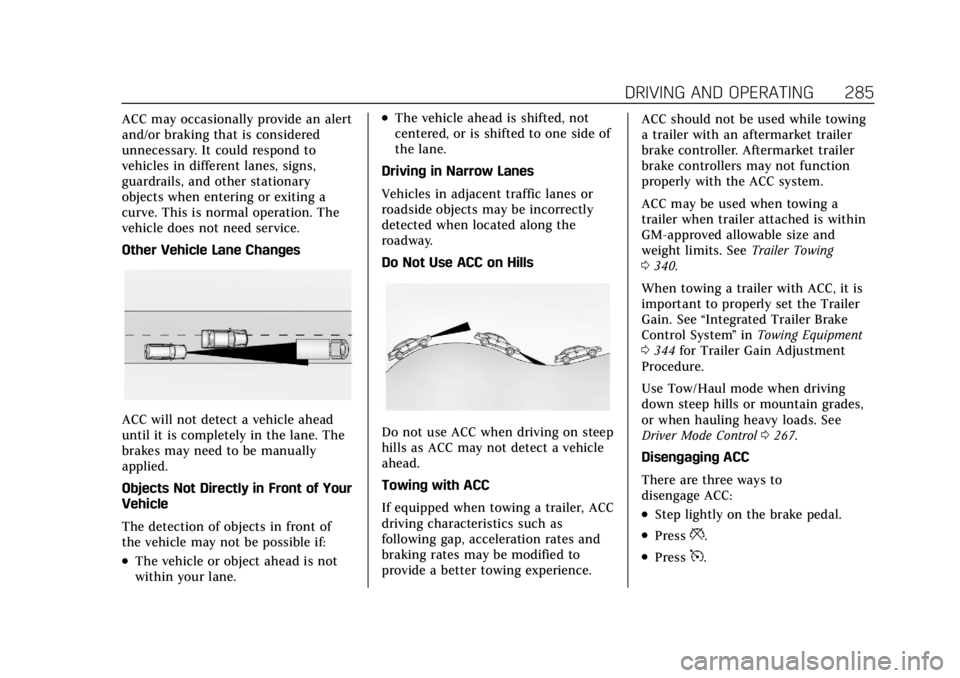
Other Vehicle Lane Changes
ACC will not detect a vehicle ahead
until it is completely in the lane. The
brakes may need to be manually
applied.
Objects Not Directly in Front of Your
Vehicle
The detection of objects in front of
the vehicle may not be possible if:
.The vehicle or object ahead is not
within your lane.
.The vehicle ahead is shifted, not
centered, or is shifted to one side of
the lane.
Driving in Narrow Lanes
Vehicles in adjacent traffic lanes or
roadside objects may be incorrectly
detected when located along the
roadway.
Do Not Use ACC on Hills
Do not use ACC when driving on steep
hills as ACC may not detect a vehicle
ahead.
Towing with ACC
If equipped when towing a trailer, ACC
driving characteristics such as
following gap, acceleration rates and
braking rates may be modified to
provide a better towing experience. ACC should not be used while towing
a trailer with an aftermarket trailer
brake controller. Aftermarket trailer
brake controllers may not function
properly with the ACC system.
ACC may be used when towing a
trailer when trailer attached is within
GM-approved allowable size and
weight limits. See
Trailer Towing
0 340.
When towing a trailer with ACC, it is
important to properly set the Trailer
Gain. See “Integrated Trailer Brake
Control System ”in Towing Equipment
0 344 for Trailer Gain Adjustment
Procedure.
Use Tow/Haul mode when driving
down steep hills or mountain grades,
or when hauling heavy loads. See
Driver Mode Control 0267.
Disengaging ACC
There are three ways to
disengage ACC:
.Step lightly on the brake pedal.
.Press*.
.Press5.
Page 291 of 508
Cadillac Escalade Owner Manual (GMNA-Localizing-U.S./Canada/Mexico-
15567102) - 2022 - CRC - 11/17/21
290 DRIVING AND OPERATING
When Super Cruise is available, the
white
^will display in the
instrument cluster.
.Press]. ACC will set the speed to
the current vehicle speed or resume
to the higher previously stored ACC
set speed.
When engaged and not steering the
vehicle, the steering wheel light bar
flashes blue, and
^will be blue. The
driver is in control of steering and
Super Cruise is not steering the
vehicle.
When the vehicle is positioned in the
center of the lane, the steering wheel
light bar and
^display will turn
green, indicating Super Cruise is
steering the vehicle.
When Super Cruise controls the
steering, traffic and other conditions
and laws permit, and it is safe to do
so, your hands can be taken off the
steering wheel.
Always pay attention to the road and
the operation of the vehicle. Always
monitor and be attentive of surrounding traffic, including vehicles
that may cross the road in front of
your vehicle.
Super Cruise steering can be
overridden with manual steering at
any time. When Super Cruise is
engaged, always be prepared to take
immediate action
—including
steering, accelerating, and braking
quickly, if necessary.
Super Cruise, when engaged, will
enable Forward Collision System to
alert and brake.
Steering Manually and Changing
Lanes
The vehicle can always be manually
steered, even with Super Cruise
engaged; for example, when manually
changing lanes.
When the steering wheel is moved
manually, the steering wheel light bar
flashes blue and
^on the
instrument cluster turns blue to
indicate Super Cruise is not steering
the vehicle. When ready to allow Super Cruise to
resume steering again, position the
vehicle in the center of the lane, hold
the steering wheel until the steering
wheel light bar turns green, and then
release the steering wheel when it is
safe to do so.
{Warning
To help prevent crashes before
making a lane change:
.Always check mirrors.
.Glance over your shoulder.
.Use the turn signals.
Super Cruise Lane Change
Super Cruise can steer to perform a
single lane change under certain
conditions when requested by the
driver or initiated by the Super Cruise
System.
To request a lane change: 1. Verify the lane next to your vehicle is clear and conditions are safe to
make a lane change.
Page 293 of 508
Cadillac Escalade Owner Manual (GMNA-Localizing-U.S./Canada/Mexico-
15567102) - 2022 - CRC - 11/17/21
292 DRIVING AND OPERATING
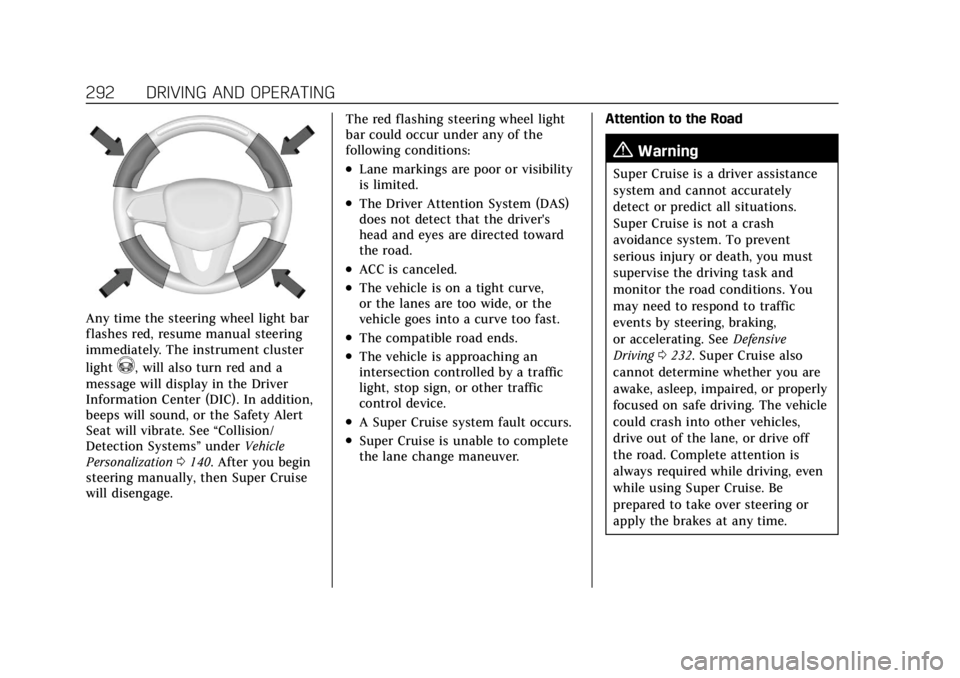
Any time the steering wheel light bar
flashes red, resume manual steering
immediately. The instrument cluster
light
^, will also turn red and a
message will display in the Driver
Information Center (DIC). In addition,
beeps will sound, or the Safety Alert
Seat will vibrate. See “Collision/
Detection Systems” underVehicle
Personalization 0140. After you begin
steering manually, then Super Cruise
will disengage. The red flashing steering wheel light
bar could occur under any of the
following conditions:
.Lane markings are poor or visibility
is limited.
.The Driver Attention System (DAS)
does not detect that the driver's
head and eyes are directed toward
the road.
.ACC is canceled.
.The vehicle is on a tight curve,
or the lanes are too wide, or the
vehicle goes into a curve too fast.
.The compatible road ends.
.The vehicle is approaching an
intersection controlled by a traffic
light, stop sign, or other traffic
control device.
.A Super Cruise system fault occurs.
.Super Cruise is unable to complete
the lane change maneuver.
Attention to the Road
{Warning
Super Cruise is a driver assistance
system and cannot accurately
detect or predict all situations.
Super Cruise is not a crash
avoidance system. To prevent
serious injury or death, you must
supervise the driving task and
monitor the road conditions. You
may need to respond to traffic
events by steering, braking,
or accelerating. See
Defensive
Driving 0232. Super Cruise also
cannot determine whether you are
awake, asleep, impaired, or properly
focused on safe driving. The vehicle
could crash into other vehicles,
drive out of the lane, or drive off
the road. Complete attention is
always required while driving, even
while using Super Cruise. Be
prepared to take over steering or
apply the brakes at any time.
Page 295 of 508
Cadillac Escalade Owner Manual (GMNA-Localizing-U.S./Canada/Mexico-
15567102) - 2022 - CRC - 11/17/21
294 DRIVING AND OPERATING
First Alert
.If the steering wheel light bar flashes green, the system has detected that your head and
eyes may not be directed toward the road.
.The flashing will stop when the system detects that your head and eyes appear to be
directed toward the road.
Second Alert
.If the steering wheel light bar flashes green for too long, Super Cruise will alert the driver
to take control of steering immediately by flashing the light bar red. Also, either beeps will
sound or the Safety Alert Seat will vibrate. See “Collision/Detection Systems”underVehicle
Personalization 0140.
.Take over steering, then Super Cruise will disengage.
.To re-engage Super Cruise, press]. See “Using Super Cruise ”previously in this section.
Third Alert
.If the steering wheel light bar flashes red for too long, a voice command will tell you to
take control of the vehicle.
.Take control of the steering immediately; ACC and Super Cruise will disengage.
.A DIC message will indicate that Super Cruise is locked out. Super Cruise cannot be
re-engaged until the vehicle is turned off and back on again.
.Continued failure to take over steering will cause the vehicle to brake to a stop and OnStar
will be called. The brake lamps and hazard warning flashers will come on.
.Take control of the vehicle and continue driving.
Page 297 of 508
Cadillac Escalade Owner Manual (GMNA-Localizing-U.S./Canada/Mexico-
15567102) - 2022 - CRC - 11/17/21
296 DRIVING AND OPERATING
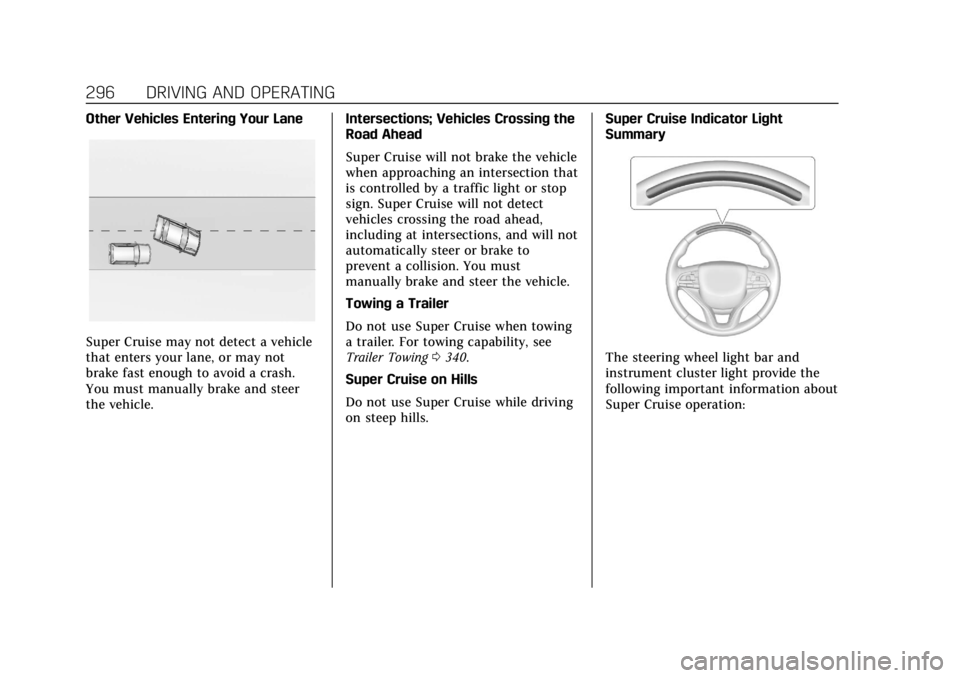
Other Vehicles Entering Your Lane
Super Cruise may not detect a vehicle
that enters your lane, or may not
brake fast enough to avoid a crash.
You must manually brake and steer
the vehicle.Intersections; Vehicles Crossing the
Road Ahead
Super Cruise will not brake the vehicle
when approaching an intersection that
is controlled by a traffic light or stop
sign. Super Cruise will not detect
vehicles crossing the road ahead,
including at intersections, and will not
automatically steer or brake to
prevent a collision. You must
manually brake and steer the vehicle.
Towing a Trailer
Do not use Super Cruise when towing
a trailer. For towing capability, see
Trailer Towing
0340.
Super Cruise on Hills
Do not use Super Cruise while driving
on steep hills. Super Cruise Indicator Light
SummaryThe steering wheel light bar and
instrument cluster light provide the
following important information about
Super Cruise operation: