change time CADILLAC ESCALADE 2022 Owner's Manual
[x] Cancel search | Manufacturer: CADILLAC, Model Year: 2022, Model line: ESCALADE, Model: CADILLAC ESCALADE 2022Pages: 508, PDF Size: 9.18 MB
Page 208 of 508

Cadillac Escalade Owner Manual (GMNA-Localizing-U.S./Canada/Mexico-
15567102) - 2022 - CRC - 11/17/21
INFOTAINMENT SYSTEM 207
.Wi-Fi Password: Select to change
the vehicle’s Wi-Fi network
password.
.Connected Phones: Select to show a
list of the vehicle’s currently
connected phones.
.Data Updating: Select to show the
data plan details including the
amount of data remaining.
Networks
This will show connected and
available Wi-Fi networks.
If a 4G LTE data package is not active
on the vehicle, the infotainment
system can be connected to an
external protected Wi-Fi network,
such as a mobile device or home
hotspot, to utilize connected services.
Device Remote Access
Touch and the following may display:
.Remote Access: Select to control
devices with an installed OnStar app
linked to this vehicle by USB or the
Wi-Fi hotspot.
Language
This will set the display language used
on the infotainment display and
instrument cluster. It may also use the
selected language for voice
recognition and audio feedback. Select
from the available languages.
Privacy
Touch and the following may display:
.Location Services: Select to allow
apps and services to identify the
vehicle location.
.Voice Recognition Sharing: Select to
send voice sessions to a cloud-based
voice recognition system.
.Types: This setting lists permissions
considered sensitive by Android,
and the apps that are currently
allowed to use each permission.
.Used By Applications: This setting
lists each application and its
allowed permissions.
Software Updates
If equipped, the vehicle can download
and install select software updates
over a wireless connection. The
system will prompt for certain updates to be downloaded and
installed. There is also an option to
check for updates manually.
To manually check for updates, touch
Settings on the Home Page and select
the System tab. Follow the on-screen
prompts. There are two options
available under Software Updates,
"Check for Updates" and "Previous
Updates". Selecting "Check for
Updates", will check and list if any
updates are available for this vehicle.
"No updates available" will display if
there is no update available. Selecting
"Previous Updates" will list all the
previous SW version(s) installed in the
vehicle. The steps to check for,
download, and install updates may
vary by vehicle.
The vehicle can be used normally
during the software download. Once
the download is complete, there may
be a prompt to accept the installation
of the update upon the next ignition
cycle or the next time the vehicle is
shifted into P (Park). For most
updates, the vehicle will be disabled
and cannot be driven during the
installation. The system will deliver
Page 211 of 508

Cadillac Escalade Owner Manual (GMNA-Localizing-U.S./Canada/Mexico-
15567102) - 2022 - CRC - 11/17/21
210 INFOTAINMENT SYSTEM
Manage Settings
Buckle To Drive :When turned ON,
Buckle to Drive prevents the driver
from shifting out of P (Park) for a
period of time if driver seat belt, and
on some vehicles, the passenger seat
belt, is not buckled. See Buckle To
Drive 059 and
Vehicle Personalization 0140.
Teen Driver Speed Limiter : Limits
the maximum speed of the vehicle.
When the speed limiter is turned on
and the vehicle is started with a Teen
Driver key, the DIC displays a message
that the top speed is limited.
On certain vehicles, when the Speed
Limiter is turned ON, the vehicle’s
maximum acceleration will be limited.
The DIC will display a message that
the acceleration is limited.
Teen Driver Speed Warning : Allows
the speed warning to be turned on or
off. Touch Set Teen Driver Speed
Warning to set the warning speed.
Set Teen Driver Speed Warning :
Displays a warning in the DIC when
exceeding a selectable speed. Choose the desired speed warning level. The
speed warning does not limit the
speed of the vehicle.
Audio Volume Limit :
Allows the
audio volume limit to be turned on or
off. Touch Set Audio Volume Limit to
choose the maximum allowable audio
volume level.
SiriusXM Explicit Content Filter (if
equipped) : Allows the SiriusXM
Explicit Content Filter to be turned
ON or OFF. When ON, the teen driver
will not be able to listen to SiriusXM
stations that contain explicit content,
and the Explicit Content Filter
selection in the Audio Settings will be
unavailable for change.
When Teen Driver is Active:
.The radio will mute when the
driver, or in some vehicles, the front
passenger seat belt, is not buckled.
The audio from any device paired to
the vehicle will also be muted.
.If an object, such as a briefcase,
handbag, grocery bag, laptop,
or other electronic device, is on the
front passenger seat, it could cause the radio to mute. If this happens,
remove the object from the seat. See
Passenger Sensing System
072.
.Some safety systems, such as
Forward Collision Alert, if equipped,
cannot be turned off.
.The gap setting for the Forward
Collision Alert and Adaptive Cruise
Control, if equipped, cannot be
changed.
.When trying to change a safety
feature that is not configurable in
Teen Driver, the DIC displays a
message indicating that Teen Driver
is active and the action is not
available.
.Super Cruise, if equipped, is not
available.
.Enhanced Low Fuel Warning (if
equipped) –When the vehicle is low
on fuel, the low fuel light on the
instrument cluster flashes and the
DIC low fuel warning cannot be
dismissed.
.Do not tow a trailer.
Page 213 of 508

Cadillac Escalade Owner Manual (GMNA-Localizing-U.S./Canada/Mexico-
15567102) - 2022 - CRC - 11/17/21
212 INFOTAINMENT SYSTEM
Trademarks and License
Agreements
FCC Information
SeeRadio Frequency Statement 0481.
"Made for iPod," and "Made for
iPhone," mean that an electronic
accessory has been designed to
connect specifically to iPod or iPhone,
respectively, and has been certified by
the developer to meet Apple
performance standards. Apple is not
responsible for the operation of this
device or its compliance with safety
and regulatory standards. Please note
that the use of this accessory with
iPod or iPhone may affect wireless
performance. iPhone, iPod, iPod
classic, iPod nano, iPod shuffle, and
iPod touch are trademarks of Apple
Inc., registered in the U.S. and other
countries.
If you decide to continue service after
your trial, your selected subscription
plan will automatically renew
thereafter. You will be charged at
then-current rates. Fees and taxes
apply. Please see the SiriusXM
Customer Agreement at siriusxm.com
for complete terms and how to cancel,
which includes calling SiriusXM at
1-866-635-2349. All fees and
programming are subject to change.
Fees and Taxes: Subscription fee,
taxes, one time activation fee, and
other fees may apply. Subscription fee
is consumer only. All fees and
programming subject to change.
Subscriptions subject to Customer
Agreement available at
www.siriusxm.com. SiriusXM service is
only available in the 48 contiguous
United States and Canada. In Canada: Some deterioration of
service may occur in extreme northern
latitudes. This is beyond the control of
SiriusXM Satellite Radio.
Explicit Language Notice: Channels
with frequent explicit language are
indicated with an
“XL”preceding the
channel name. Channel blocking is
available for SiriusXM Satellite Radio
receivers by notifying SiriusXM:
.USA Customers —See
www.siriusxm.com or call
1-888-601–6296.
.Canada Customers —See
www.siriusxm.ca or call
1-877-438-9677.
It is prohibited to copy, decompile,
disassemble, reverse engineer, hack,
manipulate, or otherwise make
available any technology or software
incorporated in receivers compatible
with the SiriusXM Satellite Radio
System or that support the SiriusXM
website, the Online Service or any of
its content. Furthermore, the AMBER
voice compression software included
in this product is protected by
Page 223 of 508
Cadillac Escalade Owner Manual (GMNA-Localizing-U.S./Canada/Mexico-
15567102) - 2022 - CRC - 11/17/21
222 CLIMATE CONTROLS
Automatic Operation
The system automatically controls the
fan speed, air delivery, air
conditioning, and recirculation in
order to heat or cool the vehicle to the
desired temperature.
When AUTO is underlined, the system
is in full automatic operation. If the
air delivery mode or fan setting is
manually adjusted, the auto indicator
turns off and the display will show the
selected settings. Auto operation can
be turned off individually for climate
settings.
For automatic operation:1. Press AUTO.
2. Set the temperature. Allow the system time to stabilize. Then
adjust the temperature as needed
for best comfort.
To improve fuel efficiency and to cool
the vehicle faster, recirculation may be
automatically selected in warm
weather. The recirculation light will
not come on. Press
@to select
recirculation; press it again to select
outside air. English units can be changed to
metric units through the instrument
cluster. See
“Cluster Options Menu ”
under Instrument Cluster 0115.
OFF : Press OFF to turn the fan on or
off. When off is selected, the system
will stop air from flowing into the
cabin. If on is selected or any other
buttons are pressed, the climate
control system will turn on and
operate at the current setting.
y/z: The temperature can be
adjusted separately for the driver and
the passenger. Press to decrease or lift
to increase the temperature. Press or
lift and hold to rapidly increase or
decrease the temperature.
SYNC : Touch SYNC on the climate
control display to link all climate zone
settings to the driver settings. Adjust
the driver side temperature control to
change the linked temperature. When
the passenger setting is adjusted, the
SYNC underline turns off. Rear :
Touch Rear on the
infotainment screen to open the rear
climate control screen. The rear
climate control settings can now be
adjusted from the front
passenger area.
Manual Operation
z 9 y: Press to decrease or lift to
increase the fan speed. Press or lift
and hold the fan controls to adjust
speed more quickly. The fan speed
setting displays. Any adjustment of
the fan speed cancels automatic fan
control and the fan can be controlled
manually. Press AUTO to return to
automatic operation.
To turn off the fan and climate
control system, press OFF on the
center stack climate controls. The
airf low will be blocked from entering
in all air delivery modes, except
defrost.
The maximum automatic fan speed
can be set to low, medium, or high. To
adjust Auto Fan Speed, see “Climate
and Air Quality” underVehicle
Personalization 0140.
Page 228 of 508
Cadillac Escalade Owner Manual (GMNA-Localizing-U.S./Canada/Mexico-
15567102) - 2022 - CRC - 11/17/21
CLIMATE CONTROLS 227
Air Vents
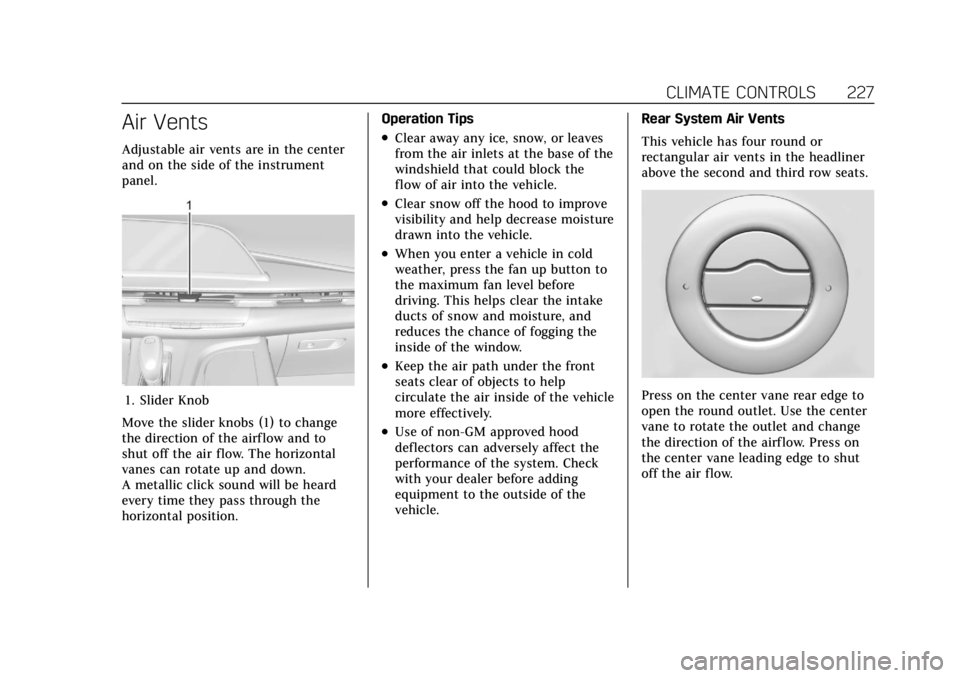
Adjustable air vents are in the center
and on the side of the instrument
panel.
1. Slider Knob
Move the slider knobs (1) to change
the direction of the airf low and to
shut off the air flow. The horizontal
vanes can rotate up and down.
A metallic click sound will be heard
every time they pass through the
horizontal position. Operation Tips
.Clear away any ice, snow, or leaves
from the air inlets at the base of the
windshield that could block the
flow of air into the vehicle.
.Clear snow off the hood to improve
visibility and help decrease moisture
drawn into the vehicle.
.When you enter a vehicle in cold
weather, press the fan up button to
the maximum fan level before
driving. This helps clear the intake
ducts of snow and moisture, and
reduces the chance of fogging the
inside of the window.
.Keep the air path under the front
seats clear of objects to help
circulate the air inside of the vehicle
more effectively.
.Use of non-GM approved hood
deflectors can adversely affect the
performance of the system. Check
with your dealer before adding
equipment to the outside of the
vehicle.
Rear System Air Vents
This vehicle has four round or
rectangular air vents in the headliner
above the second and third row seats.
Press on the center vane rear edge to
open the round outlet. Use the center
vane to rotate the outlet and change
the direction of the airf low. Press on
the center vane leading edge to shut
off the air flow.
Page 232 of 508
Cadillac Escalade Owner Manual (GMNA-Localizing-U.S./Canada/Mexico-
15567102) - 2022 - CRC - 11/17/21
DRIVING AND OPERATING 231
Front Pedestrian Braking (FPB)System . . . . . . . . . . . . . . . . . . . . . . . . . . 323
Night Vision System . . . . . . . . . . . . . 325
Side Blind Zone Alert (SBZA) . . . . 327
Lane Change Alert (LCA) . . . . . . . . 327
Lane Keep Assist (LKA) . . . . . . . . . . 330
Fuel
Top Tier Fuel . . . . . . . . . . . . . . . . . . . . . 332
Recommended Fuel . . . . . . . . . . . . . . 333
Prohibited Fuels . . . . . . . . . . . . . . . . . . 333
Fuels in Foreign Countries . . . . . . . 333
Fuel Additives . . . . . . . . . . . . . . . . . . . . 333
Filling the Tank . . . . . . . . . . . . . . . . . . 334
Filling a Portable Fuel Container . . . . . . . . . . . . . . . . . . . . . . . . 335
Trailer Towing
General Towing Information . . . . 336
Driving Characteristics andTowing Tips . . . . . . . . . . . . . . . . . . . . . 336
Trailer Towing . . . . . . . . . . . . . . . . . . . . 340
Towing Equipment . . . . . . . . . . . . . . . 344
Trailer Sway Control (TSC) . . . . . . 354
Trailering App . . . . . . . . . . . . . . . . . . . . 355
Conversions and Add-Ons
Add-On Electrical Equipment . . . 367
Driving Information
Driving for Better Fuel
Economy
Driving habits can affect fuel mileage.
Here are some driving tips to get the
best fuel economy possible:
.Set the climate controls to the
desired temperature after the engine
is started, or turn them off when
not required.
.Avoid fast starts and accelerate
smoothly.
.Brake gradually and avoid abrupt
stops.
.Avoid idling the engine for long
periods of time.
.When road and weather conditions
are appropriate, use cruise control.
.Always follow posted speed limits or
drive more slowly when conditions
require.
.Keep vehicle tires properly inflated.
.Combine several trips into a
single trip.
.Replace the vehicle's tires with the
same TPC Spec number molded into
the tire's sidewall near the size.
.Follow recommended scheduled
maintenance.
Distracted Driving
Distraction comes in many forms and
can take your focus from the task of
driving. Exercise good judgment and
do not let other activities divert your
attention away from the road. Many
local governments have enacted laws
regarding driver distraction. Become
familiar with the local laws in
your area.
To avoid distracted driving, keep your
eyes on the road, keep your hands on
the steering wheel, and focus your
attention on driving.
.Do not use a phone in demanding
driving situations. Use a hands-free
method to place or receive
necessary phone calls.
.Watch the road. Do not read, take
notes, or look up information on
phones or other electronic devices.
.Designate a front seat passenger to
handle potential distractions.
Page 249 of 508

Cadillac Escalade Owner Manual (GMNA-Localizing-U.S./Canada/Mexico-
15567102) - 2022 - CRC - 11/17/21
248 DRIVING AND OPERATING
Starting the Engine
If the vehicle has a diesel engine, see
the Duramax diesel supplement.
Caution
If you add electrical parts or
accessories, you could change the
way the engine operates. Any
resulting damage would not be
covered by the vehicle warranty. See
Add-On Electrical Equipment0367.
Shift the vehicle into P (Park) or
N (Neutral). To restart the engine
when the vehicle is already moving,
use N (Neutral) only.
Caution
Do not try to shift to P (Park) if the
vehicle is moving. If you do, you
could damage the transmission.
Shift to P (Park) only when the
vehicle is stopped.
Starting Procedure
1. The remote key must be in the vehicle. Press ENGINE START/
STOP with the brake pedal applied.
When the engine begins cranking,
let go of the button.
The idle speed will go down as the
engine gets warm. Do not race the
engine immediately after starting
it. Operate the engine and
transmission gently to allow the oil
to warm up and lubricate all
moving parts.
When the low fuel warning light is
on and the FUEL LEVEL LOW
message is displayed in the Driver
Information Center (DIC), press the
ENGINE START/STOP position to
continue engine cranking.
Caution
Cranking the engine for long
periods of time, by trying to start
the engine immediately after
cranking has ended, can overheat
and damage the cranking motor,
(Continued)
Caution (Continued)
and drain the battery. Wait at least
15 seconds between each try, to let
the cranking motor cool down.
2. If the engine does not start after five to 10 seconds, especially in
very cold weather (below −18 °C or
0 °F), it could be flooded with too
much gasoline. Try pushing the
accelerator pedal all the way to the
floor and holding it there while
pressing ENGINE START/STOP for
up to a maximum of 15 seconds.
Wait at least 15 seconds between
each try, to allow the cranking
motor to cool down. When the
engine starts, let go of the button
and accelerator. If the vehicle starts
briefly but then stops again, do the
same thing. This clears the extra
gasoline from the engine. Do not
race the engine immediately after
starting it. Operate the engine and
transmission gently until the oil
warms up and lubricates all
moving parts.
Page 263 of 508
Cadillac Escalade Owner Manual (GMNA-Localizing-U.S./Canada/Mexico-
15567102) - 2022 - CRC - 11/17/21
262 DRIVING AND OPERATING
Brakes
Electric Brake Boost
Vehicles equipped with electric brake
boost have hydraulic brake circuits
that are electronically controlled when
the brake pedal is applied during
normal operation. The system
performs routine tests and turns off
within a few minutes after the vehicle
is turned off. Noise may be heard
during this time. If the brake pedal is
pressed during the tests or when the
electric brake boost system is off, a
noticeable change in pedal force and
travel may be felt. This is normal.
Antilock Brake
System (ABS)
The Antilock Brake System (ABS)
helps prevent a braking skid and
maintain steering while braking hard.
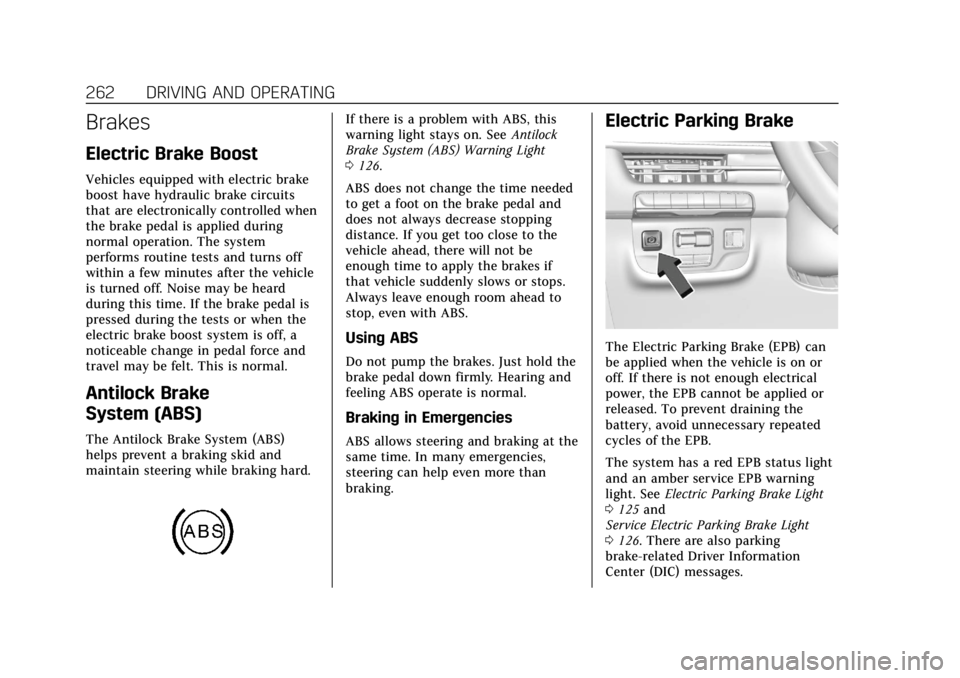
If there is a problem with ABS, this
warning light stays on. SeeAntilock
Brake System (ABS) Warning Light
0 126.
ABS does not change the time needed
to get a foot on the brake pedal and
does not always decrease stopping
distance. If you get too close to the
vehicle ahead, there will not be
enough time to apply the brakes if
that vehicle suddenly slows or stops.
Always leave enough room ahead to
stop, even with ABS.
Using ABS
Do not pump the brakes. Just hold the
brake pedal down firmly. Hearing and
feeling ABS operate is normal.
Braking in Emergencies
ABS allows steering and braking at the
same time. In many emergencies,
steering can help even more than
braking.
Electric Parking Brake
The Electric Parking Brake (EPB) can
be applied when the vehicle is on or
off. If there is not enough electrical
power, the EPB cannot be applied or
released. To prevent draining the
battery, avoid unnecessary repeated
cycles of the EPB.
The system has a red EPB status light
and an amber service EPB warning
light. See Electric Parking Brake Light
0 125 and
Service Electric Parking Brake Light
0 126. There are also parking
brake-related Driver Information
Center (DIC) messages.
Page 277 of 508

Cadillac Escalade Owner Manual (GMNA-Localizing-U.S./Canada/Mexico-
15567102) - 2022 - CRC - 11/17/21
276 DRIVING AND OPERATING
ACC works like regular cruise control.
ACC uses camera and radar sensors.
SeeRadio Frequency Statement 0481.
If a vehicle is detected in your path,
ACC can speed up the vehicle or apply
limited, moderate braking to maintain
the selected following gap. To
disengage ACC, apply the brake. If the
Traction Control System (TCS) or
StabiliTrak/Electronic Stability Control
(ESC) activates while ACC is engaged,
ACC may automatically disengage. See
Traction Control/Electronic Stability
Control 0265. When road conditions
allow ACC to be safely used, ACC can
be turned back on.
Disabling the TCS or StabiliTrak/ESC
system will disengage and prevent
engagement of ACC.
ACC can reduce the need for you to
frequently brake and accelerate,
especially when used on expressways,
freeways, and interstate highways.
When used on other roads, you may
need to take over the control of
braking or acceleration more often.{Warning
ACC has limited braking ability and
may not have time to slow the
vehicle down enough to avoid a
collision with another vehicle you
are following. This can occur when
vehicles suddenly slow or stop
ahead, or enter your lane. Also see
“Alerting the Driver” later in this
section. Complete attention is
always required while driving and
you should be ready to take action
and apply the brakes. See Defensive
Driving 0232.
{Warning
ACC will not detect or brake for
children, pedestrians, animals,
or other objects.
Do not use ACC when:
.On winding and hilly roads or
when the sensors are blocked by
snow, ice, or dirt. The system
may not detect a vehicle ahead.
Keep the entire front of the
vehicle clean.
.Visibility is poor due to rain,
snow, fog, dirt, insect residue,
or dust; when other foreign
objects obscure the camera and/
or radar; or when the vehicle in
front or oncoming traffic causes
additional environmental
obstructions, such as road spray.
ACC performance is limited
under these conditions.
.On slippery roads where fast
changes in tire traction can
cause excessive wheel slip.
Page 288 of 508
Cadillac Escalade Owner Manual (GMNA-Localizing-U.S./Canada/Mexico-
15567102) - 2022 - CRC - 11/17/21
DRIVING AND OPERATING 287
Warning (Continued)
events by steering, braking,
or accelerating. See Defensive
Driving.
Super Cruise is:
.Not a self-driving system
.Not a crash avoidance or warning
system
.Not a substitute for proper
supervision of the driving task.
Super Cruise uses the following to
detect the current lane position and
lane markings ahead on compatible
roads under certain conditions:
.Cameras
.Global Positioning System (GPS)
sensing
.A high-precision map
.GPS-enhancement data downloaded
through OnStar
Super Cruise works with Adaptive
Cruise Control (ACC), which controls
acceleration and braking while Super
Cruise is enabled and operating.
Review and understand both this section and the ACC section before
using Super Cruise. See
Adaptive
Cruise Control (Advanced) 0275.
An active Connected Service plan that
includes Super Cruise Services is
required to use Super Cruise.
{Warning
Super Cruise does not perform all
aspects of driving, nor does it do
everything a driver can do. Super
Cruise only steers to maintain
vehicle position in the current lane
or, under some circumstances, to
change lanes. Super Cruise can only
be used with Adaptive Cruise
Control.
Super Cruise does:
.Not prevent crashes or warn of
possible crashes.
.Not steer to avoid stopped or
slow-moving vehicles,
cross-traffic, construction
barriers or cones, motorcycles,
children, pedestrians, animals,
or other objects on the road. (Continued)
Warning (Continued)
.Not steer in response to vehicles
or objects next to your vehicle,
including vehicles attempting to
enter your lane.
.Not respond to traffic lights, stop
signs, or other traffic control
devices.
.Not respond to crossing traffic.
.Not make turns.
.Not steer to merge onto or to
exit highways.
.Not steer to avoid, or steer
through construction zones.
.Not function on surface streets.
.Not respond to oncoming traffic.
.Not function in city driving
conditions.
{Warning
Some state and local laws may
require hands to be kept on the
steering wheel at all times. Only
remove your hands from the
(Continued)