change time CADILLAC ESCALADE 2022 Owner's Guide
[x] Cancel search | Manufacturer: CADILLAC, Model Year: 2022, Model line: ESCALADE, Model: CADILLAC ESCALADE 2022Pages: 508, PDF Size: 9.18 MB
Page 291 of 508
Cadillac Escalade Owner Manual (GMNA-Localizing-U.S./Canada/Mexico-
15567102) - 2022 - CRC - 11/17/21
290 DRIVING AND OPERATING
When Super Cruise is available, the
white
^will display in the
instrument cluster.
.Press]. ACC will set the speed to
the current vehicle speed or resume
to the higher previously stored ACC
set speed.
When engaged and not steering the
vehicle, the steering wheel light bar
flashes blue, and
^will be blue. The
driver is in control of steering and
Super Cruise is not steering the
vehicle.
When the vehicle is positioned in the
center of the lane, the steering wheel
light bar and
^display will turn
green, indicating Super Cruise is
steering the vehicle.
When Super Cruise controls the
steering, traffic and other conditions
and laws permit, and it is safe to do
so, your hands can be taken off the
steering wheel.
Always pay attention to the road and
the operation of the vehicle. Always
monitor and be attentive of surrounding traffic, including vehicles
that may cross the road in front of
your vehicle.
Super Cruise steering can be
overridden with manual steering at
any time. When Super Cruise is
engaged, always be prepared to take
immediate action
—including
steering, accelerating, and braking
quickly, if necessary.
Super Cruise, when engaged, will
enable Forward Collision System to
alert and brake.
Steering Manually and Changing
Lanes
The vehicle can always be manually
steered, even with Super Cruise
engaged; for example, when manually
changing lanes.
When the steering wheel is moved
manually, the steering wheel light bar
flashes blue and
^on the
instrument cluster turns blue to
indicate Super Cruise is not steering
the vehicle. When ready to allow Super Cruise to
resume steering again, position the
vehicle in the center of the lane, hold
the steering wheel until the steering
wheel light bar turns green, and then
release the steering wheel when it is
safe to do so.
{Warning
To help prevent crashes before
making a lane change:
.Always check mirrors.
.Glance over your shoulder.
.Use the turn signals.
Super Cruise Lane Change
Super Cruise can steer to perform a
single lane change under certain
conditions when requested by the
driver or initiated by the Super Cruise
System.
To request a lane change: 1. Verify the lane next to your vehicle is clear and conditions are safe to
make a lane change.
Page 292 of 508
Cadillac Escalade Owner Manual (GMNA-Localizing-U.S./Canada/Mexico-
15567102) - 2022 - CRC - 11/17/21
DRIVING AND OPERATING 291
2. Use the turn signal lever to activatethe turn signal in the direction of
the desired lane change.
3. Return the turn signal lever to the neutral position after the lane
change. See Turn and Lane-Change
Signals 0155.
Super Cruise System may initiate a
single lane change when enabled
through Vehicle Personalization under
following conditions:
.The Super Cruise System may
initiate a lane change to the left to
pass a slower moving vehicle ahead
and a subsequent lane change to
right to return to your original lane.
.Super Cruise System may initiate a
lane change to left or right when
current lane is ending ahead.
.To cancel a Super Cruise lane
change, return the turn signal lever
to the neutral position or move the
turn signal lever.
.Super Cruise steering can be
overridden with manual steering at
any time to cancel a Super Cruise
lane change. If Super Cruise detects that traffic is
clear, Super Cruise will steer the
vehicle to perform the lane change.
A message appears on the Driver
Information Center (DIC) during the
lane change to provide more
information on the status of the lane
change.
The Super Cruise Lane Change feature
can be enabled or disabled through
the vehicle personalization menu. See
“Super Cruise Lane Change
”under
Vehicle Personalization 0140.
{Warning
Super Cruise Lane Change may not
detect a vehicle in an adjacent lane.
Always supervise the driving task
and monitor traffic conditions when
using the Super Cruise Lane Change
feature. Only request a lane change
when traffic conditions are safe for
a lane change, and always be ready
to manually steer the vehicle. See
“Steering Manually and Changing
Lanes” listed previously in this
section. Take Over Alert
{Warning
Super Cruise will not maintain the
vehicle’s speed while the steering
wheel light bar is flashing red.
If the steering wheel light bar
flashes red, immediately resume
manual steering to prevent serious
injury or death. If you do not
resume manual steering, the vehicle
will begin to slow in the same lane
and eventually come to a complete
stop on the road.
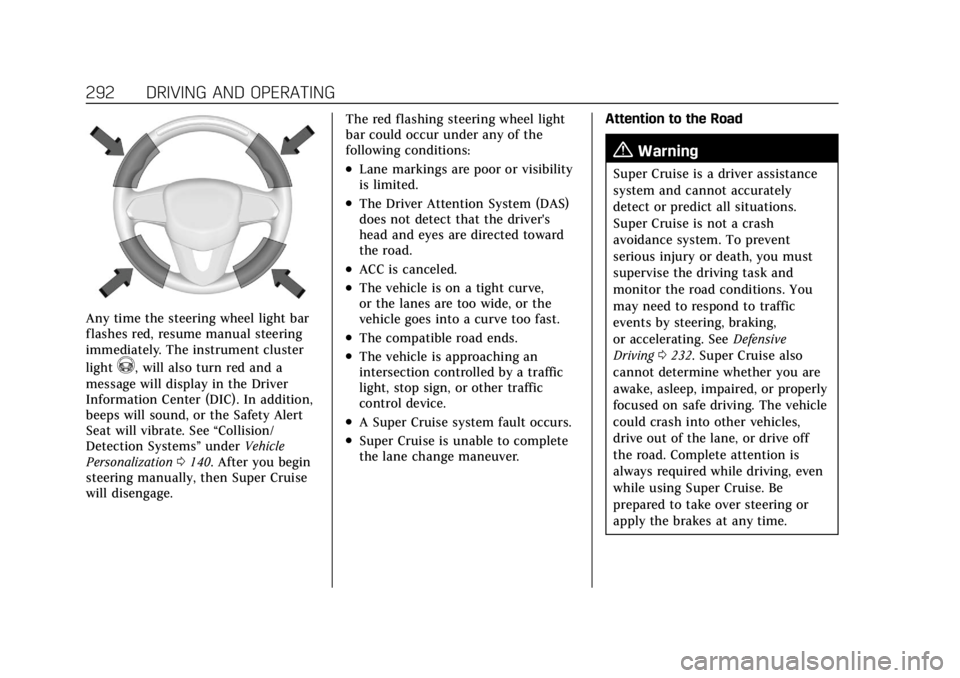
To begin steering manually, hold the
steering wheel firmly (with both
hands) using the highlighted regions
as shown in the picture below.
Page 293 of 508
Cadillac Escalade Owner Manual (GMNA-Localizing-U.S./Canada/Mexico-
15567102) - 2022 - CRC - 11/17/21
292 DRIVING AND OPERATING
Any time the steering wheel light bar
flashes red, resume manual steering
immediately. The instrument cluster
light
^, will also turn red and a
message will display in the Driver
Information Center (DIC). In addition,
beeps will sound, or the Safety Alert
Seat will vibrate. See “Collision/
Detection Systems” underVehicle
Personalization 0140. After you begin
steering manually, then Super Cruise
will disengage. The red flashing steering wheel light
bar could occur under any of the
following conditions:
.Lane markings are poor or visibility
is limited.
.The Driver Attention System (DAS)
does not detect that the driver's
head and eyes are directed toward
the road.
.ACC is canceled.
.The vehicle is on a tight curve,
or the lanes are too wide, or the
vehicle goes into a curve too fast.
.The compatible road ends.
.The vehicle is approaching an
intersection controlled by a traffic
light, stop sign, or other traffic
control device.
.A Super Cruise system fault occurs.
.Super Cruise is unable to complete
the lane change maneuver.
Attention to the Road
{Warning
Super Cruise is a driver assistance
system and cannot accurately
detect or predict all situations.
Super Cruise is not a crash
avoidance system. To prevent
serious injury or death, you must
supervise the driving task and
monitor the road conditions. You
may need to respond to traffic
events by steering, braking,
or accelerating. See
Defensive
Driving 0232. Super Cruise also
cannot determine whether you are
awake, asleep, impaired, or properly
focused on safe driving. The vehicle
could crash into other vehicles,
drive out of the lane, or drive off
the road. Complete attention is
always required while driving, even
while using Super Cruise. Be
prepared to take over steering or
apply the brakes at any time.
Page 320 of 508
Cadillac Escalade Owner Manual (GMNA-Localizing-U.S./Canada/Mexico-
15567102) - 2022 - CRC - 11/17/21
DRIVING AND OPERATING 319
Rear Pedestrian Alert can be set to Off
or Alert. See“Rear Pedestrian
Detection ”in “Collision/Detection
Systems” underVehicle Personalization
0 140. If equipped, alerts can be set to
beeps or seat pulses. See “Alert Type”
in “Collision/Detection Systems” under
Vehicle Personalization 0140.
Rear Cross Traffic Alert
(RCTA) System
If equipped, Rear Cross Traffic Alert
(RCTA) displays a red warning triangle
with a left or right pointing arrow on
the infotainment display to warn of
traffic coming from the left or right.
This system detects objects coming
from up to 20 m (65 ft) from the left
or right side of the vehicle. When an
object is detected, either three beeps
sound from the left or right or three
Safety Alert Seat pulses occur on the
left or right side, depending on the
direction of the detected vehicle.
Driving With a Trailer
Use caution while backing up when
towing a trailer. The RCTA feature is
automatically disabled when a trailer
is attached to the vehicle. Turning the Features On or Off
RCTA can be turned on or off using
the infotainment system. See
“Collision/Detection Systems”
under
Vehicle Personalization 0140.
Assistance Systems for
Driving
If equipped, when driving the vehicle
in a forward gear, Forward Collision
Alert (FCA), Front Pedestrian Braking
(FPB), Lane Keep Assist (LKA), Side
Blind Zone Alert (SBZA), Night Vision
System, Lane Change Alert (LCA),
and/or Automatic Emergency Braking
(AEB) can help to avoid a crash or
reduce crash damage.
Forward Collision Alert
(FCA) System
The FCA system may help to avoid or
reduce the harm caused by front-end
crashes. When approaching a vehicle
ahead too quickly, FCA provides a red
flashing alert on the windshield and
rapidly beeps or pulses the driver seat.
FCA also lights an amber visual alert
if following another vehicle much too
closely. FCA detects vehicles within a distance
of approximately 60 m (197 ft) and
operates at speeds above 8 km/h
(5 mph). If the vehicle has Adaptive
Cruise Control (ACC), it can detect
vehicles to distances of approximately
110 m (360 ft) and operates at all
speeds. See
Adaptive Cruise Control
(Advanced) 0275.
{Warning
FCA is a warning system and does
not apply the brakes. When
approaching a slower-moving or
stopped vehicle ahead too rapidly,
or when following a vehicle too
closely, FCA may not provide a
warning with enough time to help
avoid a crash. It also may not
provide any warning at all. FCA
does not warn of pedestrians,
animals, signs, guardrails, bridges,
construction barrels, or other
objects. Be ready to take action and
apply the brakes. See Defensive
Driving 0232.
Page 326 of 508

Cadillac Escalade Owner Manual (GMNA-Localizing-U.S./Canada/Mexico-
15567102) - 2022 - CRC - 11/17/21
DRIVING AND OPERATING 325
Cleaning the System
If FPB does not seem to operate
properly, cleaning the outside of the
windshield in front of the rearview
mirror may correct the issue.
Night Vision System
If equipped, this system can help the
driver see and alert the driver to
pedestrians or large animals ahead of
the vehicle beyond the area lit by the
headlamps. A thermal heat image of
the view ahead is displayed when it is
dark enough outside. If a pedestrian
or large animal is detected more than
25 m (82 ft) away, a yellow box
appears around the pedestrian or large
animal. With the vehicle moving,
when the system detects a pedestrian
or large animal may approach or cross
the vehicle's path, an amber
pedestrian or animal icon displays and
an amber box appears around the
identified object. When the system
detects that the vehicle is approaching
a pedestrian or large animal ahead too
quickly, the yellow or amber box
changes to red.
With the Pedestrian Braking system
turned on, Night Vision provides a red
Head-Up Display (HUD) alert when
the system detects that the vehicle is
approaching a pedestrian ahead too
quickly. In addition, an alert beeps or
the Safety Alert Seat pulses,
if equipped. SeeFront Pedestrian
Braking (FPB) System 0323.
{Warning
The system does not detect all
objects or the vehicle distance from
objects. The system may not
provide a warning with enough time
to help avoid a crash.
1. Low-Beam Headlamps
2. High-Beam Headlamps
3. Night Vision System
By selecting a view on the instrument
cluster, the Night Vision image can be
displayed. See Instrument Cluster 0115
. The Night Vision system can operate
only if:
.The ignition is on.
.The vehicle is in P (Park) or a
forward gear.
.It is dark enough outside.
.The headlamps are on, except when
parked.
Page 328 of 508

Cadillac Escalade Owner Manual (GMNA-Localizing-U.S./Canada/Mexico-
15567102) - 2022 - CRC - 11/17/21
DRIVING AND OPERATING 327
Warning (Continued)
.If the pedestrian is wearing
certain types of clothing.
.If headlamps are off, except
when parked.
.If the outside temperature
is high.
.Due to poor visibility, including
in heavy fog, rain, or snow.
.If the sensor is blocked by dirt,
snow, rain, or ice.
Be ready to take action and apply
the brakes. For more information,
see Defensive Driving 0232. Keep
the Night Vision sensor clean and
in good repair.
Night Vision Detection Unavailable
and icon
\is displayed when the
Night Vision system is unable to
detect pedestrians or animals. It may
be caused by high ambient
temperatures or other conditions. The
message can be dismissed and the
system does not need service. In rain, snow, or fog the image may
not be clear and the direction of the
road ahead may not be seen. In more
severe weather conditions, the image
may be unclear and unusable. The
system does not need service.
Keep the night vision camera clean by
activating the front windshield washer
five times when it is dark enough for
the system to operate. If the Night
Vision image still looks blurry, use a
soft wet cloth to gently clean the
sensor camera lens and dry
thoroughly. The night vision camera is
behind the lower front grille below the
driver side headlamp.
The camera must also be aligned to
work correctly. If the camera needs
adjustment, see your dealer. Do not
attempt to adjust the camera yourself.Side Blind Zone
Alert (SBZA)
If equipped, the SBZA system is a
lane-changing aid that assists drivers
with avoiding crashes that occur with
moving vehicles in the side blind
zone, or blind spot areas. When the
vehicle is in a forward gear, the left orright side mirror display will light up
if a moving vehicle is detected in that
blind zone. If the turn signal is
activated and a vehicle is also
detected on the same side, the display
will flash as an extra warning not to
change lanes. Since this system is part
of the Lane Change Alert (LCA)
system, read the entire LCA section
before using this feature.
Lane Change Alert (LCA)
If equipped, the Lane Change Alert
(LCA) system is a lane-changing aid
that can assist drivers with avoiding
lane change crashes with moving
vehicles in the side blind zone,
or blind spot areas or with vehicles
rapidly approaching these areas from
behind. When a vehicle is detected in
the blind zone, the LCA warning
display will light up in the
corresponding side mirror and will
flash if the turn signal is on. The Side
Blind Zone Alert (SBZA) system is
included as part of the LCA system.
Page 333 of 508
Cadillac Escalade Owner Manual (GMNA-Localizing-U.S./Canada/Mexico-
15567102) - 2022 - CRC - 11/17/21
332 DRIVING AND OPERATING
when LKA is disabled. On some
vehicles, a long press of over
three seconds is required to turn
LKA off.
When on,
Ais white, if equipped,
indicating that the system is not ready
to assist.
Ais green if LKA is ready
to assist. LKA may assist by gently
turning the steering wheel if the
vehicle approaches a detected lane
marking.
Ais amber when
assisting. It may also provide a Lane
Departure Warning (LDW) alert by
flashing
Aamber if the vehicle
crosses a detected lane marking.
Additionally, there may be three
beeps, or the driver seat may pulse
three times, on the right or left,
depending on the lane departure
direction.
Take Steering
The LKA system does not
continuously steer the vehicle. If LKA
does not detect active driver steering,
an alert and chime may be provided.
Steer the vehicle to dismiss. LKA may
become temporarily unavailable after
repeated take steering alerts.
When the System Does Not
Seem to Work Properly
The system performance may be
affected by:
.Close vehicles ahead.
.Sudden lighting changes, such as
when driving through tunnels.
.Banked roads.
.Roads with poor lane markings,
such as two-lane roads.
If the LKA system is not functioning
properly when lane markings are
clearly visible, cleaning the windshield
may help.
A camera blocked message may
display if the camera is blocked. Some
driver assistance systems may have
reduced performance or not work at
all. An LKA or LDW unavailable
message may display if the systems
are temporarily unavailable. This
message could be due to a blocked
camera. The LKA system does not
need service. Clean the outside of the
windshield behind the rearview mirror. LKA assistance and/or LDW alerts
may occur due to tar marks, shadows,
cracks in the road, temporary or
construction lane markings, or other
road imperfections. This is normal
system operation; the vehicle does not
need service. Turn LKA off if these
conditions continue.Fuel
Top Tier Fuel
GM recommends the use of TOP TIER
Detergent Gasoline to keep the engine
clean, reduce engine deposits, and
maintain optimal vehicle performance.
Look for the TOP TIER Logo or see
www.toptiergas.com for a list of TOP
TIER Detergent Gasoline marketers
and applicable countries.
Page 337 of 508
Cadillac Escalade Owner Manual (GMNA-Localizing-U.S./Canada/Mexico-
15567102) - 2022 - CRC - 11/17/21
336 DRIVING AND OPERATING
Warning (Continued)
.Avoid using electronic devices
while pumping fuel.
Trailer Towing
General Towing
Information
Only use towing equipment that has
been designed for the vehicle. Contact
your dealer or trailering dealer for
assistance with preparing the vehicle
to tow a trailer. Read the entire
section before towing a trailer.
To tow a disabled vehicle, seeTowing
the Vehicle 0439. To tow the vehicle
behind another vehicle such as a
motor home, see Recreational Vehicle
Towing 0440.
Driving Characteristics and
Towing Tips
{Warning
You can lose control when towing a
trailer if the correct equipment is
not used or the vehicle is not driven
properly. For example, if the trailer
is too heavy or the trailer brakes are
inadequate for the load, the vehicle
may not stop as expected. You and
others could be seriously injured.
The vehicle may also be damaged,
and the repairs would not be
covered by the vehicle warranty.
Pull a trailer only if all the steps in
this section have been followed. Ask
your dealer for advice and
information about towing a trailer
with the vehicle.
Driving with a Trailer
Trailering is different than just driving
the vehicle by itself. Trailering means
changes in handling, acceleration,
braking, durability, and fuel economy. Successful, safe trailering takes correct
equipment, and it has to be used
properly.
The following information has many
time-tested, important trailering tips
and safety rules. Many of these are
important for your safety and that of
your passengers. Read this section
carefully before pulling a trailer.
When towing a trailer:
.Become familiar with and follow all
state and local laws that apply to
trailer towing. These requirements
vary from state to state.
.State laws may require the use of
extended side view mirrors. Even if
not required, you should install
extended side view mirrors if your
visibility is limited or restricted
while towing.
.Do not tow a trailer during the first
800 km (500 mi) of vehicle use to
prevent damage to the engine, axle,
or other parts.
.It is recommended to perform the
first oil change before heavy towing.
Page 353 of 508
Cadillac Escalade Owner Manual (GMNA-Localizing-U.S./Canada/Mexico-
15567102) - 2022 - CRC - 11/17/21
352 DRIVING AND OPERATING
TRAILER OUTPUT: This displays
anytime a trailer with electric brakes
is connected. Output to the trailer
brakes is based on the amount of
vehicle braking present and relative to
the Trailer Gain setting. Output is
displayed from 0 to 100% for each
gain setting.
The Trailer Output will indicate
“- - - - - -”on the Trailer Brake Display
Page whenever the following occur:
.No trailer is connected.
.A trailer without electric brakes is
connected, no DIC message will
display
.A trailer with electric brakes has
become disconnected, a CHECK
TRAILER WIRING message displays
on the DIC
.There is a fault present in the
wiring to the trailer brakes, a
CHECK TRAILER WIRING message
displays on the DIC
.The ITBC system is not working due
to a fault, a SERVICE TRAILER
BRAKE SYSTEM message displays
in the DIC Manual Trailer Brake Apply Lever
Slide this lever right to apply the
trailer’s electric brakes independent of
the vehicle’s brakes. Use this lever to
adjust Trailer Gain to achieve the
proper power output to the trailer
brakes. The trailer's and the vehicle's
brake lamps will come on when either
vehicle brakes or manual trailer brakes
are applied and properly connected.
Trailer Gain Adjustment Procedure
Trailer Gain should be set for a
specific trailering condition and it
must be readjusted anytime vehicle
loading, trailer loading, or road surface
conditions change.
{Warning
Trailer brakes that are over-gained
or under-gained may not stop the
vehicle and the trailer as intended
and can result in a crash. Always
follow the instructions to set the
Trailer Gain for the proper trailer
stopping performance.
To adjust Trailer Gain for each towing
condition:
1. Drive the vehicle with the trailer attached on a level road surface
representative of the towing
condition and free of traffic at
about 32 to 40 km/h (20 to 25 mph)
and fully apply the Manual Trailer
Brake apply lever.
Note
Adjusting Trailer Gain at speeds lower
than 32 to 40 km/h (20 to 25 mph)
may result in an incorrect gain
setting. 2. Adjust the Trailer Gain, using the Trailer Gain adjustment buttons, to
just below the point of trailer
wheel lock-up, indicated by trailer
wheel squeal or tire smoke when a
trailer wheel locks.
Note
Trailer wheel lock-up may not occur if
towing a heavily loaded trailer. In this
case, adjust the Trailer Gain to the
highest allowable setting for the
towing condition.
Page 354 of 508
Cadillac Escalade Owner Manual (GMNA-Localizing-U.S./Canada/Mexico-
15567102) - 2022 - CRC - 11/17/21
DRIVING AND OPERATING 353
3. Readjust Trailer Gain any timevehicle loading, trailer loading,
or road surface conditions change
or if trailer wheel lock-up is
noticed at any time while towing.
Other ITBC-Related DIC Messages
TRAILER BRAKES CONNECTED: This
message will briefly display when a
trailer with electric brakes is first
connected to the vehicle. This
message will automatically turn off in
about 10 seconds. This message can
be acknowledged before it
automatically turns off.
CHECK TRAILER WIRING: This
message will display if:
.The ITBC system first determines
connection to a trailer with electric
brakes and then the trailer harness
becomes disconnected the vehicle.
If the disconnect occurs while the
vehicle is stationary, this message
will automatically turn off in about
30 seconds. This message will also
turn off if it is acknowledged or if
the trailer harness is reconnected. If the disconnect occurs while the
vehicle is moving, this message will
continue until the ignition is turned
off. This message will also turn off if
it is acknowledged or if the trailer
harness is reconnected.
.There is an electrical fault in the
wiring to the trailer brakes. This
message will continue as long as
there is an electrical fault in the
trailer wiring. This message will also
turn off if it is acknowledged.
To determine whether the electrical
fault is on the vehicle side or trailer
side of the trailer wiring harness
connection: 1. Disconnect the trailer wiring harness from the vehicle.
2. Turn the ignition off.
3. Wait 10 seconds, then turn the ignition back to RUN.
4. If the CHECK TRAILER WIRING message reappears, the electrical
fault is on the vehicle side. If the CHECK TRAILER WIRING
message only reappears when
connecting the trailer wiring
harness to the vehicle, the
electrical fault is on the trailer side.
SERVICE TRAILER BRAKE SYSTEM:
This message will display when there
is a problem with the ITBC system.
If this message continues over
multiple ignition cycles, there is a
problem with the ITBC system. Have
the vehicle serviced.
If either the CHECK TRAILER WIRING
or SERVICE TRAILER BRAKE SYSTEM
message displays while driving, the
ITBC system may not be fully
functional or may not function at all.
When traffic conditions allow,
carefully pull the vehicle over to the
side of the road and turn the ignition
off. Check the wiring connection to
the trailer and turn the ignition back
on. If either of these messages
continues, either the vehicle or trailer
needs service.
A GM dealer may be able to diagnose
and repair problems with the trailer.
However, any diagnosis and repair of
the trailer is not covered under the