instrument panel CADILLAC ESCALADE 2022 Owner's Manual
[x] Cancel search | Manufacturer: CADILLAC, Model Year: 2022, Model line: ESCALADE, Model: CADILLAC ESCALADE 2022Pages: 508, PDF Size: 9.18 MB
Page 242 of 508

Cadillac Escalade Owner Manual (GMNA-Localizing-U.S./Canada/Mexico-
15567102) - 2022 - CRC - 11/17/21
DRIVING AND OPERATING 241
Warning (Continued)
.Open a window about 5 cm (2 in)
on the vehicle side that is away
from the wind, to bring in
fresh air.
.Fully open the air outlets on or
under the instrument panel.
.Adjust the climate control
system to circulate the air inside
the vehicle and set the fan speed
to the highest setting. See
“Climate Control Systems.”
For more information about CO, see
Engine Exhaust 0252.
To save fuel, run the engine for short
periods to warm the vehicle and then
shut the engine off and partially close
the window. Moving about to keep
warm also helps.
If it takes time for help to arrive,
when running the engine, push the
accelerator pedal slightly so the
engine runs faster than the idle speed.
This keeps the battery charged to
restart the vehicle and to signal for
help with the headlamps. Do this as
little as possible, to save fuel.
If the Vehicle Is Stuck
Slowly and cautiously spin the wheels
to free the vehicle when stuck in sand,
mud, ice, or snow.
If stuck too severely for the traction
system to free the vehicle, turn the
traction system off and use the
rocking method. See Traction Control/
Electronic Stability Control 0265.
{Warning
If the vehicle's tires spin at high
speed, they can explode, and you or
others could be injured. The vehicle
can overheat, causing an engine
compartment fire or other damage.
Spin the wheels as little as possible
and avoid going above 56 km/h
(35 mph).
Rocking the Vehicle to Get it Out
Turn the steering wheel left and right
to clear the area around the front
wheels. Turn off any traction system.
Shift back and forth between
R (Reverse) and a low forward gear,
spinning the wheels as little as
possible. To prevent transmission wear, wait until the wheels stop
spinning before shifting gears. Release
the accelerator pedal while shifting,
and press lightly on the accelerator
pedal when the transmission is in
gear. Slowly spinning the wheels in
the forward and reverse directions
causes a rocking motion that could
free the vehicle. If that does not get
the vehicle out after a few tries, it
might need to be towed out. If the
vehicle does need to be towed out, see
Towing the Vehicle
0439.
Vehicle Load Limits
It is very important to know how
much weight the vehicle can carry.
This weight is called the vehicle
capacity weight and includes the
weight of all occupants, cargo, and
all nonfactory-installed options.
Two labels on the vehicle may
show how much weight it was
designed to carry, the Tire and
Loading Information label and the
Certification/Tire label.
Page 266 of 508
Cadillac Escalade Owner Manual (GMNA-Localizing-U.S./Canada/Mexico-
15567102) - 2022 - CRC - 11/17/21
DRIVING AND OPERATING 265
When Automatic Vehicle Hold (AVH)
is turned on and the vehicle is braked
to a stop, AVH prevents the vehicle
from moving during the transition
from brake pedal release to accelerator
pedal apply. The brakes release when
the accelerator pedal is applied. The
brakes may also release under other
conditions. Do not rely on AVH to
hold the vehicle.
If the accelerator pedal is not applied
within a few minutes, the Electric
Parking Brake will apply. The parking
brake will also apply if the driver door
is opened or the driver seat belt is
unfastened while AVH is holding the
vehicle.
AVH can be turned on by pressing
AUTO HOLD. The indicator light on
the switch will come on. The AVH
light on the instrument panel will
come on while AVH is actively holding
the vehicle. SeeAutomatic Vehicle Hold
(AVH) Light 0126.Ride Control Systems
Traction Control/Electronic
Stability Control
System Operation
The vehicle has a Traction Control
System (TCS) and StabiliTrak/
Electronic Stability Control (ESC).
These systems help limit wheel spin
and assist the driver in maintaining
control, especially on slippery road
conditions.
TCS activates if it senses any of the
drive wheels are spinning or beginning
to lose traction. When this happens,
TCS applies the brakes to the spinning
wheels and reduces engine power to
limit wheel spin.
StabiliTrak/ESC activates when the
vehicle senses a difference between
the intended path and the direction
the vehicle is actually traveling.
StabiliTrak/ESC selectively applies
braking pressure to one or more of the
vehicle wheel brakes to assist the
driver in keeping the vehicle on the
intended path. Trailer Sway Control (TSC) is also on automatically when
the vehicle is started. See
Trailer Sway
Control (TSC) 0354.
If cruise control is being used and
traction control or StabiliTrak/ESC
begins to limit wheel spin, cruise
control will disengage. Cruise control
may be turned back on when road
conditions allow.
Both systems come on automatically
when the vehicle is started and begins
to move. The systems may be heard or
felt while they are operating or while
performing diagnostic checks. This is
normal and does not mean there is a
problem with the vehicle.
It is recommended to leave both
systems on for normal driving
conditions, but it may be necessary to
turn TCS off if the vehicle gets stuck
in sand, mud, ice, or snow. See If the
Vehicle Is Stuck 0241 and “Turning
the Systems Off and On ”later in this
section.
When the transfer case (if equipped)
is in Four-Wheel Drive Low, the TCS
and StabiliTrak/ESC are automatically
Page 269 of 508
Cadillac Escalade Owner Manual (GMNA-Localizing-U.S./Canada/Mexico-
15567102) - 2022 - CRC - 11/17/21
268 DRIVING AND OPERATING
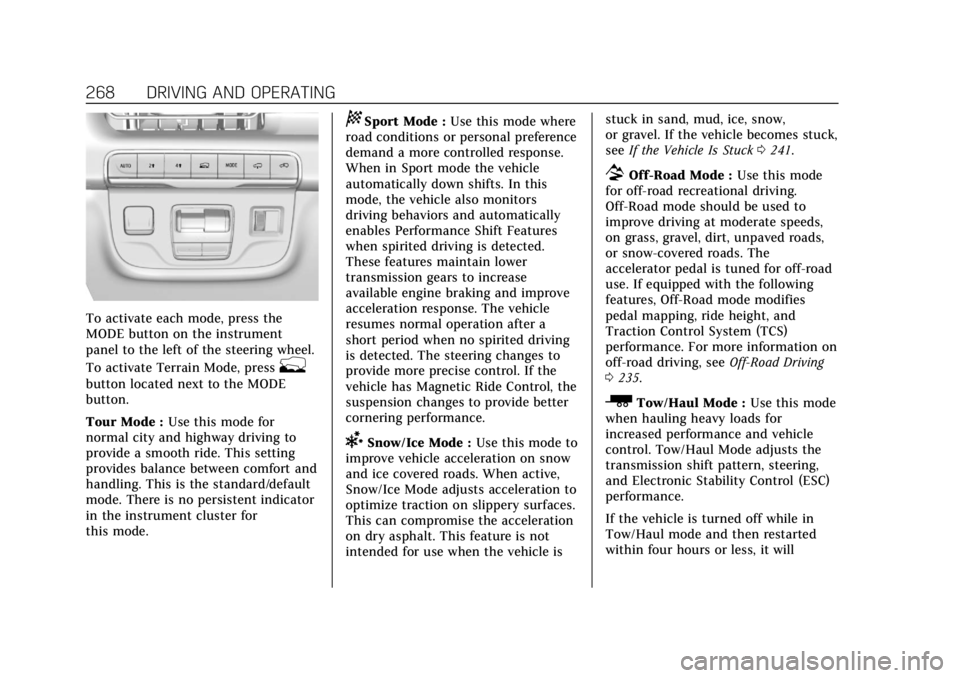
To activate each mode, press the
MODE button on the instrument
panel to the left of the steering wheel.
To activate Terrain Mode, press
g
button located next to the MODE
button.
Tour Mode :Use this mode for
normal city and highway driving to
provide a smooth ride. This setting
provides balance between comfort and
handling. This is the standard/default
mode. There is no persistent indicator
in the instrument cluster for
this mode.
8Sport Mode : Use this mode where
road conditions or personal preference
demand a more controlled response.
When in Sport mode the vehicle
automatically down shifts. In this
mode, the vehicle also monitors
driving behaviors and automatically
enables Performance Shift Features
when spirited driving is detected.
These features maintain lower
transmission gears to increase
available engine braking and improve
acceleration response. The vehicle
resumes normal operation after a
short period when no spirited driving
is detected. The steering changes to
provide more precise control. If the
vehicle has Magnetic Ride Control, the
suspension changes to provide better
cornering performance.
6Snow/Ice Mode : Use this mode to
improve vehicle acceleration on snow
and ice covered roads. When active,
Snow/Ice Mode adjusts acceleration to
optimize traction on slippery surfaces.
This can compromise the acceleration
on dry asphalt. This feature is not
intended for use when the vehicle is stuck in sand, mud, ice, snow,
or gravel. If the vehicle becomes stuck,
see
If the Vehicle Is Stuck 0241.
7Off-Road Mode : Use this mode
for off-road recreational driving.
Off-Road mode should be used to
improve driving at moderate speeds,
on grass, gravel, dirt, unpaved roads,
or snow-covered roads. The
accelerator pedal is tuned for off-road
use. If equipped with the following
features, Off-Road mode modifies
pedal mapping, ride height, and
Traction Control System (TCS)
performance. For more information on
off-road driving, see Off-Road Driving
0 235.
_Tow/Haul Mode : Use this mode
when hauling heavy loads for
increased performance and vehicle
control. Tow/Haul Mode adjusts the
transmission shift pattern, steering,
and Electronic Stability Control (ESC)
performance.
If the vehicle is turned off while in
Tow/Haul mode and then restarted
within four hours or less, it will
Page 327 of 508

Cadillac Escalade Owner Manual (GMNA-Localizing-U.S./Canada/Mexico-
15567102) - 2022 - CRC - 11/17/21
326 DRIVING AND OPERATING
Adjust the instrument panel
brightness to make the image no
brighter than necessary. Turn the
image off by selecting another view
on the instrument cluster. The night
vision image brightness and contrast
can be adjusted individually using the
touchscreen to the left of the
instrument cluster.
Warm objects, such as pedestrians,
animals, and other moving vehicles,
should appear whiter on the Night
Vision display. Cold objects, such as
the sky, signs, and parked vehicles,
should appear darker. Night Vision
only shows objects that are warmer or
colder than the surroundings. It does
not detect brake lamps, turn signals,
emergency flashers, traffic lights,
or sign information.
Use this system as an aid by
occasionally glancing at the image. Do
not stare at the image or use the
image under well-lit conditions.{Warning
Do not stare at the image while
driving as this might cause
important objects ahead not to be
seen. You could crash, and you or
others could be injured.
When a pedestrian or large animal is
detected, a yellow box will be drawn
around it. With the vehicle moving
when the pedestrian or animal may be
in the vehicle path, an amber box
displays around the pedestrian or
animal on the Night Vision display
and an amber pedestrian icon,
~,
or animal icon,
!, displays on the
instrument cluster. This pedestrian
icon is also shown on the Head-Up
Display (HUD). When the system
detects the vehicle is approaching a
pedestrian or large animal too quickly,
the amber pedestrian icon or animal
icon and amber box turns red, and a
red flashing icon,
~or!, displays on
the HUD with rapid beeping or
pulsing of the Safety Alert Seat,
if equipped. System pedestrian icons, beeps, and
(if equipped) Safety Alert Seat pulses
can be set to Off through vehicle
personalization by turning off the
Front Pedestrian Braking system. See
“Front Pedestrian Detection
”in
“Collision/Detection Systems” under
Vehicle Personalization 0140.
{Warning
The Night Vision system does not
automatically brake the vehicle.
It does not provide alerts unless it
detects a pedestrian or large
animal. The system may not detect
pedestrians, including children,
or animals:
.If they are less than 25 m
(82 ft) away.
.If they are not directly ahead in
the sensor coverage area, fully
visible, standing upright, or part
of a group.
.If the person or animal is moving
too quickly through the field of
view, such as a bicyclist.
(Continued)
Page 338 of 508
Cadillac Escalade Owner Manual (GMNA-Localizing-U.S./Canada/Mexico-
15567102) - 2022 - CRC - 11/17/21
DRIVING AND OPERATING 337
.During the first 800 km (500 mi) of
trailer towing, do not drive over
80 km/h (50 mph) and do not make
starts at full throttle.
.Vehicles can tow in D (Drive).
Tow/Haul Mode is recommended
for heavier trailers. SeeDriver Mode
Control 0267. If the transmission
downshifts too often, a lower gear
may be selected using Manual
Mode. See Manual Mode 0256.
If equipped, the following driver
assistance features should be turned
off when towing a trailer:
.Park Assist
.Automatic Parking Assist (APA)
.Reverse Automatic Braking (RAB)
If equipped, the following driver
assistance features should be turned
to alert or off when towing a trailer,
unless equipped with Super Cruise:
.Automatic Emergency
Braking (AEB)
.Front Pedestrian Braking (FPB)
If equipped with Lane Change Alert
(LCA), the LCA detection zones that
extend back from the side of the
vehicle do not move further back when a trailer is towed. Use caution
while changing lanes when towing a
trailer.
If equipped with Rear Cross Traffic
Alert (RCTA), use caution while
backing up when towing a trailer, as
the RCTA detection zones that extend
out from the back of the vehicle do
not move further back when a trailer
is towed.
{Warning
When towing a trailer, exhaust
gases may collect at the rear of the
vehicle and enter if the liftgate,
trunk/hatch, or rear-most window
is open.
When towing a trailer:
.Do not drive with the liftgate,
trunk/hatch, or rear-most
window open.
.Fully open the air outlets on or
under the instrument panel.
(Continued)
Warning (Continued)
.Also adjust the climate control
system to a setting that brings in
only outside air. See“Climate
Control Systems” in the Index.
For more information about carbon
monoxide, see Engine Exhaust
0 252.
Towing a trailer requires experience.
The combination of the vehicle and
trailer is longer and not as responsive
as the vehicle itself. Get used to the
handling and braking of the
combination by driving on a level road
surface before driving on public roads.
The trailer structure, the tires, and the
brakes must be all be rated to carry
the intended cargo. Inadequate trailer
equipment can cause the combination
to operate in an unexpected or unsafe
manner. Before driving, inspect all
trailer hitch parts and attachments,
safety chains, electrical connectors,
lamps, tires, and mirrors. See Towing
Equipment 0344. If the trailer has
electric brakes, start the combination
moving and then manually apply the
Page 351 of 508

Cadillac Escalade Owner Manual (GMNA-Localizing-U.S./Canada/Mexico-
15567102) - 2022 - CRC - 11/17/21
350 DRIVING AND OPERATING
start-up if the trailer was
disconnected while the vehicle was
off. Check the trailer connection as
appropriate.
.CHECK TRAILER XXX LAMP
appears when there is a detected
lamp or wiring fault on the trailer.
Check the trailer wiring and lamps.
Turn Signals When Towing a
Trailer
When properly connected, the trailer
turn signals should will illuminate to
indicate the vehicle is turning,
changing lanes, or stopping. When
towing a trailer, the arrows on the
instrument cluster will illuminate
even if the trailer is not properly
connected or the bulbs are
burned out.
Tow/Haul Mode
For instructions on how to enter
Tow/Haul mode, seeDriver Mode
Control 0267.
Tow/Haul assists when pulling a
heavy trailer or a large or heavy load. Tow/Haul Mode is designed to be
most effective when the vehicle and
trailer combined weight is at least
75% of the vehicle's Gross Combined
Weight Rating (GCWR). See
“Maximum Trailer Weight
”under
Trailer Towing 0340.
Tow/Haul Mode is most useful when
towing a heavy trailer or carrying a
large or heavy load:
.through rolling terrain
.in stop-and-go traffic
.in busy parking lots
Operating the vehicle in Tow/Haul
Mode when lightly loaded or not
towing will not cause damage;
however, it is not recommended and
may result in unpleasant engine and
transmission driving characteristics
and reduced fuel economy.
Integrated Trailer Brake Control
System
The vehicle may have an Integrated
Trailer Brake Control (ITBC) system
for use with electric trailer brakes or
most electric over hydraulic trailer brake systems. These instructions
apply to both types of electric trailer
brakes.
This symbol is on the Trailer Brake
Control Panel on vehicles with an
ITBC system. The power output to the
trailer brakes is proportional to the
amount of vehicle braking. This
available power output to the trailer
brakes can be adjusted to a wide
range of trailering situations.
The ITBC system is integrated with
the vehicle’s brake, anti-lock brake,
and StabiliTrak/Electronic Stability
Control (ESC) systems. In trailering
conditions that cause the vehicle’s
anti-lock brake or StabiliTrak/ESC
systems to activate, power sent to the
trailer's brakes will be automatically
adjusted to minimize trailer wheel
lock-up. This does not imply that the
trailer has StabiliTrak/ESC.
Page 352 of 508
Cadillac Escalade Owner Manual (GMNA-Localizing-U.S./Canada/Mexico-
15567102) - 2022 - CRC - 11/17/21
DRIVING AND OPERATING 351
If the vehicle’s brake, anti-lock brake,
or StabiliTrak systems are not
functioning properly, the ITBC system
may not function fully or at all. Make
sure all of these systems are fully
operational to allow the ITBC system
to function properly.
The ITBC system is powered through
the vehicle's electrical system. Turning
the ignition off will also turn off the
ITBC system. The ITBC system is fully
functional only when the ignition is in
ON/RUN.
{Warning
Connecting a trailer that has an air
brake system may result in reduced
or complete loss of trailer braking,
including increased stopping
distance or trailer instability which
could result in serious injury, death,
or property damage. Only use the
ITBC system with electric or electric
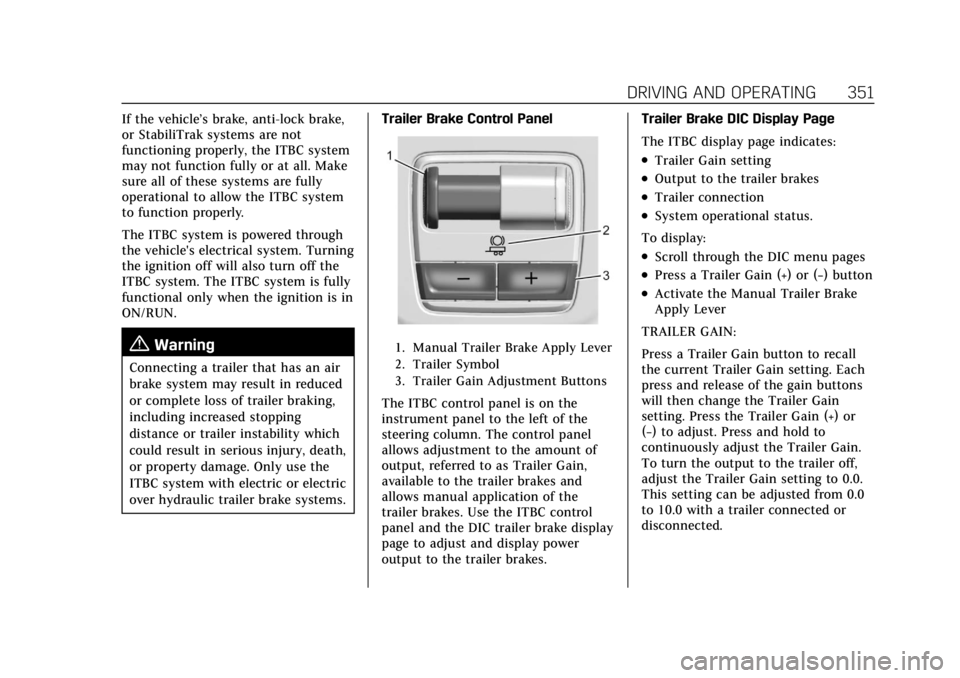
over hydraulic trailer brake systems.Trailer Brake Control Panel
1. Manual Trailer Brake Apply Lever
2. Trailer Symbol
3. Trailer Gain Adjustment Buttons
The ITBC control panel is on the
instrument panel to the left of the
steering column. The control panel
allows adjustment to the amount of
output, referred to as Trailer Gain,
available to the trailer brakes and
allows manual application of the
trailer brakes. Use the ITBC control
panel and the DIC trailer brake display
page to adjust and display power
output to the trailer brakes. Trailer Brake DIC Display Page
The ITBC display page indicates:
.Trailer Gain setting
.Output to the trailer brakes
.Trailer connection
.System operational status.
To display:
.Scroll through the DIC menu pages
.Press a Trailer Gain (+) or (−) button
.Activate the Manual Trailer Brake
Apply Lever
TRAILER GAIN:
Press a Trailer Gain button to recall
the current Trailer Gain setting. Each
press and release of the gain buttons
will then change the Trailer Gain
setting. Press the Trailer Gain (+) or
(−) to adjust. Press and hold to
continuously adjust the Trailer Gain.
To turn the output to the trailer off,
adjust the Trailer Gain setting to 0.0.
This setting can be adjusted from 0.0
to 10.0 with a trailer connected or
disconnected.
Page 369 of 508
Cadillac Escalade Owner Manual (GMNA-Localizing-U.S./Canada/Mexico-
15567102) - 2022 - CRC - 11/17/21
368 VEHICLE CARE
Vehicle Care
General Information
General Information . . . . . . . . . . . . . 369
California Perchlorate MaterialsRequirements . . . . . . . . . . . . . . . . . . . 369
Accessories and Modifications . . . . . . . . . . . . . . . . . . . 369
Vehicle Checks
Doing Your OwnService Work . . . . . . . . . . . . . . . . . . . . 370
Hood . . . . . . . . . . . . . . . . . . . . . . . . . . . . . . 371
Engine Compartment Overview . . . . . . . . . . . . . . . . . . . . . . . . . 372
Engine Oil . . . . . . . . . . . . . . . . . . . . . . . . . 373
Engine Oil Life System . . . . . . . . . . . 375
Automatic Transmission Fluid . . . . . . . . . . . . . . . . . . . . . . . . . . . . . 376
Engine Air Filter Life System . . . . 377
Engine Air Cleaner/Filter . . . . . . . . . 377
Cooling System . . . . . . . . . . . . . . . . . . . 378
Engine Overheating . . . . . . . . . . . . . . 381
Engine Fan . . . . . . . . . . . . . . . . . . . . . . . . 382
Washer Fluid . . . . . . . . . . . . . . . . . . . . . 383
Brakes . . . . . . . . . . . . . . . . . . . . . . . . . . . . . 383
Brake Pad Life System . . . . . . . . . . . 384
Brake Fluid . . . . . . . . . . . . . . . . . . . . . . . 385
Battery - North America . . . . . . . . . 386 Four-Wheel Drive . . . . . . . . . . . . . . . . 386
Front Axle . . . . . . . . . . . . . . . . . . . . . . . . 387
Rear Axle . . . . . . . . . . . . . . . . . . . . . . . . . 387
Park Brake and P (Park)
Mechanism Check . . . . . . . . . . . . . . 387
Wiper Blade Replacement . . . . . . . 388
Glass Replacement . . . . . . . . . . . . . . . 389
Windshield Replacement . . . . . . . . 389
Gas Strut(s) . . . . . . . . . . . . . . . . . . . . . . . 389Headlamp Aiming
Front Headlamp Aiming . . . . . . . . . 390
Bulb Replacement
Bulb Replacement . . . . . . . . . . . . . . . . 390
LED Lighting . . . . . . . . . . . . . . . . . . . . . 390
Electrical System
Electrical System Overload . . . . . . 390
Fuses and Circuit Breakers . . . . . . 392
Engine Compartment Fuse Block . . . . . . . . . . . . . . . . . . . . . . . . . . . . 393
Instrument Panel Fuse Block . . . . 397
Rear Compartment Fuse Block . . . . . . . . . . . . . . . . . . . . . . . . . . . . 400
Wheels and Tires
Tires . . . . . . . . . . . . . . . . . . . . . . . . . . . . . . . 402
All-Season Tires . . . . . . . . . . . . . . . . . . 403
Winter Tires . . . . . . . . . . . . . . . . . . . . . . 403 Low-Profile Tires . . . . . . . . . . . . . . . . . 403
Tire Sidewall Labeling . . . . . . . . . . . 404
Tire Designations . . . . . . . . . . . . . . . . . 405
Tire Terminology and
Definitions . . . . . . . . . . . . . . . . . . . . . . 406
Tire Pressure . . . . . . . . . . . . . . . . . . . . . . 409
Tire Pressure for High-Speed Operation . . . . . . . . . . . . . . . . . . . . . . . . 410
Tire Pressure Monitor System . . . 411
Tire Pressure Monitor Operation . . . . . . . . . . . . . . . . . . . . . . . . 412
Tire Inspection . . . . . . . . . . . . . . . . . . . 416
Tire Rotation . . . . . . . . . . . . . . . . . . . . . 417
When It Is Time for New Tires . . . . . . . . . . . . . . . . . . . . . . . . . . . . . 418
Buying New Tires . . . . . . . . . . . . . . . . 419
Different Size Tires and Wheels . . . . . . . . . . . . . . . . . . . . . . . . . . 420
Uniform Tire Quality Grading . . . 420
Wheel Alignment and Tire Balance . . . . . . . . . . . . . . . . . . . . . . . . . . 422
Wheel Replacement . . . . . . . . . . . . . . 422
Tire Chains . . . . . . . . . . . . . . . . . . . . . . . 422
If a Tire Goes Flat . . . . . . . . . . . . . . . . 423
Tire Changing . . . . . . . . . . . . . . . . . . . . . 424
Full-Size Spare Tire . . . . . . . . . . . . . . 435
Page 372 of 508

Cadillac Escalade Owner Manual (GMNA-Localizing-U.S./Canada/Mexico-
15567102) - 2022 - CRC - 11/17/21
VEHICLE CARE 371
Hood
{Warning
For vehicles with auto engine stop/
start, turn the vehicle off before
opening the hood. If the vehicle is
on, the engine will start when the
hood is opened. You or others could
be injured.
{Warning
Components under the hood can
get hot from running the engine. To
help avoid the risk of burning
unprotected skin, never touch these
components until they have cooled,
and always use a glove or towel to
avoid direct skin contact.
Clear any snow from the hood before
opening. To open the hood:
1. Pull the hood release lever with the
isymbol. It is on the lower left
side of the instrument panel.
2. Go to the front of the vehicle and locate the secondary release lever
under the front center of the hood.
Push the secondary hood release
lever to the right to release.
3. After you have partially lifted the hood, the gas strut system will
automatically lift the hood and
hold it in the fully open position. To close the hood:
1. Before closing the hood, be sure all filler caps are on properly, and all
tools are removed.
2. Pull the hood down until the strut system is no longer holding up
the hood.
3. Allow the hood to fall. Check to make sure the hood is latched
completely. Repeat this process
with additional force if necessary.
{Warning
Do not drive the vehicle if the hood
is not latched completely. The hood
could open fully, block your vision,
and cause a crash. You or others
could be injured. Always close the
hood completely before driving.
The Driver Information Center (DIC)
will display a message if the hood is
not fully closed, and the vehicle is
moving. Stop and turn off the vehicle,
check the hood for obstructions, and
close the hood again. Check to see if
the message still appears on the DIC.
Page 392 of 508
Cadillac Escalade Owner Manual (GMNA-Localizing-U.S./Canada/Mexico-
15567102) - 2022 - CRC - 11/17/21
VEHICLE CARE 391
When the current electrical load is too
heavy, the circuit breaker opens and
closes, protecting the circuit until the
current load returns to normal or the
problem is fixed. This greatly reduces
the chance of circuit overload and fire
caused by electrical problems.
Fuses and circuit breakers protect the
wires that provide the power to the
devices in your vehicle.
If there is a problem on the road and
a fuse needs to be replaced, the
same amperage fuse can be borrowed.
Choose some feature of the vehicle
that is not needed to use and replace
it as soon as possible.
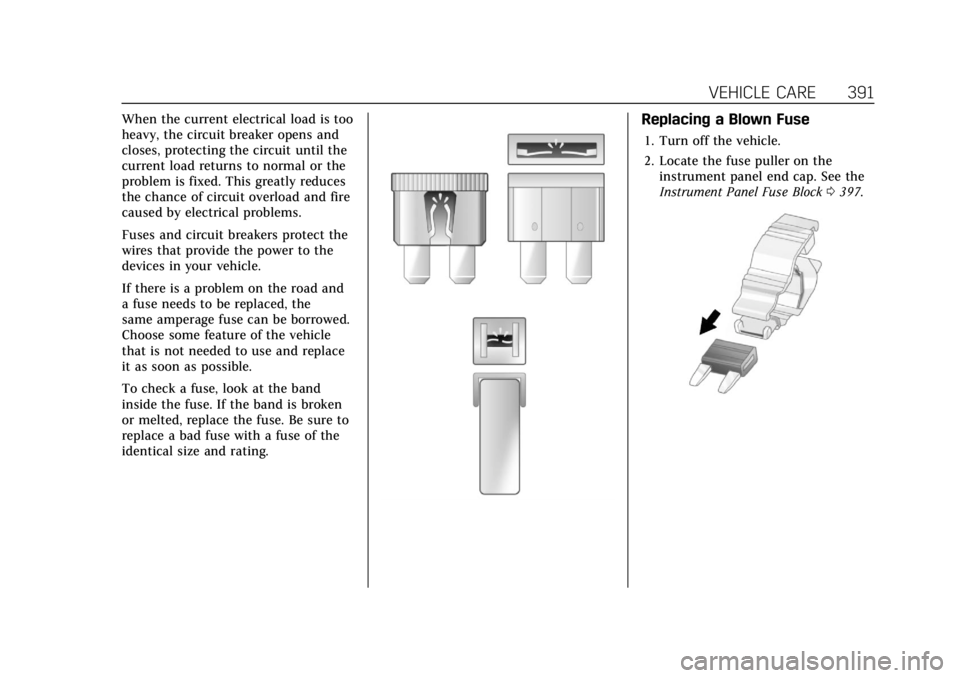
To check a fuse, look at the band
inside the fuse. If the band is broken
or melted, replace the fuse. Be sure to
replace a bad fuse with a fuse of the
identical size and rating.Replacing a Blown Fuse
1. Turn off the vehicle.
2. Locate the fuse puller on theinstrument panel end cap. See the
Instrument Panel Fuse Block 0397.