seats CADILLAC ESCALADE 2022 Manual PDF
[x] Cancel search | Manufacturer: CADILLAC, Model Year: 2022, Model line: ESCALADE, Model: CADILLAC ESCALADE 2022Pages: 508, PDF Size: 9.18 MB
Page 172 of 508
Cadillac Escalade Owner Manual (GMNA-Localizing-U.S./Canada/Mexico-
15567102) - 2022 - CRC - 11/17/21
INFOTAINMENT SYSTEM 171
especially around tall buildings or
hills, causing the sound to fade in
and out.
AM
The range for most AM stations is
greater than for FM, especially at
night. The longer range can cause
station frequencies to interfere with
each other. Static can also occur when
things like storms and power lines
interfere with radio reception. When
this happens, try reducing the treble
on the radio.
SiriusXM Satellite Radio Service
If equipped, SiriusXM Satellite Radio
Service provides digital radio
reception. Tall buildings or hills can
interfere with satellite radio signals,
causing the sound to fade in and out.
In addition, traveling or standing
under heavy foliage, bridges, garages,
or tunnels may cause loss of the
SiriusXM signal for a period of time.
Some cellular services may interfere
with SXM reception causing loss of
signal.
Mobile Device Usage
Mobile device usage, such as making
or receiving calls, charging, or just
having the mobile device on may
cause static interference in the radio.
Unplug the mobile device or turn it
off if this happens.
Multi-Band Antenna
The roof antenna may be used for
radio, navigation, and OnStar,
depending on the equipped options.
Keep clear of obstructions for clear
reception. If the vehicle has a sunroof,
and it is open, reception can also be
affected.
Audio Players
Avoiding Untrusted Media
Devices
When using media devices such as SD
cards, USB devices, and mobile
devices, consider the source.
Untrusted media devices could
contain files that affect systemoperation or performance. Avoid use if
the content or origin cannot be
trusted.
USB Port
Audio stored on a USB device may be
listened to.
The vehicle may be equipped with two
USB ports in the center console under
the armrest and another two on the
center stack. These ports are for data
and charging. There may also be two
USB ports at the rear of the center
console and a USB port on each side
of the third row seats for
charging only.
Caution
To avoid vehicle damage, unplug all
accessories and disconnect all
accessory cables from the vehicle
when not in use. Accessory cables
left plugged into the vehicle,
unconnected to a device, could be
damaged or cause an electrical
short if the unconnected end comes
(Continued)
Page 176 of 508
Cadillac Escalade Owner Manual (GMNA-Localizing-U.S./Canada/Mexico-
15567102) - 2022 - CRC - 11/17/21
INFOTAINMENT SYSTEM 175
Rear Seat Infotainment
Rear Seat Infotainment
(RSI) System
If equipped, the system includes two
HDMI ports, two Bluetooth
headphones, and video touchscreen
displays in back of the driver and
passenger seats.
The RSI system may not operate
properly until the temperature is
above−20 °C (−4 °F) and below 55 °C
(131 °F).
System Operation
To use:
1. Double-tap anywhere on either screen to power on and view the
Home screen.
2. Touch
}on the status bar to turn
the screen off.
The screens can be turned on and off
through each individual touchscreen,
independently from the other, and
through front seat control. Playback of any media playing
through that specific screen is paused
when the screen is turned off.
Screens can be locked via the front
seat control.
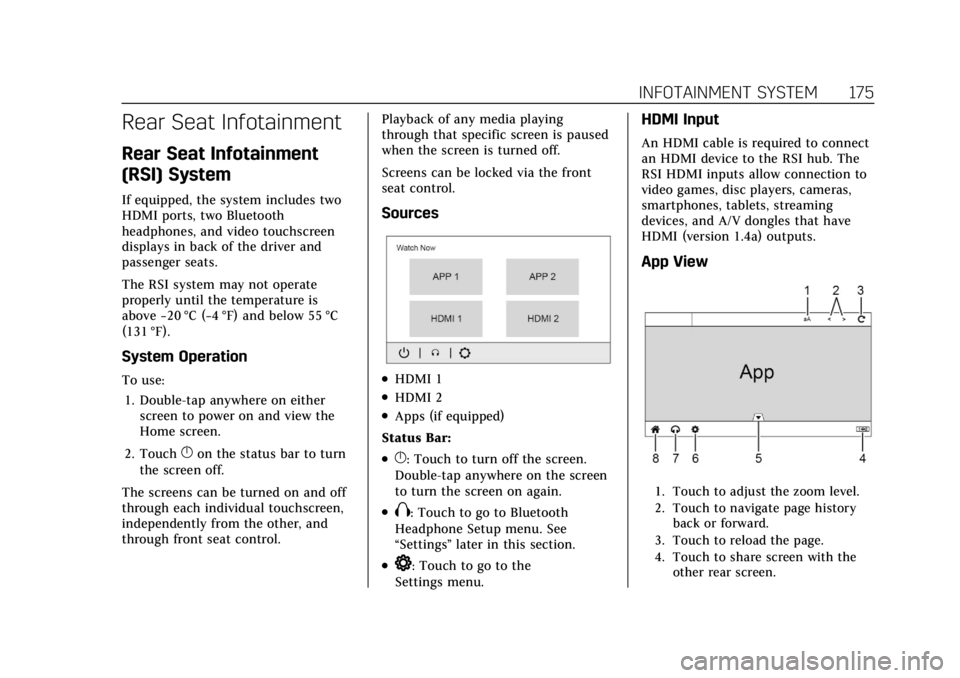
Sources
.HDMI 1
.HDMI 2
.Apps (if equipped)
Status Bar:
.}: Touch to turn off the screen.
Double-tap anywhere on the screen
to turn the screen on again.
.X: Touch to go to Bluetooth
Headphone Setup menu. See
“Settings ”later in this section.
.*: Touch to go to the
Settings menu.
HDMI Input
An HDMI cable is required to connect
an HDMI device to the RSI hub. The
RSI HDMI inputs allow connection to
video games, disc players, cameras,
smartphones, tablets, streaming
devices, and A/V dongles that have
HDMI (version 1.4a) outputs.
App View
1. Touch to adjust the zoom level.
2. Touch to navigate page history back or forward.
3. Touch to reload the page.
4. Touch to share screen with the other rear screen.
Page 225 of 508

Cadillac Escalade Owner Manual (GMNA-Localizing-U.S./Canada/Mexico-
15567102) - 2022 - CRC - 11/17/21
224 CLIMATE CONTROLS
Rear Window Defogger
K:Press to turn the rear window
defogger on or off. An indicator light
on the button comes on to show that
the rear window defogger is on.
The rear window defogger only works
when the ignition is on. The defogger
turns off if the ignition is turned off
or to ACC/ACCESSORY.
The rear window defogger can be set
to automatic operation. When Auto
Rear Defog is selected, the rear
window defogger turns on
automatically when the vehicle is first
started in cold weather and turns off
when the vehicle is warmed. To turn
Auto Rear Defog on or off, see
“Climate and Air Quality” under
Vehicle Personalization 0140.
The heated outside rearview mirrors
turn on when the rear window
defogger button is on and help to
clear fog or frost from the surface of
the mirrors.
Caution
Do not try to clear frost or other
material from the inside of the
front windshield and rear window
with a razor blade or anything else
that is sharp. This may damage the
rear window defogger grid and
affect the radio's ability to pick up
stations clearly. The repairs would
not be covered by the vehicle
warranty.
Driver and Passenger Heated and
Cooled Seats : Press
Ior+to heat
the driver or passenger seatback only.
Press
Jorzto heat the driver or
passenger seat cushion and seatback.
Press
Cor{to cool the driver or
passenger seat.
There are also auto heated and cooled
seats, for more information see Heated
and Ventilated Front Seats 048. Remote Start Climate Control
Operation :
The climate control
system may run when the vehicle is
started remotely. The rear defog may
come on during remote start based on
cold ambient conditions. The rear
defog indicator light does not come on
during a remote start. If equipped
with heated or cooled seats, they may
come on during a remote start. See
Remote Vehicle Start 013 and
Heated and Ventilated Front Seats 048.
Sensor
Page 226 of 508

Cadillac Escalade Owner Manual (GMNA-Localizing-U.S./Canada/Mexico-
15567102) - 2022 - CRC - 11/17/21
CLIMATE CONTROLS 225
The solar sensor, on top of the
instrument panel near the windshield,
monitors the solar heat.
The climate control system uses the
sensor information to adjust the
temperature, fan speed, recirculation,
and air delivery mode for best
comfort.
If the sensor is covered, the automatic
climate control system may not work
properly.
Afterblow Feature
If equipped, under certain conditions,
the fan may stay on or may turn on
and off several times after you turn
off and lock the vehicle. This is
normal.Rear Climate Control System
The rear climate control system is on the rear of the center console. The settings
can be adjusted with the rear climate controls and the rear climate display.
Rear Climate Controls
1. Heated Rear Seats
2. Air Delivery Mode Control
3. Fan Control 4. Temperature Control
5. AUTO (Automatic Operation)
O
(On/Off)
Page 227 of 508
Cadillac Escalade Owner Manual (GMNA-Localizing-U.S./Canada/Mexico-
15567102) - 2022 - CRC - 11/17/21
226 CLIMATE CONTROLS
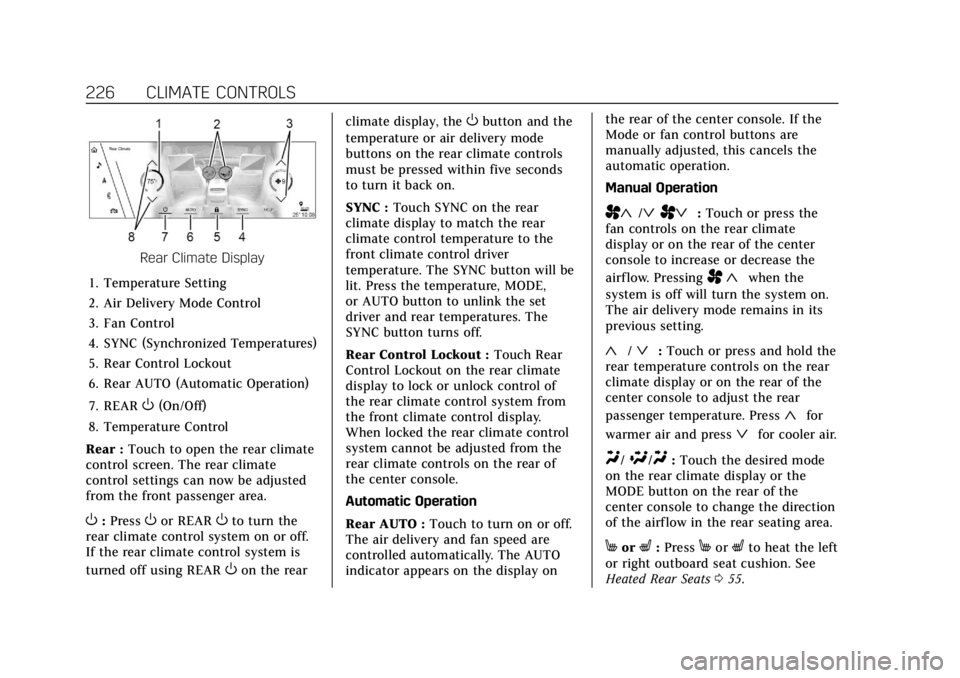
Rear Climate Display
1. Temperature Setting
2. Air Delivery Mode Control
3. Fan Control
4. SYNC (Synchronized Temperatures)
5. Rear Control Lockout
6. Rear AUTO (Automatic Operation)
7. REAR
O(On/Off)
8. Temperature Control
Rear : Touch to open the rear climate
control screen. The rear climate
control settings can now be adjusted
from the front passenger area.
O: PressOor REAROto turn the
rear climate control system on or off.
If the rear climate control system is
turned off using REAR
Oon the rear climate display, the
Obutton and the
temperature or air delivery mode
buttons on the rear climate controls
must be pressed within five seconds
to turn it back on.
SYNC : Touch SYNC on the rear
climate display to match the rear
climate control temperature to the
front climate control driver
temperature. The SYNC button will be
lit. Press the temperature, MODE,
or AUTO button to unlink the set
driver and rear temperatures. The
SYNC button turns off.
Rear Control Lockout : Touch Rear
Control Lockout on the rear climate
display to lock or unlock control of
the rear climate control system from
the front climate control display.
When locked the rear climate control
system cannot be adjusted from the
rear climate controls on the rear of
the center console.
Automatic Operation
Rear AUTO : Touch to turn on or off.
The air delivery and fan speed are
controlled automatically. The AUTO
indicator appears on the display on the rear of the center console. If the
Mode or fan control buttons are
manually adjusted, this cancels the
automatic operation.
Manual Operation
A«/ªAª:
Touch or press the
fan controls on the rear climate
display or on the rear of the center
console to increase or decrease the
airf low. Pressing
A «when the
system is off will turn the system on.
The air delivery mode remains in its
previous setting.
«/ª: Touch or press and hold the
rear temperature controls on the rear
climate display or on the rear of the
center console to adjust the rear
passenger temperature. Press
«for
warmer air and press
ªfor cooler air.
Y/\/Y: Touch the desired mode
on the rear climate display or the
MODE button on the rear of the
center console to change the direction
of the airflow in the rear seating area.
MorL: PressMorLto heat the left
or right outboard seat cushion. See
Heated Rear Seats 055.
Page 228 of 508
Cadillac Escalade Owner Manual (GMNA-Localizing-U.S./Canada/Mexico-
15567102) - 2022 - CRC - 11/17/21
CLIMATE CONTROLS 227
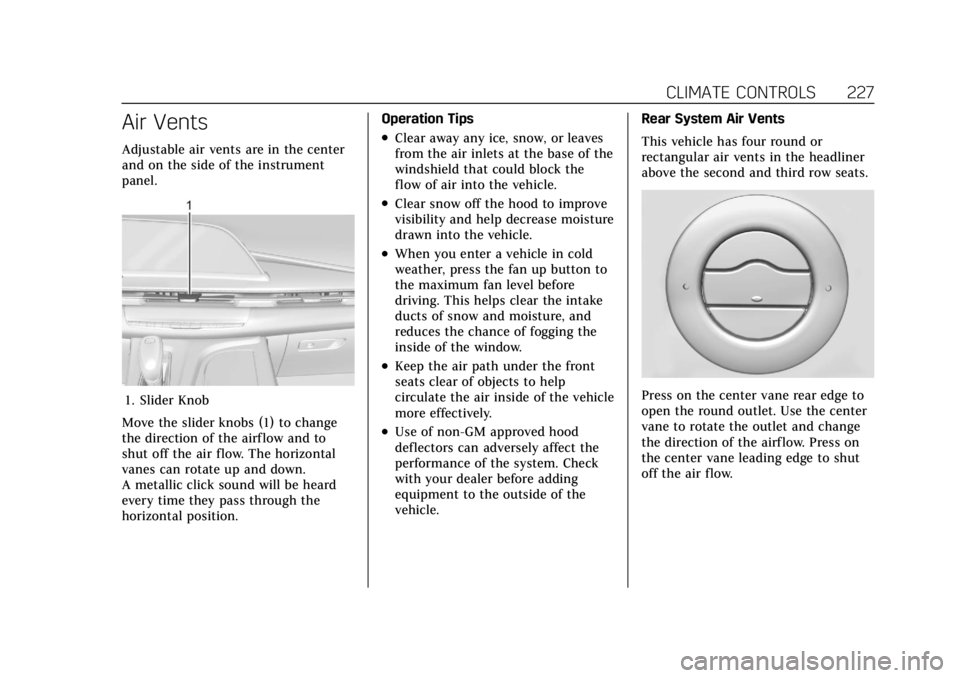
Air Vents
Adjustable air vents are in the center
and on the side of the instrument
panel.
1. Slider Knob
Move the slider knobs (1) to change
the direction of the airf low and to
shut off the air flow. The horizontal
vanes can rotate up and down.
A metallic click sound will be heard
every time they pass through the
horizontal position. Operation Tips
.Clear away any ice, snow, or leaves
from the air inlets at the base of the
windshield that could block the
flow of air into the vehicle.
.Clear snow off the hood to improve
visibility and help decrease moisture
drawn into the vehicle.
.When you enter a vehicle in cold
weather, press the fan up button to
the maximum fan level before
driving. This helps clear the intake
ducts of snow and moisture, and
reduces the chance of fogging the
inside of the window.
.Keep the air path under the front
seats clear of objects to help
circulate the air inside of the vehicle
more effectively.
.Use of non-GM approved hood
deflectors can adversely affect the
performance of the system. Check
with your dealer before adding
equipment to the outside of the
vehicle.
Rear System Air Vents
This vehicle has four round or
rectangular air vents in the headliner
above the second and third row seats.
Press on the center vane rear edge to
open the round outlet. Use the center
vane to rotate the outlet and change
the direction of the airf low. Press on
the center vane leading edge to shut
off the air flow.
Page 246 of 508
Cadillac Escalade Owner Manual (GMNA-Localizing-U.S./Canada/Mexico-
15567102) - 2022 - CRC - 11/17/21
DRIVING AND OPERATING 245
{Warning
Things you put inside the
vehicle can strike and injure
people in a sudden stop or turn,
or in a crash.
.Put things in the cargo area
of the vehicle. Try to spread
the weight evenly.
.Never stack heavier things,
like suitcases, inside the
vehicle so that some of them
are above the tops of the
seats.
.Do not leave an unsecured
child restraint in the vehicle.
.When you carry something
inside the vehicle, secure it
whenever you can.
.Do not leave a seat folded
down unless you need to. There is also important loading
information for off-road driving in
this manual. See
“Loading the
Vehicle for Off-Road Driving”
under Off-Road Driving 0235.
Add-On Equipment
There may be a limit on how
many people can be inside the
vehicle when carrying removable
items. Be sure to weigh the vehicle
before buying and installing the
new equipment.
Caution
Overloading the vehicle may cause
damage. Repairs would not be
covered by the vehicle warranty. Do
not overload the vehicle.
Remember not to exceed the
Gross Axle Weight Rating (GAWR)
of the front or rear axle.
Starting and Operating
New Vehicle Break-In
Caution
The vehicle does not need an
elaborate break-in. But it will
perform better in the long run if
you follow these guidelines:
.Do not drive at any one constant
speed, fast or slow, for the first
800 km (500 mi). Do not make
full-throttle starts. Avoid
downshifting to brake or slow the
vehicle.
.Avoid making hard stops for the
first 300 km (200 mi) or so.
During this time the new brake
linings are not yet broken in.
Hard stops with new linings can
mean premature wear and earlier
replacement. Follow this
breaking-in guideline every time
you get new brake linings. (Continued)
Page 407 of 508

Cadillac Escalade Owner Manual (GMNA-Localizing-U.S./Canada/Mexico-
15567102) - 2022 - CRC - 11/17/21
406 VEHICLE CARE
(3) Aspect Ratio:A 2-digit
number that indicates the tire
height-to-width measurements.
For example, if the tire size aspect
ratio is 75, as shown in item (3) of
the illustration, it would mean
that the tire's sidewall is
75 percent as high as it is wide.
(4) Construction Code
:A letter
code is used to indicate the type
of ply construction in the tire. The
letter "R" means radial ply
construction; the letter "D" means
diagonal or bias ply construction.
(5) Rim Diameter
:Diameter of
the wheel in inches.
(6) Service Description
:These
characters represent the load
index and speed rating of the tire.
The load index represents the load
carrying capacity a tire is certified
to carry. The speed rating is the
maximum speed a tire is certified
to carry a load.
Tire Terminology and
Definitions
Air Pressure:The amount of air
inside the tire pressing outward
on each square inch of the tire.
Air pressure is expressed in kPa
(kilopascal) or psi (pounds per
square inch).
Accessory Weight
:The combined
weight of optional accessories.
Some examples of optional
accessories are automatic
transmission, power windows,
power seats, and air conditioning.
Aspect Ratio
:The relationship of
a tire's height to its width.
Belt
:A rubber coated layer of
cords between the plies and the
tread. Cords may be made from
steel or other reinforcing
materials. Bead
:The tire bead contains steel
wires wrapped by steel cords that
hold the tire onto the rim.
Bias Ply Tire
:A pneumatic tire in
which the plies are laid at
alternate angles less than
90 degrees to the centerline of the
tread.
Cold Tire Pressure
:The amount
of air pressure in a tire, measured
in kPa (kilopascal) or psi (pounds
per square inch) before a tire has
built up heat from driving. See
Tire Pressure 0409.
Curb Weight
:The weight of a
motor vehicle with standard and
optional equipment including the
maximum capacity of fuel, oil, and
coolant, but without passengers
and cargo.
Page 419 of 508
Cadillac Escalade Owner Manual (GMNA-Localizing-U.S./Canada/Mexico-
15567102) - 2022 - CRC - 11/17/21
418 VEHICLE CARE
Lightly coat the inner diameter of
the wheel hub opening with wheel
bearing grease after a wheel
change or tire rotation to prevent
corrosion or rust buildup.
{Warning
Do not apply grease to the
wheel mounting surface, wheel
conical seats, or the wheel nuts
or bolts. Grease applied to these
areas could cause a wheel to
become loose or come off,
resulting in a crash.
When It Is Time for New
Tires
Factors, such as maintenance,
temperatures, driving speeds, vehicle
loading, and road conditions affect the
wear rate of the tires.
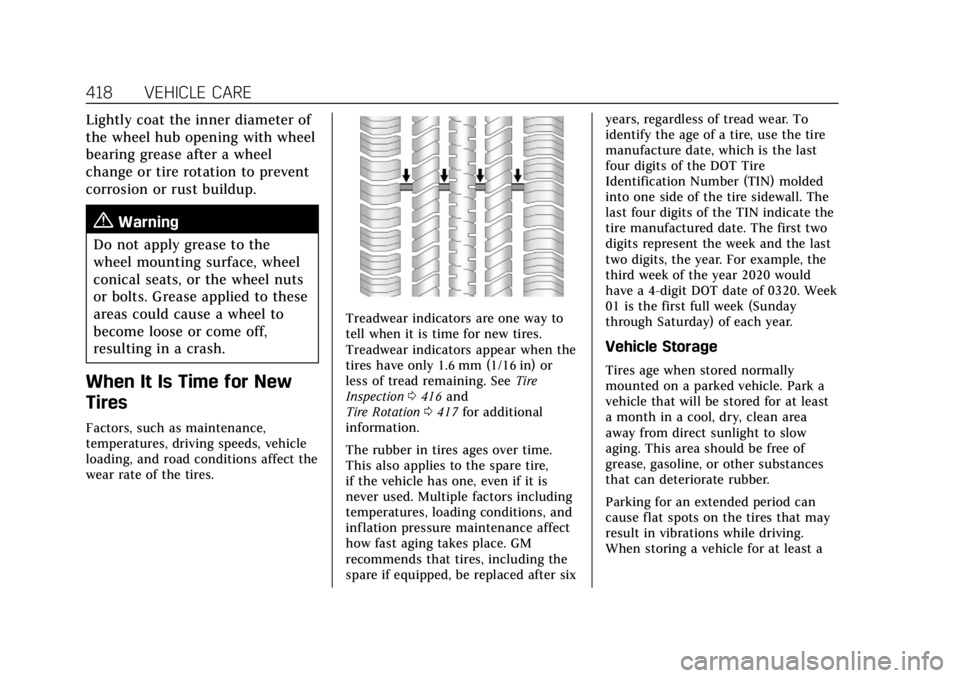
Treadwear indicators are one way to
tell when it is time for new tires.
Treadwear indicators appear when the
tires have only 1.6 mm (1/16 in) or
less of tread remaining. See Tire
Inspection 0416 and
Tire Rotation 0417 for additional
information.
The rubber in tires ages over time.
This also applies to the spare tire,
if the vehicle has one, even if it is
never used. Multiple factors including
temperatures, loading conditions, and
inflation pressure maintenance affect
how fast aging takes place. GM
recommends that tires, including the
spare if equipped, be replaced after six years, regardless of tread wear. To
identify the age of a tire, use the tire
manufacture date, which is the last
four digits of the DOT Tire
Identification Number (TIN) molded
into one side of the tire sidewall. The
last four digits of the TIN indicate the
tire manufactured date. The first two
digits represent the week and the last
two digits, the year. For example, the
third week of the year 2020 would
have a 4-digit DOT date of 0320. Week
01 is the first full week (Sunday
through Saturday) of each year.
Vehicle Storage
Tires age when stored normally
mounted on a parked vehicle. Park a
vehicle that will be stored for at least
a month in a cool, dry, clean area
away from direct sunlight to slow
aging. This area should be free of
grease, gasoline, or other substances
that can deteriorate rubber.
Parking for an extended period can
cause flat spots on the tires that may
result in vibrations while driving.
When storing a vehicle for at least a
Page 452 of 508
Cadillac Escalade Owner Manual (GMNA-Localizing-U.S./Canada/Mexico-
15567102) - 2022 - CRC - 11/17/21
VEHICLE CARE 451
4. Continue gently rubbing the soiledarea until there is no longer any
color transfer from the soil to the
cleaning cloth.
5. If the soil is not completely removed, use a mild soap solution
followed only by plain water.
If the soil is not completely removed,
it may be necessary to use a
commercial upholstery cleaner or spot
lifter. Test a small hidden area for
colorfastness before using a
commercial upholstery cleaner or spot
lifter. If ring formation occurs, clean
the entire fabric or carpet.
After cleaning, use a paper towel to
blot excess moisture.
Cleaning High Gloss Surfaces
and Vehicle Information and
Radio Displays
Use a microfiber cloth on high gloss
surfaces or vehicle displays. First, use
a soft bristle brush to remove dirt that
can scratch the surface. Then gently
clean by rubbing with a microfiber
cloth. Never use window cleaners or
solvents. Periodically hand wash the
microfiber cloth separately, using mild soap. Do not use bleach or fabric
softener. Rinse thoroughly and air dry
before next use.
Caution
Do not attach a device with a
suction cup to the display. This may
cause damage and would not be
covered by the vehicle warranty.
Instrument Panel, Leather, Vinyl,
Other Plastic Surfaces, Low
Gloss Paint Surfaces, and
Natural Open Pore Wood
Surfaces
Use a soft bristle brush to remove
dust from knobs and crevices on the
instrument cluster. Use a soft
microfiber cloth dampened with water
to remove dust and loose dirt. For a
more thorough cleaning, use a soft
microfiber cloth dampened with a
mild soap and water solution.
Caution
Soaking or saturating leather,
especially perforated leather, as well
as other interior surfaces, may
cause permanent damage. Wipe
excess moisture from these surfaces
after cleaning and allow them to
dry naturally. Never use heat,
steam, or spot removers. Do not use
liquids that contain alcohol or
solvents on leather seats. Do not
use cleaners that contain silicone or
wax-based products. Cleaners
containing these solvents can
permanently change the appearance
and feel of leather or soft trim, and
are not recommended.
Do not use cleaners that increase
gloss, especially on the instrument
panel. Reflected glare can decrease
visibility through the windshield
under certain conditions.