park assist CADILLAC ESCALADE 2022 Owners Manual
[x] Cancel search | Manufacturer: CADILLAC, Model Year: 2022, Model line: ESCALADE, Model: CADILLAC ESCALADE 2022Pages: 508, PDF Size: 9.18 MB
Page 4 of 508
Cadillac Escalade Owner Manual (GMNA-Localizing-U.S./Canada/Mexico-
15567102) - 2022 - CRC - 11/17/21
INTRODUCTION 3
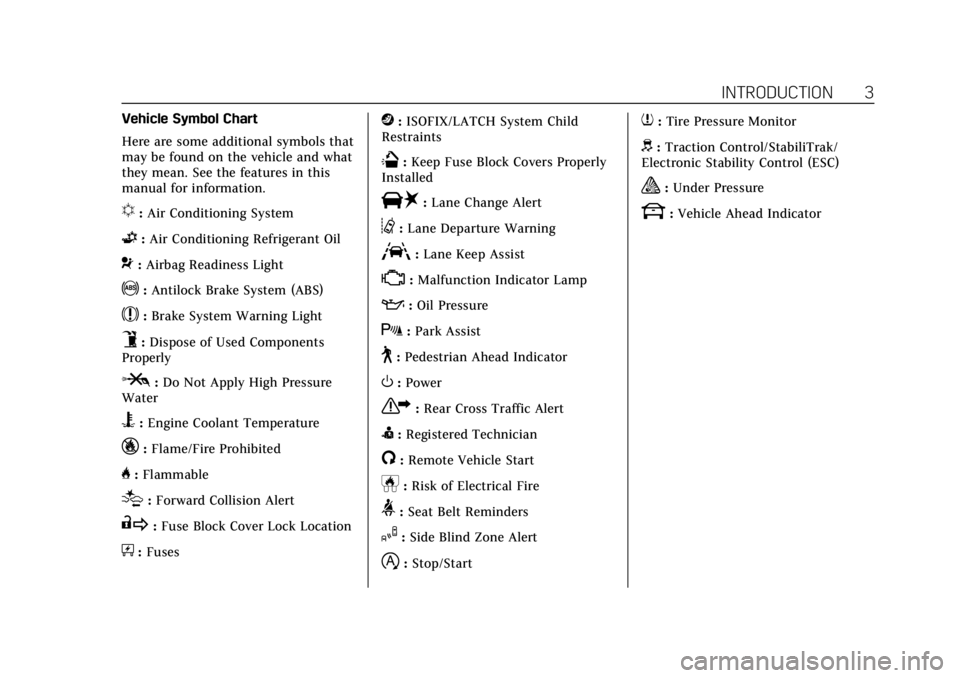
Vehicle Symbol Chart
Here are some additional symbols that
may be found on the vehicle and what
they mean. See the features in this
manual for information.
u:Air Conditioning System
G:Air Conditioning Refrigerant Oil
9:Airbag Readiness Light
!:Antilock Brake System (ABS)
$:Brake System Warning Light
9:Dispose of Used Components
Properly
P: Do Not Apply High Pressure
Water
B: Engine Coolant Temperature
_:Flame/Fire Prohibited
H: Flammable
[:Forward Collision Alert
R:Fuse Block Cover Lock Location
+:Fuses
j:ISOFIX/LATCH System Child
Restraints
Q: Keep Fuse Block Covers Properly
Installed
|: Lane Change Alert
@:Lane Departure Warning
A:Lane Keep Assist
*: Malfunction Indicator Lamp
::Oil Pressure
X:Park Assist
~:Pedestrian Ahead Indicator
O:Power
7:Rear Cross Traffic Alert
I:Registered Technician
/:Remote Vehicle Start
h:Risk of Electrical Fire
>:Seat Belt Reminders
I:Side Blind Zone Alert
h:Stop/Start
7:Tire Pressure Monitor
d:Traction Control/StabiliTrak/
Electronic Stability Control (ESC)
a: Under Pressure
k: Vehicle Ahead Indicator
Page 6 of 508

Cadillac Escalade Owner Manual (GMNA-Localizing-U.S./Canada/Mexico-
15567102) - 2022 - CRC - 11/17/21
INTRODUCTION 5
1.Driver Information Center (DIC)
0133.
2. Air Vents 0227.
3. Turn Signal Lever. See Turn and
Lane-Change Signals 0155.
Exterior Lamp Controls 0150.
4. Tap Shift Controls (If Equipped). See Manual Mode 0256.
5. Instrument Cluster 0115.
6. Driver Monitoring Camera. See Super Cruise 0286 (If Equipped).
7. Windshield Wiper/Washer 0106.
Rear Window Wiper/Washer 0108.
8. Infotainment. See Overview0161.
9. Light Sensor. See Automatic
Headlamp System 0154.
10. Dual Automatic Climate Control
System 0221.
Heated and Ventilated Front Seats
0 48 (If Equipped).
11. USB Ports. See USB Port0171.
12. Storage Compartment.
13. Infotainment Controls. See Overview 0161.
14. Hazard Warning Flashers 0155. 15.
Wireless Charging 0112.
16. Shift Lever. See Automatic
Transmission 0252.
17. Automatic Vehicle Hold (AVH) 0264
(Out of View).
Auto Stop Disable Switch. See Stop/
Start System 0249 (Out of View).
Lane Keep Assist (LKA) 0330 (If
Equipped) (Out of View).
18. ENGINE START/STOP Button. See Ignition Positions 0246.
19. Steering Wheel Controls 0105.
20. Horn 0105.
21. Steering Column Adjustment. See Steering Wheel Adjustment 0105.
22. Hood Release. See Hood0371.
23. Cruise Control 0273 (If Equipped).
Adaptive Cruise Control (Advanced)
0 275 (If Equipped).
Super Cruise 0286 (If Equipped).
Forward Collision Alert (FCA) System
0 319 (If Equipped).
Heated Steering Wheel 0105 (If
Equipped).
24. Instrument Panel Illumination
Control 0156. 25. Data Link Connector (DLC) (Out of
View). See Malfunction Indicator
Lamp (Check Engine Light) 0123.
26. Trailer Brake Control. See Towing
Equipment 0344 (If Equipped).
27. Electric Parking Brake 0262.
28. Four-Wheel Drive 0257 (If
Equipped).
Four Corner Air Suspension System
0 270 (If Equipped).
Driver Mode Control 0267
Page 105 of 508
Cadillac Escalade Owner Manual (GMNA-Localizing-U.S./Canada/Mexico-
15567102) - 2022 - CRC - 11/18/21
104 INSTRUMENTS AND CONTROLS
Instruments and
Controls
Controls
Steering Wheel Adjustment . . . . . 105
Steering Wheel Controls . . . . . . . . . 105
Heated Steering Wheel . . . . . . . . . . 105
Horn . . . . . . . . . . . . . . . . . . . . . . . . . . . . . . . 105
Windshield Wiper/Washer . . . . . . . 106
Rear Window Wiper/Washer . . . . 108
Compass . . . . . . . . . . . . . . . . . . . . . . . . . . 109
Clock . . . . . . . . . . . . . . . . . . . . . . . . . . . . . . 109
Power Outlets . . . . . . . . . . . . . . . . . . . . . 109
Wireless Charging . . . . . . . . . . . . . . . . 112
Warning Lights, Gauges, and
Indicators
Warning Lights, Gauges, andIndicators . . . . . . . . . . . . . . . . . . . . . . . 114
Instrument Cluster . . . . . . . . . . . . . . . 115
Speedometer . . . . . . . . . . . . . . . . . . . . . . 116
Odometer . . . . . . . . . . . . . . . . . . . . . . . . . 117
Trip Odometer . . . . . . . . . . . . . . . . . . . . 117
Tachometer . . . . . . . . . . . . . . . . . . . . . . . 117
Fuel Gauge . . . . . . . . . . . . . . . . . . . . . . . . 117
Engine Oil Pressure Gauge . . . . . . . 117
Engine Coolant Temperature Gauge . . . . . . . . . . . . . . . . . . . . . . . . . . . . 118 Transmission Temperature
Gauge . . . . . . . . . . . . . . . . . . . . . . . . . . . . 119
Voltmeter Gauge . . . . . . . . . . . . . . . . . 120
Seat Belt Reminders . . . . . . . . . . . . . . 120
Airbag Readiness Light . . . . . . . . . . 121
Passenger Airbag Status Indicator . . . . . . . . . . . . . . . . . . . . . . . . . 122
Charging System Light . . . . . . . . . . . 123
Malfunction Indicator Lamp (Check Engine Light) . . . . . . . . . . . 123
Brake System Warning Light . . . . 125
Electric Parking Brake Light . . . . . 125
Service Electric Parking Brake Light . . . . . . . . . . . . . . . . . . . . . . . . . . . . . 126
Antilock Brake System (ABS) Warning Light . . . . . . . . . . . . . . . . . . 126
Automatic Vehicle Hold (AVH) Light . . . . . . . . . . . . . . . . . . . . . . . . . . . . . 126
Lane Keep Assist (LKA) Light . . . 127
Automatic Emergency Braking (AEB) Disabled Light . . . . . . . . . . . 127
Vehicle Ahead Indicator . . . . . . . . . 127
Pedestrian Ahead Indicator . . . . . . 127
Traction Off Light . . . . . . . . . . . . . . . . 128
StabiliTrak OFF Light . . . . . . . . . . . . 128
Traction Control System (TCS)/ StabiliTrak Light . . . . . . . . . . . . . . . . 128
Engine Coolant Temperature Warning Light . . . . . . . . . . . . . . . . . . 129
Driver Mode Control Light . . . . . . . 129 Four Corner Air Suspension
Light . . . . . . . . . . . . . . . . . . . . . . . . . . . . . 130
Tire Pressure Light . . . . . . . . . . . . . . . 130
Engine Oil Pressure Light . . . . . . . . 131
Low Fuel Warning Light . . . . . . . . . 131
Security Light . . . . . . . . . . . . . . . . . . . . . 132
High-Beam On Light . . . . . . . . . . . . . 132
Lamps On Reminder . . . . . . . . . . . . . 132
Cruise Control Light . . . . . . . . . . . . . . 132
Door Ajar Light . . . . . . . . . . . . . . . . . . . 133
Information Displays
Driver Information Center (DIC) . . . . . . . . . . . . . . . . . . . . . 133
Vehicle Information . . . . . . . . . . . . . . 136
Head-Up Display (HUD) . . . . . . . . . 136
Vehicle Messages
Vehicle Messages . . . . . . . . . . . . . . . . . 139
Engine Power Messages . . . . . . . . . . 139
Vehicle Speed Messages . . . . . . . . . 140
Vehicle Personalization
Vehicle Personalization . . . . . . . . . . 140
Universal Remote System
Universal Remote System . . . . . . . . 147
Universal Remote System Programming . . . . . . . . . . . . . . . . . . . 147
Universal Remote System Operation . . . . . . . . . . . . . . . . . . . . . . . . 149
Page 125 of 508

Cadillac Escalade Owner Manual (GMNA-Localizing-U.S./Canada/Mexico-
15567102) - 2022 - CRC - 11/18/21
124 INSTRUMENTS AND CONTROLS
Caution (Continued)
the original tire specifications, can
cause this light to come on. This
could lead to costly repairs not
covered by the vehicle warranty.
This could also affect the vehicle’s
ability to pass an Emissions
Inspection/Maintenance test. See
Accessories and Modifications0369.
If the light is f lashing : A
malfunction has been detected that
could damage the emission control
system and increase vehicle
emissions. Diagnosis and service may
be required.
To help prevent damage, reduce
vehicle speed and avoid hard
accelerations and uphill grades.
If towing a trailer, reduce the amount
of cargo being hauled as soon as
possible.
If the light continues to flash, find a
safe place to park. Turn the vehicle off
and wait at least 10 seconds before
restarting the engine. If the light is still flashing, follow the previous
guidelines and see your dealer for
service as soon as possible.
If the light is on steady :
A
malfunction has been detected.
Diagnosis and service may be
required.
Check the following:
.If fuel has been added to the vehicle
using the capless fuel funnel
adapter, make sure that it has been
removed. See “Filling the Tank with
a Portable Gas Can ”under Filling the
Tank 0334. The diagnostic system
can detect if the adapter has been
left installed in the vehicle, allowing
fuel to evaporate into the
atmosphere. A few driving trips with
the adapter removed may turn off
the light.
.Poor fuel quality can cause
inefficient engine operation and
poor driveability, which may go
away once the engine is warmed up.
If this occurs, change the fuel
brand. It may require at least one
full tank of the proper fuel to turn
the light off. See Recommended Fuel
0 333. If the light remains on, see your
dealer.
Emissions Inspection and
Maintenance Programs
If the vehicle requires an Emissions
Inspection/Maintenance test, the test
equipment will likely connect to the
vehicle's Data Link Connector (DLC).
The DLC is under the instrument
panel to the left of the steering wheel.
Connecting devices that are not used
to perform an Emissions Inspection/
Maintenance test or to service the
vehicle may affect vehicle operation.
See
Add-On Electrical Equipment 0367.
See your dealer if assistance is needed.
The vehicle may not pass
inspection if:
.The light is on when the engine is
running.
Page 139 of 508

Cadillac Escalade Owner Manual (GMNA-Localizing-U.S./Canada/Mexico-
15567102) - 2022 - CRC - 11/18/21
138 INSTRUMENTS AND CONTROLS
HUD Rotation: Press the icons above
and below Rotation to adjust the
angle of the HUD display. This feature
may only be available in P (Park).
Speed Limit Style Adjustment
If equipped, the speed limit style can
be changed to a speed limit bar or
speed limit sign from the Options
menu in the instrument cluster. Press
the thumbwheel while Speed Limit
Style is highlighted to change the
speed sign style or to turn it off.HUD Views
English Shown, Metric Similar
Speed View : This displays the
speedometer reading in English or
metric units, and speed limit. Some
information only appears on vehicles
that have these features, and when
they are active.
English Shown, Metric Similar Active Safety View :
This displays the
speed view along with a driver
assistance graphic on the left. Driver
assistance graphics show your vehicle,
vehicle ahead, gap setting, and lane
status information. In addition to
driver assistance graphics, pedestrian
advisory and trailer sway indicators
will be displayed.
English Shown, Metric Similar
Navigation View : This displays the
speed view along with indicators for
vehicle ahead, Lane Departure
Warning/Lane Keep Assist, trailer
sway, and pedestrian advisory.
Turn-by-turn navigation information
is shown during active route. The
compass heading is displayed when
navigation routing is not active.
Page 143 of 508
Cadillac Escalade Owner Manual (GMNA-Localizing-U.S./Canada/Mexico-
15567102) - 2022 - CRC - 11/18/21
142 INSTRUMENTS AND CONTROLS
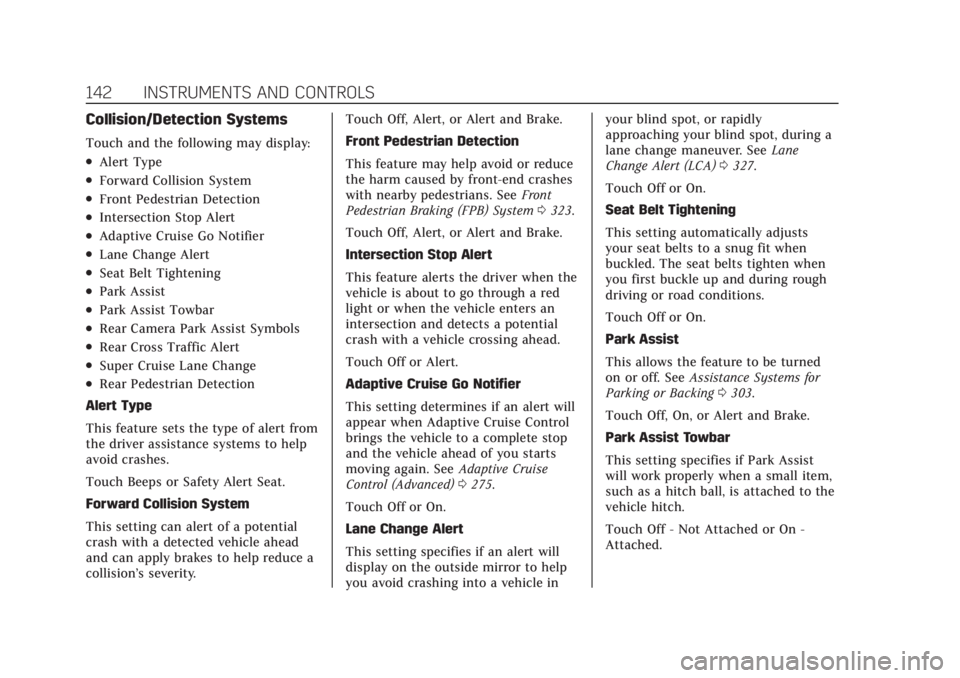
Collision/Detection Systems
Touch and the following may display:
.Alert Type
.Forward Collision System
.Front Pedestrian Detection
.Intersection Stop Alert
.Adaptive Cruise Go Notifier
.Lane Change Alert
.Seat Belt Tightening
.Park Assist
.Park Assist Towbar
.Rear Camera Park Assist Symbols
.Rear Cross Traffic Alert
.Super Cruise Lane Change
.Rear Pedestrian Detection
Alert Type
This feature sets the type of alert from
the driver assistance systems to help
avoid crashes.
Touch Beeps or Safety Alert Seat.
Forward Collision System
This setting can alert of a potential
crash with a detected vehicle ahead
and can apply brakes to help reduce a
collision’s severity. Touch Off, Alert, or Alert and Brake.
Front Pedestrian Detection
This feature may help avoid or reduce
the harm caused by front-end crashes
with nearby pedestrians. See
Front
Pedestrian Braking (FPB) System 0323.
Touch Off, Alert, or Alert and Brake.
Intersection Stop Alert
This feature alerts the driver when the
vehicle is about to go through a red
light or when the vehicle enters an
intersection and detects a potential
crash with a vehicle crossing ahead.
Touch Off or Alert.
Adaptive Cruise Go Notifier
This setting determines if an alert will
appear when Adaptive Cruise Control
brings the vehicle to a complete stop
and the vehicle ahead of you starts
moving again. See Adaptive Cruise
Control (Advanced) 0275.
Touch Off or On.
Lane Change Alert
This setting specifies if an alert will
display on the outside mirror to help
you avoid crashing into a vehicle in your blind spot, or rapidly
approaching your blind spot, during a
lane change maneuver. See
Lane
Change Alert (LCA) 0327.
Touch Off or On.
Seat Belt Tightening
This setting automatically adjusts
your seat belts to a snug fit when
buckled. The seat belts tighten when
you first buckle up and during rough
driving or road conditions.
Touch Off or On.
Park Assist
This allows the feature to be turned
on or off. See Assistance Systems for
Parking or Backing 0303.
Touch Off, On, or Alert and Brake.
Park Assist Towbar
This setting specifies if Park Assist
will work properly when a small item,
such as a hitch ball, is attached to the
vehicle hitch.
Touch Off - Not Attached or On -
Attached.
Page 144 of 508

Cadillac Escalade Owner Manual (GMNA-Localizing-U.S./Canada/Mexico-
15567102) - 2022 - CRC - 11/18/21
INSTRUMENTS AND CONTROLS 143
Rear Camera Park Assist Symbols
This setting enables the Rear Camera
Park Assist Symbols. SeeAssistance
Systems for Parking or Backing 0303.
Touch Off or On.
Rear Cross Traffic Alert
This allows the Rear Cross Traffic
Alert feature to be turned on or off.
See Assistance Systems for Parking or
Backing 0303.
Touch Off or On.
Rear Pedestrian Detection
This setting specifies if alerts will
display when the vehicle detects
pedestrians behind when in
R (Reverse). See Rear Pedestrian Alert
0 318.
Touch Off, Alert, or Alert and Brake.
Comfort and Convenience
Touch and the following may display:
.Chime Volume
.Power Liftgate
.Hands Free Liftgate/Trunk Control
.Reverse Tilt Mirror
.Remote Mirror Folding
.Rain Sense Wipers
.Auto Wipe in Reverse Gear
.Extended Hill Start Assist
Chime Volume
This sets the chime volume level.
Touch the controls on the
infotainment display to adjust the
volume.
Power Liftgate
This allows the driver to decide what
happens when pressing the Power
Liftgate switch. .
Touch Open Fully, Open to Custom
Height, or Off.
Hands Free Liftgate/Trunk Control
This allows the liftgate to be operated
hands free. See Liftgate019.
Touch Off, Open and Close,
or Open Only.
Reverse Tilt Mirror
When on, the driver, passenger,
or both driver and passenger outside
mirrors will tilt downward when the
vehicle is shifted into R (Reverse) to
improve visibility of the ground near the rear wheels. They may move from
their tilted position when the vehicle
is shifted out of R (Reverse) or turned
off. See
Reverse Tilt Mirrors 033.
Touch Off, On - Driver and Passenger,
On - Driver, or On - Passenger.
Remote Mirror Folding
This allows the outside mirrors to be
folded in when the remote key
Q
button is pressed and held. Pressing
Kunfolds the mirrors. See Folding
Mirrors 032.
Touch Off or On.
Rain Sense Wipers
This setting automatically turns on
the windshield wipers when moisture
is detected and the wiper switch is in
intermittent mode.
Touch Disabled or Enabled.
Auto Wipe in Reverse Gear
This setting automatically turns on
the rear window wiper when the
vehicle is shifted to R (Reverse) and
moisture is detected.
Touch Off or On.
Page 165 of 508
Cadillac Escalade Owner Manual (GMNA-Localizing-U.S./Canada/Mexico-
15567102) - 2022 - CRC - 11/17/21
164 INFOTAINMENT SYSTEM
Users
Touch the Users icon to sign in or
create a new user profile, and follow
the on-screen instructions.
Only four user profiles can be active at
one time in the vehicle. It may be
necessary to remove a profile from the
menu before creating or signing into
an existing profile. The removed
profile can be logged into at a
later time.
Settings
Touch the Settings icon to display the
Settings menu. SeeSettings0205.
Apps
If equipped, in-vehicle apps are
available for download. Touch the
Apps icon on the Home Page to begin.
Downloading and using in-vehicle
apps requires Internet connectivity
which can be accessed with a data
plan through the vehicle’s built-in
4G LTE Wi-Fi hotspot, if equipped,
or a compatible mobile device hotspot.
On most mobile devices, activation of
the Wi-Fi hotspot is in the device’s Settings menu under Mobile Network
Sharing, Personal Hotspot, Mobile
Hotspot, or similar.
Availability of apps and connectivity
varies by vehicle, conditions, and
location. Data plan rates apply.
Features are subject to change.
For more information, see
www.my.cadillac.com/learn for US/
Canada and see my.cadillac.com.mx.
for Mexico.
OnStar Services
If equipped, touch the OnStar Services
icon to display the OnStar Services
and Account pages. See
OnStar
Overview 0485.
Camera
Touch the Camera icon to access the
camera application. See Assistance
Systems for Parking or Backing 0303.
Rear Media
If equipped, touch the Rear Media
icon to access the Rear Seat
Infotainment application. See Rear
Seat Infotainment (RSI) System 0175.
Shortcut Menu
The shortcut menu is along the left
edge of the display. It shows up to five
applications.
Proximity Sensing
The infotainment system uses
proximity sensing. When a hand
approaches the screen, the view
changes from the Multi Function
Controller (MFC) view to the
touch view.
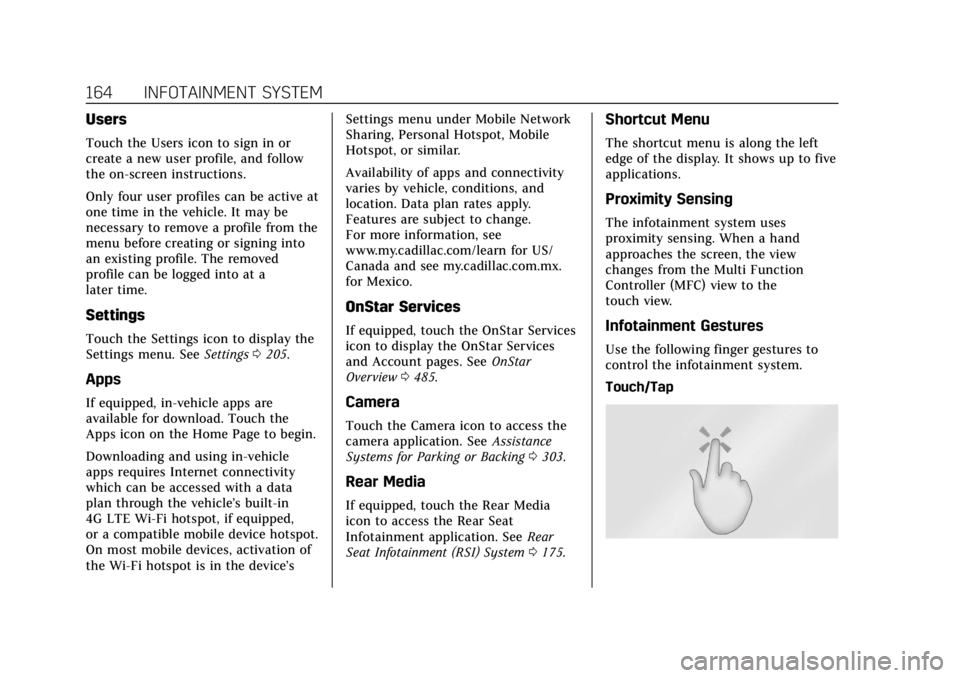
Infotainment Gestures
Use the following finger gestures to
control the infotainment system.
Touch/Tap
Page 199 of 508
Cadillac Escalade Owner Manual (GMNA-Localizing-U.S./Canada/Mexico-
15567102) - 2022 - CRC - 11/17/21
198 INFOTAINMENT SYSTEM
“Voice Keypad”:Begin a dialog to
enter special numbers like
international numbers. The numbers
can be entered in groups of digits with
each group of digits being repeated
back by the system. If the group of
digits is not correct, the command
“Delete ”will remove the last group of
digits and allow them to be re-entered.
Once the entire number has been
entered, the command “Call”will start
dialing the number.
Phone Assistant Voice
Recognition
Press and holdgon the steering
wheel controls to pass through and
launch Google phone assistant or Siri.
For the low radio, whether connected
by Bluetooth or phone projection, the
only available voice recognition is
either Siri (iPhone) or the Google
Assistant (Android).
Phone
Bluetooth (Overview)
The Bluetooth-capable system can
interact with many mobile devices,
allowing:
.Placement and receipt of calls in a
hands-free mode.
.Sharing of the device’s address book
or contact list with the vehicle.
To minimize driver distraction, before
driving, and with the vehicle parked:
.Become familiar with the features of
the mobile device. Organize the
phone book and contact lists clearly
and delete duplicate or rarely used
entries. If possible, program speed
dial or other shortcuts.
.Review the controls and operation
of the infotainment system.
.Pair mobile device(s) to the vehicle.
The system may not work with all
mobile devices. See “Pairing”later in
this section.
Vehicles with a Bluetooth system can
use a Bluetooth-capable mobile device
with a Hands-Free Profile to make and
receive phone calls. The infotainment system and voice recognition are used
to control the system. The system can
be used while the ignition is on or in
ACC/ACCESSORY. The range of the
Bluetooth system can be up to 9.1 m
(30 ft). Not all mobile devices support
all functions and not all mobile
devices work with the Bluetooth
system. See my.cadillac.com for more
information about compatible mobile
devices.
Controls
Use the controls on the center stack
and the steering wheel to operate the
Bluetooth system.
Steering Wheel Controls
g:
Press and hold to start voice
recognition on the connected
Bluetooth mobile device.
6: Press to answer, end or switch
between calls.
Infotainment System Controls
For information about how to navigate
the menu system using the
infotainment controls, see Using the
System 0163.
Page 231 of 508
Cadillac Escalade Owner Manual (GMNA-Localizing-U.S./Canada/Mexico-
15567102) - 2022 - CRC - 11/17/21
230 DRIVING AND OPERATING
Driving and
Operating
Driving Information
Driving for Better FuelEconomy . . . . . . . . . . . . . . . . . . . . . . . . 231
Distracted Driving . . . . . . . . . . . . . . . . 231
Defensive Driving . . . . . . . . . . . . . . . . 232
Impaired Driving . . . . . . . . . . . . . . . . . 232
Control of a Vehicle . . . . . . . . . . . . . . 232
Braking . . . . . . . . . . . . . . . . . . . . . . . . . . . . 232
Steering . . . . . . . . . . . . . . . . . . . . . . . . . . . 233
Off-Road Recovery . . . . . . . . . . . . . . . . 234
Loss of Control . . . . . . . . . . . . . . . . . . . 234
Off-Road Driving . . . . . . . . . . . . . . . . . 235
Driving on Wet Roads . . . . . . . . . . . 238
Hill and Mountain Roads . . . . . . . . 239
Winter Driving . . . . . . . . . . . . . . . . . . . . 240
If the Vehicle Is Stuck . . . . . . . . . . . 241
Vehicle Load Limits . . . . . . . . . . . . . . 241
Starting and Operating
New Vehicle Break-In . . . . . . . . . . . . 245
Ignition Positions . . . . . . . . . . . . . . . . 246
Starting the Engine . . . . . . . . . . . . . . 248
Stop/Start System . . . . . . . . . . . . . . . . 249
Retained Accessory Power (RAP) . . . . . . . . . . . . . . . . . . . . 250
Shifting Into Park . . . . . . . . . . . . . . . . 250 Shifting out of Park . . . . . . . . . . . . . . 251
Parking over Things
That Burn . . . . . . . . . . . . . . . . . . . . . . . 251
Dynamic Fuel Management . . . . . 251
Extended Parking . . . . . . . . . . . . . . . . . 251
Engine Exhaust
Engine Exhaust . . . . . . . . . . . . . . . . . . . 252
Running the Vehicle While Parked . . . . . . . . . . . . . . . . . . . . . . . . . . . 252
Automatic Transmission
Automatic Transmission . . . . . . . . . 252
Manual Mode . . . . . . . . . . . . . . . . . . . . . 256
Drive Systems
Four-Wheel Drive . . . . . . . . . . . . . . . . 257
Brakes
Electric Brake Boost . . . . . . . . . . . . . . 262
Antilock Brake System (ABS) . . . . 262
Electric Parking Brake . . . . . . . . . . . . 262
Brake Assist . . . . . . . . . . . . . . . . . . . . . . . 264
Hill Start Assist (HSA) . . . . . . . . . . . 264
Automatic VehicleHold (AVH) . . . . . . . . . . . . . . . . . . . . . 264
Ride Control Systems
Traction Control/ElectronicStability Control . . . . . . . . . . . . . . . . 265
Driver Mode Control . . . . . . . . . . . . . 267
Magnetic Ride Control . . . . . . . . . . . 270 Locking Rear Axle . . . . . . . . . . . . . . . . 270
Four Corner Air Suspension
System . . . . . . . . . . . . . . . . . . . . . . . . . . 270
Cruise Control
Cruise Control . . . . . . . . . . . . . . . . . . . . 273
Adaptive Cruise Control(Advanced) . . . . . . . . . . . . . . . . . . . . . . 275
Super Cruise . . . . . . . . . . . . . . . . . . . . . . 286
Driver Assistance Systems
Driver Assistance Systems . . . . . . . 302
Assistance Systems for Parking or Backing . . . . . . . . . . . . . . . . . . . . . . . 303
Rear Vision Camera (RVC) . . . . . . . 304
Surround Vision System . . . . . . . . . 305
Park Assist . . . . . . . . . . . . . . . . . . . . . . . . 312
Automatic Parking Assist (APA) . . . . . . . . . . . . . . . . . . . . . 314
Reverse Automatic Braking (RAB) . . . . . . . . . . . . . . . . . . . 316
Rear Pedestrian Alert . . . . . . . . . . . . 318
Rear Cross Traffic Alert (RCTA) System . . . . . . . . . . . . . . . . . . . . . . . . . . 319
Assistance Systems for Driving . . . . . . . . . . . . . . . . . . . . . . . . . . 319
Forward Collision Alert (FCA) System . . . . . . . . . . . . . . . . . . . . . . . . . . 319
Automatic Emergency
Braking (AEB) . . . . . . . . . . . . . . . . . . . 321