Cup holder CADILLAC ESCALADE 2022 Owners Manual
[x] Cancel search | Manufacturer: CADILLAC, Model Year: 2022, Model line: ESCALADE, Model: CADILLAC ESCALADE 2022Pages: 508, PDF Size: 9.18 MB
Page 12 of 508
Cadillac Escalade Owner Manual (GMNA-Localizing-U.S./Canada/Mexico-
15567102) - 2022 - CRC - 11/17/21
KEYS, DOORS, AND WINDOWS 11
Remote No Longer in Vehicle Alert
If the vehicle is on with a door open,
and then all doors are closed, the
vehicle will check for remote keys
inside. If a remote key is not detected,
the Driver Information Center (DIC)
will display NO REMOTE DETECTED
and the horn will chirp three times.
This occurs only once each time the
vehicle is driven. To turn on or off see
Vehicle Personalization0140.
Keyless Liftgate Opening
Press the touchpad on the underside
of the liftgate handle to open the
liftgate when all doors are unlocked,
or when the remote key is within
1 m (3 ft).
Keyless Liftglass Opening
Press the exterior liftglass button to
open the liftglass when all doors are
unlocked, or when the remote key is
within 1 m (3 ft).
See Liftgate 019. Mechanical Key Access
To access a vehicle with a weak
remote key battery, see
Door Locks
0 14.
Programming Remote Keys to
the Vehicle
Only remote keys programmed to the
vehicle will work. If a remote key is
lost or stolen, a replacement can be
purchased and programmed through
your dealer. The vehicle can be
reprogrammed so that lost or stolen
remote keys no longer work. Each
vehicle can have up to eight remote
keys matched to it.
Starting the Vehicle with a Low
Remote Key Battery
If the remote key battery is weak or if
there is interference with the signal,
the DIC may display NO KEY FOUND,
REPLACE BATTERY IN KEYor NO
REMOTE KEY WAS DETECTED PLACE
KEY IN KEY POCKET THEN START
YOUR VEHICLE when starting the
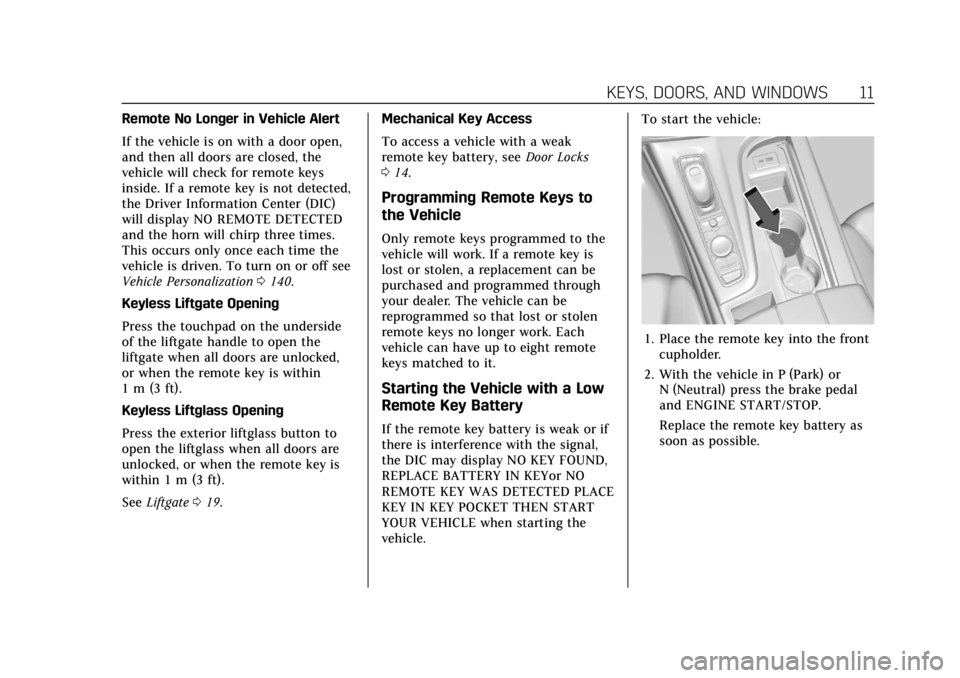
vehicle. To start the vehicle:
1. Place the remote key into the front
cupholder.
2. With the vehicle in P (Park) or N (Neutral) press the brake pedal
and ENGINE START/STOP.
Replace the remote key battery as
soon as possible.
Page 99 of 508

Cadillac Escalade Owner Manual (GMNA-Localizing-U.S./Canada/Mexico-
15567102) - 2022 - CRC - 11/17/21
98 STORAGE
Storage
Storage Compartments
Storage Compartments . . . . . . . . . . . . 98
Glove Box . . . . . . . . . . . . . . . . . . . . . . . . . . 98
Cupholders . . . . . . . . . . . . . . . . . . . . . . . . . 98
Armrest Storage . . . . . . . . . . . . . . . . . . . 99
Rear Storage . . . . . . . . . . . . . . . . . . . . . . . 99
Center Console Storage . . . . . . . . . . 100
Additional Storage Features
Cargo Tie-Downs . . . . . . . . . . . . . . . . . 101
Convenience Net . . . . . . . . . . . . . . . . . 102
Roof Rack System
Roof Rack System . . . . . . . . . . . . . . . . 102
Storage Compartments{
Warning
Do not store heavy or sharp objects
in storage compartments. In a
crash, these objects may cause the
cover to open and could result in
injury.
Glove Box
To open, pull the handle to the left.
To close, push the glove box up until
it latches. Use the vehicle key to lock
or unlock.
Cupholders
To access the cupholders, press the
cover and release.
There is storage in front of the
cupholders.
Page 100 of 508
Cadillac Escalade Owner Manual (GMNA-Localizing-U.S./Canada/Mexico-
15567102) - 2022 - CRC - 11/17/21
STORAGE 99
Rear Cupholders
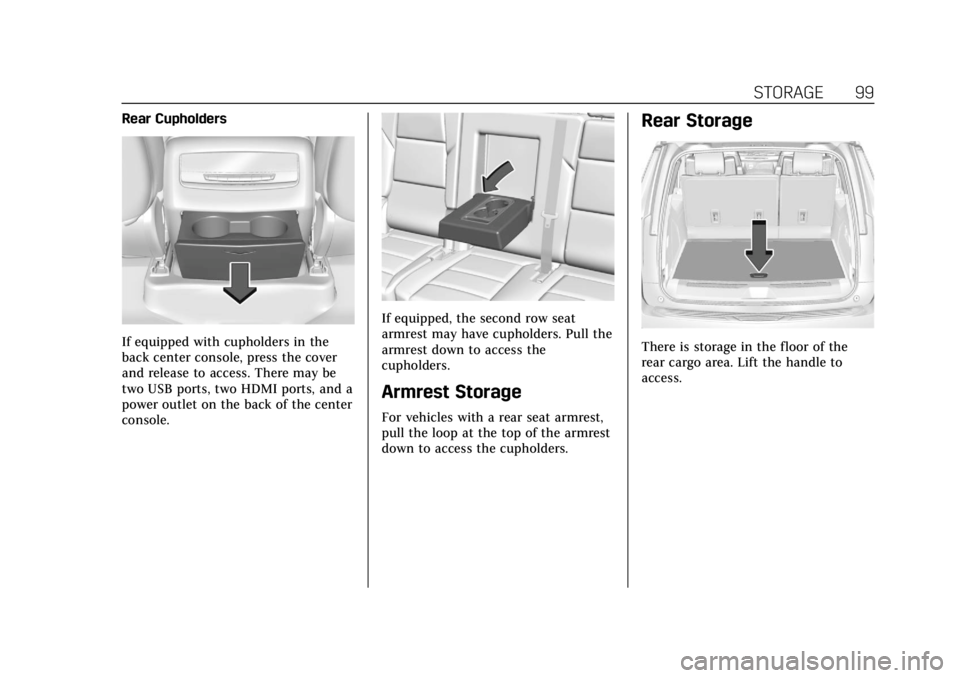
If equipped with cupholders in the
back center console, press the cover
and release to access. There may be
two USB ports, two HDMI ports, and a
power outlet on the back of the center
console.
If equipped, the second row seat
armrest may have cupholders. Pull the
armrest down to access the
cupholders.
Armrest Storage
For vehicles with a rear seat armrest,
pull the loop at the top of the armrest
down to access the cupholders.
Rear Storage
There is storage in the floor of the
rear cargo area. Lift the handle to
access.
Page 497 of 508

Cadillac Escalade Owner Manual (GMNA-Localizing-U.S./Canada/Mexico-
15567102) - 2022 - CRC - 11/17/21
496 INDEX
Caution, Danger, and Warning . . . . . . . . 2
Center Console Storage . . . . . . . . . . . . . 100
Chains, Tire . . . . . . . . . . . . . . . . . . . . . . . . . 422
ChargingWireless . . . . . . . . . . . . . . . . . . . . . . . . . . . 112
Charging System Light . . . . . . . . . . . . . 123
Check Engine Light (MalfunctionIndicator) . . . . . . . . . . . . . . . . . . . . . . . . 123
Child Restraints Infants and Young Children . . . . . . . 79
Lower Anchors and Tethers
for Children . . . . . . . . . . . . . . . . . . . . . . . 85
Older Children . . . . . . . . . . . . . . . . . . . . . 78
Securing . . . . . . . . . . . . . . . . . . . . . . . . 92, 95
Systems . . . . . . . . . . . . . . . . . . . . . . . . . . . . 81
Circuit Breakers . . . . . . . . . . . . . . . . . . . . . 392
Cleaning Exterior Care . . . . . . . . . . . . . . . . . . . . . . 444
Interior Care . . . . . . . . . . . . . . . . . . . . . . 449
Climate Control Systems
Dual Automatic . . . . . . . . . . . . . . . . . . . 221
Rear . . . . . . . . . . . . . . . . . . . . . . . . . . . . . . . . 225
Clock . . . . . . . . . . . . . . . . . . . . . . . . . . . . . . . . . 109
Cluster, Instrument . . . . . . . . . . . . . . . . . 115
Collision Damage Repair . . . . . . . . . . . 478 Compartments
Storage . . . . . . . . . . . . . . . . . . . . . . . . . . . . . 98
Compass . . . . . . . . . . . . . . . . . . . . . . . . . . . . . 109
Connected Services Connections . . . . . . . . . . . . . . . . . . . . . . . 492
Diagnostics . . . . . . . . . . . . . . . . . . . . . . . . 493
Navigation . . . . . . . . . . . . . . . . . . . . . . . . . 491
Connections Connected Services . . . . . . . . . . . . . . . 492
Control Traction and Electronic
Stability . . . . . . . . . . . . . . . . . . . . . . . . . . 265
Control of a Vehicle . . . . . . . . . . . . . . . . 232
Controls Steering Wheel . . . . . . . . . . . . . . . . . . . . 162
Convenience Net . . . . . . . . . . . . . . . . . . . . 102
Convex Mirrors . . . . . . . . . . . . . . . . . . . . . . 31
Coolant
Engine Temperature Gauge . . . . . . 118
Engine Temperature WarningLight . . . . . . . . . . . . . . . . . . . . . . . . . . . . . 129
Cooling . . . . . . . . . . . . . . . . . . . . . . . . .221, 225
Cooling System . . . . . . . . . . . . . . . . . . . . . 378
Cornering Lamps . . . . . . . . . . . . . . . . . . . 156
Courtesy Transportation Program . . . . . . . . . . . . . . . . . . . . . . . . . . . . 477
Coverage Explanations . . . . . . . . . . . . . 192 Cruise Control . . . . . . . . . . . . . . . . . . . . . . . 273
Light . . . . . . . . . . . . . . . . . . . . . . . . . . . . . . . 132
Cruise Control, Adaptive . . . . . . . . . . . 275
Cruise Control, Super . . . . . . . . . . . . . . . 286
Cupholders . . . . . . . . . . . . . . . . . . . . . . . . . . . 98
Customer Assistance . . . . . . . . . . . . . . . 474 Offices . . . . . . . . . . . . . . . . . . . . . . . . . . . . . 473
Text Telephone (TTY) Users . . . . . 474
Customer Information Publications OrderingInformation . . . . . . . . . . . . . . . . . . . . . . 480
Customer Satisfaction Procedure . . . . . . . . . . . . . . . . . . . . . . . . . . 471
Cybersecurity . . . . . . . . . . . . . . . . . . . . . . . . 482
D
Damage Repair, Collision . . . . . . . . . . . 478
Danger, Warning, and Caution . . . . . . . . 2
Data Collection Infotainment System . . . . . . . . . . . . . 484
OnStar . . . . . . . . . . . . . . . . . . . . . . . . . . . . . 483
Data Recorders, Event . . . . . . . . . . . . . . 483
Database Coverage Explanations . . . . . . . . . . . . . . . . . . . . . . 192
Daytime Running Lamps (DRL) . . . 154
Defensive Driving . . . . . . . . . . . . . . . . . . . 232
Delayed Locking . . . . . . . . . . . . . . . . . . . . . 18
Destination . . . . . . . . . . . . . . . . . . . . . . . . . . 185