battery location CADILLAC ESCALADE 2022 Owners Manual
[x] Cancel search | Manufacturer: CADILLAC, Model Year: 2022, Model line: ESCALADE, Model: CADILLAC ESCALADE 2022Pages: 508, PDF Size: 9.18 MB
Page 8 of 508
Cadillac Escalade Owner Manual (GMNA-Localizing-U.S./Canada/Mexico-
15567102) - 2022 - CRC - 11/17/21
KEYS, DOORS, AND WINDOWS 7
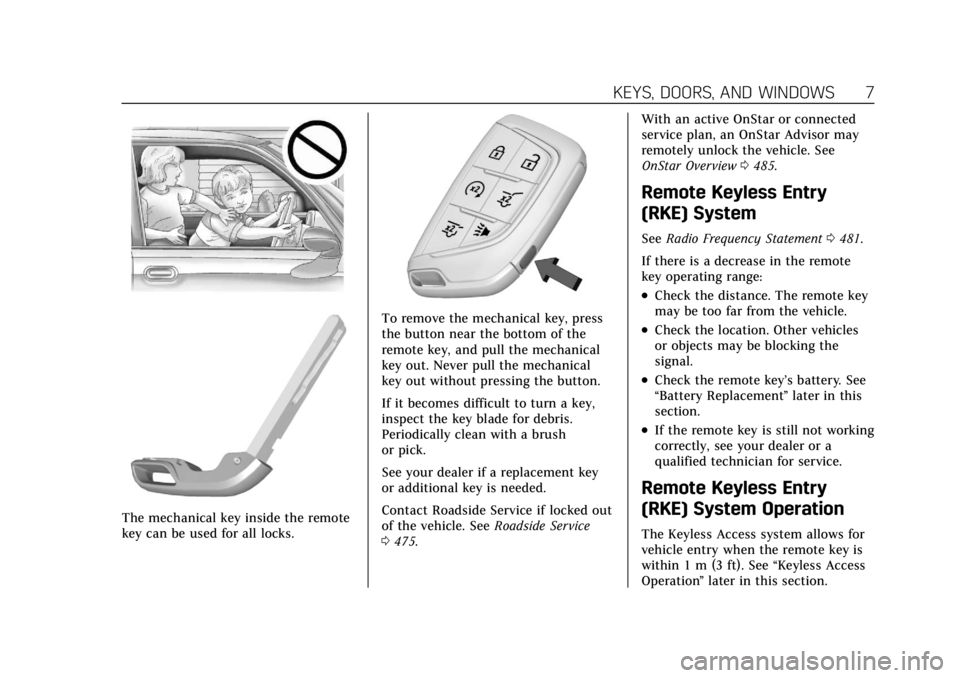
The mechanical key inside the remote
key can be used for all locks.
To remove the mechanical key, press
the button near the bottom of the
remote key, and pull the mechanical
key out. Never pull the mechanical
key out without pressing the button.
If it becomes difficult to turn a key,
inspect the key blade for debris.
Periodically clean with a brush
or pick.
See your dealer if a replacement key
or additional key is needed.
Contact Roadside Service if locked out
of the vehicle. SeeRoadside Service
0 475. With an active OnStar or connected
service plan, an OnStar Advisor may
remotely unlock the vehicle. See
OnStar Overview
0485.
Remote Keyless Entry
(RKE) System
See Radio Frequency Statement 0481.
If there is a decrease in the remote
key operating range:
.Check the distance. The remote key
may be too far from the vehicle.
.Check the location. Other vehicles
or objects may be blocking the
signal.
.Check the remote key’s battery. See
“Battery Replacement ”later in this
section.
.If the remote key is still not working
correctly, see your dealer or a
qualified technician for service.
Remote Keyless Entry
(RKE) System Operation
The Keyless Access system allows for
vehicle entry when the remote key is
within 1 m (3 ft). See “Keyless Access
Operation ”later in this section.
Page 24 of 508
Cadillac Escalade Owner Manual (GMNA-Localizing-U.S./Canada/Mexico-
15567102) - 2022 - CRC - 11/17/21
KEYS, DOORS, AND WINDOWS 23
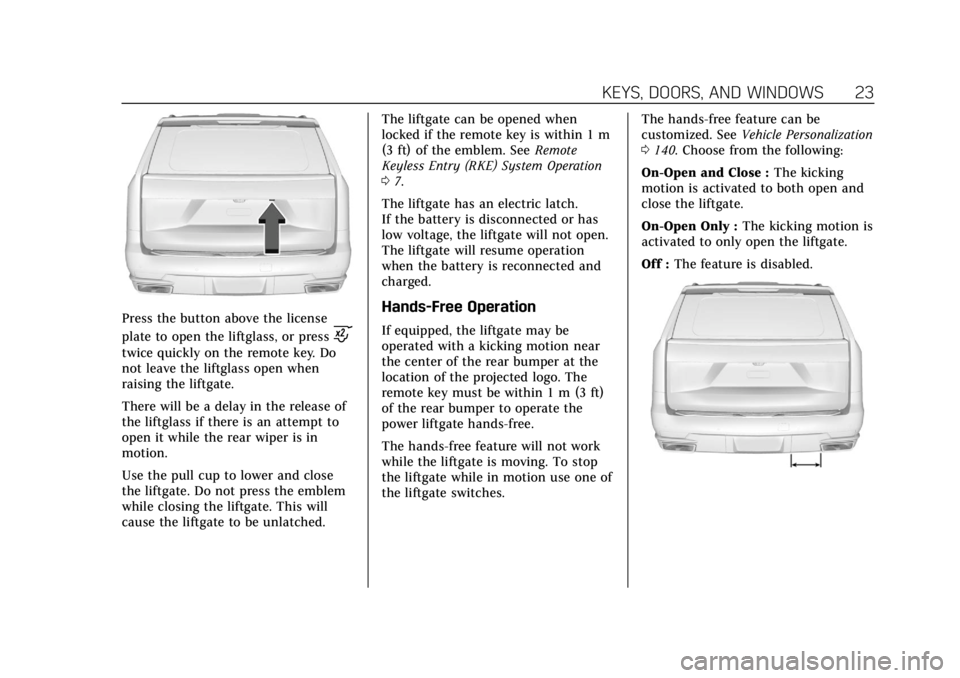
Press the button above the license
plate to open the liftglass, or press
c
twice quickly on the remote key. Do
not leave the liftglass open when
raising the liftgate.
There will be a delay in the release of
the liftglass if there is an attempt to
open it while the rear wiper is in
motion.
Use the pull cup to lower and close
the liftgate. Do not press the emblem
while closing the liftgate. This will
cause the liftgate to be unlatched.The liftgate can be opened when
locked if the remote key is within 1 m
(3 ft) of the emblem. See
Remote
Keyless Entry (RKE) System Operation
0 7.
The liftgate has an electric latch.
If the battery is disconnected or has
low voltage, the liftgate will not open.
The liftgate will resume operation
when the battery is reconnected and
charged.
Hands-Free Operation
If equipped, the liftgate may be
operated with a kicking motion near
the center of the rear bumper at the
location of the projected logo. The
remote key must be within 1 m (3 ft)
of the rear bumper to operate the
power liftgate hands-free.
The hands-free feature will not work
while the liftgate is moving. To stop
the liftgate while in motion use one of
the liftgate switches. The hands-free feature can be
customized. See
Vehicle Personalization
0 140. Choose from the following:
On-Open and Close : The kicking
motion is activated to both open and
close the liftgate.
On-Open Only : The kicking motion is
activated to only open the liftgate.
Off : The feature is disabled.
Page 77 of 508

Cadillac Escalade Owner Manual (GMNA-Localizing-U.S./Canada/Mexico-
15567102) - 2022 - CRC - 11/17/21
76 SEATS AND RESTRAINTS
massagers can affect how well the
passenger sensing system operates.
We recommend that you not use seat
covers or other aftermarket equipment
except when approved by GM for your
specific vehicle. SeeAdding Equipment
to the Airbag-Equipped Vehicle 076 for
more information about modifications
that can affect how the system
operates.
The ON indicator may be lit if an
object, such as a briefcase, handbag,
grocery bag, laptop, or other electronic
device, is put on an unoccupied seat.
If this is not desired, remove the
object from the seat.
{Warning
Stowing articles under the
passenger seat or between the
passenger seat cushion and
seatback may interfere with the
proper operation of the passenger
sensing system.
Servicing the
Airbag-Equipped Vehicle
Airbags affect how the vehicle should
be serviced. There are parts of the
airbag system in several places around
the vehicle. Your dealer and the
service manual have information
about servicing the vehicle and the
airbag system. To purchase a service
manual, see Publication Ordering
Information 0480.
{Warning
For up to 10 seconds after the
vehicle is turned off and the battery
is disconnected, an airbag can still
inflate during improper service. You
can be injured if you are close to an
airbag when it inflates. Avoid
yellow connectors. They are
probably part of the airbag system.
Be sure to follow proper service
procedures, and make sure the
person performing work for you is
qualified to do so.
Adding Equipment to the
Airbag-Equipped Vehicle
Adding accessories that change the
vehicle's frame, bumper system,
height, front end, or side sheet metal
may keep the airbag system from
working properly.
The operation of the airbag system
can also be affected by changing,
including improperly repairing or
replacing, any parts of the following:
.Airbag system, including airbag
modules, front or side impact
sensors, sensing and diagnostic
module, airbag wiring, or front
center console
.Front seats, including stitching,
seams or zippers
.Seat belts
.Steering wheel, instrument panel,
overhead console, ceiling trim,
or pillar garnish trim
.Inner door seals, including speakers
Your dealer and the service manual
have information about the location of
the airbag modules and sensors,
Page 135 of 508
Cadillac Escalade Owner Manual (GMNA-Localizing-U.S./Canada/Mexico-
15567102) - 2022 - CRC - 11/18/21
134 INSTRUMENTS AND CONTROLS
infotainment display. SeeSettings
0 205 or
Vehicle Information 0136.
If the vehicle has a diesel engine, see
the Duramax diesel supplement for
more information.
DIC Information Displays
The following is the list of all possible
DIC information displays and their
locations. Some of the information
displays may not be available for your
particular vehicle.
Control Panel
Trip 1 or Trip 2 and Average Fuel
Economy : The Trip display shows the
current distance traveled, in either
kilometers (km) or miles (mi), since
the trip odometer was last reset. To
reset the current trip, touch and hold
the touchscreen display when trip
odometer is displayed.
The Average Fuel Economy display
shows the approximate average liters
per 100 kilometers (L/100 km) or
miles per gallon (mpg). This number
is calculated based on the number of
L/100 km (mpg) recorded since the last time this menu item was reset.
This number reflects only the
approximate average fuel economy
that the vehicle has right now, and
will change as driving conditions
change. The Average Fuel Economy
can be reset along with the trip
odometer by touching and holding the
touchscreen display when trip
odometer is displayed.
Left Zone
Time/Date :
Displays current date and
time information.
Auto Lane Change : Displays the
status of a driver-requested lane
change when Super Cruise is active.
See Super Cruise 0286.
Eff iciency Gauge : Displays a gauge
that is a guide to driving in an
efficient manner.
Efficient Driving is shown by a green
ball in the center of the gauge.
Inefficient driving is shown by a
yellow ball above the center of the
gauge. Aggressive braking is shown by
a yellow ball below the center of the
gauge. Average Speed :
Shows the average
speed of the vehicle in kilometers per
hour (km/h) or miles per hour (mph).
This average is calculated based on
the various vehicle speeds recorded
since the last reset of this value. The
average speed can be reset by
touching reset in vehicle information
screen.
Timer : This display can be used as a
timer. To start the timer, touch Start
while this display is active. The
display will show the amount of time
that has passed since the timer was
last reset. To stop the timer, touch
Stop briefly while this display is active
and the timer is running. To reset the
timer to zero, touch and hold Reset
while this display is active.
Off Road : Displays vehicle pitch and
roll information, road wheel angle,
and four-wheel drive (4WD) status.
Battery Voltage : Shows the current
battery voltage.
Trailer Brake : On vehicles with the
Integrated Trailer Brake Control
(ITBC) system, the trailer brake
display appears in the DIC.
Page 248 of 508

Cadillac Escalade Owner Manual (GMNA-Localizing-U.S./Canada/Mexico-
15567102) - 2022 - CRC - 11/17/21
DRIVING AND OPERATING 247
A sound may be heard as the lock
actuates or releases. The steering
column lock may not release with the
wheels turned off center. If this
happens, the vehicle may not start.
Move the steering wheel from left to
right while attempting to start the
vehicle. If this does not work, the
vehicle needs service.
If the vehicle must be shut off in an
emergency:1. Brake using a firm and steady pressure. Do not pump the brakes
repeatedly. This may deplete power
assist, requiring increased brake
pedal force.
2. Shift the vehicle to N (Neutral). This can be done while the vehicle
is moving. After shifting to
N (Neutral), firmly apply the brakes
and steer the vehicle to a safe
location.
3. Come to a complete stop.
4. Hold the brake pedal down and shift to P (Park). The shift lever
must be in P (Park) to turn the
ignition off. 5. Continue to hold the brake
pedal down.
6. Set the parking brake. See Electric
Parking Brake 0262.
7. Press ENGINE START/STOP once to turn the ignition off.
8. Release the brake pedal.
If the vehicle cannot be pulled over,
and must be shut off while driving,
press and hold ENGINE START/STOP
for longer than two seconds, or press
twice in five seconds.
ACC/ACCESSORY (Amber Indicator
Light) : This mode allows some
electrical accessories to be used when
the engine is off.
With the ignition off, pressing the
button one time without the brake
pedal applied will place the ignition
system in ACC/ACCESSORY.
The ignition will switch from
ACC/ACCESSORY to off after
five minutes to prevent battery
rundown. ON/RUN/START (Green Indicator
Light) :
This mode is for driving and
starting. With the ignition off, and the
brake pedal applied, pressing the
button once will turn the ignition on.
Once engine cranking begins, release
the button. Engine cranking will
continue until the engine starts. See
Starting the Engine 0248.
Service Mode
This power mode is available for
service and diagnostics, and to verify
the proper operation of the
malfunction indicator lamp as may be
required for emission inspection
purposes. With the vehicle off, and the
brake pedal not applied, pressing and
holding the button for more than
five seconds will place the vehicle in
Service Mode. The instruments and
audio systems will operate as they do
when the ignition is on, but the
vehicle will not be able to be driven.
The engine will not start in Service
Mode. Press the button again to turn
the ignition off.
Page 374 of 508
Cadillac Escalade Owner Manual (GMNA-Localizing-U.S./Canada/Mexico-
15567102) - 2022 - CRC - 11/17/21
VEHICLE CARE 373
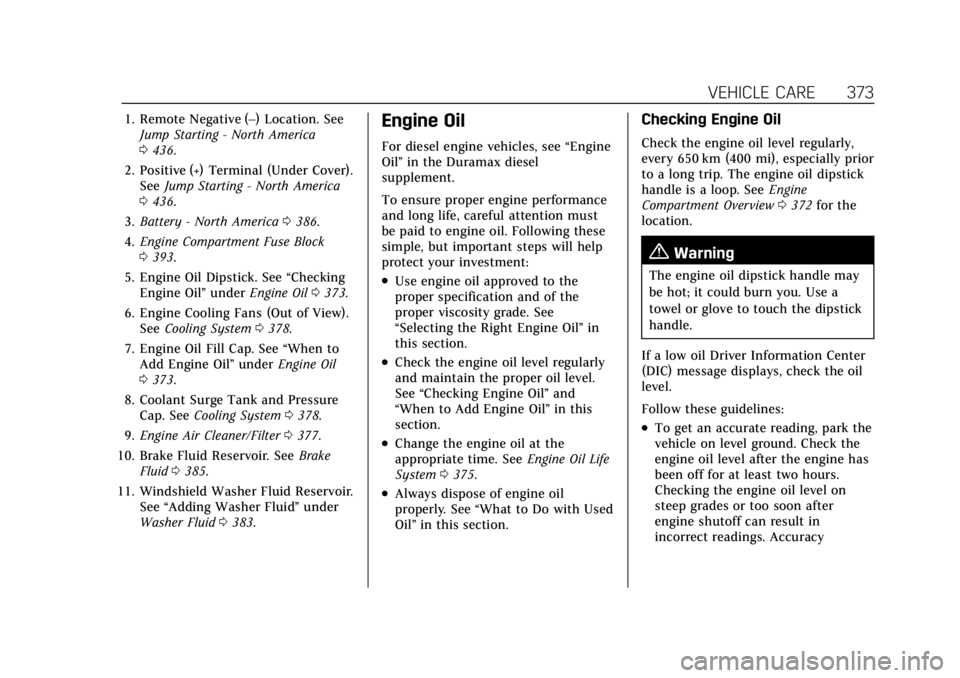
1. Remote Negative (–) Location. SeeJump Starting - North America
0436.
2. Positive (+) Terminal (Under Cover). See Jump Starting - North America
0 436.
3. Battery - North America 0386.
4. Engine Compartment Fuse Block
0393.
5. Engine Oil Dipstick. See “Checking
Engine Oil” underEngine Oil 0373.
6. Engine Cooling Fans (Out of View). See Cooling System 0378.
7. Engine Oil Fill Cap. See “When to
Add Engine Oil” underEngine Oil
0 373.
8. Coolant Surge Tank and Pressure Cap. See Cooling System 0378.
9. Engine Air Cleaner/Filter 0377.
10. Brake Fluid Reservoir. See Brake
Fluid 0385.
11. Windshield Washer Fluid Reservoir. See “Adding Washer Fluid” under
Washer Fluid 0383.Engine Oil
For diesel engine vehicles, see “Engine
Oil” in the Duramax diesel
supplement.
To ensure proper engine performance
and long life, careful attention must
be paid to engine oil. Following these
simple, but important steps will help
protect your investment:
.Use engine oil approved to the
proper specification and of the
proper viscosity grade. See
“Selecting the Right Engine Oil” in
this section.
.Check the engine oil level regularly
and maintain the proper oil level.
See “Checking Engine Oil” and
“When to Add Engine Oil” in this
section.
.Change the engine oil at the
appropriate time. See Engine Oil Life
System 0375.
.Always dispose of engine oil
properly. See “What to Do with Used
Oil” in this section.
Checking Engine Oil
Check the engine oil level regularly,
every 650 km (400 mi), especially prior
to a long trip. The engine oil dipstick
handle is a loop. See Engine
Compartment Overview 0372 for the
location.
{Warning
The engine oil dipstick handle may
be hot; it could burn you. Use a
towel or glove to touch the dipstick
handle.
If a low oil Driver Information Center
(DIC) message displays, check the oil
level.
Follow these guidelines:
.To get an accurate reading, park the
vehicle on level ground. Check the
engine oil level after the engine has
been off for at least two hours.
Checking the engine oil level on
steep grades or too soon after
engine shutoff can result in
incorrect readings. Accuracy
Page 387 of 508

Cadillac Escalade Owner Manual (GMNA-Localizing-U.S./Canada/Mexico-
15567102) - 2022 - CRC - 11/17/21
386 VEHICLE CARE
the specified intervals to prevent
increased stopping distance. See
Maintenance Schedule0455.
What to Add
Use only GM approved DOT 4 brake
fluid from a clean, sealed container.
See Recommended Fluids and
Lubricants 0464.
{Warning
The wrong or contaminated brake
fluid could result in damage to the
brake system. This could result in
the loss of braking leading to a
possible injury. Always use the
proper GM approved brake fluid.
Caution
If brake fluid is spilled on the
vehicle's painted surfaces, the paint
finish can be damaged. Immediately
wash off any painted surface.
Battery - North America
The original equipment battery is
maintenance free. Do not remove the
cap and do not add fluid. Refer to the replacement number
shown on the original battery label
when a new battery is needed. See
Engine Compartment Overview
0372
for battery location.
{Warning
WARNING: Battery posts,
terminals and related accessories
can expose you to chemicals
including lead and lead compounds,
which are known to the State of
California to cause cancer and birth
defects or other reproductive harm.
Wash hands after handling. For
more information go to
www.P65Warnings.ca.gov.
See the warning on the back cover.
Vehicle Storage
{Warning
Batteries have acid that can burn
you and gas that can explode. You
can be badly hurt if you are not
careful. Always wear eye protection. (Continued)
Warning (Continued)
SeeJump Starting - North America
0 436 for tips on working around a
battery without getting hurt.
Infrequent Usage: Remove the black,
negative (−) cable from the battery to
keep the battery from running down.
Extended Storage: Remove the black,
negative (−) cable from the battery or
use a battery trickle charger.
Four-Wheel Drive
Transfer Case
If the vehicle is equipped with
Four-Wheel Drive, be sure to perform
the lubricant checks described in this
section.
When to Check Lubricant
Refer to Maintenance Schedule 0455
to determine how often to check the
lubricant.
How to Check Lubricant
To get an accurate reading, the vehicle
should be on a level surface.
Page 439 of 508

Cadillac Escalade Owner Manual (GMNA-Localizing-U.S./Canada/Mexico-
15567102) - 2022 - CRC - 11/17/21
438 VEHICLE CARE
4. Turn the ignition off on bothvehicles. Unplug unnecessary
accessories plugged into the
accessory power outlets. Turn off
the radio and all the lamps that are
not needed. This will avoid sparks
and help save both batteries. And it
could save the radio!
5. Open the hood on the other vehicle and locate the positive (+) and
negative (−) terminal locations on
that vehicle.
{Warning
An electric fan can start up even
when the engine is not running and
can injure you. Keep hands,
clothing, and tools away from any
underhood electric fan.
{Warning
Using a match near a battery can
cause battery gas to explode. People
have been hurt doing this, and
some have been blinded. Use a
flashlight if you need more light.
(Continued)
Warning (Continued)
Battery fluid contains acid that can
burn you. Do not get it on you.
If you accidentally get it in your
eyes or on your skin, flush the place
with water and get medical help
immediately.
{Warning
Fans or other moving engine parts
can injure you badly. Keep your
hands away from moving parts
once the engine is running.
6. Check that the jumper cables do not have loose or missing
insulation. If they do, you could get
a shock. The vehicles could be
damaged too.
Before you connect the cables, here
are some basic things you should
know. Positive (+) will go to
positive (+) or to a remote
positive (+) terminal if the vehicle
has one. Negative (−) will go to a heavy, unpainted metal engine part
or to a remote negative (−) terminal
if the vehicle has one.
Do not connect positive (+) to
negative (−) or you will get a short
that would damage the battery and
maybe other parts too. And do not
connect the negative (−) cable to
the negative (−) terminal on the
dead battery because this can
cause sparks.
7. Connect one end of the red positive (+) cable to the discharged
battery positive (+) terminal.
8. Do not let the other end touch metal. Connect it to the good
battery positive (+) terminal. Use a
remote positive (+) terminal if the
vehicle has one.
9. Connect one end of the black negative (−) cable to the good
battery negative (−) terminal. Use a
remote negative (−) terminal if the
vehicle has one.
Do not let the other end touch
anything until the next step.
Page 477 of 508
Cadillac Escalade Owner Manual (GMNA-Localizing-U.S./Canada/Mexico-
15567102) - 2022 - CRC - 11/17/21
476 CUSTOMER INFORMATION
.Emergency Tow from a Public
Road or Highway:Tow to the
nearest Cadillac dealer for warranty
service, or if the vehicle was in a
crash and cannot be driven.
Assistance is not given when the
vehicle is stuck in the sand, mud,
or snow.
.Flat Tire Change: Service to change
a flat tire with a spare tire. The
spare tire, if equipped, must be in
good condition and properly
inflated. It is your responsibility for
the repair or replacement of the tire
if it is not covered by the warranty.
.Battery Jump Start: Service to
jump start a dead battery.
.Trip Interruption Benefits and
Service: If your trip is interrupted
due to a warranty failure, incidental
expenses may be reimbursed during
the Powertrain warranty period.
Items considered are hotel, meals,
and rental car or a vehicle being
delivered back to the customer, up
to 500 miles.
Cadillac Technician Roadside
Service (U.S. Only)
Cadillac's exceptional Roadside Service
is more than an auto club or towing
service. It provides every Cadillac
owner in the United States with the
advantage of contacting a Cadillac
advisor and, where available, a
Cadillac trained dealer technician who
can provide on-site service.
A dealer technician will travel to your
location within a 30-mile radius of a
participating Cadillac dealership.
If beyond this radius, we will arrange
to have your car towed to the nearest
Cadillac dealership. Each technician
travels with a specially equipped
service vehicle complete with the
necessary Cadillac parts and tools
required to handle most roadside
repairs.
Services Not Included in
Roadside Service
.Impound towing caused by violation
of any laws
.Legal fines
.Mounting, dismounting, or changing
of snow tires, chains, or other
traction devices
Service is not provided if a vehicle is
in an area that is not accessible to the
service vehicle or is not a regularly
traveled or maintained public road,
which includes ice and winter roads.
Off-road use is not covered.
Services Specific to
Canadian-Purchased Vehicles
.Fuel delivery: Reimbursement is up
to 7 liters. Diesel fuel delivery may
be restricted. Propane and other
fuels are not provided through this
service.
.Lock-Out Service: Vehicle
registration is required.
.Trip Interruption Benefits and
Service: Pre-authorization, original
detailed receipts, and a copy of the
repair orders are required. Once
authorization has been received, the
Roadside Service advisor will help
you make arrangements and explain
how to receive payment. Items
considered are hotel, meals, and
Page 486 of 508
Cadillac Escalade Owner Manual (GMNA-Localizing-U.S./Canada/Mexico-
15567102) - 2022 - CRC - 11/17/21
ONSTAR 485
OnStar
OnStar Overview
OnStar Overview . . . . . . . . . . . . . . . . . . 485
OnStar Services
Emergency . . . . . . . . . . . . . . . . . . . . . . . . 486
Security . . . . . . . . . . . . . . . . . . . . . . . . . . . 486
OnStar Additional Information
OnStar AdditionalInformation . . . . . . . . . . . . . . . . . . . . . 487
OnStar Overview
=Voice Command Button
QBlue OnStar Button
>Red Emergency Button
This vehicle may be equipped with a
comprehensive, in-vehicle system that
can connect to an OnStar Advisor for
Emergency, Security, Navigation,
Connections, and Diagnostics Services.
OnStar services may require a paid
service plan and data plan. OnStar
requires the vehicle battery and
electrical system, cellular service, and
GPS satellite signals to be available
and operating. OnStar acts as a link to
existing emergency service providers.
OnStar may collect information about
you and your vehicle, including
location information. See OnStar User
Terms, Privacy Statement, and
Software Terms for more details including system limitations at
www.onstar.com (U.S.) or
www.onstar.ca (Canada).
The OnStar system status light is next
to the OnStar buttons. If the status
light is:
.Solid Green: System is ready.
.Flashing Green: On a call.
.Red: Indicates a problem.
.Off: System is off. PressQtwice to
speak with an OnStar Advisor.
Press
Qor call 1-888-4ONSTAR
(1-888-466-7827) to speak to an
Advisor.
Functionality of the Voice Command
button may vary by vehicle and
region.
Press
=to:
.Open the OnStar app on the
infotainment display. If equipped,
the infotainment system has OnStar
controls in the embedded OnStar
app on the Home Page. Most OnStar
functions that can be performed
with the buttons can be done using
the app. To open the app, touch the
OnStar icon on the Home Page. App