cruise control CADILLAC ESCALADE 2022 Owners Manual
[x] Cancel search | Manufacturer: CADILLAC, Model Year: 2022, Model line: ESCALADE, Model: CADILLAC ESCALADE 2022Pages: 508, PDF Size: 9.18 MB
Page 6 of 508

Cadillac Escalade Owner Manual (GMNA-Localizing-U.S./Canada/Mexico-
15567102) - 2022 - CRC - 11/17/21
INTRODUCTION 5
1.Driver Information Center (DIC)
0133.
2. Air Vents 0227.
3. Turn Signal Lever. See Turn and
Lane-Change Signals 0155.
Exterior Lamp Controls 0150.
4. Tap Shift Controls (If Equipped). See Manual Mode 0256.
5. Instrument Cluster 0115.
6. Driver Monitoring Camera. See Super Cruise 0286 (If Equipped).
7. Windshield Wiper/Washer 0106.
Rear Window Wiper/Washer 0108.
8. Infotainment. See Overview0161.
9. Light Sensor. See Automatic
Headlamp System 0154.
10. Dual Automatic Climate Control
System 0221.
Heated and Ventilated Front Seats
0 48 (If Equipped).
11. USB Ports. See USB Port0171.
12. Storage Compartment.
13. Infotainment Controls. See Overview 0161.
14. Hazard Warning Flashers 0155. 15.
Wireless Charging 0112.
16. Shift Lever. See Automatic
Transmission 0252.
17. Automatic Vehicle Hold (AVH) 0264
(Out of View).
Auto Stop Disable Switch. See Stop/
Start System 0249 (Out of View).
Lane Keep Assist (LKA) 0330 (If
Equipped) (Out of View).
18. ENGINE START/STOP Button. See Ignition Positions 0246.
19. Steering Wheel Controls 0105.
20. Horn 0105.
21. Steering Column Adjustment. See Steering Wheel Adjustment 0105.
22. Hood Release. See Hood0371.
23. Cruise Control 0273 (If Equipped).
Adaptive Cruise Control (Advanced)
0 275 (If Equipped).
Super Cruise 0286 (If Equipped).
Forward Collision Alert (FCA) System
0 319 (If Equipped).
Heated Steering Wheel 0105 (If
Equipped).
24. Instrument Panel Illumination
Control 0156. 25. Data Link Connector (DLC) (Out of
View). See Malfunction Indicator
Lamp (Check Engine Light) 0123.
26. Trailer Brake Control. See Towing
Equipment 0344 (If Equipped).
27. Electric Parking Brake 0262.
28. Four-Wheel Drive 0257 (If
Equipped).
Four Corner Air Suspension System
0 270 (If Equipped).
Driver Mode Control 0267
Page 105 of 508
Cadillac Escalade Owner Manual (GMNA-Localizing-U.S./Canada/Mexico-
15567102) - 2022 - CRC - 11/18/21
104 INSTRUMENTS AND CONTROLS
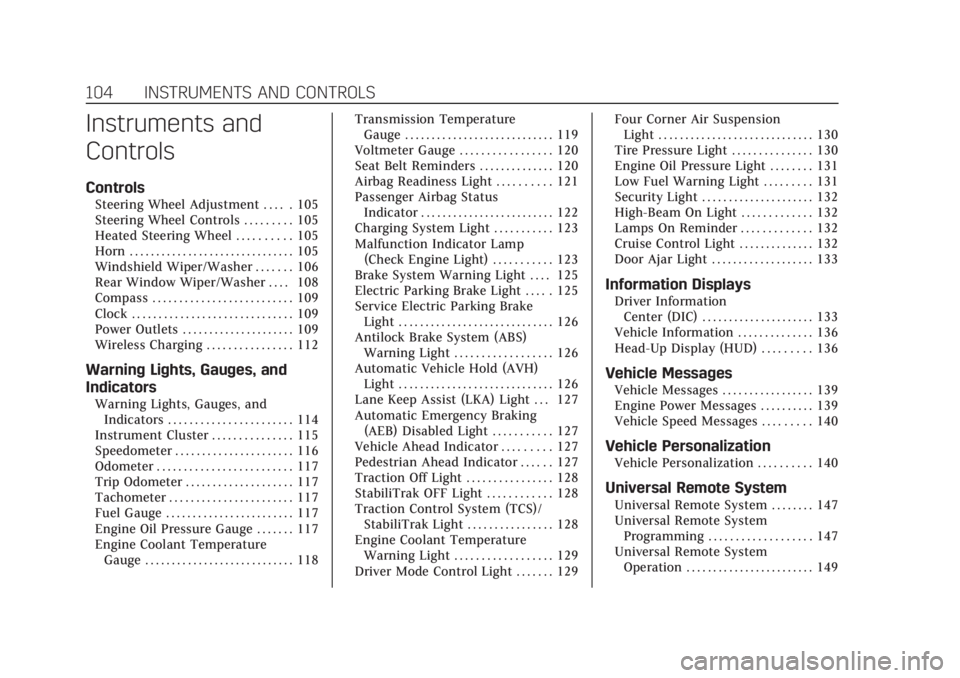
Instruments and
Controls
Controls
Steering Wheel Adjustment . . . . . 105
Steering Wheel Controls . . . . . . . . . 105
Heated Steering Wheel . . . . . . . . . . 105
Horn . . . . . . . . . . . . . . . . . . . . . . . . . . . . . . . 105
Windshield Wiper/Washer . . . . . . . 106
Rear Window Wiper/Washer . . . . 108
Compass . . . . . . . . . . . . . . . . . . . . . . . . . . 109
Clock . . . . . . . . . . . . . . . . . . . . . . . . . . . . . . 109
Power Outlets . . . . . . . . . . . . . . . . . . . . . 109
Wireless Charging . . . . . . . . . . . . . . . . 112
Warning Lights, Gauges, and
Indicators
Warning Lights, Gauges, andIndicators . . . . . . . . . . . . . . . . . . . . . . . 114
Instrument Cluster . . . . . . . . . . . . . . . 115
Speedometer . . . . . . . . . . . . . . . . . . . . . . 116
Odometer . . . . . . . . . . . . . . . . . . . . . . . . . 117
Trip Odometer . . . . . . . . . . . . . . . . . . . . 117
Tachometer . . . . . . . . . . . . . . . . . . . . . . . 117
Fuel Gauge . . . . . . . . . . . . . . . . . . . . . . . . 117
Engine Oil Pressure Gauge . . . . . . . 117
Engine Coolant Temperature Gauge . . . . . . . . . . . . . . . . . . . . . . . . . . . . 118 Transmission Temperature
Gauge . . . . . . . . . . . . . . . . . . . . . . . . . . . . 119
Voltmeter Gauge . . . . . . . . . . . . . . . . . 120
Seat Belt Reminders . . . . . . . . . . . . . . 120
Airbag Readiness Light . . . . . . . . . . 121
Passenger Airbag Status Indicator . . . . . . . . . . . . . . . . . . . . . . . . . 122
Charging System Light . . . . . . . . . . . 123
Malfunction Indicator Lamp (Check Engine Light) . . . . . . . . . . . 123
Brake System Warning Light . . . . 125
Electric Parking Brake Light . . . . . 125
Service Electric Parking Brake Light . . . . . . . . . . . . . . . . . . . . . . . . . . . . . 126
Antilock Brake System (ABS) Warning Light . . . . . . . . . . . . . . . . . . 126
Automatic Vehicle Hold (AVH) Light . . . . . . . . . . . . . . . . . . . . . . . . . . . . . 126
Lane Keep Assist (LKA) Light . . . 127
Automatic Emergency Braking (AEB) Disabled Light . . . . . . . . . . . 127
Vehicle Ahead Indicator . . . . . . . . . 127
Pedestrian Ahead Indicator . . . . . . 127
Traction Off Light . . . . . . . . . . . . . . . . 128
StabiliTrak OFF Light . . . . . . . . . . . . 128
Traction Control System (TCS)/ StabiliTrak Light . . . . . . . . . . . . . . . . 128
Engine Coolant Temperature Warning Light . . . . . . . . . . . . . . . . . . 129
Driver Mode Control Light . . . . . . . 129 Four Corner Air Suspension
Light . . . . . . . . . . . . . . . . . . . . . . . . . . . . . 130
Tire Pressure Light . . . . . . . . . . . . . . . 130
Engine Oil Pressure Light . . . . . . . . 131
Low Fuel Warning Light . . . . . . . . . 131
Security Light . . . . . . . . . . . . . . . . . . . . . 132
High-Beam On Light . . . . . . . . . . . . . 132
Lamps On Reminder . . . . . . . . . . . . . 132
Cruise Control Light . . . . . . . . . . . . . . 132
Door Ajar Light . . . . . . . . . . . . . . . . . . . 133
Information Displays
Driver Information Center (DIC) . . . . . . . . . . . . . . . . . . . . . 133
Vehicle Information . . . . . . . . . . . . . . 136
Head-Up Display (HUD) . . . . . . . . . 136
Vehicle Messages
Vehicle Messages . . . . . . . . . . . . . . . . . 139
Engine Power Messages . . . . . . . . . . 139
Vehicle Speed Messages . . . . . . . . . 140
Vehicle Personalization
Vehicle Personalization . . . . . . . . . . 140
Universal Remote System
Universal Remote System . . . . . . . . 147
Universal Remote System Programming . . . . . . . . . . . . . . . . . . . 147
Universal Remote System Operation . . . . . . . . . . . . . . . . . . . . . . . . 149
Page 133 of 508

Cadillac Escalade Owner Manual (GMNA-Localizing-U.S./Canada/Mexico-
15567102) - 2022 - CRC - 11/18/21
132 INSTRUMENTS AND CONTROLS
Security Light
The security light should come on
briefly as the engine is started. If it
does not come on, have the vehicle
serviced by your dealer. If the system
is working normally, the indicator
light turns off.
If the light stays on and the engine
does not start, there could be a
problem with the theft-deterrent
system. SeeImmobilizer Operation
0 30.
High-Beam On Light
This light comes on when the
high-beam headlamps are in use. See
Headlamp High/Low-Beam Changer
0153.
IntelliBeam Light
This light comes on when the
IntelliBeam system, if equipped, is
enabled. See Exterior Lamp Controls
0 150.
Lamps On Reminder
This light comes on when the exterior
lamps are in use, except when only
the Daytime Running Lamps (DRL)
are active. See Exterior Lamp Controls
0 150.
Cruise Control Light
The cruise control light is white when
the cruise control is on and ready, and
turns green when the cruise control is
set and active.
See Cruise Control 0273.
Adaptive Cruise Control Light
This light is white when the Adaptive
Cruise Control (ACC, if equipped) is on
and ready, and turns green when the
ACC is set and active.
Page 134 of 508
Cadillac Escalade Owner Manual (GMNA-Localizing-U.S./Canada/Mexico-
15567102) - 2022 - CRC - 11/18/21
INSTRUMENTS AND CONTROLS 133
Curve Speed Control Light
If equipped, this light may illuminate
green when ACC is actively controlling
the vehicle speed and detects a sharp
curve on the road ahead.
ACC automatically slows the vehicle
down while navigating the curve and
may increase speed out of the curve,
but will not exceed the set speed.
SeeAdaptive Cruise Control (Advanced)
0 275.
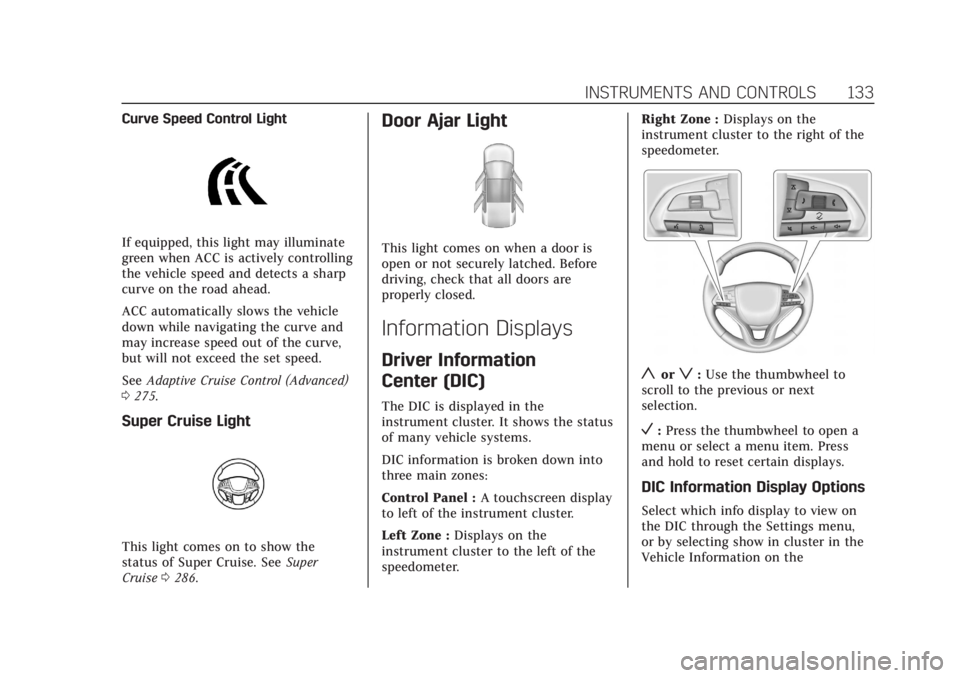
Super Cruise Light
This light comes on to show the
status of Super Cruise. See Super
Cruise 0286.
Door Ajar Light
This light comes on when a door is
open or not securely latched. Before
driving, check that all doors are
properly closed.
Information Displays
Driver Information
Center (DIC)
The DIC is displayed in the
instrument cluster. It shows the status
of many vehicle systems.
DIC information is broken down into
three main zones:
Control Panel : A touchscreen display
to left of the instrument cluster.
Left Zone : Displays on the
instrument cluster to the left of the
speedometer. Right Zone :
Displays on the
instrument cluster to the right of the
speedometer.
yorz: Use the thumbwheel to
scroll to the previous or next
selection.
V: Press the thumbwheel to open a
menu or select a menu item. Press
and hold to reset certain displays.
DIC Information Display Options
Select which info display to view on
the DIC through the Settings menu,
or by selecting show in cluster in the
Vehicle Information on the
Page 135 of 508
Cadillac Escalade Owner Manual (GMNA-Localizing-U.S./Canada/Mexico-
15567102) - 2022 - CRC - 11/18/21
134 INSTRUMENTS AND CONTROLS
infotainment display. SeeSettings
0 205 or
Vehicle Information 0136.
If the vehicle has a diesel engine, see
the Duramax diesel supplement for
more information.
DIC Information Displays
The following is the list of all possible
DIC information displays and their
locations. Some of the information
displays may not be available for your
particular vehicle.
Control Panel
Trip 1 or Trip 2 and Average Fuel
Economy : The Trip display shows the
current distance traveled, in either
kilometers (km) or miles (mi), since
the trip odometer was last reset. To
reset the current trip, touch and hold
the touchscreen display when trip
odometer is displayed.
The Average Fuel Economy display
shows the approximate average liters
per 100 kilometers (L/100 km) or
miles per gallon (mpg). This number
is calculated based on the number of
L/100 km (mpg) recorded since the last time this menu item was reset.
This number reflects only the
approximate average fuel economy
that the vehicle has right now, and
will change as driving conditions
change. The Average Fuel Economy
can be reset along with the trip
odometer by touching and holding the
touchscreen display when trip
odometer is displayed.
Left Zone
Time/Date :
Displays current date and
time information.
Auto Lane Change : Displays the
status of a driver-requested lane
change when Super Cruise is active.
See Super Cruise 0286.
Eff iciency Gauge : Displays a gauge
that is a guide to driving in an
efficient manner.
Efficient Driving is shown by a green
ball in the center of the gauge.
Inefficient driving is shown by a
yellow ball above the center of the
gauge. Aggressive braking is shown by
a yellow ball below the center of the
gauge. Average Speed :
Shows the average
speed of the vehicle in kilometers per
hour (km/h) or miles per hour (mph).
This average is calculated based on
the various vehicle speeds recorded
since the last reset of this value. The
average speed can be reset by
touching reset in vehicle information
screen.
Timer : This display can be used as a
timer. To start the timer, touch Start
while this display is active. The
display will show the amount of time
that has passed since the timer was
last reset. To stop the timer, touch
Stop briefly while this display is active
and the timer is running. To reset the
timer to zero, touch and hold Reset
while this display is active.
Off Road : Displays vehicle pitch and
roll information, road wheel angle,
and four-wheel drive (4WD) status.
Battery Voltage : Shows the current
battery voltage.
Trailer Brake : On vehicles with the
Integrated Trailer Brake Control
(ITBC) system, the trailer brake
display appears in the DIC.
Page 140 of 508
Cadillac Escalade Owner Manual (GMNA-Localizing-U.S./Canada/Mexico-
15567102) - 2022 - CRC - 11/18/21
INSTRUMENTS AND CONTROLS 139
Navigation turn-by-turn Alerts shown
in the instrument cluster may also be
displayed in any HUD view.
Care of the HUD
Clean the inside of the windshield to
remove any dirt or film that could
reduce the sharpness or clarity of the
HUD image.
Clean the HUD lens with a soft cloth
sprayed with glass cleaner. Wipe the
lens gently, then dry it.
HUD Troubleshooting
Check that:
.Nothing is covering the HUD lens.
.The HUD brightness setting is not
too dim or too bright.
.The HUD is adjusted to the proper
height.
.Polarized sunglasses are not worn.
.The windshield and HUD lens are
clean.
If the HUD image is not correct,
contact your dealer.
The windshield is part of the HUD
system. See Windshield Replacement
0 389.
Vehicle Messages
Messages displayed on the DIC
indicate the status of the vehicle or
some action that may be needed to
correct a condition. Multiple messages
may appear one after another.
The messages that do not require
immediate action can be
acknowledged and cleared by pressing
the thumbwheel. The messages that
require immediate action cannot be
cleared until that action is performed.
All messages should be taken
seriously; clearing the message does
not correct the problem.
If a SERVICE message appears, see
your dealer.
Follow the instructions given in the
messages. The system displays
messages regarding the following
topics:
.Service Messages
.Fluid Levels
.Vehicle Security
.Brakes
.Ride Control Systems
.Driver Assistance Systems
.Cruise Control
.Lighting and Bulb Replacement
.Wiper/Washer Systems
.Doors and Windows
.Seat Belts
.Airbag Systems
.Engine and Transmission
.Tire Pressure
.Battery
Engine Power Messages
REDUCED ACCELERATION DRIVE
WITH CARE
This message displays when the
vehicle's propulsion power is reduced.
A reduction in propulsion power can
affect the vehicle's ability to
accelerate. If this message is on, but
there is no observed reduction in
performance, proceed to your
destination. Under certain conditions
the performance may be reduced the
next time the vehicle is driven. The
vehicle may be driven while this
message is on, but maximum
acceleration and speed may be
reduced. Anytime this message stays
Page 141 of 508

Cadillac Escalade Owner Manual (GMNA-Localizing-U.S./Canada/Mexico-
15567102) - 2022 - CRC - 11/18/21
140 INSTRUMENTS AND CONTROLS
on, or displays repeatedly, the vehicle
should be taken to your dealer for
service as soon as possible.
Under certain operating conditions,
propulsion will be disabled. Try
restarting after the ignition has been
off for two minutes.
Vehicle Speed Messages
SPEED LIMITED TO
XXX KM/H (MPH)
This message shows that the vehicle
speed has been limited to the speed
displayed. The limited speed is a
protection for various propulsion and
vehicle systems, such as lubrication,
thermal, brakes, suspension, Teen
Driver if equipped, or tires.
(If equipped with a diesel engine, see
the Duramax Diesel supplement.)–
For Diesel
Vehicle Personalization
The following are all possible vehicle
personalization features. Depending
on the vehicle, some may not be
available. For System and Search functions, see
Settings
0205.
To access the vehicle
personalization menu: 1. Touch the Settings icon on the Home Page of the infotainment
display.
2. Touch Vehicle to display a list of available options.
3. Touch to select the desired feature setting.
4. Touch the options on the infotainment display to disable or
enable a setting.
The menu may contain the following:
Valet Mode
This will lock the infotainment system
and steering wheel controls. It may
also limit access to vehicle storage
locations, if equipped.
To enable valet mode: 1. Enter a four-digit code on the keypad.
2. Select Enter to go to the confirmation screen.
3. Re-enter the four-digit code. Touch Lock or Unlock to lock or
unlock the system. Touch Back to go
back to the previous menu.
Teen Driver
See
Teen Driver 0209.
Rear Seat Reminder
This allows for a chime and a message
when the rear door has been opened
before or during operation of the
vehicle.
Touch Off or On.
Buckle to Drive
This feature can prevent shifting out
of Park when the driver, and if
applicable the front passenger, seat
belt is not buckled. See Buckle To Drive
0 59.
Touch Off or On.
The vehicle may need to be restarted
to activate this feature.
Super Cruise Lane Change
When on, the vehicle can change
lanes while Super Cruise is active. The
vehicle will only steer to change lanes
when traffic allows.
Page 143 of 508
Cadillac Escalade Owner Manual (GMNA-Localizing-U.S./Canada/Mexico-
15567102) - 2022 - CRC - 11/18/21
142 INSTRUMENTS AND CONTROLS
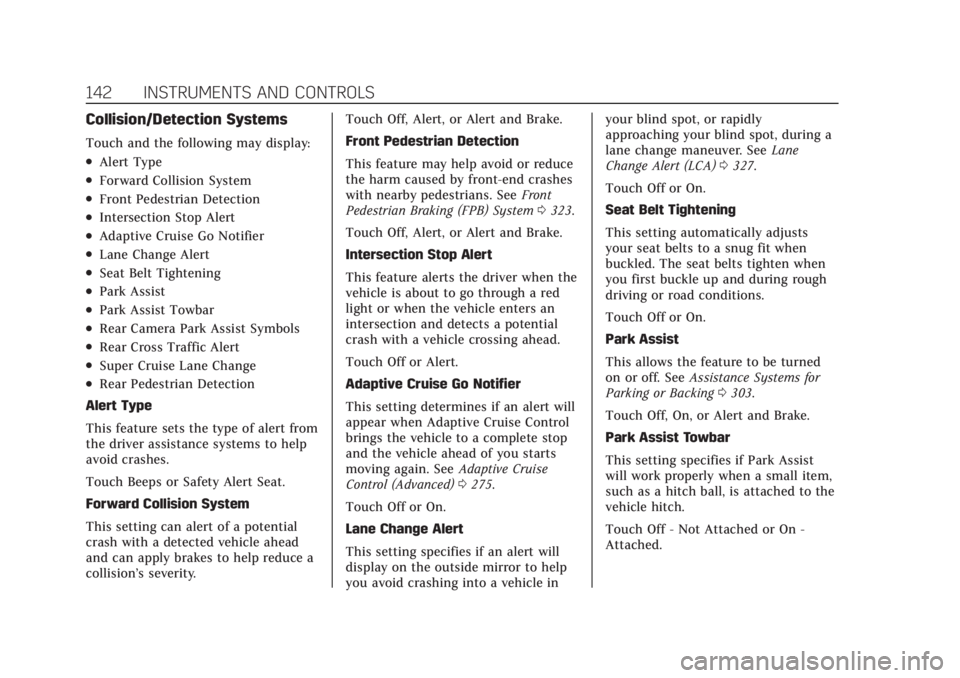
Collision/Detection Systems
Touch and the following may display:
.Alert Type
.Forward Collision System
.Front Pedestrian Detection
.Intersection Stop Alert
.Adaptive Cruise Go Notifier
.Lane Change Alert
.Seat Belt Tightening
.Park Assist
.Park Assist Towbar
.Rear Camera Park Assist Symbols
.Rear Cross Traffic Alert
.Super Cruise Lane Change
.Rear Pedestrian Detection
Alert Type
This feature sets the type of alert from
the driver assistance systems to help
avoid crashes.
Touch Beeps or Safety Alert Seat.
Forward Collision System
This setting can alert of a potential
crash with a detected vehicle ahead
and can apply brakes to help reduce a
collision’s severity. Touch Off, Alert, or Alert and Brake.
Front Pedestrian Detection
This feature may help avoid or reduce
the harm caused by front-end crashes
with nearby pedestrians. See
Front
Pedestrian Braking (FPB) System 0323.
Touch Off, Alert, or Alert and Brake.
Intersection Stop Alert
This feature alerts the driver when the
vehicle is about to go through a red
light or when the vehicle enters an
intersection and detects a potential
crash with a vehicle crossing ahead.
Touch Off or Alert.
Adaptive Cruise Go Notifier
This setting determines if an alert will
appear when Adaptive Cruise Control
brings the vehicle to a complete stop
and the vehicle ahead of you starts
moving again. See Adaptive Cruise
Control (Advanced) 0275.
Touch Off or On.
Lane Change Alert
This setting specifies if an alert will
display on the outside mirror to help
you avoid crashing into a vehicle in your blind spot, or rapidly
approaching your blind spot, during a
lane change maneuver. See
Lane
Change Alert (LCA) 0327.
Touch Off or On.
Seat Belt Tightening
This setting automatically adjusts
your seat belts to a snug fit when
buckled. The seat belts tighten when
you first buckle up and during rough
driving or road conditions.
Touch Off or On.
Park Assist
This allows the feature to be turned
on or off. See Assistance Systems for
Parking or Backing 0303.
Touch Off, On, or Alert and Brake.
Park Assist Towbar
This setting specifies if Park Assist
will work properly when a small item,
such as a hitch ball, is attached to the
vehicle hitch.
Touch Off - Not Attached or On -
Attached.
Page 211 of 508

Cadillac Escalade Owner Manual (GMNA-Localizing-U.S./Canada/Mexico-
15567102) - 2022 - CRC - 11/17/21
210 INFOTAINMENT SYSTEM
Manage Settings
Buckle To Drive :When turned ON,
Buckle to Drive prevents the driver
from shifting out of P (Park) for a
period of time if driver seat belt, and
on some vehicles, the passenger seat
belt, is not buckled. See Buckle To
Drive 059 and
Vehicle Personalization 0140.
Teen Driver Speed Limiter : Limits
the maximum speed of the vehicle.
When the speed limiter is turned on
and the vehicle is started with a Teen
Driver key, the DIC displays a message
that the top speed is limited.
On certain vehicles, when the Speed
Limiter is turned ON, the vehicle’s
maximum acceleration will be limited.
The DIC will display a message that
the acceleration is limited.
Teen Driver Speed Warning : Allows
the speed warning to be turned on or
off. Touch Set Teen Driver Speed
Warning to set the warning speed.
Set Teen Driver Speed Warning :
Displays a warning in the DIC when
exceeding a selectable speed. Choose the desired speed warning level. The
speed warning does not limit the
speed of the vehicle.
Audio Volume Limit :
Allows the
audio volume limit to be turned on or
off. Touch Set Audio Volume Limit to
choose the maximum allowable audio
volume level.
SiriusXM Explicit Content Filter (if
equipped) : Allows the SiriusXM
Explicit Content Filter to be turned
ON or OFF. When ON, the teen driver
will not be able to listen to SiriusXM
stations that contain explicit content,
and the Explicit Content Filter
selection in the Audio Settings will be
unavailable for change.
When Teen Driver is Active:
.The radio will mute when the
driver, or in some vehicles, the front
passenger seat belt, is not buckled.
The audio from any device paired to
the vehicle will also be muted.
.If an object, such as a briefcase,
handbag, grocery bag, laptop,
or other electronic device, is on the
front passenger seat, it could cause the radio to mute. If this happens,
remove the object from the seat. See
Passenger Sensing System
072.
.Some safety systems, such as
Forward Collision Alert, if equipped,
cannot be turned off.
.The gap setting for the Forward
Collision Alert and Adaptive Cruise
Control, if equipped, cannot be
changed.
.When trying to change a safety
feature that is not configurable in
Teen Driver, the DIC displays a
message indicating that Teen Driver
is active and the action is not
available.
.Super Cruise, if equipped, is not
available.
.Enhanced Low Fuel Warning (if
equipped) –When the vehicle is low
on fuel, the low fuel light on the
instrument cluster flashes and the
DIC low fuel warning cannot be
dismissed.
.Do not tow a trailer.
Page 231 of 508
Cadillac Escalade Owner Manual (GMNA-Localizing-U.S./Canada/Mexico-
15567102) - 2022 - CRC - 11/17/21
230 DRIVING AND OPERATING
Driving and
Operating
Driving Information
Driving for Better FuelEconomy . . . . . . . . . . . . . . . . . . . . . . . . 231
Distracted Driving . . . . . . . . . . . . . . . . 231
Defensive Driving . . . . . . . . . . . . . . . . 232
Impaired Driving . . . . . . . . . . . . . . . . . 232
Control of a Vehicle . . . . . . . . . . . . . . 232
Braking . . . . . . . . . . . . . . . . . . . . . . . . . . . . 232
Steering . . . . . . . . . . . . . . . . . . . . . . . . . . . 233
Off-Road Recovery . . . . . . . . . . . . . . . . 234
Loss of Control . . . . . . . . . . . . . . . . . . . 234
Off-Road Driving . . . . . . . . . . . . . . . . . 235
Driving on Wet Roads . . . . . . . . . . . 238
Hill and Mountain Roads . . . . . . . . 239
Winter Driving . . . . . . . . . . . . . . . . . . . . 240
If the Vehicle Is Stuck . . . . . . . . . . . 241
Vehicle Load Limits . . . . . . . . . . . . . . 241
Starting and Operating
New Vehicle Break-In . . . . . . . . . . . . 245
Ignition Positions . . . . . . . . . . . . . . . . 246
Starting the Engine . . . . . . . . . . . . . . 248
Stop/Start System . . . . . . . . . . . . . . . . 249
Retained Accessory Power (RAP) . . . . . . . . . . . . . . . . . . . . 250
Shifting Into Park . . . . . . . . . . . . . . . . 250 Shifting out of Park . . . . . . . . . . . . . . 251
Parking over Things
That Burn . . . . . . . . . . . . . . . . . . . . . . . 251
Dynamic Fuel Management . . . . . 251
Extended Parking . . . . . . . . . . . . . . . . . 251
Engine Exhaust
Engine Exhaust . . . . . . . . . . . . . . . . . . . 252
Running the Vehicle While Parked . . . . . . . . . . . . . . . . . . . . . . . . . . . 252
Automatic Transmission
Automatic Transmission . . . . . . . . . 252
Manual Mode . . . . . . . . . . . . . . . . . . . . . 256
Drive Systems
Four-Wheel Drive . . . . . . . . . . . . . . . . 257
Brakes
Electric Brake Boost . . . . . . . . . . . . . . 262
Antilock Brake System (ABS) . . . . 262
Electric Parking Brake . . . . . . . . . . . . 262
Brake Assist . . . . . . . . . . . . . . . . . . . . . . . 264
Hill Start Assist (HSA) . . . . . . . . . . . 264
Automatic VehicleHold (AVH) . . . . . . . . . . . . . . . . . . . . . 264
Ride Control Systems
Traction Control/ElectronicStability Control . . . . . . . . . . . . . . . . 265
Driver Mode Control . . . . . . . . . . . . . 267
Magnetic Ride Control . . . . . . . . . . . 270 Locking Rear Axle . . . . . . . . . . . . . . . . 270
Four Corner Air Suspension
System . . . . . . . . . . . . . . . . . . . . . . . . . . 270
Cruise Control
Cruise Control . . . . . . . . . . . . . . . . . . . . 273
Adaptive Cruise Control(Advanced) . . . . . . . . . . . . . . . . . . . . . . 275
Super Cruise . . . . . . . . . . . . . . . . . . . . . . 286
Driver Assistance Systems
Driver Assistance Systems . . . . . . . 302
Assistance Systems for Parking or Backing . . . . . . . . . . . . . . . . . . . . . . . 303
Rear Vision Camera (RVC) . . . . . . . 304
Surround Vision System . . . . . . . . . 305
Park Assist . . . . . . . . . . . . . . . . . . . . . . . . 312
Automatic Parking Assist (APA) . . . . . . . . . . . . . . . . . . . . . 314
Reverse Automatic Braking (RAB) . . . . . . . . . . . . . . . . . . . 316
Rear Pedestrian Alert . . . . . . . . . . . . 318
Rear Cross Traffic Alert (RCTA) System . . . . . . . . . . . . . . . . . . . . . . . . . . 319
Assistance Systems for Driving . . . . . . . . . . . . . . . . . . . . . . . . . . 319
Forward Collision Alert (FCA) System . . . . . . . . . . . . . . . . . . . . . . . . . . 319
Automatic Emergency
Braking (AEB) . . . . . . . . . . . . . . . . . . . 321