trailer CADILLAC ESCALADE 2023 User Guide
[x] Cancel search | Manufacturer: CADILLAC, Model Year: 2023, Model line: ESCALADE, Model: CADILLAC ESCALADE 2023Pages: 461, PDF Size: 7.99 MB
Page 225 of 461

Cadillac Escalade Owner Manual (GMNA-Localizing-U.S./Canada/Mexico-
16417396) - 2023 - CRC - 5/11/22
Driving and Operating 223
.Infotainment System
.Power Windows (during RAP this
functionality will be lost when any door
is opened)
.Sunroof (during RAP this functionality will
be lost when any door is opened)
.Auxiliary Power Outlet
.Audio System
.OnStar System
Shifting Into Park
{Warning
Parking on grades with poor traction such
as ice, snow, mud, or gravel may cause
the vehicle to unintentionally move and
could result in injury, death, and/or
vehicle damage. If equipped with
four-wheel drive, use AUTO or 4 (HI) to
provide additional traction. Be sure to
apply the parking brake. SeeElectric
Parking Brake 0236 and
Four-Wheel Drive 0231.
{Warning
It can be dangerous to get out of the
vehicle if the vehicle is not in P (Park)
with the parking brake set. The vehicle
can roll. If you have left the engine
running, the vehicle can move suddenly.
You or others could be injured. To be
sure the vehicle will not move, even
when you are on fairly level ground, use
the steps that follow. If you are pulling a
trailer, see Driving Characteristics and
Towing Tips 0305.
To shift into P (Park): 1. Hold the brake pedal down and set the Electric Parking Brake (EPB). See Electric
Parking Brake 0236.
2. Press the P (Park) switch on top of the shift lever.
3. Press ENGINE START/STOP to turn the vehicle off.
If the vehicle is shifted into P (Park) on a
hill, the EPB may apply automatically. The
driver may not be able to release the EPB
using the EPB switch. It should automatically
release when the vehicle is shifted out of
P (Park).
Leaving the Vehicle with the Engine
Running
{Warning
It can be dangerous to leave the vehicle
with the engine running. It could
overheat and catch fire.
It is dangerous to get out of the vehicle
if the vehicle is not in P (Park) with the
parking brake set. The vehicle can roll.
Do not leave the vehicle when the engine
is running. If you have left the engine
running, the vehicle can move suddenly.
You or others could be injured. To be
sure the vehicle will not move, even
when you are on fairly level ground,
always set the parking brake and shift to
P (Park). See Shifting Into Park 0223.
If you are towing a trailer, see Driving
Characteristics and Towing Tips 0305.
If you have to leave the vehicle with the
engine running, the vehicle must be in
P (Park) with the EPB set.
Confirm that the vehicle is in P (Park).
Page 227 of 461
Cadillac Escalade Owner Manual (GMNA-Localizing-U.S./Canada/Mexico-
16417396) - 2023 - CRC - 5/11/22
Driving and Operating 225
Engine Exhaust{
Warning
Engine exhaust contains carbon monoxide
(CO), which cannot be seen or smelled.
Exposure to CO can cause
unconsciousness and even death.
Exhaust may enter the vehicle if:
.The vehicle idles in areas with poor
ventilation (parking garages, tunnels,
deep snow that may block underbody
airflow or tail pipes).
.The exhaust smells or sounds strange
or different.
.The exhaust system leaks due to
corrosion or damage.
.The vehicle exhaust system has been
modified, damaged, or improperly
repaired.
.There are holes or openings in the
vehicle body from damage or
aftermarket modifications that are not
completely sealed. (Continued)
Warning (Continued)
If unusual fumes are detected or if it is
suspected that exhaust is coming into the
vehicle:
.Drive it only with the windows
completely down.
.Have the vehicle repaired immediately.
Never park the vehicle with the engine
running in an enclosed area such as a
garage or a building that has no fresh air
ventilation.
Running the Vehicle While Parked
It is better not to park with the engine
running.
If the vehicle is left with the engine running,
follow the proper steps to be sure the
vehicle will not move. See Shifting Into Park
0 223 and Engine Exhaust 0225.
If parking on a hill and pulling a trailer, see
Driving Characteristics and Towing Tips
0 305.
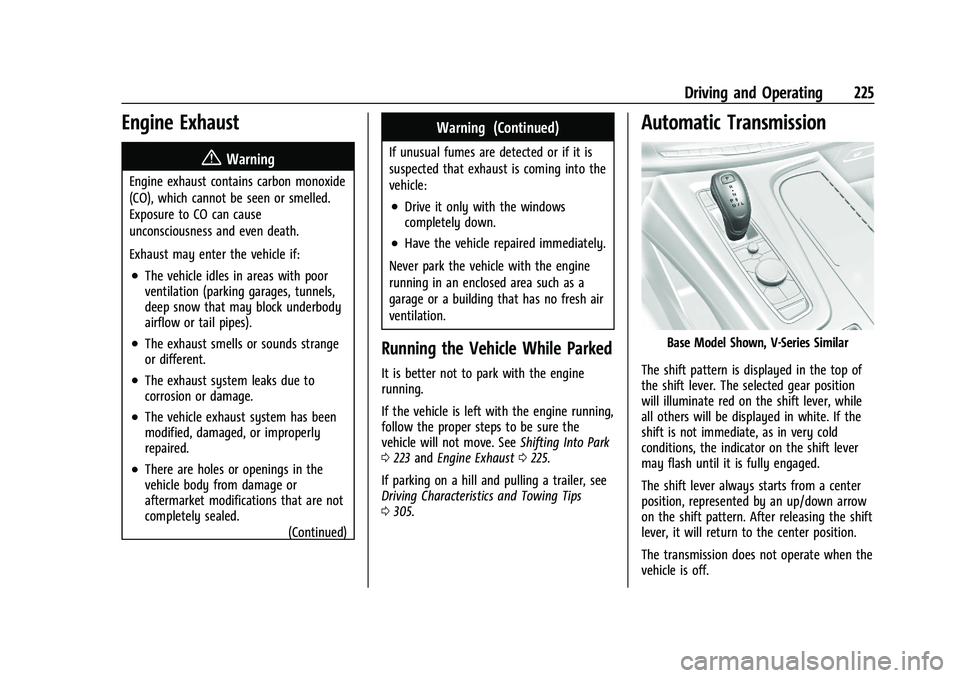
Automatic Transmission
Base Model Shown, V-Series Similar
The shift pattern is displayed in the top of
the shift lever. The selected gear position
will illuminate red on the shift lever, while
all others will be displayed in white. If the
shift is not immediate, as in very cold
conditions, the indicator on the shift lever
may flash until it is fully engaged.
The shift lever always starts from a center
position, represented by an up/down arrow
on the shift pattern. After releasing the shift
lever, it will return to the center position.
The transmission does not operate when the
vehicle is off.
Page 231 of 461

Cadillac Escalade Owner Manual (GMNA-Localizing-U.S./Canada/Mexico-
16417396) - 2023 - CRC - 5/11/22
Driving and Operating 229
Caution
A transmission hot message may display
if the automatic transmission fluid is too
hot. Driving under this condition can
damage the vehicle. Stop and idle the
engine to cool the automatic
transmission fluid. This message clears
when the transmission fluid has cooled
sufficiently.
D : This position is for normal driving.
If more power is needed for passing, press
the accelerator pedal down.
To shift into D (Drive):
1. Bring the vehicle to a complete stop.
2. From the center position, move the shift lever back.
.If the vehicle is in P (Park) press the
shift lock release button while pulling
the shift lever back.
.D will illuminate in red.
.After releasing the shift lever, it will
return to the center position.
To shift out of D (Drive): 1. Bring the vehicle to a complete stop.
2. Shift to the desired gear. 3. After releasing the shift lever, it will
return to the center position.
Downshifting the transmission on a slippery
road could result in skidding. See “Skidding”
under Loss of Control 0209.
Caution
Spinning the tires or holding the vehicle
in one place on a hill using only the
accelerator pedal may damage the
transmission. The repair will not be
covered by the vehicle warranty. If the
vehicle is stuck, do not spin the tires.
When stopping on a hill, use the brakes
to hold the vehicle in place.
Manual Mode
Electronic Range Select (ERS)
Caution
Driving with the engine at a high rpm
without upshifting while using Tap Shift,
could damage the vehicle. Always upshift
when necessary while using Tap Shift.
Electronic Range Select (ERS), or Manual
Mode, allows manual selection of gear
positions. Use this mode when driving
downhill or towing a trailer to limit the top
gear and vehicle speed. The shift position
indicator within the Driver Information
Center (DIC) displays a number next to the L
indicating the highest available gear.
To enter ERS/Manual Mode:1. With the vehicle in D (Drive), pull back the shift lever to activate L (Low). The L
will illuminate red, and the D will turn
white.
Page 239 of 461

Cadillac Escalade Owner Manual (GMNA-Localizing-U.S./Canada/Mexico-
16417396) - 2023 - CRC - 5/11/22
Driving and Operating 237
The EPB is released when the red EPB status
light is off.
If the amber service EPB warning light is on,
release the EPB by pressing and holding the
EPB switch. Continue to hold the switch
until the red EPB status light is off. If either
light stays on after release is attempted, see
your dealer.
Caution
Driving with the parking brake on can
overheat the brake system and cause
premature wear or damage to brake
system parts. Make sure that the parking
brake is fully released and the brake
warning light is off before driving.
If you are towing a trailer and parking on a
hill, see Driving Characteristics and Towing
Tips 0305.
Automatic EPB Release
The EPB automatically releases if the vehicle
is running, placed into gear, and an attempt
is made to drive. Avoid rapid acceleration
when the EPB is applied to preserve parking
brake lining life.
Brake Assist
Brake Assist detects rapid brake pedal
applications due to emergency braking
situations and provides additional braking to
activate the Antilock Brake System (ABS) if
the brake pedal is not pushed hard enough
to activate ABS normally. Minor noise, brake
pedal pulsation, and/or pedal movement
during this time may occur. Continue to
apply the brake pedal as the driving
situation dictates. Brake Assist disengages
when the brake pedal is released.
Hill Start Assist (HSA)
{Warning
Do not rely on the HSA feature. HSA does
not replace the need to pay attention
and drive safely. You may not hear or
feel alerts or warnings provided by this
system. Failure to use proper care when
driving may result in injury, death,
or vehicle damage. See Defensive Driving
0 207.
When the vehicle is stopped on a grade, Hill
Start Assist (HSA) temporarily prevents the
vehicle from rolling in an unintended
direction during the transition from brake pedal release to accelerator pedal apply. The
brakes release when the accelerator pedal is
applied or automatically release after a few
seconds. The brakes may also release under
other conditions. Do not rely on HSA to hold
the vehicle.
HSA is available when the vehicle is facing
uphill in a forward gear, or when facing
downhill in R (Reverse). The vehicle must
come to a complete stop on a grade for HSA
to activate.
Automatic Vehicle Hold (AVH)
Page 240 of 461

Cadillac Escalade Owner Manual (GMNA-Localizing-U.S./Canada/Mexico-
16417396) - 2023 - CRC - 5/11/22
238 Driving and Operating
{Warning
Do not rely on this feature. It does not
replace the need to pay attention and
drive safely. You may not hear or feel
alerts or warnings provided by this
system. Failure to use proper care when
driving may result in injury, death,
or vehicle damage.
When Automatic Vehicle Hold (AVH) is
turned on and the vehicle is braked to a
stop, AVH prevents the vehicle from moving
during the transition from brake pedal
release to accelerator pedal apply. The
brakes release when the accelerator pedal is
applied. The brakes may also release under
other conditions. Do not rely on AVH to
hold the vehicle.
If the accelerator pedal is not applied within
a few minutes, the Electric Parking Brake
will apply. The parking brake will also apply
if the driver door is opened or the driver
seat belt is unfastened while AVH is holding
the vehicle.
AVH can be turned on by pressing AUTO
HOLD. The indicator light on the switch will
come on. The AVH light on the instrument panel will come on while AVH is actively
holding the vehicle. See
Automatic Vehicle
Hold (AVH) Light 0117.
Ride Control Systems
Traction Control/Electronic
Stability Control
System Operation
The vehicle has a Traction Control System
(TCS) and StabiliTrak/Electronic Stability
Control (ESC). These systems help limit
wheel spin and assist the driver in
maintaining control, especially on slippery
road conditions.
TCS activates if it senses any of the drive
wheels are spinning or beginning to lose
traction. When this happens, TCS applies the
brakes to the spinning wheels and reduces
engine power to limit wheel spin.
StabiliTrak/ESC activates when the vehicle
senses a difference between the intended
path and the direction the vehicle is actually
traveling. StabiliTrak/ESC selectively applies
braking pressure to one or more of the
vehicle wheel brakes to assist the driver in
keeping the vehicle on the intended path. Trailer Sway Control (TSC) is also on
automatically when the vehicle is started.
See
Trailer Sway Control (TSC) 0322.
If cruise control is being used and traction
control or StabiliTrak/ESC begins to limit
wheel spin, cruise control will disengage.
Cruise control may be turned back on when
road conditions allow.
Both systems come on automatically when
the vehicle is started and begins to move.
The systems may be heard or felt while
they are operating or while performing
diagnostic checks. This is normal and does
not mean there is a problem with the
vehicle.
It is recommended to leave both systems on
for normal driving conditions, but it may be
necessary to turn TCS off if the vehicle gets
stuck in sand, mud, ice, or snow. See If the
Vehicle Is Stuck 0215 and “Turning the
Systems Off and On” later in this section.
When the transfer case (if equipped) is in
Four-Wheel Drive Low, the TCS and
StabiliTrak/ESC are automatically disabled,
g
comes on, and the appropriate message will
appear on the Driver Information
Center (DIC).
Page 242 of 461

Cadillac Escalade Owner Manual (GMNA-Localizing-U.S./Canada/Mexico-
16417396) - 2023 - CRC - 5/11/22
240 Driving and Operating
To turn TCS back on, select or touch the
Traction virtual button on the screen. The
traction off light
idisplayed in the
instrument cluster will turn off.
To turn StabiliTrak/ESC off, first turn off TCS
to enable the Stability virtual button on the
screen, then select or touch the Stability
virtual button. The StabiliTrak/ESC off light
gwill display in the instrument cluster. See
StabiliTrak OFF Light 0119.
To turn StabiliTrak/ESC back on, select or
touch the Stability virtual button on the
screen. StabiliTrak/ESC will turn on, but TCS
will remain off.
TCS cannot be on when StabiliTrak/ESC is
off. If both systems are turned off, selecting
or touching the Traction virtual button will
turn both systems back on.
StabiliTrak/ESC will automatically turn on if
the vehicle exceeds 56 km/h (35 mph) and
cannot be turned off again until speed is
reduced. Traction control will remain off.
Vehicles equipped with the four corner air
suspension re-enable StabiliTrak/ESC at
32 km/h (20 mph). The vehicle has a Trailer Sway Control (TSC)
feature and a Hill Start Assist (HSA) feature.
See
Trailer Sway Control (TSC) 0322 or
Hill Start Assist (HSA) 0237.
Adding accessories can affect the vehicle
performance. See Accessories and
Modifications 0336.Driver Mode Control
Driver Mode Control (DMC) allows the driver
to adjust the overall driving experience to
better suit preference by adjusting multiple
subsystems simultaneously. Drive mode
availability and affected vehicle subsystems
are dependent upon vehicle trim level,
region, and optional features.
Tour will be the default mode at every
ignition cycle. A unique and persistent
indicator will be displayed in the instrument
cluster for each mode.
Depending on trim level, Tour mode, Sport
mode, Snow/Ice mode, Off-Road mode, Tow/
Haul mode, Terrain mode, My mode, and V
mode may be available.
To activate each mode, press the MODE
button on the instrument panel to the left
of the steering wheel. To activate Terrain
mode, press
gbutton located next to
the MODE button.
Tour Mode : Use this mode for normal city
and highway driving to provide a smooth
ride. This setting provides balance between
comfort and handling. This is the standard/
default mode. There is no persistent
indicator in the instrument cluster for
this mode.
8Sport Mode : Use this mode where road
conditions or personal preference demand a
more controlled response. When in Sport
mode the vehicle automatically down shifts.
Page 243 of 461

Cadillac Escalade Owner Manual (GMNA-Localizing-U.S./Canada/Mexico-
16417396) - 2023 - CRC - 5/11/22
Driving and Operating 241
In this mode, the vehicle also monitors
driving behaviors and automatically enables
Performance Shift Features when spirited
driving is detected. These features maintain
lower transmission gears to increase
available engine braking and improve
acceleration response. The vehicle resumes
normal operation after a short period when
no spirited driving is detected. The steering
changes to provide more precise control.
If the vehicle has Magnetic Ride Control, the
suspension changes to provide better
cornering performance.
6Snow/Ice Mode :Use this mode to
improve vehicle acceleration on snow and
ice covered roads. When active, Snow/Ice
Mode adjusts acceleration to optimize
traction on slippery surfaces. This can
compromise the acceleration on dry asphalt.
This feature is not intended for use when
the vehicle is stuck in sand, mud, ice, snow,
or gravel. If the vehicle becomes stuck, see If
the Vehicle Is Stuck 0215.
V-Series only: If traction control is disabled
when in Snow/Ice mode the transfer case
and the electronic limited slip differential
will operate in a more aggressive manner to
provide maximum traction.
7Off-Road Mode : Use this mode for
off-road recreational driving. Off-Road mode
should be used to improve driving at
moderate speeds, on grass, gravel, dirt,
unpaved roads, or snow-covered roads. The
accelerator pedal is tuned for off-road use.
If equipped with the following features,
Off-Road mode modifies pedal mapping, ride
height, and Traction Control System (TCS)
performance. For more information on
off-road driving, see Off-Road Driving0209.
_Tow/Haul Mode : Use this mode
when hauling heavy loads for increased
performance and vehicle control. Tow/Haul
Mode adjusts the transmission shift pattern,
steering, and Electronic Stability Control
(ESC) performance.
If the vehicle is turned off while in Tow/
Haul mode and then restarted within four
hours or less, it will remain active.
Otherwise, the vehicle will start in Tour
mode. Tow/Haul mode turns on trailer sway
control.
If equipped with a diesel engine, exhaust
braking is automatically activated when
Tow/Haul mode is selected. The system will
command down shifts to reduce vehicle
speed when the brake is applied. The normal
tow/haul shift pattern will return once the vehicle is on a low grade or when the
accelerator pedal is pressed. While in the
Electronic Range Select (ERS) Mode (see
Manual Mode
0229 or
Manual Mode (V-Series) 0230), grade
braking is deactivated, allowing the driver to
select a range, and limiting the highest gear
available.
For more information on trailer weight
specifications, see Towing Equipment 0313.gTerrain Mode : Use this mode when
traveling on very rough roads at very low
speeds, such as a two-track or heavily rutted
road. This mode can also be used for pulling
a boat out of the water on a trailer. When
in Terrain mode, the vehicle shifts
automatically, but will hold a lower gear
longer to maximize engine torque. This
mode has a unique pedal map and
transmission shift pattern for better control
at lower speeds and over rough terrain. This
mode modifies accelerator pedal mapping,
transmission shift pattern, ride height, and
Electronic Limited-Slip Differential (eSLD).
When the vehicle comes to a stop on an
upward grade, automatic vehicle hold is
engaged until the driver presses the
accelerator pedal. Stop/Start and cruise
control are disabled in Terrain mode.
Page 244 of 461

Cadillac Escalade Owner Manual (GMNA-Localizing-U.S./Canada/Mexico-
16417396) - 2023 - CRC - 5/11/22
242 Driving and Operating
Active Braking during lift throttle will be
engaged. This feature automatically applies
light braking to simulate heavy engine
braking of four-wheel-drive low. It also
applies light braking in D (Drive) until the
vehicle is at idle speeds. In L1 and L2 light
braking will typically bring the vehicle to a
stop. Active Braking during lift throttle also
reduces trailer braking.
Terrain mode automatically exits to Tour
mode if the brake temperatures become too
hot, electronic parking brake becomes
inoperable, or the vehicle cannot perform
braking or vehicle hold.
For more information on off-road driving,
seeOff-Road Driving 0209 and
Hill and Mountain Roads 0213. V Mode
If equipped, to activate V mode, press the V
mode button on the center console.
V Mode and My Mode
V mode and My mode is used to personalize
everyday driving. This mode allows the
driver to configure the vehicle system
settings to their driving preferences. My
mode will remain active every time the
vehicle is started. To customize V mode or
My mode, see
“Drive Mode Customization.”
Launch Control (V-Series Only)
Launch Control is available within V mode
only to allow high levels of vehicle
acceleration in a straight line. Launch Control is a form of traction control that
manages tire spin while launching the
vehicle. This feature is intended for use
during closed course race events where up
to 97 km (60 mph) are desirable. Launch
Control is only available when the following
criteria are met:
‐
V mode is selected.
‐ The vehicle is not moving.
‐ The steering wheel is pointing straight.
‐ The brake pedal is firmly pressed to the
floor, equivalent to a panic brake event.
‐ The accelerator pedal is rapidly applied to
wide open throttle. If the vehicle rolls due
to wide open throttle, release the
throttle, press the brake pedal more
firmly, and reapply the accelerator to
wide open throttle.
Launch Control will initially limit vehicle
speed as rapidly applying the accelerator
pedal to a wide open throttle. Allow the
engine rpm to stabilize and wait for the
traction control light to begin flashing –this
indicates that the vehicle is ready to launch.
A smooth, quick release of the brake pedal,
while maintaining the fully pressed
accelerator pedal, will manage wheel slip.
Page 247 of 461

Cadillac Escalade Owner Manual (GMNA-Localizing-U.S./Canada/Mexico-
16417396) - 2023 - CRC - 5/11/22
Driving and Operating 245
When the vehicle is in Tow/Haul Driver
Mode, Off-Road Driver Mode, or it senses a
trailer is connected, Automatic Entry/Egress
Mode is disabled.
Increased Height
Increased Height is 25 mm (1 in) higher than
Normal Height. This ride height raises the
vehicle for off-road use, allows for higher
speeds than Maximum Height, and is only
available with specific optional content.
Increased Height can be selected in the Ride
Height Menu while vehicle speed is less
than 80 km/h (50 mph). If vehicle speed
exceeds 80 km/h (50 mph), the vehicle will
automatically lower to Normal Height.
Off-Road Driver Mode and Terrain Driver
Mode will automatically set Increased
Height when vehicle speed is less than
80 km/h (50 mph). If vehicle speed exceeds
80 km/h (50 mph), the vehicle will lower to
Normal Height. Normal Height will be
maintained until vehicle speed is slowed to
less than 16 km/h (10 mph) and then the
vehicle will automatically raise back to
Increased Height.The vehicle will automatically lower from
Increased Height to Normal Height to
provide improved stability if aggressive
maneuvers are detected.
Maximum Height
Maximum Height is 50 mm (2 in) higher
than Normal Height. This ride height raises
the vehicle for off-road use and is only
available with specific optional content.
To raise the vehicle to Maximum Height,
first shift the transfer case to 4
n. Once the
transfer case is in 4
nand vehicle speed is
less than 48 km/hr (30 mph), select
Maximum Height in the Ride Height Menu.
If vehicle speed exceeds 48 km/h, the
vehicle will automatically lower to Increased
Height.
The vehicle will automatically lower from
Maximum Height to Normal Height to
provide improved stability if aggressive
maneuvers are detected.
Aerodynamic Height
Aerodynamic Height is 20 mm (0.75 in)
lower than Normal Height. This ride height
lowers the vehicle at higher vehicle speeds
to improve aerodynamics. The vehicle will lower to Aerodynamic
Height when vehicle speed exceeds
105 km/h (65 mph) for a period of time. The
vehicle will raise to Normal Height when the
vehicle slows to less than 48 km/h
(30 mph).
Aerodynamic Height is automatically
disabled when a trailer is connected to the
vehicle or Tow/Haul Driver Mode is active.
Lowered Height (V-Series Only)
Lowered Height is 20 mm (0.75 in) lower
than Normal Height. This ride height lowers
the vehicle to enhance handling and is only
available with specific optional content.
V Mode will automatically set Lowered
Height when enabled. See
Driver Mode
Control 0240.
Suspension Modes
The air suspension has two special modes,
Service Mode and Alignment Mode, located
in the infotainment screen under Settings/
Vehicle/Suspension.
Service Mode
Service Mode will disable all air suspension
operation including raising and lowering the
vehicle and operation of the air compressor.
Page 255 of 461

Cadillac Escalade Owner Manual (GMNA-Localizing-U.S./Canada/Mexico-
16417396) - 2023 - CRC - 5/11/22
Driving and Operating 253
Near Gap Setting
If equipped, and a trailer is electrically
connected, the gap setting display will be as
follows:
Far Gap Setting with Trailer
Medium Gap Setting with Trailer
Near Gap Setting with Trailer
Since each gap setting corresponds to a
following time (Far, Medium, or Near), the
following distance will vary based on vehicle
speed. The faster the vehicle speed, the
further back your vehicle will follow a
vehicle detected ahead. Consider traffic and
weather conditions when selecting the following gap. The range of selectable gaps
may not be appropriate for all drivers and
driving conditions.
Changing the gap setting automatically
changes the alert timing sensitivity (Far,
Medium, or Near) for the Forward Collision
Alert (FCA) feature. See
Forward Collision
Alert (FCA) System 0287.
Courtesy Gap
Press and hold
[on the steering wheel
when vehicle is moving to temporarily
increase the gap with the vehicle ahead to
allow for merging traffic.
Press and hold
[when stopped to cancel
ACC from resuming automatically (if the
stop is brief) and remain stationary. This can
be used to allow traffic to merge between
you and the vehicle ahead. Press RES+ or
the accelerator pedal to resume ACC.
Following distance gap will return to the
original selection after hold.