stop CADILLAC ESCALADE 2023 Owner's Manual
[x] Cancel search | Manufacturer: CADILLAC, Model Year: 2023, Model line: ESCALADE, Model: CADILLAC ESCALADE 2023Pages: 461, PDF Size: 7.99 MB
Page 59 of 461

Cadillac Escalade Owner Manual (GMNA-Localizing-U.S./Canada/Mexico-
16417396) - 2023 - CRC - 5/9/22
Seats and Restraints 57
driver seat belt is not buckled. Turning the
vehicle off then on will not change this
condition.
On some models, Buckle to Drive may also
delay shifting out of P (Park) if a front
passenger seat belt is unbuckled. A message
displays in the DIC. Buckle the front
passenger seat belt to shift out of P (Park).
This feature may delay the vehicle from
shifting out of P (Park) if an object, such as
a briefcase, handbag, grocery bag, laptop,
or other electronic device, is on the front
passenger seat. If this happens, remove the
object from the seat or buckle the seat belt
to shift out of P (Park).
If the driver, or on some vehicles, the
present front passenger remains unbuckled,
the DIC message will turn off after several
seconds and the vehicle can be shifted out
of P (Park). See“Seat Belts”and“Child
Restraints” in the Index for information
about the importance of proper
restraint use.
If the driver seat belt or the front passenger
seat belt is unbuckled when driving, the seat
belt reminder chime and light(s) will come
on. See Seat Belt Reminders 0112. This feature may not function properly if the
airbag readiness light is on. See
Airbag
Readiness Light 0113.
How to Wear Seat Belts Properly
Follow these rules for everyone's protection.
There are additional things to know about
seat belts and children, including smaller
children and infants. If a child will be riding
in the vehicle, see Older Children074 or
Infants and Young Children 075. Review and
follow the rules for children in addition to
the following rules.
It is very important for all occupants to
buckle up. Statistics show that unbelted
people are hurt more often in crashes than
those who are wearing seat belts.
There are important things to know about
wearing a seat belt properly.
.Sit up straight and always keep your feet
on the floor in front of you (if possible).
.Wear the lap part of the belt low and
snug on the hips, just touching the
thighs. In a crash, this applies force to the
strong pelvic bones and you would be
less likely to slide under the lap belt.
If you slid under it, the belt would apply
force on your abdomen. This could cause
serious or even fatal injuries.
.Wear the shoulder belt over the shoulder
and across the chest. These parts of the
body are best able to take belt
restraining forces. The shoulder belt locks
if there is a sudden stop or crash.
Page 63 of 461
Cadillac Escalade Owner Manual (GMNA-Localizing-U.S./Canada/Mexico-
16417396) - 2023 - CRC - 5/9/22
Seats and Restraints 61
Shoulder Belt Height Adjuster
The vehicle has a shoulder belt height
adjuster for the driver and front outboard
passenger positions.
Adjust the height so the shoulder portion of
the belt is on the shoulder and not falling
off of it. The belt should be close to, but not
contacting, the neck. Improper shoulder belt
height adjustment could reduce the
effectiveness of the seat belt in a crash. See
How to Wear Seat Belts Properly057.
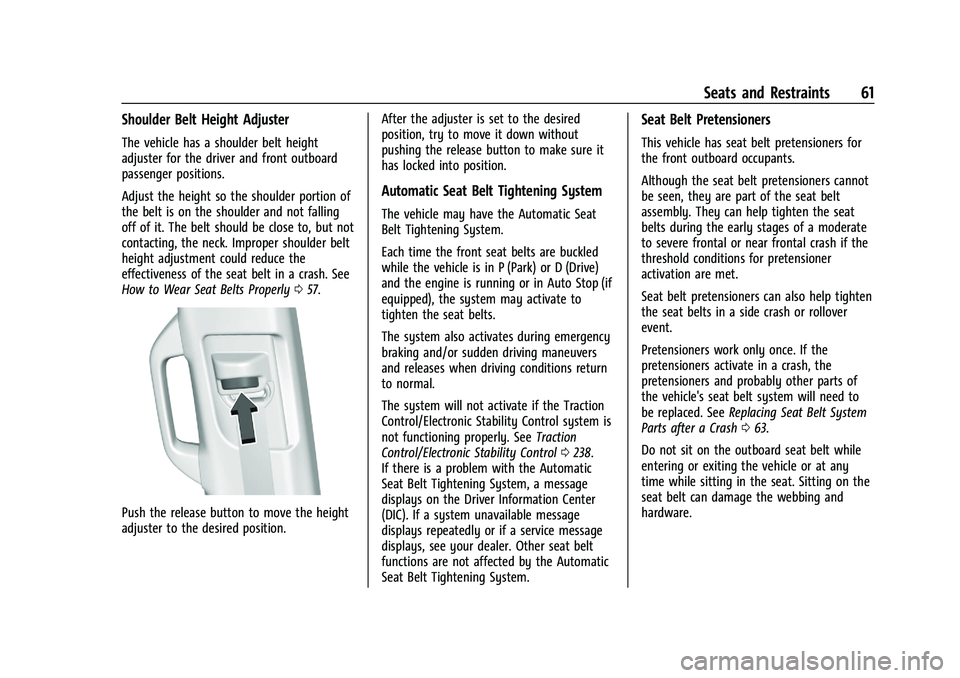
Push the release button to move the height
adjuster to the desired position. After the adjuster is set to the desired
position, try to move it down without
pushing the release button to make sure it
has locked into position.
Automatic Seat Belt Tightening System
The vehicle may have the Automatic Seat
Belt Tightening System.
Each time the front seat belts are buckled
while the vehicle is in P (Park) or D (Drive)
and the engine is running or in Auto Stop (if
equipped), the system may activate to
tighten the seat belts.
The system also activates during emergency
braking and/or sudden driving maneuvers
and releases when driving conditions return
to normal.
The system will not activate if the Traction
Control/Electronic Stability Control system is
not functioning properly. See
Traction
Control/Electronic Stability Control 0238.
If there is a problem with the Automatic
Seat Belt Tightening System, a message
displays on the Driver Information Center
(DIC). If a system unavailable message
displays repeatedly or if a service message
displays, see your dealer. Other seat belt
functions are not affected by the Automatic
Seat Belt Tightening System.
Seat Belt Pretensioners
This vehicle has seat belt pretensioners for
the front outboard occupants.
Although the seat belt pretensioners cannot
be seen, they are part of the seat belt
assembly. They can help tighten the seat
belts during the early stages of a moderate
to severe frontal or near frontal crash if the
threshold conditions for pretensioner
activation are met.
Seat belt pretensioners can also help tighten
the seat belts in a side crash or rollover
event.
Pretensioners work only once. If the
pretensioners activate in a crash, the
pretensioners and probably other parts of
the vehicle's seat belt system will need to
be replaced. See Replacing Seat Belt System
Parts after a Crash 063.
Do not sit on the outboard seat belt while
entering or exiting the vehicle or at any
time while sitting in the seat. Sitting on the
seat belt can damage the webbing and
hardware.
Page 80 of 461
Cadillac Escalade Owner Manual (GMNA-Localizing-U.S./Canada/Mexico-
16417396) - 2023 - CRC - 5/9/22
78 Seats and Restraints
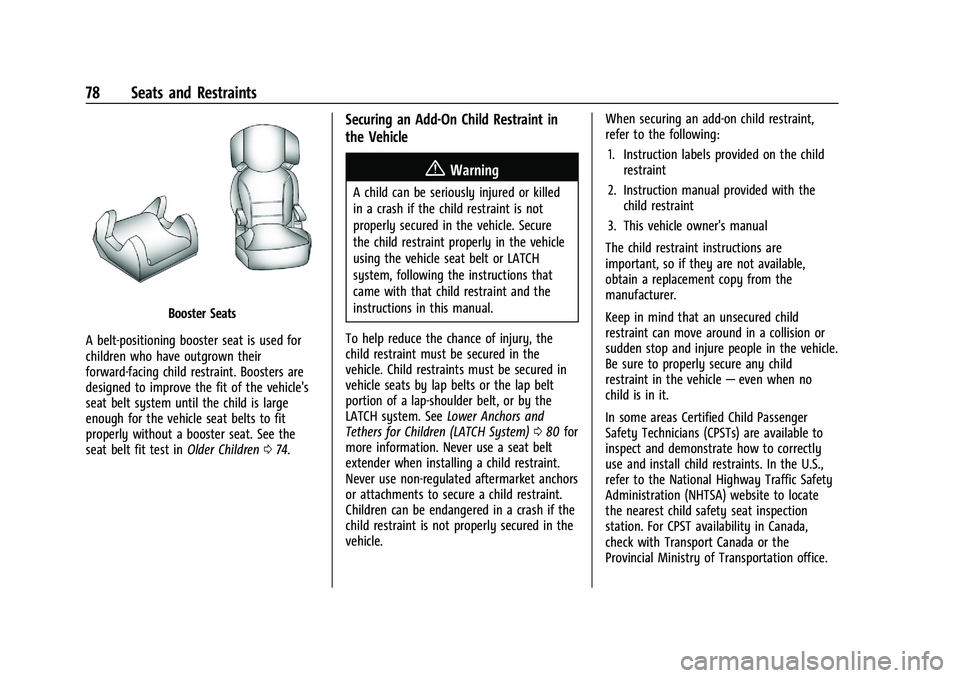
Booster Seats
A belt-positioning booster seat is used for
children who have outgrown their
forward-facing child restraint. Boosters are
designed to improve the fit of the vehicle's
seat belt system until the child is large
enough for the vehicle seat belts to fit
properly without a booster seat. See the
seat belt fit test in Older Children074.
Securing an Add-On Child Restraint in
the Vehicle
{Warning
A child can be seriously injured or killed
in a crash if the child restraint is not
properly secured in the vehicle. Secure
the child restraint properly in the vehicle
using the vehicle seat belt or LATCH
system, following the instructions that
came with that child restraint and the
instructions in this manual.
To help reduce the chance of injury, the
child restraint must be secured in the
vehicle. Child restraints must be secured in
vehicle seats by lap belts or the lap belt
portion of a lap-shoulder belt, or by the
LATCH system. See Lower Anchors and
Tethers for Children (LATCH System) 080 for
more information. Never use a seat belt
extender when installing a child restraint.
Never use non-regulated aftermarket anchors
or attachments to secure a child restraint.
Children can be endangered in a crash if the
child restraint is not properly secured in the
vehicle. When securing an add-on child restraint,
refer to the following:
1. Instruction labels provided on the child restraint
2. Instruction manual provided with the child restraint
3. This vehicle owner's manual
The child restraint instructions are
important, so if they are not available,
obtain a replacement copy from the
manufacturer.
Keep in mind that an unsecured child
restraint can move around in a collision or
sudden stop and injure people in the vehicle.
Be sure to properly secure any child
restraint in the vehicle —even when no
child is in it.
In some areas Certified Child Passenger
Safety Technicians (CPSTs) are available to
inspect and demonstrate how to correctly
use and install child restraints. In the U.S.,
refer to the National Highway Traffic Safety
Administration (NHTSA) website to locate
the nearest child safety seat inspection
station. For CPST availability in Canada,
check with Transport Canada or the
Provincial Ministry of Transportation office.
Page 82 of 461

Cadillac Escalade Owner Manual (GMNA-Localizing-U.S./Canada/Mexico-
16417396) - 2023 - CRC - 5/9/22
80 Seats and Restraints
Do not install a child restraint in any rear
seating position where it cannot be installed
securely.
Depending on where you place the child
restraint and the size of the child restraint,
you may not be able to access adjacent seat
belts or LATCH anchors for additional
passengers or child restraints. Adjacent
seating positions should not be used if the
child restraint prevents access to or
interferes with the routing of the seat belt.
The seat in front of an installed child
restraint should be adjusted to ensure
proper installation according to the child
restraint manual.
When installing a child restraint in an
adjustable second row seating position, the
seat should be adjusted fore or aft to ensure
proper installation according to the child
restraint manual. If the seat is able to
recline, the seat back should be positioned
to its full upright position before installing a
child restraint.
Wherever a child restraint is installed, be
sure to follow the instructions that came
with the child restraint and secure the child
restraint properly.Keep in mind that an unsecured child
restraint can move around in a collision or
sudden stop and injure people in the vehicle.
Be sure to properly secure any child
restraint in the vehicle
—even when no
child is in it.
Lower Anchors and Tethers for
Children (LATCH System)
The LATCH system secures a child restraint
during driving or in a crash. LATCH
attachments on the child restraint are used
to attach the child restraint to the anchors
in the vehicle. This system is designed to
make installation of a child restraint easier.
In order to use the LATCH system in your
vehicle, you need a child restraint that has
LATCH attachments. LATCH-compatible
rear-facing and forward-facing child seats can
be properly installed using either the LATCH
anchors or the vehicle’s seat belts. Do not
use both the seat belts and the LATCH
anchorage system to secure a rear-facing or
forward-facing child restraint. Booster seats use the vehicle’s seat belts to
secure the child and the booster seat. If the
manufacturer recommends that the booster
seat be secured with the LATCH system, this
can be done as long as the booster seat can
be positioned properly and there is no
interference with the proper positioning of
the lap-shoulder belt on the child.
Make sure to follow the instructions that
came with the child restraint, and also the
instructions in this manual.
When installing a child restraint with a top
tether, you must also use either the lower
anchors or the seat belts to properly secure
the child restraint. A child restraint must
never be attached using only the top tether.
For a forward-facing 5-pt harness child
restraint where the combined weight of the
child and restraint are up to 29.5 kg (65 lb),
use either the lower LATCH anchorages with
the top tether anchorage, or the seat belt
with the top tether anchorage. Where the
combined weight of the child and restraint
are greater than 29.5 kg (65 lb), use the seat
belt with the top tether anchorage only.
Page 96 of 461

Cadillac Escalade Owner Manual (GMNA-Localizing-U.S./Canada/Mexico-
16417396) - 2023 - CRC - 5/9/22
94 Storage
Center Console Storage
Press the button and lift to open. There is
an auxiliary jack, USB ports, an accessory
power outlet, a tote compartment, and a
device holder inside.
On the rear of the console there are
auxiliary jacks, a power outlet, and a
storage area.
SeePower Outlets 0102 and the
infotainment section. Center Console Refrigerator/FreezerIf equipped with a center console
refrigerator/freezer, lift the armrest to
access. A light will turn on when the
armrest is up.
The refrigerator/freezer mode can only be
used while the engine is running. If the
vehicle is turned off and turned back on
again, the last operating mode will be
resumed.
{Warning
Do not store glass and aluminum
containers inside the bin when in freezer
mode. Glass and aluminum containers
(Continued)
Warning (Continued)
can break when their contents are frozen.
Use caution removing broken containers
to avoid personal injury.
{Warning
Do not touch bin surfaces with wet or
damp hands while the freezer is on. Skin
could stick to the bin surface.
Caution
Do not put any objects between the front
seats and the center console side walls.
The air path could be blocked and cause
the unit to stop working.
To use in refrigerator mode, press the
button once. One light on the button will be
lit. The operating temperature is 5°C (41°F).
To use in freezer mode, press the button
twice. Two lights on the button will be lit.
The operating temperature is -5°C (23°F).
Page 98 of 461

Cadillac Escalade Owner Manual (GMNA-Localizing-U.S./Canada/Mexico-
16417396) - 2023 - CRC - 5/9/22
96 Storage
{Warning
Before driving and occasionally during a
trip, check that cargo is securely fastened,
rests evenly between the cross rails and
does not block the vehicle's lamps or
windows. Never load cargo directly on
the roof of the vehicle or allow cargo to
hang over the rear or sides of the vehicle.
Never load cargo without first properly
installing cross rails and other accessories
designed to carry cargo. Personal injury,
death or damage to the vehicle or other
property may occur.
If driving for a long distance, on rough
roads, or at high speeds, occasionally stop
the vehicle to make sure the cargo remains
in its place.
Cargo Weight Limits
Do not exceed the maximum cargo weight
for the roof rack system, including the
weight of the cross rails and any other
accessories used to carry the cargo such as
bike racks or roof boxes. The maximum
cargo weight that can be loaded onto the
roof rack system is 100 kg (220 lb) or the weight designated in the instructions that
came with the cross rails or other roof rack
accessories, whichever is less.
{Warning
Never load the roof rack with more
weight than specified in this section.
Loading cargo on the roof rack will make
the vehicle's center of gravity higher. To
avoid losing control of the vehicle, avoid
overloading, high speeds, sudden starts,
sharp turns, sudden braking, or abrupt
maneuvers when carrying cargo on the
roof rack.
The weight of any cargo carried on the roof
rack system must be included in calculating
the loaded weight of the vehicle. Do not
exceed the maximum vehicle capacity when
loading the vehicle, including cargo carried
on the roof rack system and passengers
and cargo carried in the vehicle. For more
information on vehicle capacity and loading,
see Vehicle Load Limits 0215.
Page 102 of 461

Cadillac Escalade Owner Manual (GMNA-Localizing-U.S./Canada/Mexico-
16417396) - 2023 - CRC - 5/9/22
100 Instruments and Controls
Night Vision Camera Washer
When it is dark enough for the night vision
system to operate, activate the front
windshield washer five times to clean the
camera sensor.
SeeNight Vision System 0292 for
information on using the night vision
system.
Wiper Parking
If the ignition is turned off while the wipers
are on LO, HI, or AUTO with Rainsense
turned off, they will immediately stop.
If the windshield wiper lever is then moved
to OFF before the driver door is opened or
within 10 minutes, the wipers will restart
and move to the base of the windshield.
If the ignition is turned off while the wipers
are performing wipes due to windshield
washing or Rainsense, the wipers continue
to run until they reach the base of the
windshield.
Rainsense
If equipped with Rainsense and the feature
is turned on, a sensor near the top center of
the windshield detects the amount of water on the windshield and controls the
frequency of the windshield wiper based on
the current sensitivity setting.
Keep this area of the windshield clear of
debris to allow for best system performance.
AUTO :
Move the windshield wiper lever to
AUTO. Turn the band on the wiper lever to
adjust the sensitivity.
.Turn the band up for more sensitivity to
moisture.
.Turn the band down for less sensitivity to
moisture.
.Move the windshield wiper lever out of
the AUTO position to deactivate
Rainsense.
To turn the Rainsense feature on or off, see
“Rain Sense Wipers” under Settings >
Vehicle> Comfort and Convenience > Rain
Sense Wipers. Wiper Arm Assembly Protection
When using an automatic car wash, move
the windshield wiper lever to OFF. This
disables the automatic Rainsense windshield
wipers.
With Rainsense, if the transmission is in
N (Neutral) and the vehicle speed is very
slow, the wipers will automatically stop at
the base of the windshield.
The wiper operations return to normal when
the transmission is no longer in N (Neutral)
or the vehicle speed has increased.
Rear Window Wiper/Washer
The rear window wiper/washer controls are
on the end of the windshield wiper lever.
Turn the controls to adjust the setting.
OFF :
Turns the wiper off.
Page 103 of 461

Cadillac Escalade Owner Manual (GMNA-Localizing-U.S./Canada/Mexico-
16417396) - 2023 - CRC - 5/9/22
Instruments and Controls 101
INT :Turns on the rear wiper with a delay
between wipes.
ON : Turns on the rear wiper.
1:Push the windshield wiper lever
forward to spray washer fluid on the rear
window. The wipers will clear the rear
window and either stop or return to your
preset speed. For more washer cycles, push
and hold the lever.
The rear window wiper/washer will not
operate if the liftgate is open or ajar. If the
liftgate is opened while the rear wiper is on,
the wiper returns to the parked position and
stops.
See “Rear Camera Washer” later in this
section.
Rear Wiper Arm Assembly Protection
When using an automatic car wash, move
the rear wiper control to OFF to disable the
rear wiper. In some vehicles, if the
transmission is in N (Neutral) and the
vehicle speed is very slow, the rear wiper
will automatically park under the rear
spoiler.
The wiper operations return to normal when
the transmission is no longer in N (Neutral)
or the vehicle speed has increased. Auto Wipe in Reverse Gear
If the rear wiper control is off, the rear
wiper will automatically operate
continuously when the transmission is in
R (Reverse), and the front windshield wiper
is performing low or high speed wipes.
If the rear wiper control is off, the
transmission is in R (Reverse), and the front
windshield wiper is performing INT wipes,
then the rear wiper automatically performs
INT wipes.
This feature can be turned on or off. See
“Auto Wipe in Reverse Gear”
under Settings
> Vehicle > Comfort and Convenience > Auto
Wipe in Reverse Gear.
The windshield washer reservoir is used for
the windshield, rear window, and rear mirror
camera, if equipped. See Rear Camera Mirror
0 32. Check the fluid level in the reservoir if
either washer is not working. See Washer
Fluid 0351.
Rear Camera Washer
If equipped, push the windshield wiper lever
forward to spray washer fluid on the rear
camera lens. The lever returns to its starting
position when released. See Rear Camera
Mirror 032.
Activating the Rear Camera Washer also
cleans the rear window.
Compass
The vehicle may have a compass display on
the Instrument Cluster. The compass receives
its heading and other information from the
Global Positioning System (GPS) antenna,
StabiliTrak/Electronic Stability Control (ESC),
and vehicle speed information.
The compass system is designed to operate
for a certain number of miles or degrees of
turn before needing a signal from the GPS
Page 105 of 461

Cadillac Escalade Owner Manual (GMNA-Localizing-U.S./Canada/Mexico-
16417396) - 2023 - CRC - 5/9/22
Instruments and Controls 103
Caution
Hanging heavy equipment from the
power outlet can cause damage not
covered by the vehicle warranty. The
power outlets are designed for accessory
power plugs only, such as cell phone
charge cords.
Power Outlet 110/120 Volt Alternating
Current
If equipped, the vehicle has two alternating
current power outlets.
.Rear storage area
.Back of the center console
With Refrigerator/Freezer
Standard
When the ignition is on, power to the 110/
120 Volt outlet is enabled. 110 Volts is
supplied to the outlet when it is enabled
and electrical equipment is plugged into that
outlet. One power outlet can be used with
electrical equipment that uses a maximum
of 400 watts.
Ensure that all connected devices do not
exceed 400 watts.
An indicator light on the outlet illuminates
when the outlet is enabled and no system
fault is detected. The outlet will not provide
power when the ignition is off or the plug is
not fully seated into the outlet. The outlet
does not operate while the engine is starting. If a USB powered streaming device
is being used, it is suggested to use a USB
port for power. See
USB Port0154.
If uninterrupted power supply is required
while driving, disable the Auto Engine Stop/
Start System by pressing the Auto Stop
disable switch. See Stop/Start System0222.
If equipment is connected using more than
400 watts or a system fault is detected, a
protection circuit shuts off the power supply
and the indicator light will flash.
Do not use a power outlet with a missing or
damaged cover.
The power outlet is not designed for the
following, and may not work properly if
they are plugged in:
.Equipment with high initial peak wattage,
such as compressor-driven refrigerators
and electric power tools
.Other equipment requiring an extremely
stable power supply, such as
microcomputer-controlled electric blankets
and touch sensor lamps
.Medical equipment.
Page 106 of 461

Cadillac Escalade Owner Manual (GMNA-Localizing-U.S./Canada/Mexico-
16417396) - 2023 - CRC - 5/9/22
104 Instruments and Controls
Wireless Charging
If equipped and enabled, the vehicle has
wireless charging in the center console in
front of the storage bin. The system
operates at 145 kHz and wirelessly charges
one Qi compatible smartphone. The power
output of the system is capable of charging
at a rate up to 3 amp (15 W), as requested
by the compatible smartphone. SeeRadio
Frequency Statement 0435.
{Warning
Wireless charging may affect the
operation of an implanted pacemaker or
other medical devices. If you have one, it
is recommended to consult with your
doctor before using the wireless charging
system.
The vehicle must be on, in accessory mode,
or Retained Accessory Power (RAP) must be
active. The wireless charging feature may
not correctly indicate charging when the
vehicle is in RAP, during a Bluetooth phone
call, or when phone projection (e.g. Apple
CarPlay / Android Auto) is active. See
Retained Accessory Power (RAP) 0222. The operating temperature is
−40 °C (−40 °F)
to 85 °C (185 °F) for the charging system and
0 °C (32 °F) to 35 °C (95 °F) for the phone.
A charging stopped alert may be displayed
on the infotainment screen, if the wireless
charger or smartphone are outside of
normal operating temperature. Charging will
automatically resume when a normal
operating temperature is reached.
{Warning
Remove all objects from the charger
before charging your compatible
smartphone. Objects, such as coins, keys,
rings, paper clips, or cards, between the
smartphone and charger may become
very hot.
On the rare occasion that the charging
system does not detect an object, and
the object gets wedged between the
smartphone and charger, remove the
smartphone and allow the object to cool
before removing it from the charger, to
prevent burns.
To charge a compatible smartphone:
1. Confirm the smartphone is capable of wireless charging.
2. Remove all objects from the charging pocket. The system may not charge if
there are any objects between the
smartphone and charger.
3. Place the smartphone face up against the rear of the charger.
To maximize the charge rate, ensure the
smartphone is fully seated and centered
in the holder with nothing under it.
A thick smartphone case may prevent
the charger from working, or reduce the
charging performance. See your dealer
for additional information.