ECU CADILLAC ESCALADE 2023 Repair Manual
[x] Cancel search | Manufacturer: CADILLAC, Model Year: 2023, Model line: ESCALADE, Model: CADILLAC ESCALADE 2023Pages: 461, PDF Size: 7.99 MB
Page 438 of 461

Cadillac Escalade Owner Manual (GMNA-Localizing-U.S./Canada/Mexico-
16417396) - 2023 - CRC - 5/9/22
436 Customer Information
To contact NHTSA, you may call the
Vehicle Safety Hotline toll-free at
1-888-327-4236 (TTY: 1-800-424-9153); go
to
https://www.safercar.gov;or write to:
Administrator, NHTSA
1200 New Jersey Avenue, S.E.
Washington, D.C. 20590
You can also obtain other information
about motor vehicle safety from
https://www.safercar.gov.
Reporting Safety Defects to the
Canadian Government
If you live in Canada, and you believe
that the vehicle has a safety defect,
notify Transport Canada immediately,
and notify General Motors of Canada
Company. Call Transport Canada at
1-800-333-0510; go to:
www.tc.gc.ca/recalls (English)
www.tc.gc.ca/rappels (French)
or write to:
Transport Canada
Motor Vehicle Safety Directorate
Defect Investigations and Recalls
Division
80 Noel Street
Gatineau
,QC J8Z 0A1
Reporting Safety Defects to
General Motors
In addition to notifying NHTSA (or Transport
Canada) in a situation like this, notify
General Motors.
In the U.S., call 1-800-458-8006, or write:
Cadillac Customer Assistance Center
Cadillac Motor Car Division
P.O. Box 33169
Detroit, MI 48232-5169
In Canada, call 1-888-446-2000, or write:
Canadian Cadillac Customer Care Centre
General Motors of Canada Company
500 Wentworth Street W
Oshawa, ON L1J 0C5
In Mexico, call 800-466-0805 or
800-212-234-5522.
In other Central America and Caribbean
Countries, call 52-555-901-2369.
Vehicle Data Recording and
Privacy
The vehicle has a number of computers that
record information about the vehicle’s
performance and how it is driven or used.
For example, the vehicle uses computer
modules to monitor and control engine and
transmission performance, to monitor the
conditions for airbag deployment and
deploy them in a crash, and, if equipped, to
provide antilock braking to help the driver
control the vehicle. These modules may
store data to help the dealer technician
service the vehicle or to help GM improve
safety or features. Some modules may also
store data about how the vehicle is
operated, such as rate of fuel consumption
or average speed. These modules may retain
personal preferences, such as radio presets,
seat positions, and temperature settings.
Cybersecurity
GM collects information about the use of
your vehicle including operational and safety
related information. We collect this
information to provide, evaluate, improve,
and troubleshoot our products and services
and to develop new products and services.
Page 439 of 461

Cadillac Escalade Owner Manual (GMNA-Localizing-U.S./Canada/Mexico-
16417396) - 2023 - CRC - 5/9/22
Customer Information 437
The protection of vehicle electronics systems
and customer data from unauthorized
outside electronic access or control is
important to GM. GM maintains appropriate
security standards, practices, guidelines and
controls aimed at defending the vehicle and
the vehicle service ecosystem against
unauthorized electronic access, detecting
possible malicious activity in related
networks, and responding to suspected
cybersecurity incidents in a timely,
coordinated and effective manner. Security
incidents could impact your safety or
compromise your private data. To minimize
security risks, please do not connect your
vehicle electronic systems to unauthorized
devices or connect your vehicle to any
unknown or untrusted networks (such as
Bluetooth, WIFI or similar technology). In
the event you suspect any security incident
impacting your data or the safe operation of
your vehicle, please stop operating your
vehicle and contact your dealer.
Event Data Recorders
This vehicle is equipped with an Event Data
Recorder (EDR). The main purpose of an EDR
is to record, in certain crash or near
crash-like situations, such as an air bag
deployment or hitting a road obstacle, datathat will assist in understanding how a
vehicle’s systems performed. The EDR is
designed to record data related to vehicle
dynamics and safety systems for a short
period of time, typically 30 seconds or less.
The EDR in this vehicle is designed to record
such data as:
.How various systems in your vehicle were
operating;
.Whether or not the driver and passenger
safety belts were buckled/fastened;
.How far (if at all) the driver was
depressing the accelerator and/or brake
pedal; and,
.How fast the vehicle was traveling.
These data can help provide a better
understanding of the circumstances in which
crashes and injuries occur.
Note
EDR data are recorded by your vehicle only
if a non-trivial crash situation occurs; no
data are recorded by the EDR under normal
driving conditions and no personal data
(e.g., name, gender, age, and crash location)
are recorded. However, other parties, such
as law enforcement, could combine the EDR data with the type of personally identifying
data routinely acquired during a crash
investigation.
To read data recorded by an EDR, special
equipment is required, and access to the
vehicle or the EDR is needed. In addition to
the vehicle manufacturer, other parties, such
as law enforcement, that have the special
equipment, can read the information if they
have access to the vehicle or the EDR.
GM will not access these data or share it
with others except: with the consent of the
vehicle owner or, if the vehicle is leased,
with the consent of the lessee; in response
to an official request by police or similar
government office; as part of GM's defense
of litigation through the discovery process;
or, as permitted by law. Data that GM
collects or receives may also be used for GM
research needs or may be made available to
others for research purposes, where a need
is shown and the data is not tied to a
specific vehicle or vehicle owner.
OnStar
If the vehicle is equipped with OnStar and
has an active service plan, additional data
may be collected and transmitted through
the OnStar system. This includes information
Page 441 of 461
Cadillac Escalade Owner Manual (GMNA-Localizing-U.S./Canada/Mexico-
16417396) - 2023 - CRC - 5/9/22
OnStar 439
OnStar
OnStar Overview
OnStar Overview . . . . . . . . . . . . . . . . . . . . . . 439
OnStar Services
Emergency . . . . . . . . . . . . . . . . . . . . . . . . . . . . 440
Security . . . . . . . . . . . . . . . . . . . . . . . . . . . . . . . 440
OnStar Additional Information
OnStar Additional Information . . . . . . . . 440
OnStar Overview
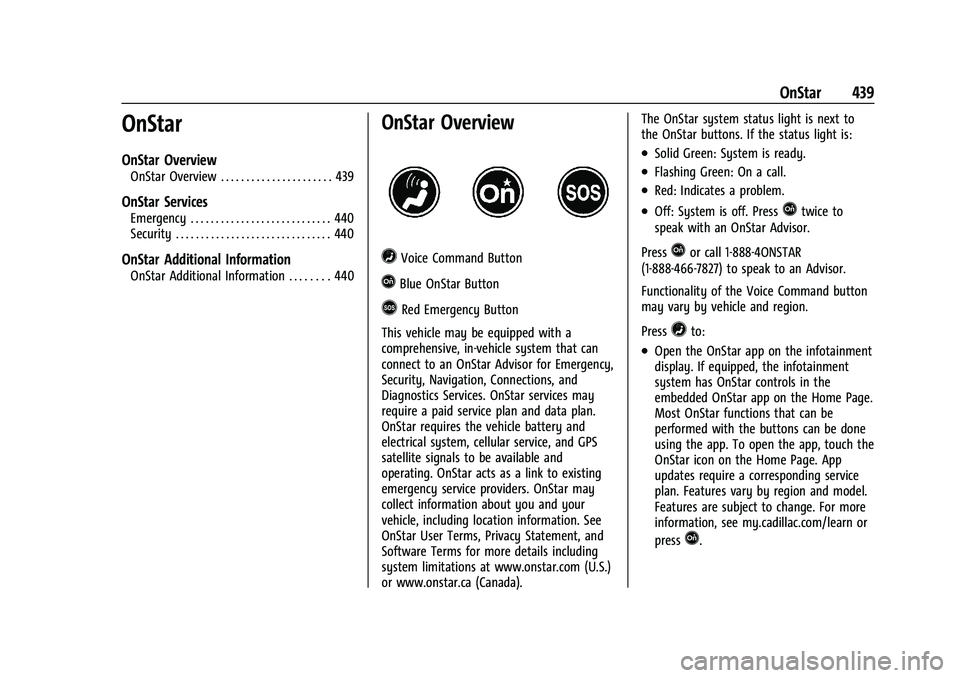
=Voice Command Button
QBlue OnStar Button
>Red Emergency Button
This vehicle may be equipped with a
comprehensive, in-vehicle system that can
connect to an OnStar Advisor for Emergency,
Security, Navigation, Connections, and
Diagnostics Services. OnStar services may
require a paid service plan and data plan.
OnStar requires the vehicle battery and
electrical system, cellular service, and GPS
satellite signals to be available and
operating. OnStar acts as a link to existing
emergency service providers. OnStar may
collect information about you and your
vehicle, including location information. See
OnStar User Terms, Privacy Statement, and
Software Terms for more details including
system limitations at www.onstar.com (U.S.)
or www.onstar.ca (Canada). The OnStar system status light is next to
the OnStar buttons. If the status light is:
.Solid Green: System is ready.
.Flashing Green: On a call.
.Red: Indicates a problem.
.Off: System is off. PressQtwice to
speak with an OnStar Advisor.
Press
Qor call 1-888-4ONSTAR
(1-888-466-7827) to speak to an Advisor.
Functionality of the Voice Command button
may vary by vehicle and region.
Press
=to:
.Open the OnStar app on the infotainment
display. If equipped, the infotainment
system has OnStar controls in the
embedded OnStar app on the Home Page.
Most OnStar functions that can be
performed with the buttons can be done
using the app. To open the app, touch the
OnStar icon on the Home Page. App
updates require a corresponding service
plan. Features vary by region and model.
Features are subject to change. For more
information, see my.cadillac.com/learn or
press
Q.
Page 442 of 461
Cadillac Escalade Owner Manual (GMNA-Localizing-U.S./Canada/Mexico-
16417396) - 2023 - CRC - 5/9/22
440 OnStar
Or
.Give OnStar Turn-by-Turn Navigation voice
commands.
.Obtain and customize the Wi-Fi hotspot
name or SSID and password, if equipped.
Press
Qto connect to an Advisor to:
.Verify account information or update
contact information.
.Get driving directions.
.Receive a Diagnostic check of the vehicle's
key operating systems.
.Receive Roadside Assistance.
.Manage Wi-Fi Settings, if equipped.
Press
>to get a priority connection to an
OnStar Advisor available 24/7 to:
.Get help for an emergency.
.Be a Good Samaritan or respond to an
AMBER Alert.
.Get assistance in severe weather or other
crisis situations and find evacuation
routes.
OnStar Services
Emergency
Emergency Services require an active safety
and security plan. With Automatic Crash
Response, built-in sensors can automatically
alert a specially trained OnStar Advisor who
is immediately connected in to the vehicle
to help.
Press
>for a priority connection to an
OnStar Advisor who can contact emergency
service providers, direct them to your exact
location, and relay important information.
With OnStar Crisis Assist, specially trained
Advisors are available 24 hours a day, 7 days
a week, to provide a central point of
contact, assistance, and information during a
crisis.
With Roadside Assistance, Advisors can
locate a nearby service provider to help with
a flat tire, a battery jump, or an empty
gas tank.
Security
If equipped, OnStar provides these services:
.With Stolen Vehicle Assistance, OnStar
Advisors can use GPS to pinpoint the
vehicle and help authorities quickly
recover it.
.With Remote Ignition Block, if equipped,
OnStar can block the vehicle from being
restarted.
.With Stolen Vehicle Slowdown,
if equipped, OnStar can work with law
enforcement to gradually slow the
vehicle down.
Theft Alarm Notification
If equipped, if the doors are locked and the
vehicle alarm sounds, a notification by text,
e-mail, or phone call will be sent. If the
vehicle is stolen, an OnStar Advisor can work
with authorities to recover the vehicle.
OnStar Additional
Information
In-Vehicle Audio Messages
Audio messages may play important
information at the following times:
.Prior to vehicle purchase. PressQto set
up an account.
Page 445 of 461

Cadillac Escalade Owner Manual (GMNA-Localizing-U.S./Canada/Mexico-
16417396) - 2023 - CRC - 5/9/22
OnStar 443
Add-on Electrical Equipment
The OnStar system is integrated into the
electrical architecture of the vehicle. Do not
add any electrical equipment. SeeAdd-On
Electrical Equipment 0334. Added electrical
equipment may interfere with the operation
of the OnStar system and cause it to not
operate.
Vehicle Software Updates
OnStar or GM may remotely deliver
software updates or changes to the vehicle
without further notice or consent. These
updates or changes may enhance or
maintain safety, security, or the operation
of the vehicle or the vehicle systems.
Software updates or changes may affect or
erase data or settings that are stored in the
vehicle, such as saved navigation
destinations or pre-set radio stations.
Neither OnStar nor GM is responsible for
any affected or erased data or settings.
These updates or changes may also collect
personal information. Such collection is
described in the OnStar privacy statement or
separately disclosed at the time of
installation. These updates or changes may
also cause a system to automatically
communicate with GM servers to collect
information about vehicle system status, identify whether updates or changes are
available, or deliver updates or changes. An
active OnStar agreement constitutes consent
to these software updates or changes and
agreement that either OnStar or GM may
remotely deliver them to the vehicle.
Privacy
The complete OnStar Privacy Statement may
be found at www.onstar.com (U.S.),
or www.onstar.ca (Canada). We recommend
that you review it. If you have any
questions, call 1-888-4ONSTAR
(1-888-466-7827) or press
Qto speak with
an Advisor. Users of wireless
communications are cautioned that the
privacy of any information sent via wireless
cellular communications cannot be assured.
Third parties may unlawfully intercept or
access transmissions and private
communications without consent.
OnStar - Software Acknowledgements
To obtain the source code under GPL, LGPL,
MPL, and other open source licenses, that is
contained in this product, please visit
https://opensource.lge.com. In addition to
the source code, all referred license terms,
warranty disclaimers, and copyright notices
are available for download. This offer is valid for a period of three years after our last
shipment of this product. This offer is valid
to anyone in receipt of this information.
*Provided through LG Electronics Inc., who is
solely responsible for provisions of related
OSS compliance.
Page 447 of 461

Cadillac Escalade Owner Manual (GMNA-Localizing-U.S./Canada/Mexico-
16417396) - 2023 - CRC - 5/9/22
Connected Services 445
Ensuring Security
.Change the default passwords for the
Wi-Fi hotspot and myCadillac mobile app.
Make these passwords different from
each other and use a combination of
letters and numbers to increase the
security.
.Change the default name of the SSID
(Service Set Identifier). This is the network
name that is visible to other wireless
devices. Choose a unique name and avoid
family names or vehicle descriptions.
Wi-Fi Hotspot (If Equipped)
The vehicle may have a built-in Wi-Fi
hotspot that provides access to the Internet
and web content at 4G LTE speed. Up to
seven mobile devices can be connected.
A data plan is required. Use the in-vehicle
controls only when it is safe to do so. 1. To retrieve Wi-Fi hotspot information, press
=to open the OnStar app on the
infotainment display, then select Wi-Fi
Hotspot. On some vehicles, touch Wi-Fi
or Wi-Fi Settings on the screen.
2. The Wi-Fi settings will display the Wi-Fi hotspot name (SSID), password, and on
some vehicles, the connection type (no
Internet connection, 3G, 4G, 4G LTE), and signal quality (poor, good, excellent). The
LTE icon shows connection to Wi-Fi. It is
possible that the icon may not illuminate
even though the vehicle has an active
connection.
3. To change the SSID or password, press
Qor call 1-888-4ONSTAR to connect
with an Advisor. On some vehicles, the
SSID and password can be changed in
the Wi-Fi Hotspot menu.
After initial set-up, your vehicle’s Wi-Fi
hotspot will connect automatically to your
mobile devices. Manage data usage by
turning Wi-Fi on or off on your mobile
device, by using the myCadillac mobile app,
or by contacting an OnStar Advisor. On
some vehicles, Wi-Fi can also be managed
from the Wi-Fi Hotspot menu.
MyCadillac Mobile App (If Available)
Download the myCadillac mobile app to
compatible Apple and Android smartphones.
Cadillac users can access the following
services from a smartphone:
.Remotely start/stop the vehicle,
if factory-equipped.
.Lock/unlock doors, if equipped with
automatic locks.
.Activate the horn and lamps.
.Check the vehicle fuel level, oil life, or
tire pressure, if factory-equipped with the
Tire Pressure Monitor System.
.Send destinations to the vehicle.
.Locate the vehicle on a map (U.S.
market only).
.Turn the vehicle's Wi-Fi hotspot on/off,
manage settings, and monitor data
consumption, if equipped.
.Locate a dealer and schedule service.
.Request Roadside Assistance.
.Set a parking reminder with pin drop,
take a photo, make a note, and set a
timer.
.Connect with Cadillac on social media.
Features are subject to change. For
myCadillac mobile app information and
compatibility, see my.cadillac.com.
An active OnStar or connected service plan
may be required. A compatible device,
factory-installed remote start, and power
locks are required. Data rates apply. See
www.onstar.com for details and system
limitations.
Page 449 of 461
Cadillac Escalade Owner Manual (GMNA-Localizing-U.S./Canada/Mexico-
16417396) - 2023 - CRC - 5/9/22
Index 447
IndexA
Accessories and Modifications . . . . . . . . . . . 336
Accessory Power . . . . . . . . . . . . . . . . . . . . . . . . . 222
AdaptiveCruise Control . . . . . . . . . . . . . . . . . . . . . . . . . 248
Forward Lighting (AFL) . . . . . . . . . . . . . . . . . 138
Forward Lighting (AFL) Light . . . . . . . . . . . 123
Add-On Electrical Equipment . . . . . . . . . . . . . 334
Additional OnStar Information . . . . . . . . . . . . . . . . . . . . 440
Adjustments Lumbar, Front Seats . . . . . . . . . . . . . . . . . . . . 43
Agreements Trademarks and License . . . . . . . . . . . . . . . 190
Air Cleaner/Filter, Engine . . . . . . . . . . . . . . . . . . 346
Conditioning . . . . . . . . . . . . . . . . . . . . . . 197, 200
Filter Life System . . . . . . . . . . . . . . . . . . . . . . 345
Filter, Passenger Compartment . . . . . . . . 203
Four Corner Suspension . . . . . . . . . . . . . . . . 243
Vents . . . . . . . . . . . . . . . . . . . . . . . . . . . . . . . . . . 202
Air Suspension Light . . . . . . . . . . . . . . . . . . . . . 120
Airbag System . . . . . . . . . . . . . . . . . . . . . . . . . . . . 63 Check . . . . . . . . . . . . . . . . . . . . . . . . . . . . . . . . . . . 73
How Does an Airbag Restrain? . . . . . . . . . . 67
Passenger Sensing System . . . . . . . . . . . . . . 69
What Makes an Airbag Inflate? . . . . . . . . . 67 Airbag System (cont'd)
What Will You See after an Airbag
Inflates? . . . . . . . . . . . . . . . . . . . . . . . . . . . . . . 68
When Should an Airbag Inflate? . . . . . . . . 66
Where Are the Airbags? . . . . . . . . . . . . . . . . 65
Airbags Adding Equipment to the Vehicle . . . . . . . 72
Passenger Status Indicator . . . . . . . . . . . . . . 113
Readiness Light . . . . . . . . . . . . . . . . . . . . . . . . . 113
Replacing System Parts after a
Crash . . . . . . . . . . . . . . . . . . . . . . . . . . . . . . . . . 73
Servicing Airbag-Equipped Vehicles . . . . . . 72
Alarm Vehicle Security . . . . . . . . . . . . . . . . . . . . . . . . 27
Alert Lane Change . . . . . . . . . . . . . . . . . . . . . . . . . . . 294
Rear Cross Traffic . . . . . . . . . . . . . . . . . . . . . . 286
Rear Pedestrian . . . . . . . . . . . . . . . . . . . . . . . . 285
Side Blind Zone (SBZA) . . . . . . . . . . . . . . . . . 294
All-Season Tires . . . . . . . . . . . . . . . . . . . . . . . . . . 370
AM-FM Radio . . . . . . . . . . . . . . . . . . . . . . . . . . . . 150
Antenna Multi-band . . . . . . . . . . . . . . . . . . . . . . . . . . . . . 154
Antilock Brake System (ABS) . . . . . . . . . . . . . 235 Warning Light . . . . . . . . . . . . . . . . . . . . . . . . . . 117
Appearance Care
Exterior . . . . . . . . . . . . . . . . . . . . . . . . . . . . . . . . 406
Interior . . . . . . . . . . . . . . . . . . . . . . . . . . . . . . . . 410
Page 451 of 461

Cadillac Escalade Owner Manual (GMNA-Localizing-U.S./Canada/Mexico-
16417396) - 2023 - CRC - 5/9/22
Index 449
Check Engine Light (MalfunctionIndicator) . . . . . . . . . . . . . . . . . . . . . . . . . . . . . . . 114
Child Restraints Infants and Young Children . . . . . . . . . . . . . 75
Lower Anchors and Tethers forChildren . . . . . . . . . . . . . . . . . . . . . . . . . . . . . . . 80
Older Children . . . . . . . . . . . . . . . . . . . . . . . . . . 74
Securing . . . . . . . . . . . . . . . . . . . . . . . . . . . . 87, 89
Systems . . . . . . . . . . . . . . . . . . . . . . . . . . . . . . . . 77
Child Safety Locks . . . . . . . . . . . . . . . . . . . . . . . . .19
Circuit Breakers . . . . . . . . . . . . . . . . . . . . . . . . . . 360
Cleaning Exterior Care . . . . . . . . . . . . . . . . . . . . . . . . . . . 406
Interior Care . . . . . . . . . . . . . . . . . . . . . . . . . . . 410
Climate Control Systems Dual Automatic . . . . . . . . . . . . . . . . . . . . . . . . 197
Rear . . . . . . . . . . . . . . . . . . . . . . . . . . . . . . . . . . . 200
Clock . . . . . . . . . . . . . . . . . . . . . . . . . . . . . . . . . . . . 102
Cluster, Instrument . . . . . . . . . . . . . . . . . . . . . . 107
Collision Damage Repair . . . . . . . . . . . . . . . . . 433
Compartments Storage . . . . . . . . . . . . . . . . . . . . . . . . . . . . . . . . . 92
Compass . . . . . . . . . . . . . . . . . . . . . . . . . . . . . . . . . .101
Connected Services Connections . . . . . . . . . . . . . . . . . . . . . . . . . . . 444
Diagnostics . . . . . . . . . . . . . . . . . . . . . . . . . . . . 446
Navigation . . . . . . . . . . . . . . . . . . . . . . . . . . . . . 444 Connections
Connected Services . . . . . . . . . . . . . . . . . . . . 444
Control Traction and Electronic Stability . . . . . . . 238
Control of a Vehicle . . . . . . . . . . . . . . . . . . . . . 207
Controls Steering Wheel . . . . . . . . . . . . . . . . . . . . . . . . 146
Convenience Net . . . . . . . . . . . . . . . . . . . . . . . . . . 95
Convex Mirrors . . . . . . . . . . . . . . . . . . . . . . . . . . . 30
Coolant Engine Temperature Gauge . . . . . . . . . . . . 110
Engine Temperature Warning Light . . . . . 119
Cooling . . . . . . . . . . . . . . . . . . . . . . . . . . . . . 197, 200
Cooling System . . . . . . . . . . . . . . . . . . . . . . . . . . 347
Cornering Lamps . . . . . . . . . . . . . . . . . . . . . . . . . 140
Courtesy Transportation Program . . . . . . . . 432
Coverage Explanations . . . . . . . . . . . . . . . . . . . . 173
Cruise Control . . . . . . . . . . . . . . . . . . . . . . . . . . . 246 Adaptive . . . . . . . . . . . . . . . . . . . . . . . . . . . . . . . 248
Light . . . . . . . . . . . . . . . . . . . . . . . . . . . . . . . . . . . 123
Super . . . . . . . . . . . . . . . . . . . . . . . . . . . . . . . . . . 258
Cupholders . . . . . . . . . . . . . . . . . . . . . . . . . . . . . . . 92
Customer Assistance Offices . . . . . . . . . . . . . . . . . . . . . . . . . . . . . . . . . 429
Text Telephone (TTY) Users . . . . . . . . . . . . 429
Customer Information Publications Ordering Information . . . . . 435
Customer Satisfaction Procedure . . . . . . . . . 427 Cybersecurity . . . . . . . . . . . . . . . . . . . . . . . . . . . . 436
D
Damage Repair, Collision . . . . . . . . . . . . . . . . . 433
Danger, Warning, and Caution . . . . . . . . . . . . . .2
Dashboard . . . . . . . . . . . . . . . . . . . . . . . . . . . . . . . . . .5
Data Collection
Infotainment System . . . . . . . . . . . . . . . . . . 438
OnStar . . . . . . . . . . . . . . . . . . . . . . . . . . . . . . . . . 437
Data Recorders, Event . . . . . . . . . . . . . . . . . . . 437
Database Coverage Explanations . . . . . . . . . . 173
Daytime Running Lamps (DRL) . . . . . . . . . . . . 137
Defensive Driving . . . . . . . . . . . . . . . . . . . . . . . . 207
Delayed Locking . . . . . . . . . . . . . . . . . . . . . . . . . . .18
Destination . . . . . . . . . . . . . . . . . . . . . . . . . . . . . . 167
Diagnostics Connected Services . . . . . . . . . . . . . . . . . . . . 446
Disabled Vehicle Transporting . . . . . . . . . . . . . . . . . . . . . . . . . . . 401
Distracted Driving . . . . . . . . . . . . . . . . . . . . . . . . 206
Dome Lamps . . . . . . . . . . . . . . . . . . . . . . . . . . . . . . 141
Door Ajar Light . . . . . . . . . . . . . . . . . . . . . . . . . . . . . . 124
Delayed Locking . . . . . . . . . . . . . . . . . . . . . . . . 18
Locks . . . . . . . . . . . . . . . . . . . . . . . . . . . . . . . . . . . . 15
Power Locks . . . . . . . . . . . . . . . . . . . . . . . . . . . . 18
Drive Belt Routing, Engine . . . . . . . . . . . . . . . 426
Page 455 of 461

Cadillac Escalade Owner Manual (GMNA-Localizing-U.S./Canada/Mexico-
16417396) - 2023 - CRC - 5/9/22
Index 453
LightsAdaptive Forward Lighting (AFL)
Light . . . . . . . . . . . . . . . . . . . . . . . . . . . . . . . . . 123
Airbag Readiness . . . . . . . . . . . . . . . . . . . . . . . 113
Antilock Brake System (ABS) Warning . . . . . . . . . . . . . . . . . . . . . . . . . . . . . . 117
Automatic Emergency Braking
(AEB) Disabled . . . . . . . . . . . . . . . . . . . . . . . . 118
Automatic Vehicle Hold . . . . . . . . . . . . . . . . . 117
Brake System Warning . . . . . . . . . . . . . . . . . 115
Charging System . . . . . . . . . . . . . . . . . . . . . . . 114
Check Engine (Malfunction Indicator) . . . . . . . . . . . . . . . . . . . . . . . . . . . . . 114
Cruise Control Light . . . . . . . . . . . . . . . . . . . . 123
Door Ajar . . . . . . . . . . . . . . . . . . . . . . . . . . . . . . 124
Driver Mode Control . . . . . . . . . . . . . . . . . . . 120
Electric Parking Brake . . . . . . . . . . . . . . . . . . . 116
Engine Coolant Temperature Warning . . . . . . . . . . . . . . . . . . . . . . . . . . . . . . 119
Engine Oil Pressure . . . . . . . . . . . . . . . . . . . . 122
Four Corner Air Suspension . . . . . . . . . . . . 120
Four-Wheel-Drive . . . . . . . . . . . . . . . . . . . . . . . 117
Gauges and Indicators . . . . . . . . . . . . . . . . . 106
High-Beam On . . . . . . . . . . . . . . . . . . . . . . . . . 123
Lane Keep Assist . . . . . . . . . . . . . . . . . . . . . . . . 117
Low Fuel Warning . . . . . . . . . . . . . . . . . . . . . 122
Seat Belt Reminders . . . . . . . . . . . . . . . . . . . . 112
Security . . . . . . . . . . . . . . . . . . . . . . . . . . . . . . . . 122 Lights (cont'd)
Service Electric Parking Brake . . . . . . . . . . . 116
StabiliTrak OFF . . . . . . . . . . . . . . . . . . . . . . . . . . 119
Tire Pressure . . . . . . . . . . . . . . . . . . . . . . . . . . . . 121
Traction Control System
(TCS)/StabiliTrak . . . . . . . . . . . . . . . . . . . . . . 119
Traction Off . . . . . . . . . . . . . . . . . . . . . . . . . . . . . 118
Lock Steering Column . . . . . . . . . . . . . . . . . . . . . . . . 29
Locking Rear Axle . . . . . . . . . . . . . . . . . . . . . . . . 243
Locks Automatic Door . . . . . . . . . . . . . . . . . . . . . . . . . 18
Delayed Locking . . . . . . . . . . . . . . . . . . . . . . . . 18
Door . . . . . . . . . . . . . . . . . . . . . . . . . . . . . . . . . . . . . 15
Lockout Protection . . . . . . . . . . . . . . . . . . . . . . 19
Power Door . . . . . . . . . . . . . . . . . . . . . . . . . . . . . 18
Safety . . . . . . . . . . . . . . . . . . . . . . . . . . . . . . . . . . 19
Loss of Control . . . . . . . . . . . . . . . . . . . . . . . . . . 209
Low Fuel Warning Light . . . . . . . . . . . . . . . . . . 122
Low-Profile Tires . . . . . . . . . . . . . . . . . . . . . . . . . 370
Lower Anchors and Tethers for Children (LATCH System) . . . . . . . . . . . . . . . . 80
Lumbar Adjustment . . . . . . . . . . . . . . . . . . . . . . . 43 Front Seats . . . . . . . . . . . . . . . . . . . . . . . . . . . . . 43
M
Magnetic Ride Control . . . . . . . . . . . . . . . . . . . 243 Maintenance
Records . . . . . . . . . . . . . . . . . . . . . . . . . . . . . . . . 422
Maintenance Schedule . . . . . . . . . . . . . . . . . . . .415 Recommended Fluids andLubricants . . . . . . . . . . . . . . . . . . . . . . . . . . . . 419
Malfunction Indicator Lamp . . . . . . . . . . . . . . . 114
Manual Mode . . . . . . . . . . . . . . . . . . . . . . . . . . . . . 229, 230
Map Data Updates . . . . . . . . . . . . . . . . . . . . . . . . 173
Maps . . . . . . . . . . . . . . . . . . . . . . . . . . . . . . . . . . . . 166
Massage Seats . . . . . . . . . . . . . . . . . . . . . . . . . . . . . . . . . . . 44
Media Avoiding Untrusted Devices . . . . . . . . . . . . 154
Memory Seats . . . . . . . . . . . . . . . . . . . . . . . . . . . . 44
Messages Engine Power . . . . . . . . . . . . . . . . . . . . . . . . . . 130
Vehicle . . . . . . . . . . . . . . . . . . . . . . . . . . . . . . . . 130
Vehicle Speed . . . . . . . . . . . . . . . . . . . . . . . . . . . 131
Mirrors Automatic Dimming . . . . . . . . . . . . . . . . . . . . 32
Automatic Dimming Rearview . . . . . . . . . . 32
Convex . . . . . . . . . . . . . . . . . . . . . . . . . . . . . . . . . 30
Folding . . . . . . . . . . . . . . . . . . . . . . . . . . . . . . . . . . 31
Heated . . . . . . . . . . . . . . . . . . . . . . . . . . . . . . . . . 32
Interior Rearview . . . . . . . . . . . . . . . . . . . . . . . 32
Power . . . . . . . . . . . . . . . . . . . . . . . . . . . . . . . . . . 30
Rear Camera . . . . . . . . . . . . . . . . . . . . . . . . . . . . 32
Page 456 of 461
Cadillac Escalade Owner Manual (GMNA-Localizing-U.S./Canada/Mexico-
16417396) - 2023 - CRC - 5/9/22
454 Index
Mirrors (cont'd)Tilt in Reverse . . . . . . . . . . . . . . . . . . . . . . . . . . 32
Mode Driver Control . . . . . . . . . . . . . . . . . . . . . . . . . 240
Monitor System, Tire Pressure . . . . . . . . . . . 376
Multi-band Antenna . . . . . . . . . . . . . . . . . . . . . .154
Multi-Point Vehicle Inspection (MPVI) . . . . .417
N
Navigation Connected Services . . . . . . . . . . . . . . . . . . . . 444
Destination . . . . . . . . . . . . . . . . . . . . . . . . . . . . 167
Symbols . . . . . . . . . . . . . . . . . . . . . . . . . . . . . . . 167
Using the System . . . . . . . . . . . . . . . . . . . . . . 163
Net, Convenience . . . . . . . . . . . . . . . . . . . . . . . . . 95
New Vehicle Break-In . . . . . . . . . . . . . . . . . . . . 219
Night Vision System . . . . . . . . . . . . . . . . . . . . . 292
O
Odometer . . . . . . . . . . . . . . . . . . . . . . . . . . . . . . . 108 Trip . . . . . . . . . . . . . . . . . . . . . . . . . . . . . . . . . . . . 108
Off-Road
Driving . . . . . . . . . . . . . . . . . . . . . . . . . . . . . . . . 209
Recovery . . . . . . . . . . . . . . . . . . . . . . . . . . . . . . . 208
Oil Engine . . . . . . . . . . . . . . . . . . . . . . . . . . . . . . . . . 342
Engine Oil Life System . . . . . . . . . . . . . . . . . 344
Engine Oil Pressure Gauge . . . . . . . . . . . . . 109 Oil (cont'd)
Pressure Light . . . . . . . . . . . . . . . . . . . . . . . . . 122
Older Children, Restraints . . . . . . . . . . . . . . . . . 74
Online Account . . . . . . . . . . . . . . . . . . . . . . . . . . 429
OnStar . . . . . . . . . . . . . . . . . . . . . . . . . . . . . . . . . . . 437 Additional Information . . . . . . . . . . . . . . . . . 440
Overview . . . . . . . . . . . . . . . . . . . . . . . . . . . . . . 439
OnStar Emergency . . . . . . . . . . . . . . . . . . . . . . . 440
OnStar Security . . . . . . . . . . . . . . . . . . . . . . . . . . 440
Outlets Power . . . . . . . . . . . . . . . . . . . . . . . . . . . . . . . . . 102
Overheating, Engine . . . . . . . . . . . . . . . . . . . . . 350
Overview . . . . . . . . . . . . . . . . . . . . . . . . . . . . . . . . .145
Instrument Panel . . . . . . . . . . . . . . . . . . . . . . . . 5
P
ParkAssist . . . . . . . . . . . . . . . . . . . . . . . . . . . . . 274, 280
Shifting Into . . . . . . . . . . . . . . . . . . . . . . . . . . . 223
Shifting Out of . . . . . . . . . . . . . . . . . . . . . . . . 224
Parking Brake and P (Park) Mechanism
Check . . . . . . . . . . . . . . . . . . . . . . . . . . . . . . . . 356
Extended . . . . . . . . . . . . . . . . . . . . . . . . . . . . . . 224
Over Things That Burn . . . . . . . . . . . . . . . . . 224
Parking Assist
Automatic . . . . . . . . . . . . . . . . . . . . . . . . . . . . . 282 Parking or Backing
Assistance Systems . . . . . . . . . . . . . . . . . . . . 274
Passenger Airbag Status Indicator . . . . . . . . . . . . . . . . . 113
Compartment Air Filter . . . . . . . . . . . . . . . . 203
Sensing System . . . . . . . . . . . . . . . . . . . . . . . . . 69
Pedestrian Ahead Indicator . . . . . . . . . . . . . . . 118
Perchlorate Materials Requirements,
California . . . . . . . . . . . . . . . . . . . . . . . . . . . . . . 336
Phone Apple CarPlay and Android Auto . . . . . . . 182
Bluetooth . . . . . . . . . . . . . . . . . . . . . . . . . . 178, 179
Port USB . . . . . . . . . . . . . . . . . . . . . . . . . . . . . . . . . . . . 154
Positioning Vehicle . . . . . . . . . . . . . . . . . . . . . . . . . . . . . . . . . 172
Power Assist Steps . . . . . . . . . . . . . . . . . . . . . . . . . . . . . 27
Door Locks . . . . . . . . . . . . . . . . . . . . . . . . . . . . . . 18
Mirrors . . . . . . . . . . . . . . . . . . . . . . . . . . . . . . . . . 30
Outlets . . . . . . . . . . . . . . . . . . . . . . . . . . . . . . . . 102
Protection, Battery . . . . . . . . . . . . . . . . . . . . . 143
Retained Accessory (RAP) . . . . . . . . . . . . . . 222
Seat Adjustment . . . . . . . . . . . . . . . . . . . . . . . . 42
Windows . . . . . . . . . . . . . . . . . . . . . . . . . . . . . . . 35
Pregnancy, Using Seat Belts . . . . . . . . . . . . . . 62
Privacy Vehicle Data Recording . . . . . . . . . . . . . . . . 436