oil pressure CADILLAC ESCALADE ESV 2004 2.G Owners Manual
[x] Cancel search | Manufacturer: CADILLAC, Model Year: 2004, Model line: ESCALADE ESV, Model: CADILLAC ESCALADE ESV 2004 2.GPages: 504, PDF Size: 3.27 MB
Page 153 of 504
Instrument Panel Overview...............................3-4
Hazard Warning Flashers................................3-6
Other Warning Devices...................................3-7
Horn.............................................................3-7
Tilt Wheel.....................................................3-7
Turn Signal/Multifunction Lever.........................3-8
Exterior Lamps.............................................3-14
Interior Lamps..............................................3-17
Ultrasonic Rear Parking Assist (URPA)............3-19
Accessory Power Outlets...............................3-22
Ashtrays and Cigarette Lighter........................3-22
Analog Clock...............................................3-23
Climate Controls............................................3-23
Automatic Climate Control System...................3-23
Outlet Adjustment.........................................3-30
Rear Climate Control System.........................3-30
Climate Controls Personalization.....................3-33
Warning Lights, Gages, and Indicators............3-34
Instrument Panel Cluster................................3-35
Speedometer and Odometer...........................3-36
Tachometer.................................................3-36
Safety Belt Reminder Light.............................3-36
Air Bag Readiness Light................................3-36
Passenger Air Bag Status Indicator.................3-38Charging System Light..................................3-39
Voltmeter Gage............................................3-40
Brake System Warning Light..........................3-40
Anti-Lock Brake System Warning Light.............3-42
Low Tire Pressure Warning Light....................3-42
Traction Off Light..........................................3-43
Engine Coolant Temperature Gage..................3-43
Transmission Temperature Gage.....................3-44
Malfunction Indicator Lamp.............................3-45
Oil Pressure Gage........................................3-47
Security Light...............................................3-48
Cruise Control Light......................................3-49
Tow/Haul Mode Light....................................3-49
Fuel Gage...................................................3-49
Low Fuel Warning Light.................................3-50
Driver Information Center (DIC).......................3-50
DIC Operation and Displays...........................3-51
DIC Warnings and Messages.........................3-62
Audio System(s).............................................3-69
Setting the Time...........................................3-70
Radio with Cassette and CD..........................3-70
Navigation/Radio System...............................3-86
Rear Seat Entertainment System....................3-86
Section 3 Instrument Panel
3-1
Page 199 of 504
Emissions Inspection and Maintenance
Programs
Some state/provincial and local governments have or
may begin programs to inspect the emission control
equipment on your vehicle. Failure to pass this
inspection could prevent you from getting a vehicle
registration.
Here are some things you need to know to help your
vehicle pass an inspection:
Your vehicle will not pass this inspection if the check
engine light is on or not working properly.
Your vehicle will not pass this inspection if the
OBD (on-board diagnostic) system determines that
critical emission control systems have not been
completely diagnosed by the system. The vehicle would
be considered not ready for inspection. This can
happen if you have recently replaced your battery or if
your battery has run down. The diagnostic system
is designed to evaluate critical emission control systems
during normal driving. This may take several days of
routine driving. If you have done this and your vehicle
still does not pass the inspection for lack of OBD system
readiness, your GM dealer can prepare the vehicle for
inspection.
Oil Pressure Gage
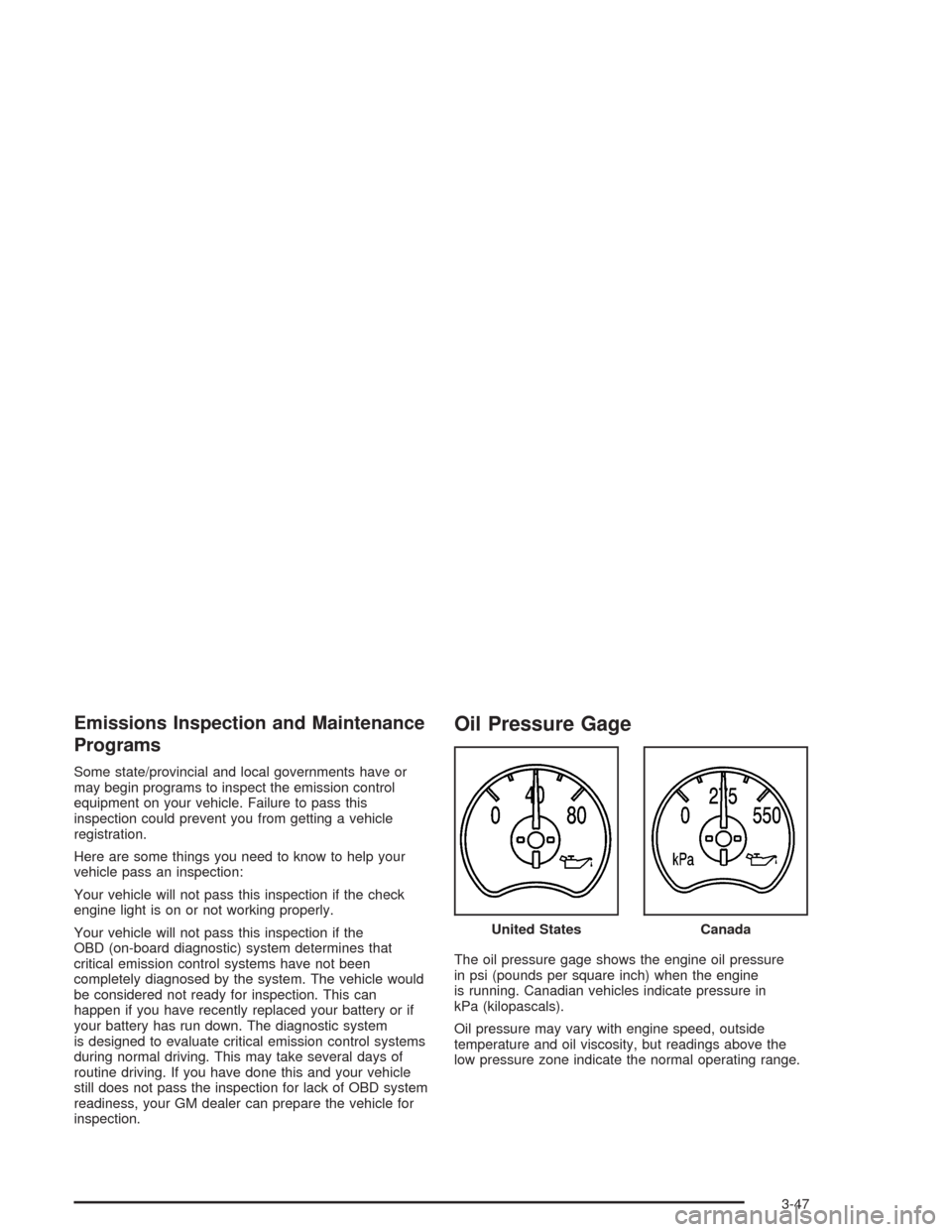
The oil pressure gage shows the engine oil pressure
in psi (pounds per square inch) when the engine
is running. Canadian vehicles indicate pressure in
kPa (kilopascals).
Oil pressure may vary with engine speed, outside
temperature and oil viscosity, but readings above the
low pressure zone indicate the normal operating range.United States
Canada
3-47
Page 200 of 504

A reading in the low pressure zone may be caused by a
dangerously low oil level or some other problem
causing low oil pressure. Check your oil as soon as
possible. SeeDIC Warnings and Messages on
page 3-62.
{CAUTION:
Do not keep driving if the oil pressure is low.
If you do, your engine can become so hot that
it catches re. You or others could be burned.
Check your oil as soon as possible and have
your vehicle serviced.
Notice:Lack of proper engine oil maintenance may
damage the engine. The repairs would not be
covered by your warranty. Always follow the
maintenance schedule in this manual for changing
engine oil.
Security Light
This light will come on
briey when you turn the
key toward START.
The light will stay on until
the engine starts.
If the light ashes, the Passlock
®system has entered a
tamper mode. If the vehicle fails to start, seePasslock®
on page 2-17.
If the light comes on continuously while driving and
stays on, there may be a problem with the Passlock
®
system. Your vehicle will not be protected by Passlock®,
and you should see your dealer.
Also, seeContent Theft-Deterrent on page 2-16for
additional information regarding the security light.
3-48
Page 203 of 504
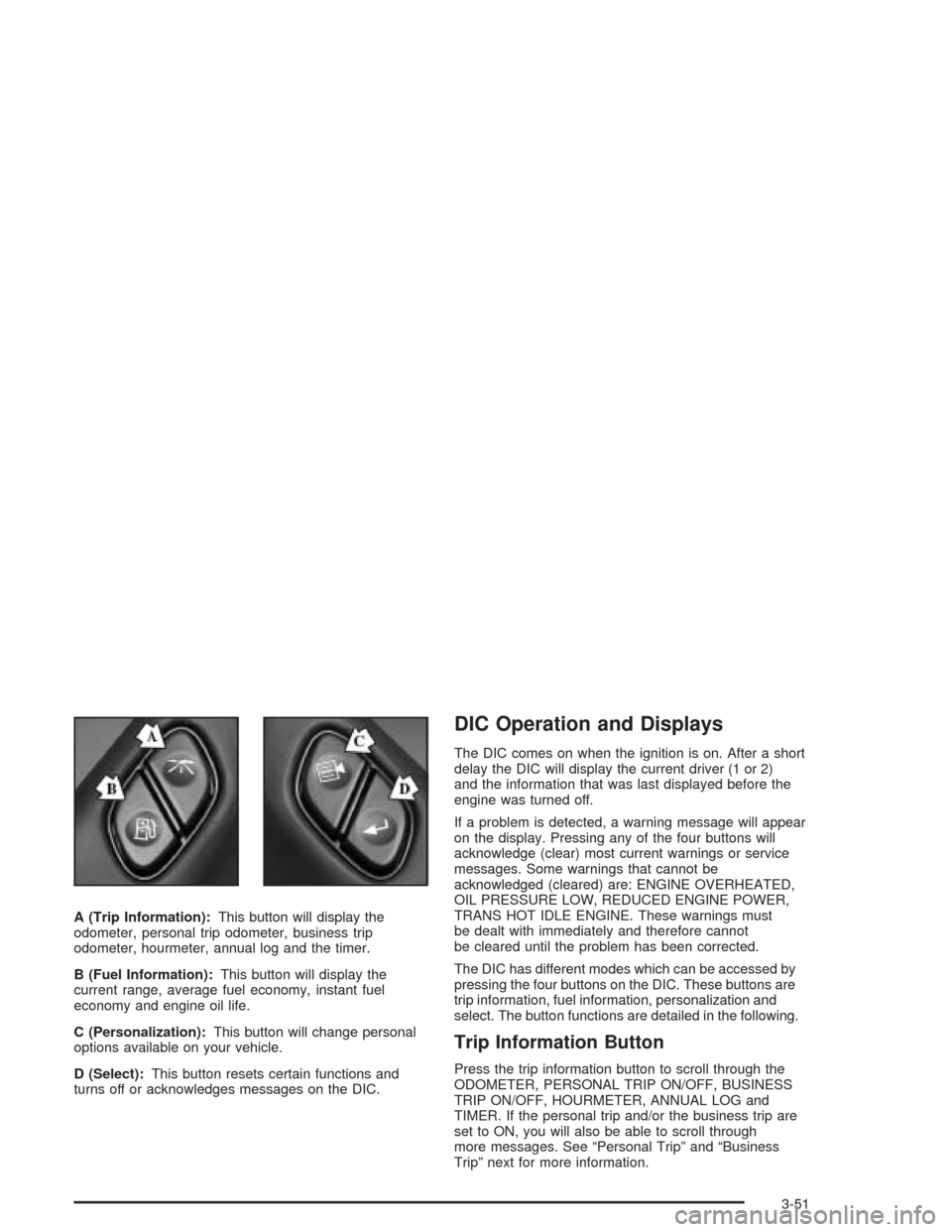
A (Trip Information):This button will display the
odometer, personal trip odometer, business trip
odometer, hourmeter, annual log and the timer.
B (Fuel Information):This button will display the
current range, average fuel economy, instant fuel
economy and engine oil life.
C (Personalization):This button will change personal
options available on your vehicle.
D (Select):This button resets certain functions and
turns off or acknowledges messages on the DIC.
DIC Operation and Displays
The DIC comes on when the ignition is on. After a short
delay the DIC will display the current driver (1 or 2)
and the information that was last displayed before the
engine was turned off.
If a problem is detected, a warning message will appear
on the display. Pressing any of the four buttons will
acknowledge (clear) most current warnings or service
messages. Some warnings that cannot be
acknowledged (cleared) are: ENGINE OVERHEATED,
OIL PRESSURE LOW, REDUCED ENGINE POWER,
TRANS HOT IDLE ENGINE. These warnings must
be dealt with immediately and therefore cannot
be cleared until the problem has been corrected.
The DIC has different modes which can be accessed by
pressing the four buttons on the DIC. These buttons are
trip information, fuel information, personalization and
select. The button functions are detailed in the following.
Trip Information Button
Press the trip information button to scroll through the
ODOMETER, PERSONAL TRIP ON/OFF, BUSINESS
TRIP ON/OFF, HOURMETER, ANNUAL LOG and
TIMER. If the personal trip and/or the business trip are
set to ON, you will also be able to scroll through
more messages. See “Personal Trip” and “Business
Trip” next for more information.
3-51
Page 214 of 504
DIC Warnings and Messages
Warning messages are displayed on the DIC to notify
the driver that the status of the vehicle has changed and
that some action may be needed by the driver to
correct the condition. If there is more than one message
that needs to be displayed they will appear one after
another. Some messages may not require immediate
action but you should press the select button to
acknowledge that you received the message and clear it
from the display. Some messages cannot be cleared
from the display because they are more urgent;
these messages require action before they can be
removed from the DIC display. The following are the
possible messages that can be displayed and some
information about them.
CHANGE ENGINE OIL
This message is displayed when the engine oil needs to
be changed and service is required for your vehicle.
SeeScheduled Maintenance on page 6-5andEngine
Oil on page 5-14for more information. Also see “GM Oil
Life System” previously in this section for information
on how to reset the message. This message will
clear itself after 10 seconds until the next ignition cycle.
OIL LIFE RESET
This message will appear on the display for about
10 seconds after resetting the change engine oil
message.
OIL PRESSURE LOW
If low oil pressure levels occur, this message will be
displayed on the DIC and a chime will sound. Stop the
vehicle as soon as safely possible and do not operate
it until the cause of the low oil pressure has been
corrected. Check your oil as soon as possible and have
your vehicle serviced.
CHECK OIL LEVEL
If the oil level in the vehicle is low, this message will
appear on the DIC. Check the oil level and correct it as
necessary. You may need to let the vehicle cool or
warm up and cycle the ignition to be sure this message
will clear. Once the problem is corrected, pressing
the select button will clear this message from the DIC
display. This message will clear itself after 10 seconds
until the next ignition cycle.
3-62
Page 297 of 504

Here are some things you can check before a trip:
Windshield Washer Fluid:Is the reservoir full? Are
all windows clean inside and outside?
Wiper Blades:Are they in good shape?
Fuel, Engine Oil, Other Fluids:Have you checked
all levels?
Lamps:Are they all working? Are the lenses clean?
Tires:They are vitally important to a safe,
trouble-free trip. Is the tread good enough for
long-distance driving? Are the tires all inated to the
recommended pressure?
Weather Forecasts:What is the weather outlook
along your route? Should you delay your trip a
short time to avoid a major storm system?
Maps:Do you have up-to-date maps?
Highway Hypnosis
Is there actually such a condition as “highway
hypnosis”? Or is it just plain falling asleep at the wheel?
Call it highway hypnosis, lack of awareness, or
whatever.
There is something about an easy stretch of road with the
same scenery, along with the hum of the tires on the
road, the drone of the engine, and the rush of the wind
against the vehicle that can make you sleepy. Do not let it
happen to you! If it does, your vehicle can leave the road
inless than a second,and you could crash and be
injured.
What can you do about highway hypnosis? First, be
aware that it can happen.
Then here are some tips:
Make sure your vehicle is well ventilated, with a
comfortably cool interior.
Keep your eyes moving. Scan the road ahead and
to the sides. Check your mirrors and your
instruments frequently.
If you get sleepy, pull off the road into a rest,
service or parking area and take a nap, get some
exercise, or both. For safety, treat drowsiness
on the highway as an emergency.
4-39
Page 329 of 504

Service............................................................5-3
Doing Your Own Service Work.........................5-4
Adding Equipment to the Outside of Your
Vehicle......................................................5-5
Fuel................................................................5-5
Gasoline Octane............................................5-5
Gasoline Specications....................................5-6
California Fuel...............................................5-6
Additives.......................................................5-7
Fuels in Foreign Countries...............................5-7
Filling Your Tank............................................5-8
Filling a Portable Fuel Container.....................5-10
Checking Things Under the Hood....................5-10
Hood Release..............................................5-11
Engine Compartment Overview.......................5-12
Engine Oil...................................................5-14
Engine Air Cleaner/Filter................................5-19
Automatic Transmission Fluid.........................5-21
Engine Coolant.............................................5-24
Coolant Surge Tank Pressure Cap..................5-27
Engine Overheating.......................................5-28
Cooling System............................................5-30
Engine Fan Noise.........................................5-36Power Steering Fluid.....................................5-37
Windshield Washer Fluid................................5-38
Brakes........................................................5-39
Battery........................................................5-42
Jump Starting...............................................5-43
All-Wheel Drive..............................................5-49
Rear Axle.......................................................5-50
Front Axle......................................................5-51
Headlamp Aiming...........................................5-52
Headlamp Horizontal Aiming...........................5-54
Headlamp Vertical Aiming..............................5-54
Bulb Replacement..........................................5-56
High Intensity Discharge (HID) Lighting............5-56
Halogen Bulbs..............................................5-56
Headlamps..................................................5-57
Front Turn Signal, Sidemarker and Daytime
Running Lamps.........................................5-61
Center High-Mounted Stoplamp (CHMSL).........5-62
Taillamps.....................................................5-62
Replacement Bulbs.......................................5-63
Windshield Wiper Blade Replacement..............5-64
Section 5 Service and Appearance Care
5-1
Page 341 of 504

A. Engine Air Cleaner/Filter. SeeEngine Air
Cleaner/Filter on page 5-19.
B. Coolant Surge Tank. SeeCooling System on
page 5-30andCoolant Surge Tank Pressure Cap
on page 5-27.
C. Air Filter Restriction Indicator (If Equipped). See
Engine Air Cleaner/Filter on page 5-19.
D. Engine Oil Fill. SeeEngine Oil on page 5-14.
E. Engine Oil Dipstick. SeeEngine Oil on page 5-14.
F. Automatic Transmission Dipstick. SeeAutomatic
Transmission Fluid on page 5-21.
G. Fan. SeeCooling System on page 5-30andEngine
Fan Noise on page 5-36.H. Remote Negative (−) Terminal (GND). SeeJump
Starting on page 5-43.
I. Remote Positive (+) Terminal. SeeJump Starting on
page 5-43.
J. Power Steering Fluid Reservoir (Out of View). See
Power Steering Fluid on page 5-37.
K. Brake Fluid Reservoir. SeeBrakes on page 5-39.
L. Underhood Fuse Block. See “Underhood Fuse Block”
underFuses and Circuit Breakers on page 5-115.
M. Battery. SeeBattery on page 5-42.
N. Windshield Washer Fluid Reservoir. SeeWindshield
Washer Fluid on page 5-38.
5-13
Page 358 of 504

If you get the overheat warning with no sign of steam,
try this for a minute or so:
1. Turn on your heater to full hot at the highest fan
speed and open the window as necessary.
2. If you’re in a traffic jam, shift to NEUTRAL (N);
otherwise, shift to the highest gear while
driving – DRIVE (D).
If you no longer have the overheat warning, you can
drive. Just to be safe, drive slower for about 10 minutes.
If the warning doesn’t come back on, you can drive
normally.
If the warning continues, pull over, stop, and park your
vehicle right away.
If there’s still no sign of steam, push down the
accelerator until the engine speed is about twice as fast
as normal idle speed for at least three minutes while
you’re parked. If you still have the warning,turn off the
engine and get everyone out of the vehicleuntil it
cools down. Also, see “Overheated Engine Protection
Operating Mode” listed previously in this section.
You may decide not to lift the hood but to get service
help right away.Cooling System
When you decide it’s safe to lift the hood, here’s what
you’ll see:
A. Coolant Surge Tank
B. Coolant Surge Tank Pressure Cap
C. Engine Fan
If the coolant inside the coolant surge tank is boiling,
don’t do anything else until it cools down. The vehicle
should be parked on a level surface.
5-30
Page 399 of 504

(D) Construction Code:A letter code is used to
indicate the type of ply construction in the tire. The letter
“R” means radial ply construction; the letter “D” means
diagonal or bias ply construction; and the letter “B”
means belted-bias ply construction.
(E) Rim Diameter:Diameter of the wheel in inches.
(F) Service Description:The service description
indicates the load range and speed rating of a tire. The
load index can range from 1 to 279. Speed ratings
range from “A” to “Z”. The light truck tire size example
above shows dual or single tire congurations.
Tire Terminology and Denitions
Air Pressure:The amount of air inside the tire pressing
outward on each square inch of the tire. Air pressure
is expressed in pounds per square inch (psi) or
kilopascal (kPa).
Accessory Weight:This means the combined weight
of optional accessories. Some examples of optional
accessories are, automatic transmission, power steering,
power brakes, power windows, power seats, and air
conditioning.Aspect Ratio:The relationship of a tire’s height to
its width.
Belt:A rubber coated layer of cords that is located
between the plies and the tread. Cords may be made
from steel or other reinforcing materials.
Bead:The tire bead contains steel wires wrapped by
steel cords that hold the tire onto the rim.
Bias Ply Tire:A pneumatic tire in which the plies are
laid at alternate angles less than 90 degrees to the
centerline of the tread.
Cold Ination Pressure:The amount of air pressure
in a tire, measured in pounds per square inch (psi) or
kilopascals (kPa) before a tire has built up heat from
driving. SeeInation - Tire Pressure on page 5-74.
Curb Weight:This means the weight of a motor vehicle
with standard and optional equipment including the
maximum capacity of fuel, oil and coolant, but without
passengers and cargo.
5-71