audio CADILLAC ESCALADE ESV 2007 2.G User Guide
[x] Cancel search | Manufacturer: CADILLAC, Model Year: 2007, Model line: ESCALADE ESV, Model: CADILLAC ESCALADE ESV 2007 2.GPages: 574, PDF Size: 2.89 MB
Page 273 of 574
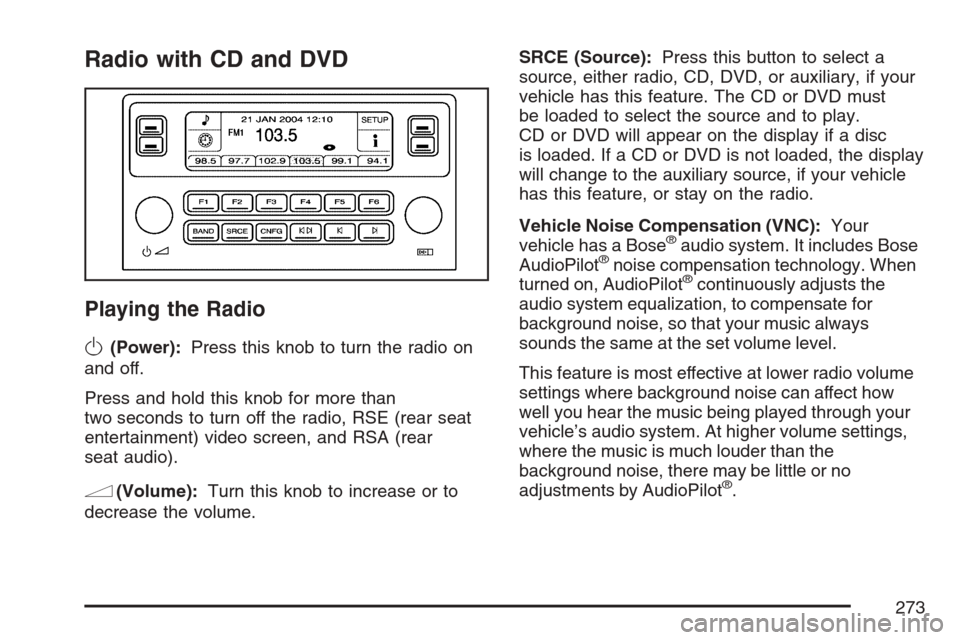
Radio with CD and DVD
Playing the Radio
O
(Power):Press this knob to turn the radio on
and off.
Press and hold this knob for more than
two seconds to turn off the radio, RSE (rear seat
entertainment) video screen, and RSA (rear
seat audio).
n(Volume):Turn this knob to increase or to
decrease the volume.SRCE (Source):Press this button to select a
source, either radio, CD, DVD, or auxiliary, if your
vehicle has this feature. The CD or DVD must
be loaded to select the source and to play.
CD or DVD will appear on the display if a disc
is loaded. If a CD or DVD is not loaded, the display
will change to the auxiliary source, if your vehicle
has this feature, or stay on the radio.
Vehicle Noise Compensation (VNC):Your
vehicle has a Bose
®audio system. It includes Bose
AudioPilot®noise compensation technology. When
turned on, AudioPilot®continuously adjusts the
audio system equalization, to compensate for
background noise, so that your music always
sounds the same at the set volume level.
This feature is most effective at lower radio volume
settings where background noise can affect how
well you hear the music being played through your
vehicle’s audio system. At higher volume settings,
where the music is much louder than the
background noise, there may be little or no
adjustments by AudioPilot
®.
273
Page 274 of 574
To use AudioPilot®, set the radio volume at a low to
moderate listening level. Begin listening while the
vehicle is stopped with the motor running. Turn the
AudioPilot
®on by pressing the tune/sel knob to
enter the main menu. Then turn the tune/sel (select)
knob until VNC:AUDIOPILOT appears on the
display. Press the tune/sel knob to turn AudioPilot
®
on and off. An X will appear in the box when it is
turned on. Then, resume driving, gradually
increasing the vehicle speed. You will notice that
your music sounds the same regardless of
background noises; such as road noise, tire hum, or
wind. With the AudioPilot
®turned off, repeat this
process again without adjusting the volume or tone
controls. You will notice that background noise is
now audible, and will prevent you from hearing
softer passages of the music. To turn AudioPilot
®
off, press the tune/sel knob to enter the main menu,
turn the tune/sel knob until VNC:AUDIOPILOT
appears, and press the tune/sel knob. The X in
the box will disappear when it is turned off. For
additional information on AudioPilot
®, please visit
www.bose.com.
Finding a Station
BAND:Press this button to select AM, FM1, FM2,
or XM1 or XM2 (if equipped).
w(Tune):Turn this knob to select radio
stations.
©¨(Seek):Press the left single arrow button to
go to the previous station and stay there. Press the
right single arrow button to go to the next station
and stay there. The sound will mute while seeking.
The radio will only seek stations with a strong signal
that are in the selected band.
©¨(Scan):Press the double arrow scan button
to enter scan mode. SCAN will appear on the
display. Press this button to scan to the next
station. The radio will go to a station, play for
ve seconds, and then go on to the next station.
Press this button again to stop scanning.
274
Page 278 of 574
AUDIO EQUALIZER:This feature allows you to
select customized equalization settings. To choose
an equalization setting (EQ0 through EQ5),
perform the following steps:
1. Press the tune/sel knob to enter the
main menu.
2. Turn the tune/sel knob until EQUALIZER
appears on the display.
3. Press the tune/sel knob to set the equalization
setting. The equalization setting will appear on
the display.
4. Press the BACK (F6) button to exit the
display. To return to the original display,
repeatedly press the BACK (F6) button or
wait for the display to time out.
The equalization settings are preset to
EQ0 (Normal), EQ1 (Pop), EQ2 (Rock),
EQ3 (Jazz), EQ4 (Talk), and EQ5 (Country).Adjusting the Speakers (Balance/Fade)
To adjust the balance or fade, perform the
following steps:
1. Press the tune/sel knob to enter the
main menu.
2. Turn the tune/sel knob until
BALANCE – FADER appears on the display.
3. Press the tune/sel knob to enter the tone
settings.
4. Press the tune/sel knob to scroll to BALANCE
or FADER.
5. Turn the tune/sel knob to adjust the BALANCE
to the right or the left speakers and the
FADER to the front or the rear speakers.
6. Press the tune/sel knob to set the adjustment.
7. Press the BACK (F6) button to exit the
display. To return to the original display,
repeatedly press the BACK (F6) button or
wait for the display to time out.
EQ0 will not appear on the display when in
this mode.
278
Page 279 of 574
Digital Signal Processing (DSP):This feature is
used to provide a choice of different listening
experiences. To choose a DSP setting, perform
the following steps:
1. Press the tune/sel knob to enter the
main menu.
2. Turn the tune/sel knob until DSP appears on
the display.
3. Press the tune/sel knob to set the DSP
setting. The DSP setting will appear on
the display.
4. Press the BACK (F6) button to exit the
display. To return to the original display,
repeatedly press the BACK (F6) button or
wait for the display to time out.The DSP settings available are:
Normal: Select this setting for normal mode,
this provides the best sound quality for all
seating positions.
Centerpoint™: Select this setting to enable
Bose Centerpoint™. Centerpoint™ signal
processing gives surround sound listening for
a CD, MP3, or a DVD stereo audio source.
Centerpoint™ delivers ve independent audio
channels from conventional stereo recordings.
Rear: Select this setting to adjust the audio for
the rear seat passengers to receive the best
possible sound quality.
Driver: Select this setting to adjust the audio
for the driver to receive the best possible
sound quality.
5.1 Surround: Select this setting to turn
on true 5.1 surround sound processing,
available for DVD-A or DVD-V sources that
were recorded in 5.1 Surround.
5.1 Surround + Normal— this mode is
optimized for all seating positions.
5.1 Surround + Rear— this mode is
optimized for rear seat occupants.
279
Page 280 of 574
XM™ Satellite Radio Service
XM™ is a satellite radio service that is based in
the 48 contiguous United States and Canada.
XM™ offers a large variety of coast-to-coast
channels including music, news, sports, talk,
traffic/weather (U.S. subscribers), and children’s
programming. XM™ provides digital quality
audio and text information that includes song title
and artist name. A service fee is required in
order to receive the XM™ service. For more
information, contact XM™; In the U.S. at
www.xmradio.com or call 1-800-852-XMXM (9696)
or in Canada at www.xmradio.ca or call
1-877-GET-XMSR (438-9677).
4(Information):Press this button while in XM™
mode to retrieve three different categories of
information related to the current song or channel:
Artist, Song Title, Category or PTY. To view
this information, perform the following:
1. Press the tune/sel knob to enter the
main menu.
2. Turn the tune/sel knob until INFO (information)
appears on the display.
3. Press the tune/sel knob to select INFO. The
display will change to show the additional
XM™ information.4. Press the BACK (F6) button to exit the
display. To return to the original display,
repeatedly press the BACK (F6) button or wait
for the display to time out.
Radio Data System (RDS)
The audio system has a Radio Data System
(RDS). RDS features are available for use only on
FM stations that broadcast RDS information.
With RDS, the radio can do the following:
Seek to stations broadcasting the selected
type of programming
Receive announcements concerning local and
national emergencies
Display messages from radio stations
Seek to stations with traffic announcements
This system relies upon receiving specic
information from these stations and will only work
when the information is available. In rare cases, a
radio station may broadcast incorrect information
that will cause the radio features to work
improperly. If this happens, contact the radio
station.
280
Page 287 of 574
©¨(Scan):Press this double arrow button to
listen to each track for 10 seconds. The CD will go
to a track, play for 10 seconds, and then go on
to the next track. Press this button again to
stop scanning.
SRCE (Source):Press this button to select a
source, either radio, CD, DVD or AUX (auxiliary),
if your vehicle has this feature. The CD must
be loaded to select the source and to play. CD will
appear on the display if a CD is loaded. If a CD
is not loaded, the display will change to the
next available source, either DVD, AUX, if your
vehicle has this feature, or radio.
Z(Eject):Press this button to eject the CD
that is currently playing, or press and hold
this button to eject all of the CDs loaded. You will
hear a beep. Eject may be activated with the
ignition or radio off. If the CD is not removed after
a short time, the CD will be brought back into
the CD player for storage.
Using an MP3 CD
MP3 Format
If you burn your own MP3 disc on a personal
computer:
Make sure the MP3 les are recorded on a
CD-R disc.
Do not mix standard audio and MP3 les on
one disc.
Make sure playlists have a .m3u or .wpl
extension, other le extensions may not work.
Files can be recorded with a variety of xed
or variable bit rates. Song title, artist name,
and album will be available for display by
the radio when recorded using ID3 tags
version 1 and 2.
Create a folder structure that makes it easy to
nd songs while driving. Organize songs by
albums using one folder for each album.
Each folder or album should contain 18 songs
or less.
Make sure to nalize the disc when burning
an MP3 disc, using multiple sessions. It is
usually better to burn the disc all at once.
287
Page 288 of 574

The player will be able to read and play a
maximum of 50 folders, 50 playlists, 10 sessions,
and 255 les. Long le names, folder names,
or playlist names may use more disc memory
space than necessary. To conserve space on the
disc, minimize the length of the le, folder or
playlist names. You can also play an MP3 CD that
was recorded using no le folders. The system
can support up to 11 folders in depth, though, keep
the depth of the folders to a minimum in order
to keep down the complexity and confusion
in trying to locate a particular folder during
playback. If a CD contains more than the
maximum of 50 folders, 50 playlists, 10 sessions,
and 255 les the player will let you access and
navigate up to the maximum, but all items over the
maximum will be ignored.
Root Directory
The root directory will be treated as a folder. If the
root directory has compressed audio les, the
directory will be displayed as F1 ROOT. All les
contained directly under the root directory will
be accessed prior to any root directory folders.
However, playlists (Px) will always be accessed
before root folders or les.
Empty Directory or Folder
If a root directory or a folder exists somewhere
in the le structure that contains only
folders/subfolders and no compressed les directly
beneath them, the player will advance to the
next folder in the le structure that contains
compressed audio les and the empty folder will
not be displayed or numbered.
No Folder
When the CD contains only compressed les, the
les will be located under the root folder. The
next and previous folder functions will have
no function on a CD that was recorded without
folders or playlists. When displaying the name of
the folder the radio will display ROOT.
When the CD contains only playlists and
compressed audio les, but no folders, all les
will be located under the root folder. The
folder down and the folder up buttons will search
playlists (Px) rst and then go to the root
folder. When the radio displays the name of the
folder the radio will display ROOT.
288
Page 289 of 574
Order of Play
Tracks will be played in the following order:
Play will begin from the rst track in the rst
playlist and will continue sequentially through
all tracks in each playlist. When the last
track of the last playlist has been played, play
will continue from the rst track of the rst
playlist.
If the CD does not contain any playlists, and
then play will begin from the rst track under
the root directory. When all tracks from
the root directory have been played, play
will continue from les according to their
numerical listing. After playing the last track
from the last folder, play will begin again at the
rst track of the rst folder or root directory.
When play enters a new folder, the display will not
automatically show the new folder name. The
new track name will appear on the display.
File System and Naming
The song name that will be displayed will be the
song name that is contained in the ID3 tag. If
the song name is not present in the ID3 tag, and
then the radio will display the le name without
the extension (such as .mp3) as the track name.
Track names longer than 32 characters or
four pages will be shortened. The display will not
show parts of words on the last page of text
and the extension of the lename will not be
displayed.
Preprogrammed Playlists
You can access preprogrammed playlists which
were created by WinAmp™, MusicMatch™,
or Real Jukebox™ software, however, you will not
have editing capability. These playlists will be
treated as special folders containing compressed
audio song les.
289
Page 290 of 574
Playing an MP3
M(Load):Press this button to load CDs into the
CD player. This CD player will hold up to six CDs.
To insert one CD, do the following:
1. The ignition and the radio can be on or off.
2. Press and release the load button. Please
Wait will appear on the display.
3. When INSERT appears on the display, insert
a CD partway into the slot, label side up. The
player will pull the CD in.
When a CD is inserted, CD will appear on the
display, the number of the CD and the track
number will appear on the display if the
radio is on.
If the radio is on, the CD will begin to play
automatically.If the ignition or radio is turned off with a CD in
the player it will stay in the player. When the
ignition or radio is turned on, the CD will start to
play where it stopped, if it was the last selected
audio source.
As each new track starts to play, the track number
will appear on the display.
The CD player can play the smaller 3 inch (8 cm)
single CDs with an adapter ring. Full-size CDs
and the smaller CDs are loaded in the same
manner.
If playing a CD-R, the sound quality may be
reduced due to CD-R quality, the method of
recording, the quality of the music that has been
recorded, and the way the CD-R has been handled.
There may be an increase in skipping, difficulty in
nding tracks, and/or difficulty in loading and
ejecting. If these problems occur, check the bottom
surface of the CD. If the surface of the CD is
damaged, such as cracked, broken, or scratched,
the CD will not play properly. If the surface of the
CD is soiled, seeCare of Your CDs and DVDs on
page 319for more information.
If there is no apparent damage, try a known
good CD.
290
Page 294 of 574

Using the DVD Player
Insert a disc partway into the slot, label side up.
The player will pull it in. If the ignition and the radio
are on, the CD or DVD will begin playing. A
DVD may be loaded with the radio off, but it will
not start playing until the radio is on, and sourced
to DVD. The DVD player can be controlled by
the buttons on the radio, the rear seat audio
system, and the remote control, if your vehicle has
this feature. See theRear Seat Entertainment
System on page 303for more information. A DVD
icon will display whenever a disc is loaded. The
DVD player can also be run for passengers in
the rear seat with the radio off. The rear seat
passenger can power on the video screen and
use the remote control to navigate the disc.
SeeRear Seat Entertainment System on page 303
for more information.
Z(Eject):Press this button to eject the DVD or
CD. Eject may be activated with the ignition or
radio off. If the disc is not removed after a
short time, the disc will be pulled back into the
DVD player for storage.The DVD player is only compatible with DVDs of
the appropriate region code. The region code
is printed on the jacket of most DVDs.
DVD video, DVD audio, DVD-R/RW, and
DVD + R/RW are fully supported by this DVD
player. In addition, standard audio CDs, CD-R,
CD-RW, video CD, SACD, MP3, and WMA
formatted discs are fully supported. If a disc is
inserted that is not supported, an error message
will display and the disc will be ejected.
When a DVD is inserted, the DVD functions will
appear on the display above the pushbuttons,
in place of the preset stations. These functions
vary based on the type of disc that is inserted.
Loading the disc can take some time as the DVD
player reads the disc and determines the type.
DVD Messages
If the disc comes out, it could be for one of the
following reasons:
It is very hot. When the temperature returns to
normal, the disc should play.
You are driving on a very rough road.
When the road becomes smoother, the disc
should play.
294