audio CADILLAC ESCALADE ESV 2007 2.G Owner's Guide
[x] Cancel search | Manufacturer: CADILLAC, Model Year: 2007, Model line: ESCALADE ESV, Model: CADILLAC ESCALADE ESV 2007 2.GPages: 574, PDF Size: 2.89 MB
Page 311 of 574
r(Fast Reverse):Press this button to fast
reverse the DVD or CD. To stop fast reversing a
DVD video, press the play button. To stop fast
reversing a DVD audio or CD, release the fast
reverse button. This button may not work when the
DVD is playing the copyright information or the
previews.
[(Fast Forward):Press this button to fast
forward the DVD or CD. To stop fast forwarding a
DVD video, press the play button. To stop fast
forwarding a DVD audio or CD, release the
fast forward button. This button may not work
when the DVD is playing the copyright information
or the previews.
e(Audio):Press this button to change audio
tracks on DVDs that have this feature when
the DVD is playing. The format and content of
this function will vary for each disc.
{(Subtitles):Press this button to turn ON/OFF
subtitles and to move through subtitle options
when a DVD is playing. The format and content of
this function will vary for each disc.
AUX (Auxiliary):Press this button to switch the
system between the DVD player and an auxiliary
source.If your vehicle has a third row video screen, the
AUX button will control the source display on
the second row video screen, and the third row
video screen as described in the table below:
Aux Button
PressSecond Row
ScreenThird Row
Screen
Default State
(No Press)DVD Media DVD Media
First PressAux Video
SourceAux Video
Source
Second Press DVD MediaAux Video
Source
Third PressAux Video
SourceDVD Media
Fourth PressReturn to Default
StateReturn to
Default State
d(Camera):Press this button to change camera
angles on DVDs that have this feature when a
DVD is playing. The format and content of
this function will vary for each disc.
1 through 0 (Numeric Keypad):The numeric
keypad provides the capability of direct chapter or
track number selection.
311
Page 313 of 574
Problem Recommended Action
The auxiliary source is
running but there is no
picture or sound.Check that the RSE video
screen is in the auxiliary
source mode.
Check the auxiliary input
connections at both
devices.
Sometimes the wireless
headphone audio cuts out
or buzzes.Check for obstructions,
low batteries, reception
range, and interference
from cellular telephone
towers or by using your
cellular telephone in
the vehicle.
Check that the
headphones are on
correctly using the L (left)
and R (right) on the
headphones.
I lost the remote and/or
the headphones.See your dealer for
assistance.
The DVD is playing, but
there is no picture or
sound.Check that the RSE video
screen is sourced to the
DVD player.DVD Display Error Messages
The DVD display error message depends on
which radio you have. The video screen may
display one of the following:
Disc Load/Eject Error:This message is
displayed when there are disc load or eject
problems.
Disc Format Error:This message will be
displayed, if the disc is inserted with the disc label
wrong side up, or if the disc is damaged.
Disc Region Error:This message will be
displayed, if the disc is not from a correct region.
No Disc Inserted:This message will be
displayed, if no disc is present when the EJECT
button is pressed on the radio.
DVD Distortion
Video distortion may occur when operating cellular
phones, scanners, CB radios, Global Position
Systems (GPS)*, two-way radios, mobile fax, or
walkie talkies.
313
Page 314 of 574
It may be necessary to turn off the DVD player
when operating one of these devices in or near the
vehicle.
*Excludes the OnStar
®System.
Cleaning the RSE Overhead Console
When cleaning the RSE overhead console surface,
use only a clean cloth dampened with clean
water.
Cleaning the Video Screen
When cleaning the video screen, use only a clean
cloth dampened with clean water. Use care
when directly touching or cleaning the screen, as
damage may result.
Rear Seat Audio (RSA)
This feature allows rear seat passengers to listen
to and control any of the music sources: radio,
CDs, DVDs, or other auxiliary sources. The
rear seat passengers can control the same music
sources the front seat passengers are listening
to (dual control) or a different source. For example,
rear seat passengers can listen to and control a
CD through the headphones, while the driver
listens to the radio through the speakers. The rear
seat passengers have control of the volume for
each set of headphones.
You can operate the RSA functions even when
the main radio is off.
Audio can be heard through wired headphones
(not included) plugged into the jacks on the RSA.
If your vehicle has this feature, audio can also
be heard on Channel 2 of the wireless
headphones.
The audio system allows the rear speakers to
continue playing even when the RSA audio
is active through the headphones.
314
Page 316 of 574
PROG (Program):Press this button to go to the
next preset radio station or channel set on the
main radio. This function is inactive, with
some radios, if the front seat passengers are
listening to the radio.
When a CD or DVD audio is playing, press this
button to go to the beginning of the CD or
DVD audio. This function is inactive, with some
radios, if the front seat passengers are listening to
the disc.
When a disc is playing in the CD or DVD changer,
press this button to select the next disc, if
multiple discs are loaded. This function is inactive,
with some radios, if the front seat passengers
are listening to the disc.
When a DVD video menu is being displayed,
press the PROG button to perform the menu
function, enter.Theft-Deterrent Feature
THEFTLOCK®is designed to discourage theft
of your vehicle’s radio. The feature works
automatically by learning a portion of the Vehicle
Identication Number (VIN). If the radio is
moved to a different vehicle, it will not operate.
If the radio is removed from your vehicle, the
original VIN in the radio can be used to trace the
radio back to your vehicle.
With THEFTLOCK
®activated, the radio will not
operate if stolen.
316
Page 317 of 574

Audio Steering Wheel Controls
Your vehicle has audio
steering wheel controls,
they may differ
depending on your
vehicle’s options. Some
audio controls can
be adjusted at
the steering wheel.
They include the
following:
xw(Next/Previous):Press the up or the down
arrow to go to the next or to the previous radio
station stored as a favorite.
When a CD/DVD is playing, press the up or the
down arrow to go to the next or previous track or
chapter.
g(Mute/Voice Recognition):Press and release
this button to silence the vehicle speakers only.
The audio of the wireless and wired headphones,
if your vehicle has these features, will not be
muted. Press and release this button again, to turn
the sound on.
If your vehicle has the navigation system, press
and hold this button for longer than one second to
initiate voice recognition. See “Voice Recognition”
in the Navigation System manual for more
information.
Your vehicle has OnStar
®, press and hold this
button for longer than one second to interact with
the OnStar
®system. If your vehicle also has
the navigation system, press and hold this button
for longer than one second to initiate voice
recognition and say “OnStar” to enter OnStar
®
mode. See theOnStar®System on page 165in
this manual for more information.
SRCE (Source):Press this button to switch
between the radio (AM, FM), XM™ (if equipped),
CD, and if your vehicle has these features,
DVD, front auxiliary, and rear auxiliary.
317
Page 513 of 574
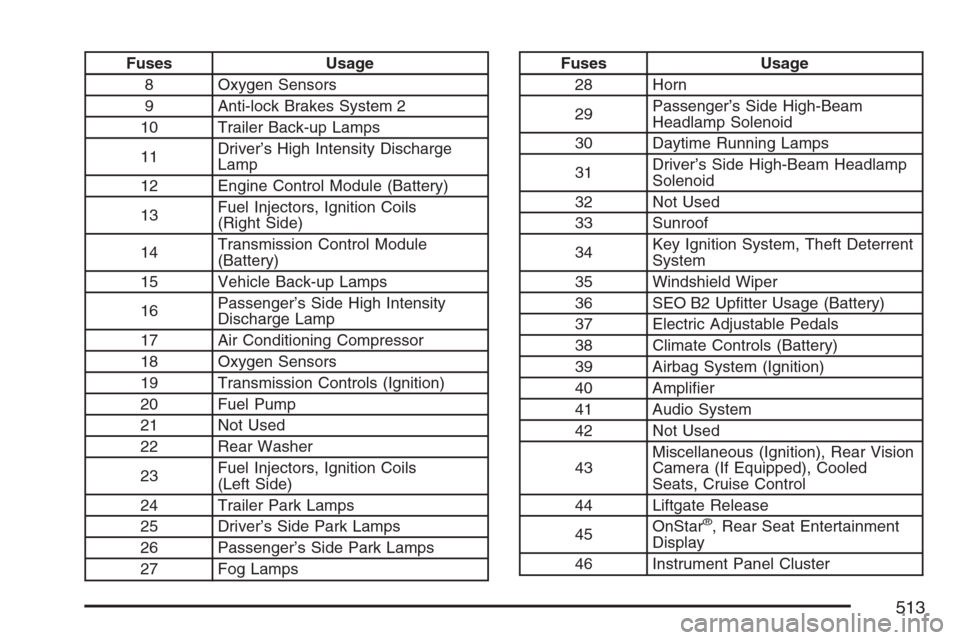
Fuses Usage
8 Oxygen Sensors
9 Anti-lock Brakes System 2
10 Trailer Back-up Lamps
11Driver’s High Intensity Discharge
Lamp
12 Engine Control Module (Battery)
13Fuel Injectors, Ignition Coils
(Right Side)
14Transmission Control Module
(Battery)
15 Vehicle Back-up Lamps
16Passenger’s Side High Intensity
Discharge Lamp
17 Air Conditioning Compressor
18 Oxygen Sensors
19 Transmission Controls (Ignition)
20 Fuel Pump
21 Not Used
22 Rear Washer
23Fuel Injectors, Ignition Coils
(Left Side)
24 Trailer Park Lamps
25 Driver’s Side Park Lamps
26 Passenger’s Side Park Lamps
27 Fog LampsFuses Usage
28 Horn
29Passenger’s Side High-Beam
Headlamp Solenoid
30 Daytime Running Lamps
31Driver’s Side High-Beam Headlamp
Solenoid
32 Not Used
33 Sunroof
34Key Ignition System, Theft Deterrent
System
35 Windshield Wiper
36 SEO B2 Uptter Usage (Battery)
37 Electric Adjustable Pedals
38 Climate Controls (Battery)
39 Airbag System (Ignition)
40 Amplier
41 Audio System
42 Not Used
43Miscellaneous (Ignition), Rear Vision
Camera (If Equipped), Cooled
Seats, Cruise Control
44 Liftgate Release
45OnStar
®, Rear Seat Entertainment
Display
46 Instrument Panel Cluster
513
Page 560 of 574

Appearance Care (cont.)
Weatherstrips........................................... 500
Windshield, Backglass, and
Wiper Blades........................................ 502
Wood Panels........................................... 499
Ashtray(s).................................................... 219
Assist Handles............................................ 179
Audio System(s).......................................... 270
Audio Steering Wheel Controls................. 317
Care of Your CD and DVD Player............ 319
Care of Your CDs and DVDs................... 319
Chime Level Adjustment........................... 320
Navigation/Radio System, see
Navigation Manual................................ 303
Radio with CD and DVD.......................... 273
Rear Seat Audio (RSA)............................ 314
Rear Side Window Antenna..................... 319
Setting the Time...................................... 272
Theft-Deterrent Feature............................ 316
Understanding Radio Reception............... 318
XM™ Satellite Radio Antenna System...... 320
Automatic Headlamp System....................... 211
Automatic Transmission
Fluid........................................................ 415
Operation................................................. 144
Autoride
®..................................................... 378
B
Battery........................................................ 436
Run-Down Protection............................... 213
Before Leaving on a Long Trip.................... 360
Bench Seat, Split (60/40).............................. 19
Brake
Anti-Lock Brake System (ABS)................. 327
Emergencies............................................ 329
Parking.................................................... 151
System Warning Light.............................. 235
Brake Pedal, Throttle................................... 142
Brakes........................................................ 433
Braking....................................................... 326
Braking in Emergencies............................... 329
Break-In, New Vehicle................................. 139
Bucket Seats, Rear....................................... 26
Bulb Replacement....................................... 449
Back-Up Lamps....................................... 449
Headlamp Aiming..................................... 446
High Intensity Discharge (HID) Lighting.... 449
License Plate Lamps................................ 451
Replacement Bulbs.................................. 451
Buying New Tires........................................ 470
560
Page 569 of 574

Q
Questions and Answers About
Safety Belts............................................... 42
R
Radios........................................................ 270
Care of Your CD and DVD Player............ 319
Care of Your CDs and DVDs................... 319
Navigation/Radio System, see
Navigation Manual................................ 303
Radio with CD and DVD.......................... 273
Rear Seat Audio...................................... 314
Setting the Time...................................... 272
Theft-Deterrent......................................... 316
Understanding Reception......................... 318
Rainsense™ II Wipers................................. 199
Reading Lamps........................................... 213
Rear Air Conditioning and Heating System
and Electronic Climate Controls............... 226
Rear Axle.................................................... 444
Rear Door Security Locks........................... 124
Rear Heated Seats....................................... 18
Rear Safety Belt Comfort Guides.................. 56Rear Seat Armrest...................................... 181
Rear Seat Audio (RSA)............................... 314
Rear Seat Entertainment System................. 303
Rear Seat Passengers, Safety Belts.............. 53
Rear Side Window Antenna......................... 319
Rear Storage Area...................................... 180
Rear Windshield Washer/Wiper.................... 201
Rearview Mirror, Automatic Dimming with
OnStar®, Compass and Temperature
Display..................................................... 159
Reclining Seatbacks, Power.......................... 15
Recommended Fluids and Lubricants.......... 531
Recovery Hooks.......................................... 369
Recreational Vehicle Towing........................ 376
Remote Keyless Entry System.................... 114
Remote Keyless Entry System,
Operation................................................. 115
Removing the Flat Tire and Installing the
Spare Tire................................................ 482
Removing the Spare Tire and Tools............ 478
Replacement Bulbs..................................... 451
Reporting Safety Defects
Canadian Government............................. 556
General Motors........................................ 557
United States Government....................... 556
569
Page 571 of 574
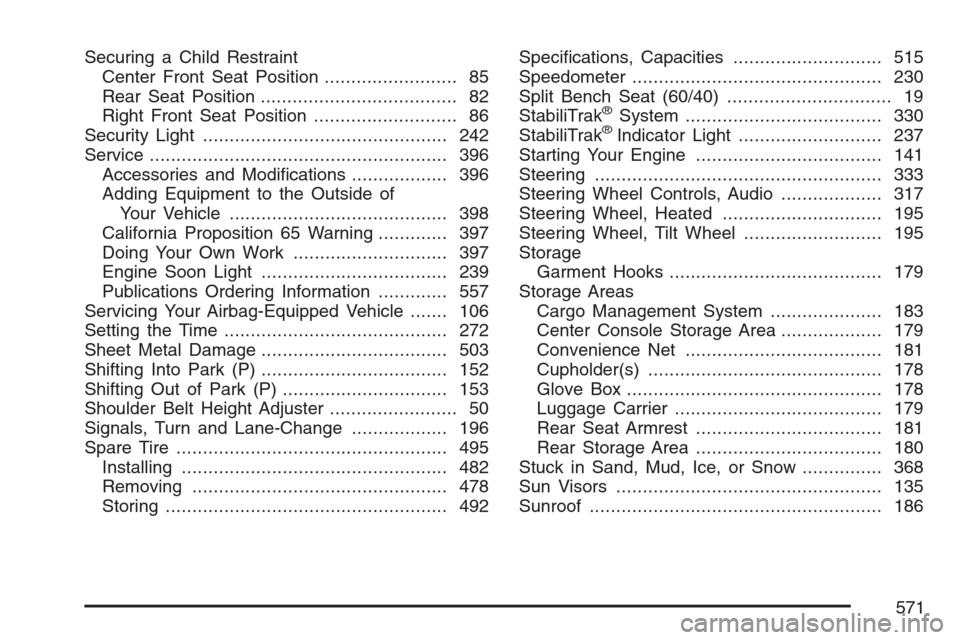
Securing a Child Restraint
Center Front Seat Position......................... 85
Rear Seat Position..................................... 82
Right Front Seat Position........................... 86
Security Light.............................................. 242
Service........................................................ 396
Accessories and Modications.................. 396
Adding Equipment to the Outside of
Your Vehicle......................................... 398
California Proposition 65 Warning............. 397
Doing Your Own Work............................. 397
Engine Soon Light................................... 239
Publications Ordering Information............. 557
Servicing Your Airbag-Equipped Vehicle....... 106
Setting the Time.......................................... 272
Sheet Metal Damage................................... 503
Shifting Into Park (P)................................... 152
Shifting Out of Park (P)............................... 153
Shoulder Belt Height Adjuster........................ 50
Signals, Turn and Lane-Change.................. 196
Spare Tire................................................... 495
Installing.................................................. 482
Removing................................................ 478
Storing..................................................... 492Specications, Capacities............................ 515
Speedometer............................................... 230
Split Bench Seat (60/40)............................... 19
StabiliTrak
®System..................................... 330
StabiliTrak®Indicator Light........................... 237
Starting Your Engine................................... 141
Steering...................................................... 333
Steering Wheel Controls, Audio................... 317
Steering Wheel, Heated .............................. 195
Steering Wheel, Tilt Wheel.......................... 195
Storage
Garment Hooks........................................ 179
Storage Areas
Cargo Management System..................... 183
Center Console Storage Area................... 179
Convenience Net..................................... 181
Cupholder(s)............................................ 178
Glove Box................................................ 178
Luggage Carrier....................................... 179
Rear Seat Armrest................................... 181
Rear Storage Area................................... 180
Stuck in Sand, Mud, Ice, or Snow............... 368
Sun Visors.................................................. 135
Sunroof....................................................... 186
571