audio CADILLAC ESCALADE ESV 2009 Owner's Manual
[x] Cancel search | Manufacturer: CADILLAC, Model Year: 2009, Model line: ESCALADE ESV, Model: CADILLAC ESCALADE ESV 2009Pages: 602, PDF Size: 5.18 MB
Page 262 of 602

r (Fast Reverse): Press to fast reverse the DVD
or CD. To stop fast reversing a DVD video, press the
play/pause button. To stop fast reversing a DVD audio or
CD, release the fast reverse button. This button might not
work when the DVD is playing the copyright information
or the previews.
[ (Fast Forward): Press to fast forward the DVD
or CD. To stop fast forwarding a DVD video, press the
play/pause button. To stop fast forwarding a DVD audio
or CD, release the fast forward button. This button
might not work when the DVD is playing the copyright
information or the previews.
e (Audio): Press to change audio tracks on DVDs
that have this feature when the DVD is playing.
The format and content of this function vary for
each disc.
{ (Subtitles): Press to turn ON/OFF subtitles and to
move through subtitle options when a DVD is playing.
The format and content of this function varies for
each disc.
AUX (Auxiliary): Press to switch the system between
the DVD player and an auxiliary source. If the vehicle has a third row video screen, the AUX
button controls the source display on the second
row video screen, and the third row video screen
as described in the table below:
Aux Button
Press Second Row
Screen Third Row
Screen
Default State
(No Press) DVD Media DVD Media
First Press Aux Video
Source Aux Video
Source
Second Press DVD Media Aux Video
Source
Third Press Aux Video
Source DVD Media
Fourth Press Return to
Default State Return to
Default State
d (Camera): Press to change camera angles on DVDs
that have this feature when a DVD is playing. The format
and content of this function varies for each disc.
1 through 0 (Numeric Keypad): The numeric keypad
provides the capability of direct chapter or track
number selection.
3-94
Page 264 of 602
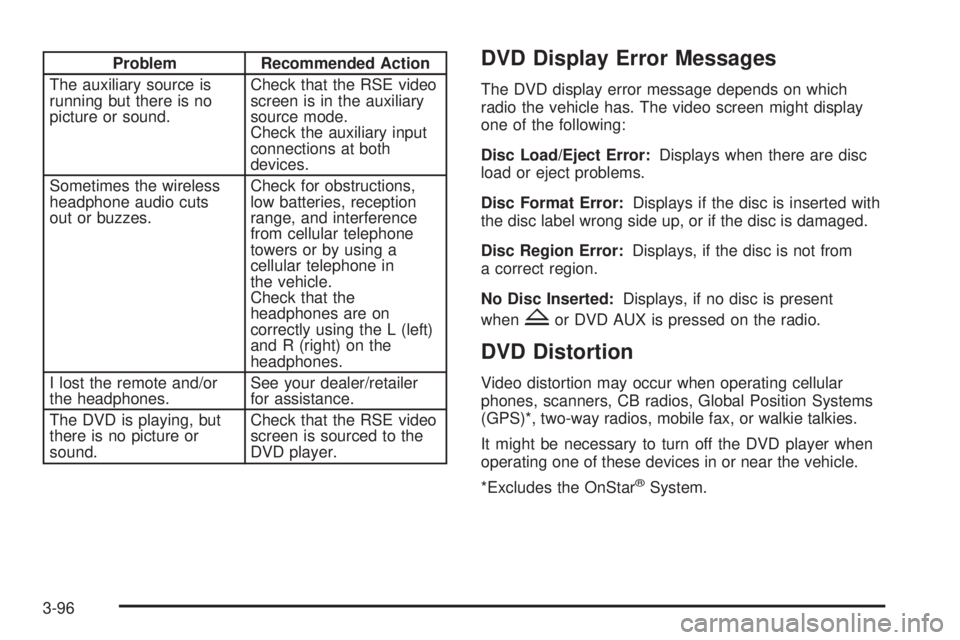
Problem Recommended Action
The auxiliary source is
running but there is no
picture or sound. Check that the RSE video
screen is in the auxiliary
source mode.
Check the auxiliary input
connections at both
devices.
Sometimes the wireless
headphone audio cuts
out or buzzes. Check for obstructions,
low batteries, reception
range, and interference
from cellular telephone
towers or by using a
cellular telephone in
the vehicle.
Check that the
headphones are on
correctly using the L (left)
and R (right) on the
headphones.
I lost the remote and/or
the headphones. See your dealer/retailer
for assistance.
The DVD is playing, but
there is no picture or
sound. Check that the RSE video
screen is sourced to the
DVD player. DVD Display Error Messages The DVD display error message depends on which
radio the vehicle has. The video screen might display
one of the following:
Disc Load/Eject Error: Displays when there are disc
load or eject problems.
Disc Format Error: Displays if the disc is inserted with
the disc label wrong side up, or if the disc is damaged.
Disc Region Error: Displays, if the disc is not from
a correct region.
No Disc Inserted: Displays, if no disc is present
when
Z or DVD AUX is pressed on the radio.
DVD Distortion Video distortion may occur when operating cellular
phones, scanners, CB radios, Global Position Systems
(GPS)*, two-way radios, mobile fax, or walkie talkies.
It might be necessary to turn off the DVD player when
operating one of these devices in or near the vehicle.
*Excludes the OnStar ®
System.
3-96
Page 266 of 602
Using the RSE System
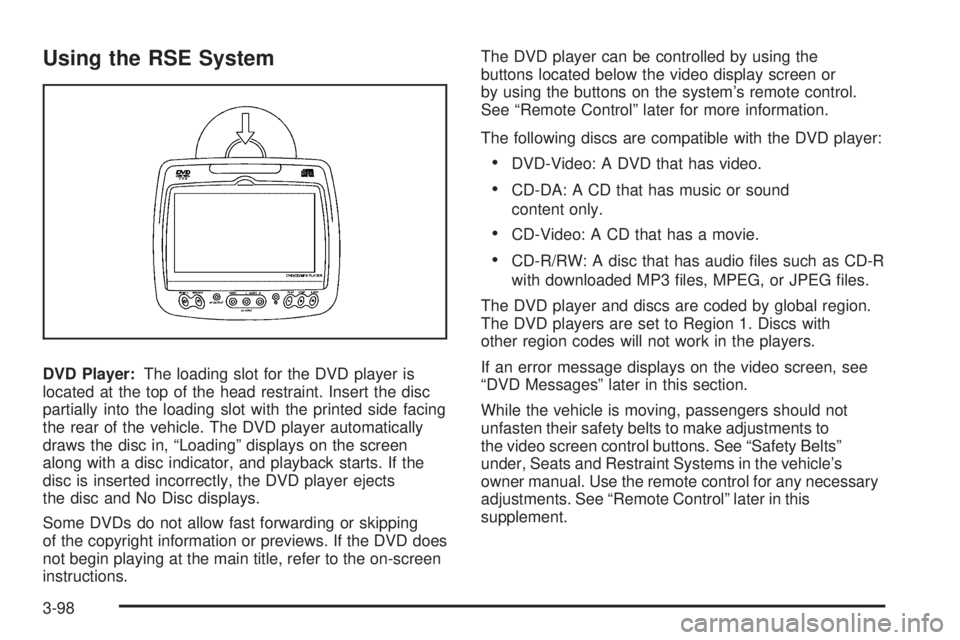
DVD Player: The loading slot for the DVD player is
located at the top of the head restraint. Insert the disc
partially into the loading slot with the printed side facing
the rear of the vehicle. The DVD player automatically
draws the disc in, “Loading” displays on the screen
along with a disc indicator, and playback starts. If the
disc is inserted incorrectly, the DVD player ejects
the disc and No Disc displays.
Some DVDs do not allow fast forwarding or skipping
of the copyright information or previews. If the DVD does
not begin playing at the main title, refer to the on-screen
instructions. The DVD player can be controlled by using the
buttons located below the video display screen or
by using the buttons on the system’s remote control.
See “Remote Control” later for more information.
The following discs are compatible with the DVD player:
DVD-Video: A DVD that has video.
CD-DA: A CD that has music or sound
content only.
CD-Video: A CD that has a movie.
CD-R/RW: A disc that has audio les such as CD-R
with downloaded MP3 les, MPEG, or JPEG les.
The DVD player and discs are coded by global region.
The DVD players are set to Region 1. Discs with
other region codes will not work in the players.
If an error message displays on the video screen, see
“DVD Messages” later in this section.
While the vehicle is moving, passengers should not
unfasten their safety belts to make adjustments to
the video screen control buttons. See “Safety Belts”
under, Seats and Restraint Systems in the vehicle’s
owner manual. Use the remote control for any necessary
adjustments. See “Remote Control” later in this
supplement.
3-98
Page 267 of 602
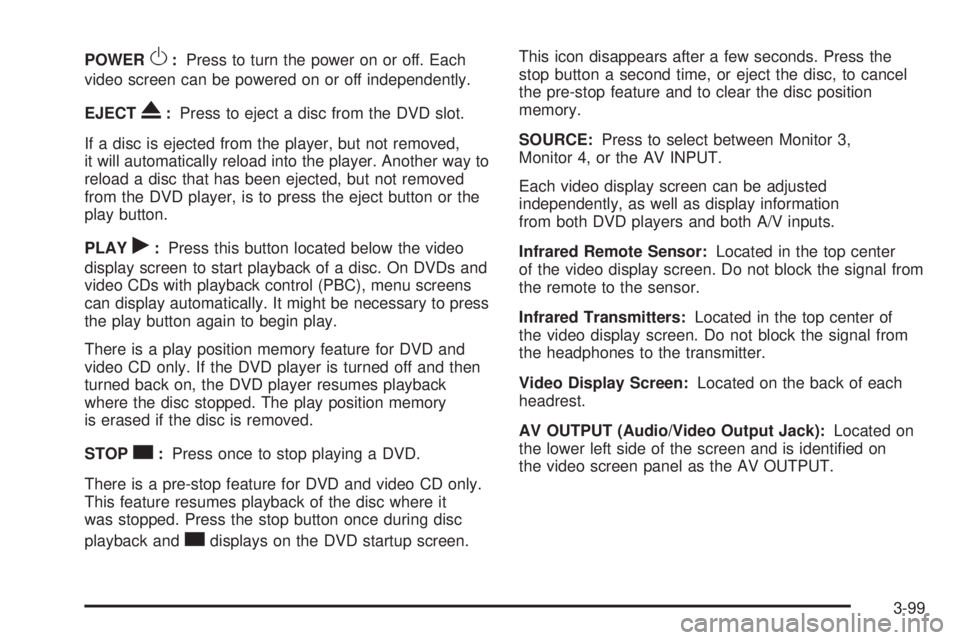
POWER
O : Press to turn the power on or off. Each
video screen can be powered on or off independently.
EJECT
X : Press to eject a disc from the DVD slot.
If a disc is ejected from the player, but not removed,
it will automatically reload into the player. Another way to
reload a disc that has been ejected, but not removed
from the DVD player, is to press the eject button or the
play button.
PLAY
r : Press this button located below the video
display screen to start playback of a disc. On DVDs and
video CDs with playback control (PBC), menu screens
can display automatically. It might be necessary to press
the play button again to begin play.
There is a play position memory feature for DVD and
video CD only. If the DVD player is turned off and then
turned back on, the DVD player resumes playback
where the disc stopped. The play position memory
is erased if the disc is removed.
STOP
c : Press once to stop playing a DVD.
There is a pre-stop feature for DVD and video CD only.
This feature resumes playback of the disc where it
was stopped. Press the stop button once during disc
playback and
c displays on the DVD startup screen. This icon disappears after a few seconds. Press the
stop button a second time, or eject the disc, to cancel
the pre-stop feature and to clear the disc position
memory.
SOURCE: Press to select between Monitor 3,
Monitor 4, or the AV INPUT.
Each video display screen can be adjusted
independently, as well as display information
from both DVD players and both A/V inputs.
Infrared Remote Sensor: Located in the top center
of the video display screen. Do not block the signal from
the remote to the sensor.
Infrared Transmitters: Located in the top center of
the video display screen. Do not block the signal from
the headphones to the transmitter.
Video Display Screen: Located on the back of each
headrest.
AV OUTPUT (Audio/Video Output Jack): Located on
the lower left side of the screen and is identied on
the video screen panel as the AV OUTPUT.
3-99
Page 268 of 602
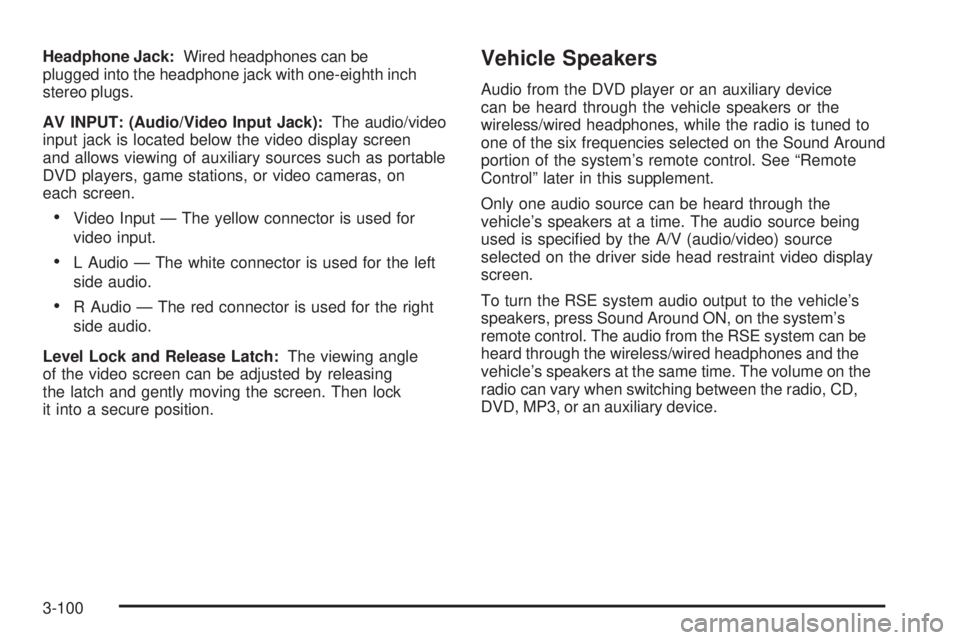
Headphone Jack: Wired headphones can be
plugged into the headphone jack with one-eighth inch
stereo plugs.
AV INPUT: (Audio/Video Input Jack): The audio/video
input jack is located below the video display screen
and allows viewing of auxiliary sources such as portable
DVD players, game stations, or video cameras, on
each screen.
Video Input — The yellow connector is used for
video input.
L Audio — The white connector is used for the left
side audio.
R Audio — The red connector is used for the right
side audio.
Level Lock and Release Latch: The viewing angle
of the video screen can be adjusted by releasing
the latch and gently moving the screen. Then lock
it into a secure position. Vehicle Speakers Audio from the DVD player or an auxiliary device
can be heard through the vehicle speakers or the
wireless/wired headphones, while the radio is tuned to
one of the six frequencies selected on the Sound Around
portion of the system’s remote control. See “Remote
Control” later in this supplement.
Only one audio source can be heard through the
vehicle’s speakers at a time. The audio source being
used is specied by the A/V (audio/video) source
selected on the driver side head restraint video display
screen.
To turn the RSE system audio output to the vehicle’s
speakers, press Sound Around ON, on the system’s
remote control. The audio from the RSE system can be
heard through the wireless/wired headphones and the
vehicle’s speakers at the same time. The volume on the
radio can vary when switching between the radio, CD,
DVD, MP3, or an auxiliary device.
3-100
Page 270 of 602
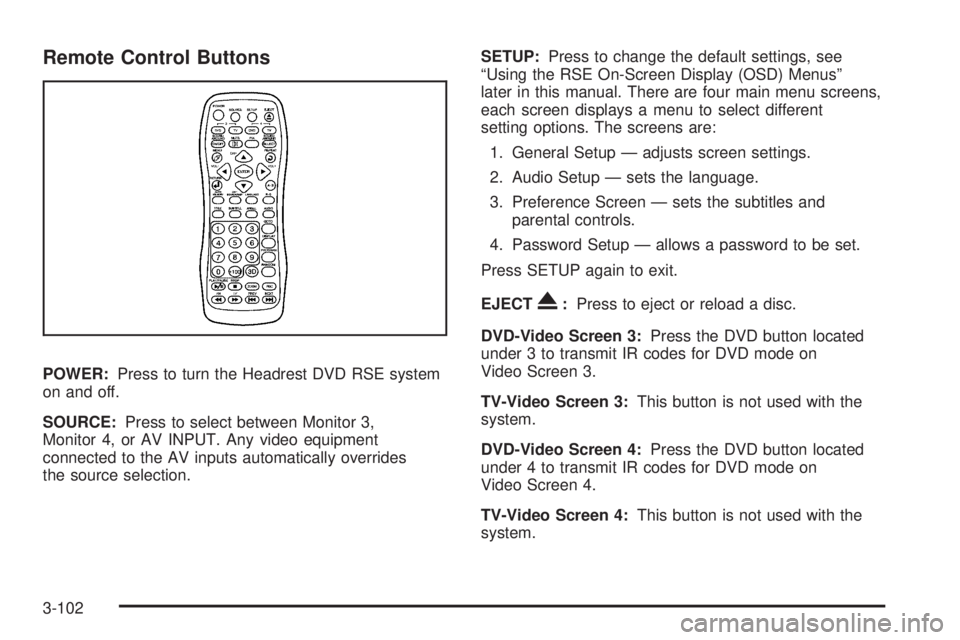
Remote Control Buttons
POWER: Press to turn the Headrest DVD RSE system
on and off.
SOURCE: Press to select between Monitor 3,
Monitor 4, or AV INPUT. Any video equipment
connected to the AV inputs automatically overrides
the source selection. SETUP: Press to change the default settings, see
“Using the RSE On-Screen Display (OSD) Menus”
later in this manual. There are four main menu screens,
each screen displays a menu to select different
setting options. The screens are:
1. General Setup — adjusts screen settings.
2. Audio Setup — sets the language.
3. Preference Screen — sets the subtitles and
parental controls.
4. Password Setup — allows a password to be set.
Press SETUP again to exit.
EJECT
X : Press to eject or reload a disc.
DVD-Video Screen 3: Press the DVD button located
under 3 to transmit IR codes for DVD mode on
Video Screen 3.
TV-Video Screen 3: This button is not used with the
system.
DVD-Video Screen 4: Press the DVD button located
under 4 to transmit IR codes for DVD mode on
Video Screen 4.
TV-Video Screen 4: This button is not used with the
system.
3-102
Page 271 of 602
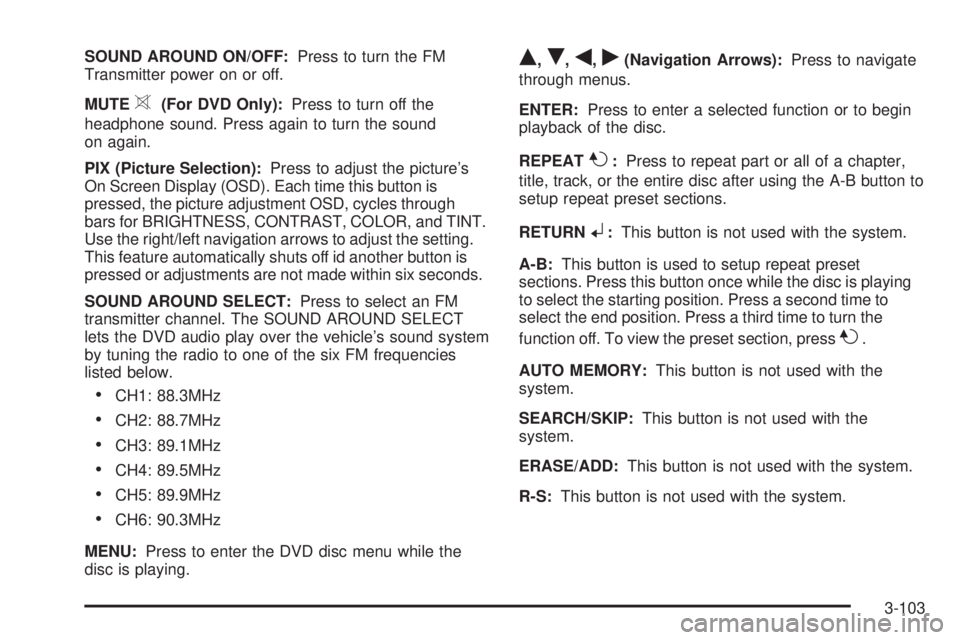
SOUND AROUND ON/OFF: Press to turn the FM
Transmitter power on or off.
MUTE
> (For DVD Only): Press to turn off the
headphone sound. Press again to turn the sound
on again.
PIX (Picture Selection): Press to adjust the picture’s
On Screen Display (OSD). Each time this button is
pressed, the picture adjustment OSD, cycles through
bars for BRIGHTNESS, CONTRAST, COLOR, and TINT.
Use the right/left navigation arrows to adjust the setting.
This feature automatically shuts off id another button is
pressed or adjustments are not made within six seconds.
SOUND AROUND SELECT: Press to select an FM
transmitter channel. The SOUND AROUND SELECT
lets the DVD audio play over the vehicle’s sound system
by tuning the radio to one of the six FM frequencies
listed below.
CH1: 88.3MHz
CH2: 88.7MHz
CH3: 89.1MHz
CH4: 89.5MHz
CH5: 89.9MHz
CH6: 90.3MHz
MENU: Press to enter the DVD disc menu while the
disc is playing. Q ,
R ,
q ,
r (Navigation Arrows): Press to navigate
through menus.
ENTER: Press to enter a selected function or to begin
playback of the disc.
REPEAT
7 : Press to repeat part or all of a chapter,
title, track, or the entire disc after using the A-B button to
setup repeat preset sections.
RETURN
8 : This button is not used with the system.
A-B: This button is used to setup repeat preset
sections. Press this button once while the disc is playing
to select the starting position. Press a second time to
select the end position. Press a third time to turn the
function off. To view the preset section, press
7 .
AUTO MEMORY: This button is not used with the
system.
SEARCH/SKIP: This button is not used with the
system.
ERASE/ADD: This button is not used with the system.
R-S: This button is not used with the system.
3-103
Page 272 of 602

TITLE: Press to enter the disc title mode. The title
feature is disc-specic, and may not be available on
all discs.
SUBTITLE: Press to change the subtitle language to
another available language or to turn subtitles off.
ANGLE: Press to select a different viewing angle for
discs that are recorded with different camera angles.
AUDIO: Press to select a different language for
discs that are recorded with different languages.
0-9 (Numbers): The numbers located on the lower
left side of the remote control can be used to enter
numbered menu options, channels, or track numbers.
GOTO: Press to enter the GOTO menu to choose
a desired title, chapter, track, or song inside the disc.
DISPLAY: Press to scroll through display information
on the upper left corner of the screen, such as title,
chapter/track, time elapsed, and time remaining,
or to turn off the display
PROGRAM: Press to edit a playback program
containing desired titles in the DVD or tracks in
the CD-DA.
3D: Press to change between different 3D audio modes
for DVD or CD.
The options for DVD are: Off, Rock, Pop, Live, Dance,
Techno, Classic, and Soft. The options for CD are: Off, Concert, Living room, Hall,
Bathroom Cave, Arena, and Church.
RANDOM: Press to play titles randomly.
PLAY/PAUSE
r /
j : Press to start playback of the
disc, or to pause playback.
STOP
c : Press to stop playback of a disc.
To resume disc playback, press PLAY.
To start playback from the beginning of the disc,
press STOP, STOP, then PLAY.
ZOOM: Press to either enlarge the viewed image by
2X, 3X, and 4X, or reduce the image by 1/2X, 1/3X,
and 1/4X.
PBC (Playback Control): Press to turn video CD
playback control on or off.
FR
r (Fast Reverse): Press to fast reverse the disc.
Press multiple times to choose between 2X, 4X, 8X,
16X, and 32X speeds.
FF
[ (Fast Forward): Press to fast forward the disc.
Press multiple times to choose between 2X, 4X, 8X,
16X, and 32X speeds.
3-104
Page 278 of 602

Playing Audio CD When an audio CD is playing, the display shows the
current track and the amount of time that track has been
playing, the total amount of time on the disc, and the
current time running on the disc.
DISPLAY: Press to choose from the following display
options:
1. Press DISPLAY once and Single Elapsed appears
along with the current track playing and the length
of time for that track.
2. Press DISPLAY twice and Single Remain appears
along with the current track playing and the amount
of time left on the track.
3. Press DISPLAY three times and Total Elapsed
appears along with the current track playing and
the total time that has played on the CD.
4. Press DISPLAY four times and Total Remain
appears along with the current track playing and
the amount of time left on the CD. REPEAT: Press to toggle between Track and All.
The default for repeat is OFF.
Track repeats the track that is playing.
All repeats the disc that is playing.
Playing MP3 CD MP3 is the format for storing digital audio. An audio CD
quality song can be compressed into the MP3 format with
very little loss of quality, while taking up much less space.
CD-R/RW discs that have been encoded in MP3 format
can be played on the DVD player. See “Using an MP3”
under the Audio System(s) section in the vehicle’s owner
manual.
Selecting Folders and Songs When an MP3 disc is inserted in the player, the
navigation screen appears. The folders and songs
can be changed by navigating through the le system.
The DVD player plays the songs in the order they
were burned to the disc.
3-110
Page 280 of 602

Tips and Troubleshooting Chart Problem Recommended Action
IR Sensor Inoperative
Check that the
batteries are good in
the remote control.
Check that the
remote Control
IR Sensor is not
blocked.
Aim the remote
control toward the
IR Sensor being
controlled.
Select the correct
screen, 3 or 4.
No picture
Check that the
correct video input
mode is selected.
Check that the video
cable is plugged into
the jack securely. Problem Recommended Action
No Sound
Check that the
correct audio input
mode is selected.
Check that the audio
cable is securely
plugged into the jack.
Cleaning the Video Screens The video display screens are made of a specially
coated glass and can be scratched or damaged by
abrasive products, solvents, or ammonia-based window
cleaners. Clean with a soft, lint-free, cotton cloth that
has been slightly dampened with warm water. Dry the
screens by wiping with a clean dry cotton cloth.
3-112