audio CADILLAC ESCALADE ESV 2009 Owner's Guide
[x] Cancel search | Manufacturer: CADILLAC, Model Year: 2009, Model line: ESCALADE ESV, Model: CADILLAC ESCALADE ESV 2009Pages: 602, PDF Size: 5.18 MB
Page 281 of 602
Cleaning the Components Use care when touching or cleaning the components
such as the DVD player or the discs.
Do not use DVD lens cleaners for DVD players because
the lens of the DVD optics can become contaminated
by lubricants.
Handle CDs and DVDs carefully. Store them in their
original cases or other protective cases and away from
direct sunlight and dust. The DVD player scans the
bottom surface of the disc. If the surface of a CD or
DVD is damaged, such as cracked, broken, or scratched,
the CD or DVD may not play properly or not at all. If the
surface of a CD or DVD is soiled, take a soft, lint free
cloth or dampen a clean, soft cloth in a mild, neutral
detergent solution mixed with water, and clean it.
Make sure the wiping process starts from the center
to the edge.
Do not touch the bottom side of a CD or DVD while
handling it; this could damage the surface. Pick up CDs
or DVDs by grasping the outer edges or the edge of
the hole and the outer edge. Rear Seat Audio (RSA) Vehicles with this feature allow the rear seat passengers
to listen to and control any of the music sources: radio,
CDs, DVDs, or other auxiliary sources. The rear seat
passengers can control the same music sources the
front seat passengers are listening to (dual control) or
a different source. For example, rear seat passengers
can listen to and control a CD through the headphones,
while the driver listens to the radio through the speakers.
The rear seat passengers have control of the volume for
each set of headphones.
RSA functions can be operated even when the main
radio is off.
Audio can be heard through wired headphones
(not included) plugged into the jacks on the RSA.
If the vehicle has this feature, audio can also be
heard on Channel 2 of the wireless headphones.
The audio system allows the rear speakers to continue
playing even when the RSA audio is active through
the headphones.
To listen to an iPod or portable audio device through
the RSA, attach the iPod or portable audio device to
the auxiliary input (if available), located below the RSA.
Turn the iPod on, then choose the auxiliary input
with the RSA SRCE button.
3-113
Page 283 of 602
PROG (Program): Press this button to go to the
next preset radio station or channel set on the main
radio. This function is inactive, with some radios, if the
front seat passengers are listening to the radio.
When a CD or DVD audio disc is playing, press this
button to go to the beginning of the CD or DVD audio.
This function is inactive, with some radios, if the
front seat passengers are listening to the disc.
When a disc is playing in the CD or DVD changer,
press this button to select the next disc, if multiple discs
are loaded. This function is inactive, with some radios,
if the front seat passengers are listening to the disc.
When a DVD video menu is being displayed, press the
PROG button to perform the menu function, enter.
Theft-Deterrent Feature THEFTLOCK ®
is designed to discourage theft of the
vehicle’s radio by learning a portion of the Vehicle
Identication Number (VIN). The radio does not operate
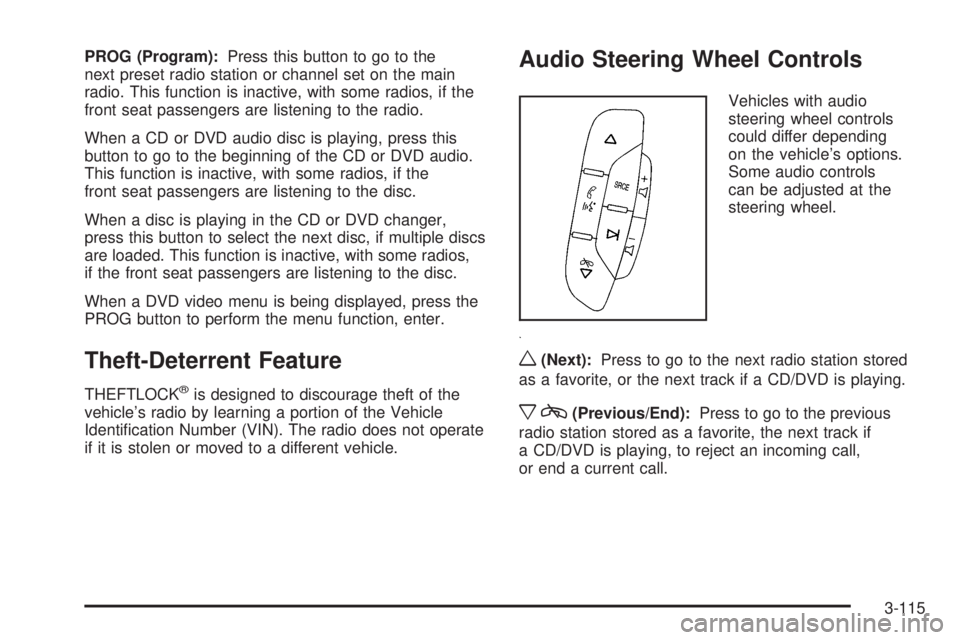
if it is stolen or moved to a different vehicle. Audio Steering Wheel Controls Vehicles with audio
steering wheel controls
could differ depending
on the vehicle’s options.
Some audio controls
can be adjusted at the
steering wheel.
w (Next): Press to go to the next radio station stored
as a favorite, or the next track if a CD/DVD is playing.
x c (Previous/End): Press to go to the previous
radio station stored as a favorite, the next track if
a CD/DVD is playing, to reject an incoming call,
or end a current call.
3-115
Page 287 of 602

Overview ........................................................ .4-2
Navigation System Overview ........................... .4-2
Getting Started .............................................. .4-4
Cleaning the Display .................................... .4-12
Features and Controls ................................... .4-13
Using the Navigation System ......................... .4-13
Maps ......................................................... .4-15
Symbols ..................................................... .4-19
Destination ................................................. .4-25
Congure Menu ........................................... .4-43
Global Positioning System (GPS) ................... .4-59 Vehicle Positioning ....................................... .4-60
Problems with Route Guidance ...................... .4-61
If the System Needs Service ......................... .4-61
Ordering Map DVDs ..................................... .4-61
Database Coverage Explanations ................... .4-62
Navigation Audio System ............................... .4-62
CD Player .................................................. .4-71
DVD Player ................................................ .4-78
Care of Your CDs and DVDs ........................ .4-84
Auxiliary Devices ......................................... .4-85
Voice Recognition ......................................... .4-86
Section 4 Navigation System
4-1
Page 289 of 602
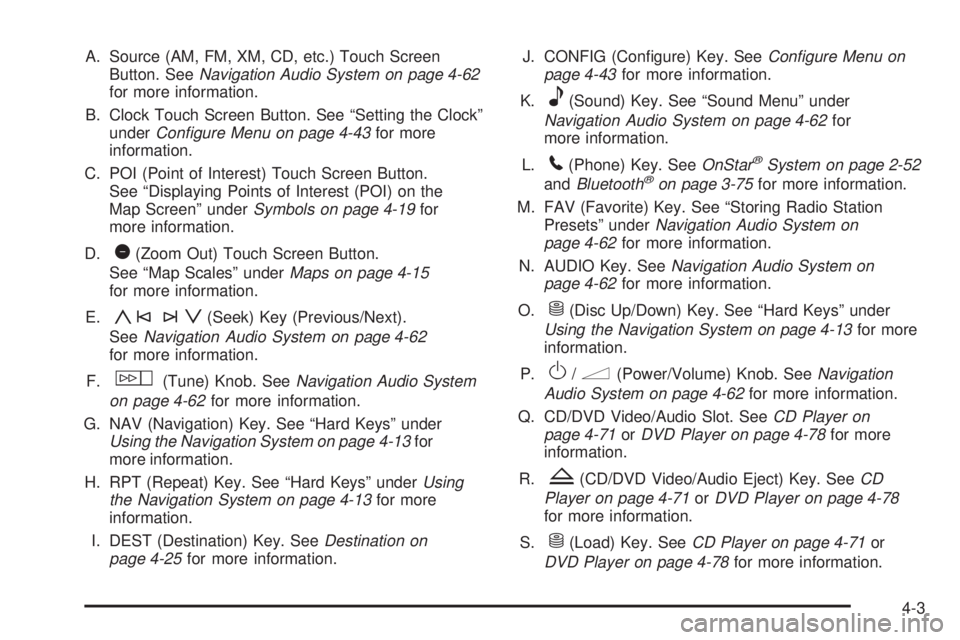
A. Source (AM, FM, XM, CD, etc.) Touch Screen
Button. See Navigation Audio System on page 4-62
for more information.
B. Clock Touch Screen Button. See “Setting the Clock”
under Configure Menu on page 4-43 for more
information.
C. POI (Point of Interest) Touch Screen Button.
See “Displaying Points of Interest (POI) on the
Map Screen” under Symbols on page 4-19 for
more information.
D.
1 (Zoom Out) Touch Screen Button.
See “Map Scales” under Maps on page 4-15
for more information.
E.
y©¨z (Seek) Key (Previous/Next).
See Navigation Audio System on page 4-62
for more information.
F.
w (Tune) Knob. See Navigation Audio System
on page 4-62 for more information.
G. NAV (Navigation) Key. See “Hard Keys” under
Using the Navigation System on page 4-13 for
more information.
H. RPT (Repeat) Key. See “Hard Keys” under Using
the Navigation System on page 4-13 for more
information.
I. DEST (Destination) Key. See Destination on
page 4-25 for more information. J. CONFIG (Congure) Key. See Configure Menu on
page 4-43 for more information.
K.
e (Sound) Key. See “Sound Menu” under
Navigation Audio System on page 4-62 for
more information.
L.
5 (Phone) Key. See OnStar ®
System on page 2-52
and Bluetooth ®
on page 3-75 for more information.
M. FAV (Favorite) Key. See “Storing Radio Station
Presets” under Navigation Audio System on
page 4-62 for more information.
N. AUDIO Key. See Navigation Audio System on
page 4-62 for more information.
O.
M (Disc Up/Down) Key. See “Hard Keys” under
Using the Navigation System on page 4-13 for more
information.
P.
O /
n (Power/Volume) Knob. See Navigation
Audio System on page 4-62 for more information.
Q. CD/DVD Video/Audio Slot. See CD Player on
page 4-71 or DVD Player on page 4-78 for more
information.
R.
Z (CD/DVD Video/Audio Eject) Key. See CD
Player on page 4-71 or DVD Player on page 4-78
for more information.
S.
M (Load) Key. See CD Player on page 4-71 or
DVD Player on page 4-78 for more information.
4-3
Page 290 of 602
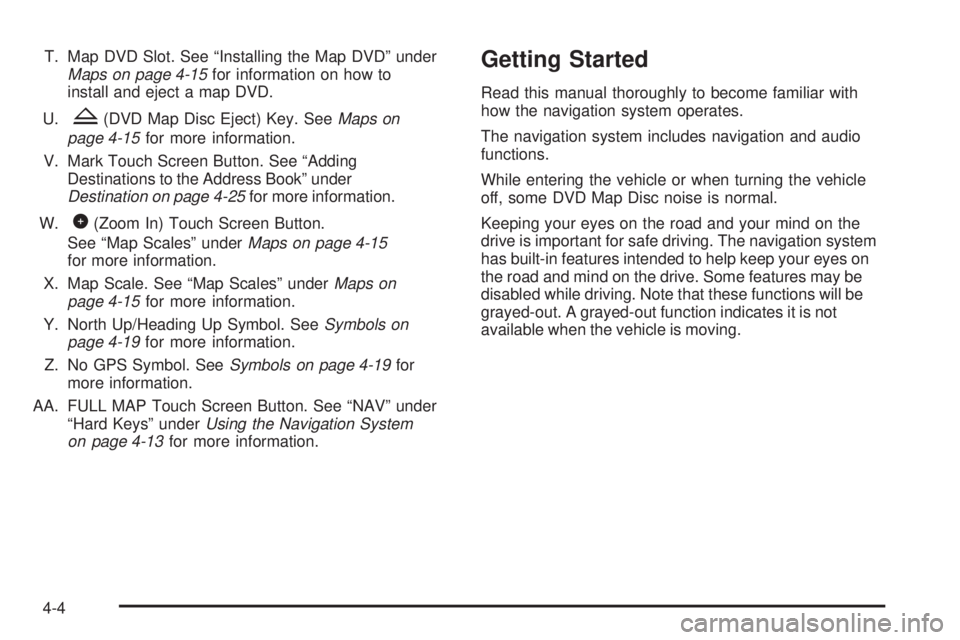
T. Map DVD Slot. See “Installing the Map DVD” under
Maps on page 4-15 for information on how to
install and eject a map DVD.
U.
Z (DVD Map Disc Eject) Key. See Maps on
page 4-15 for more information.
V. Mark Touch Screen Button. See “Adding
Destinations to the Address Book” under
Destination on page 4-25 for more information.
W.
0 (Zoom In) Touch Screen Button.
See “Map Scales” under Maps on page 4-15
for more information.
X. Map Scale. See “Map Scales” under Maps on
page 4-15 for more information.
Y. North Up/Heading Up Symbol. See Symbols on
page 4-19 for more information.
Z. No GPS Symbol. See Symbols on page 4-19 for
more information.
AA. FULL MAP Touch Screen Button. See “NAV” under
“Hard Keys” under Using the Navigation System
on page 4-13 for more information. Getting Started Read this manual thoroughly to become familiar with
how the navigation system operates.
The navigation system includes navigation and audio
functions.
While entering the vehicle or when turning the vehicle
off, some DVD Map Disc noise is normal.
Keeping your eyes on the road and your mind on the
drive is important for safe driving. The navigation system
has built-in features intended to help keep your eyes on
the road and mind on the drive. Some features may be
disabled while driving. Note that these functions will be
grayed-out. A grayed-out function indicates it is not
available when the vehicle is moving.
4-4
Page 291 of 602
All functions are available when the vehicle is parked.
Do the following before driving:
Become familiar with the navigation system
operation, hard keys on the faceplate, and
touch-sensitive screen buttons of the navigation
system.
Set up the audio by presetting favorite stations,
setting the tone, and adjusting the speakers.
Set up the navigation features before beginning
driving, such as entering an address or a preset
destination.
Set up your phone numbers in advance so they can
be called easily with the press of a single button or
a single voice command (for navigation systems
equipped with phone capability).
{ CAUTION: Taking your eyes off the road too long or too often
while using the navigation system could cause a
crash resulting in injury or death to you or others.
Focus your attention on driving. { CAUTION: Avoid looking too long or too often at the moving
map on the navigation screen. This could cause a
crash and you or others can be injured or killed.
Use the turn-by-turn voice guidance directions
whenever possible.
Use the navigation system to:
Plan a route.
Select a destination using various methods and
choices.
Follow turn-by-turn route and map guidance with
voice prompts, only if permitted by traffic laws,
controls, and conditions.
You should always be alert and obey traffic and
roadway laws and instructions, regardless of the
guidance from the navigation system. Because the
navigation system uses street map information that
does not include all traffic restrictions or the latest road
changes, it may suggest using a road that is now closed
for construction or a turn that is prohibited by signs
at the intersection. Because the system uses limited
information, you must always evaluate whether following
the system’s directions is safe and legal for the current
conditions.
4-5
Page 293 of 602
Language — English/Metric To change the language of the navigation screens,
see Driver Information Center (DIC) on page 3-47
for more information.
To change the navigation screens from English or
metric, see DIC Operation and Displays on page 3-48
for more information.
Deleting Personal Information This navigation system can record and store personal
information such as names and addresses. Delete
this information when selling your vehicle or returning
a leased vehicle. See “Edit Address Book — Edit/View”
under Configure Menu on page 4-43 for deleting
information from the address book. Limit Features While Driving The navigation system may have this feature.
Touch the Limit Features While Driving screen button
to turn the ability to limit functions on and off while
driving. When this screen button is highlighted,
the following functions are limited while driving:
Music Navigator Scrolling
Radio Category Scrolling
Navigation Menu Scrolling and some functions
See “Category” under Navigation Audio System on
page 4-62 for more information. See “From Map” under
Destination on page 4-25 for more information.
Some functions will remain limited regardless of the
setting.
4-7
Page 294 of 602
Storing Radio Station Presets To set preset radio stations, do the following:
1. Press
O to turn the system on.
2. Press the AUDIO hard key and select the desired
band (AM, FM, or XM (if equipped)).
3. Use the
w (tuning) knob or the SEEK arrows to
tune to the desired station.
4. Press and hold one of the ve preset screen
buttons, at the bottom of the screen, until a beep
is heard or if the station displays on the selected
preset button.
5. Repeat the steps for each preset.
See “Storing Radio Station Presets” under Navigation
Audio System on page 4-62 for more information. Setting the Clock The navigation system time and the analog clock
operate independently. Changing the time through
the navigation system does not change the time on
the analog clock. See Analog Clock on page 3-26 to
change the analog clock time.
To set the time for the navigation system:
1. Press the CONFIG key to enter the congure menu
options, then press the CONFIG key repeatedly
until the time is selected or touch the time screen
button.
2. Press the Hours and Minutes − (minus) and
+ (plus) signs to decrease or to increase the time.
See “Setting the Clock” under Configure Menu
on page 4-43 for more information.
4-8
Page 299 of 602
Features and Controls Using the Navigation System This section presents basic information needed to
operate the navigation system.
Use the hard keys located on the navigation system
along with the available touch-sensitive screen buttons
on the navigation screen to operate the system.
See Navigation System Overview on page 4-2 for
more information.
Once the vehicle is moving, various functions are
disabled to reduce driver distractions.
Hard Keys The following hard keys are located on the navigation
system:
O /
n (Power/Volume): Press to turn the system
on and off. Turn to increase or decrease the volume
to the audio system.
Press and hold for more than two seconds to turn off
the navigation system, the Rear Seat Entertainment
(RSE), and Rear Seat Audio (RSA). If the vehicle has
not been tuned off, the RSE and the RSA can be turned
back on by pressing this knob and continues play of
the last active source. w (Tune): Turn to go to the next or previous
radio station or disc track or chapter. See Navigation
Audio System on page 4-62 , CD Player on page 4-71 ,
or DVD Player on page 4-78 for more information.
Z (DVD Map Disc Eject): Press to eject the DVD
map disc. This button is located next to the upper disc
slot. See Maps on page 4-15 for more information.
M (Load): Press to load CDs or audio/video DVDs.
See CD Player on page 4-71 or DVD Player on
page 4-78 for more information.
Z (CD/DVD Eject): Press to eject CDs or audio/video
DVDs. This button is located under the load button.
See CD Player on page 4-71 or DVD Player on
page 4-78 for more information.
M (Disc Up/Down): Press the up or down arrows to go
to the next or previous disc.
AUDIO: Press access the full Audio screen to change
AM, FM, XM™ Satellite Radio Service (if equipped),
CD/DVD, and auxiliary input. See “Audio” under
Navigation Audio System on page 4-62 for more
information.
FAV (Favorite): Press to access the preset stations.
See “Storing Radio Station Presets” under Navigation
Audio System on page 4-62 for more information.
4-13
Page 300 of 602
5 (Phone): Press to access calling through OnStar ®
.
See OnStar ®
System on page 2-52 and Bluetooth ®
on page 3-75 for more information.
e (Sound): Press to access the Sound screen to
adjust bass, midrange, treble, and Digital Signal
Processing (DSP). See “Sound Menu” under Navigation
Audio System on page 4-62 for more information.
DEST (Destination): Press to access the Destination
Entry screen to plan a destination. See Destination
on page 4-25 for more information.
CONFIG (Congure Menu): Press to adjust
features for sound, radio, navigation, and the display.
See Configure Menu on page 4-43 for more information.
NAV (Navigation): Press to view your vehicle’s current
position on the map screen. Each press of this key cycles
through Full Map and the tab that displays the current
audio source (AM, FM, CD, etc.). Full Map displays the screen in full map view. Selecting the audio tab splits the
screen between the map screen and the current audio
source screen menu. See “Audio” under Navigation
Audio System on page 4-62 for more information.
RPT (Navigation Repeat): Press to repeat the last
voice guidance prompt.
y©¨z (Seek): Press the seek arrows to seek
and scan radio stations, to seek tracks on a CD, and to
seek chapters on a DVD. See Navigation Audio System
on page 4-62 , CD Player on page 4-71 ,or DVD Player
on page 4-78 for more information.
Touch-Sensitive Screen Buttons Touch-sensitive screen buttons are located on the
screen. When a screen button has been selected,
a beep sounds. Screen buttons are highlighted when
a feature is available.
4-14