seats CADILLAC ESCALADE ESV 2009 Owner's Guide
[x] Cancel search | Manufacturer: CADILLAC, Model Year: 2009, Model line: ESCALADE ESV, Model: CADILLAC ESCALADE ESV 2009Pages: 602, PDF Size: 5.18 MB
Page 199 of 602

Rear Window Defogger The rear window defogger uses a warming grid to
remove fog from the rear window.
< (Rear Window Defogger): Press to turn the rear
window defogger on or off. It automatically turns off after
it has been activated. The defogger can also be turned off
by turning off the engine. Do not drive the vehicle until all
the windows are clear.
Notice: Do not use a razor blade or sharp object
to clear the inside rear window. Do not adhere
anything to the defogger grid lines in the rear glass.
These actions may damage the rear defogger.
Repairs would not be covered by your warranty.
Heated Mirrors: For vehicles with heated outside
rearview mirrors, the mirrors heat to help clear fog or
frost from the surface of the mirror when the rear window
defog button is pressed. See Outside Heated Mirrors
on page 2-42 .
Heated or Cooled Seats: For vehicles with heated
seats or heated and cooled seats, see Heated Seats on
page 1-5 or Heated and Cooled Seats on page 1-6 .Outlet Adjustment Use the air outlets located in the center and on the side
of the instrument panel to direct the airow.
Operation Tips
Keep the hood and front air inlets free of ice, snow,
or any other obstruction (such as leaves). The heater
and defroster will work far better, reducing the
chance of fogging the inside of the windows.
When you enter a vehicle in cold weather, press
the fan up button to the maximum fan level before
driving. This helps clear the intake ducts of snow
and moisture, and reduces the chance of fogging
the inside of the window.
Keep the air path under the front seats clear of
objects. This helps air to circulate throughout the
vehicle.
Adding outside equipment to the front of the
vehicle, such as hood-air deectors, may affect
the performance of the heating and air conditioning
system. Check with your dealer/retailer before
adding equipment to the outside of the vehicle.
3-31
Page 200 of 602
Rear Air Conditioning and Heating
System and Electronic Climate
Controls For vehicles with the rear heat and air conditioning
controls, they are integrated with the rear seat audio
controls located in the center console. The system
can be controlled from the front controls as well as
the rear controls.
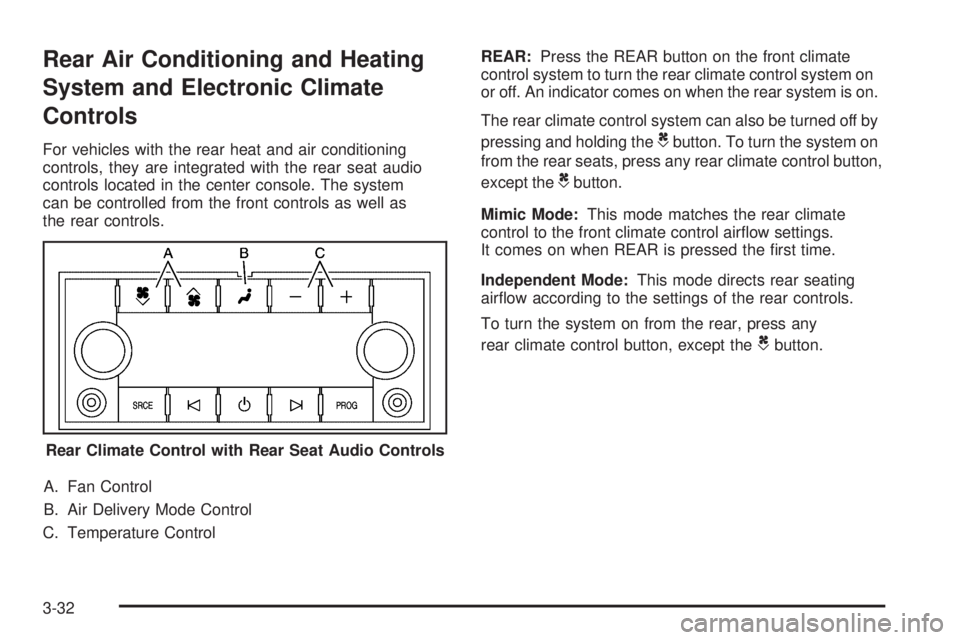
A. Fan Control
B. Air Delivery Mode Control
C. Temperature Control REAR: Press the REAR button on the front climate
control system to turn the rear climate control system on
or off. An indicator comes on when the rear system is on.
The rear climate control system can also be turned off by
pressing and holding the
C button. To turn the system on
from the rear seats, press any rear climate control button,
except the
C button.
Mimic Mode: This mode matches the rear climate
control to the front climate control airow settings.
It comes on when REAR is pressed the rst time.
Independent Mode: This mode directs rear seating
airow according to the settings of the rear controls.
To turn the system on from the rear, press any
rear climate control button, except the
C button.
Rear Climate Control with Rear Seat Audio Controls
3-32
Page 221 of 602

Relearn Remote Key This display allows you to match Remote Keyless
Entry (RKE) transmitters to your vehicle. To match
an RKE transmitter to your vehicle:
1. Press the vehicle information button until
PRESS
V TO RELEARN REMOTE KEY displays.
2. Press the set/reset button until REMOTE KEY
LEARNING ACTIVE is displayed.
3. Press and hold the lock and unlock buttons on
the rst transmitter at the same time for about
15 seconds.
On vehicles with memory recall seats, the rst
transmitter learned will match driver 1 and
the second will match driver 2.
A chime will sound indicating that the transmitter is
matched.
4. To match additional transmitters at this time, repeat
Step 3.
Each vehicle can have a maximum of eight
transmitters matched to it.
5. To exit the programming mode, you must cycle the
key to LOCK/OFF. Compass Zone Setting This display allows for setting the compass zone.
See DIC Compass on page 3-53 for more information.
Compass Recalibration This display allows for calibrating the compass.
See DIC Compass on page 3-53 for more information.
Blank Display This display shows no information.
DIC Compass Your vehicle may have a compass in the Driver
Information Center (DIC).
3-53
Page 223 of 602

Compass Calibration The compass can be manually calibrated. Only calibrate
the compass in a magnetically clean and safe location,
such as an open parking lot, where driving the vehicle
in circles is not a danger. It is suggested to calibrate
away from tall buildings, utility wires, manhole covers,
or other industrial structures, if possible.
If CAL should ever appear in the DIC display, the
compass should be calibrated.
If the DIC display does not show a heading, for example,
N for North, or the heading does not change after
making turns, there may be a strong magnetic eld
interfering with the compass. Such interference may
be caused by a magnetic CB or cell phone antenna
mount, a magnetic emergency light, magnetic note
pad holder, or any other magnetic item. Turn off
the vehicle, move the magnetic item, then turn
on the vehicle and calibrate the compass. To calibrate the compass, use the following procedure:
Compass Calibration Procedure 1. Before calibrating the compass, make sure the
compass zone is set to the variance zone in
which the vehicle is located. See “Compass
Variance (Zone) Procedure” earlier in this section.
Do not operate any switches such as window,
sunroof, climate controls, seats, etc. during
the calibration procedure.
2. Press the vehicle information button until
PRESS
V TO CALIBRATE COMPAS (Compass)
displays.
3. Press the set/reset button to start the compass
calibration.
4. The DIC will display CALIBRATING: DRIVE IN
CIRCLES. Drive the vehicle in tight circles at less
than 5 mph (8 km/h) to complete the calibration.
The DIC will display CALIBRATION COMPLETE
for a few seconds when the calibration is complete.
The DIC display will then return to the previous menu.
3-55
Page 266 of 602
Using the RSE System
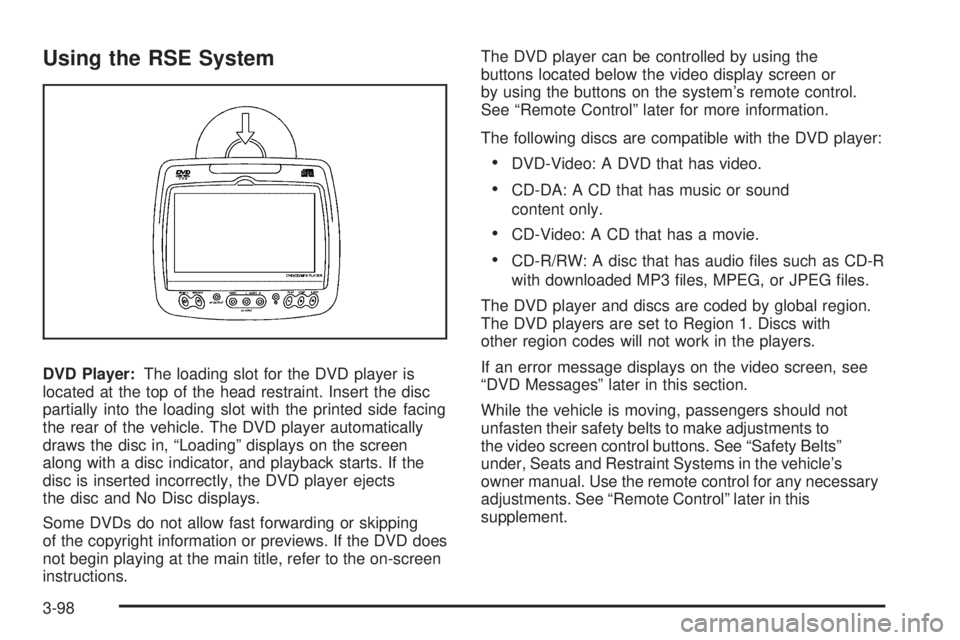
DVD Player: The loading slot for the DVD player is
located at the top of the head restraint. Insert the disc
partially into the loading slot with the printed side facing
the rear of the vehicle. The DVD player automatically
draws the disc in, “Loading” displays on the screen
along with a disc indicator, and playback starts. If the
disc is inserted incorrectly, the DVD player ejects
the disc and No Disc displays.
Some DVDs do not allow fast forwarding or skipping
of the copyright information or previews. If the DVD does
not begin playing at the main title, refer to the on-screen
instructions. The DVD player can be controlled by using the
buttons located below the video display screen or
by using the buttons on the system’s remote control.
See “Remote Control” later for more information.
The following discs are compatible with the DVD player:
DVD-Video: A DVD that has video.
CD-DA: A CD that has music or sound
content only.
CD-Video: A CD that has a movie.
CD-R/RW: A disc that has audio les such as CD-R
with downloaded MP3 les, MPEG, or JPEG les.
The DVD player and discs are coded by global region.
The DVD players are set to Region 1. Discs with
other region codes will not work in the players.
If an error message displays on the video screen, see
“DVD Messages” later in this section.
While the vehicle is moving, passengers should not
unfasten their safety belts to make adjustments to
the video screen control buttons. See “Safety Belts”
under, Seats and Restraint Systems in the vehicle’s
owner manual. Use the remote control for any necessary
adjustments. See “Remote Control” later in this
supplement.
3-98
Page 415 of 602
Using heavier suspension components to get
added durability might not change your weight
ratings. Ask your dealer to help you load your
vehicle the right way.
If you put things inside your vehicle — like
suitcases, tools, packages, or anything
else — they will go as fast as the vehicle
goes. If you have to stop or turn quickly, or
if there is a crash, they will keep going.
{ CAUTION: Things you put inside your vehicle can strike
and injure people in a sudden stop or turn, or
in a crash.
Put things in the cargo area of your
vehicle. Try to spread the weight evenly.
Never stack heavier things, like
suitcases, inside the vehicle so that some
of them are above the tops of the seats.
Do not leave an unsecured child restraint
in your vehicle.
When you carry something inside the
vehicle, secure it whenever you can.
Do not leave a seat folded down unless
you need to. There is also important loading information for
off-road driving in this manual. See “Loading Your
Vehicle for Off-Road Driving” under Off-Road
Driving on page 5-13 .
Add-On Equipment
When you carry removable items, you may
need to put a limit on how many people you
can carry inside your vehicle. Be sure to weigh
your vehicle before you buy and install the
new equipment.
Notice :
Overloading your vehicle may cause
damage. Repairs would not be covered by your
warranty. Do not overload your vehicle.
Remember not to exceed the Gross Axle Weight
Rating (GAWR) of the front or rear axle.
Automatic Level Control
The automatic level control rear suspension
comes as a part of the Road Sensing Suspension.
See Road Sensing Suspension on page 5-9 .
This type of level control is fully automatic and will
provide a better leveled riding position as well as
better handling under a variety of passenger and
loading conditions. An air compressor connected
to the rear shocks will raise or lower the rear of
the vehicle to maintain proper vehicle height.
5-39
Page 493 of 602
Tire Terminology and Denitions Air Pressure :
The amount of air inside the
tire pressing outward on each square inch of the
tire. Air pressure is expressed in pounds per
square inch (psi) or kilopascal (kPa).
Accessory Weight :
This means the combined
weight of optional accessories. Some examples of
optional accessories are, automatic transmission,
power steering, power brakes, power windows,
power seats, and air conditioning.
Aspect Ratio :
The relationship of a tire’s height
to its width.
Belt :
A rubber coated layer of cords that is located
between the plies and the tread. Cords may be
made from steel or other reinforcing materials.
Bead :
The tire bead contains steel wires wrapped
by steel cords that hold the tire onto the rim.
Bias Ply Tire :
A pneumatic tire in which the plies
are laid at alternate angles less than 90 degrees
to the centerline of the tread. Cold Tire Pressure :
The amount of air pressure
in a tire, measured in pounds per square inch (psi)
or kilopascals (kPa) before a tire has built up heat
from driving. See Inflation - Tire Pressure on
page 6-62 .
Curb Weight :
The weight of a motor vehicle with
standard and optional equipment including the
maximum capacity of fuel, oil, and coolant, but
without passengers and cargo.
DOT Markings :
A code molded into the sidewall
of a tire signifying that the tire is in compliance
with the U.S. Department of Transportation (DOT)
motor vehicle safety standards. The DOT code
includes the Tire Identication Number (TIN),
an alphanumeric designator which can also identify
the tire manufacturer, production plant, brand,
and date of production.
GVWR :
Gross Vehicle Weight Rating.
See Loading the Vehicle on page 5-33 .
GAWR FRT :
Gross Axle Weight Rating for the
front axle. See Loading the Vehicle on page 5-33 .
6-59
Page 541 of 602
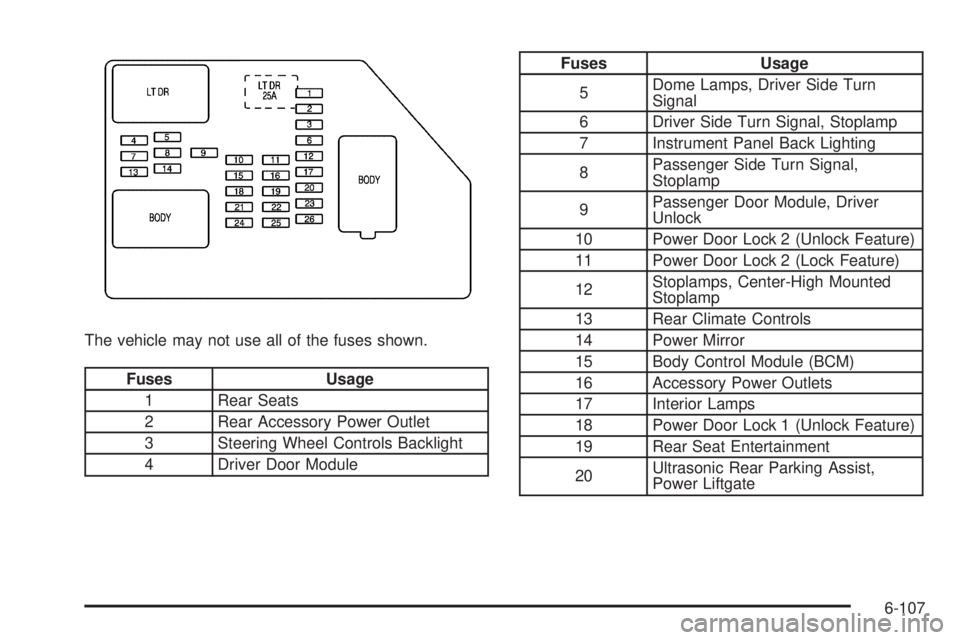
The vehicle may not use all of the fuses shown.
Fuses Usage
1 Rear Seats
2 Rear Accessory Power Outlet
3 Steering Wheel Controls Backlight
4 Driver Door Module Fuses Usage
5 Dome Lamps, Driver Side Turn
Signal
6 Driver Side Turn Signal, Stoplamp
7 Instrument Panel Back Lighting
8 Passenger Side Turn Signal,
Stoplamp
9 Passenger Door Module, Driver
Unlock
10 Power Door Lock 2 (Unlock Feature)
11 Power Door Lock 2 (Lock Feature)
12 Stoplamps, Center-High Mounted
Stoplamp
13 Rear Climate Controls
14 Power Mirror
15 Body Control Module (BCM)
16 Accessory Power Outlets
17 Interior Lamps
18 Power Door Lock 1 (Unlock Feature)
19 Rear Seat Entertainment
20 Ultrasonic Rear Parking Assist,
Power Liftgate
6-107
Page 542 of 602

Fuses Usage
21 Power Door Lock 1 (Lock Feature)
22 Driver Information Center (DIC)
23 Rear Wiper
24 Cooled Seats
25 Driver Seat Module, Remote
Keyless Entry System
26 Driver Power Door Lock
(Unlock Feature)
Circuit Breaker Usage
LT DR Driver Side Power Window Circuit
Breaker
Harness
Connector Usage
LT DR Driver Door Harness Connection
BODY Harness Connector
BODY Harness Connector Center Instrument Panel Fuse Block The center instrument panel fuse block is located
underneath the instrument panel, to the left of the
steering column.
Top View
Harness
Connector Usage
BODY 2 Body Harness Connector 2
BODY 1 Body Harness Connector 1
BODY 3 Body Harness Connector 3
6-108
Page 562 of 602

Usage Fluid/Lubricant
Front and
Rear Axle SAE 75W-90 Synthetic
Axle Lubricant
(GM Part No. U.S. 89021677,
in Canada 89021678) meeting
GM Specication 9986115.
Transfer Case DEXRON ®
-VI Automatic
Transmission Fluid.
Hood Hinges Multi-Purpose Lubricant, Superlube
(GM Part No. U.S. 12346241,
in Canada 10953474).
Body Door
Hinge Pins,
Tailgate Hinge
and Linkage,
Folding Seats,
and Fuel
Door Hinge Multi-Purpose Lubricant, Superlube
(GM Part No. U.S. 12346241,
in Canada 10953474). Usage Fluid/Lubricant
Outer Tailgate
Handle Pivot
Points Multi-Purpose Lubricant, Superlube
(GM Part No. U.S. 12346241,
in Canada 10953474).
Weatherstrip
Conditioning Weatherstrip Lubricant
(GM Part No. U.S. 3634770,
in Canada 10953518) or
Dielectric Silicone Grease
(GM Part No. U.S. 12345579,
in Canada 992887).
Weatherstrip
Squeaks Synthetic Grease with
Teon, Superlube
(GM Part No. U.S. 12371287,
in Canada 10953437).
7-14