service CADILLAC ESCALADE ESV 2009 Service Manual
[x] Cancel search | Manufacturer: CADILLAC, Model Year: 2009, Model line: ESCALADE ESV, Model: CADILLAC ESCALADE ESV 2009Pages: 602, PDF Size: 5.18 MB
Page 252 of 602

Call Waiting Call waiting must be supported on the Bluetooth phone
and enabled by the wireless service carrier to work.
Press
b g to answer an incoming call when
another call is active. The original call is placed
on hold.
Press
b g again to return to the original call.
To ignore the incoming call, continue with the
original call with no action.
Press
c x to disconnect the current call and
switch to the call on hold.
Three-Way Calling Three-Way Calling must be supported on the
Bluetooth phone and enabled by the wireless service
carrier to work.
1. While on a call press
b g . The system responds
with “Ready” followed by a tone.
2. Say “Three-way call”. The system responds with
“Three-way call, please say dial or call”.
3. Use the dial or call command to dial the number of
the third party to be called.
4. Once the call is connected, press
b g to link all
the callers together. Ending a Call Press
c x to end a call.
Muting a Call During a call, all sounds from inside the vehicle can be
muted so that the person on the other end of the
call cannot hear them.
To Mute a call 1. Press
b g . The system responds with “Ready”
followed by a tone.
2. Say “Mute Call”. The system responds with
“Call muted”.
To Cancel Mute 1. Press
b g . The system responds with “Ready”
followed by a tone.
2. After the tone, say “Mute Call”. The system
responds with “Resuming call”.
3-84
Page 255 of 602

Clearing the System Unless information is deleted out of the in-vehicle
Bluetooth system, it will be retained indenitely.
This includes all saved name tags in the phonebook
and phone pairing information. For information on how
to delete this information, see the above sections
on Deleting a Paired Phone and Deleting Name Tags.
Other Information The Bluetooth ®
word mark and logos are owned by
the Bluetooth ®
SIG, Inc. and any use of such marks
by General Motors is under license. Other trademarks
and trade names are those of their respective owners.
This device complies with Part 15 of the FCC Rules.
Operation is subject to the following two conditions:
1. This device may not cause harmful interference.
2. This device must accept any interference received,
including interference that may cause undesired
operation. This device complies with RSS-210 of Industry Canada.
Operation is subject to the following two conditions:
1. This device may not cause interference.
2. This device must accept any interference received,
including interference that may cause undesired
operation of the device.
Changes or modications to this system by other than
an authorized service facility could void authorization to
use this equipment.
Rear Seat Entertainment (RSE)
System (Overhead) The vehicle may have an Overhead DVD Rear Seat
Entertainment (RSE) system. The RSE system works
with the vehicle’s audio system. The DVD player is part of
the front radio. The RSE system includes a radio with a
DVD player, a video display screen, and if the vehicle
has a third row seat, it could have a second video display
screen, audio/video jacks, two wireless headphones,
and a remote control. See Navigation Audio System on
page 4-62 for more information on the vehicle’s audio/
DVD system.
3-87
Page 285 of 602
XM™ Satellite Radio Service XM Satellite Radio Service gives digital radio reception
from coast-to-coast in the 48 contiguous United States,
and in Canada. Just as with FM, tall buildings or hills can
interfere with satellite radio signals, causing the sound to
fade in and out. In addition, traveling or standing under
heavy foliage, bridges, garages, or tunnels may cause
loss of the XM signal for a period of time.
Cellular Phone Usage Cellular phone usage may cause interference with the
vehicle’s radio. This interference may occur when making
or receiving phone calls, charging the phone’s battery,
or simply having the phone on. This interference causes
an increased level of static while listening to the radio.
If static is received while listening to the radio, unplug
the cellular phone and turn it off.
Rear Side Window Antenna The AM-FM antenna is located in the passenger rear
side windows. Make sure the inside surfaces of the
rear side windows are not scratched and that the lines
on the glass are not damaged. If the inside surfaces
are damaged, they could interfere with radio reception. If a cellular telephone antenna needs to be attached to
the glass, make sure that the grid lines for the AM-FM
antenna are not damaged. There is enough space
between the grid lines to attach a cellular telephone
antenna without interfering with radio reception.
Notice: Using a razor blade or sharp object to
clear the inside of the rear side windows may affect
radio reception or damage the rear side window
antenna. Repairs would not be covered by the
warranty. Do not clear the inside of the rear side
windows with sharp objects.
Notice: Do not apply aftermarket glass tinting
with metallic lm. The metallic lm in some tinting
materials will interfere with or distort the incoming
radio reception. Any damage caused to the antenna
due to metallic tinting materials will not be covered
by the warranty.
XM™ Satellite Radio Antenna
System The XM Satellite Radio antenna is located on the roof of
the vehicle. Keep the antenna clear of obstructions for
clear radio reception.
If the vehicle has a sunroof, the performance of the XM
system may be affected if the sunroof is open.
3-117
Page 287 of 602

Overview ........................................................ .4-2
Navigation System Overview ........................... .4-2
Getting Started .............................................. .4-4
Cleaning the Display .................................... .4-12
Features and Controls ................................... .4-13
Using the Navigation System ......................... .4-13
Maps ......................................................... .4-15
Symbols ..................................................... .4-19
Destination ................................................. .4-25
Congure Menu ........................................... .4-43
Global Positioning System (GPS) ................... .4-59 Vehicle Positioning ....................................... .4-60
Problems with Route Guidance ...................... .4-61
If the System Needs Service ......................... .4-61
Ordering Map DVDs ..................................... .4-61
Database Coverage Explanations ................... .4-62
Navigation Audio System ............................... .4-62
CD Player .................................................. .4-71
DVD Player ................................................ .4-78
Care of Your CDs and DVDs ........................ .4-84
Auxiliary Devices ......................................... .4-85
Voice Recognition ......................................... .4-86
Section 4 Navigation System
4-1
Page 299 of 602
Features and Controls Using the Navigation System This section presents basic information needed to
operate the navigation system.
Use the hard keys located on the navigation system
along with the available touch-sensitive screen buttons
on the navigation screen to operate the system.
See Navigation System Overview on page 4-2 for
more information.
Once the vehicle is moving, various functions are
disabled to reduce driver distractions.
Hard Keys The following hard keys are located on the navigation
system:
O /
n (Power/Volume): Press to turn the system
on and off. Turn to increase or decrease the volume
to the audio system.
Press and hold for more than two seconds to turn off
the navigation system, the Rear Seat Entertainment
(RSE), and Rear Seat Audio (RSA). If the vehicle has
not been tuned off, the RSE and the RSA can be turned
back on by pressing this knob and continues play of
the last active source. w (Tune): Turn to go to the next or previous
radio station or disc track or chapter. See Navigation
Audio System on page 4-62 , CD Player on page 4-71 ,
or DVD Player on page 4-78 for more information.
Z (DVD Map Disc Eject): Press to eject the DVD
map disc. This button is located next to the upper disc
slot. See Maps on page 4-15 for more information.
M (Load): Press to load CDs or audio/video DVDs.
See CD Player on page 4-71 or DVD Player on
page 4-78 for more information.
Z (CD/DVD Eject): Press to eject CDs or audio/video
DVDs. This button is located under the load button.
See CD Player on page 4-71 or DVD Player on
page 4-78 for more information.
M (Disc Up/Down): Press the up or down arrows to go
to the next or previous disc.
AUDIO: Press access the full Audio screen to change
AM, FM, XM™ Satellite Radio Service (if equipped),
CD/DVD, and auxiliary input. See “Audio” under
Navigation Audio System on page 4-62 for more
information.
FAV (Favorite): Press to access the preset stations.
See “Storing Radio Station Presets” under Navigation
Audio System on page 4-62 for more information.
4-13
Page 301 of 602
Alpha-Numeric Keyboard Letters of the alphabet, symbols, punctuation, and
numbers, when available, displays on the navigation
screen as an alpha or numeric keyboard. The alpha
keyboard displays when the system requires entry of
a city or street name.
All characters are touch-sensitive screen buttons.
Touch a character to select it.
A-Y (Accent Alphabet): Select to enter letters with
accent symbols. This button may toggle to A-Z.
A-Z (Alphabet): Select to enter letters from the
alphabet. This button may toggle to A-Y.
0-9 (Numbers): Select to enter numbers.
U (Space): Select to enter a space between
characters or the words of a name.
Backspace: Select if an incorrect character has been
entered.
To make name entries easier, the system only highlights
the characters that can follow the last one entered.
For example, if a Z is entered, a T may not be available
for selection. If a name does not display after entry, it may need to
be entered differently or the map DVD disc may not
contain that information. See Database Coverage
Explanations on page 4-62 for more information.
Maps This section includes basic information that you need to
know about the map database.
The maps are stored on a DVD. The United States,
Canada, and Puerto Rico are contained on one disc.
Detailed Areas Road network attributes are contained in the
map database for detailed areas. Attributes include
information such as street names, street address,
turn restrictions, etc. A detailed area includes all
major highways, service roads, and residential roads.
The detailed areas include points of interest (POI) such
as: restaurants, airports, banks, hospitals, police stations,
gas stations, tourist attractions, historical monuments,
etc. The map database may not include data for newly
constructed areas or map database corrections that are
completed after the production of the disc. The navigation
system provides full route guidance in the detailed map
areas.
4-15
Page 321 of 602
To use the preset destination entry method:
1. Press the DEST hard key.
2. Select the desired preset destination screen button.
The screen buttons are labeled with the name that
was selected for the destination when it was stored.
The map screen, with the destination marked
displays.
3. Select the route preference (Fastest, Shortest,
or Other). The system calculates and highlights
the route.
4. Select the Start Guidance screen button. The route
is now ready to be started.
See “Getting Started on Your Route” later in this
section for more information.
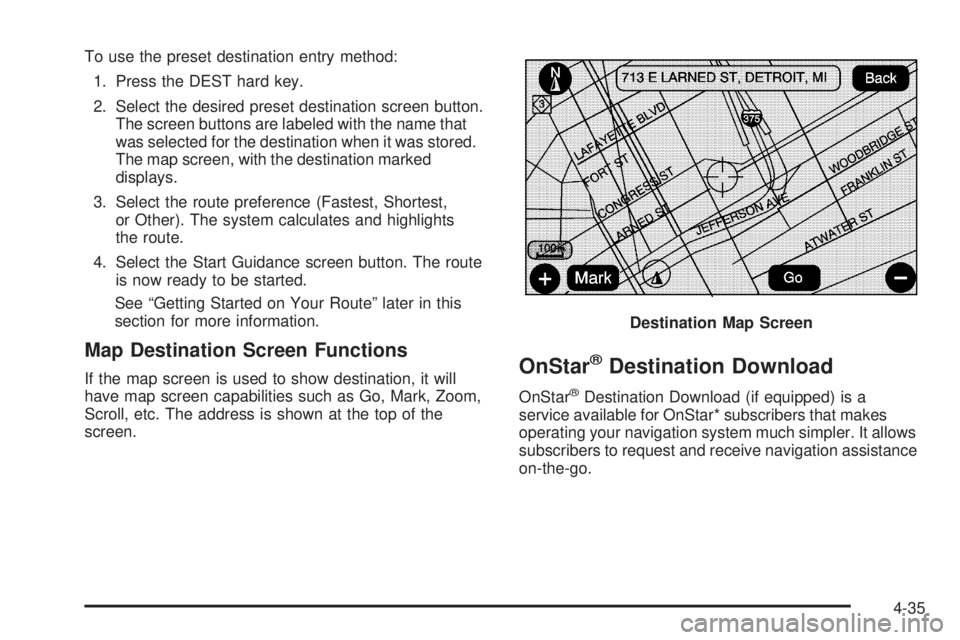
Map Destination Screen Functions If the map screen is used to show destination, it will
have map screen capabilities such as Go, Mark, Zoom,
Scroll, etc. The address is shown at the top of the
screen.
OnStar ®
Destination Download OnStar ®
Destination Download (if equipped) is a
service available for OnStar* subscribers that makes
operating your navigation system much simpler. It allows
subscribers to request and receive navigation assistance
on-the-go. Destination Map Screen
4-35
Page 334 of 602

Off-Road Mode To turn the Off-road mode on or off, do the following:
1. Press the CONFIG hard key.
2. Press the Nav screen button.
3. Press the Off-Road mode screen button. The button
will be highlighted when the feature is on.
When the off-road mode is turned on, the navigation
system will show the path being traveled by the vehicle
when not on a marked road. This path will be a simulation
since the map database coverage will not have these
roads on the DVD. This path will be stored in the
navigation system’s memory, see “Previous Destination”
under Destination on page 4-25 for more information.
See “Off-Road Driving” in the Index of your vehicle’s
owner manual for more information about off-road
driving. Traffic Options Read the following Options descriptions to understand
how the XM NavTraffic™ operates.
XM NavTraffic™ (USA and Canada) Vehicles with the navigation system have an
XM NavTraffic™ receiver. XM NavTraffic™ is a
subscription service provided via XM™ Satellite
Radio. XM NavTraffic™ provides real-time traffic
information fully integrated to the navigation system
to display current traffic conditions for a driver’s chosen
route. XM NavTraffic™ allows drivers to make the most
informed, timesaving routing decisions.
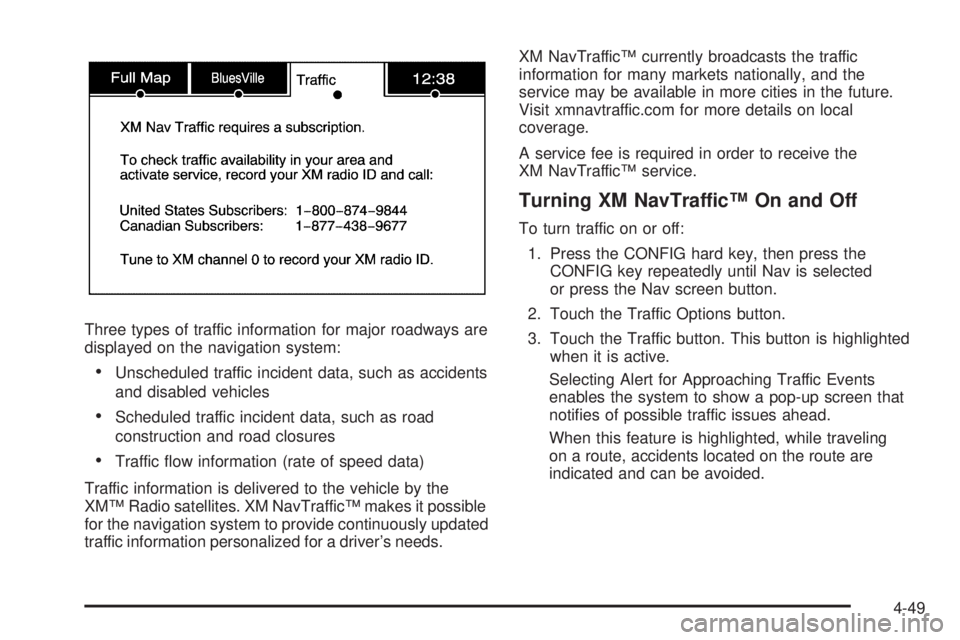
If the Traffic touch screen button is pressed or if
an attempt is made to turn on the traffic display in the
Navigation Setup Menu without a subscription, a Caution
screen displays indicating that XM traffic is not activated.
4-48
Page 335 of 602
Three types of traffic information for major roadways are
displayed on the navigation system:
Unscheduled traffic incident data, such as accidents
and disabled vehicles
Scheduled traffic incident data, such as road
construction and road closures
Traffic ow information (rate of speed data)
Traffic information is delivered to the vehicle by the
XM™ Radio satellites. XM NavTraffic™ makes it possible
for the navigation system to provide continuously updated
traffic information personalized for a driver’s needs. XM NavTraffic™ currently broadcasts the traffic
information for many markets nationally, and the
service may be available in more cities in the future.
Visit xmnavtraffic.com for more details on local
coverage.
A service fee is required in order to receive the
XM NavTraffic™ service.
Turning XM NavTraffic™ On and Off To turn traffic on or off:
1. Press the CONFIG hard key, then press the
CONFIG key repeatedly until Nav is selected
or press the Nav screen button.
2. Touch the Traffic Options button.
3. Touch the Traffic button. This button is highlighted
when it is active.
Selecting Alert for Approaching Traffic Events
enables the system to show a pop-up screen that
noties of possible traffic issues ahead.
When this feature is highlighted, while traveling
on a route, accidents located on the route are
indicated and can be avoided.
4-49
Page 345 of 602
Global Positioning System (GPS) The navigation system determines the position of the
vehicle by using satellite signals, various vehicle signals,
and map data.
At times, other interferences such as the satellite
condition, road conguration, the condition of the
vehicle and/or other circumstances can interfere with
the navigation system’s ability to determine the accurate
position of the vehicle.
The GPS shows the current position of the vehicle using
signals sent by the GPS Satellites of the United States
Department of Defense. When the vehicle is not
receiving signals from the satellites, a symbol appears
on the map screen. Refer to Symbols on page 4-19 . This system may not be available or interferences may
occur if any of the following are true:
Signals are obstructed by tall buildings, trees, large
trucks, or a tunnel.
Objects are located on the front dash of the vehicle.
Satellites are being repaired or improved.
After-market glass tinting has been applied to the
vehicle’s windshield.
Notice: Do not apply after-market glass tinting
to the vehicle’s windows. Glass tinting interferes
with the system’s ability to receive GPS signals
and causes the system to malfunction. The window
might have to be replaced to correct the problem.
This would not be covered by the warranty.
For more information if the GPS is not functioning
properly, see If the System Needs Service on page 4-61
and Problems with Route Guidance on page 4-61 .
4-59