lock CADILLAC ESCALADE ESV 2009 Manual Online
[x] Cancel search | Manufacturer: CADILLAC, Model Year: 2009, Model line: ESCALADE ESV, Model: CADILLAC ESCALADE ESV 2009Pages: 602, PDF Size: 5.18 MB
Page 280 of 602

Tips and Troubleshooting Chart Problem Recommended Action
IR Sensor Inoperative
Check that the
batteries are good in
the remote control.
Check that the
remote Control
IR Sensor is not
blocked.
Aim the remote
control toward the
IR Sensor being
controlled.
Select the correct
screen, 3 or 4.
No picture
Check that the
correct video input
mode is selected.
Check that the video
cable is plugged into
the jack securely. Problem Recommended Action
No Sound
Check that the
correct audio input
mode is selected.
Check that the audio
cable is securely
plugged into the jack.
Cleaning the Video Screens The video display screens are made of a specially
coated glass and can be scratched or damaged by
abrasive products, solvents, or ammonia-based window
cleaners. Clean with a soft, lint-free, cotton cloth that
has been slightly dampened with warm water. Dry the
screens by wiping with a clean dry cotton cloth.
3-112
Page 283 of 602
PROG (Program): Press this button to go to the
next preset radio station or channel set on the main
radio. This function is inactive, with some radios, if the
front seat passengers are listening to the radio.
When a CD or DVD audio disc is playing, press this
button to go to the beginning of the CD or DVD audio.
This function is inactive, with some radios, if the
front seat passengers are listening to the disc.
When a disc is playing in the CD or DVD changer,
press this button to select the next disc, if multiple discs
are loaded. This function is inactive, with some radios,
if the front seat passengers are listening to the disc.
When a DVD video menu is being displayed, press the
PROG button to perform the menu function, enter.
Theft-Deterrent Feature THEFTLOCK ®
is designed to discourage theft of the
vehicle’s radio by learning a portion of the Vehicle
Identication Number (VIN). The radio does not operate
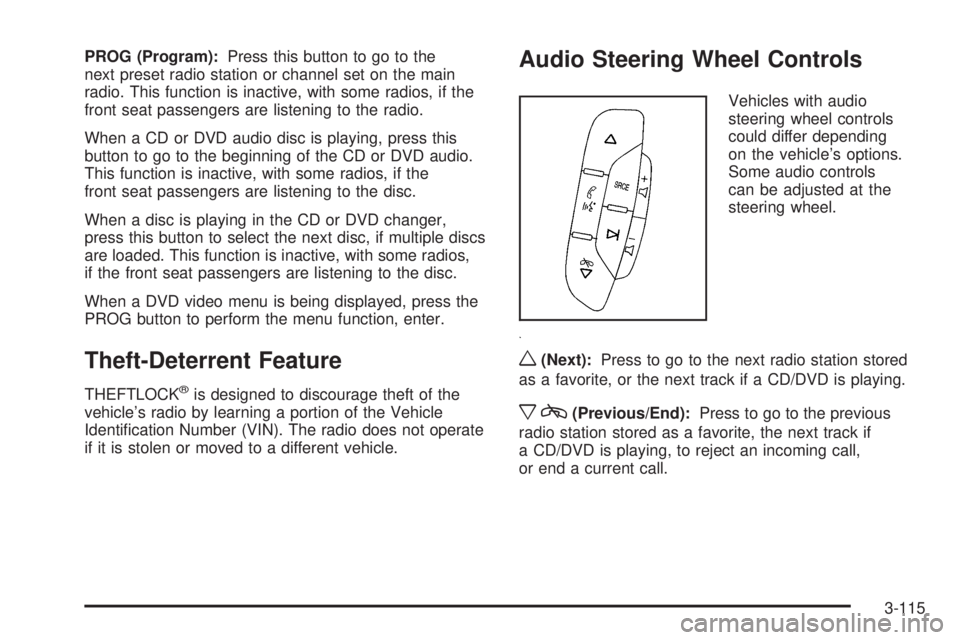
if it is stolen or moved to a different vehicle. Audio Steering Wheel Controls Vehicles with audio
steering wheel controls
could differ depending
on the vehicle’s options.
Some audio controls
can be adjusted at the
steering wheel.
w (Next): Press to go to the next radio station stored
as a favorite, or the next track if a CD/DVD is playing.
x c (Previous/End): Press to go to the previous
radio station stored as a favorite, the next track if
a CD/DVD is playing, to reject an incoming call,
or end a current call.
3-115
Page 289 of 602
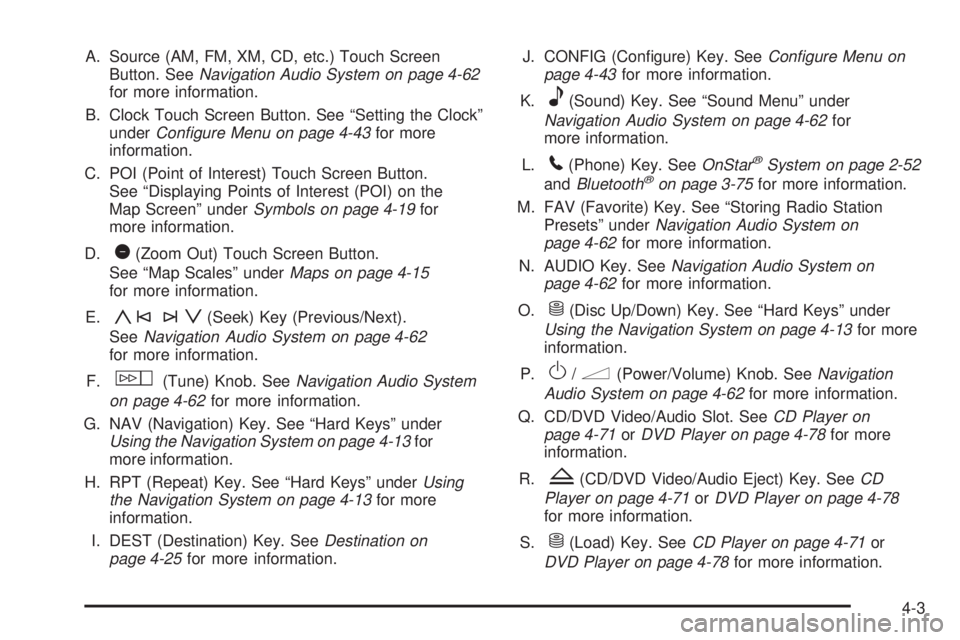
A. Source (AM, FM, XM, CD, etc.) Touch Screen
Button. See Navigation Audio System on page 4-62
for more information.
B. Clock Touch Screen Button. See “Setting the Clock”
under Configure Menu on page 4-43 for more
information.
C. POI (Point of Interest) Touch Screen Button.
See “Displaying Points of Interest (POI) on the
Map Screen” under Symbols on page 4-19 for
more information.
D.
1 (Zoom Out) Touch Screen Button.
See “Map Scales” under Maps on page 4-15
for more information.
E.
y©¨z (Seek) Key (Previous/Next).
See Navigation Audio System on page 4-62
for more information.
F.
w (Tune) Knob. See Navigation Audio System
on page 4-62 for more information.
G. NAV (Navigation) Key. See “Hard Keys” under
Using the Navigation System on page 4-13 for
more information.
H. RPT (Repeat) Key. See “Hard Keys” under Using
the Navigation System on page 4-13 for more
information.
I. DEST (Destination) Key. See Destination on
page 4-25 for more information. J. CONFIG (Congure) Key. See Configure Menu on
page 4-43 for more information.
K.
e (Sound) Key. See “Sound Menu” under
Navigation Audio System on page 4-62 for
more information.
L.
5 (Phone) Key. See OnStar ®
System on page 2-52
and Bluetooth ®
on page 3-75 for more information.
M. FAV (Favorite) Key. See “Storing Radio Station
Presets” under Navigation Audio System on
page 4-62 for more information.
N. AUDIO Key. See Navigation Audio System on
page 4-62 for more information.
O.
M (Disc Up/Down) Key. See “Hard Keys” under
Using the Navigation System on page 4-13 for more
information.
P.
O /
n (Power/Volume) Knob. See Navigation
Audio System on page 4-62 for more information.
Q. CD/DVD Video/Audio Slot. See CD Player on
page 4-71 or DVD Player on page 4-78 for more
information.
R.
Z (CD/DVD Video/Audio Eject) Key. See CD
Player on page 4-71 or DVD Player on page 4-78
for more information.
S.
M (Load) Key. See CD Player on page 4-71 or
DVD Player on page 4-78 for more information.
4-3
Page 294 of 602
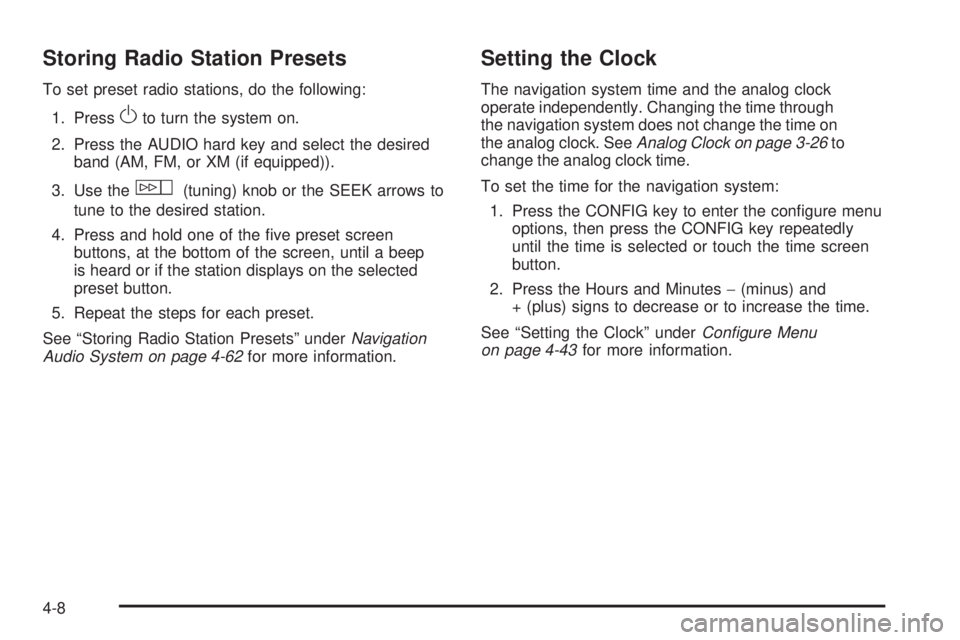
Storing Radio Station Presets To set preset radio stations, do the following:
1. Press
O to turn the system on.
2. Press the AUDIO hard key and select the desired
band (AM, FM, or XM (if equipped)).
3. Use the
w (tuning) knob or the SEEK arrows to
tune to the desired station.
4. Press and hold one of the ve preset screen
buttons, at the bottom of the screen, until a beep
is heard or if the station displays on the selected
preset button.
5. Repeat the steps for each preset.
See “Storing Radio Station Presets” under Navigation
Audio System on page 4-62 for more information. Setting the Clock The navigation system time and the analog clock
operate independently. Changing the time through
the navigation system does not change the time on
the analog clock. See Analog Clock on page 3-26 to
change the analog clock time.
To set the time for the navigation system:
1. Press the CONFIG key to enter the congure menu
options, then press the CONFIG key repeatedly
until the time is selected or touch the time screen
button.
2. Press the Hours and Minutes − (minus) and
+ (plus) signs to decrease or to increase the time.
See “Setting the Clock” under Configure Menu
on page 4-43 for more information.
4-8
Page 341 of 602

After selecting the INFO (information) screen button,
the type of traffic condition, the street name, and a
description of the traffic condition displays. See “Scrolling
the Map” under Maps on page 4-15 for more information.
To display traffic events in another state or a great
distance away, scroll to the desired area, and then
stop scrolling. Wait for the traffic to update. It may
take up to two minutes before traffic in this new area
can be received and displayed.
Traffic Event Display Categories The following are traffic condition categories and
symbols that can appear on the display:
Category 1, Road Closure:
q (Road Closed): Road and/or ramps closed.
Category 2, Traffic Delayed:
o (Stopped Traffic): Traffic stopped, stop and go
traffic, delayed and congested traffic. Category 3, Incidents:
p (Alert): Object in the roadway, disabled vehicle, or
dangerous road conditions.
t (Accident): Roadway obstructed due to accident.
s (Road Works): Delayed traffic due to construction.
Category 4, Advisories:
j /
r (Road Condition): Delayed or stopped traffic,
lane blocked or closed due to a road condition.
k (Weather): Heavy rain, snow, or fog weather
condition.
m (Parking): Available parking area.
l (Information): Special event, general information, or
warning.
4-55
Page 344 of 602
![CADILLAC ESCALADE ESV 2009 Manual Online Brightness/Contrast/Mode
Touch this screen button to change the brightness,
contrast, and mode of the display.
] (Brightness): Touch the + (plus) or − (minus)
screen buttons to increase or decrease](/img/23/58684/w960_58684-343.png "CADILLAC ESCALADE ESV 2009 Manual Online Brightness/Contrast/Mode
Touch this screen button to change the brightness,
contrast, and mode of the display.
] (Brightness): Touch the + (plus) or − (minus)
screen buttons to increase or decrease")
Brightness/Contrast/Mode
Touch this screen button to change the brightness,
contrast, and mode of the display.
] (Brightness): Touch the + (plus) or − (minus)
screen buttons to increase or decrease the brightness
of the screen.
_ (Contrast): Touch the + (plus) or − (minus) screen
buttons to increase or decrease the contrast of the
screen. Auto (Automatic): Touch this screen button for the
system to automatically adjust the screen background
depending on exterior lighting conditions.
Night: Touch this screen button and the system makes
the map background darker.
Day: Touch this screen button and the system makes
the map background brighter.
Setting the Clock The navigation system time and the analog clock
operate independently. Changing the time through
the navigation system does not change the time on
the analog clock. See Analog Clock on page 3-26 to
change the analog clock time.
Press the CONFIG key to enter the congure menu
options, then press the CONFIG key repeatedly until
the time is selected or touch the time screen button.
Hours: Press the − (minus) or + (plus) signs to
decrease or increase the hours.
Minutes: Press the − (minus) or + (plus) signs to
decrease or increase the minutes.
12/24 Format: Select the 12 screen button for standard
time; select the 24 screen button for military time.
4-58
Page 356 of 602
XM™ Radio Messages XL (Explicit Language Channels): XL on the radio
display, after the channel name, indicates content
with explicit language. These channels, or any others,
can be blocked at a customer’s request by calling
1-800-852-XMXM (9696).
XM Updating: The encryption code in the receiver is
being updated and no action is required.
No XM signal: The vehicle is in a location that is
blocking the XM™ signal. When the vehicle is moved
into an open area, the signal should return.
Loading XM: The audio system is processing audio
and text data received. No action is needed.
Channel Off Air: This channel is not currently in
service.
Channel Unauth: This channel is blocked or cannot be
received with your XM Subscription package.
Channel Unavail: This previously assigned channel is
no longer assigned.
No Artist Info: No artist information is available.
The system is working properly. No Title Info: No song title information is available.
The system is working properly.
No CAT Info: No category information is available.
The system is working properly.
CAT Not Found: There are no channels available for
the selected category. The system is working properly.
No Information: No text or informational messages
are available. The system is working properly.
XM Theftlocked: The XM™ receiver may have
previously been in another vehicle. For security
purposes, XM™ receivers cannot be swapped between
vehicles. If this message is received after having your
vehicle serviced, check with your dealer/retailer.
XM Radio ID: If tuned to channel 0, this message
will alternate with the XM™ Radio eight digit radio ID
label. This label is needed to activate the service.
Unknown: If this message is received when tuned
to channel 0, there may be a receiver fault. Consult
with your dealer/retailer.
Check XM Receiver: If this message does not clear
within a short period of time, the receiver may have
a fault. Consult with your dealer/retailer.
4-70
Page 359 of 602
r (Rewind): Touch and hold this button to rewind
quickly through a track selection. You will hear sound at
a reduced volume. Release this button to stop rewinding.
The display will show the elapsed time of the track.
[ (Forward): Touch and hold this button to fast
forward quickly through a track selection. You will hear
sound at a reduced volume. Release this button to stop
fast forwarding. The display will show the elapsed time
of the track.
y©¨z (Seek): To seek tracks, press the up arrow
to go to the next track. Press the down arrow to go to the
start of the current track, if more than eight seconds have
played. If either arrow is pressed more than once, the
player continues moving backward or forward through
the CD. The sound mutes while seeking.
w (Tuning Knob): Turn this knob counterclockwise
one notch to go to the start of the current track, turn it
again to go to the previous track. Turn this knob
clockwise to go to the next track.
When playing an audio CD the rear seat operator can
power on the RSE video screen and use the remote
control to navigate through the tracks on the CD. Using an MP3 CD MP3 Format There are guidelines that must be met, when creating an
MP3 disc. If the guidelines are not met when recording a
CD-R(W), the CD may not play. The guidelines are:
Sampling rate: 16 kHz, 22.05 kHz, 24 kHz, 32 kHz,
and 44.1 kHz.
Bit rates supported: 32, 40, 48, 56, 64, 80, 96, 112,
128, 160, 192, 224, 256, and 320 kbps.
ID3 tag information is displayed by the radio
if it is available. The radio supports ID3 tag
information v1.0, v1.1, or v2.0. The radio will display
a lename, song name, artist name, album name,
and directory name.
Maximum 32 characters, including spaces, in a le or
folder name.
Maximum number of folders is 100 with a maximum
hierarchy of eight folders.
Create a folder structure that makes it easy to nd
songs while driving. Organize songs by albums using
one folder for each album. Each folder or album
should contain 18 songs or less.
4-73
Page 363 of 602

qr (Folder/Artist/Album): Select the left or right
arrow to go to the previous or next folder, artist,
or album on the disc.
Press the middle screen button, with the folder, artist,
or album name, to sort the MP3 by folder, artist, or album.
It may take a few minutes for the system to sort the MP3.
y©¨z (Seek): To seek tracks, press the up arrow
to go to the next track. Press the down arrow to go to the
start of the current track, if more than eight seconds have
played. If either arrow is pressed more than once, the
player will continue moving backward or forward through
the CD. The sound will mute while seeking.
w (Tuning Knob): Turn this knob counterclockwise
one notch to go to the start of the current track, turn
it again to go to the previous track. Turn this knob
clockwise to go to the next track.
When playing an MP3 the rear seat operator can power
on the RSE video screen and use the remote control
to navigate through the MP3. CD Messages If Disc Read Error appears on the display and/or the CD
comes out, it could be for one of the following reasons:
If a disc was inserted with an invalid or unknown
format.
If the map DVD disc was installed into the CD slot.
See “Installing the Map DVD” under Maps on
page 4-15 for more information.
It is very hot. When the temperature returns to
normal, the CD should play.
You are driving on a very rough road. When the
road becomes smoother, the CD should play.
The CD is dirty, scratched, wet, or upside down.
The air is very humid. If so, wait about an hour and
try again.
There may have been a problem while burning
the CD.
The label may be caught in the CD player.
If the CD is not playing correctly, for any other reason,
try a known good CD.
If any error occurs repeatedly or if an error cannot be
corrected, contact your dealer/retailer.
4-77
Page 369 of 602

Subtitle Language: Touch English, Francais, Espanol,
Italiano, or Deutsch to change the default language
of the subtitles that the DVD player uses for each disc.
The subtitle language must be available on the disc.
The subtitle language may vary for each DVD.
Menu Language: Touch English, Francais, Espanol,
Italiano, or Deutsch to change the default language
of the DVD video menus. The menu language must
be available on the disc. The menu language may
vary for each DVD.
Parental Level: Touch this button to change the rating
level to only allow the play of DVDs with a certain rating.
The rating selection is 1 through 8, with 1 Kids Safe being
a G rating. If the 1 is selected, any DVD with a rating
above G will not be able to be viewed without entering
a password.
When the parental level is rst entered a keyboard will
appear on the display and a four-digit password will need
to be created. Type in a password that you will be able to
remember. Once the password is created, you can then
select a rating level.
If you would like to change the rating level, press the
Parental Level button, then press the Password button.
Type in the password and then change the rating level. If the password has been forgotten, contact your
dealer/retailer.
This may not be available on all DVDs.
Aspect: Touch this button to change the aspect ratio of
the DVD. This may not be available on all DVDs.
y (Next Track/Chapter): Press this hard key to go
to the next track or chapter. This button may not work
when the DVD is playing the copyright information
or the previews.
z (Previous Track/Chapter): Press this hard key
to return to the start of the current track or chapter.
Press this button again to go to the previous track
or chapter. This button may not work when the DVD
is playing the copyright information or the previews.
w (Tuning Knob): Turn this knob counterclockwise
one notch to go to the start of the current chapter/track,
turn it again to go to the previous chapter/track. Turn
this knob clockwise to go to the next chapter/track.
4-83