lock CADILLAC ESCALADE ESV 2009 Manual PDF
[x] Cancel search | Manufacturer: CADILLAC, Model Year: 2009, Model line: ESCALADE ESV, Model: CADILLAC ESCALADE ESV 2009Pages: 602, PDF Size: 5.18 MB
Page 234 of 602

DISPLAY LANGUAGE This feature allows you to select the language in which
the DIC messages will appear.
Press the customization button until the DISPLAY
LANGUAGE screen appears on the DIC display.
Press the set/reset button once to access the settings
for this feature. Then press the customization button to
scroll through the following settings:
ENGLISH (default): All messages will appear in
English.
DEUTSCH: All messages will appear in German.
ITALIANO: All messages will appear in Italian.
FRANCAIS: All messages will appear in French.
ESPANOL: All messages will appear in Spanish.
ARABIC: All messages will appear in Arabic.
CHINESE: All messages will appear in Chinese.
NO CHANGE: No change will be made to this feature.
The current setting will remain.
To select a setting, press the set/reset button while the
desired setting is displayed on the DIC. AUTO DOOR LOCK This feature allows you to select when the vehicle’s
doors will automatically lock. See Programmable
Automatic Door Locks on page 2-11 for more
information.
Press the customization button until AUTO DOOR
LOCK appears on the DIC display. Press the set/reset
button once to access the settings for this feature.
Then press the customization button to scroll through
the following settings:
SHIFT OUT OF PARK (default): The doors will
automatically lock when the vehicle is shifted out of
P (Park).
AT VEHICLE SPEED: The doors will automatically lock
when the vehicle speed is above 8 mph (13 km/h) for
three seconds.
NO CHANGE: No change will be made to this feature.
The current setting will remain.
To select a setting, press the set/reset button while the
desired setting is displayed on the DIC.
3-66
Page 235 of 602

AUTO DOOR UNLOCK This feature allows you to select whether or not to
turn off the automatic door unlocking feature. It also
allows you to select which doors and when the doors
will automatically unlock. See Programmable Automatic
Door Locks on page 2-11 for more information.
Press the customization button until AUTO DOOR
UNLOCK appears on the DIC display. Press the
set/reset button once to access the settings for this
feature. Then press the customization button to scroll
through the following settings:
OFF: None of the doors will automatically unlock.
DRIVER AT KEY OUT: Only the driver’s door will
unlock when the key is taken out of the ignition.
DRIVER IN PARK: Only the driver’s door will unlock
when the vehicle is shifted into P (Park).
ALL AT KEY OUT: All of the doors will unlock when
the key is taken out of the ignition.
ALL IN PARK (default): All of the doors will unlock
when the vehicle is shifted into P (Park).
NO CHANGE: No change will be made to this feature.
The current setting will remain.
To select a setting, press the set/reset button while the
desired setting is displayed on the DIC. REMOTE DOOR LOCK This feature allows you to select the type of feedback
you will receive when locking the vehicle with the
Remote Keyless Entry (RKE) transmitter. You will not
receive feedback when locking the vehicle with the RKE
transmitter if the doors are open. See Remote Keyless
Entry (RKE) System Operation on page 2-5 for more
information.
Press the customization button until REMOTE DOOR
LOCK appears on the DIC display. Press the set/reset
button once to access the settings for this feature.
Then press the customization button to scroll through
the following settings:
OFF: There will be no feedback when you press the
lock button on the RKE transmitter.
LIGHTS ONLY: The exterior lamps will ash when you
press the lock button on the RKE transmitter.
HORN ONLY: The horn will sound on the second press
of the lock button on the RKE transmitter.
HORN & LIGHTS (default): The exterior lamps
will ash when you press the lock button on the RKE
transmitter, and the horn will sound when the lock button
is pressed again within ve seconds of the previous
command.
NO CHANGE: No change will be made to this feature.
The current setting will remain.
3-67
Page 236 of 602

To select a setting, press the set/reset button while the
desired setting is displayed on the DIC.
REMOTE DOOR UNLOCK This feature allows you to select the type of feedback
you will receive when unlocking the vehicle with the
Remote Keyless Entry (RKE) transmitter. You will not
receive feedback when unlocking the vehicle with the
RKE transmitter if the doors are open. See Remote
Keyless Entry (RKE) System Operation on page 2-5
for more information.
Press the customization button until REMOTE DOOR
UNLOCK appears on the DIC display. Press the
set/reset button once to access the settings for this
feature. Then press the customization button to scroll
through the following settings:
LIGHTS OFF: The exterior lamps will not ash when
you press the unlock button on the RKE transmitter.
LIGHTS ON (default): The exterior lamps will
ash when you press the unlock button on the
RKE transmitter.
NO CHANGE: No change will be made to this feature.
The current setting will remain.
To select a setting, press the set/reset button while the
desired setting is displayed on the DIC. DELAY DOOR LOCK This feature allows you to select whether or not the
locking of the vehicle’s doors and liftgate will be delayed.
When locking the doors and liftgate with the power door
lock switch and a door or the liftgate is open, this feature
will delay locking the doors and liftgate until ve seconds
after the last door is closed. You will hear three chimes
to signal that the delayed locking feature is in use.
The key must be out of the ignition for this feature to
work. You can temporarily override delayed locking by
pressing the power door lock switch twice or the lock
button on the RKE transmitter twice. See Delayed
Locking on page 2-10 for more information.
Press the customization button until DELAY DOOR
LOCK appears on the DIC display. Press the set/reset
button once to access the settings for this feature.
Then press the customization button to scroll through
the following settings:
OFF: There will be no delayed locking of the vehicle’s
doors.
ON (default): The doors will not lock until ve seconds
after the last door or the liftgate is closed.
NO CHANGE: No change will be made to this feature.
The current setting will remain.
To select a setting, press the set/reset button while the
desired setting is displayed on the DIC.
3-68
Page 237 of 602

EXIT LIGHTING This feature allows you to select the amount of time
you want the exterior lamps to remain on when it is dark
enough outside. This happens after the key is turned
from ON/RUN to LOCK/OFF.
Press the customization button until EXIT LIGHTING
appears on the DIC display. Press the set/reset
button once to access the settings for this feature.
Then press the customization button to scroll through
the following settings:
OFF: The exterior lamps will not turn on.
30 SECONDS (default): The exterior lamps will stay on
for 30 seconds.
1 MINUTE: The exterior lamps will stay on for
one minute.
2 MINUTES: The exterior lamps will stay on for
two minutes.
NO CHANGE: No change will be made to this feature.
The current setting will remain.
To select a setting, press the set/reset button while the
desired setting is displayed on the DIC. APPROACH LIGHTING This feature allows you to select whether or not to
have the exterior lights turn on briey during low light
periods after unlocking the vehicle using the Remote
Keyless Entry (RKE) transmitter.
Press the customization button until APPROACH
LIGHTING appears on the DIC display. Press the
set/reset button once to access the settings for
this feature. Then press the customization button
to scroll through the following settings:
OFF: The exterior lights will not turn on when you
unlock the vehicle with the RKE transmitter.
ON (default): If it is dark enough outside, the exterior
lights will turn on briey when you unlock the vehicle
with the RKE transmitter.
The lights will remain on for 20 seconds or until the
lock button on the RKE transmitter is pressed, or
the vehicle is no longer off. See Remote Keyless
Entry (RKE) System Operation on page 2-5 for
more information.
NO CHANGE: No change will be made to this feature.
The current setting will remain.
To select a setting, press the set/reset button while the
desired setting is displayed on the DIC.
3-69
Page 240 of 602
To select a setting, press the set/reset button while the
desired setting is displayed on the DIC.
EASY EXIT SETUP If your vehicle has this feature, it allows you to select
which areas will recall with the automatic easy exit
seat feature. It also allows you to turn off the automatic
easy exit feature. See Memory Features on page 1-7
and “EASY EXIT RECALL” earlier for more information.
Press the customization button until EASY EXIT SETUP
appears on the DIC display. Press the set/reset button
once to access the settings for this feature. Then press
the menu up/down button to scroll through the following
settings:
OFF: No automatic seat exit will recall.
SEAT ONLY: The driver’s seat will recall.
TILT ONLY: The steering wheel tilt feature will recall.
ALL (default): The driver’s seat and the steering wheel
tilt feature will recall.
NO CHANGE: No change will be made to this feature.
The current setting will remain.
To select a setting, press the set/reset button while the
desired setting is displayed on the DIC. MEMORY SEAT RECALL This feature allows you to select your preference for
the remote memory seat recall feature. See Memory
Features on page 1-7 for more information.
Press the customization button until MEMORY SEAT
RECALL appears on the DIC display. Press the set/
reset button once to access the settings for this feature.
Then press the customization button to scroll through the
following settings:
OFF (default): No remote memory seat recall will
occur.
ON: The driver’s seat, and on some vehicles, the
outside mirrors will automatically move to the stored
driving position when the unlock button on the Remote
Keyless Entry (RKE) transmitter is pressed. On some
vehicles with the adjustable throttle and brake pedal
feature, the pedals will also automatically move.
See “Relearn Remote Key” under DIC Operation and
Displays on page 3-48 for more information on matching
transmitters to driver ID numbers.
NO CHANGE: No change will be made to this feature.
The current setting will remain.
To select a setting, press the set/reset button while the
desired setting is displayed on the DIC.
3-72
Page 259 of 602

Audio Output Audio from the DVD player or auxiliary inputs can be
heard through the following possible sources:
Wireless Headphones
Vehicle Speakers
Vehicle wired headphone jacks on the rear seat
audio system, if the vehicle has this feature.
The RSE system always transmits the audio signal to
the wireless headphones, if there is audio available.
See “Headphones” earlier in this section for more
information.
The DVD player is capable of outputting audio to the
wired headphone jacks on the RSA system, if the
vehicle has this feature. The DVD player can be
selected as an audio source on the RSA system.
See Rear Seat Audio (RSA) on page 3-113 for
more information.
When a device is connected to the A/V jacks, the
rear seat passengers are be able to hear audio from
the auxiliary device through the wireless or wired
headphones. The front seat passengers are able to
listen to playback from this device through the vehicle
speakers by selecting AUX as the source on the radio. Video Screen(s) The video screen(s) are located in the overhead
console.
To use the video screen(s):
1. Push the release button located on the overhead
console.
2. Move the screen to the desired position.
When the video screen is not in use, push it up into its
locked position.
If a DVD is playing and the screen is raised to its locked
position, the screen remains on, this is normal, and
the DVD continues to play through the previous audio
source. Use the remote control power button or eject the
disc to turn off the screen.
The overhead console contains the IR (infrared)
transmitters for the wireless headphones and the IR
receivers for the remote control. They are located at
the rear of the console.
Notice: Avoid directly touching the video screen,
as damage may occur. See “Cleaning the Video
Screen” later in this section for more information.
3-91
Page 260 of 602
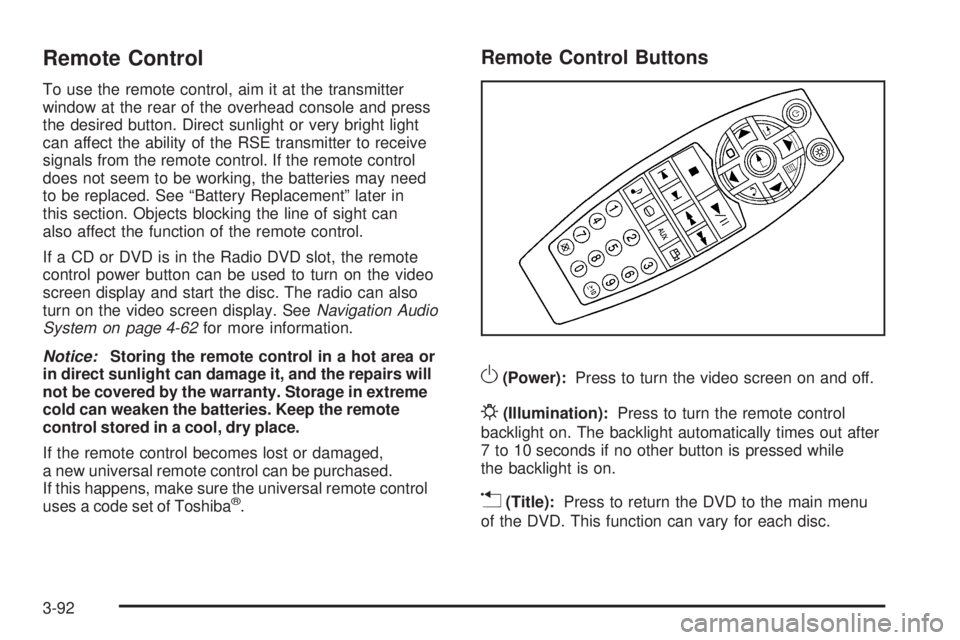
Remote Control To use the remote control, aim it at the transmitter
window at the rear of the overhead console and press
the desired button. Direct sunlight or very bright light
can affect the ability of the RSE transmitter to receive
signals from the remote control. If the remote control
does not seem to be working, the batteries may need
to be replaced. See “Battery Replacement” later in
this section. Objects blocking the line of sight can
also affect the function of the remote control.
If a CD or DVD is in the Radio DVD slot, the remote
control power button can be used to turn on the video
screen display and start the disc. The radio can also
turn on the video screen display. See Navigation Audio
System on page 4-62 for more information.
Notice: Storing the remote control in a hot area or
in direct sunlight can damage it, and the repairs will
not be covered by the warranty. Storage in extreme
cold can weaken the batteries. Keep the remote
control stored in a cool, dry place.
If the remote control becomes lost or damaged,
a new universal remote control can be purchased.
If this happens, make sure the universal remote control
uses a code set of Toshiba ®
. Remote Control Buttons
O (Power): Press to turn the video screen on and off.
P (Illumination): Press to turn the remote control
backlight on. The backlight automatically times out after
7 to 10 seconds if no other button is pressed while
the backlight is on.
v (Title): Press to return the DVD to the main menu
of the DVD. This function can vary for each disc.
3-92
Page 267 of 602
POWER
O : Press to turn the power on or off. Each
video screen can be powered on or off independently.
EJECT
X : Press to eject a disc from the DVD slot.
If a disc is ejected from the player, but not removed,
it will automatically reload into the player. Another way to
reload a disc that has been ejected, but not removed
from the DVD player, is to press the eject button or the
play button.
PLAY
r : Press this button located below the video
display screen to start playback of a disc. On DVDs and
video CDs with playback control (PBC), menu screens
can display automatically. It might be necessary to press
the play button again to begin play.
There is a play position memory feature for DVD and
video CD only. If the DVD player is turned off and then
turned back on, the DVD player resumes playback
where the disc stopped. The play position memory
is erased if the disc is removed.
STOP
c : Press once to stop playing a DVD.
There is a pre-stop feature for DVD and video CD only.
This feature resumes playback of the disc where it
was stopped. Press the stop button once during disc
playback and
c displays on the DVD startup screen. This icon disappears after a few seconds. Press the
stop button a second time, or eject the disc, to cancel
the pre-stop feature and to clear the disc position
memory.
SOURCE: Press to select between Monitor 3,
Monitor 4, or the AV INPUT.
Each video display screen can be adjusted
independently, as well as display information
from both DVD players and both A/V inputs.
Infrared Remote Sensor: Located in the top center
of the video display screen. Do not block the signal from
the remote to the sensor.
Infrared Transmitters: Located in the top center of
the video display screen. Do not block the signal from
the headphones to the transmitter.
Video Display Screen: Located on the back of each
headrest.
AV OUTPUT (Audio/Video Output Jack): Located on
the lower left side of the screen and is identied on
the video screen panel as the AV OUTPUT.
3-99
Page 268 of 602
Headphone Jack: Wired headphones can be
plugged into the headphone jack with one-eighth inch
stereo plugs.
AV INPUT: (Audio/Video Input Jack): The audio/video
input jack is located below the video display screen
and allows viewing of auxiliary sources such as portable
DVD players, game stations, or video cameras, on
each screen.
Video Input — The yellow connector is used for
video input.
L Audio — The white connector is used for the left
side audio.
R Audio — The red connector is used for the right
side audio.
Level Lock and Release Latch: The viewing angle
of the video screen can be adjusted by releasing
the latch and gently moving the screen. Then lock
it into a secure position. Vehicle Speakers Audio from the DVD player or an auxiliary device
can be heard through the vehicle speakers or the
wireless/wired headphones, while the radio is tuned to
one of the six frequencies selected on the Sound Around
portion of the system’s remote control. See “Remote
Control” later in this supplement.
Only one audio source can be heard through the
vehicle’s speakers at a time. The audio source being
used is specied by the A/V (audio/video) source
selected on the driver side head restraint video display
screen.
To turn the RSE system audio output to the vehicle’s
speakers, press Sound Around ON, on the system’s
remote control. The audio from the RSE system can be
heard through the wireless/wired headphones and the
vehicle’s speakers at the same time. The volume on the
radio can vary when switching between the radio, CD,
DVD, MP3, or an auxiliary device.
3-100
Page 269 of 602
Wireless Headphones The two wireless headphones included with the
Headrest DVD RSE system will only work with the
Headrest DVD RSE system and are marked for channel 3
and 4. The wireless headphones must be used within a
line of sight of the transmitter that is located above the
video display screen.
3-4 Channel Selector: This is located on the right
earpiece. Either Channel 3 or 4 can be selected with the
channel selector. The driver side monitor is designated as
Channel 3, and the passenger side as Channel 4. Set the
channel selector switch according to the video display
screen being viewed. The message, “To listen to this
monitor tune your headphones to Channel 3 (or 4)”
displays for ve seconds then disappears when the
video display screen is turned on.
OFF/ON (Power): Turn the power switch located on
the earpiece to turn the wireless headphones on or off.
Each headphone has a light to indicate ON. If the
light does not come on, the batteries may need to be
replaced. See “Battery Replacement” under Rear Seat
Entertainment System in the vehicle’s owner manual.
The headphones shut off automatically if the RSE system
is turned off or if the headphones are out of range of the
transmitter for more than three minutes. VOL
0 (Volume): Use to adjust the volume on the
headphones.
Notice: Do not store the headphones in heat or
direct sunlight. This could damage the headphones
and repairs will not be covered by the warranty.
Storage in extreme cold can weaken the batteries.
Keep the headphones stored in a cool, dry place.
Remote Control To use the remote control, aim at the remote sensor
located on top center of the video display screen
and press the desired button.
Objects blocking the line-of-sight can affect the function
of the remote control. Direct or very bright light can affect
the ability of the transmitter to receive signals from the
remote control. If the remote control does not seem to
be working, the batteries might need to be replaced.
See “Battery Replacement” following this section.
The remote control provided with the Headrest DVD
RSE system, is not a universal remote control and will
not control other equipment.
Notice: Storing the remote control in a hot area or
in direct sunlight can damage it, and the repairs will
not be covered by the warranty. Storage in extreme
cold can weaken the batteries. Keep the remote
control stored in a cool, dry place.
3-101