air condition CADILLAC ESCALADE ESV 2010 Owner's Manual
[x] Cancel search | Manufacturer: CADILLAC, Model Year: 2010, Model line: ESCALADE ESV, Model: CADILLAC ESCALADE ESV 2010Pages: 620, PDF Size: 7.4 MB
Page 238 of 620

Black plate (46,1)Cadillac Escalade/Escalade ESV Owner Manual - 2010
Tire Pressure On vehicles with the Tire Pressure Monitor System
(TPMS), the pressure for each tire can be viewed in the
DIC. The tire pressure will be shown in either pounds
per square inch (psi) or kilopascals (kPa). Press the
vehicle information button until the DIC displays FRONT
TIRES PSI (kPa) LEFT ## RIGHT ##. Press the vehicle
information button again until the DIC displays REAR
TIRES PSI (kPa) LEFT ## RIGHT ##.
If a low tire pressure condition is detected by the
system while driving, a message advising you to
add air to a specific tire will appear in the display.
See Inflation - Tire Pressure
on page 7 ‑ 65 and DIC
Warnings and Messages on page 4 ‑ 49 for more
information.
If the tire pressure display shows dashes instead of a
value, there may be a problem with your vehicle. If this
consistently occurs, see your dealer for service. Battery Voltage This display shows the current battery voltage. If the
voltage is in the normal range, the value will display. For
example, the display may read BATTERY VOLTAGE
13.2 VOLTS. If the voltage is low, the display will show
LOW. If the voltage is high, the display will show HIGH.
Your vehicle's charging system regulates voltage based
on the state of the battery. The battery voltage may
fluctuate when viewing this information on the DIC. This
is normal. See Charging System Light
on page 4 ‑ 32 for
more information. If there is a problem with the battery
charging system, the DIC will display a message. See
DIC Warnings and Messages on page 4 ‑ 49 .
Oil Pressure This display will show the oil pressure in either pounds
per square inch (psi) or kilopascals (kPa)
4-46
Page 242 of 620

Black plate (50,1)Cadillac Escalade/Escalade ESV Owner Manual - 2010
You should take any messages that appear on the
display seriously and remember that clearing the
messages will only make the messages disappear, not
correct the problem.
The following are the possible messages that can be
displayed and some information about them.
BATTERY LOW START VEHICLE When the vehicle ’ s battery is severely discharged, this
message will display and four chimes will sound. Start
the vehicle immediately. If the vehicle is not started and
the battery continues to discharge, the climate controls,
heated seats, and audio systems will shut off and the
vehicle may require a jump start. These systems will
function again after the vehicle is started.
CHANGE ENGINE OIL SOON This message displays when the engine oil needs to be
changed. When you change the engine oil, be sure to
reset the CHANGE ENGINE OIL SOON message.
See Engine Oil Life System
on page 7 ‑ 20 for
information on how to reset the message. See Engine
Oil on page 7 ‑ 17 and Scheduled Maintenance on
page 8 ‑ 3
for more information. DRIVER DOOR OPEN This message displays and a chime sounds if the driver
door is not fully closed and the vehicle is shifted out of
P (Park). Stop and turn off the vehicle, check the door
for obstructions, and close the door again. Check to see
if the message still appears on the DIC.
ENGINE HOT A/C (Air Conditioning)
TURNED OFF This message displays when the engine coolant
becomes hotter than the normal operating temperature.
See Engine Coolant Temperature Gauge
on
page 4 ‑ 35 . To avoid added strain on a hot engine,
the air conditioning compressor automatically turns off.
When the coolant temperature returns to normal, the air
conditioning compressor turns back on. You can
continue to drive your vehicle.
If this message continues to appear, have the system
repaired by your dealer as soon as possible to avoid
damage to the engine.
ENGINE OIL HOT IDLE ENGINE This message displays when the engine oil becomes
hotter than the normal operating temperature. Stop and
allow the vehicle to idle until it cools down. See Engine
Coolant Temperature Gauge
on page 4 ‑ 35 .
4-50
Page 245 of 620

Black plate (53,1)Cadillac Escalade/Escalade ESV Owner Manual - 2010
REAR ACCESS OPEN This message displays and a chime sounds if the
liftgate or liftglass is open while the ignition is in
ON/RUN. Turn off the vehicle and check the liftgate
and liftglass. Restart the vehicle and check for the
message on the DIC display.
REMOTE KEY LEARNING ACTIVE This message displays while you are matching a
Remote Keyless Entry (RKE) transmitter to your
vehicle. See “ Matching Transmitter(s) to Your Vehicle ”
under Remote Keyless Entry (RKE) System Operation
on page 3 ‑ 4 and DIC Operation and Displays on
page 4 ‑ 42 for more information.
REPLACE BATTERY IN REMOTE KEY This message displays if a Remote Keyless Entry
(RKE) transmitter battery is low. The battery needs to
be replaced in the transmitter. See “ Battery
Replacement ” under Remote Keyless Entry (RKE)
System Operation on page 3 ‑ 4 . RIGHT REAR DOOR OPEN This message displays and a chime sounds if the
passenger side rear door is not fully closed and the
vehicle is shifted out of P (Park). Stop and turn off the
vehicle, check the door for obstructions, and close the
door again. Check to see if the message still appears
on the DIC.
SERVICE AIR BAG This message displays if there is a problem with the
airbag system. Have your dealer inspect the system for
problems. See Airbag Readiness Light on page 4 ‑ 30
and Airbag System on page 2 ‑ 74 for more information.
SERVICE BATTERY CHARGING
SYSTEM On some vehicles, this message displays if there is a
problem with the battery charging system. Under certain
conditions, the charging system light may also turn on
in the instrument panel cluster. See Charging System
Light on page 4 ‑ 32 . Driving with this problem could
drain the battery. Turn off all unnecessary accessories.
Have the electrical system checked as soon as
possible. See your dealer.
4-53
Page 354 of 620
Black plate (52,1)Cadillac Escalade/Escalade ESV Owner Manual - 2010
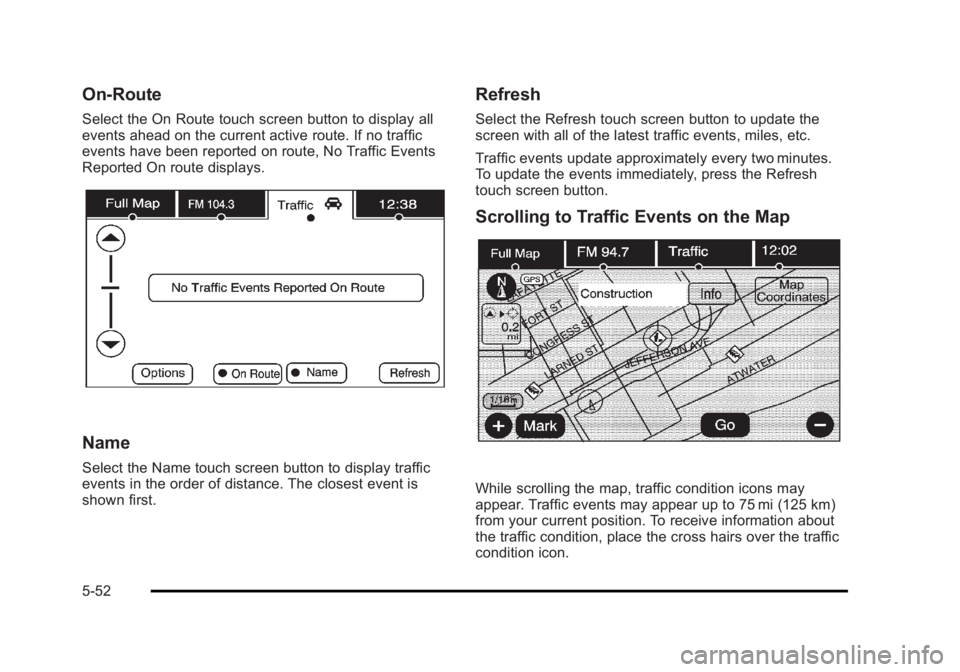
On-Route Select the On Route touch screen button to display all
events ahead on the current active route. If no traffic
events have been reported on route, No Traffic Events
Reported On route displays.
Name Select the Name touch screen button to display traffic
events in the order of distance. The closest event is
shown first. Refresh Select the Refresh touch screen button to update the
screen with all of the latest traffic events, miles, etc.
Traffic events update approximately every two minutes.
To update the events immediately, press the Refresh
touch screen button.
Scrolling to Traffic Events on the Map
While scrolling the map, traffic condition icons may
appear. Traffic events may appear up to 75 mi (125 km)
from your current position. To receive information about
the traffic condition, place the cross hairs over the traffic
condition icon.
5-52
Page 359 of 620
Black plate (57,1)Cadillac Escalade/Escalade ESV Owner Manual - 2010
Global Positioning System (GPS) The navigation system determines the position of the
vehicle by using satellite signals, various vehicle
signals, and map data.
At times, other interferences such as the satellite
condition, road configuration, the condition of the
vehicle and/or other circumstances can interfere with
the navigation system's ability to determine the accurate
position of the vehicle.
The GPS shows the current position of the vehicle
using signals sent by the GPS Satellites of the United
States Department of Defense. When the vehicle is not
receiving signals from the satellites, a symbol appears
on the map screen. Refer to Symbols on page 5 ‑ 17 .
This system may not be available or interferences may
occur if any of the following are true: .
Signals are obstructed by tall buildings, trees, large
trucks, or a tunnel. .
Objects are located on the front dash of the
vehicle. .
Satellites are being repaired or improved. .
After-market glass tinting has been applied to the
vehicle's windshield. Notice: Do not apply after-market glass tinting to
the vehicle's windows. Glass tinting interferes with
the system's ability to receive GPS signals and
causes the system to malfunction. The window
might have to be replaced to correct the problem.
This would not be covered by the warranty.
For more information if the GPS is not functioning
properly, see If the System Needs Service
on
page 5 ‑ 59
and Problems with Route Guidance on
page 5 ‑ 58 .
Vehicle Positioning At times, the position of the vehicle on the map may be
inaccurate due to one or more of the following reasons: .
Road system has changed. .
Vehicle is driving on slippery road surfaces such as
in sand, gravel, and/or snow. .
Vehicle is traveling on winding roads. .
Vehicle is on a long straight road. .
Vehicle is approaching a tall building or a large
vehicle. .
Surface streets run parallel to a freeway. .
Vehicle has just been transferred by a vehicle
carrier or a ferry. .
Current position calibration is set incorrectly.
5-57
Page 400 of 620
Black plate (8,1)Cadillac Escalade/Escalade ESV Owner Manual - 2010
It is recommended to leave the system on for normal
driving conditions, but it may be necessary to turn the
system off if the vehicle is stuck in sand, mud, ice or
snow, and you want to “ rock ” the vehicle to attempt to
free it. It may also be necessary to turn off the system
when driving in extreme off-road conditions where high
wheel spin is required. See If Your Vehicle is Stuck in
Sand, Mud, Ice, or Snow on page 6 ‑ 30 .
Traction Control Operation The traction control system is part of the StabiliTrak
system. Traction control limits wheel spin by
reducing engine power to the wheels (engine speed
management) and by applying brakes to each individual
wheel (brake-traction control) as necessary.
The traction control system is enabled automatically
when the vehicle is started. It will activate and the
StabiliTrak light will flash if it senses that any of the
wheels are spinning or beginning to lose traction while
driving. If traction control is turned off, only the
brake-traction control portion of traction control will
work. The engine speed management will be disabled.
In this mode, engine power is not reduced automatically
and the driven wheels can spin more freely. This can
cause the brake-traction control to activate constantly. Notice: If the wheel(s) of one axle is allowed to spin
excessively while the StabiliTrak ®
, ABS, brake
warning lights, and any relevant DIC messages are
displayed, the transfer case could be damaged.
The repairs would not be covered by the vehicle
warranty. Reduce engine power and do not spin the
wheel(s) excessively while these lights and
messages are displayed.
The traction control system may activate on dry or
rough roads or under conditions such as heavy
acceleration while turning or abrupt upshifts/downshifts
of the transmission. When this happens, a reduction in
acceleration may be noticed, or a noise or vibration may
be heard. This is normal.
If cruise control is being used when the system
activates, the StabiliTrak light will flash and cruise
control will automatically disengage. Cruise control may
be reengaged when road conditions allow. See Cruise
Control on page 4 ‑ 8 .
StabiliTrak may also turn off automatically if it
determines that a problem exists with the system. If the
problem does not clear itself after restarting the vehicle,
see your dealer for service.
6-8
Page 405 of 620

Black plate (13,1)Cadillac Escalade/Escalade ESV Owner Manual - 2010
While driving on a surface with reduced traction, try
your best to avoid sudden steering, acceleration,
or braking, including reducing vehicle speed by shifting
to a lower gear. Any sudden changes could cause the
tires to slide. You may not realize the surface is slippery
until the vehicle is skidding. Learn to recognize warning
clues — such as enough water, ice, or packed snow on
the road to make a mirrored surface — and slow down
when you have any doubt.
Remember: Antilock brakes help avoid only the
braking skid.
Off-Road Driving Vehicles with all ‐ wheel drive can be used for off ‐ road
driving. Vehicles without all ‐ wheel drive and vehicles
with 22 ‐ inch tire/wheel assemblies should not be driven
off-road except on a level, solid surface.
Many of the vehicle design features that help make the
vehicle more responsive on paved roads during poor
weather conditions also help make it better suited for
off ‐ road use than conventional passenger vehicles. The
vehicle does not have features usually thought to be
necessary for extended or severe off ‐ road use such as
special underbody shielding and transfer case low gear
range. The airbag system is designed to work properly under a
wide range of conditions, including off ‐ road usage.
Always wear your safety belt and observe safe driving
speeds, especially on rough terrain.
Drinking and driving can be very dangerous on any
road and this is certainly true for off-road driving. At the
very time you need special alertness and driving skills,
your reflexes, perceptions, and judgment can be
affected by even a small amount of alcohol. You could
have a serious — or even fatal — accident if you drink
and drive or ride with a driver who has been drinking.
Off-roading can be great fun but has some definite
hazards. The greatest of these is the terrain itself. When
off-road driving, traffic lanes are not marked, curves are
not banked, and there are no road signs. Surfaces can
be slippery, rough, uphill, or downhill.
Avoid sharp turns and abrupt maneuvers. Failure to
operate the vehicle correctly off ‐ road could result in loss
of vehicle control or vehicle rollover.
Off-roading involves some new skills. That is why it is
very important that you read these driving tips and
suggestions to help make off-road driving safer and
more enjoyable.
6-13
Page 429 of 620
Black plate (37,1)Cadillac Escalade/Escalade ESV Owner Manual - 2010
If you put things inside your vehicle — like
suitcases, tools, packages, or anything
else — they will go as fast as the vehicle goes.
If you have to stop or turn quickly, or if there is a
crash, they will keep going.
{ WARNING: Things you put inside your vehicle can strike
and injure people in a sudden stop or turn,
or in a crash. .
Put things in the cargo area of your
vehicle. Try to spread the weight evenly. .
Never stack heavier things, like
suitcases, inside the vehicle so that some
of them are above the tops of the seats. .
Do not leave an unsecured child restraint
in your vehicle. .
When you carry something inside the
vehicle, secure it whenever you can. .
Do not leave a seat folded down unless
you need to. There is also important loading information for
off-road driving in this manual. See “ Loading Your
Vehicle for Off-Road Driving ” under Off-Road
Driving on page 6 ‑ 13 .
Add-On Equipment When you carry removable items, you may need
to put a limit on how many people you can carry
inside your vehicle. Be sure to weigh your vehicle
before you buy and install the new equipment. Notice :
Overloading the vehicle may cause
damage. Repairs would not be covered by the
vehicle warranty. Do not overload the vehicle.
Remember not to exceed the Gross Axle Weight
Rating (GAWR) of the front or rear axle.
Automatic Level Control The automatic level control rear suspension
comes as a part of the Road Sensing Suspension.
See Road Sensing Suspension
on page 6 ‑ 9 .
This type of level control is fully automatic and will
provide a better leveled riding position as well as
better handling under a variety of passenger and
loading conditions. An air compressor connected
to the rear shocks will raise or lower the rear of
the vehicle to maintain proper vehicle height.
6-37
Page 433 of 620
Black plate (41,1)Cadillac Escalade/Escalade ESV Owner Manual - 2010
Two-wheel-drive vehicles should not be towed with
the rear wheels on the ground. Two-wheel-drive
transmissions have no provisions for internal lubrication
while being towed.
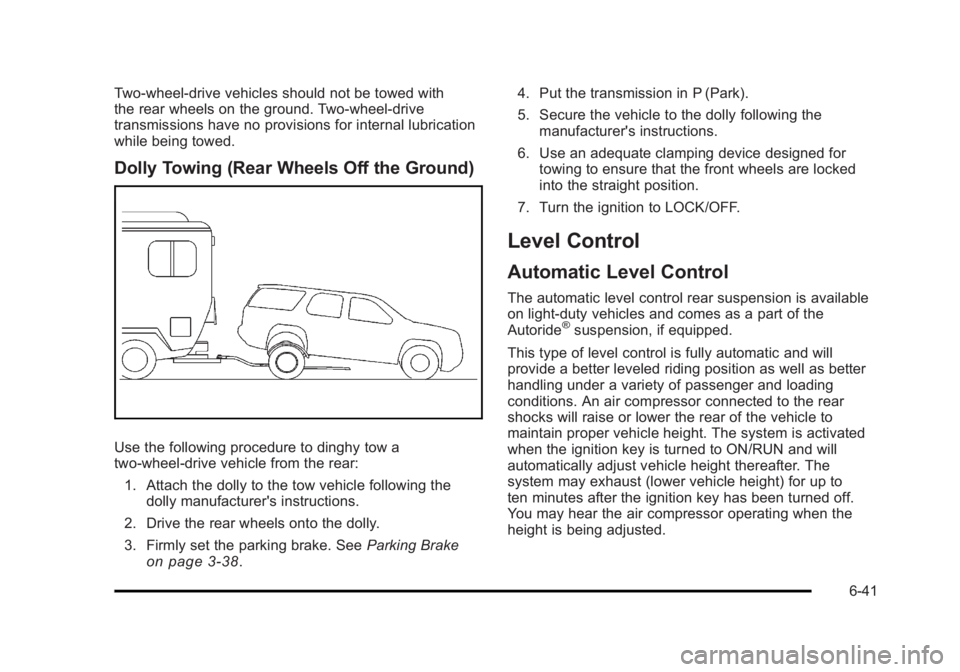
Dolly Towing (Rear Wheels Off the Ground)
Use the following procedure to dinghy tow a
two-wheel-drive vehicle from the rear:
1. Attach the dolly to the tow vehicle following the
dolly manufacturer's instructions.
2. Drive the rear wheels onto the dolly.
3. Firmly set the parking brake. See Parking Brake
on page 3 ‑ 38 . 4. Put the transmission in P (Park).
5. Secure the vehicle to the dolly following the
manufacturer's instructions.
6. Use an adequate clamping device designed for
towing to ensure that the front wheels are locked
into the straight position.
7. Turn the ignition to LOCK/OFF.
Level Control Automatic Level Control The automatic level control rear suspension is available
on light ‐ duty vehicles and comes as a part of the
Autoride ®
suspension, if equipped.
This type of level control is fully automatic and will
provide a better leveled riding position as well as better
handling under a variety of passenger and loading
conditions. An air compressor connected to the rear
shocks will raise or lower the rear of the vehicle to
maintain proper vehicle height. The system is activated
when the ignition key is turned to ON/RUN and will
automatically adjust vehicle height thereafter. The
system may exhaust (lower vehicle height) for up to
ten minutes after the ignition key has been turned off.
You may hear the air compressor operating when the
height is being adjusted.
6-41
Page 434 of 620

Black plate (42,1)Cadillac Escalade/Escalade ESV Owner Manual - 2010
If a weight ‐ distributing hitch is being used, it is
recommended to allow the shocks to inflate, thereby
leveling the vehicle prior to adjusting the hitch.
Autoride ®
With this feature, improved vehicle ride and handling is
provided under a variety of passenger and loading
conditions.
The system is fully automatic and uses a computer
controller to continuously monitor vehicle speed, wheel
to body position, lift/dive and steering position of the
vehicle. The controller then sends signals to each shock
absorber to independently adjust the damping level to
provide the optimum vehicle ride.
Autoride also interacts with the tow/haul mode that,
when activated, will provide additional control of the
shock absorbers. This additional control results in better
ride and handling characteristics when the vehicle is
loaded or towing a trailer. See “ Tow/Haul Mode ” under
Towing a Trailer
on page 6 ‑ 42 for more information.
Towing a Trailer If the vehicle has a two – mode hybrid engine, see the
Two – mode Hybrid manual for more information.
Do not tow a trailer during break ‐ in. See New Vehicle
Break-In on page 3 ‑ 26 for more information. { WARNING: The driver can lose control when pulling a trailer if
the correct equipment is not used or the vehicle is
not driven properly. For example, if the trailer is
too heavy, the brakes may not work well — or
even at all. The driver and passengers could be
seriously injured. The vehicle may also be
damaged; the resulting repairs would not be
covered by the vehicle warranty. Pull a trailer only
if all the steps in this section have been followed.
Ask your dealer for advice and information about
towing a trailer with the vehicle.
Notice: Pulling a trailer improperly can damage the
vehicle and result in costly repairs not covered by
the vehicle warranty. To pull a trailer correctly,
follow the advice in this section and see your dealer
for important information about towing a trailer with
the vehicle.
To identify the trailering capacity of the vehicle, read the
information in “ Weight of the Trailer ” that appears later
in this section.
6-42