phone CADILLAC ESCALADE ESV 2010 Owner's Guide
[x] Cancel search | Manufacturer: CADILLAC, Model Year: 2010, Model line: ESCALADE ESV, Model: CADILLAC ESCALADE ESV 2010Pages: 620, PDF Size: 7.4 MB
Page 301 of 620
Black plate (109,1)Cadillac Escalade/Escalade ESV Owner Manual - 2010
Cellular Phone Usage Cellular phone usage may cause interference with
the vehicle's radio. This interference may occur
when making or receiving phone calls, charging the
phone's battery, or simply having the phone on. This
interference causes an increased level of static while
listening to the radio. If static is received while listening
to the radio, unplug the cellular phone and turn it off.
Rear Side Window Antenna The AM-FM antenna is located in the passenger rear
side windows. Make sure the inside surfaces of the rear
side windows are not scratched and that the lines on
the glass are not damaged. If the inside surfaces are
damaged, they could interfere with radio reception.
If a cellular telephone antenna needs to be attached to
the glass, make sure that the grid lines for the AM-FM
antenna are not damaged. There is enough space
between the grid lines to attach a cellular telephone
antenna without interfering with radio reception. Notice: Using a razor blade or sharp object to clear
the inside of the rear side windows may affect radio
reception or damage the rear side window antenna.
Repairs would not be covered by the warranty. Do
not clear the inside of the rear side windows with
sharp objects.
Notice: Do not apply aftermarket glass tinting with
metallic film. The metallic film in some tinting
materials will interfere with or distort the incoming
radio reception. Any damage caused to the antenna
due to metallic tinting materials will not be covered
by the warranty.
XM ™ Satellite Radio Antenna
System The XM Satellite Radio antenna is located on the roof of
the vehicle. Keep the antenna clear of obstructions for
clear radio reception.
If the vehicle has a sunroof, the performance of the XM
system may be affected if the sunroof is open.
4-109
Page 305 of 620
Black plate (3,1)Cadillac Escalade/Escalade ESV Owner Manual - 2010
A. FULL MAP Touch Screen Button. See “ NAV ” under
“ Hard Keys ” under Using the Navigation System
on page 5 ‑ 12 for more information.
B. No GPS Symbol. See Symbols on page 5 ‑ 17 for
more information.
C. North Up/Heading Up Symbol. See Symbols
on
page 5 ‑ 17 for more information.
D. Map Scale. See “ Map Scales ” under Maps on
page 5 ‑ 14
for more information.
E.
0 (Zoom In) Touch Screen Button. See “ Map
Scales ” under Maps on page 5 ‑ 14 for more
information.
F. Mark Touch Screen Button. See “ Adding
Destinations to the Address Book ” under
Destination
on page 5 ‑ 24 for more information.
G.
Z (DVD Map Disc Eject) Key. See Maps on
page 5 ‑ 14 for more information.
H. Map DVD Slot. See “ Installing the Map DVD ” under
Maps
on page 5 ‑ 14 for information on how to
install and eject a map DVD.
I.
M (Load) Key. See CD Player on page 5 ‑ 68 or
DVD Player on page 5 ‑ 75 for more information.
J.
Z (CD/DVD Video/Audio Eject) Key. See CD
Player
on page 5 ‑ 68 or DVD Player on page 5 ‑ 75
for more information. K. CD/DVD Video/Audio Slot. See CD Player on
page 5 ‑ 68
or DVD Player on page 5 ‑ 75 for more
information.
L.
O /
n (Power/Volume) Knob. See Navigation
Audio System on page 5 ‑ 60 for more information.
M.
M (Disc Up/Down) Key. See “ Hard Keys ” under
Using the Navigation System on page 5 ‑ 12 for
more information.
N. AUDIO Key. See Navigation Audio System on
page 5 ‑ 60 for more information.
O. FAV (Favorite) Key. See “ Storing Radio Station
Presets ” under Navigation Audio System
on
page 5 ‑ 60 for more information.
P.
5 (Phone) Key. See the OnStar ®
owner guide and
Bluetooth ®
on page 4 ‑ 68 for more information.
Q.
e (Sound) Key. See “ Sound Menu ” under
Navigation Audio System
on page 5 ‑ 60 for more
information.
R. Source (AM, FM, XM, CD, etc.) Touch Screen
Button. See Navigation Audio System
on
page 5 ‑ 60 for more information.
S. Clock Touch Screen Button. See “ Setting the
Clock ” under Configure Menu on page 5 ‑ 42 for
more information.
5-3
Page 307 of 620
Black plate (5,1)Cadillac Escalade/Escalade ESV Owner Manual - 2010 .
Set up the navigation features before beginning
driving, such as entering an address or a preset
destination. .
Set up your phone numbers in advance so they
can be called easily with the press of a single
button or a single voice command (for navigation
systems equipped with phone capability).
{ WARNING: Taking your eyes off the road too long or too often
while using the navigation system could cause a
crash resulting in injury or death to you or others.
Focus your attention on driving.
{ WARNING: Avoid looking too long or too often at the moving
map on the navigation screen. This could cause a
crash and you or others can be injured or killed.
Use the turn-by-turn voice guidance directions
whenever possible. Use the navigation system to: .
Plan a route. .
Select a destination using various methods and
choices. .
Follow turn-by-turn route and map guidance with
voice prompts, only if permitted by traffic laws,
controls, and conditions.
You should always be alert and obey traffic and
roadway laws and instructions, regardless of the
guidance from the navigation system. Because the
navigation system uses street map information that
does not include all traffic restrictions or the latest road
changes, it may suggest using a road that is now closed
for construction or a turn that is prohibited by signs at
the intersection. Because the system uses limited
information, you must always evaluate whether
following the system's directions is safe and legal for
the current conditions.
5-5
Page 315 of 620
Black plate (13,1)Cadillac Escalade/Escalade ESV Owner Manual - 2010
5 (Phone): Press to access calling through OnStar ®
.
See the OnStar ®
owner guide and Bluetooth ®
on
page 4 ‑ 68 for more information.
e (Sound): Press to access the Sound screen to
adjust bass, midrange, treble, and Digital Signal
Processing (DSP). See “ Sound Menu ” under Navigation
Audio System on page 5 ‑ 60 for more information.
DEST (Destination): Press to access the Destination
Entry screen to plan a destination. See Destination on
page 5 ‑ 24 for more information.
CONFIG (Configure Menu): Press to adjust features
for sound, radio, navigation, and the display. See
Configure Menu on page 5 ‑ 42 for more information.
NAV (Navigation): Press to view your vehicle's current
position on the map screen. Each press of this key
cycles through Full Map and the tab that displays the
current audio source (AM, FM, CD, etc.). Full Map
displays the screen in full map view. Selecting the audio
tab splits the screen between the map screen and the
current audio source screen menu. See “ Audio ” under
Navigation Audio System
on page 5 ‑ 60 for more
information.
RPT (Navigation Repeat): Press to repeat the last
voice guidance prompt. y © ¨ z (Seek): Press the seek arrows to seek and
scan radio stations, to seek tracks on a CD, and to seek
chapters on a DVD. See Navigation Audio System on
page 5 ‑ 60
, CD Player on page 5 ‑ 68 , or DVD Player
on page 5 ‑ 75 for more information.
Touch-Sensitive Screen Buttons Touch-sensitive screen buttons are located on the
screen. When a screen button has been selected, a
beep sounds. Screen buttons are highlighted when a
feature is available.
Alpha-Numeric Keyboard Letters of the alphabet, symbols, punctuation, and
numbers, when available, displays on the navigation
screen as an alpha or numeric keyboard. The alpha
keyboard displays when the system requires entry of a
city or street name.
All characters are touch-sensitive screen buttons. Touch
a character to select it.
A-Y (Accent Alphabet): Select to enter letters with
accent symbols. This button may toggle to A-Z.
A-Z (Alphabet): Select to enter letters from the
alphabet. This button may toggle to A-Y.
0-9 (Numbers): Select to enter numbers.
5-13
Page 323 of 620
Black plate (21,1)Cadillac Escalade/Escalade ESV Owner Manual - 2010
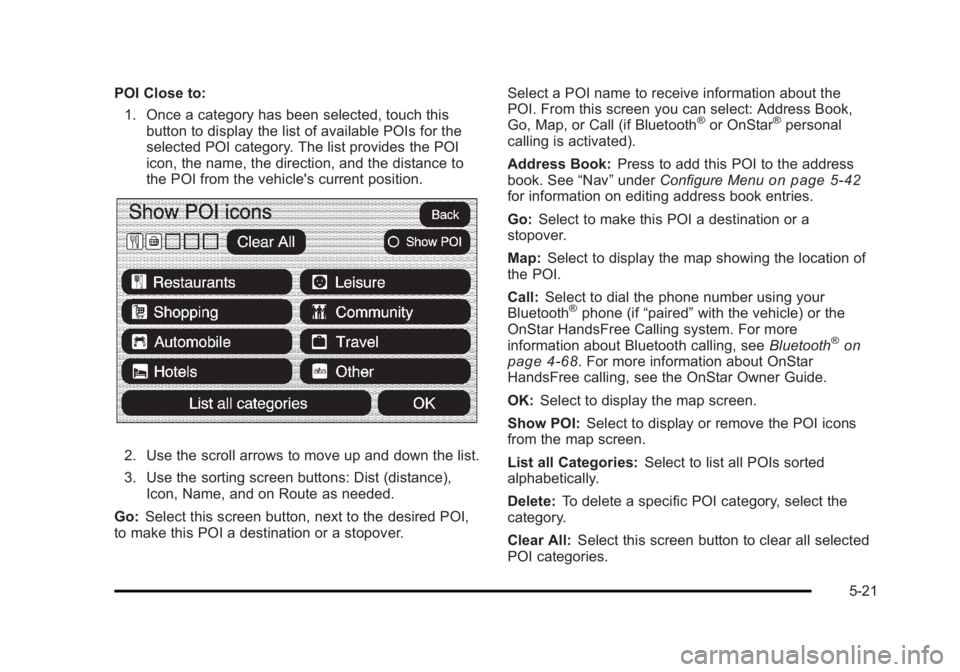
POI Close to:
1. Once a category has been selected, touch this
button to display the list of available POIs for the
selected POI category. The list provides the POI
icon, the name, the direction, and the distance to
the POI from the vehicle's current position.
2. Use the scroll arrows to move up and down the list.
3. Use the sorting screen buttons: Dist (distance),
Icon, Name, and on Route as needed.
Go: Select this screen button, next to the desired POI,
to make this POI a destination or a stopover. Select a POI name to receive information about the
POI. From this screen you can select: Address Book,
Go, Map, or Call (if Bluetooth ®
or OnStar ®
personal
calling is activated).
Address Book: Press to add this POI to the address
book. See “ Nav ” under Configure Menu
on page 5 ‑ 42
for information on editing address book entries.
Go: Select to make this POI a destination or a
stopover.
Map: Select to display the map showing the location of
the POI.
Call: Select to dial the phone number using your
Bluetooth ®
phone (if “ paired ” with the vehicle) or the
OnStar HandsFree Calling system. For more
information about Bluetooth calling, see Bluetooth ®
on
page 4 ‑ 68 . For more information about OnStar
HandsFree calling, see the OnStar Owner Guide.
OK: Select to display the map screen.
Show POI: Select to display or remove the POI icons
from the map screen.
List all Categories: Select to list all POIs sorted
alphabetically.
Delete: To delete a specific POI category, select the
category.
Clear All: Select this screen button to clear all selected
POI categories.
5-21
Page 337 of 620
Black plate (35,1)Cadillac Escalade/Escalade ESV Owner Manual - 2010
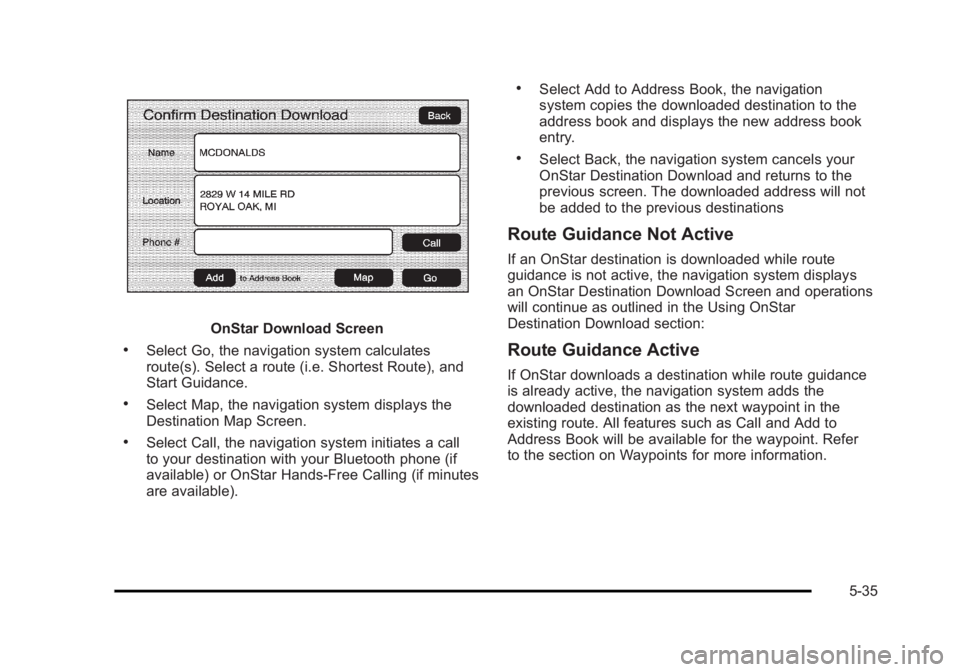
OnStar Download Screen.
Select Go, the navigation system calculates
route(s). Select a route (i.e. Shortest Route), and
Start Guidance. .
Select Map, the navigation system displays the
Destination Map Screen. .
Select Call, the navigation system initiates a call
to your destination with your Bluetooth phone (if
available) or OnStar Hands-Free Calling (if minutes
are available). .
Select Add to Address Book, the navigation
system copies the downloaded destination to the
address book and displays the new address book
entry. .
Select Back, the navigation system cancels your
OnStar Destination Download and returns to the
previous screen. The downloaded address will not
be added to the previous destinations
Route Guidance Not Active If an OnStar destination is downloaded while route
guidance is not active, the navigation system displays
an OnStar Destination Download Screen and operations
will continue as outlined in the Using OnStar
Destination Download section:
Route Guidance Active If OnStar downloads a destination while route guidance
is already active, the navigation system adds the
downloaded destination as the next waypoint in the
existing route. All features such as Call and Add to
Address Book will be available for the waypoint. Refer
to the section on Waypoints for more information.
5-35
Page 338 of 620
Black plate (36,1)Cadillac Escalade/Escalade ESV Owner Manual - 2010
Previous Destinations Previous OnStar Destination Downloads are saved
under Previous Destinations in the navigation system
where they can be accessed or saved to the
address book.
Important Notes regarding OnStar Destination
Download: .
If the navigation system is turned off when the
destination download is attempted, the navigation
system will automatically turn on and display the
OnStar Destination Download Screen. The radio
will remain on after the download occurs. .
If OnStar downloads a destination and the address
is not found in the mapping disc ’ s database and
routing by coordinates is not available, the Go
and Map buttons gray out and routing will not be
available. Press the blue OnStar button for further
assistance. .
The Call button grays out when there is no phone
number available for your destination and while
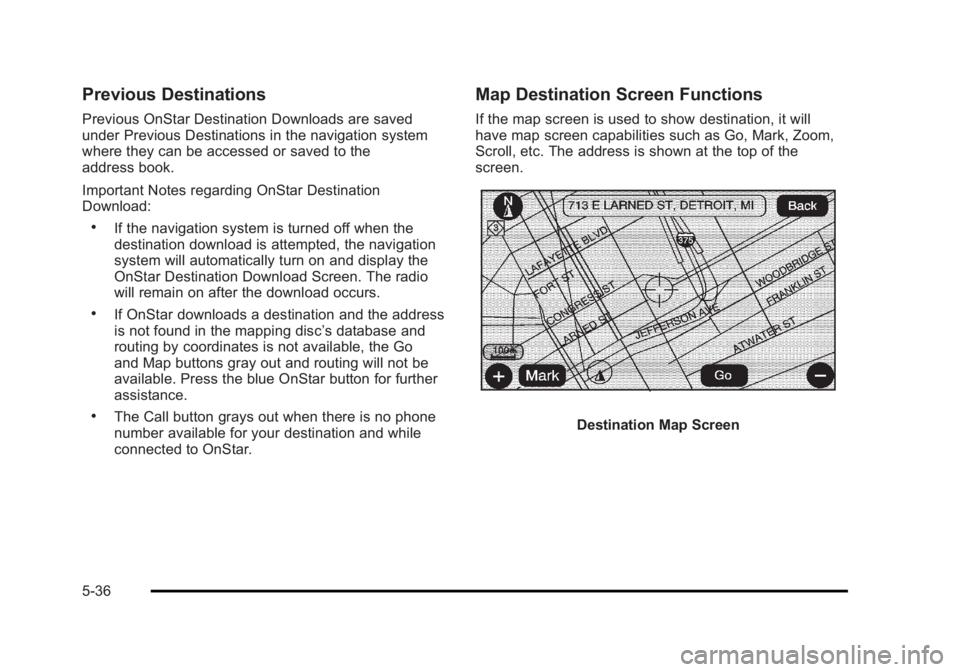
connected to OnStar. Map Destination Screen Functions If the map screen is used to show destination, it will
have map screen capabilities such as Go, Mark, Zoom,
Scroll, etc. The address is shown at the top of the
screen.
Destination Map Screen
5-36
Page 347 of 620
Black plate (45,1)Cadillac Escalade/Escalade ESV Owner Manual - 2010
To add or change the phone number of an address
book entry:
1. Select the CONFIG hard key.
2. Select the NAV screen button.
3. Select the Edit/View Address Book screen button.
4. Select the address book entry to change.
5. Touch the Phone # screen button and use the
numeric keyboard to input or change the phone
number.
6. Touch the OK screen button to save your changes,
then touch the Back screen button to return to the
Address Book information screen.
To change the map icon of an address book entry:
1. Select the CONFIG hard key.
2. Select the NAV screen button.
3. Select the Edit/View Address Book screen button.
4. Select the address book entry to change.
5. Select the Icon screen button.
6. Select an icon from the list.
To add a voice tag to an address book entry:
1. Select the CONFIG hard key.
2. Select the NAV screen button.
3. Select the Edit/View Address Book screen button. 4. Select the Add Voice Tag screen button.
5. The system will ask for you to state the name. You
will have four seconds to state the name. The
system will respond back with the name and
prompt you to repeat the name for confirmation.
To delete an address book entry:
1. Select the CONFIG hard key.
2. Select the NAV screen button.
3. Select the Edit/View Address Book screen button.
4. Select the address book entry to delete.
5. Press the Delete screen button to delete the
address book entry.
6. A confirmation pop-up will display. Select Ok to
delete; select Cancel to cancel the operation.
To delete the entire address book:
1. Select the CONFIG hard key.
2. Select the NAV screen button.
3. Select the Edit/View Address Book screen button.
4. A list of all the address book entries will display.
Press and hold the Clear All screen button.
5. A confirmation pop-up will display. Select Ok to
delete; select Cancel to cancel the operation.
5-45
Page 361 of 620
Black plate (59,1)Cadillac Escalade/Escalade ESV Owner Manual - 2010
To recalibrate the vehicle's position on the map, see
your dealer.
If the System Needs Service If your system needs service and you have followed the
steps listed here and still are experiencing problems,
see your dealer for assistance.
Ordering Map DVDs The map DVD in your vehicle is the most up-to-date
information available when your vehicle was produced.
The map DVD is updated periodically, provided that the
map information has changed.
If you have any questions about the operation of
the navigation system or the update process, contact
the GM Nav Disc Center toll ‐ free phone number,
1 ‐ 877 ‐ NAV ‐ DISC (1 ‐ 877 ‐ 628 ‐ 3472) or go to the center's
website, gmnavdisc.com. If you need any updates or a
replacement disc, because the current disc is lost,
damaged, or needs to be updated, call the GM Nav
Disc Center or order a new disc online. To order a disc,
have your Vehicle Identification Number (VIN) available. This helps the center make sure you receive the correct
and most up-to-date DVD map disc for your vehicle.
See “ Vehicle Identification Number (VIN) ” in the Index of
your vehicle's owner manual for more information.
After receiving the updated disc, replace the old disc in
the navigation system. See “ Installing the DVD Map
Disc ” and “ Ejecting the DVD Map Disc ” under Maps
on
page 5 ‑ 14 . Dispose of the old disc to avoid confusion
about which disc is the most current.
Database Coverage Explanations Coverage area depends upon the map detail available.
Some areas have greater map detail than others. The
navigation system works only as well as the information
provided on the map disc. See Ordering Map DVDs
on
page 5 ‑ 59 on how to obtain updated map information.
5-59
Page 362 of 620
Black plate (60,1)Cadillac Escalade/Escalade ESV Owner Manual - 2010
Navigation Audio System Notice: Before adding any sound equipment to the
vehicle, such as an audio system, CD player, CB
radio, mobile telephone, or two-way radio, make
sure that it can be added by checking with your
dealer. Also, check federal rules covering mobile
radio and telephone units. If sound equipment can
be added, it is very important to do it properly.
Added sound equipment can interfere with the
operation of the vehicle's engine, radio, or other
systems, and even damage them. The vehicle's
systems can interfere with the operation of sound
equipment that has been added.
Notice: The chime signals related to safety belts,
parking brake, and other functions of the vehicle
operate through the navigation system. If that
equipment is replaced or additional equipment is
added to the vehicle, the chimes may not work.
Make sure that replacement or additional equipment
is compatible with the vehicle before installing it.
See “ Accessories and Modifications ” in the
vehicle's owner manual. Playing the Radio
O /
n (Power/Volume): Press to turn the audio
system on and off. Turn to increase or to decrease the
volume.
Press and hold for more than two seconds to turn off
the navigation system, the Rear Seat Entertainment
(RSE) video screen, and Rear Seat Audio (RSA). If the
vehicle has not been turned off, press this knob to turn
RSE and RSA back on and to continue playback of the
last active source.
w (Tuning Knob): Turn to go to the next or previous
frequency or disc track or chapter. See CD Player
on
page 5 ‑ 68 or DVD Player on page 5 ‑ 75 for more
information.
AUDIO: Press to display the audio screen. Press to
switch between AM, FM, or XM, if equipped, DISC,
or AUX (Auxiliary), or touch the screen button. See CD
Player on page 5 ‑ 68 , DVD Player on page 5 ‑ 75 , and
Auxiliary Devices
on page 5 ‑ 85 for more information.
5-60