transmission CADILLAC ESCALADE ESV 2010 Owners Manual
[x] Cancel search | Manufacturer: CADILLAC, Model Year: 2010, Model line: ESCALADE ESV, Model: CADILLAC ESCALADE ESV 2010Pages: 620, PDF Size: 7.4 MB
Page 7 of 620
Black plate (1,1)Cadillac Escalade/Escalade ESV Owner Manual - 2010
Section 1 In BriefInstrument Panel . . . . . . . . . . . . . . . . . . . . . . . . . . . . . . . . . . . 1-2
Initial Drive Information . . . . . . . . . . . . . . . . . . . . . . . . . . . 1-4
Remote Keyless Entry (RKE) System . . . . . . . . . . . 1-4
Remote Vehicle Start . . . . . . . . . . . . . . . . . . . . . . . . . . . 1-4
Door Locks . . . . . . . . . . . . . . . . . . . . . . . . . . . . . . . . . . . . . 1-5
Liftgate . . . . . . . . . . . . . . . . . . . . . . . . . . . . . . . . . . . . . . . . . . 1-6
Windows . . . . . . . . . . . . . . . . . . . . . . . . . . . . . . . . . . . . . . . . 1-7
Seat Adjustment . . . . . . . . . . . . . . . . . . . . . . . . . . . . . . . . 1-7
Second Row Seats . . . . . . . . . . . . . . . . . . . . . . . . . . . . . 1-9
Third Row Seats . . . . . . . . . . . . . . . . . . . . . . . . . . . . . . . . 1-9
Heated Seats . . . . . . . . . . . . . . . . . . . . . . . . . . . . . . . . . . 1-10
Head Restraint Adjustment . . . . . . . . . . . . . . . . . . . . 1-10
Safety Belt . . . . . . . . . . . . . . . . . . . . . . . . . . . . . . . . . . . . . 1-11
Sensing System for Passenger Airbag . . . . . . . . . 1-11
Mirror Adjustment . . . . . . . . . . . . . . . . . . . . . . . . . . . . . . 1-12
Steering Wheel Adjustment . . . . . . . . . . . . . . . . . . . . 1-13
Interior Lighting . . . . . . . . . . . . . . . . . . . . . . . . . . . . . . . . 1-13
Exterior Lighting . . . . . . . . . . . . . . . . . . . . . . . . . . . . . . . 1-14
Windshield Wiper/Washer . . . . . . . . . . . . . . . . . . . . . . 1-15
Climate Controls . . . . . . . . . . . . . . . . . . . . . . . . . . . . . . . 1-15
Transmission . . . . . . . . . . . . . . . . . . . . . . . . . . . . . . . . . . 1-16 Vehicle Features . . . . . . . . . . . . . . . . . . . . . . . . . . . . . . . . . . 1-16
Satellite Radio . . . . . . . . . . . . . . . . . . . . . . . . . . . . . . . . . 1-16
Portable Audio Devices . . . . . . . . . . . . . . . . . . . . . . . . 1-17
Steering Wheel Controls . . . . . . . . . . . . . . . . . . . . . . . 1-17
Bluetooth ®
. . . . . . . . . . . . . . . . . . . . . . . . . . . . . . . . . . . . . 1-18
Navigation System . . . . . . . . . . . . . . . . . . . . . . . . . . . . . 1-18
Driver Information Center (DIC) . . . . . . . . . . . . . . . . 1-18
Cruise Control . . . . . . . . . . . . . . . . . . . . . . . . . . . . . . . . . 1-20
Side Blind Zone Alert (SBZA) . . . . . . . . . . . . . . . . . . 1-20
Rear Vision Camera (RVC) . . . . . . . . . . . . . . . . . . . . 1-21
Ultrasonic Parking Assist . . . . . . . . . . . . . . . . . . . . . . 1-21
Power Outlets . . . . . . . . . . . . . . . . . . . . . . . . . . . . . . . . . 1-21
Universal Remote System . . . . . . . . . . . . . . . . . . . . . 1-21
Performance and Maintenance . . . . . . . . . . . . . . . . . . 1-22
StabiliTrak ®
System . . . . . . . . . . . . . . . . . . . . . . . . . . . 1-22
Tire Pressure Monitor . . . . . . . . . . . . . . . . . . . . . . . . . . 1-22
Engine Oil Life System . . . . . . . . . . . . . . . . . . . . . . . . 1-23
Fuel E85 (85% Ethanol) . . . . . . . . . . . . . . . . . . . . . . . 1-23
Driving for Better Fuel Economy . . . . . . . . . . . . . . . 1-23
Roadside Service . . . . . . . . . . . . . . . . . . . . . . . . . . . . . . 1-24
OnStar ®
. . . . . . . . . . . . . . . . . . . . . . . . . . . . . . . . . . . . . . . 1-24
1-1
Page 9 of 620
Black plate (3,1)Cadillac Escalade/Escalade ESV Owner Manual - 2010
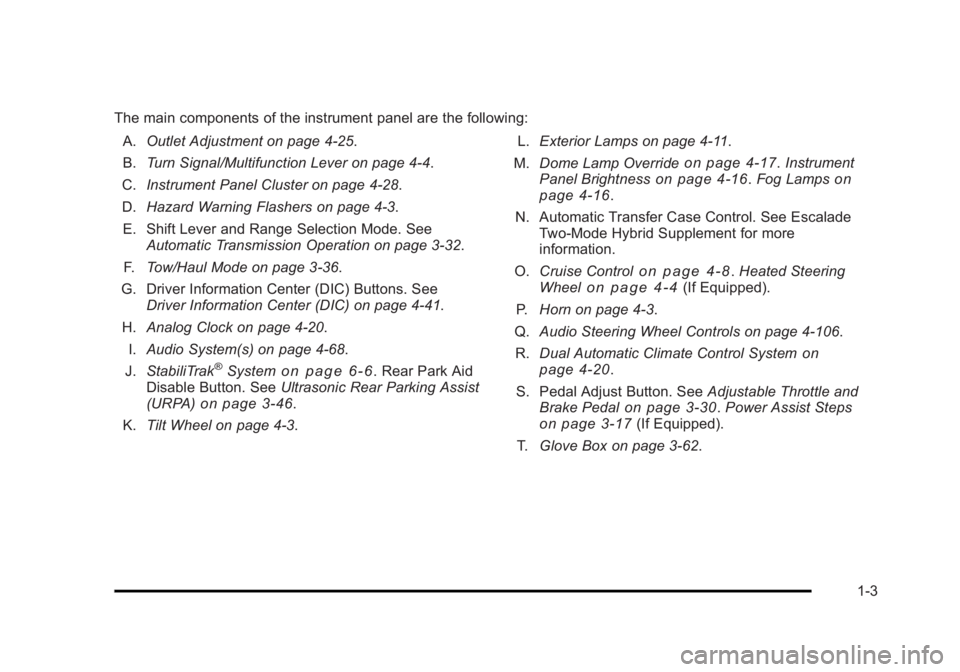
The main components of the instrument panel are the following:
A. Outlet Adjustment on page 4 ‑ 25 .
B. Turn Signal/Multifunction Lever on page 4 ‑ 4 .
C. Instrument Panel Cluster on page 4 ‑ 28 .
D. Hazard Warning Flashers on page 4 ‑ 3 .
E. Shift Lever and Range Selection Mode. See
Automatic Transmission Operation on page 3 ‑ 32 .
F. Tow/Haul Mode on page 3 ‑ 36 .
G. Driver Information Center (DIC) Buttons. See
Driver Information Center (DIC) on page 4 ‑ 41 .
H. Analog Clock on page 4 ‑ 20 .
I. Audio System(s) on page 4 ‑ 68 .
J. StabiliTrak ®
System on page 6 ‑ 6 . Rear Park Aid
Disable Button. See Ultrasonic Rear Parking Assist
(URPA) on page 3 ‑ 46 .
K. Tilt Wheel on page 4 ‑ 3 . L. Exterior Lamps on page 4 ‑ 11 .
M. Dome Lamp Override on page 4 ‑ 17 . Instrument
Panel Brightness on page 4 ‑ 16 . Fog Lamps on
page 4 ‑ 16 .
N. Automatic Transfer Case Control. See Escalade
Two ‐ Mode Hybrid Supplement for more
information.
O. Cruise Control
on page 4 ‑ 8 . Heated Steering
Wheel on page 4 ‑ 4 (If Equipped).
P. Horn on page 4 ‑ 3 .
Q. Audio Steering Wheel Controls on page 4 ‑ 106 .
R. Dual Automatic Climate Control System
on
page 4 ‑ 20 .
S. Pedal Adjust Button. See Adjustable Throttle and
Brake Pedal on page 3 ‑ 30 . Power Assist Steps
on page 3 ‑ 17 (If Equipped).
T. Glove Box on page 3 ‑ 62 .
1-3
Page 22 of 620
Black plate (16,1)Cadillac Escalade/Escalade ESV Owner Manual - 2010
See Dual Automatic Climate Control System on
page 4 ‑ 20
and Rear Air Conditioning and Heating
System and Electronic Climate Controls on page 4 ‑ 26
(If Equipped).
Transmission Driver Shift Control (DSC)
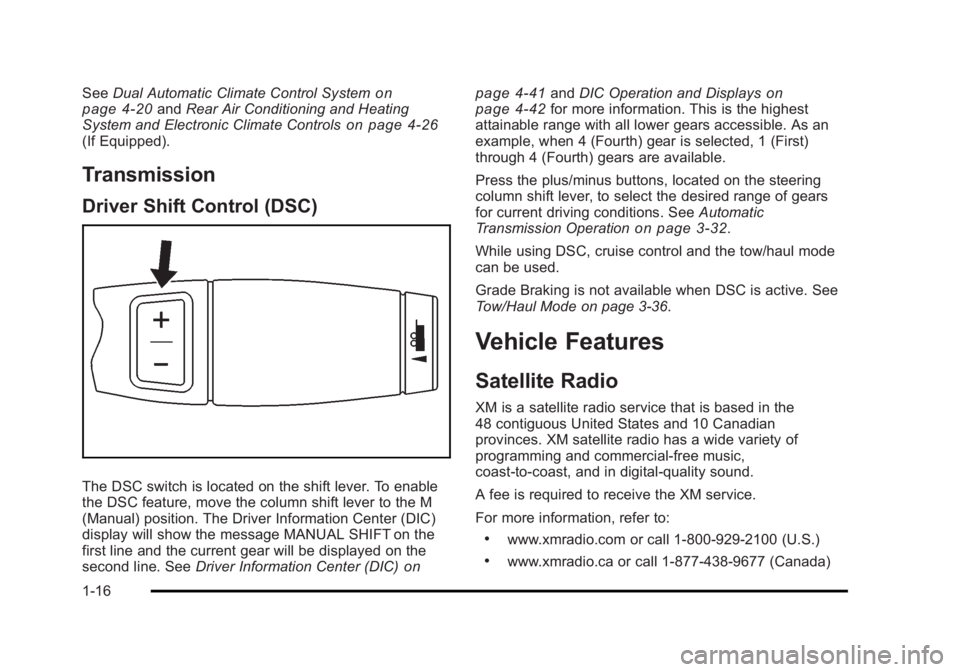
The DSC switch is located on the shift lever. To enable
the DSC feature, move the column shift lever to the M
(Manual) position. The Driver Information Center (DIC)
display will show the message MANUAL SHIFT on the
first line and the current gear will be displayed on the
second line. See Driver Information Center (DIC) on page 4 ‑ 41 and DIC Operation and Displays on
page 4 ‑ 42
for more information. This is the highest
attainable range with all lower gears accessible. As an
example, when 4 (Fourth) gear is selected, 1 (First)
through 4 (Fourth) gears are available.
Press the plus/minus buttons, located on the steering
column shift lever, to select the desired range of gears
for current driving conditions. See Automatic
Transmission Operation on page 3 ‑ 32 .
While using DSC, cruise control and the tow/haul mode
can be used.
Grade Braking is not available when DSC is active. See
Tow/Haul Mode on page 3 ‑ 36 .
Vehicle Features Satellite Radio XM is a satellite radio service that is based in the
48 contiguous United States and 10 Canadian
provinces. XM satellite radio has a wide variety of
programming and commercial-free music,
coast-to-coast, and in digital-quality sound.
A fee is required to receive the XM service.
For more information, refer to: .
www.xmradio.com or call 1-800-929-2100 (U.S.) .
www.xmradio.ca or call 1-877-438-9677 (Canada)
1-16
Page 24 of 620

Black plate (18,1)Cadillac Escalade/Escalade ESV Owner Manual - 2010
Bluetooth ®
For vehicles with an in-vehicle Bluetooth system, it
allows users with a Bluetooth enabled cell phone to
make and receive hands-free calls using the vehicle ’ s
audio system and controls.
The Bluetooth enabled cell phone must be paired with
the in-vehicle Bluetooth system before it can be used in
the vehicle. Not all phones will support all functions. For
more information visit www.gm.com/bluetooth.
For more information, see Bluetooth ®
on page 4 ‑ 68 .
Navigation System The vehicle's navigation system provides detailed maps
of most major freeways and roads throughout the
United States and Canada. After a destination has been
set, the system provides turn-by-turn instructions for
reaching the destination. In addition, the system can
help locate a variety of points of interest (POI), such as
banks, airports, restaurants, and more.
See Navigation System in the owner's manual for more
information. Driver Information Center (DIC) The DIC display is located at the bottom of the
instrument panel cluster. It shows the status of many
vehicle systems and enables access to the
personalization menu.
The DIC buttons are
located on the instrument
panel, next to the steering
wheel.
3 (Trip/Fuel): Press this button to display the
odometer, trip odometer, fuel range, average economy,
fuel used, timer, and transmission temperature. The
compass and outside air temperature will also be shown
in the display. The temperature will be shown in °F or
°C depending on the units selected.
1-18
Page 45 of 620
Black plate (13,1)Cadillac Escalade/Escalade ESV Owner Manual - 2010
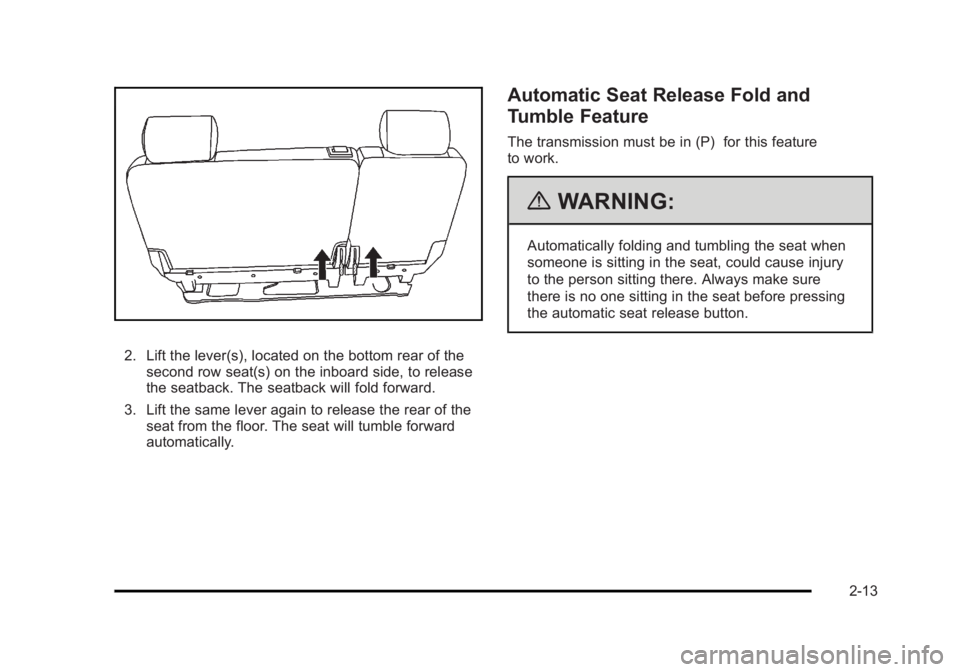
2. Lift the lever(s), located on the bottom rear of the
second row seat(s) on the inboard side, to release
the seatback. The seatback will fold forward.
3. Lift the same lever again to release the rear of the
seat from the floor. The seat will tumble forward
automatically. Automatic Seat Release Fold and
Tumble Feature The transmission must be in (P) for this feature
to work.
{ WARNING: Automatically folding and tumbling the seat when
someone is sitting in the seat, could cause injury
to the person sitting there. Always make sure
there is no one sitting in the seat before pressing
the automatic seat release button.
2-13
Page 52 of 620
Black plate (20,1)Cadillac Escalade/Escalade ESV Owner Manual - 2010
Automatic Seat Release Fold and
Tumble Feature The transmission must be in (P) for this feature
to work.
{ WARNING: Automatically folding and tumbling the seat when
someone is sitting in the seat, could cause injury
to the person sitting there. Always make sure
there is no one sitting in the seat before pressing
the automatic seat release button. Folding and Tumbling the Second Row
Seat(s) from the Third Row Seats or
Outside
{ WARNING: Using the third row seating position while the
second row is folded, or folded and tumbled, could
cause injury in a sudden stop or crash. Be sure to
return the seat to the passenger seating position.
Push and pull on the seat to make sure it is
locked into place.
To fold and tumble the seat from the third row seats,
if your vehicle has them, do the following:
1. Make sure that there is nothing under, in front of,
or on the seat.
Notice: Folding a rear seat with the safety belts still
fastened may cause damage to the seat or the
safety belts. Always unbuckle the safety belts and
return them to their normal stowed position before
folding a rear seat.
2-20
Page 125 of 620
Black plate (1,1)Cadillac Escalade/Escalade ESV Owner Manual - 2010
Section 3 Features and ControlsKeys . . . . . . . . . . . . . . . . . . . . . . . . . . . . . . . . . . . . . . . . . . . . . . . . 3-3
Remote Keyless Entry (RKE) System . . . . . . . . . . . 3-4
Remote Keyless Entry (RKE) System
Operation . . . . . . . . . . . . . . . . . . . . . . . . . . . . . . . . . . . . . 3-4
Remote Vehicle Start . . . . . . . . . . . . . . . . . . . . . . . . . . . 3-7
Doors and Locks . . . . . . . . . . . . . . . . . . . . . . . . . . . . . . . . . 3-10
Door Locks . . . . . . . . . . . . . . . . . . . . . . . . . . . . . . . . . . . . 3-10
Power Door Locks . . . . . . . . . . . . . . . . . . . . . . . . . . . . . 3-10
Delayed Locking . . . . . . . . . . . . . . . . . . . . . . . . . . . . . . . 3-11
Programmable Automatic Door Locks . . . . . . . . . . 3-11
Rear Door Security Locks . . . . . . . . . . . . . . . . . . . . . . 3-11
Lockout Protection . . . . . . . . . . . . . . . . . . . . . . . . . . . . . 3-12
Liftgate/Liftglass . . . . . . . . . . . . . . . . . . . . . . . . . . . . . . . 3-12
Power Liftgate . . . . . . . . . . . . . . . . . . . . . . . . . . . . . . . . . 3-14
Power Assist Steps . . . . . . . . . . . . . . . . . . . . . . . . . . . . 3-17
Windows . . . . . . . . . . . . . . . . . . . . . . . . . . . . . . . . . . . . . . . . . . 3-18
Power Windows . . . . . . . . . . . . . . . . . . . . . . . . . . . . . . . 3-19
Sun Visors . . . . . . . . . . . . . . . . . . . . . . . . . . . . . . . . . . . . . 3-21 Theft-Deterrent Systems . . . . . . . . . . . . . . . . . . . . . . . . . 3-22
Content Theft-Deterrent . . . . . . . . . . . . . . . . . . . . . . . . 3-22
PASS-Key ®
III+ Electronic Immobilizer . . . . . . . . . 3-24
PASS-Key ®
III+ Electronic Immobilizer
Operation . . . . . . . . . . . . . . . . . . . . . . . . . . . . . . . . . . . . 3-24
Starting and Operating Your Vehicle . . . . . . . . . . . . 3-26
New Vehicle Break-In . . . . . . . . . . . . . . . . . . . . . . . . . . 3-26
Ignition Positions . . . . . . . . . . . . . . . . . . . . . . . . . . . . . . 3-27
Retained Accessory Power (RAP) . . . . . . . . . . . . . 3-28
Starting the Engine . . . . . . . . . . . . . . . . . . . . . . . . . . . . 3-29
Adjustable Throttle and Brake Pedal . . . . . . . . . . . 3-30
Engine Coolant Heater . . . . . . . . . . . . . . . . . . . . . . . . . 3-31
Active Fuel Management ™ . . . . . . . . . . . . . . . . . . . . 3-32
Automatic Transmission Operation . . . . . . . . . . . . . 3-32
Tow/Haul Mode . . . . . . . . . . . . . . . . . . . . . . . . . . . . . . . . 3-36
Parking Brake . . . . . . . . . . . . . . . . . . . . . . . . . . . . . . . . . 3-38
Shifting Into Park . . . . . . . . . . . . . . . . . . . . . . . . . . . . . . 3-39
Shifting Out of Park . . . . . . . . . . . . . . . . . . . . . . . . . . . . 3-40
Parking Over Things That Burn . . . . . . . . . . . . . . . . 3-41
Engine Exhaust . . . . . . . . . . . . . . . . . . . . . . . . . . . . . . . . 3-41
Running the Vehicle While Parked . . . . . . . . . . . . . 3-42
3-1
Page 140 of 620

Black plate (16,1)Cadillac Escalade/Escalade ESV Owner Manual - 2010
Pressing the buttons, or touchpad switch a second time
while the liftgate is moving reverses the direction.
l : The liftgate can also be closed by pressing the
power liftgate button next to the liftgate latch.
Press the button a second time during liftgate operation
to reverse that operation.
The power liftgate may be temporarily disabled under
extreme temperatures, or under low battery conditions.
If this occurs, the liftgate can still be operated manually.
If you shift the transmission out of P (Park) while the
power function is in progress, the liftgate power function
will continue to completion. If you shift the transmission
out of P (Park) and accelerate before the power liftgate
latches closed, the liftgate may reverse to the open
position. Cargo could fall out of the vehicle. Always
make sure the power liftgate is closed and latched
before you drive away.
If you power open the liftgate and the liftgate support
struts have lost pressure, the lights will flash and a
chime will sound. The liftgate will stay open temporarily,
then slowly close. See your dealer for service before
using the liftgate. Obstacle Detection Features If the liftgate encounters an obstacle during a power
open or close cycle, a warning chime will sound and the
liftgate will automatically reverse direction to the full
closed or open position. After removing the obstruction,
the power liftgate operation can be used again. If the
liftgate encounters multiple obstacles on the same
power cycle, the power function will deactivate, and you
must manually open or close the liftgate. The REAR
ACCESS OPEN warning message in the Driver
Information Center (DIC) will indicate that the liftgate is
open. After removing the obstructions, manually open
the liftgate to the full open position or close the liftgate
to the fully closed and latched position. The liftgate will
now resume normal power operation.
Your vehicle has pinch sensors located on the side
edges of the liftgate. If an object is caught between the
liftgate and the body and presses against this sensor,
the liftgate will reverse direction and open fully. The
liftgate will remain open until it is activated again or
closed manually. Do not force the liftgate open or closed
during a power cycle.
3-16
Page 151 of 620
Black plate (27,1)Cadillac Escalade/Escalade ESV Owner Manual - 2010
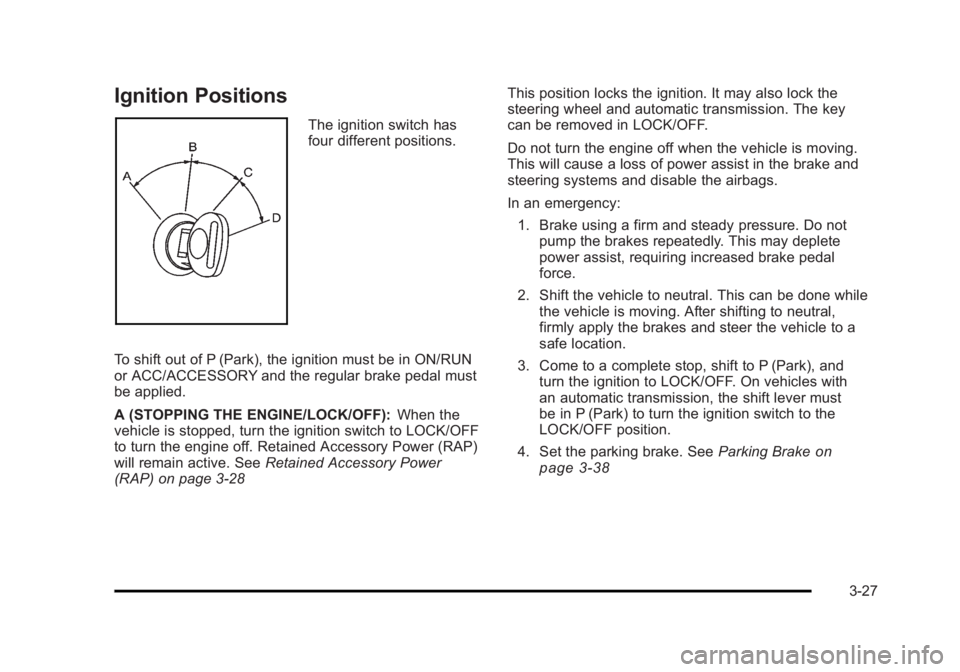
Ignition Positions The ignition switch has
four different positions.
To shift out of P (Park), the ignition must be in ON/RUN
or ACC/ACCESSORY and the regular brake pedal must
be applied.
A (STOPPING THE ENGINE/LOCK/OFF): When the
vehicle is stopped, turn the ignition switch to LOCK/OFF
to turn the engine off. Retained Accessory Power (RAP)
will remain active. See Retained Accessory Power
(RAP) on page 3 ‑ 28 This position locks the ignition. It may also lock the
steering wheel and automatic transmission. The key
can be removed in LOCK/OFF.
Do not turn the engine off when the vehicle is moving.
This will cause a loss of power assist in the brake and
steering systems and disable the airbags.
In an emergency:
1. Brake using a firm and steady pressure. Do not
pump the brakes repeatedly. This may deplete
power assist, requiring increased brake pedal
force.
2. Shift the vehicle to neutral. This can be done while
the vehicle is moving. After shifting to neutral,
firmly apply the brakes and steer the vehicle to a
safe location.
3. Come to a complete stop, shift to P (Park), and
turn the ignition to LOCK/OFF. On vehicles with
an automatic transmission, the shift lever must
be in P (Park) to turn the ignition switch to the
LOCK/OFF position.
4. Set the parking brake. See Parking Brake
on
page 3 ‑ 38
3-27
Page 152 of 620

Black plate (28,1)Cadillac Escalade/Escalade ESV Owner Manual - 2010
The steering may bind with the wheels turned off center.
If this happens, move the steering wheel from right to
left while turning the key to ACC/ACCESSORY. If this
doesn't work, then the vehicle needs service.
Notice: Using a tool to force the key to turn in the
ignition could cause damage to the switch or break
the key. Use the correct key, make sure it is all the
way in, and turn it only with your hand. If the key
cannot be turned by hand, see your dealer.
B (ACC/ACCESSORY): This position lets things like
the radio and the windshield wipers operate while the
engine is off. Use this position if the vehicle must be
pushed or towed.
C (ON/RUN): This position can be used to operate the
electrical accessories and to display some instrument
panel cluster warning and indicator lights. The switch
stays in this position when the engine is running. The
transmission is also unlocked in this position on
automatic transmission vehicles.
If you leave the key in the ACC/ACCESSORY or
ON/RUN position with the engine off, the battery could
be drained. You may not be able to start the vehicle if
the battery is allowed to drain for an extended period
of time. D (START): This is the position that starts the engine.
When the engine starts, release the key. The ignition
switch returns to ON/RUN for driving.
A warning tone will sound when the driver door is
opened, the ignition is in ACC/ACCESSORY or
LOCK/OFF and the key is in the ignition.
Retained Accessory Power (RAP) The following vehicle accessories can be used for up to
10 minutes after the engine is turned off: .
Audio System .
Power Windows .
OnStar ®
System (if equipped) .
Sunroof (if equipped)
These features work when the key is in ON/RUN or
ACC/ACCESSORY. Once the key is turned from
ON/RUN to LOCK/OFF, the windows and sunroof
continue to work up to 10 minutes until any door is
opened. The radio continues to work for up to
10 minutes or until the driver door is opened.
3-28