center console CADILLAC ESCALADE ESV 2011 User Guide
[x] Cancel search | Manufacturer: CADILLAC, Model Year: 2011, Model line: ESCALADE ESV, Model: CADILLAC ESCALADE ESV 2011Pages: 548, PDF Size: 8.45 MB
Page 145 of 548

Black plate (11,1)Cadillac Escalade/Escalade ESV Owner Manual - 2011
Instruments and Controls 5-11
Ashtrays The front ashtray is located in the
center console near the cupholders.
Press on the access door to open it
and use the ashtray.
Notice: If papers, pins, or other
flammable items are put in the
ashtray, hot cigarettes or other
smoking materials could ignite
them and possibly damage the
vehicle. Never put flammable
items in the ashtray.
To remove the ashtray, pull it from
the center console. Slide it back in
and push down to be sure it is
secure. Warning Lights,
Gauges, and
Indicators Warning lights and gauges can
signal that something is wrong
before it becomes serious enough
to cause an expensive repair or
replacement. Paying attention to the
warning lights and gauges could
prevent injury.
Warning lights come on when there
could be a problem with a vehicle
function. Some warning lights come
on briefly when the engine is started
to indicate they are working. Gauges can indicate when there
could be a problem with a vehicle
function. Often gauges and warning
lights work together to indicate a
problem with the vehicle.
When one of the warning lights
comes on and stays on while
driving, or when one of the gauges
shows there may be a problem,
check the section that explains what
to do. Follow this manual's advice.
Waiting to do repairs can be costly
and even dangerous.
Page 150 of 548

Black plate (16,1)Cadillac Escalade/Escalade ESV Owner Manual - 2011
5-16 Instruments and Controls
Airbag Readiness Light The system checks the airbag's
electrical system for possible
malfunctions. If the light stays on it
indicates there is an electrical
problem. The system check
includes the airbag sensor, the
pretensioners, the airbag modules,
the wiring, and the crash sensing
and diagnostic module. For more
information on the airbag system,
see Airbag System on page 3 ‑ 35 .
The airbag readiness light comes on
solid for a few seconds when the
engine is started. If the light does
not come on then, have it fixed
immediately. { WARNINGIf the airbag readiness light stays
on after the vehicle is started or
comes on while driving, it means
the airbag system might not be
working properly. The airbags in
the vehicle might not inflate in a
crash, or they could even inflate
without a crash. To help avoid
injury, have the vehicle serviced
right away.
If there is a problem with the airbag
system, a Driver Information Center
(DIC) message can also come on.
See Airbag System Messages on
page 5 ‑ 38 for more information. Passenger Airbag Status
Indicator If the vehicle has the airbag status
indicator pictured in the following
illustration, then the vehicle has a
passenger sensing system for the
right front passenger position. The
passenger airbag status indicator is
on the overhead console. See
Passenger Sensing System on
page 3 ‑ 44 for important safety
information.
In addition, if the vehicle has a
passenger sensing system for the
right front passenger position, the
label on the vehicle's sun visors
refers to “ ADVANCED AIRBAGS. ”
Page 228 of 548

Black plate (26,1)Cadillac Escalade/Escalade ESV Owner Manual - 2011
7-26 Infotainment System If the CD/DVD is not playing
correctly, for any other reason,
try a known good CD/DVD.
If any error occurs repeatedly or if
an error cannot be corrected,
contact your dealer.
Connecting a USB Storage
Device or iPod ®
The USB Port, located in the center
console, can be used to control an
iPod or a USB storage device.
To avoid connection problems,
extension cords are not
recommended. Use only the
cable that came with the device.
To connect a USB storage device,
connect the device to the USB port
located in the center console. To connect an iPod, connect one
end of the USB cable that came
with the iPod to the iPod ’ s dock
connector and connect the other
end to the USB port. If the vehicle is
on and the USB connection works,
“ OK to disconnect ” and a GM logo
may appear on the iPod and iPod
appears on the radio's display. The
iPod music appears on the radio ’ s
display and begins playing.
The iPod charges while it is
connected to the vehicle if the
vehicle is in the ACC/ACCESSORY
or ON/RUN position. When the
vehicle is turned off, the iPod
automatically powers off and will
not charge or draw power from the
vehicle's battery. USB Supported File and Folder
Structure
The guidelines that must be met
while using USB supported files
and folders are: .
Up to 700 folders. .
Up to 8 folders in depth. .
Up to 65,535 files. .
Folder and file names up to
64 bytes. .
Files with an .mp3 or .wma file
extension. .
AAC files stored on an iPod. .
FAT16 .
FAT32
Page 318 of 548
Black plate (6,1)Cadillac Escalade/Escalade ESV Owner Manual - 2011
8-6 Climate Controls
< (Rear Window Defogger):
Press to turn the rear window
defogger on or off. It automatically
turns off after it has been activated.
The defogger can also be turned off
by turning off the engine. Do not
drive the vehicle until all the
windows are clear.
Notice: Do not use a razor blade
or sharp object to clear the inside
rear window. Do not adhere
anything to the defogger grid
lines in the rear glass. These
actions may damage the rear
defogger. Repairs would not be
covered by your warranty.
Heated Mirrors: Press
< to help
clear fog or frost from the surface of
the outside mirror. See “ Outside
Heated Mirrors ” in Heated Mirrors
on page 2 ‑ 17 .
Heated or Cooled Seats: For
vehicles with heated and cooled
seats, see Heated and Ventilated
Front Seats on page 3 ‑ 8 . Rear Climate Control System
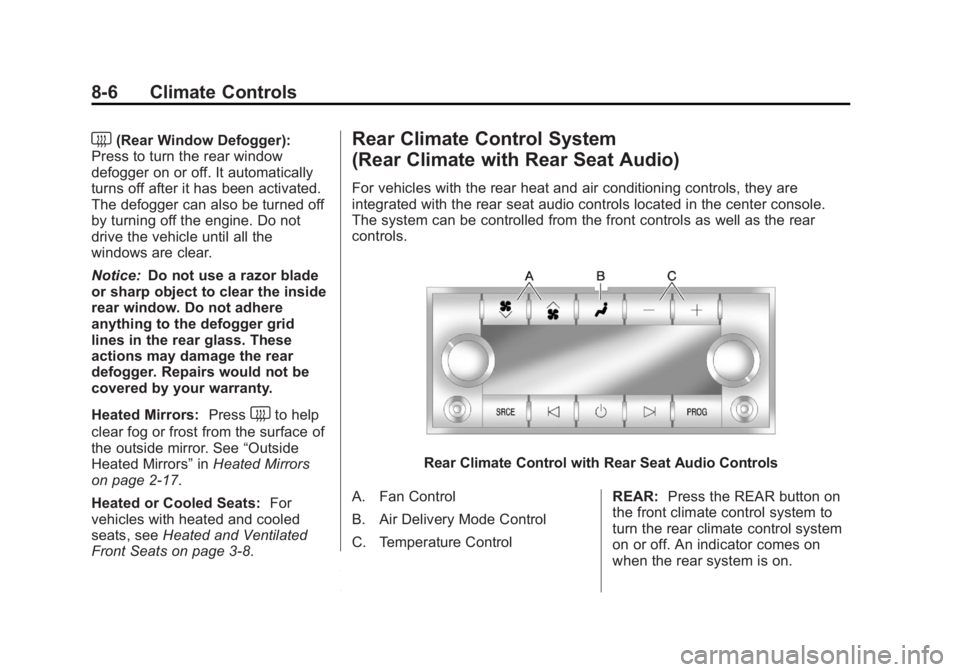
(Rear Climate with Rear Seat Audio) For vehicles with the rear heat and air conditioning controls, they are
integrated with the rear seat audio controls located in the center console.
The system can be controlled from the front controls as well as the rear
controls.
Rear Climate Control with Rear Seat Audio Controls
A. Fan Control
B. Air Delivery Mode Control
C. Temperature Control REAR: Press the REAR button on
the front climate control system to
turn the rear climate control system
on or off. An indicator comes on
when the rear system is on.
Page 351 of 548

Black plate (31,1)Cadillac Escalade/Escalade ESV Owner Manual - 2011
Driving and Operating 9-31.
Avoid making hard stops for
the first 322 km (200 miles) or
so. During this time the new
brake linings are not yet
broken in. Hard stops with
new linings can mean
premature wear and earlier
replacement. Follow this
breaking-in guideline every
time you get new brake
linings. .
Do not tow a trailer during
break-in. See Trailer Towing
on page 9 ‑ 74 for the trailer
towing capabilities of the
vehicle and more
information.
Following break ‐ in, engine speed
and load can be gradually
increased. Adjustable Throttle and
Brake Pedal The vehicle has adjustable throttle
and brake pedals that allow you to
change their positions.
The feature will not operate when
the vehicle is in R (Reverse) or
while using the cruise control.
The switch used to adjust the
pedals is located on the center
console below the climate control
system. Press the right and left arrows to
move the pedals either closer or
further from your body.
Before you start driving, fully press
the brake pedal to confirm the
adjustment is right for you. While
driving, make only small
adjustments.
The vehicle has a memory function
which allows the pedal positions
to be saved and recalled. See
“ Memory Features ” under Power
Seat Adjustment on page 3 ‑ 3 for
more information.
Page 538 of 548

Black plate (2,1)Cadillac Escalade/Escalade ESV Owner Manual - 2011
i-2 INDEX
BBattery . . . . . . . . . . . . . . . . . . . . . . . 10-27
Jump Starting . . . . . . . . . . . . . . . 10-82
Load Management . . . . . . . . . . . . 6-12
Power Protection . . . . . . . . . . . . . 6-12
Voltage and Charging
Messages . . . . . . . . . . . . . . . . . . . 5-31
Blade Replacement, Wiper . . . 10-32
Bluetooth . . . . . . . . . . . . . . . . . . . . . 7-103
Brake
Pedal and Adjustable
Throttle . . . . . . . . . . . . . . . . . . . . . . 9-31
Brake System Warning Light . . . 5-21
Brakes . . . . . . . . . . . . . . . . . . . . . . . . 10-24
Antilock . . . . . . . . . . . . . . . . . . . . . . . 9-45
Assist . . . . . . . . . . . . . . . . . . . . . . . . . 9-47
Fluid . . . . . . . . . . . . . . . . . . . . . . . . 10-26
Parking . . . . . . . . . . . . . . . . . . . . . . . 9-46
System Messages . . . . . . . . . . . . 5-31
Braking . . . . . . . . . . . . . . . . . . . . . . . . . 9-4
Break-In, New Vehicle . . . . . . . . . 9-30
Bulb Replacement . . . . . . . . . . . . 10-38
Back-Up Lamps . . . . . . . . . . . . 10-36
Fog Lamps . . . . . . . . . . . . . . . . . . . . 6-9
Headlamp Aiming . . . . . . . . . . . 10-34 Bulb Replacement (cont.)
Headlamps . . . . . . . . . . . . . . . . . 10-36
High Intensity Discharge
(HID) Lighting . . . . . . . . . . . . . 10-36
License Plate Lamps . . . . . . . 10-37
Buying New Tires . . . . . . . . . . . . . 10-61
C Calibration . . . . . . . . . . . . . . . . . . . . . . 5-6
California
Fuel Requirements . . . . . . . . . . . 9-64
Perchlorate Materials
Requirements . . . . . . . . . . . . . . . 10-3
Warning . . . . . . . . . . . . . . . . . . . . . . 10-2
Camera, Rear Vision . . . . . . . . . . 9-59
Canadian Vehicle Owners . . . . . . . . iii
Capacities and
Specifications . . . . . . . . . . . . . . . . 12-2
Carbon Monoxide
Engine Exhaust . . . . . . . . . . . . . . . 9-38
Liftgate . . . . . . . . . . . . . . . . . . 2-9, 2-10
Winter Driving . . . . . . . . . . . . . . . . 9-21
Cautions, Danger, and
Warnings . . . . . . . . . . . . . . . . . . . . . . . . iv
CD/DVD Player . . . . . . . . . . . . . . . . 7-19
Center Console Storage . . . . . . . . 4-3 Chains, Tire . . . . . . . . . . . . . . . . . . 10-66
Charging
System Light . . . . . . . . . . . . . . . . . 5-18
Check
Engine Light . . . . . . . . . . . . . . . . . . 5-18
Ignition
Transmission Lock . . . . . . . . 10-31
Child Restraints
Infants and Young
Children . . . . . . . . . . . . . . . . . . . . . 3-53
Lower Anchors and
Tethers for Children . . . . . . . . . 3-59
Older Children . . . . . . . . . . . . . . . . 3-51
Securing . . . . . . . . . . . . . . . . 3-68, 3-71
Systems . . . . . . . . . . . . . . . . . . . . . . 3-56
Cigarette Lighter . . . . . . . . . . . . . . . 5-10
Circuit Breakers . . . . . . . . . . . . . . 10-39
Cleaning
Exterior Care . . . . . . . . . . . . . . . 10-90
Interior Care . . . . . . . . . . . . . . . . 10-94
Climate Control Systems
Dual Automatic . . . . . . . . . . . . . . . . 8-1
Rear . . . . . . . . . . . . . . . . . . . . . . . . . . . 8-6
Clock . . . . . . . . . . . . . . . . . . . . . . . . . . . 5-8
Cluster, Instrument . . . . . . . . . . . . 5-12
Collision Damage Repair . . . . . 13-12
Page 547 of 548
Black plate (11,1)Cadillac Escalade/Escalade ESV Owner Manual - 2011
INDEX i-11Steering . . . . . . . . . . . . . . . . . . . . . . . . 9-5
Fluid, Power . . . . . . . . . . . . . . . . 10-23
Heated Wheel . . . . . . . . . . . . . . . . . 5-5
Wheel Adjustment . . . . . . . . . . . . . 5-2
Wheel Controls . . . . . . . . . . . . . . . . 5-3
Steps
Power Assist . . . . . . . . . . . . . . . . . 2-13
Storage
Rear . . . . . . . . . . . . . . . . . . . . . . . . . . . 4-2
Storage Areas
Armrest . . . . . . . . . . . . . . . . . . . . . . . . 4-2
Center Console . . . . . . . . . . . . . . . . 4-3
Glove Box . . . . . . . . . . . . . . . . . . . . . 4-1
Roof Rack System . . . . . . . . . . . . . 4-3
Stuck Vehicle . . . . . . . . . . . . . . . . . . 9-23
Sun Visors . . . . . . . . . . . . . . . . . . . . . 2-22
Sunroof . . . . . . . . . . . . . . . . . . . . . . . . 2-22
Symbols . . . . . . . . . . . . . . . . . . . . . . . . . . iv
Symbols, Navigation . . . . . . . . . . . 7-64
System
Infotainment . . . . . . . . . . . . . . . . . . . 7-2
Roof Rack . . . . . . . . . . . . . . . . . . . . . 4-3
System Needs Service, If . . . . . . 7-98 T Tachometer . . . . . . . . . . . . . . . . . . . . 5-13
Text Telephone (TTY) Users . . . 13-6
Theft-Deterrent Systems . . . . . . . 2-15
Immobilizer . . . . . . . . . . . . . . . . . . . 2-14
Third-Row Seats . . . . . . . . . . . . . . . 3-14
Throttle, Adjustable . . . . . . . . . . . . 9-31
Time . . . . . . . . . . . . . . . . . . . . . . . . . . . . 5-8
Tires
Buying New Tires . . . . . . . . . . . 10-61
Chains . . . . . . . . . . . . . . . . . . . . . . 10-66
Changing . . . . . . . . . . . . . . . . . . . 10-68
Designations . . . . . . . . . . . . . . . 10-49
Different Size . . . . . . . . . . . . . . . 10-62
Full-Size Spare . . . . . . . . . . . . . 10-81
If a Tire Goes Flat . . . . . . . . . . 10-66
Inflation Monitor System . . . . 10-56
Inspection . . . . . . . . . . . . . . . . . . 10-58
Messages . . . . . . . . . . . . . . . . . . . . 5-39
Pressure . . . . . . . . . . . . . . . . . . . . 10-54
Pressure Light . . . . . . . . . . . . . . . . 5-23
Pressure Monitor System . . . 10-54
Rotation . . . . . . . . . . . . . . . . . . . . 10-59
Secondary Latch System . . . 10-79
Sidewall Labeling . . . . . . . . . . . 10-48 Tires (cont.)
Terminology and
Definitions . . . . . . . . . . . . . . . . . 10-49
Uniform Tire Quality
Grading . . . . . . . . . . . . . . . . . . . 10-63
Wheel Alignment and Tire
Balance . . . . . . . . . . . . . . . . . . . 10-65
Wheel Replacement . . . . . . . . 10-65
When It Is Time for New
Tires . . . . . . . . . . . . . . . . . . . . . . 10-60
Tow/Haul Mode . . . . . . . . . . . . . . . . 9-43
Tow/Haul Mode Light . . . . . . . . . . 5-23
Towing
Driving Characteristics . . . . . . . . 9-71
Equipment . . . . . . . . . . . . . . . . . . . . 9-78
General Information . . . . . . . . . . 9-70
Recreational Vehicle . . . . . . . . 10-87
Trailer . . . . . . . . . . . . . . . . . . . . . . . . 9-74
Vehicle . . . . . . . . . . . . . . . . . . . . . 10-87
Traction
Road Sensing Suspension . . . 9-50
Trailer Towing . . . . . . . . . . . . . . . . . 9-74
Transmission
Automatic . . . . . . . . . . . . . . . . . . . . . 9-40
Fluid, Automatic . . . . . . . . . . . . .10-11
Messages . . . . . . . . . . . . . . . . . . . . 5-40