center console CADILLAC ESCALADE ESV 2011 Owners Manual
[x] Cancel search | Manufacturer: CADILLAC, Model Year: 2011, Model line: ESCALADE ESV, Model: CADILLAC ESCALADE ESV 2011Pages: 548, PDF Size: 8.45 MB
Page 15 of 548

Black plate (9,1)Cadillac Escalade/Escalade ESV Owner Manual - 2011
In Brief 1-9
Second Row Seats On vehicles with a 60/40 split bench
or buckets seats, the seatbacks can
be folded for additional cargo space,
or the seats can be folded and
tumbled for easy entry/exit to the
third row seats, if equipped. On
vehicles with bucket seats, the
seatbacks also recline.
See Second Row Seats on
page 3 ‑ 10 for more information.
Third Row Seats On vehicles with third row seats, the
seatbacks can be folded, and the
entire seat can be tumbled or
removed from the vehicle.
For detailed instructions, see Third
Row Seats on page 3 ‑ 14 . Heated and Ventilated
Seats
The buttons are on the climate
control panel.
{ : Press to cool the entire seat.
+ : Press to heat the
seatback only.
z : Press to heat the seat and
seatback.
Press the desired button once for
the highest setting. With each press
of the button, the seat will change to
the next lower setting, and then to
the off setting. Indicator bars next to
the symbol on the climate control display show the selected setting:
three for high, two for medium, and
one for low.
See Heated and Ventilated Front
Seats on page 3 ‑ 8 .
Heated Rear Seats
The buttons are on the Rear Sear
Audio (RSA) panel on the rear of the
center console.
Press
M or
L to heat the left
outboard or right outboard seat
cushion and to cycle through the
temperature settings.
See Heated Rear Seats on
page 3 ‑ 9 .
Page 18 of 548
Black plate (12,1)Cadillac Escalade/Escalade ESV Owner Manual - 2011
1-12 In Brief
Steering Wheel
Adjustment
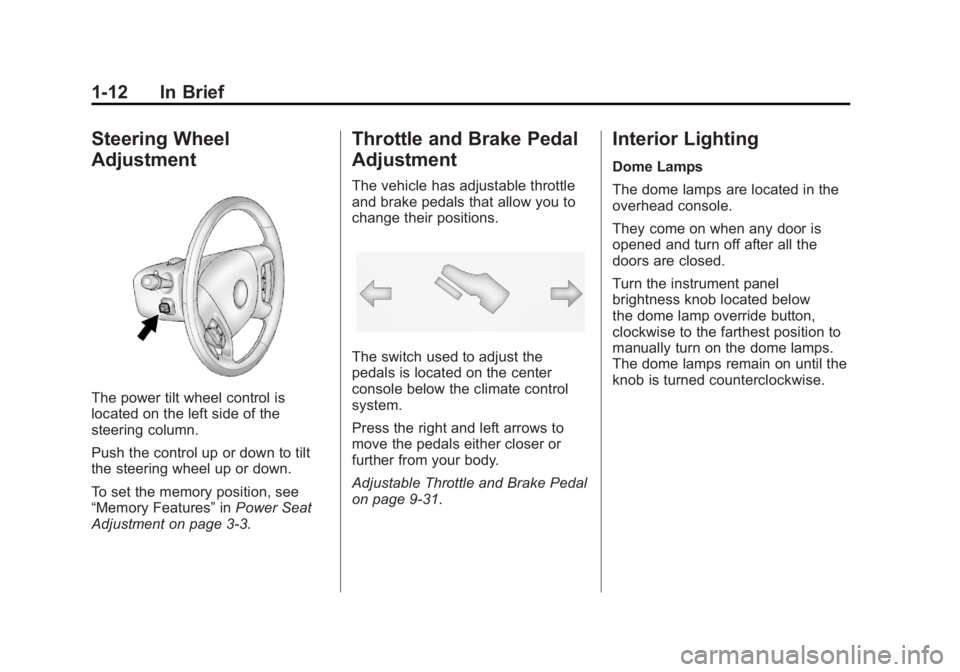
The power tilt wheel control is
located on the left side of the
steering column.
Push the control up or down to tilt
the steering wheel up or down.
To set the memory position, see
“ Memory Features ” in Power Seat
Adjustment on page 3 ‑ 3 . Throttle and Brake Pedal
Adjustment The vehicle has adjustable throttle
and brake pedals that allow you to
change their positions.
The switch used to adjust the
pedals is located on the center
console below the climate control
system.
Press the right and left arrows to
move the pedals either closer or
further from your body.
Adjustable Throttle and Brake Pedal
on page 9 ‑ 31 . Interior Lighting Dome Lamps
The dome lamps are located in the
overhead console.
They come on when any door is
opened and turn off after all the
doors are closed.
Turn the instrument panel
brightness knob located below
the dome lamp override button,
clockwise to the farthest position to
manually turn on the dome lamps.
The dome lamps remain on until the
knob is turned counterclockwise.
Page 22 of 548

Black plate (16,1)Cadillac Escalade/Escalade ESV Owner Manual - 2011
1-16 In Brief The Driver Information Center
(DIC) display will show the message
MANUAL SHIFT on the first line and
the current gear will be displayed on
the second line. This is the highest
attainable range with all lower gears
accessible. As an example, when
5 (Fifth) gear is selected, 1 (First)
through 5 (Fifth) gears are available.
Press the plus/minus buttons,
located on the steering column shift
lever, to select the desired range of
gears for current driving conditions.
See Manual Mode on page 9 ‑ 43 .
While using DSC, cruise control and
the tow/haul mode can be used.
Grade Braking is not available when
DSC is active. See Tow/Haul Mode
on page 9 ‑ 43 . Vehicle Features Radio(s) This vehicle's radio is part of the
navigation system. See Infotainment
on page 7 ‑ 2 .
Satellite Radio XM is a satellite radio service
that is based in the 48 contiguous
United States and 10 Canadian
provinces. XM satellite radio has a
wide variety of programming and
commercial-free music, coast to
coast, and in digital-quality sound.
A fee is required to receive the
XM service.
For more information, refer to: .
www.xmradio.com or call
1-800-929-2100 (U.S.) .
www.xmradio.ca or call
1-877-438-9677 (Canada)
Also, see Satellite Radio on
page 7 ‑ 16 . Portable Audio Devices This vehicle has an auxiliary input,
located on the audio faceplate,
and a USB port located on the
instrument panel or in the center
console. External devices such
as iPod ®
, laptop computers,
MP3 players, CD changers, USB
storage device, etc. can be
connected to the auxiliary port
using a 3.5 mm (1/8 in) input jack
or the USB port depending on the
audio system.
See Auxiliary Devices on page 7 ‑ 31
for further information.
Page 44 of 548

Black plate (12,1)Cadillac Escalade/Escalade ESV Owner Manual - 2011
2-12 Keys, Doors and Windows Obstacle Detection Features If the liftgate encounters an obstacle
during a power open or close cycle,
a warning chime will sound and the
liftgate will automatically reverse
direction to the full closed or open
position. After removing the
obstruction, the power liftgate
operation can be used again.
If the liftgate encounters multiple
obstacles on the same power cycle,
the power function will deactivate,
and you must manually open or
close the liftgate. The REAR
ACCESS OPEN warning message
in the Driver Information Center
(DIC) will indicate that the liftgate
is open. After removing the
obstructions, manually open the
liftgate to the full open position or
close the liftgate to the fully closed
and latched position. The liftgate
will now resume normal power
operation.
Pinch sensors are located on the
sides of the liftgate. If an object is
caught between the liftgate and the body and presses against this
sensor, the liftgate will reverse
direction and open fully. The liftgate
will remain open until it is activated
again or closed manually. Do not
force the liftgate open or closed
during a power cycle.
Manual Operation of Power
Liftgate To change the liftgate to manual
operation, press the switch on the
overhead console to the OFF
position.
With the power liftgate disabled and
all of the doors unlocked, the liftgate
can be manually opened and
closed.
To open the liftgate, press the
touchpad on the handle on the
outside of the liftgate, and lift the
gate open. To close the liftgate, use
the pull cup to lower the liftgate and
close. The liftgate latch will power
close. Always close the liftgate
before driving. If the RKE button or the power close
button on the liftgate is pressed
while power operation is disabled,
the lamps will flash three times, but
the liftgate will not move.
It is not recommended that you
drive with the liftgate open,
however, if you must drive with the
liftgate open, the liftgate should be
set to manual operation by pressing
the OFF switch on the center
console.
The liftgate has an electric latch.
If the battery is disconnected or
has low voltage, the liftgate will
not open. The liftgate will resume
operation when the battery is
reconnected and charged.
If the battery is properly connected
with adequate voltage, the switch is
not disabled, and the liftgate still will
not function, your vehicle should be
taken to a dealer for service.
Page 45 of 548

Black plate (13,1)Cadillac Escalade/Escalade ESV Owner Manual - 2011
Keys, Doors and Windows 2-13
Power Assist Steps The vehicle may have power assist
steps.
The switch used to disable the
power assist steps is located on the
center console below the climate
control system.
The power assist steps
automatically extend from beneath
the vehicle on the side in which the
door has been opened. Once the
door is closed, the assist steps
automatically move back under the
vehicle after a brief delay. The
vehicle must not be moving for the
assist steps to extend or retract.
The assist steps cannot be disabled
in the extended position. Vehicle Security This vehicle has theft-deterrent
features; however, they do not
make it impossible to steal.
Anti-Theft Alarm System Your vehicle has a content
theft-deterrent alarm system.
This is the security light.
To arm the theft-deterrent system:
1. Open the door.
2. Lock the door with the Remote
Keyless Entry (RKE) transmitter
or the power door lock switch.
The security light will come on to
inform the driver the system is arming. If a door is open when
the doors are locked, the
security light will flash.
If the delayed locking feature is
turned on, the theft ‐ deterrent
system will not start the arming
process until the last door is
closed and the delay timer has
expired. See Delayed Locking
on page 2 ‑ 8 .
3. Close all doors. The security
light should go off after about
30 seconds. The alarm is not
armed until the security light
goes off.
If a locked driver door is opened
without using the RKE transmitter, a
10-second pre-alarm will occur. The
horn will chirp and the lights will
flash. If the key is not placed in the
ignition and turned to START or the
door is not unlocked by pressing
the unlock button on the RKE
transmitter during the 10-second
pre-alarm, the alarm will go off.
Page 54 of 548

Black plate (22,1)Cadillac Escalade/Escalade ESV Owner Manual - 2011
2-22 Keys, Doors and Windows Window Lockout
o (Window Lockout): This button
is on the driver door near the
window switches.
Press the right side of the
button to disable the rear window
controls. The light on the button
will illuminate, indicating the feature
is in use. The rear windows still
can be raised or lowered using the
driver window switches when the
lockout feature is active.
To restore power to the rear
windows, press the button again.
The light on the button will go out. Sun Visors
Pull the sun visor down to block
glare. Detach the sun visor from the
center mount to pivot to the side
window, or to extend along the rod,
if available. Roof Sunroof
A. Open or Close Sunroof
B. Vent
On vehicles with a sunroof, there
are two sunroof switches on the
overhead console above the
rearview mirror.
Page 65 of 548

Black plate (9,1)Cadillac Escalade/Escalade ESV Owner Manual - 2011
Seats and Restraints 3-9
Rear Seats Heated Rear Seats
{ WARNINGIf you cannot feel temperature
change or pain to the skin, the
seat heater may cause burns
even at low temperatures. See
the Warning under Heated and
Ventilated Front Seats on
page 3 ‑ 8 . The buttons are on the Rear Seat
Audio (RSA) panel on the rear of the
center console.
Press
M or
L to heat the left
outboard or right outboard seat
cushion. An indicator on the RSA
display appears when this feature
is on. Press the button once for the
highest setting. With each press of
the button, the heated seat changes
to the next lower setting, and then
the off setting. Indicator bars next to
the symbol show the setting: three
for high, two for medium, and one
for low.
The heated seats are canceled
ten seconds after the ignition is
turned off. To use this feature after
the vehicle is restarted, press the
desired button.
Page 131 of 548
Black plate (1,1)Cadillac Escalade/Escalade ESV Owner Manual - 2011
Storage 4-1
Storage Storage Compartments Glove Box . . . . . . . . . . . . . . . . . . . . 4-1
Cupholders . . . . . . . . . . . . . . . . . . . 4-1
Armrest Storage . . . . . . . . . . . . . . 4-2
Rear Storage . . . . . . . . . . . . . . . . . 4-2
Center Console Storage . . . . . . 4-3
Roof Rack System Roof Rack System . . . . . . . . . . . . 4-3
Storage
Compartments Glove Box Pull the bottom of the glove box
handle upward to open it. Use
the key to lock and unlock the
glove box.
Cupholders Cupholders are in the center
console for the front passengers.
Press down on the access door
release to open and use the front
cupholders. Push the door back
down to close it. Push down and
then back on the front cupholder to
remove it for cleaning. Heated and Cooled
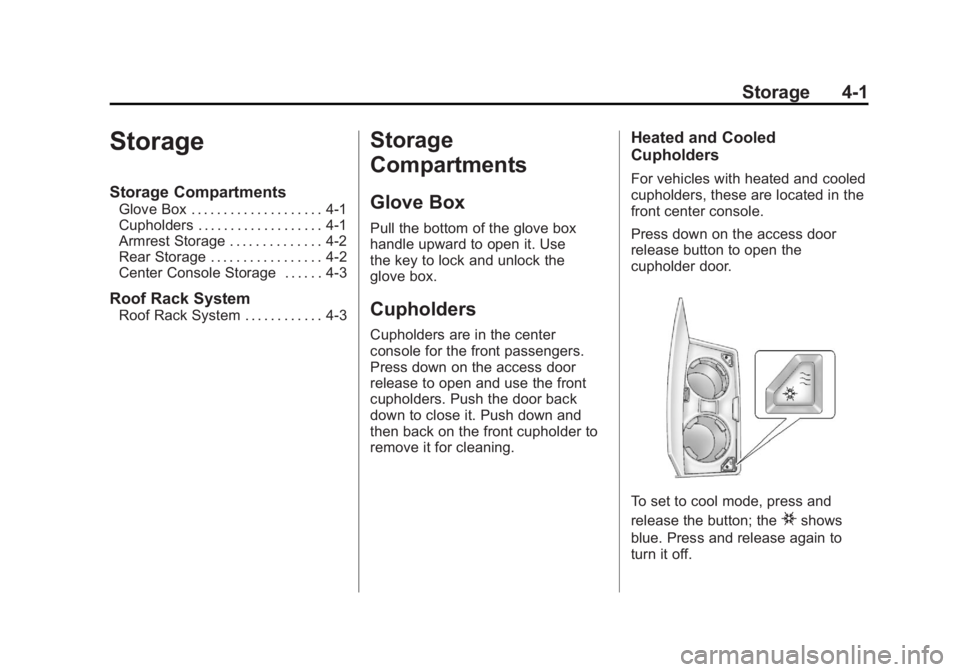
Cupholders For vehicles with heated and cooled
cupholders, these are located in the
front center console.
Press down on the access door
release button to open the
cupholder door.
To set to cool mode, press and
release the button; the
i shows
blue. Press and release again to
turn it off.
Page 133 of 548
Black plate (3,1)Cadillac Escalade/Escalade ESV Owner Manual - 2011
Storage 4-3
Center Console Storage A console compartment is located
between the bucket seats.
The console has both an upper and
lower storage bin accessed by lifting
up on the latches located at the
front of the console lid.
The console may have an
accessory power outlet inside.
See Power Outlets on page 5 ‑ 9 .
The rear of the console also has a
cupholder that swings down for the
rear seat passengers to use. Roof Rack System
{ WARNINGIf something is carried on top of
the vehicle that is longer or wider
than the roof rack — like paneling,
plywood, or a mattress — the
wind can catch it while the vehicle
is being driven. The item being
carried could be violently torn off,
and this could cause a collision
and damage the vehicle. Never
carry something longer or wider
than the roof rack on top of the
vehicle unless using a GM
certified accessory carrier.
For vehicles with a roof rack, the
rack can be used to load items.
For roof racks that do not have
crossrails included, GM Certified
crossrails can be purchased as an
accessory. See your dealer for
additional information. For vehicles with crossrails, they
can be moved back and forth to
help secure cargo. To adjust them,
turn the knob located at each end of
the crossrail counterclockwise until
the crossrail can move freely. To
secure the crossrail, turn the knob
located at each end of the crossrail
clockwise until tightened. Tie the
load to the siderails or siderail
supports.
Notice: Loading cargo on the
roof rack that weighs more than
91 kg (200 lbs) or hangs over the
rear or sides of the vehicle may
damage the vehicle. Load cargo
so that it rests evenly between
the crossrails, making sure to
fasten cargo securely.
To prevent damage or loss of cargo
when driving, check to make sure
crossrails and cargo are securely
fastened. Loading cargo on the roof
rack will make the vehicle ’ s center
of gravity higher. Avoid high speeds,
Page 144 of 548

Black plate (10,1)Cadillac Escalade/Escalade ESV Owner Manual - 2011
5-10 Instruments and Controls Power Outlet 110 Volt
Alternative Current The vehicle may have a power
outlet that can be used to plug in
electrical equipment that uses a
maximum limit of 150 watts.
The power outlet is located on the
rear of the center console. An indicator light on the outlet turns
on to show it is in use. The light
comes on when the ignition is in
ON/RUN and equipment requiring
less than 150 watts is plugged into
the outlet, and no system fault is
detected.
If equipment is connected using
more than 150 watts or a system
fault is detected, a protection circuit
shuts off the power supply and the
indicator light turns off. To reset
the circuit, unplug the item and
plug it back in or turn the Remote
Accessory Power (RAP) off and
then back on. See Retained
Accessory Power (RAP) on
page 9 ‑ 35
The power outlet is not designed for
and may not work properly, if the
following are plugged in: .
Equipment with high initial
peak wattage such as:
compressor-driven refrigerators
and electric power tools. .
Other equipment requiring
an extremely stable
power supply such as:
microcomputer-controlled
electric blankets, touch
sensor lamps, etc.
Cigarette Lighter The cigarette lighter is located in the
center console near the cupholders.
Press on the access door to open it
and use the lighter.
To use the cigarette lighter, push it
in all the way, and let go. When it is
ready, it will pop back out by itself.
Notice: Holding a cigarette lighter
in while it is heating does not let
the lighter back away from the
heating element when it is hot.
Damage from overheating can
occur to the lighter or heating
element, or a fuse could be
blown. Do not hold a cigarette
lighter in while it is heating.