ignition CADILLAC ESCALADE ESV 2011 User Guide
[x] Cancel search | Manufacturer: CADILLAC, Model Year: 2011, Model line: ESCALADE ESV, Model: CADILLAC ESCALADE ESV 2011Pages: 548, PDF Size: 8.45 MB
Page 48 of 548

Black plate (16,1)Cadillac Escalade/Escalade ESV Owner Manual - 2011
2-16 Keys, Doors and Windows 3. After the engine has started,
turn the key to LOCK/OFF, and
remove the key.
4. Insert the new key to be
programmed and turn it to the
ON/RUN position within
five seconds of turning the
ignition to the LOCK/OFF
position in Step 3.
The security light will turn off
once the key has been
programmed.
5. Repeat Steps 1 through 4 if
additional keys are to be
programmed.
If you lose or damage your
PASS-Key III+ key, see your dealer
or a locksmith who can service
PASS-Key III+ to have a new
key made.
Do not leave the key or device
that disarms or deactivates the
theft-deterrent system in the vehicle. Exterior Mirrors Convex Mirrors
{ WARNINGA convex mirror can make things,
like other vehicles, look farther
away than they really are. If you
cut too sharply into the right lane,
you could hit a vehicle on the
right. Check the inside mirror or
glance over your shoulder before
changing lanes.
The passenger side mirror is convex
shaped. A convex mirror's surface is
curved so more can be seen from
the driver seat. Power Mirrors
Controls for the outside power
foldaway mirrors are on the driver
door armrest.
Page 50 of 548

Black plate (18,1)Cadillac Escalade/Escalade ESV Owner Manual - 2011
2-18 Keys, Doors and Windows
Automatic Dimming
Mirror The vehicle has an automatic
dimming mirror. The driver outside
mirror automatically adjusts for the
glare of headlamps behind you. This
feature is controlled by the on and
off setting on the inside rearview
mirror. See Automatic Dimming
Rearview Mirror on page 2 ‑ 18 for
more information. Park Tilt Mirrors If the vehicle has the memory
package, the passenger and/or
driver mirror tilts to a preselected
position when the vehicle is in
R (Reverse). This feature lets the
driver view the curb when parallel
parking. The mirror(s) return to the
original position when the vehicle is
shifted out of R (Reverse), or the
ignition is turned off or to
OFF/LOCK.
Turn this feature on or off through
the Driver Information Center (DIC).
See Driver Information Center (DIC)
on page 5 ‑ 26 for more information.Interior Mirrors Automatic Dimming
Rearview Mirror Automatic dimming reduces the
glare of lights from behind the
vehicle. The dimming feature comes
on and the indicator light illuminates
each time the vehicle is started.
O (On/Off): Press to turn the
dimming feature on or off.
The vehicle may have IntelliBeam ®
.
For more information on IntelliBeam,
see “ IntelliBeam Intelligent
High ‐ Beam Headlamp Control
System ” under Exterior Lamp
Controls on page 6 ‑ 1 .
Page 52 of 548
Black plate (20,1)Cadillac Escalade/Escalade ESV Owner Manual - 2011
2-20 Keys, Doors and Windows
Power Windows
{ WARNINGLeaving children in a vehicle with
the keys is dangerous for many
reasons. Children or others could
be badly injured or even killed.
They could operate the power
windows or other controls or even
make the vehicle move. The
windows will function and they
could be seriously injured or killed
if caught in the path of a closing
window. Do not leave keys in a
vehicle with children.
When there are children in the
rear seat use the window lockout
button to prevent unintentional
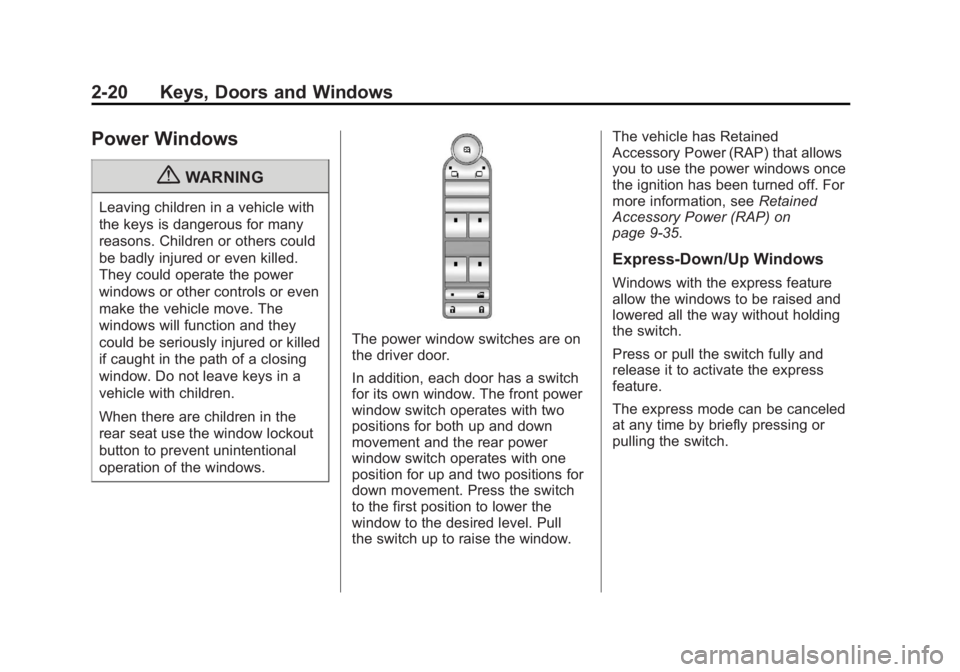
operation of the windows. The power window switches are on
the driver door.
In addition, each door has a switch
for its own window. The front power
window switch operates with two
positions for both up and down
movement and the rear power
window switch operates with one
position for up and two positions for
down movement. Press the switch
to the first position to lower the
window to the desired level. Pull
the switch up to raise the window. The vehicle has Retained
Accessory Power (RAP) that allows
you to use the power windows once
the ignition has been turned off. For
more information, see Retained
Accessory Power (RAP) on
page 9 ‑ 35 .
Express-Down/Up Windows Windows with the express feature
allow the windows to be raised and
lowered all the way without holding
the switch.
Press or pull the switch fully and
release it to activate the express
feature.
The express mode can be canceled
at any time by briefly pressing or
pulling the switch.
Page 53 of 548

Black plate (21,1)Cadillac Escalade/Escalade ESV Owner Manual - 2011
Keys, Doors and Windows 2-21Express Window Anti-Pinch
Feature If any object is in the path of the
window when the express ‐ up is
active, the window will stop at the
obstruction and auto ‐ reverse to a
preset factory position. Weather
conditions such as severe icing
may also cause the window to
auto ‐ reverse. The window will
return to normal operation once the
obstruction or condition is removed.
Express Window Anti ‐ Pinch
Override
{ WARNING
If express override is activated,
the window will not reverse
automatically. You or others could
be injured and the window could
be damaged. Before you use
express override, make sure that
all people and obstructions are
clear of the window path. In an emergency, the anti ‐ pinch
feature can be overridden in a
supervised mode. Hold the window
switch all the way up to the second
position. The window will rise for as
long as the switch is held. Once the
switch is released, the express
mode is re ‐ activated.
In this mode, the window can still
close on an object in its path. Use
care when using the override mode.
Programming the Power
Windows If the battery on the vehicle has
been recharged, disconnected,
or is not working, you will need to
reprogram each front power window
for the express-up feature to work.
Before reprogramming, replace or
recharge the vehicle's battery. To program each front window,
follow these steps:
1. With the ignition in ACC/
ACCESSORY, ON/RUN,
or when Retained Accessory
Power (RAP) is active, close all
doors.
2. Press and hold the power
window switch until the window
is fully open.
3. Pull the power window switch up
until the window is fully closed.
4. Continue holding the switch up
for approximately two seconds
after the window is completely
closed.
The window is now reprogrammed.
Repeat the process for the other
windows.
Page 55 of 548
Black plate (23,1)Cadillac Escalade/Escalade ESV Owner Manual - 2011
Keys, Doors and Windows 2-23The sunroof only operates when
the ignition is in ON/RUN or
ACC/ACCESSORY, or in Retained
Accessory Power (RAP). See
Retained Accessory Power (RAP)
on page 9 ‑ 35 for more information.
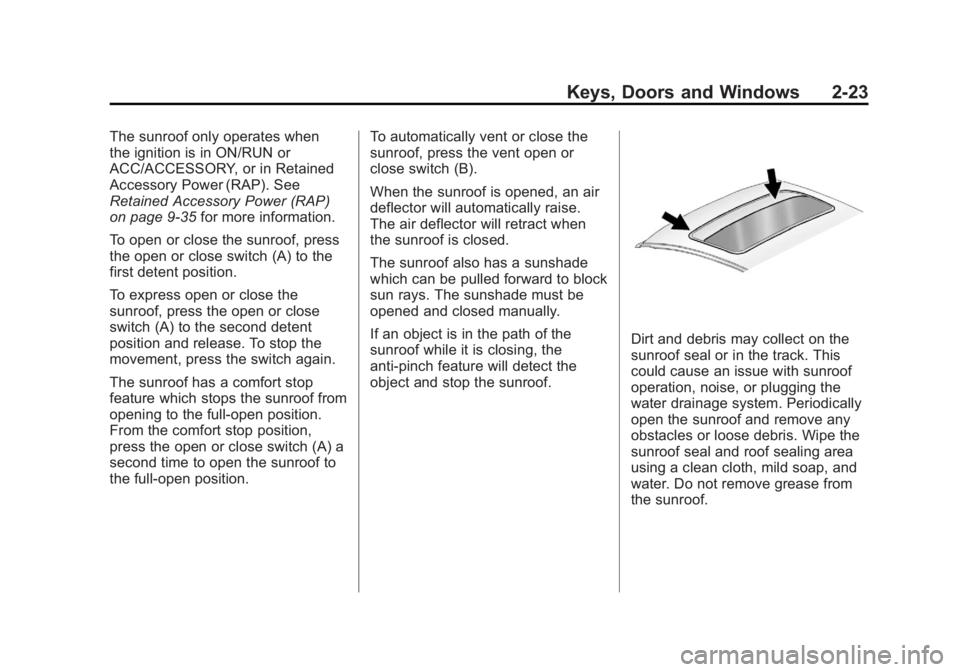
To open or close the sunroof, press
the open or close switch (A) to the
first detent position.
To express open or close the
sunroof, press the open or close
switch (A) to the second detent
position and release. To stop the
movement, press the switch again.
The sunroof has a comfort stop
feature which stops the sunroof from
opening to the full-open position.
From the comfort stop position,
press the open or close switch (A) a
second time to open the sunroof to
the full-open position. To automatically vent or close the
sunroof, press the vent open or
close switch (B).
When the sunroof is opened, an air
deflector will automatically raise.
The air deflector will retract when
the sunroof is closed.
The sunroof also has a sunshade
which can be pulled forward to block
sun rays. The sunshade must be
opened and closed manually.
If an object is in the path of the
sunroof while it is closing, the
anti-pinch feature will detect the
object and stop the sunroof. Dirt and debris may collect on the
sunroof seal or in the track. This
could cause an issue with sunroof
operation, noise, or plugging the
water drainage system. Periodically
open the sunroof and remove any
obstacles or loose debris. Wipe the
sunroof seal and roof sealing area
using a clean cloth, mild soap, and
water. Do not remove grease from
the sunroof.
Page 61 of 548

Black plate (5,1)Cadillac Escalade/Escalade ESV Owner Manual - 2011
Seats and Restraints 3-5Memory Remote Recall
The memory feature can recall the
driver seat, outside mirrors, power
steering column, and pedals to
stored positions when entering the
vehicle.
To activate, unlock the driver
door with the Remote Keyless
Entry (RKE) transmitter. The driver
seat, outside mirrors, power steering
column, and adjustable pedals
will move to the memory positions
associated with the transmitter
used to unlock the vehicle.
This feature can be turned on or off
using the vehicle personalization
menu. See “ Memory Seat Recall ”
under Vehicle Personalization on
page 5 ‑ 40 for more information. To stop recall movement, press one
of the power seat controls, memory
or power mirror buttons, power
steering column control, or the
adjustable pedal switch.
If something has blocked the driver
seat, power steering column, or the
adjustable pedals while recalling a
memory position, the recall may
stop. Remove the obstruction; then
press and hold the appropriate
manual control for the memory item
that is not recalling for two seconds.
Try recalling the memory position
again by pressing the appropriate
memory button. If the memory
position is still not recalling, see
your dealer for service. Easy Exit Positions
This feature can move the driver
seat rearward and the power
steering column up and forward to
allow extra room to exit the vehicle.
B (Easy Exit Positions): Press
to recall the easy exit positions.
The vehicle must be in P (Park).
If the easy exit feature is
programmed on in the vehicle
personalization menu, automatic
driver seat and power steering
column movement occur when
the ignition key is removed.
Page 64 of 548

Black plate (8,1)Cadillac Escalade/Escalade ESV Owner Manual - 2011
3-8 Seats and Restraints
Heated and Ventilated
Front Seats
{ WARNINGIf you cannot feel temperature
change or pain to the skin, the
seat heater may cause burns
even at low temperatures. To
reduce the risk of burns, people
with such a condition should use
care when using the seat heater,
especially for long periods of
time. Do not place anything on
the seat that insulates against
heat, such as a blanket, cushion,
cover, or similar item. This
may cause the seat heater to
overheat. An overheated seat
heater may cause a burn or
may damage the seat. The buttons are on the climate
control panel.
{ (Cooled Seat): Press to cool
the seat.
+ (Heated Seatback): Press to
heat the seatback.
z (Heated Seat and Seatback):
Press to heat seat and seatback. One of these symbols appears on
the climate control display when this
feature is on.
Press the desired button once for
the highest setting. With each press
of the button, the seat will change to
the next lower setting, and then to
the off setting.
Indicator bars next to the symbol on
the climate control display show the
selected setting: three for high, two
for medium, and one for low.
The heated and cooled seats
are canceled when the ignition is
turned off. To use this feature after
restarting the vehicle, press the
desired button again.
Page 65 of 548

Black plate (9,1)Cadillac Escalade/Escalade ESV Owner Manual - 2011
Seats and Restraints 3-9
Rear Seats Heated Rear Seats
{ WARNINGIf you cannot feel temperature
change or pain to the skin, the
seat heater may cause burns
even at low temperatures. See
the Warning under Heated and
Ventilated Front Seats on
page 3 ‑ 8 . The buttons are on the Rear Seat
Audio (RSA) panel on the rear of the
center console.
Press
M or
L to heat the left
outboard or right outboard seat
cushion. An indicator on the RSA
display appears when this feature
is on. Press the button once for the
highest setting. With each press of
the button, the heated seat changes
to the next lower setting, and then
the off setting. Indicator bars next to
the symbol show the setting: three
for high, two for medium, and one
for low.
The heated seats are canceled
ten seconds after the ignition is
turned off. To use this feature after
the vehicle is restarted, press the
desired button.
Page 104 of 548

Black plate (48,1)Cadillac Escalade/Escalade ESV Owner Manual - 2011
3-48 Seats and Restraints Additional Factors Affecting
System Operation Safety belts help keep the
passenger in position on the
seat during vehicle maneuvers
and braking, which helps the
passenger sensing system maintain
the passenger airbag status.
See “ Safety Belts ” and “ Child
Restraints ” in the Index for
additional information about the
importance of proper restraint use.
If the shoulder portion of the belt is
pulled out all the way, the child
restraint locking feature will be
engaged. This may unintentionally
cause the passenger sensing
system to turn the airbag off for
some adult ‐ size occupants. If this
happens, let the belt go back all
the way and start again.
A thick layer of additional material,
such as a blanket or cushion,
or aftermarket equipment such as
seat covers, seat heaters, and seat
massagers, can affect how well the passenger sensing system
operates. We recommend that
you not use seat covers or other
aftermarket equipment except when
approved by GM for your specific
vehicle. See Adding Equipment to
the Airbag-Equipped Vehicle on
page 3 ‑ 49 for more information
about modifications that can affect
how the system operates.
The on indicator may be lit if an
object, such as a briefcase,
handbag, grocery bag, laptop,
or other electronic device, is put
on an unoccupied seat. If this is not
desired, remove the object from
the seat.
{ WARNING
Stowing of articles under the
passenger seat or between the
passenger seat cushion and
seatback may interfere with the
proper operation of the passenger
sensing system. Servicing the
Airbag-Equipped Vehicle Airbags affect how the vehicle
should be serviced. There are parts
of the airbag system in several
places around the vehicle. Your
dealer and the service manual have
information about servicing the
vehicle and the airbag system. To
purchase a service manual, see
Service Publications Ordering
Information on page 13 ‑ 15 .
{ WARNINGFor up to 10 seconds after the
ignition is turned off and the
battery is disconnected, an airbag
can still inflate during improper
service. You can be injured if you
are close to an airbag when it
inflates. Avoid yellow connectors.
They are probably part of the
airbag system. Be sure to follow
(Continued)
Page 143 of 548

Black plate (9,1)Cadillac Escalade/Escalade ESV Owner Manual - 2011
Instruments and Controls 5-9
Power Outlets The accessory power outlets can be
used to plug in electrical equipment,
such as a cell phone or MP3 player.
The vehicle has three accessory
power outlets located: .
Inside the floor console
storage bin. .
On the rear of the floor console. .
In the rear cargo area on the
passenger side.
Remove the cover to use and
replace when not in use.
The accessory power outlets are
powered, even when the ignition is
in LOCK/OFF. Continuing to use
power outlets while the ignition is in
LOCK/OFF may cause the vehicle's
battery to run down. { WARNINGPower is always supplied to the
outlets. Do not leave electrical
equipment plugged in when the
vehicle is not in use because the
vehicle could catch fire and cause
injury or death.
Notice: Leaving electrical
equipment plugged in for an
extended period of time while
the vehicle is off will drain the
battery. Always unplug electrical
equipment when not in use and
do not plug in equipment that
exceeds the maximum 20 ampere
rating. Certain power accessory plugs
may not be compatible with the
accessory power outlet and could
overload adapter or vehicle fuses.
If a problem is experienced, see
your dealer.
When adding electrical equipment,
be sure to follow the proper
installation instructions included
with the equipment. Do not use
equipment exceeding the
maximum amperage rating of
20 amperes. See Add-On Electrical
Equipment on page 9 ‑ 82 .
Notice: Hanging heavy
equipment from the power outlet
can cause damage not covered
by the vehicle warranty. The
power outlets are designed for
accessory power plugs only, such
as cell phone charge cords.