ignition CADILLAC ESCALADE ESV 2011 Service Manual
[x] Cancel search | Manufacturer: CADILLAC, Model Year: 2011, Model line: ESCALADE ESV, Model: CADILLAC ESCALADE ESV 2011Pages: 548, PDF Size: 8.45 MB
Page 201 of 548
Black plate (11,1)Cadillac Escalade/Escalade ESV Owner Manual - 2011
Lighting 6-11Dome Lamp Override
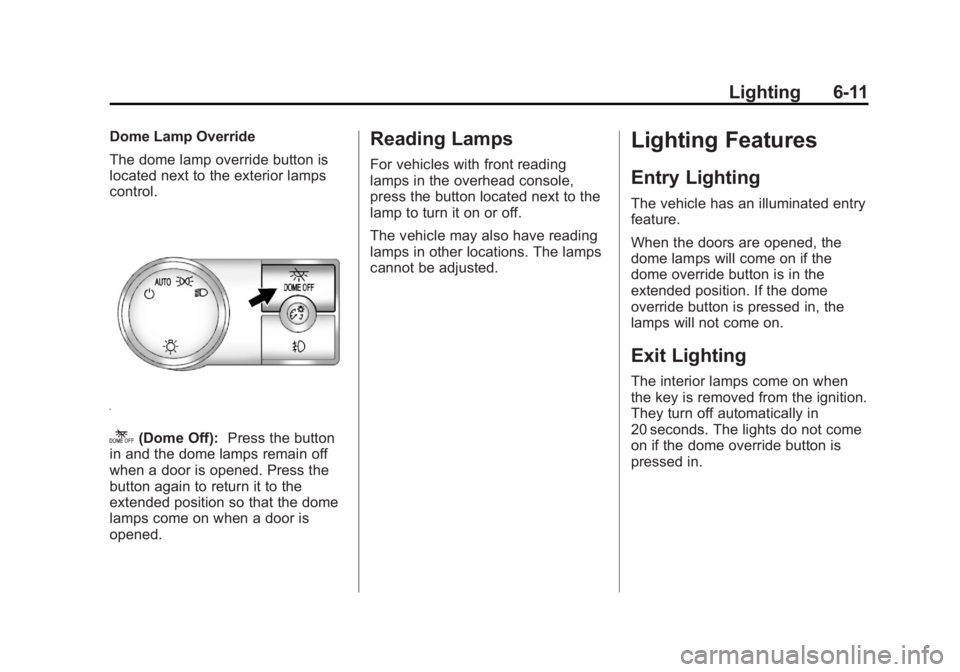
The dome lamp override button is
located next to the exterior lamps
control.
k (Dome Off): Press the button
in and the dome lamps remain off
when a door is opened. Press the
button again to return it to the
extended position so that the dome
lamps come on when a door is
opened. Reading Lamps For vehicles with front reading
lamps in the overhead console,
press the button located next to the
lamp to turn it on or off.
The vehicle may also have reading
lamps in other locations. The lamps
cannot be adjusted.
Lighting Features Entry Lighting The vehicle has an illuminated entry
feature.
When the doors are opened, the
dome lamps will come on if the
dome override button is in the
extended position. If the dome
override button is pressed in, the
lamps will not come on.
Exit Lighting The interior lamps come on when
the key is removed from the ignition.
They turn off automatically in
20 seconds. The lights do not come
on if the dome override button is
pressed in.
Page 202 of 548
Black plate (12,1)Cadillac Escalade/Escalade ESV Owner Manual - 2011
6-12 Lighting
Battery Load
Management The vehicle has Electric Power
Management (EPM) that estimates
the battery's temperature and state
of charge. It then adjusts the voltage
for best performance and extended
life of the battery.
When the battery's state of charge
is low, the voltage is raised slightly
to quickly bring the charge back up.
When the state of charge is high,
the voltage is lowered slightly to
prevent overcharging. If the vehicle
has a voltmeter gauge or a voltage
display on the Driver Information
Center (DIC), you may see the
voltage move up or down. This is
normal. If there is a problem, an
alert will be displayed. The battery can be discharged at
idle if the electrical loads are very
high. This is true for all vehicles.
This is because the generator
(alternator) may not be spinning fast
enough at idle to produce all the
power that is needed for very high
electrical loads.
A high electrical load occurs when
several of the following are on, such
as: headlamps, high beams, fog
lamps, rear window defogger,
climate control fan at high speed,
heated seats, engine cooling fans,
trailer loads, and loads plugged into
accessory power outlets.
EPM works to prevent excessive
discharge of the battery. It does this
by balancing the generator's output
and the vehicle's electrical needs.
It can increase engine idle speed to
generate more power, whenever
needed. It can temporarily reduce
the power demands of some
accessories. Normally, these actions occur in
steps or levels, without being
noticeable. In rare cases at the
highest levels of corrective action,
this action may be noticeable to the
driver. If so, a Driver Information
Center (DIC) message might be
displayed, such as BATTERY LOW
START VEHICLE . If this message
displays, it is recommended that the
driver reduce the electrical loads as
much as possible and restart the
vehicle. See Battery Voltage and
Charging Messages on page 5 ‑ 31 .
Battery Power Protection This feature shuts off the dome
lamps if they are left on for more
than 10 minutes when the ignition is
in LOCK/OFF. This helps to prevent
the battery from running down.
Page 221 of 548

Black plate (19,1)Cadillac Escalade/Escalade ESV Owner Manual - 2011
Infotainment System 7-19
Audio Players CD/DVD Player The player can be used for CD,
MP3, and as a DVD video player.
Read this section for more
information about DVD video.
When playing an audio CD the rear
seat operator can power on the
RSE video screen and use the
remote control to navigate through
the tracks on the CD.
CD Player While playing a CD, the navigation
system is available.
When you insert a CD, the CD tab
displays. If a DSP setting is
selected for the CD, it activates
each time you play a CD.
If the ignition or radio is turned off
with a CD in the player, it stays in
the player. When the ignition or radio is turned on, the CD starts
playing where it stopped, if it was
the last selected audio source.
As each new track starts to play, the
track number displays.
If an error appears on the display,
see “ CD/DVD Messages ” in this
section.
If viewing a map screen, press the
CD screen button. The display splits
between the audio screen and the
map screen. If you do not want to
view a split screen or you are not on
a map screen, press AUDIO then
press AUDIO again, repeatedly until
CD is selected or press the CD
screen button.
X (Eject): To eject a disc:
1. Press
X .
2. The system displays
“ Ejecting Disc. ” Playing an Audio CD
j /
r (Pause/Play): Press to pause
the CD. This button will then change
to the play button. Press the play
button to play the CD.
Random:
1. Press to hear the tracks in
random, rather than sequential,
order.
2. Press Random again to turn off
random play.
Page 232 of 548
Black plate (30,1)Cadillac Escalade/Escalade ESV Owner Manual - 2011
7-30 Infotainment System Playing an MP3
While playing a CD, the navigation
system is available.
When you insert a CD, the CD
tab displays. If a DSP setting is
selected for the CD, it will be
activated each time you play a CD.
If you turn off the ignition or radio
with a CD in the player, it stays in
the player. When you turn on the
ignition or radio, the CD starts
playing where it stopped, if it was
the last selected audio source.
As each new track starts to play,
the track number appears on the
display.
If an error appears on the display,
see “ CD/DVD Messages ” in this
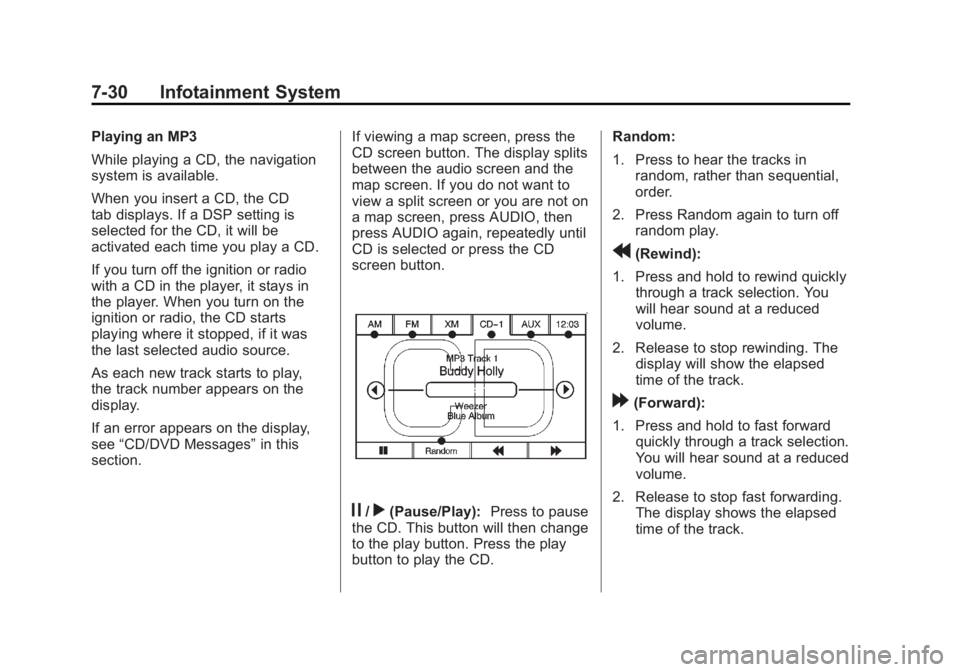
section. If viewing a map screen, press the
CD screen button. The display splits
between the audio screen and the
map screen. If you do not want to
view a split screen or you are not on
a map screen, press AUDIO, then
press AUDIO again, repeatedly until
CD is selected or press the CD
screen button.
j /
r (Pause/Play): Press to pause
the CD. This button will then change
to the play button. Press the play
button to play the CD. Random:
1. Press to hear the tracks in
random, rather than sequential,
order.
2. Press Random again to turn off
random play.
r (Rewind):
1. Press and hold to rewind quickly
through a track selection. You
will hear sound at a reduced
volume.
2. Release to stop rewinding. The
display will show the elapsed
time of the track.
[ (Forward):
1. Press and hold to fast forward
quickly through a track selection.
You will hear sound at a reduced
volume.
2. Release to stop fast forwarding.
The display shows the elapsed
time of the track.
Page 235 of 548
Black plate (33,1)Cadillac Escalade/Escalade ESV Owner Manual - 2011
Infotainment System 7-33
Rear Seat
Infotainment Rear Seat Entertainment
(RSE) System (Overhead) The vehicle may have an
Overhead DVD Rear Seat
Entertainment (RSE) system.
The RSE system works with the
vehicle's audio system. The DVD
player is part of the front radio. The
RSE system includes a radio with a
DVD player, a video display screen,
and if the vehicle has a third row
seat, it could have a second video
display screen, audio/video jacks,
two wireless headphones, and a
remote control. See CD/DVD Player
on page 7 ‑ 19 for more information
on the vehicle's DVD system. Before Driving The RSE is designed for rear seat
passengers only. The driver cannot
safely view the video screen while
driving and should not try to do so.
In severe or extreme weather
conditions, the RSE system might
not work until the temperature is
within the operating range. The
operating range for the RSE system
is above − 20°C ( − 4°F) or below
60°C (140°F). If the temperature of
the vehicle is outside this range,
heat or cool the vehicle until the
temperature is within the operating
range of the RSE system.
Parental Control The RSE system may have a
Parental Control feature, depending
on which radio the vehicle has. To
start Parental Control, press and
hold the radio power button for more
than two seconds to stop all system features such as: radio, video
screen, Rear Seat Audio (RSA),
DVD, and/or CD. While Parental
Control is on, a padlock icon
displays.
The radio can be turned back on
with a single press of the power
button, but the RSE system will
remain under Parental Control.
To turn Parental Control off, press
and hold the radio power button for
more than two seconds. The RSE
returns from where it was previously
left and the padlock icon disappears
from the radio display.
Parental Control can also be turned
off by inserting or ejecting any disc,
pressing the play icon on the radio
DVD display menu, or changing an
ignition position.
Page 243 of 548

Black plate (41,1)Cadillac Escalade/Escalade ESV Owner Manual - 2011
Infotainment System 7-41Battery Replacement
To change the remote control
batteries:
1. Slide the rear cover back on the
remote control.
2. Replace the two batteries in the
compartment. Make sure they
are installed correctly using the
diagram on the inside of the
remote control.
3. Replace the battery cover.
If the remote control is to be stored
for a long period of time, remove the
batteries and keep them in a cool,
dry place. Tips and Troubleshooting Chart Problem Recommended Action
There is no power. The ignition might not be turned to
ON/RUN or ACC/ACCESSORY.
The picture does not fill the
screen. There are black borders
on the top and bottom or on
both sides, or the picture looks
stretched out. Check the display mode settings in the
setup menu by pressing the display
menu button on the remote control.
In auxiliary mode, the picture
moves or scrolls. Check the auxiliary input connections at
both devices.
The remote control does
not work. Check to make sure there is no
obstruction between the remote
control and the transmitter window.
Check the batteries to make sure
they are not dead or installed
incorrectly.
Page 245 of 548
Black plate (43,1)Cadillac Escalade/Escalade ESV Owner Manual - 2011
Infotainment System 7-43DVD Distortion Video distortion can occur when
operating cellular phones, scanners,
CB radios, Global Position Systems
(GPS)*, two-way radios, mobile fax
machines, or walkie talkies.
It might be necessary to turn off the
DVD player when operating one of
these devices in or near the vehicle.
*Excludes the OnStar ®
System.
Cleaning the RSE Overhead
Console When cleaning the RSE overhead
console surface, use only a clean
cloth dampened with clean water.
Cleaning the Video Screen When cleaning the video screen,
use only a clean cloth dampened
with clean water. Use care when
directly touching or cleaning the
screen, as damage could result. Rear Seat Entertainment
(RSE) System
(Headrest DVD) Vehicles with an RSE system
include two head restraint video
display screens with integrated DVD
players, auxiliary inputs, two
wireless headphones, and a remote
control. This system works
independently from the vehicle's
Overhead DVD RSE system. See
Rear Seat Entertainment (RSE)
System (Overhead) on page 7 ‑ 33 or
Rear Seat Entertainment (RSE)
System (Headrest DVD) on
page 7 ‑ 43 for information about the
Overhead DVD RSE system.
The vehicle has a feature called
Retained Accessory Power (RAP).
With RAP, the RSE system can be
played even after the ignition is
turned off. See Retained Accessory
Power (RAP) on page 9 ‑ 35 for more
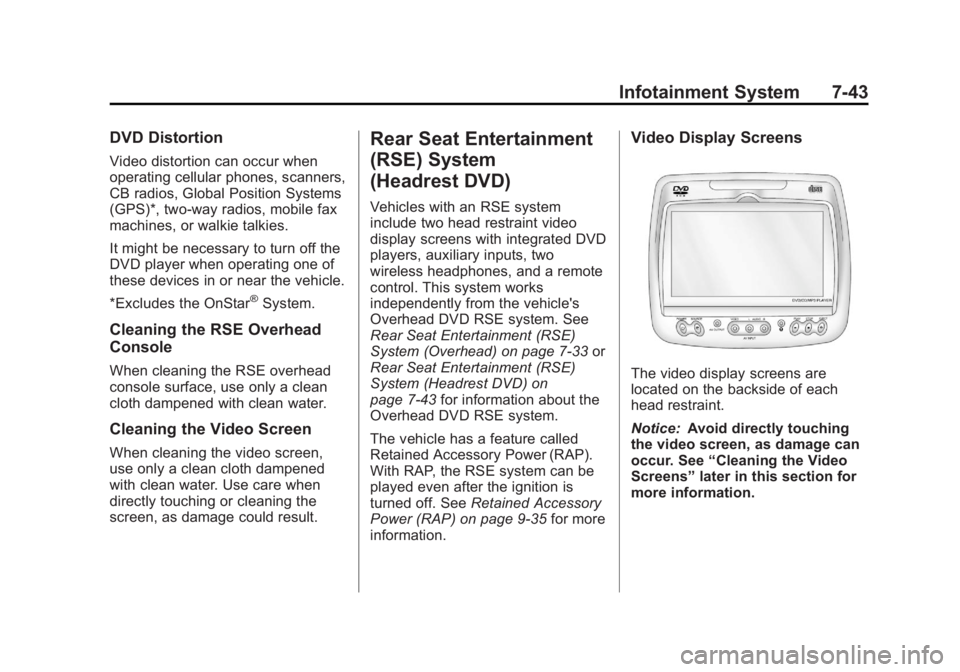
information. Video Display Screens
The video display screens are
located on the backside of each
head restraint.
Notice: Avoid directly touching
the video screen, as damage can
occur. See “ Cleaning the Video
Screens ” later in this section for
more information.
Page 289 of 548
Black plate (87,1)Cadillac Escalade/Escalade ESV Owner Manual - 2011
Infotainment System 7-872. Press the Remove Map Data
screen button to remove the
map data. A screen showing,
“ The Map can now be safely
removed ” displays.
3. Press the confirmation screen
button to safely remove the
map data.
If the map data is not removed, the
map database will not be available
for that ignition cycle. Map database
functionality can be restored by
cycling the ignition. Off-Road Mode
To turn the Off-road mode on or off:
1. Press CONFIG.
2. Press the Nav screen button.
3. Press Off-Road mode. The
button will be highlighted when
the feature is on.
When the off-road mode is turned
on, the navigation system will show
the path being traveled by the
vehicle when not on a marked road.
This path will be a simulation since
the map database coverage will not
have these roads on the DVD. This
path will be stored in the navigation
system's memory, see “ Previous
Destination ” under Destination on
page 7 ‑ 69 for more information.
See Defensive Driving on page 9 ‑ 2
for more information about off-road
driving. Traffic Options
(US and Canada) Read the following Options
descriptions to understand how the
XM NavTraffic ™ operates.
XM NavTraffic
(USA and Canada) Vehicles with the navigation system
have an XM NavTraffic receiver. XM
NavTraffic is a subscription service
provided via XM Satellite Radio. XM
NavTraffic provides real-time traffic
information fully integrated to the
navigation system to display current
traffic conditions for a driver ’ s
chosen route. XM NavTraffic allows
drivers to make the most informed,
timesaving routing decisions.
If the Traffic screen button is
pressed or if an attempt is made to
turn on the traffic display in the
Navigation Setup Menu without a
subscription, a Caution screen
displays indicating that XM traffic is
not activated.
Page 302 of 548
Black plate (100,1)Cadillac Escalade/Escalade ESV Owner Manual - 2011
7-100 Infotainment System
Voice Recognition The navigation system's voice
recognition allows for hands-free
operation of the navigation system,
audio system, and OnStar (if
equipped) features.
Voice recognition can be used when
the ignition is on or when Retained
Accessory Power (RAP) is active.
See Retained Accessory Power
(RAP) on page 9 ‑ 35 for more
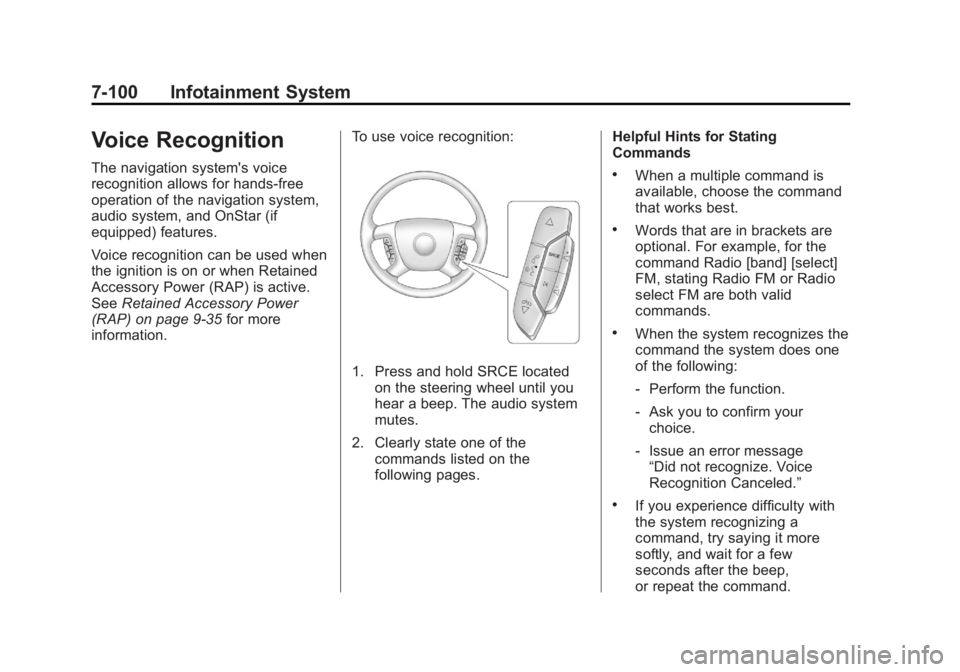
information. To use voice recognition:
1. Press and hold SRCE located
on the steering wheel until you
hear a beep. The audio system
mutes.
2. Clearly state one of the
commands listed on the
following pages. Helpful Hints for Stating
Commands .
When a multiple command is
available, choose the command
that works best. .
Words that are in brackets are
optional. For example, for the
command Radio [band] [select]
FM, stating Radio FM or Radio
select FM are both valid
commands. .
When the system recognizes the
command the system does one
of the following:
‐ Perform the function.
‐ Ask you to confirm your
choice.
‐ Issue an error message
“ Did not recognize. Voice
Recognition Canceled. ” .
If you experience difficulty with
the system recognizing a
command, try saying it more
softly, and wait for a few
seconds after the beep,
or repeat the command.
Page 311 of 548
Black plate (109,1)Cadillac Escalade/Escalade ESV Owner Manual - 2011
Infotainment System 7-109Three ‐ Way CallingThree ‐ way calling must be
supported on the cell phone and
enabled by the wireless service
carrier.
1. While on a call, press
b g .
2. Say “ Three ‐ way call. ”
3. Use the dial or call command to
dial the number of the third party
to be called.
4. Once the call is connected,
press
b g to link all callers
together.
Ending a Call
Press
c x to end a call. Muting a Call During a call, all sounds from inside
the vehicle can be muted so that the
person on the other end of the call
cannot hear them. .
To mute a call, press
b g , and
then say “ Mute call. ” .
To cancel mute, press
b g , and
then say “ Un ‐ mute call. ”
Transferring a Call Audio can be transferred between
the Bluetooth system and the cell
phone.
The cell phone must be paired
and connected with the Bluetooth
system before a call can be
transferred. The connection process
can take up to two minutes after
the ignition is turned to ON/RUN. Transferring Audio from the
Bluetooth System to a Cell Phone
During a call with the audio in the
vehicle:
1. Press
b g .
2. Say “ Transfer Call. ”
Transferring Audio to the
Bluetooth System from a Cell
Phone
During a call with the audio on the
cell phone, press
b g . The audio
transfers to the vehicle. If the audio
does not transfer to the vehicle,
use the audio transfer feature on the
cell phone. See your cell phone
manufacturer's user guide for more
information.