lights CADILLAC ESCALADE ESV 2011 User Guide
[x] Cancel search | Manufacturer: CADILLAC, Model Year: 2011, Model line: ESCALADE ESV, Model: CADILLAC ESCALADE ESV 2011Pages: 548, PDF Size: 8.45 MB
Page 188 of 548
Black plate (54,1)Cadillac Escalade/Escalade ESV Owner Manual - 2011
5-54 Instruments and Controls .
If a switch is set between
the up and down position,
write “ Middle. ”
The switch settings written
down in Step 2 now
become the button strokes
to be entered into the
Universal Home Remote in
Step 4. Be sure to enter the
switch settings written down
in Step 2, in order from left
to right, into the Universal
Home Remote, when
completing Step 4.
3. From inside your vehicle, first
firmly press all three buttons
at the same time for about
three seconds. Release the
buttons to put the Universal
Home Remote into
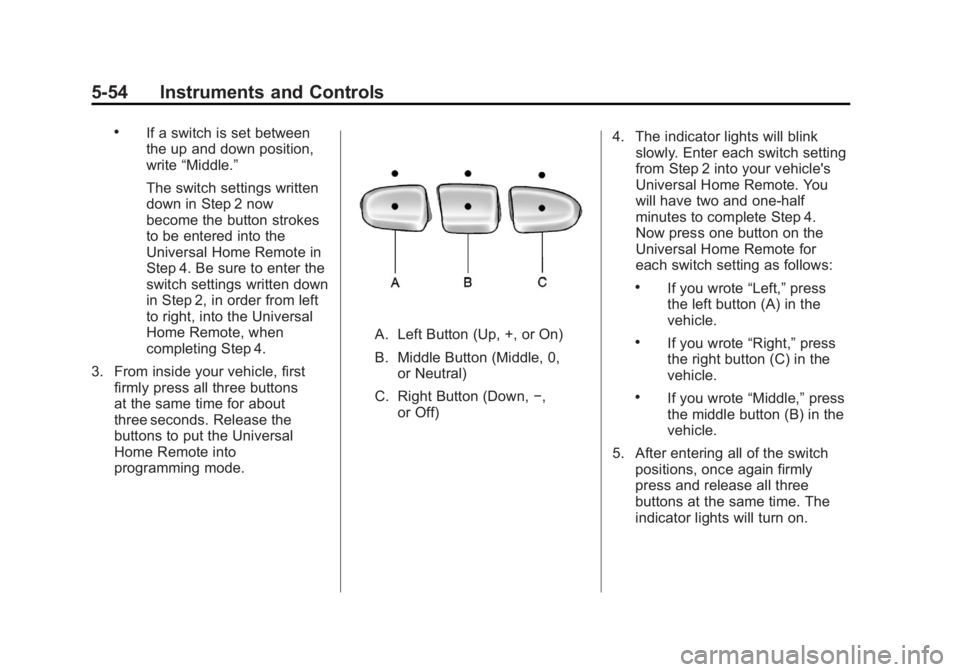
programming mode. A. Left Button (Up, +, or On)
B. Middle Button (Middle, 0,
or Neutral)
C. Right Button (Down, − ,
or Off) 4. The indicator lights will blink
slowly. Enter each switch setting
from Step 2 into your vehicle's
Universal Home Remote. You
will have two and one-half
minutes to complete Step 4.
Now press one button on the
Universal Home Remote for
each switch setting as follows: .
If you wrote “ Left, ” press
the left button (A) in the
vehicle. .
If you wrote “ Right, ” press
the right button (C) in the
vehicle. .
If you wrote “ Middle, ” press
the middle button (B) in the
vehicle.
5. After entering all of the switch
positions, once again firmly
press and release all three
buttons at the same time. The
indicator lights will turn on.
Page 189 of 548
Black plate (55,1)Cadillac Escalade/Escalade ESV Owner Manual - 2011
Instruments and Controls 5-556. Press and hold the button
that will be used to control the
garage door until the garage
door moves. The indicator
light above the selected button
should slowly blink. This button
may need to be held for up to
55 seconds.
7. Immediately release the button
when the garage door moves.
The indicator light will blink
rapidly until programming is
complete.
8. Press and release the same
button again. The garage door
should move, confirming that
programming is successful and
complete.
To program another Fixed Code
device such as an additional garage
door opener, a security device,
or home automation device, repeat
Steps 1-8, choosing a different
button in Step 6 than what was
used for the garage door opener. Universal Remote System
Operation Press and hold the appropriate
button for at least half of a second.
The indicator light will come on
while the signal is being transmitted.
Reprogramming Universal
Home Remote Buttons Any of the three buttons can be
reprogrammed by repeating the
instructions.
Erasing Universal Home
Remote Buttons The programmed buttons should be
erased when the vehicle is sold or
the lease ends. To erase either Rolling Code or
Fixed Code settings on the
Universal Home Remote device:
1. Press and hold the two outside
buttons at the same time for
approximately 20 seconds, until
the indicator lights, located
directly above the buttons, begin
to blink rapidly.
2. Once the indicator lights begin to
blink, release both buttons. The
codes from all buttons will be
erased.
For help or information on the
Universal Home Remote System,
call the customer assistance phone
number under Customer Assistance
Offices (U.S. and Canada) on
page 13 ‑ 5 or Customer Assistance
Offices (Mexico) on page 13 ‑ 5 .
Page 192 of 548
Black plate (2,1)Cadillac Escalade/Escalade ESV Owner Manual - 2011
6-2 Lighting It controls the following systems: .
Headlamps .
Taillamps .
Parking Lamps .
License Plate Lamps .
Instrument Panel Lights
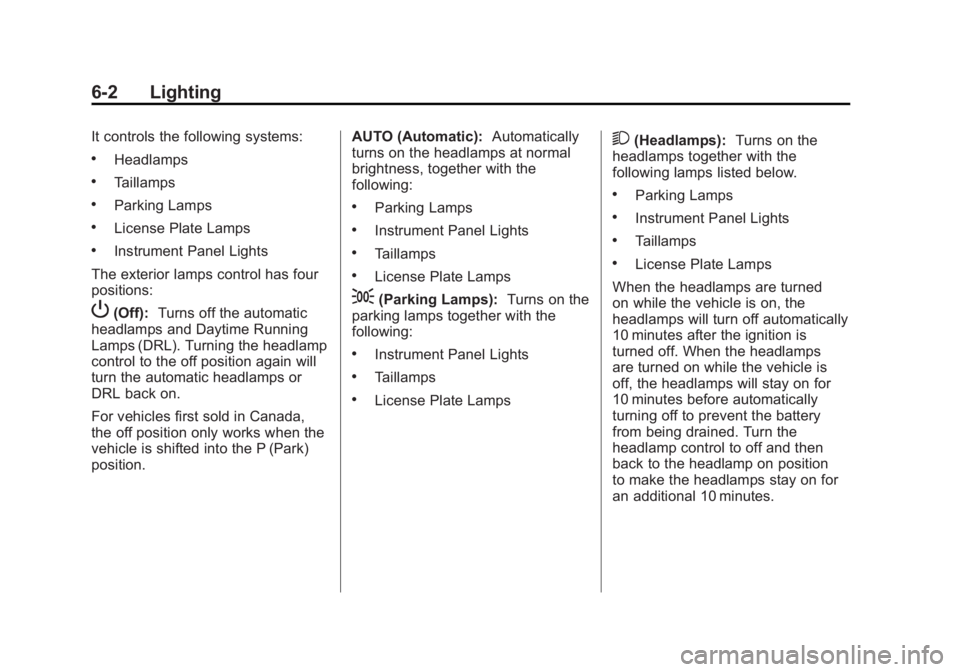
The exterior lamps control has four
positions:
P (Off): Turns off the automatic
headlamps and Daytime Running
Lamps (DRL). Turning the headlamp
control to the off position again will
turn the automatic headlamps or
DRL back on.
For vehicles first sold in Canada,
the off position only works when the
vehicle is shifted into the P (Park)
position. AUTO (Automatic): Automatically
turns on the headlamps at normal
brightness, together with the
following: .
Parking Lamps .
Instrument Panel Lights .
Taillamps .
License Plate Lamps
; (Parking Lamps): Turns on the
parking lamps together with the
following: .
Instrument Panel Lights .
Taillamps .
License Plate Lamps 2 (Headlamps): Turns on the
headlamps together with the
following lamps listed below. .
Parking Lamps .
Instrument Panel Lights .
Taillamps .
License Plate Lamps
When the headlamps are turned
on while the vehicle is on, the
headlamps will turn off automatically
10 minutes after the ignition is
turned off. When the headlamps
are turned on while the vehicle is
off, the headlamps will stay on for
10 minutes before automatically
turning off to prevent the battery
from being drained. Turn the
headlamp control to off and then
back to the headlamp on position
to make the headlamps stay on for
an additional 10 minutes.
Page 197 of 548

Black plate (7,1)Cadillac Escalade/Escalade ESV Owner Manual - 2011
Lighting 6-7When the DRL system is on,
only the DRL lamps are on. The
taillamps, sidemarker, instrument
panel lights, and other lamps will
not be on.
When it begins to get dark, the
automatic headlamp system
switches from DRL to the
headlamps.
To turn off the DRL lamps, turn the
exterior lamps control to the OFF
position and then release. For
vehicles first sold in Canada, the
transmission must be in the P (Park)
position before the DRL lamps can
be turned off. Automatic Headlamp
System When it is dark enough outside, the
automatic headlamp system turns
on the headlamps at the normal
brightness, along with the taillamps,
sidemarker, parking lamps, and the
instrument panel lights. The radio
lights will also be dim.
To turn off the automatic headlamp
system, turn the exterior lamps
switch to the off position and then
release it. The vehicle has a light sensor
located on the top of the instrument
panel which regulates when the
automatic headlamps turn on. Do
not cover the sensor, otherwise the
headlamps will come on whenever
the ignition is on.
The system may also turn on the
headlamps when driving through a
parking garage, heavy overcast
weather, or a tunnel. This is normal.
Page 198 of 548

Black plate (8,1)Cadillac Escalade/Escalade ESV Owner Manual - 2011
6-8 Lighting There is a delay in the transition
between the daytime and nighttime
operation of the automatic
headlamp system so that driving
under bridges or bright overhead
street lights does not affect the
system. The automatic headlamp
system is only affected when the
light sensor detects a change in
lighting lasting longer than the
delay.
If the vehicle is started in a dark
garage, the automatic headlamp
system will come on immediately.
Once the vehicle leaves the garage,
it takes approximately one minute
for the automatic headlamp system
to change if it is bright enough
outside. During that delay, the instrument panel cluster may not be
as bright as usual. Make sure the
instrument panel brightness control
is in the full bright position. See
Instrument Panel Illumination
Control on page 6 ‑ 10 .
To idle the vehicle with the
automatic headlamp system off,
turn the control to the off position.
The headlamps will also stay on
after you exit the vehicle. This
feature can be programmed using
the Driver Information Center (DIC).
See Vehicle Personalization on
page 5 ‑ 40 .
The regular headlamp system can
be turned on when needed. Hazard Warning Flashers
| (Hazard Warning Flashers):
Press this button located on top of
the steering column, to make the
front and rear turn signal lamps
flash on and off. This warns others
that you are having trouble. Press
again to turn the flashers off.
When the hazard warning flashers
are on, the vehicle's turn signals will
not work.
Page 200 of 548
Black plate (10,1)Cadillac Escalade/Escalade ESV Owner Manual - 2011
6-10 Lighting Remember, fog lamps alone will
not give off as much light as the
headlamps. Never use the fog
lamps in the dark without turning
on the headlamps.
The fog lamps will go off whenever
the high-beam headlamps come on.
When the high beams go off, the fog
lamps will come on again.
The fog lamps will be cancelled
after the ignition is turned off. To use
the fog lamps after restarting the
vehicle, press the fog lamp button
again.
Some localities have laws that
require the headlamps to be on
along with the fog lamps. Interior Lighting Instrument Panel
Illumination Control
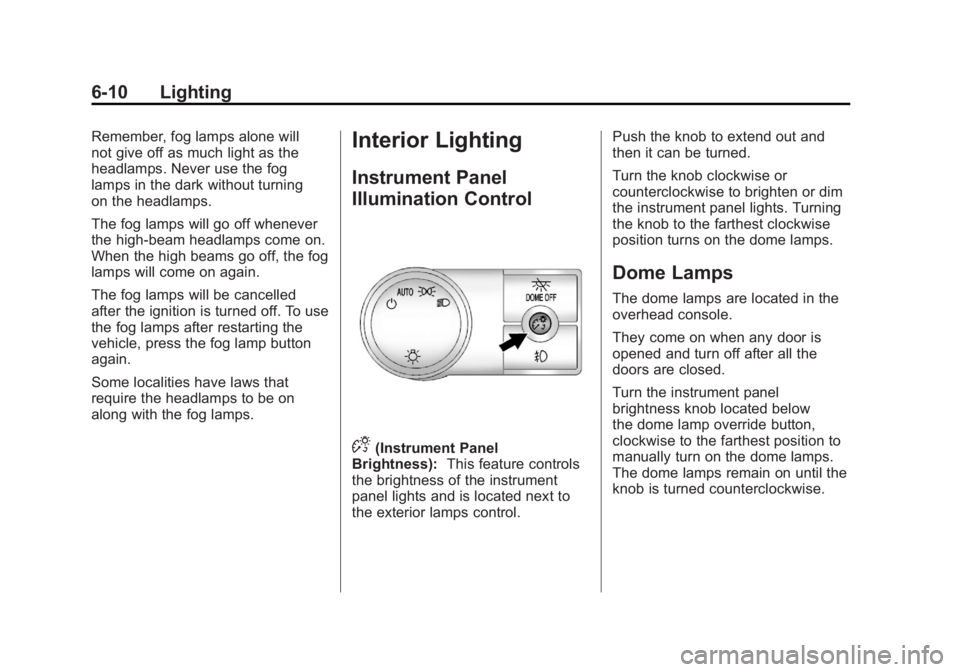
D (Instrument Panel
Brightness): This feature controls
the brightness of the instrument
panel lights and is located next to
the exterior lamps control. Push the knob to extend out and
then it can be turned.
Turn the knob clockwise or
counterclockwise to brighten or dim
the instrument panel lights. Turning
the knob to the farthest clockwise
position turns on the dome lamps.
Dome Lamps The dome lamps are located in the
overhead console.
They come on when any door is
opened and turn off after all the
doors are closed.
Turn the instrument panel
brightness knob located below
the dome lamp override button,
clockwise to the farthest position to
manually turn on the dome lamps.
The dome lamps remain on until the
knob is turned counterclockwise.
Page 201 of 548
Black plate (11,1)Cadillac Escalade/Escalade ESV Owner Manual - 2011
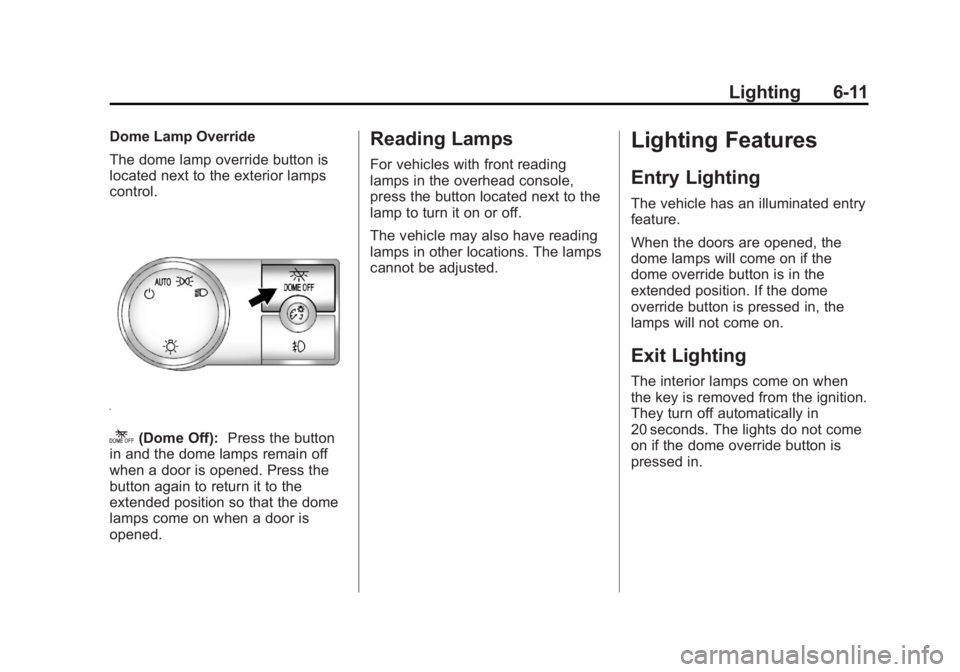
Lighting 6-11Dome Lamp Override
The dome lamp override button is
located next to the exterior lamps
control.
k (Dome Off): Press the button
in and the dome lamps remain off
when a door is opened. Press the
button again to return it to the
extended position so that the dome
lamps come on when a door is
opened. Reading Lamps For vehicles with front reading
lamps in the overhead console,
press the button located next to the
lamp to turn it on or off.
The vehicle may also have reading
lamps in other locations. The lamps
cannot be adjusted.
Lighting Features Entry Lighting The vehicle has an illuminated entry
feature.
When the doors are opened, the
dome lamps will come on if the
dome override button is in the
extended position. If the dome
override button is pressed in, the
lamps will not come on.
Exit Lighting The interior lamps come on when
the key is removed from the ignition.
They turn off automatically in
20 seconds. The lights do not come
on if the dome override button is
pressed in.
Page 209 of 548
Black plate (7,1)Cadillac Escalade/Escalade ESV Owner Manual - 2011
Infotainment System 7-76. Once a state or province has
been selected the City name
category is automatically
selected for entry.
If five or less names are
available, a list displays. If more
than five are available, the
List screen button displays a
number. This number represents
the number of available cities.
Press this button to view the list
and select a city.
7. Once a city has been selected
the Street name category is
automatically selected for entry.
If five or less streets are
available for the selected city,
the system displays the list
of streets. If more than five
streets are available the system
displays the alpha keyboard.
Start entering the street name. If five or less names are
available, a list displays. If more
than five are available, the
List screen button displays a
number. This button represents
the number of available streets.
Select this button to view the
list and select a street.
8. Once a street has been
selected, select the House #
screen button to enter the house
number. The system displays
the house number range that is
available for the street.
9. Press GO. A map screen, with
the destination marked appears.
10. Select the route preference
for Fastest, Shortest, or Other.
The system calculates and
highlights the route.
11. Press Start Guidance. You are
now ready to start your route.
See “ Address Entry ” under
Destination on page 7 ‑ 69 for
more information. Entering a Point of Interest (POI)
To set a destination by entering a
Point of Interest (POI), do the
following:
1. Press
O to turn the system on.
2. A caution may appear. Press OK
to proceed.
3. Press DEST.
4. Press
i Point of Interest.
5. Select the state/province screen
button, if needed, to change the
current state or province. A list
of all of the available states and
provinces appear. Select the
state or province.
Page 210 of 548
Black plate (8,1)Cadillac Escalade/Escalade ESV Owner Manual - 2011
7-8 Infotainment System 6. Enter the specific title of the
POI in the POI name space
(e.g. Washington Monument).
If five or less names are
available, a list displays. If
more than five are available, the
List screen button displays a
number. This button represents
the number of available POIs.
Press this button to view the list.
7. Press GO next to the POI.
A map screen, with the
destination marked appears.
8. Select the route preference for
Fastest, Shortest, or Other. The
system calculates and highlights
the route.
9. Press Start Guidance. The route
is now ready to be started.
See “ Point of Interest (POI) ” under
Destination on page 7 ‑ 69 for more
information. Storing Preset Destinations
1. Press
O to turn the system on.
2. A caution may appear. Press OK
to proceed.
3. Press DEST.
Enter a destination. See
Destination on page 7 ‑ 69 for
more information on how to
enter a destination.
4. Press DEST, the Route screen
displays. Press Final Destination
or Stopover. The information
screen displays for that location.
Press Add to Address Book. The
address book screen appears. 5. Press the Name screen button.
An alpha-keyboard displays.
Enter the name. Press the Back
screen button.
6. Press and hold one of the
screen buttons at the bottom
of the screen until the name
appears in the screen button on
the display.
The name appears in that preset
destination screen button and is
now available to select from the
Destination Entry screen. See
“ Using Your Stored Preset
Destinations ” in this section to
select it as a destination.
See “ Adding or Changing
Preset Destinations ” under
Destination on page 7 ‑ 69 for
more information on how to add
preset destinations.
Page 211 of 548
Black plate (9,1)Cadillac Escalade/Escalade ESV Owner Manual - 2011
Infotainment System 7-9Using Your Stored Preset
Destinations These destinations are available for
selection while driving.
1. Press
O to turn the system on.
2. A caution may appear. Press OK
to proceed.
3. Press DEST.
4. Select one of the available
preset destination screen
buttons. A map screen, with the
destination marked appears.
5. Select the route preference for
Fastest, Shortest, or Other. The
system calculates and highlights
the route.
6. Press Start Guidance. The route
is now ready to be started.
See “ Preset Destination ” under
Destination on page 7 ‑ 69 for more
information. Canceling Guidance Guidance is canceled once the final
destination is reached. To cancel
guidance prior to arrival at the final
destination:
1. Press DEST.
2. Press Cancel Guidance.
3. Press OK to confirm.
Guidance Volume Adjust the volume of voice guidance
prompts:
1. Press CONFIG to enter the
menu options, then press
CONFIG again, repeatedly until
Nav is selected or press the Nav
screen button. 2. Press Voice Prompt.
3. Press + or – screen buttons to
increase or to decrease the
volume of the voice prompts.
The system responds with the
adjusted voice level.
See “ Voice Prompt ” under
Configure Menu on page 7 ‑ 83 for
more information.
Cleaning the Display Screen Use a soft clean cotton cloth
dampened with clean water.