reset infotainment system CADILLAC ESCALADE ESV 2012 User Guide
[x] Cancel search | Manufacturer: CADILLAC, Model Year: 2012, Model line: ESCALADE ESV, Model: CADILLAC ESCALADE ESV 2012Pages: 538, PDF Size: 8.42 MB
Page 243 of 538

Black plate (61,1)Cadillac Escalade/Escalade ESV Owner Manual - 2012 - 2nd CRC - 11/29/11
Infotainment System 7-61
© ¨ (Seek): When listening to FM,
AM, or XM (if equipped), press
either the left
© or right
¨ seek
arrow to go to the previous or to the
next station or channels and stay
there. This function is inactive, with
some radios, if the front seat
passengers are listening to the
radio.
Press and hold either the left
© or
right
¨ seek arrow until the display
flashes, to tune to an individual
station. The display stops flashing
after the buttons have not been
pushed for more than two seconds.
This function is inactive, with some
radios, if the front seat passengers
are listening to the radio. While listening to a disc, press the
right
¨ seek arrow to go to the next
track or chapter on the disc. Press
the left
© seek arrow to go back to
the start of the current track or
chapter (if more than ten seconds
have played). This function is
inactive, with some radios, if the
front seat passengers are listening
to the disc.
When a DVD video menu is being
displayed, press either the left
© or
right
¨ seek arrow to perform a
cursor up or down on the menu.
Hold the left
© or right
¨ seek arrow
to perform a cursor left or right on
the menu. When a USB device is playing, the
right or left seek button can be used
to control the device.
PROG (Program): Press this
button to go to the next preset radio
station or channel set on the main
radio. This function is inactive, with
some radios, if the front seat
passengers are listening to the
radio.
When a CD or DVD audio disc is
playing, press this button to go to
the beginning of the CD or DVD
audio. This function is inactive, with
some radios, if the front seat
passengers are listening to the disc.
When a DVD video menu is being
displayed, press the PROG button
to perform the menu function, enter.
Page 244 of 538

Black plate (62,1)Cadillac Escalade/Escalade ESV Owner Manual - 2012 - 2nd CRC - 11/29/11
7-62 Infotainment System
Navigation Using the Navigation
System This section presents basic
information needed to operate the
navigation system.
Use the buttons located on the
navigation system along with the
available touch-sensitive screen
buttons on the navigation screen to
operate the system. See Overview
on page 7 ‑ 4 for more information.
Once the vehicle is moving, various
functions are disabled to reduce
driver distractions.
Navigation Control Buttons
The following control buttons are
located on the navigation system:
O /
n (Power/Volume):
1. Press to turn the system on
and off.
2. Turn to increase or decrease the
volume to the audio system. 3. Press and hold for more than
two seconds to turn off the
navigation system, the Rear
Seat Entertainment (RSE), and
Rear Seat Audio (RSA). If the
vehicle has not been tuned off,
the RSE and the RSA can be
turned back on by pressing this
knob and continues play of the
last active source.
Z (Eject): Press to eject the
CD/DVD Disc. See CD/DVD Player
on page 7 ‑ 18 .
w (Tuning Knob): Turn to go to
the next or previous frequency or
disc track or chapter. See CD/DVD
Player on page 7 ‑ 18 or MP3 on
page 7 ‑ 27 for more information.
AUDIO: Press to display the audio
screen. Press to switch between
AM, FM, or XM, if equipped, DISC,
or AUX (Auxiliary), or press on the
screen button. See CD/DVD Player
on page 7 ‑ 18 , MP3 on page 7 ‑ 27 ,
and Auxiliary Devices on page 7 ‑ 30
for more information. FAV (Favorite): Press to access
the preset stations. See “ Storing
Radio Station Presets ” under,
Overview on page 7 ‑ 4 .
5 (Phone): See OnStar Overview
on page 14 ‑ 1 (if equipped) and
Bluetooth on page 7 ‑ 103 (if
equipped) for more information.
e (Sound): Press to access the
Sound menu to adjust the treble,
midrange, bass, fade, balance, and
Digital Signal Processing (DSP).
y /
z (Scan Up/Down): Press to
scan the tracks/chapters up or down
on a disc.
y /
© or
¨ /
z (Seek/Scan)
(Previous/Next): Press the up or
down arrows to go to the next or
previous station. Press and hold
either arrow for more than
two seconds. The radio goes to a
station, plays for a few seconds,
then goes to the next station.
NAV (Navigation): Press to view
the vehicle's current position on the
map screen. Each press of this
Page 259 of 538
Black plate (77,1)Cadillac Escalade/Escalade ESV Owner Manual - 2012 - 2nd CRC - 11/29/11
Infotainment System 7-774. Press Latitude and select either
N (North) or S (South) to enter
the direction of the latitude
coordinate. Enter the numeric
portion of the latitude coordinate.
5. Press Longitude and select
either E (East) or W (West) next
to enter the direction of the
longitude coordinate. Enter the
numeric portion of the longitude
coordinate.
6. Once both coordinates are
entered, press GO. The map
screen, with the destination
marked displays.
7. Select the route preference for
Fastest, Shortest, or Other. The
system calculates and highlights
the route.
8. Press Start Guidance. The route
is now ready to be started.
See “ Getting Started on Your
Route ” in this section for more
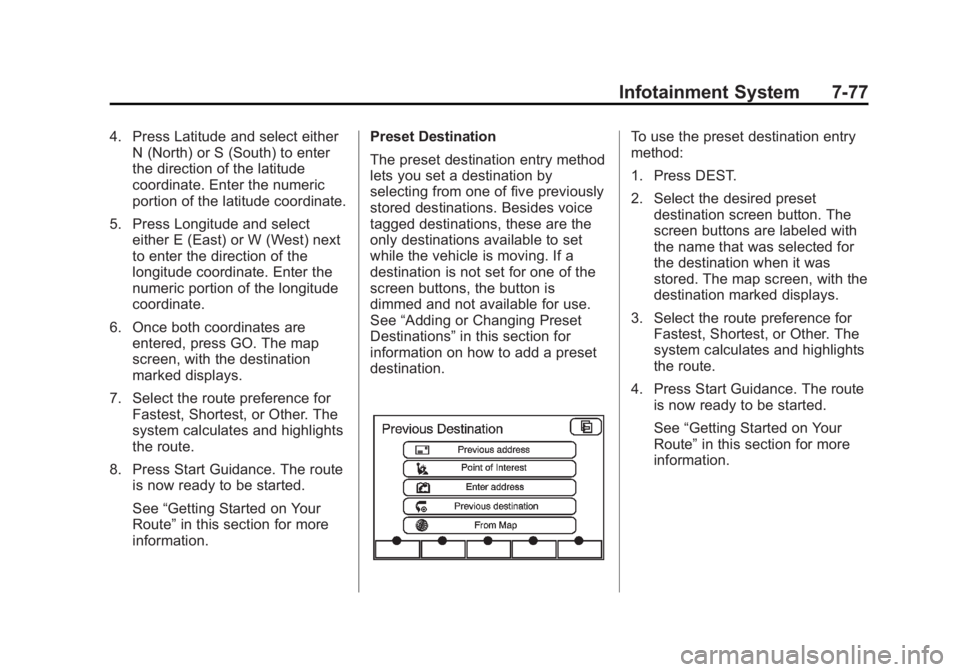
information. Preset Destination
The preset destination entry method
lets you set a destination by
selecting from one of five previously
stored destinations. Besides voice
tagged destinations, these are the
only destinations available to set
while the vehicle is moving. If a
destination is not set for one of the
screen buttons, the button is
dimmed and not available for use.
See “ Adding or Changing Preset
Destinations ” in this section for
information on how to add a preset
destination. To use the preset destination entry
method:
1. Press DEST.
2. Select the desired preset
destination screen button. The
screen buttons are labeled with
the name that was selected for
the destination when it was
stored. The map screen, with the
destination marked displays.
3. Select the route preference for
Fastest, Shortest, or Other. The
system calculates and highlights
the route.
4. Press Start Guidance. The route
is now ready to be started.
See “ Getting Started on Your
Route ” in this section for more
information.
Page 265 of 538

Black plate (83,1)Cadillac Escalade/Escalade ESV Owner Manual - 2012 - 2nd CRC - 11/29/11
Infotainment System 7-83Adding Destinations to the
Address Book There are two ways to add a
destination to the address book: .
To add the current vehicle
position to the address book,
press the Mark screen button
from the map screen. The
system automatically saves the
current vehicle information in the
address book. When scrolling on
the map the Mark screen button
automatically adds the current
scrolled position information in
the address book. .
Press the Add to Address Book
screen button when available on
POI information screens,
Destination Entry screens,
or POI screens. The system
automatically saves this
information in the address book.
See “ Nav ” under Configure Menu on
page 7 ‑ 84 for information on editing
address book entries. Adding or Changing Preset
Destinations This feature allows additions or
changes one of five preset
destinations. When a destination
has been added as a preset
destination, it is available to select
from the Destination Entry screen.
See “ Preset Destination ” previously
for information on how to select a
preset destination as a final
destination.
To store the current vehicle position
as a preset destination:
1. Press Mark from the map screen
to add the current vehicle
position to the address book.
The Address Book screen
appears.
2. Press Name. An alpha-keyboard
displays. Enter the name. Press
OK then press Back to return to
the address book information
screen. 3. Press and hold one of the
buttons at the bottom of the
screen until the name appears in
that preset destination screen
button. It is now available to
select from the Destination Entry
screen.
To store an address book entry as a
preset destination:
1. Press CONFIG.
2. Press the Nav screen button.
3. Press Edit/View.
4. Select the address book entry to
be stored as the preset
destination. Press Name to add
a name, if needed.
5. Press and hold one of the
buttons at the bottom of the
screen until the name appears in
that preset destination screen
button. It is now available to
select from the Destination Entry
screen.
Page 266 of 538

Black plate (84,1)Cadillac Escalade/Escalade ESV Owner Manual - 2012 - 2nd CRC - 11/29/11
7-84 Infotainment System
Configure Menu
Press CONFIG to adjust several of
the system's features and
preferences. The last selected
CONFIG screen is the screen that
displays: Sound, Radio, Nav
(navigation), Display, or Time. Sound Press CONFIG to enter the
configure menu options, then press
CONFIG again, repeatedly until
Sound is selected or press the
Sound screen button to make
speaker and DSP (Digital Signal
Processing) adjustments. See
“ Sound Menu ” under, AM-FM Radio
on page 7 ‑ 9 for more information.
Radio Press CONFIG to enter the
configure menu options, then press
CONFIG again, repeatedly until
Radio is selected or press the Radio
screen button to make changes for
radio information displayed, preset
pages, XM (if equipped) categories,
and Bose AudioPilot. See “ Radio
Menu ” under, AM-FM Radio on
page 7 ‑ 9 for more information. Nav (Navigation)
Press CONFIG to enter the
configure menu options, then press
CONFIG again, repeatedly until Nav
is selected or press the Nav screen
button.
Voice Prompt
Press the Voice Prompt screen
button to change the volume of the
voice prompts or to turn voice
guidance on and off.