phone CADILLAC ESCALADE EXT 2006 2.G User Guide
[x] Cancel search | Manufacturer: CADILLAC, Model Year: 2006, Model line: ESCALADE EXT, Model: CADILLAC ESCALADE EXT 2006 2.GPages: 484, PDF Size: 2.98 MB
Page 241 of 484

DVD Messages
The following errors may be displayed on the
video screen:
Disc Format Error:This message will be displayed if a
disc is inserted upside down, if the disc is not readable,
or if the format is not compatible with the DVD player.
Load/Eject Error:This message will be displayed if the
disc is not properly loaded or ejected.
Disc Play Error:This message will be displayed if the
DVD player cannot play the disc. Scratched or
damaged discs will cause this error.
Region Code Error:This message will be displayed if
the region code of the DVD is not compatible with
the region code of the DVD player.
No Disc:This message will be displayed if any of the
buttons on the DVD faceplate or remote control are
pressed and no disc is present in the DVD player.
DVD Distortion
There may be an experience with audio distortion in the
wireless headphones when operating cellular phones,
scanners, CB radios, Global Positioning Systems (GPS)*,
two-way radios, mobile fax, or walkie talkies.
It may be necessary to turn off the DVD player when
operating one of these devices in or near the vehicle.
* Excludes the OnStar
®System.
Cleaning the Video Screen
Pour some isopropyl or rubbing alcohol on a clean cloth
and gently wipe the video screen. Do not spray
directly onto the screen and do not press too hard or
too long on the video screen.
3-91
Page 242 of 484
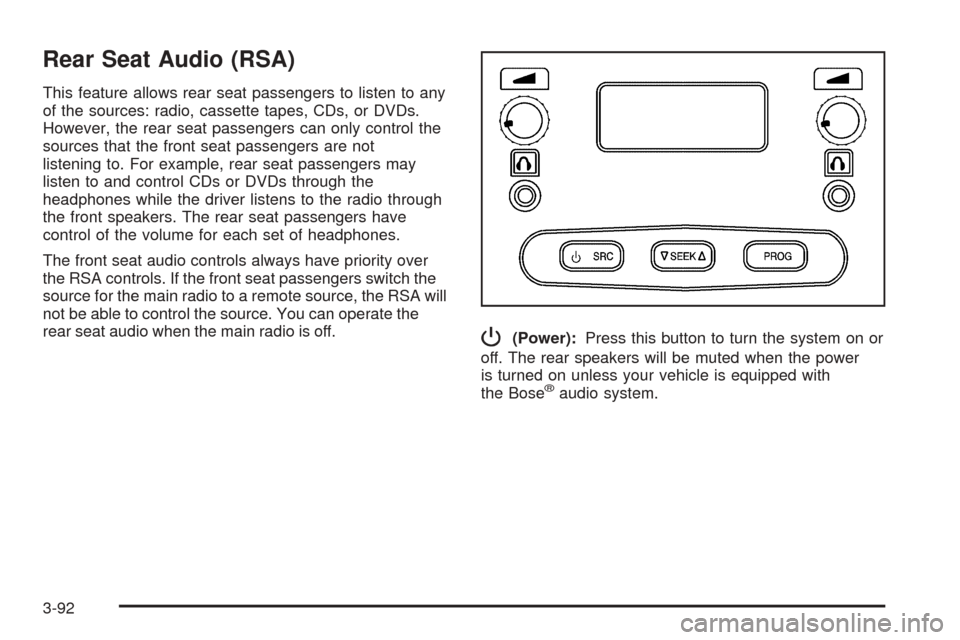
Rear Seat Audio (RSA)
This feature allows rear seat passengers to listen to any
of the sources: radio, cassette tapes, CDs, or DVDs.
However, the rear seat passengers can only control the
sources that the front seat passengers are not
listening to. For example, rear seat passengers may
listen to and control CDs or DVDs through the
headphones while the driver listens to the radio through
the front speakers. The rear seat passengers have
control of the volume for each set of headphones.
The front seat audio controls always have priority over
the RSA controls. If the front seat passengers switch the
source for the main radio to a remote source, the RSA will
not be able to control the source. You can operate the
rear seat audio when the main radio is off.
P(Power):Press this button to turn the system on or
off. The rear speakers will be muted when the power
is turned on unless your vehicle is equipped with
the Bose
®audio system.
3-92
Page 243 of 484
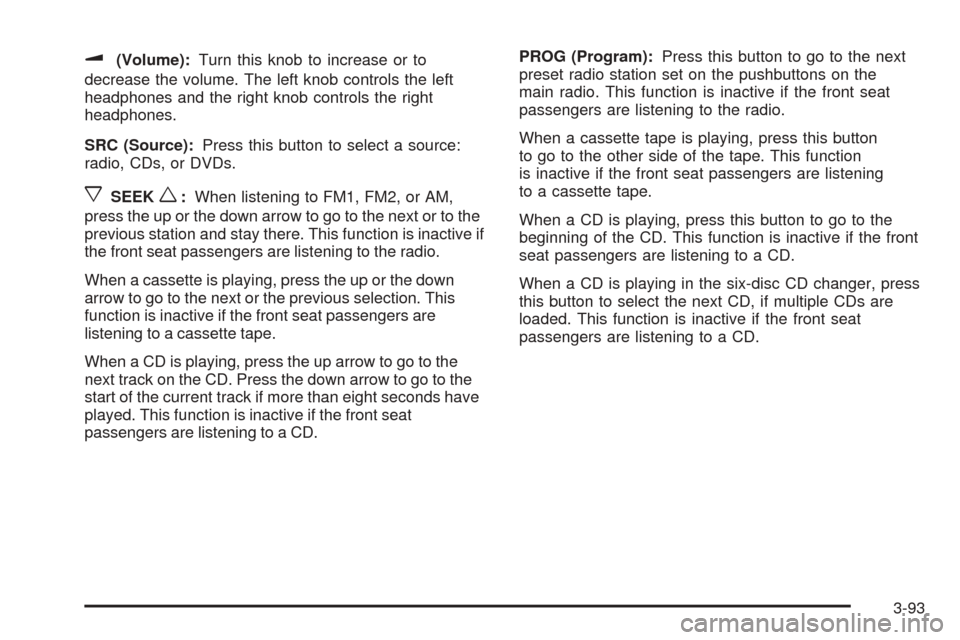
u(Volume):Turn this knob to increase or to
decrease the volume. The left knob controls the left
headphones and the right knob controls the right
headphones.
SRC (Source):Press this button to select a source:
radio, CDs, or DVDs.
xSEEKw:When listening to FM1, FM2, or AM,
press the up or the down arrow to go to the next or to the
previous station and stay there. This function is inactive if
the front seat passengers are listening to the radio.
When a cassette is playing, press the up or the down
arrow to go to the next or the previous selection. This
function is inactive if the front seat passengers are
listening to a cassette tape.
When a CD is playing, press the up arrow to go to the
next track on the CD. Press the down arrow to go to the
start of the current track if more than eight seconds have
played. This function is inactive if the front seat
passengers are listening to a CD.PROG (Program):Press this button to go to the next
preset radio station set on the pushbuttons on the
main radio. This function is inactive if the front seat
passengers are listening to the radio.
When a cassette tape is playing, press this button
to go to the other side of the tape. This function
is inactive if the front seat passengers are listening
to a cassette tape.
When a CD is playing, press this button to go to the
beginning of the CD. This function is inactive if the front
seat passengers are listening to a CD.
When a CD is playing in the six-disc CD changer, press
this button to select the next CD, if multiple CDs are
loaded. This function is inactive if the front seat
passengers are listening to a CD.
3-93
Page 249 of 484

Radio Reception
You may experience frequency interference and static
during normal radio reception if items such as cellphone
chargers, vehicle convenience accessories, and
external electronic devices are plugged into the
accessory power outlet. If there is interference or static,
unplug the item from the accessory power outlet.
AM
The range for most AM stations is greater than for FM,
especially at night. The longer range can cause
station frequencies to interfere with each other. For
better radio reception, most AM radio stations will boost
the power levels during the day, and then reduce
these levels during the night. Static can also occur when
things like storms and power lines interfere with radio
reception. When this happens, try reducing the treble on
your radio.
FM Stereo
FM stereo will give the best sound, but FM signals will
reach only about 10 to 40 miles (16 to 65 km). Tall
buildings or hills can interfere with FM signals, causing
the sound to fade in and out.
XM™ Satellite Radio Service
XM™ Satellite Radio Service gives digital radio
reception from coast-to-coast in the 48 contiguous
United States, and in Canada (if available). Just as with
FM, tall buildings or hills can interfere with satellite
radio signals, causing the sound to fade in and out.
In addition, traveling or standing under heavy foliage,
bridges, garages, or tunnels may cause loss of the
XM™ signal for a period of time. The radio may display
NO SIGNAL to indicate interference.
3-99
Page 284 of 484
Hydroplaning
Hydroplaning is dangerous. So much water can build up
under your tires that they can actually ride on the
water. This can happen if the road is wet enough and
you are going fast enough. When your vehicle is
hydroplaning, it has little or no contact with the road.
Hydroplaning does not happen often. But it can if your
tires do not have much tread or if the pressure in
one or more is low. It can happen if a lot of water is
standing on the road. If you can see reections
from trees, telephone poles, or other vehicles, and
raindrops dimple the water’s surface, there could
be hydroplaning.
Hydroplaning usually happens at higher speeds. There
just is not a hard and fast rule about hydroplaning.
The best advice is to slow down when it is raining.
Driving Through Deep Standing Water
Notice:If you drive too quickly through deep
puddles or standing water, water can come in
through your engine’s air intake and badly damage
your engine. Never drive through water that is
slightly lower than the underbody of your vehicle. If
you cannot avoid deep puddles or standing water,
drive through them very slowly.
Driving Through Flowing Water
{CAUTION:
Flowing or rushing water creates strong forces.
If you try to drive through owing water, as you
might at a low water crossing, your vehicle can
be carried away. As little as six inches of
owing water can carry away a smaller vehicle.
If this happens, you and other vehicle
occupants could drown. Do not ignore police
warning signs, and otherwise be very cautious
about trying to drive through owing water.
Some Other Rainy Weather Tips
Turn on your low-beam headlamps — not just
your parking lamps — to help make you more
visible to others.
Besides slowing down, allow some extra following
distance. And be especially careful when you
pass another vehicle. Allow yourself more clear
room ahead, and be prepared to have your
view restricted by road spray.
Have good tires with proper tread depth. SeeTires
on page 5-60.
4-32
Page 455 of 484
Customer Assistance and Information...............7-2
Customer Satisfaction Procedure......................7-2
Online Owner Center......................................7-3
Customer Assistance for Text Telephone
(TTY) Users...............................................7-4
Customer Assistance Offices............................7-4
GM Mobility Reimbursement Program................7-5
Roadside Service...........................................7-6
Courtesy Transportation...................................7-7
Vehicle Data Collection and Event
Data Recorders..........................................7-9
Collision Damage Repair................................7-10Reporting Safety Defects................................7-13
Reporting Safety Defects to the
United States Government..........................7-13
Reporting Safety Defects to the
Canadian Government................................7-14
Reporting Safety Defects to
General Motors.........................................7-14
Service Publications Ordering Information.........7-14
Section 7 Customer Assistance and Information
7-1
Page 457 of 484
The BBB Auto Line Program is an out of court program
administered by the Council of Better Business
Bureaus to settle automotive disputes regarding vehicle
repairs or the interpretation of the New Vehicle
Limited Warranty. Although you may be required to
resort to this informal dispute resolution program prior to
ling a court action, use of the program is free of
charge and your case will generally be heard within
40 days. If you do not agree with the decision given in
your case, you may reject it and proceed with any other
venue for relief available to you.
You may contact the BBB Auto Line Program using the
toll-free telephone number or write them at the
following address:
BBB Auto Line Program
Council of Better Business Bureaus, Inc.
4200 Wilson Boulevard
Suite 800
Arlington, VA 22203-1838
Telephone: 1-800-955-5100
This program is available in all 50 states and the
District of Columbia. Eligibility is limited by vehicle age,
mileage and other factors. General Motors reserves
the right to change eligibility limitations and/or
discontinue its participation in this program.Online Owner Center
The Owner Center is a resource for your GM ownership
needs. Specic vehicle information can be found in
one place.
The Online Owner Center allows you to:
Get e-mail service reminders.
Access information about your specic vehicle,
including tips and videos and an electronic
version of this owner’s manual (United States only).
Keep track of your vehicle’s service history and
maintenance schedule.
Find GM dealers for service nationwide.
Receive special promotions and privileges only
available to members (United States only).
Refer to the web for updated information.
To register your vehicle, visit www.MyGMLink.com
(United States) or My GM Canada within
www.gmcanada.com (Canada).
7-3
Page 458 of 484
Customer Assistance for Text
Telephone (TTY) Users
To assist customers who are deaf, hard of hearing, or
speech-impaired and who use Text Telephones (TTYs),
Cadillac has TTY equipment available at its Customer
Assistance Center. Any TTY user can communicate
with Cadillac by dialing: 1-800-833-CMCC (2622).
(TTY users in Canada can dial 1-800-263-3830.)
Customer Assistance Offices
Cadillac encourages customers to call the toll-free
number for assistance. However, if a customer wishes
to write or e-mail Cadillac, refer to the addresses below.
United States — Customer Assistance
Cadillac Customer Assistance Center
Cadillac Motor Car Division
P.O. Box 33169
Detroit, MI 48232-5169
www.Cadillac.com
1-800-458-8006
1-800-833-2622 (For Text Telephone devices (TTYs))
Roadside Assistance: 1-800-882-1112
Fax Number: 313-381-0022From Puerto Rico:
1-800-496-9992 (English)
1-800-496-9993 (Spanish)
Fax Number: 313-381-0022
From U.S. Virgin Islands:
1-800-496-9994
Fax Number: 313-381-0022
Canada — Customer Assistance
General Motors of Canada Limited
Canadian Cadillac Customer Communication
Centre, 163-005
1908 Colonel Sam Drive
Oshawa, Ontario L1H 8P7
1-888-446-2000
1-800-263-3830 (For Text Telephone devices (TTYs))
Roadside Assistance: 1-800-882-1112
7-4
Page 459 of 484
Overseas — Customer Assistance
Please contact the local General Motors Business Unit.
Mexico, Central America and
Caribbean Islands/Countries
(Except Puerto Rico and U.S. Virgin
Islands) — Customer Assistance
General Motors de Mexico, S. de R.L. de C.V.
Customer Assistance Center
Paseo de la Reforma # 2740
Col. Lomas de Bezares
C.P. 11910, Mexico, D.F.
01-800-508-0000
Long Distance: 011-52-53 29 0 800
GM Mobility Reimbursement
Program
This program, available to qualied applicants, can
reimburse you up to $1,000 of the cost of eligible
aftermarket adaptive equipment required for your vehicle,
such as hand controls or a wheelchair/scooter lift.
The offer is available for a very limited period of time
from the date of vehicle purchase/lease. For more
details, or to determine your vehicle’s eligibility, visit
gmmobility.com or call the GM Mobility Assistance
Center at 1-800-323-9935. Text telephone (TTY) users,
call 1-800-833-9935.
GM of Canada also has a Mobility Program.
Call 1-800-GM-DRIVE (463-7483) for details.
TTY users call 1-800-263-3830.
7-5
Page 461 of 484
Roadside Service Availability
Wherever you drive in the United States or Canada,
an advisor is available to assist you over the phone.
A dealer technician, if available, can travel to your
location within a 30 mile (50 km) radius of a participating
Cadillac dealership. If beyond this radius, we will
arrange to have your car towed to the nearest Cadillac
dealership.
Reaching Roadside Service
Dial the toll-free Roadside Service number:
1-800-882-1112. A Roadside Service Advisor will assist
you and request the following information:
A description of the problem
Name, home address, home telephone number
Location of your Cadillac and number you are
calling from
The model year, Vehicle Identication Number
(VIN), mileage, and date of delivery
Roadside Service for the Hearing or
Speech Impaired
Roadside Service is prepared to assist owners who have
hearing difficulties or are speech impaired. Cadillac has
installed special telecommunication devices called
Text Telephone (TTY) in the Roadside Service Center.
Any customer who has access to a (TTY) or a
conventional teletypewriter can communicate with
Cadillac by dialing from the United States or Canada
1-888-889-2438— daily, 24 hours.
Courtesy Transportation
To enhance your ownership experience, we and our
participating dealers are proud to offer Courtesy
Transportation, a customer support program for
new vehicles.
The Courtesy Transportation program is offered to
customers in conjunction with the Bumper-to-Bumper
coverage provided by the New Vehicle Limited Warranty.
Several transportation options are available when
warranty repairs are required. This will reduce your
inconvenience during warranty repairs.
7-7