steering CADILLAC ESCALADE EXT 2007 3.G Owner's Manual
[x] Cancel search | Manufacturer: CADILLAC, Model Year: 2007, Model line: ESCALADE EXT, Model: CADILLAC ESCALADE EXT 2007 3.GPages: 580, PDF Size: 3.01 MB
Page 243 of 580

Driver Information Center (DIC)
Your vehicle has a Driver Information Center (DIC).
The DIC displays information about your vehicle.
It also displays warning messages if a system
problem is detected. The DIC also allows some
features to be customized. SeeDIC Vehicle
Customization on page 257for more information.
All messages will appear in the DIC display located
in the center of the instrument panel cluster.
The DIC comes on when the ignition is on. After
a short delay, the DIC will display the information
that was last displayed before the engine was
turned off.
SeeDIC Operation and Displays on page 243and
DIC Vehicle Customization on page 257for the
displays available.
DIC Operation and Displays
The DIC has different displays which can be
accessed by pressing the DIC buttons located
on the instrument panel, next to the steering wheel.
The DIC displays trip, fuel, and vehicle system
information, and warning messages if a system
problem is detected. A digital speedometer
also appears at the bottom of the DIC display. The
digital speedometer can be enabled or disabled.
See “DISPLAY DIGITAL SPEED” underDIC
Vehicle Customization on page 257for more
information.
243
Page 268 of 580
Then, when driving conditions permit, you can
tune to your favorite stations using the presets and
steering wheel controls if the vehicle has them.
{CAUTION:
This system provides you with a far greater
access to audio stations and song listings.
Giving extended attention to entertainment
tasks while driving can cause a crash and
you or others can be injured or killed.
Always keep your eyes on the road and
your mind on the drive — avoid engaging
in extended searching while driving.
Keeping your mind on the drive is important for
safe driving. For more information, seeDefensive
Driving on page 322.Here are some ways in which you can help avoid
distraction while driving.
While your vehicle is parked:
Familiarize yourself with all of its controls.
Familiarize yourself with its operation.
Set up your audio system by presetting your
favorite radio stations, setting the tone, and
adjusting the speakers. Then, when driving
conditions permit, you can tune to your favorite
radio stations using the presets and steering
wheel controls if the vehicle has them.
Notice:Before adding any sound equipment
to your vehicle, such as an audio system,
CD player, CB radio, mobile telephone,
or two-way radio, make sure that it can be
added by checking with your dealer. Also,
check federal rules covering mobile radio and
telephone units. If sound equipment can be
added, it is very important to do it properly.
Added sound equipment may interfere with the
operation of your vehicle’s engine, radio, or
other systems, and even damage them.
Your vehicle’s systems may interfere with
the operation of sound equipment that
has been added.
268
Page 316 of 580
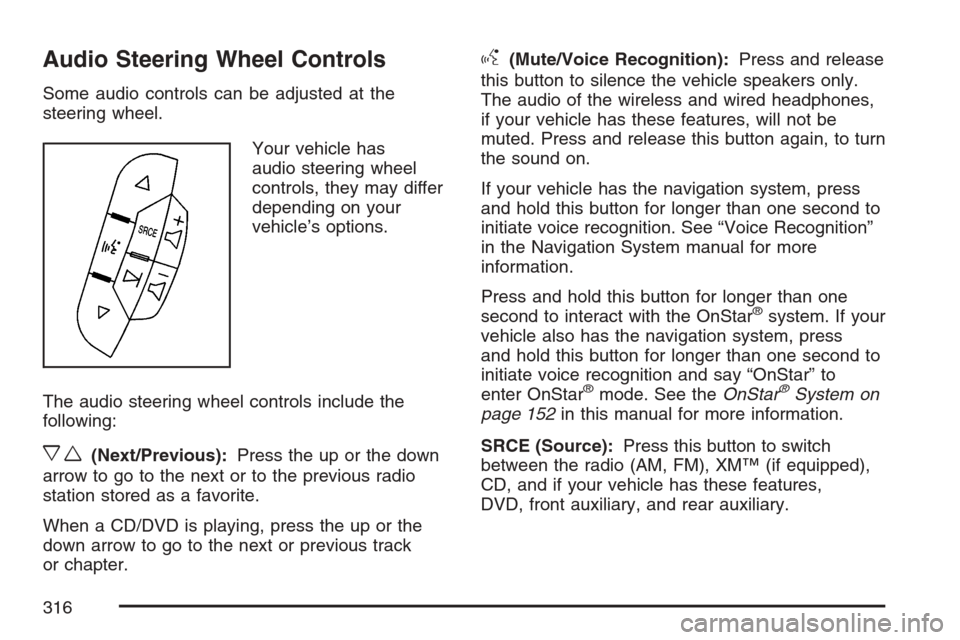
Audio Steering Wheel Controls
Some audio controls can be adjusted at the
steering wheel.
Your vehicle has
audio steering wheel
controls, they may differ
depending on your
vehicle’s options.
The audio steering wheel controls include the
following:
xw(Next/Previous):Press the up or the down
arrow to go to the next or to the previous radio
station stored as a favorite.
When a CD/DVD is playing, press the up or the
down arrow to go to the next or previous track
or chapter.
g(Mute/Voice Recognition):Press and release
this button to silence the vehicle speakers only.
The audio of the wireless and wired headphones,
if your vehicle has these features, will not be
muted. Press and release this button again, to turn
the sound on.
If your vehicle has the navigation system, press
and hold this button for longer than one second to
initiate voice recognition. See “Voice Recognition”
in the Navigation System manual for more
information.
Press and hold this button for longer than one
second to interact with the OnStar
®system. If your
vehicle also has the navigation system, press
and hold this button for longer than one second to
initiate voice recognition and say “OnStar” to
enter OnStar
®mode. See theOnStar®System on
page 152in this manual for more information.
SRCE (Source):Press this button to switch
between the radio (AM, FM), XM™ (if equipped),
CD, and if your vehicle has these features,
DVD, front auxiliary, and rear auxiliary.
316
Page 321 of 580
Your Driving, the Road, and
Your Vehicle............................................ 322
Defensive Driving...................................... 322
Drunken Driving........................................ 323
Control of a Vehicle.................................. 326
Braking...................................................... 326
Anti-Lock Brake System (ABS).................. 327
Braking in Emergencies............................. 329
Locking Differential.................................... 329
Road Sensing Suspension......................... 329
StabiliTrak
®System................................... 330
All-Wheel Drive (AWD) System.................. 333
Steering.................................................... 333
Off-Road Recovery.................................... 335
Passing..................................................... 336
Loss of Control.......................................... 338
Off-Road Driving........................................ 339
Driving at Night......................................... 355
Driving in Rain and on Wet Roads............ 356City Driving............................................... 360
Freeway Driving........................................ 361
Before Leaving on a Long Trip.................. 362
Highway Hypnosis..................................... 363
Hill and Mountain Roads........................... 364
Winter Driving........................................... 366
If Your Vehicle is Stuck in Sand, Mud,
Ice, or Snow.......................................... 370
Rocking Your Vehicle to Get It Out........... 370
Recovery Hooks........................................ 371
Loading Your Vehicle................................ 372
Truck-Camper Loading Information............ 378
Towing........................................................ 378
Towing Your Vehicle ................................. 378
Recreational Vehicle Towing...................... 379
Autoride
®................................................... 379
Towing a Trailer........................................ 380
Trailer Recommendations.......................... 392
Section 4 Driving Your Vehicle
321
Page 326 of 580
Control of a Vehicle
You have three systems that make your vehicle
go where you want it to go. They are the
brakes, the steering, and the accelerator. All
three systems have to do their work at the places
where the tires meet the road.
Sometimes, as when you are driving on snow or
ice, it is easy to ask more of those control systems
than the tires and road can provide. That means
you can lose control of your vehicle. See
StabiliTrak
®System on page 330.
Adding non-GM accessories can affect your
vehicle’s performance. SeeAccessories and
Modications on page 397.
Braking
SeeBrake System Warning Light on page 232.
Braking action involves perception time and
reaction time.
First, you have to decide to push on the brake
pedal. That is perception time. Then you have to
bring up your foot and do it. That is reaction time.
Average reaction time is about three-fourths of a
second. But that is only an average. It might
be less with one driver and as long as two or
three seconds or more with another. Age, physical
condition, alertness, coordination, and eyesight
all play a part. So do alcohol, drugs, and
frustration. But even in three-fourths of a second,
a vehicle moving at 60 mph (100 km/h) travels
66 feet (20 m). That could be a lot of distance in an
emergency, so keeping enough space between
your vehicle and others is important.
And, of course, actual stopping distances vary
greatly with the surface of the road, whether it is
pavement or gravel; the condition of the road,
whether it is wet, dry, or icy; tire tread; the
condition of the brakes; the weight of the vehicle;
and the amount of brake force applied.
326
Page 329 of 580
Remember: ABS does not change the time you
need to get your foot up to the brake pedal
or always decrease stopping distance. If you get
too close to the vehicle in front of you, you will not
have time to apply your brakes if that vehicle
suddenly slows or stops. Always leave enough
room up ahead to stop, even though you
have ABS.
Using ABS
Do not pump the brakes. Just hold the brake
pedal down rmly and let anti-lock work for you.
You may feel the brakes vibrate, or you may notice
some noise, but this is normal.
Braking in Emergencies
With ABS, you can steer and brake at the same
time. In many emergencies, steering can help you
more than even the very best braking.
Locking Differential
If your vehicle has this feature, your locking
differential can give you additional traction on
snow, mud, ice, sand or gravel. It works like
a standard axle most of the time, but when one of
the wheels has no traction and the other does,
this feature will allow the wheel with traction
to move the vehicle.
Road Sensing Suspension
The Road Sensing Suspension (RSS) feature
provides superior vehicle ride and handling under
a variety of passenger and loading conditions.
The system is fully automatic and uses a computer
controller to continuously monitor vehicle speed,
wheel to body position, lift/dive and steering
position of the vehicle. The controller then sends
signals to each shock absorber to independently
adjust the damping level to provide the optimum
vehicle ride.
329
Page 330 of 580
RSS also interacts with the tow/haul mode that,
when engaged, will provide additional control
of the shock absorbers. This additional control
results in better ride and handling characteristics
when the vehicle is loaded or towing a trailer. See
“Tow/Haul Mode” underTowing a Trailer on
page 380.
StabiliTrak®System
Your vehicle may be equipped with the
StabiliTrak®system which combines antilock
brake, traction and stability control systems and
helps the driver maintain directional control of the
vehicle in most driving conditions.
When you rst start your vehicle and begin to
drive away, the system performs several diagnostic
checks to ensure there are no problems. You
may hear or feel the system working. This
is normal and does not mean there is a problem
with your vehicle. The system should initialize
before the vehicle reaches 20 mph (32 km/h).
In some cases, it may take approximately
two miles of driving before the system initializes.If the system fails to turn on or activate, the
StabiliTrak
®light along with one of the following
messages will be displayed on the Driver
Information Center (DIC): TRACTION CONTROL
OFF, SERVICE TRACTION CONTROL,
STABILITRAK OFF, SERVICE STABILITRAK. If
these DIC messages appear, make sure the
StabiliTrak
®system has not been turned off using
the StabiliTrak®on/off button. Then turn the
steering wheel clockwise from the nine o’clock
position to the three o’clock position. If this clears
the message(s), your vehicle does not need
servicing. If this does not clear the message(s),
then turn the vehicle off, wait 15 seconds, and then
turn it back on again to reset the system. If any
of these messages still appear on the Driver
Information Center (DIC), your vehicle should be
taken in for service. For more information on
the DIC messages, seeDriver Information Center
(DIC) on page 243.
330
Page 333 of 580
All-Wheel Drive (AWD) System
With this feature, engine power is sent to all
four wheels at all times. This is like four-wheel
drive, but there is no separate lever or switch to
engage or disengage the front axle. It is fully
automatic, and adjusts itself as needed for road
conditions. SeeStabiliTrak
®System on page 330
for more information.
Steering
Power Steering
If you lose power steering assist because the
engine stops or the system is not functioning, you
can steer but it will take much more effort.
Steering Tips
It is important to take curves at a reasonable
speed.
A lot of the “driver lost control” accidents
mentioned on the news happen on curves. Here
is why:
Experienced driver or beginner, each of us is
subject to the same laws of physics when driving on
curves. The traction of the tires against the road
surface makes it possible for the vehicle to change
its path when you turn the front wheels. If there is
no traction, inertia will keep the vehicle going in the
same direction. If you have ever tried to steer a
vehicle on wet ice, you will understand this.
The traction you can get in a curve depends on
the condition of your tires and the road surface, the
angle at which the curve is banked, and your
speed. While you are in a curve, speed is the
one factor you can control.
333
Page 334 of 580
Suppose you are steering through a sharp curve.
Then you suddenly accelerate. Both control
systems — steering and acceleration — have to
do their work where the tires meet the road.
Adding the sudden acceleration can demand too
much of those places. You can lose control.
SeeStabiliTrak
®System on page 330.
What should you do if this ever happens? Ease up
on the accelerator pedal, steer the vehicle the
way you want it to go, and slow down.
Speed limit signs near curves warn that you
should adjust your speed. Of course, the posted
speeds are based on good weather and road
conditions. Under less favorable conditions you will
want to go slower.
If you need to reduce your speed as you approach
a curve, do it before you enter the curve, while
your front wheels are straight ahead.
Try to adjust your speed so you can “drive”
through the curve. Maintain a reasonable, steady
speed. Wait to accelerate until you are out of
the curve, and then accelerate gently into
the straightaway.Adding non-GM accessories can affect your
vehicle’s performance. SeeAccessories and
Modications on page 397.
Steering in Emergencies
There are times when steering can be more
effective than braking. For example, you come
over a hill and nd a truck stopped in your lane, or
a car suddenly pulls out from nowhere, or a
child darts out from between parked cars and
stops right in front of you. You can avoid these
problems by braking — if you can stop in time. But
sometimes you cannot; there is not room. That
is the time for evasive action — steering around
the problem.
Your vehicle can perform very well in emergencies
like these. First apply your brakes.
SeeBraking on page 326. It is better to remove as
much speed as you can from a possible collision.
Then steer around the problem, to the left or
right depending on the space available.
334
Page 335 of 580
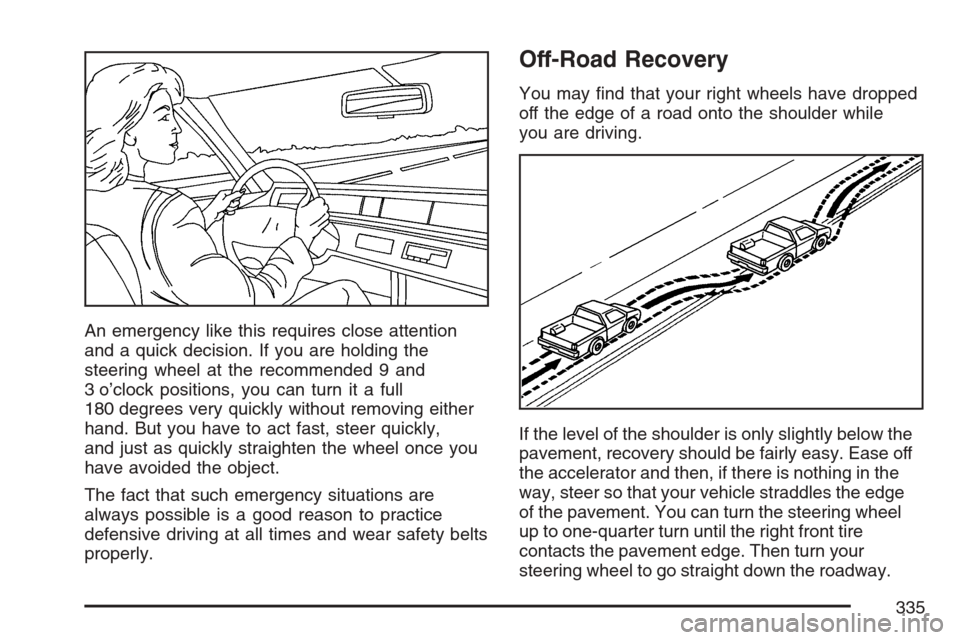
An emergency like this requires close attention
and a quick decision. If you are holding the
steering wheel at the recommended 9 and
3 o’clock positions, you can turn it a full
180 degrees very quickly without removing either
hand. But you have to act fast, steer quickly,
and just as quickly straighten the wheel once you
have avoided the object.
The fact that such emergency situations are
always possible is a good reason to practice
defensive driving at all times and wear safety belts
properly.
Off-Road Recovery
You may nd that your right wheels have dropped
off the edge of a road onto the shoulder while
you are driving.
If the level of the shoulder is only slightly below the
pavement, recovery should be fairly easy. Ease off
the accelerator and then, if there is nothing in the
way, steer so that your vehicle straddles the edge
of the pavement. You can turn the steering wheel
up to one-quarter turn until the right front tire
contacts the pavement edge. Then turn your
steering wheel to go straight down the roadway.
335