ECU CADILLAC ESCALADE EXT 2007 3.G Workshop Manual
[x] Cancel search | Manufacturer: CADILLAC, Model Year: 2007, Model line: ESCALADE EXT, Model: CADILLAC ESCALADE EXT 2007 3.GPages: 580, PDF Size: 3.01 MB
Page 166 of 580
Cupholder(s)
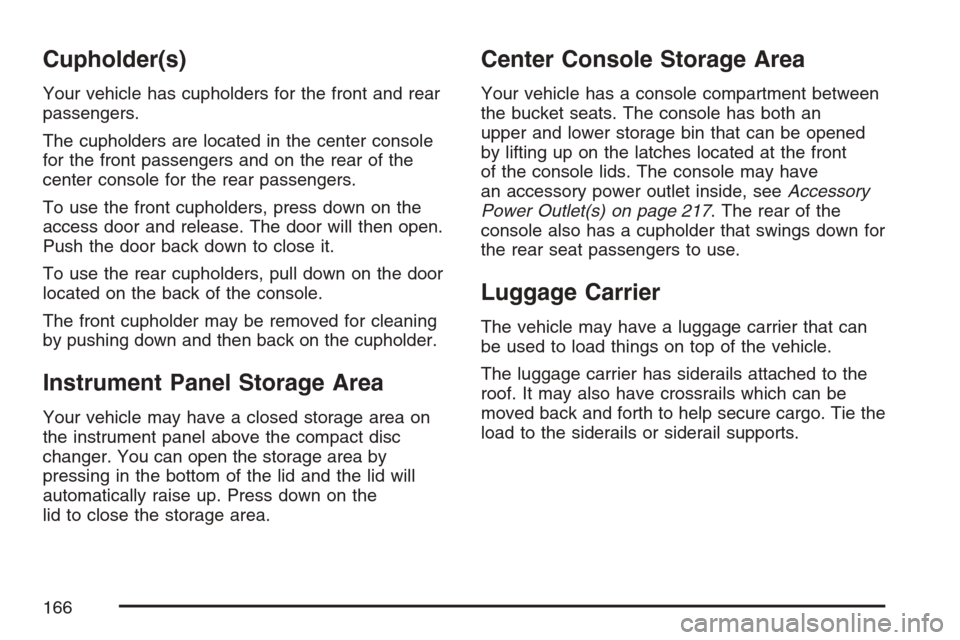
Your vehicle has cupholders for the front and rear
passengers.
The cupholders are located in the center console
for the front passengers and on the rear of the
center console for the rear passengers.
To use the front cupholders, press down on the
access door and release. The door will then open.
Push the door back down to close it.
To use the rear cupholders, pull down on the door
located on the back of the console.
The front cupholder may be removed for cleaning
by pushing down and then back on the cupholder.
Instrument Panel Storage Area
Your vehicle may have a closed storage area on
the instrument panel above the compact disc
changer. You can open the storage area by
pressing in the bottom of the lid and the lid will
automatically raise up. Press down on the
lid to close the storage area.
Center Console Storage Area
Your vehicle has a console compartment between
the bucket seats. The console has both an
upper and lower storage bin that can be opened
by lifting up on the latches located at the front
of the console lids. The console may have
an accessory power outlet inside, seeAccessory
Power Outlet(s) on page 217. The rear of the
console also has a cupholder that swings down for
the rear seat passengers to use.
Luggage Carrier
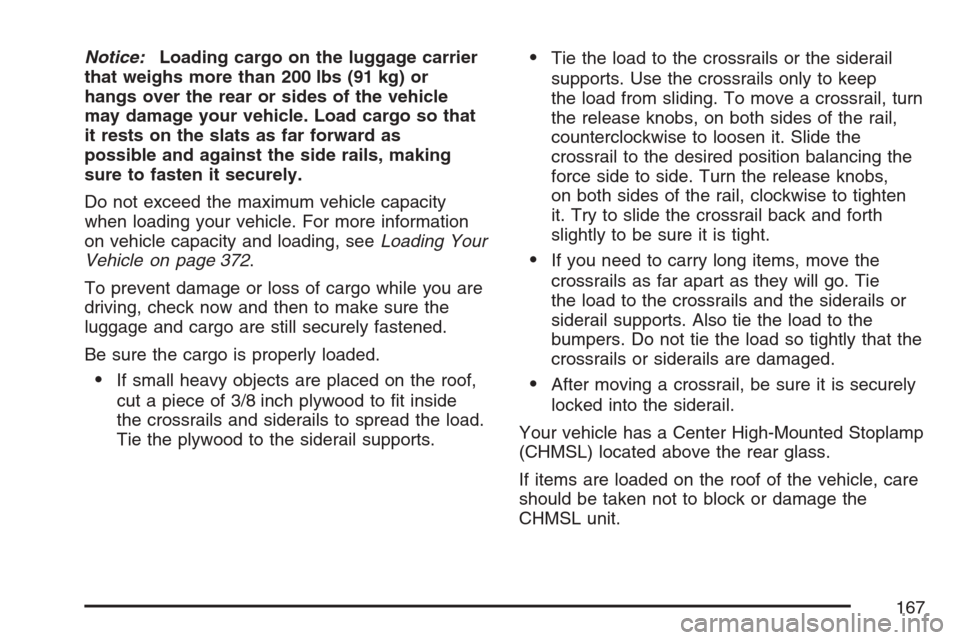
The vehicle may have a luggage carrier that can
be used to load things on top of the vehicle.
The luggage carrier has siderails attached to the
roof. It may also have crossrails which can be
moved back and forth to help secure cargo. Tie the
load to the siderails or siderail supports.
166
Page 167 of 580
Notice:Loading cargo on the luggage carrier
that weighs more than 200 lbs (91 kg) or
hangs over the rear or sides of the vehicle
may damage your vehicle. Load cargo so that
it rests on the slats as far forward as
possible and against the side rails, making
sure to fasten it securely.
Do not exceed the maximum vehicle capacity
when loading your vehicle. For more information
on vehicle capacity and loading, seeLoading Your
Vehicle on page 372.
To prevent damage or loss of cargo while you are
driving, check now and then to make sure the
luggage and cargo are still securely fastened.
Be sure the cargo is properly loaded.
If small heavy objects are placed on the roof,
cut a piece of 3/8 inch plywood to t inside
the crossrails and siderails to spread the load.
Tie the plywood to the siderail supports.
Tie the load to the crossrails or the siderail
supports. Use the crossrails only to keep
the load from sliding. To move a crossrail, turn
the release knobs, on both sides of the rail,
counterclockwise to loosen it. Slide the
crossrail to the desired position balancing the
force side to side. Turn the release knobs,
on both sides of the rail, clockwise to tighten
it. Try to slide the crossrail back and forth
slightly to be sure it is tight.
If you need to carry long items, move the
crossrails as far apart as they will go. Tie
the load to the crossrails and the siderails or
siderail supports. Also tie the load to the
bumpers. Do not tie the load so tightly that the
crossrails or siderails are damaged.
After moving a crossrail, be sure it is securely
locked into the siderail.
Your vehicle has a Center High-Mounted Stoplamp
(CHMSL) located above the rear glass.
If items are loaded on the roof of the vehicle, care
should be taken not to block or damage the
CHMSL unit.
167
Page 168 of 580
Rear Seat Armrest
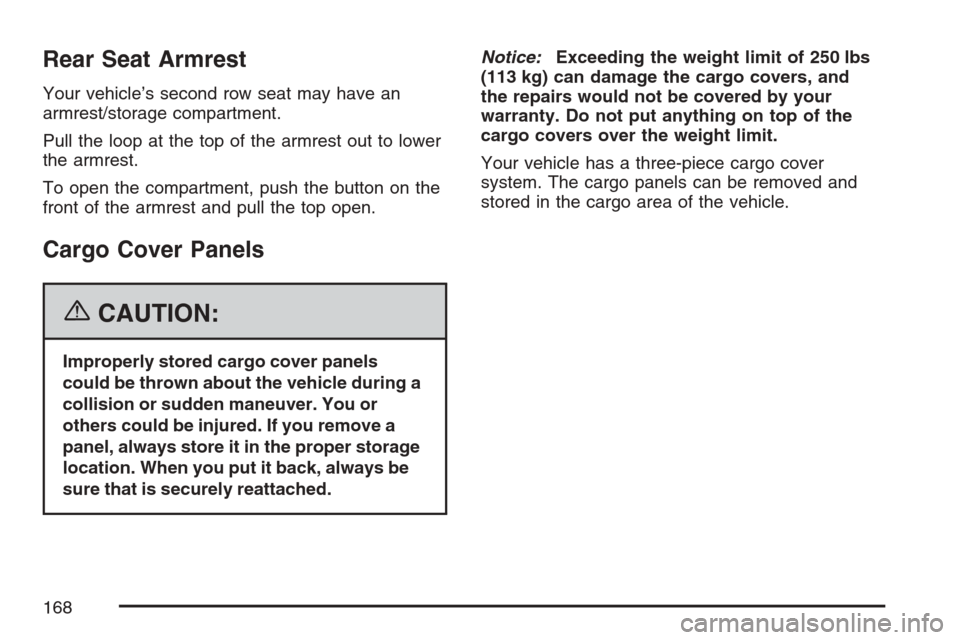
Your vehicle’s second row seat may have an
armrest/storage compartment.
Pull the loop at the top of the armrest out to lower
the armrest.
To open the compartment, push the button on the
front of the armrest and pull the top open.
Cargo Cover Panels
{CAUTION:
Improperly stored cargo cover panels
could be thrown about the vehicle during a
collision or sudden maneuver. You or
others could be injured. If you remove a
panel, always store it in the proper storage
location. When you put it back, always be
sure that is securely reattached.Notice:Exceeding the weight limit of 250 lbs
(113 kg) can damage the cargo covers, and
the repairs would not be covered by your
warranty. Do not put anything on top of the
cargo covers over the weight limit.
Your vehicle has a three-piece cargo cover
system. The cargo panels can be removed and
stored in the cargo area of the vehicle.
168
Page 171 of 580
Cargo Panel Storage System
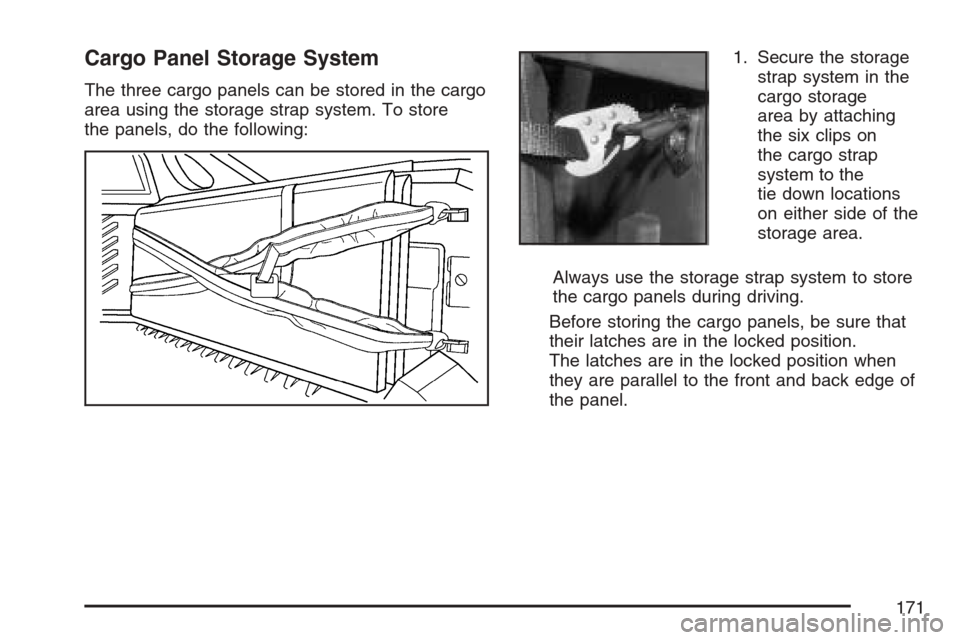
The three cargo panels can be stored in the cargo
area using the storage strap system. To store
the panels, do the following:1. Secure the storage
strap system in the
cargo storage
area by attaching
the six clips on
the cargo strap
system to the
tie down locations
on either side of the
storage area.
Always use the storage strap system to store
the cargo panels during driving.
Before storing the cargo panels, be sure that
their latches are in the locked position.
The latches are in the locked position when
they are parallel to the front and back edge of
the panel.
171
Page 172 of 580
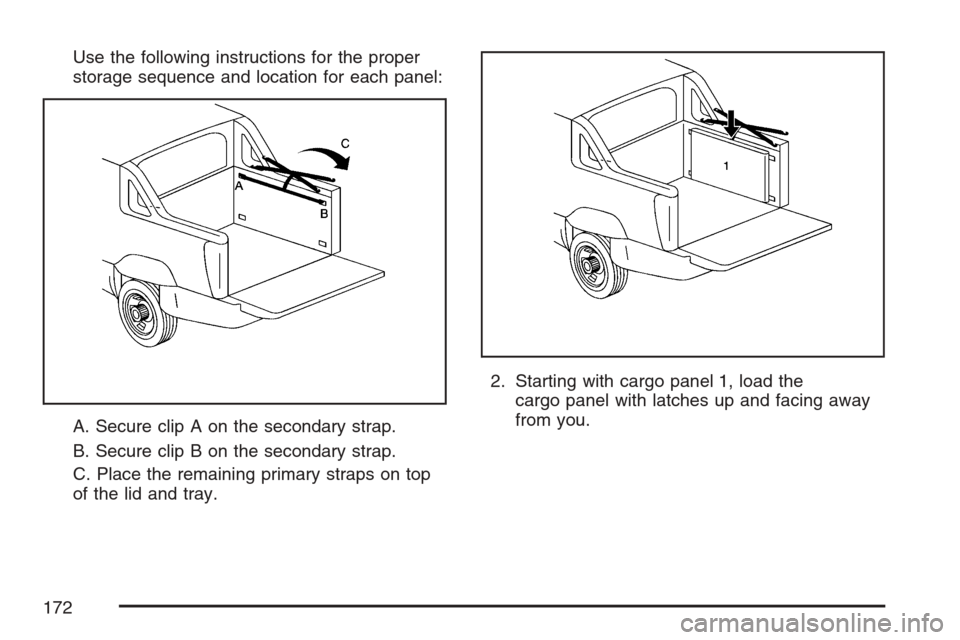
Use the following instructions for the proper
storage sequence and location for each panel:
A. Secure clip A on the secondary strap.
B. Secure clip B on the secondary strap.
C. Place the remaining primary straps on top
of the lid and tray.2. Starting with cargo panel 1, load the
cargo panel with latches up and facing away
from you.
172
Page 175 of 580
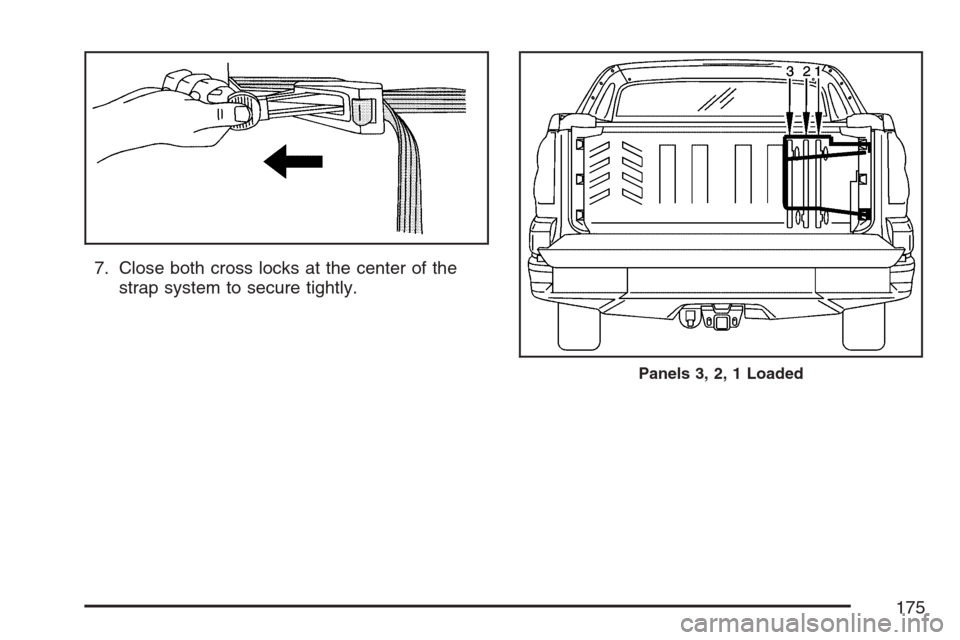
7. Close both cross locks at the center of the
strap system to secure tightly.
Panels 3, 2, 1 Loaded
175
Page 190 of 580
Tire Pressure Light.................................... 236
Malfunction Indicator Lamp........................ 236
Oil Pressure Light..................................... 240
Security Light............................................ 240
Fog Lamp Light......................................... 241
Lights On Reminder.................................. 241
Cruise Control Light.................................. 241
Highbeam On Light................................... 241
Tow/Haul Mode Light................................ 242
Fuel Gage................................................. 242
Driver Information Center (DIC).................. 243
DIC Operation and Displays...................... 243
DIC Warnings and Messages.................... 248
DIC Vehicle Customization........................ 257Audio System(s)......................................... 267
Setting the Time........................................ 269
Radio with CD and DVD........................... 270
XM Radio Messages................................. 300
Navigation/Radio System........................... 302
Rear Seat Entertainment System............... 302
Rear Seat Audio (RSA)............................. 313
Theft-Deterrent Feature............................. 315
Audio Steering Wheel Controls.................. 316
Radio Reception........................................ 317
Care of Your CDs and DVDs.................... 318
Care of the CD and DVD Player............... 318
Fixed Mast Antenna.................................. 318
XM™ Satellite Radio Antenna System....... 319
Chime Level Adjustment............................ 319
Section 3 Instrument Panel
190
Page 218 of 580
Ashtray(s) and Cigarette Lighter
The front ashtray and cigarette lighter are located in
the center console near the cupholders, if the
vehicle has them. Press on the access door to open
it and use the ashtray and lighter.
Notice:If you put papers, pins, or other
ammable items in the ashtray, hot cigarettes
or other smoking materials could ignite
them and possibly damage your vehicle.
Never put ammable items in the ashtray.
To remove the ashtray, pull it from the center
console. Slide it back in and push down to be sure
it is secure.
To use the cigarette lighter, push it in all the way,
and let go. When it is ready, it will pop back
out by itself.
Notice:Holding a cigarette lighter in while it
is heating will not allow the lighter to back
away from the heating element when it is hot.
Damage from overheating may occur to the
lighter or heating element, or a fuse could be
blown. Do not hold a cigarette lighter in
while it is heating.
Analog Clock
To adjust the clock, do the following:
1. Locate the adjustment button, near the lower
left corner of the clock.
2. Push and hold the adjustment button to
advance the clock hands. Release the
button before you get to the desired time.
3. Push and release the button to increase the
time by one minute increments until the
desired time is reached.
218
Page 231 of 580

Your vehicle has a rear seat that will accommodate
a rear-facing child restraint. A label on your sun
visor says, “Never put a rear-facing child seat
in the front.” This is because the risk to the
rear-facing child is so great, if the airbag deploys.
{CAUTION:
Even though the passenger sensing
system is designed to turn off the
passenger’s frontal airbag if the system
detects a rear-facing child restraint,
no system is failsafe, and no one can
guarantee that an airbag will not deploy
under some unusual circumstance, even
though it is turned off. We recommend
that rear-facing child restraints be secured
in the rear seat, even if the airbag is off.If the word OFF or the off symbol is lit on the
airbag status indicator, it means that the
passenger sensing system has turned off the right
front passenger’s frontal airbag. SeePassenger
Sensing System on page 78for more on this,
including important safety information.
If, after several seconds, all status indicator lights
remain on, or if there are no lights at all, there
may be a problem with the lights or the passenger
sensing system. See your dealer for service.
{CAUTION:
If the off indicator and the airbag readiness
light ever come on together, it means
that something may be wrong with the
airbag system. If this ever happens, have
the vehicle serviced promptly, because
an adult-size person sitting in the right
front passenger seat may not have the
protection of the frontal airbag. See
Airbag Readiness Light on page 229.
231
Page 240 of 580
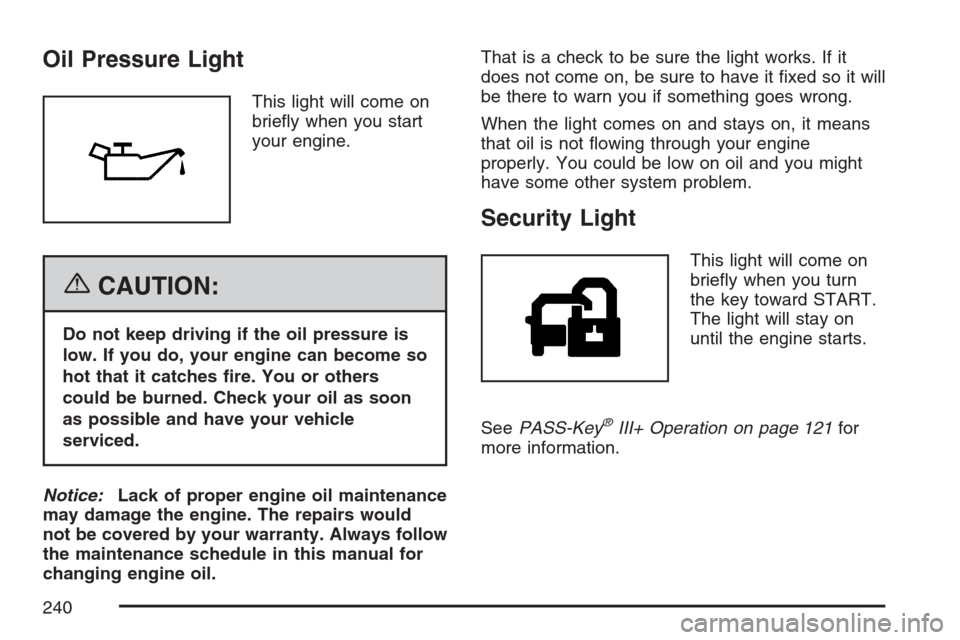
Oil Pressure Light
This light will come on
briey when you start
your engine.
{CAUTION:
Do not keep driving if the oil pressure is
low. If you do, your engine can become so
hot that it catches re. You or others
could be burned. Check your oil as soon
as possible and have your vehicle
serviced.
Notice:Lack of proper engine oil maintenance
may damage the engine. The repairs would
not be covered by your warranty. Always follow
the maintenance schedule in this manual for
changing engine oil.That is a check to be sure the light works. If it
does not come on, be sure to have it xed so it will
be there to warn you if something goes wrong.
When the light comes on and stays on, it means
that oil is not owing through your engine
properly. You could be low on oil and you might
have some other system problem.
Security Light
This light will come on
briey when you turn
the key toward START.
The light will stay on
until the engine starts.
SeePASS-Key
®III+ Operation on page 121for
more information.
240