lock CADILLAC ESCALADE EXT 2010 3.G User Guide
[x] Cancel search | Manufacturer: CADILLAC, Model Year: 2010, Model line: ESCALADE EXT, Model: CADILLAC ESCALADE EXT 2010 3.GPages: 580, PDF Size: 6.23 MB
Page 32 of 580
![CADILLAC ESCALADE EXT 2010 3.G User Guide How OnStar Service Works
Q
:This blue button connects you to a specially
trained OnStar advisor to verify your account
information and to answer questions.
]: Push this red emergency button to get pri](/img/23/7932/w960_7932-31.png "CADILLAC ESCALADE EXT 2010 3.G User Guide How OnStar Service Works
Q
:This blue button connects you to a specially
trained OnStar advisor to verify your account
information and to answer questions.
]: Push this red emergency button to get pri")
How OnStar Service Works
Q
:This blue button connects you to a specially
trained OnStar advisor to verify your account
information and to answer questions.
]: Push this red emergency button to get priority help
from specially trained OnStar emergency advisors.
X: Push this button for hands‐free, voice‐activated
calling and to give voice commands for turn‐by‐turn
navigation.
Crisis Assist, Stolen Vehicle Assistance, Vehicle
Diagnostics, Remote Door Unlock, Roadside
Assistance, Turn‐by‐Turn Navigation and Hands‐Free
Calling are available on most vehicles. Not all OnStar
services are available on all vehicles. For more
information see the OnStar Owner's Guide or visit
www.onstar.com (U.S.) or www.onstar.ca (Canada),
contact OnStar at 1-888-4-ONSTAR (1‐888‐466‐7827)
or TTY 1‐877‐248‐2080, or press
Qto speak with an
OnStar advisor 24 hours a day, 7 days a week.
For a full description of OnStar services and system
limitations, see the OnStar Owner's Guide in the
glove box.
OnStar service is subject to the OnStar terms and
conditions included in the OnStar Subscriber
Information. OnStar service cannot work unless the vehicle is in a
place where OnStar has an agreement with a wireless
service provider for service in that area. OnStar service
also cannot work unless the vehicle is in a place where
the wireless service provider OnStar has hired for that
area has coverage, network capacity and reception
when the service is needed, and technology that is
compatible with the OnStar service. Not all services are
available everywhere, particularly in remote or enclosed
areas, or at all times.
The OnStar system can record and transmit vehicle
information. This information is automatically sent to an
OnStar call center when
Qis pressed,]is pressed,
or if the airbags or ACR system deploy. This information
usually includes the vehicle's GPS location and, in the
event of a crash, additional information regarding the
crash that the vehicle was involved in (e.g. the direction
from which the vehicle was hit). When the virtual
advisor feature of OnStar hands-free calling is used, the
vehicle also sends OnStar the vehicle's GPS location
so they can provide services where it is located.
Location information about the vehicle is only available
if the GPS satellite signals are unobstructed and
available.
1-26
Page 37 of 580
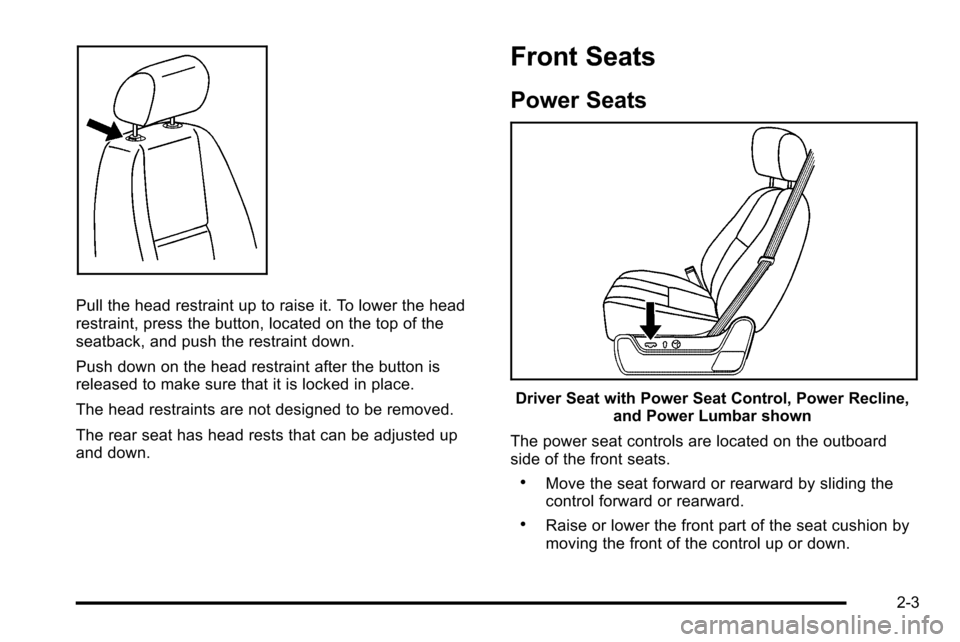
Pull the head restraint up to raise it. To lower the head
restraint, press the button, located on the top of the
seatback, and push the restraint down.
Push down on the head restraint after the button is
released to make sure that it is locked in place.
The head restraints are not designed to be removed.
The rear seat has head rests that can be adjusted up
and down.
Front Seats
Power Seats
Driver Seat with Power Seat Control, Power Recline,and Power Lumbar shown
The power seat controls are located on the outboard
side of the front seats.
.Move the seat forward or rearward by sliding the
control forward or rearward.
.Raise or lower the front part of the seat cushion by
moving the front of the control up or down.
2-3
Page 40 of 580
Memory Features
Your vehicle has the memory package.
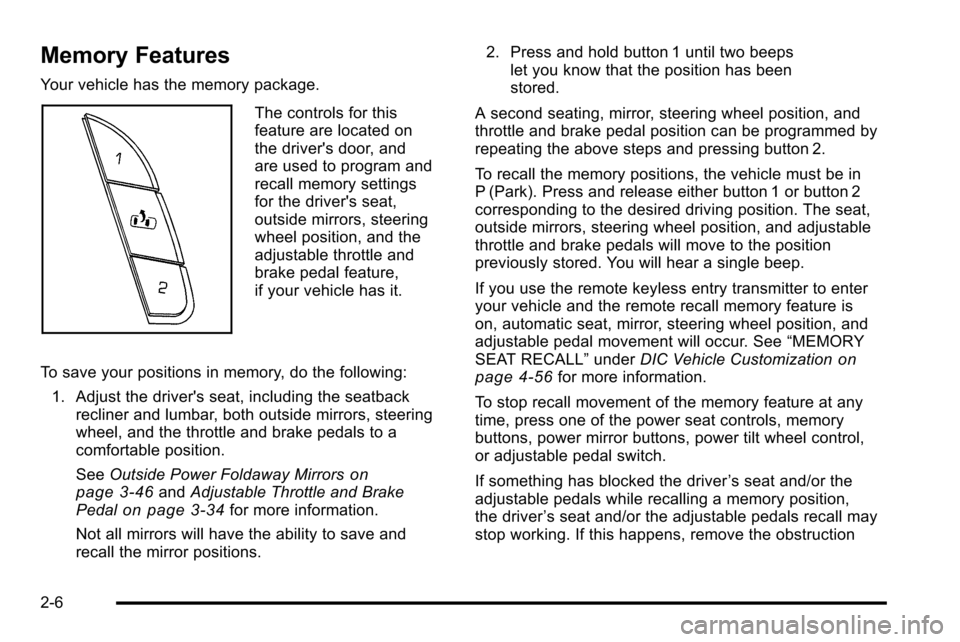
The controls for this
feature are located on
the driver's door, and
are used to program and
recall memory settings
for the driver's seat,
outside mirrors, steering
wheel position, and the
adjustable throttle and
brake pedal feature,
if your vehicle has it.
To save your positions in memory, do the following: 1. Adjust the driver's seat, including the seatback recliner and lumbar, both outside mirrors, steering
wheel, and the throttle and brake pedals to a
comfortable position.
See Outside Power Foldaway Mirrors
on
page 3‑46and Adjustable Throttle and Brake
Pedalon page 3‑34for more information.
Not all mirrors will have the ability to save and
recall the mirror positions. 2. Press and hold button 1 until two beeps
let you know that the position has been
stored.
A second seating, mirror, steering wheel position, and
throttle and brake pedal position can be programmed by
repeating the above steps and pressing button 2.
To recall the memory positions, the vehicle must be in
P (Park). Press and release either button 1 or button 2
corresponding to the desired driving position. The seat,
outside mirrors, steering wheel position, and adjustable
throttle and brake pedals will move to the position
previously stored. You will hear a single beep.
If you use the remote keyless entry transmitter to enter
your vehicle and the remote recall memory feature is
on, automatic seat, mirror, steering wheel position, and
adjustable pedal movement will occur. See “MEMORY
SEAT RECALL” underDIC Vehicle Customization
on
page 4‑56for more information.
To stop recall movement of the memory feature at any
time, press one of the power seat controls, memory
buttons, power mirror buttons, power tilt wheel control,
or adjustable pedal switch.
If something has blocked the driver ’s seat and/or the
adjustable pedals while recalling a memory position,
the driver ’s seat and/or the adjustable pedals recall may
stop working. If this happens, remove the obstruction
2-6
Page 44 of 580
To return the seats to the normal position, push the
seatback up and fold the seat cushion down.
{WARNING:
A safety belt that is improperly routed, not
properly attached, or twisted will not provide the
protection needed in a crash. The person wearing
the belt could be seriously injured. After raising
the rear seatback, always check to be sure that
the safety belts are properly routed and attached,
and are not twisted.
{WARNING:
If the seatback is not locked, it could move
forward in a sudden stop or crash. That could
cause injury to the person sitting there. Always be
sure to press the rear of the seat cushion down.
This action locks the seatback in place.
Push and pull on the seatback to make sure it is locked.
Raise the head restraint.
Safety Belts
Safety Belts: They Are for Everyone
This part of the manual tells you how to use safety belts
properly. It also tells you some things you should not do
with safety belts.
{WARNING:
Do not let anyone ride where a safety belt cannot
be worn properly. In a crash, if you or your
passenger(s) are not wearing safety belts, the
injuries can be much worse. You can hit things
inside the vehicle harder or be ejected from the
vehicle. You and your passenger(s) can be
seriously injured or killed. In the same crash, you
might not be, if you are buckled up. Always fasten
your safety belt, and check that your passenger(s)
are restrained properly too.
2-10
Page 50 of 580
Occupants who are not buckled up can be thrown out of
the vehicle in a crash. And they can strike others in the
vehicle who are wearing safety belts.
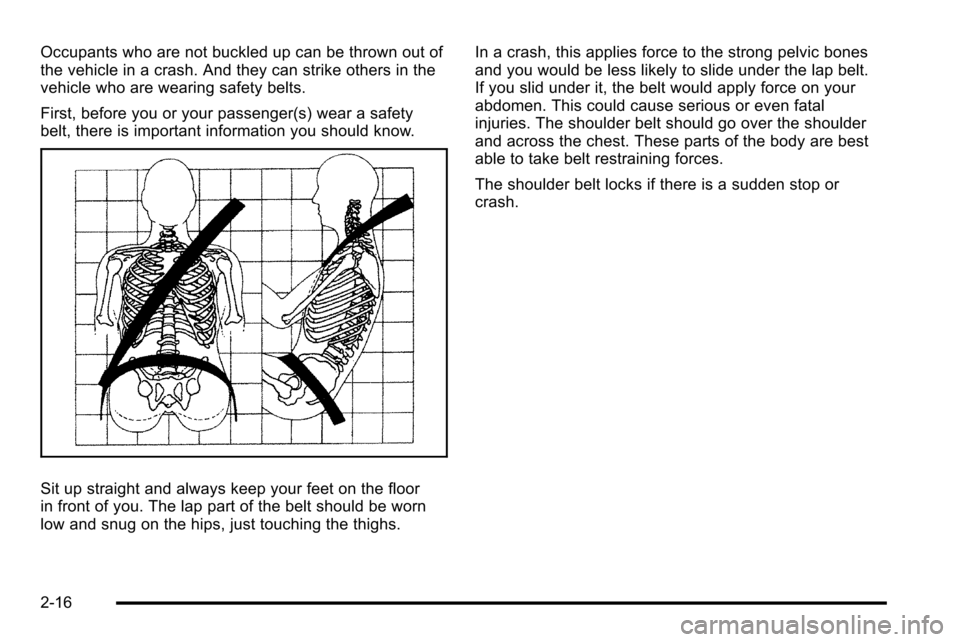
First, before you or your passenger(s) wear a safety
belt, there is important information you should know.
Sit up straight and always keep your feet on the floor
in front of you. The lap part of the belt should be worn
low and snug on the hips, just touching the thighs.In a crash, this applies force to the strong pelvic bones
and you would be less likely to slide under the lap belt.
If you slid under it, the belt would apply force on your
abdomen. This could cause serious or even fatal
injuries. The shoulder belt should go over the shoulder
and across the chest. These parts of the body are best
able to take belt restraining forces.
The shoulder belt locks if there is a sudden stop or
crash.
2-16
Page 58 of 580
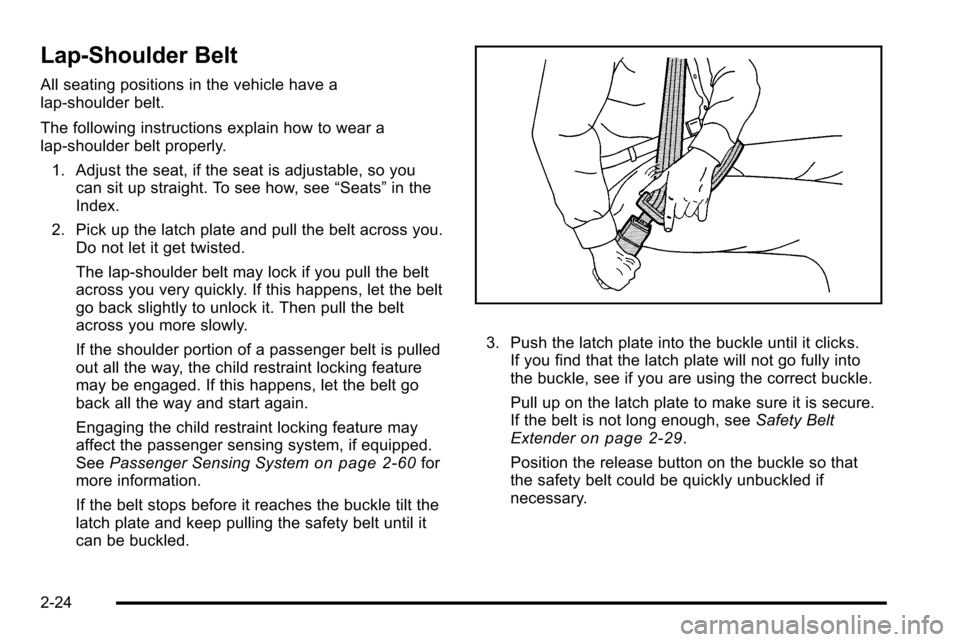
Lap-Shoulder Belt
All seating positions in the vehicle have a
lap-shoulder belt.
The following instructions explain how to wear a
lap-shoulder belt properly.1. Adjust the seat, if the seat is adjustable, so you can sit up straight. To see how, see “Seats”in the
Index.
2. Pick up the latch plate and pull the belt across you. Do not let it get twisted.
The lap-shoulder belt may lock if you pull the belt
across you very quickly. If this happens, let the belt
go back slightly to unlock it. Then pull the belt
across you more slowly.
If the shoulder portion of a passenger belt is pulled
out all the way, the child restraint locking feature
may be engaged. If this happens, let the belt go
back all the way and start again.
Engaging the child restraint locking feature may
affect the passenger sensing system, if equipped.
See Passenger Sensing System
on page 2‑60for
more information.
If the belt stops before it reaches the buckle tilt the
latch plate and keep pulling the safety belt until it
can be buckled.
3. Push the latch plate into the buckle until it clicks. If you find that the latch plate will not go fully into
the buckle, see if you are using the correct buckle.
Pull up on the latch plate to make sure it is secure.
If the belt is not long enough, see Safety Belt
Extender
on page 2‑29.
Position the release button on the buckle so that
the safety belt could be quickly unbuckled if
necessary.
2-24
Page 60 of 580
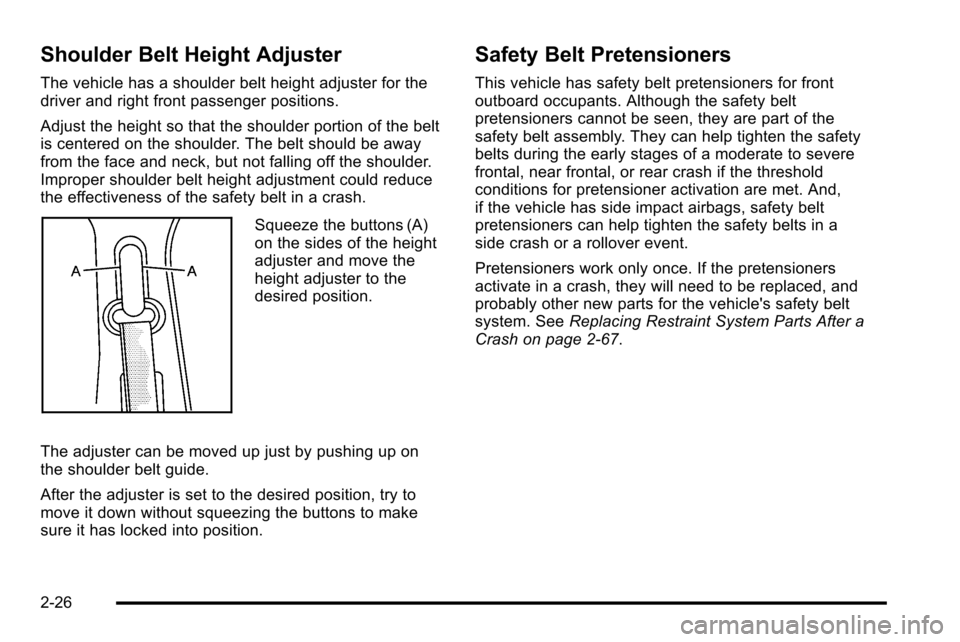
Shoulder Belt Height Adjuster
The vehicle has a shoulder belt height adjuster for the
driver and right front passenger positions.
Adjust the height so that the shoulder portion of the belt
is centered on the shoulder. The belt should be away
from the face and neck, but not falling off the shoulder.
Improper shoulder belt height adjustment could reduce
the effectiveness of the safety belt in a crash.
Squeeze the buttons (A)
on the sides of the height
adjuster and move the
height adjuster to the
desired position.
The adjuster can be moved up just by pushing up on
the shoulder belt guide.
After the adjuster is set to the desired position, try to
move it down without squeezing the buttons to make
sure it has locked into position.
Safety Belt Pretensioners
This vehicle has safety belt pretensioners for front
outboard occupants. Although the safety belt
pretensioners cannot be seen, they are part of the
safety belt assembly. They can help tighten the safety
belts during the early stages of a moderate to severe
frontal, near frontal, or rear crash if the threshold
conditions for pretensioner activation are met. And,
if the vehicle has side impact airbags, safety belt
pretensioners can help tighten the safety belts in a
side crash or a rollover event.
Pretensioners work only once. If the pretensioners
activate in a crash, they will need to be replaced, and
probably other new parts for the vehicle's safety belt
system. See Replacing Restraint System Parts After a
Crash on page 2‑67.
2-26
Page 76 of 580
According to accident statistics, children and infants
are safer when properly restrained in a child restraint
system or infant restraint system secured in a rear
seating position. SeeWhere to Put the Restraint
on
page 2‑37for additional information.
Securing a Child Restraint Designed for the
LATCH System
{WARNING:
If a LATCH-type child restraint is not attached to
anchors, the child restraint will not be able to
protect the child correctly. In a crash, the child
could be seriously injured or killed. Install a
LATCH-type child restraint properly using the
anchors, or use the vehicle's safety belts to
secure the restraint, following the instructions that
came with the child restraint and the instructions
in this manual.
{WARNING:
Do not attach more than one child restraint to a
single anchor. Attaching more than one child
restraint to a single anchor could cause the
anchor or attachment to come loose or even
break during a crash. A child or others could be
injured. To reduce the risk of serious or fatal
injuries during a crash, attach only one child
restraint per anchor.
{WARNING:
Children can be seriously injured or strangled if a
shoulder belt is wrapped around their neck and
the safety belt continues to tighten. Buckle any
unused safety belts behind the child restraint so
children cannot reach them. Pull the shoulder belt
all the way out of the retractor to set the lock,
if your vehicle has one, after the child restraint
has been installed.
2-42
Page 78 of 580
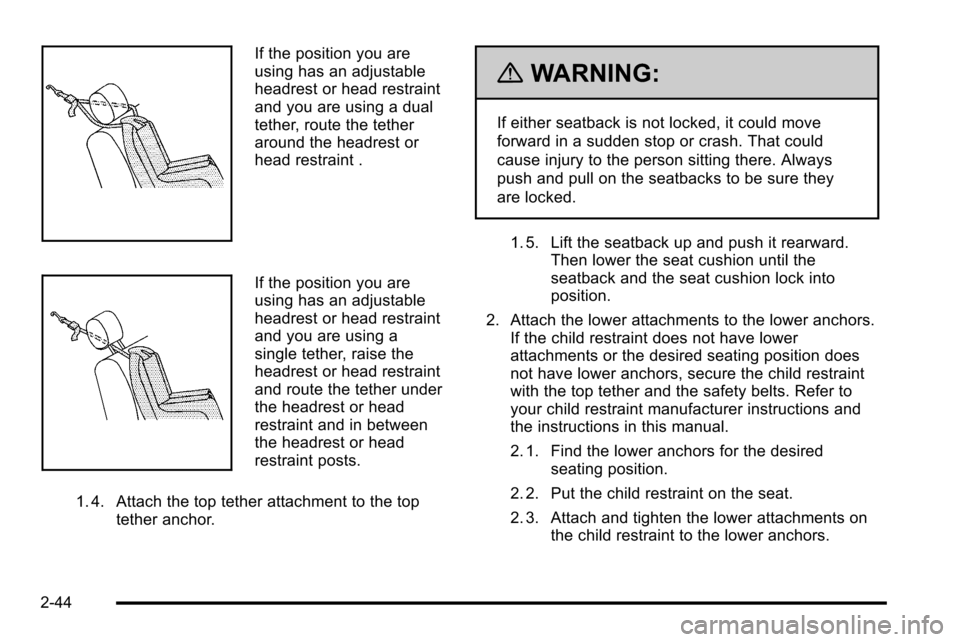
If the position you are
using has an adjustable
headrest or head restraint
and you are using a dual
tether, route the tether
around the headrest or
head restraint .
If the position you are
using has an adjustable
headrest or head restraint
and you are using a
single tether, raise the
headrest or head restraint
and route the tether under
the headrest or head
restraint and in between
the headrest or head
restraint posts.
1. 4. Attach the top tether attachment to the top tether anchor.
{WARNING:
If either seatback is not locked, it could move
forward in a sudden stop or crash. That could
cause injury to the person sitting there. Always
push and pull on the seatbacks to be sure they
are locked.
1. 5. Lift the seatback up and push it rearward. Then lower the seat cushion until the
seatback and the seat cushion lock into
position.
2. Attach the lower attachments to the lower anchors. If the child restraint does not have lower
attachments or the desired seating position does
not have lower anchors, secure the child restraint
with the top tether and the safety belts. Refer to
your child restraint manufacturer instructions and
the instructions in this manual.
2. 1. Find the lower anchors for the desired seating position.
2. 2. Put the child restraint on the seat.
2. 3. Attach and tighten the lower attachments on the child restraint to the lower anchors.
2-44
Page 80 of 580
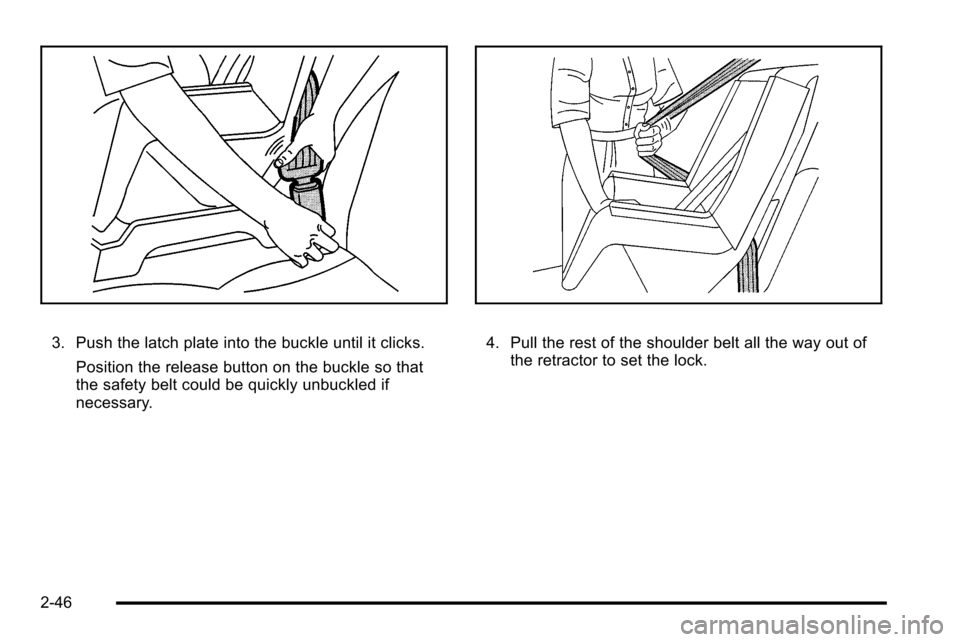
3. Push the latch plate into the buckle until it clicks.Position the release button on the buckle so that
the safety belt could be quickly unbuckled if
necessary.4. Pull the rest of the shoulder belt all the way out ofthe retractor to set the lock.
2-46