radio CADILLAC ESCALADE EXT 2010 3.G User Guide
[x] Cancel search | Manufacturer: CADILLAC, Model Year: 2010, Model line: ESCALADE EXT, Model: CADILLAC ESCALADE EXT 2010 3.GPages: 580, PDF Size: 6.23 MB
Page 156 of 580
Universal Home Remote
System
SeeRadio Frequency Statementon page 9‑20for information regarding Part 15 of the Federal
Communications Commission (FCC) Rules and
RSS-210/211 of Industry and Science Canada.
Universal Home Remote System
Operation (With Three Round LED)
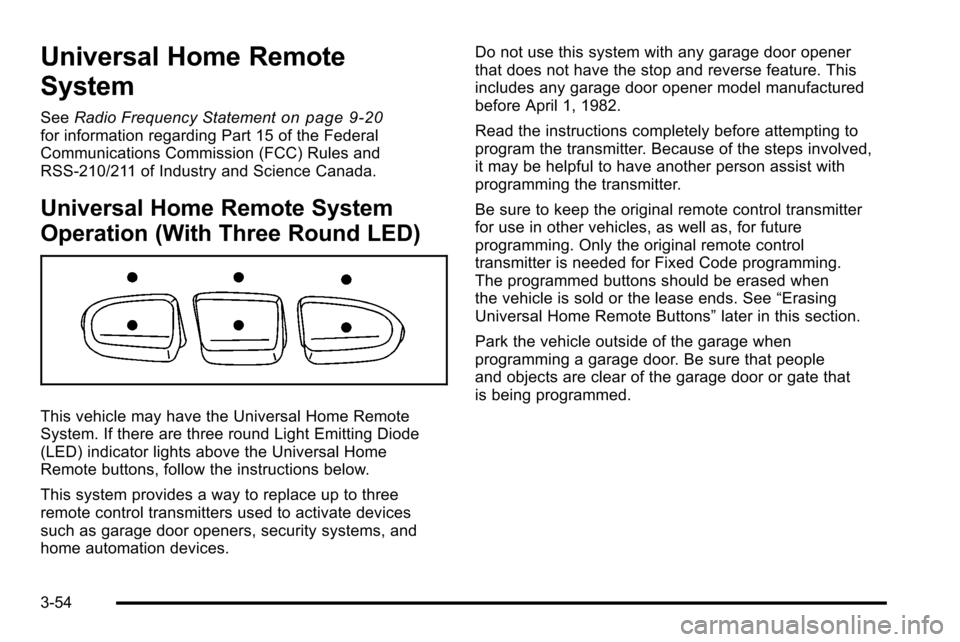
This vehicle may have the Universal Home Remote
System. If there are three round Light Emitting Diode
(LED) indicator lights above the Universal Home
Remote buttons, follow the instructions below.
This system provides a way to replace up to three
remote control transmitters used to activate devices
such as garage door openers, security systems, and
home automation devices. Do not use this system with any garage door opener
that does not have the stop and reverse feature. This
includes any garage door opener model manufactured
before April 1, 1982.
Read the instructions completely before attempting to
program the transmitter. Because of the steps involved,
it may be helpful to have another person assist with
programming the transmitter.
Be sure to keep the original remote control transmitter
for use in other vehicles, as well as, for future
programming. Only the original remote control
transmitter is needed for Fixed Code programming.
The programmed buttons should be erased when
the vehicle is sold or the lease ends. See
“Erasing
Universal Home Remote Buttons” later in this section.
Park the vehicle outside of the garage when
programming a garage door. Be sure that people
and objects are clear of the garage door or gate that
is being programmed.
3-54
Page 182 of 580
Section 4 Instrument Panel
Antilock Brake System (ABS) Warning Light . . . 4-32
StabiliTrak®Indicator Light . . . . . . . . . . . . . . . . . . . . . 4-32
Engine Coolant Temperature Gage . . . . . . . . . . . . 4-33
Tire Pressure Light . . . . . . . . . . . . . . . . . . . . . . . . . . . . 4-33
Malfunction Indicator Lamp . . . . . . . . . . . . . . . . . . . . 4-34
Oil Pressure Light . . . . . . . . . . . . . . . . . . . . . . . . . . . . . 4-37
Security Light . . . . . . . . . . . . . . . . . . . . . . . . . . . . . . . . . . 4-37
Fog Lamp Light . . . . . . . . . . . . . . . . . . . . . . . . . . . . . . . . 4-38
Lights On Reminder . . . . . . . . . . . . . . . . . . . . . . . . . . . 4-38
Cruise Control Light . . . . . . . . . . . . . . . . . . . . . . . . . . . 4-38
Highbeam On Light . . . . . . . . . . . . . . . . . . . . . . . . . . . . 4-38
Tow/Haul Mode Light . . . . . . . . . . . . . . . . . . . . . . . . . . 4-39
Fuel Gage . . . . . . . . . . . . . . . . . . . . . . . . . . . . . . . . . . . . . 4-39 Driver Information Center (DIC)
. . . . . . . . . . . . . . . . . .4-39
DIC Operation and Displays . . . . . . . . . . . . . . . . . . . 4-40
DIC Compass . . . . . . . . . . . . . . . . . . . . . . . . . . . . . . . . . . 4-46
DIC Warnings and Messages . . . . . . . . . . . . . . . . . . 4-48
DIC Vehicle Customization . . . . . . . . . . . . . . . . . . . . 4-56
Audio System(s) . . . . . . . . . . . . . . . . . . . . . . . . . . . . . . . . . . 4-66
Bluetooth
®. . . . . . . . . . . . . . . . . . . . . . . . . . . . . . . . . . . . . 4-66
Rear Seat Entertainment (RSE) System . . . . . . . 4-77
Rear Seat Audio (RSA) . . . . . . . . . . . . . . . . . . . . . . . . 4-85
Theft-Deterrent Feature . . . . . . . . . . . . . . . . . . . . . . . . 4-87
Audio Steering Wheel Controls . . . . . . . . . . . . . . . . 4-88
Radio Reception . . . . . . . . . . . . . . . . . . . . . . . . . . . . . . . 4-89
Fixed Mast Antenna . . . . . . . . . . . . . . . . . . . . . . . . . . . 4-90
XM™ Satellite Radio Antenna System . . . . . . . . . 4-90
4-2
Page 195 of 580

When it begins to get dark, the automatic headlamp
system switches from DRL to the headlamps.
To turn off the DRL lamps, turn the exterior lamps
control to the OFF position and then release. For
vehicles first sold in Canada, the transmission must be
in the P (Park) position, before the DRL lamps can be
turned off.
Automatic Headlamp System
When it is dark enough outside and the headlamp
switch is in AUTO, the automatic headlamp system
turns on the headlamps along with other lamps such as
the taillamps, sidemarker, parking lamps, roof marker
lamps, and the instrument panel lights. The radio lights
will also be dim.
To turn off the automatic headlamp system, turn the
exterior lamps switch to the off position and then
release. For vehicles first sold in Canada, the
transmission must be in the P (Park) position, before
the automatic headlamp system can be turned off.The vehicle has a light sensor located on the top of
the instrument panel. Do not cover this sensor or the
system will come on whenever the ignition is on.
The system may also turn on the headlamps when
driving through a parking garage, a tunnel, or while
driving in heavy overcast weather. This is normal.
There is a delay in the transition between the daytime
and nighttime operation of the Daytime Running Lamps
(DRL) and the automatic headlamp systems so that
driving under bridges or bright overhead street lights
does not affect the system. The DRL and automatic
headlamp system is only affected when the light sensor
sees a change in lighting lasting longer than the delay.
If the vehicle is started in a dark garage, the automatic
headlamp system comes on immediately. Once the
vehicle leaves the garage, it takes approximately
one minute for the automatic headlamp system to
change to DRL if it is light outside. During that delay,
the instrument panel cluster may not be as bright as
usual. Make sure the instrument panel brightness
control is in the full bright position. See
Instrument
Panel Brightness on page 4‑16.
4-15
Page 196 of 580

Fog Lamps
For vehicles with fog lamps, they can be used for better
vision in foggy or misty conditions. The parking lamps
and/or low-beam headlamps must be on for the fog
lamps to work.
The fog lamp button is located on the left side of the
instrument panel.
#(Fog Lamps):Press to turn the fog lamps on or off.
An indicator light comes on in the instrument panel
cluster to show that the fog lamps are on.
Remember, fog lamps alone will not give off as much
light as the headlamps. Never use the fog lamps in the
dark without turning on the headlamps.
The fog lamps will go off whenever the high-beam
headlamps come on. When the high beams go off, the
fog lamps will come on again.
The fog lamps will be cancelled after the ignition is
turned off. To use the fog lamps after restarting the
vehicle, press the fog lamp button again.
Some localities have laws that require the headlamps to
be on along with the fog lamps.
Exterior Cargo Lamps
The cargo lamp can be used if more light is needed in
the cargo area of the vehicle or in the top-box storage
units. Some vehicles will only have a cargo lamp in the
driver side top box.
The cargo lamps come on by turning on the interior
dome lamps.
Instrument Panel Brightness
The knob for this feature is located next to the exterior
lamps control.
D (Instrument Panel Lights) : Push the knob to extend
and then turn clockwise or counterclockwise to brighten
or dim the instrument panel lights and the radio display.
This only works if the headlamps or parking lamps
are on.
To turn on the dome lamps, with the vehicle doors
closed, turn the knob all the way clockwise.
4-16
Page 200 of 580
Analog Clock
The analog clock is located on the instrument panel
above the radio. The clock is not connected with any
other vehicle system and runs by itself. To adjust the
clock:1. The adjustment button is located in the lower left corner of the clock.
2. Push and hold the adjustment button to advance the clock hands. Holding the button down will
cause the clock to advance faster. Release the
button before reaching the desired time.
3. Push and release the button to increase the time by one minute increments until the desired time is
reached.
Climate Controls
Dual Automatic Climate Control
System
The heating, cooling, and ventilation in the vehicle can
be controlled with this system. The vehicle also has a
flow-through ventilation system described later in this
section.
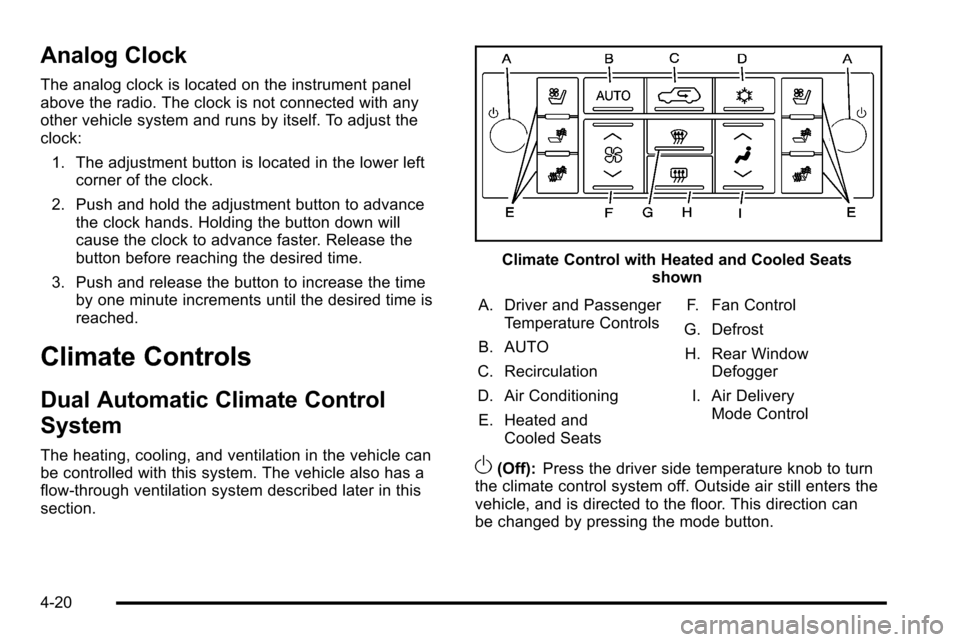
Climate Control with Heated and Cooled Seats shown
A. Driver and Passenger Temperature Controls
B. AUTO
C. Recirculation
D. Air Conditioning E. Heated and Cooled Seats F. Fan Control
G. Defrost
H. Rear Window Defogger
I. Air Delivery Mode Control
O(Off): Press the driver side temperature knob to turn
the climate control system off. Outside air still enters the
vehicle, and is directed to the floor. This direction can
be changed by pressing the mode button.
4-20
Page 210 of 580
Then, after several more seconds, the status indicator
will light either ON or OFF, or either the on or off symbol
to let you know the status of the right front passenger
frontal airbag.
If the word ON or the on symbol is lit on the passenger
airbag status indicator, it means that the right front
passenger frontal airbag is enabled (may inflate).
If the word OFF or the off symbol is lit on the airbag
status indicator, it means that the passenger sensing
system has turned off the right front passenger frontal
airbag.
If, after several seconds, both status indicator lights
remain on, or if there are no lights at all, there may be
a problem with the lights or the passenger sensing
system. See your dealer/retailer for service.
{WARNING:
If the airbag readiness light ever comes on and
stays on, it means that something may be wrong
with the airbag system. To help avoid injury to
yourself or others, have the vehicle serviced right
away. SeeAirbag Readiness Light
on page 4‑28
for more information, including important safety
information.
Charging System Light
This light comes on briefly
when the ignition key is
turned to START, but the
engine is not running, as
a check to show it is
working.
If it does not, have the vehicle serviced by your dealer/
retailer.
The light should go out once the engine starts. If it stays
on, or comes on while driving, there could be a problem
with the charging system. A charging system message
in the Driver Information Center (DIC) can also appear.
See DIC Warnings and Messages
on page 4‑48for
more information. This light could indicate that there are
problems with a generator drive belt, or that there is an
electrical problem. Have it checked right away. If the
vehicle must be driven a short distance with the light on,
turn off accessories, such as the radio and air
conditioner.
4-30
Page 246 of 580
Audio System(s)
Read the following pages to become familiar with the
audio system's features.
{WARNING:
Taking your eyes off the road for extended periods
could cause a crash resulting in injury or death to
you or others. Do not give extended attention to
entertainment tasks while driving.
This system provides access to many audio and non
audio listings.
To minimize taking your eyes off the road while driving,
do the following while the vehicle is parked:
.Become familiar with the operation and controls of
the audio system.
.Set up the tone, speaker adjustments, and preset
radio stations.
For more information, see Defensive Driving
on
page 6‑2.
This vehicle's infotainment system may be equipped
with a noise reduction system which can work
improperly if the audio amplifier, engine calibrations, exhaust system, microphones, radio, or speakers are
modified or replaced. This could result in more
noticeable engine noise at certain speeds.
Notice:
Contact your dealer/retailer before adding
any equipment.
Adding audio or communication equipment could
interfere with the operation of the vehicle's engine,
radio, or other systems, and could damage them.
Follow federal rules covering mobile radio and
telephone equipment.
The vehicle has Retained Accessory Power (RAP).
With RAP, the audio system can be played even after
the ignition is turned off. See Retained Accessory
Power (RAP)
on page 3‑32for more information.
Bluetooth®
Vehicles with a Bluetooth system can use a Bluetooth
capable cell phone with a Hands Free Profile to make
and receive phone calls. The system can be used while
the key is in ON/RUN or ACC/ACCESSORY position.
The range of the Bluetooth system can be up to 9.1 m
(30 ft). Not all phones support all functions, and not all
phones are guaranteed to work with the in-vehicle
Bluetooth system. See www.gm.com/bluetooth for more
information on compatible phones.
4-66
Page 256 of 580
Sending a Stored Name Tag During a Call
1. Pressbg. The system responds with “Ready”
followed by a tone.
2. Say “Send name tag.” The system responds with
“Say a name tag to send tones” followed by a tone.
3. Say the name tag to send.
.If the system clearly recognizes the name tag it
responds with “OK, Sending
the dial tones are sent and the call continues.
.If the system is not sure it recognized the name
tag properly, it responds “Dial
Please say yes or no?” followed by a tone.
If the name tag is correct, say “Yes”. The
system responds with “OK, Sending
continues.
Clearing the System
Unless information is deleted out of the in‐vehicle
Bluetooth system, it will be retained indefinitely. This
includes all saved name tags in the phonebook and
phone pairing information. For information on how to
delete this information, see the above sections on
Deleting a Paired Phone and Deleting Name Tags.
Other Information
The Bluetooth®word mark and logos are owned by the
Bluetooth®SIG, Inc. and any use of such marks by
General Motors is under license. Other trademarks and
trade names are those of their respective owners.
See Radio Frequency Statement
on page 9‑20for FCC
information.
4-76
Page 257 of 580
Rear Seat Entertainment (RSE)
System
The vehicle may have an DVD Rear Seat Entertainment
(RSE) system. The RSE system works with the
vehicle's audio system. The DVD player is part of the
front radio. The RSE system includes a radio with a
DVD player, a video display screen, audio/video jacks,
two wireless headphones, and a remote control. See
Navigation Audio System
on page 5‑59for more
information on the vehicle's audio/DVD system.
Driver Control of the Audio System
The driver has basic control of the whole audio system.
Press and hold
Ofor more than two seconds to turn off
the radio, RSE, and the RSA (rear seat audio). See
Navigation Audio System
on page 5‑59for more
information.
Before Driving
The RSE is designed for rear seat passengers only. The
driver cannot safely view the video screen while driving
and should not try to do so.
In severe or extreme weather conditions the RSE
system might not work until the temperature is within
the operating range. The operating range for the RSE
system is above −4°F (−20°C) or below 140°F (60°C).
If the temperature of the vehicle is outside of this range,
heat or cool the vehicle until the temperature is within
the operating range of the RSE system.
Headphones
The RSE includes two 2-channel wireless headphones
that are dedicated to this system. Channel 1 is
dedicated to the DVD player, while Channel 2 is
dedicated to RSA selections. These headphones are
used to listen to media such as CDs, DVDs, MP3s,
DVDAs, radio, any auxiliary source connected to
A/V jacks, or the auxiliary input jack, if the vehicle has
this feature. The wireless headphones have an On/Off
button, channel 1/2 switch, and a volume control.
4-77
Page 259 of 580
Audio/Video (A/V) Jacks
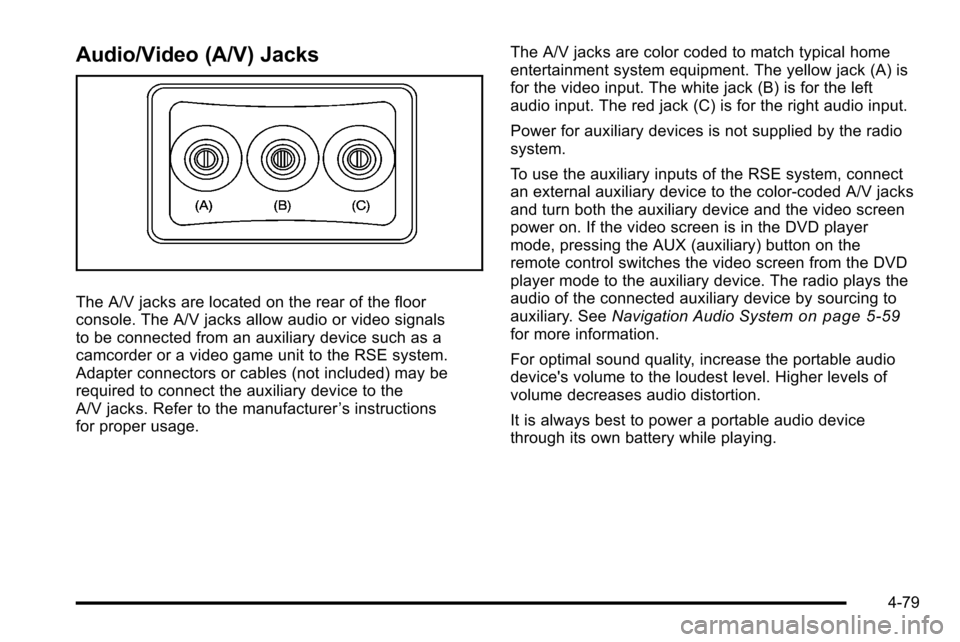
The A/V jacks are located on the rear of the floor
console. The A/V jacks allow audio or video signals
to be connected from an auxiliary device such as a
camcorder or a video game unit to the RSE system.
Adapter connectors or cables (not included) may be
required to connect the auxiliary device to the
A/V jacks. Refer to the manufacturer’s instructions
for proper usage. The A/V jacks are color coded to match typical home
entertainment system equipment. The yellow jack (A) is
for the video input. The white jack (B) is for the left
audio input. The red jack (C) is for the right audio input.
Power for auxiliary devices is not supplied by the radio
system.
To use the auxiliary inputs of the RSE system, connect
an external auxiliary device to the color-coded A/V jacks
and turn both the auxiliary device and the video screen
power on. If the video screen is in the DVD player
mode, pressing the AUX (auxiliary) button on the
remote control switches the video screen from the DVD
player mode to the auxiliary device. The radio plays the
audio of the connected auxiliary device by sourcing to
auxiliary. See
Navigation Audio Systemon page 5‑59for more information.
For optimal sound quality, increase the portable audio
device's volume to the loudest level. Higher levels of
volume decreases audio distortion.
It is always best to power a portable audio device
through its own battery while playing.
4-79