audio CADILLAC ESCALADE EXT 2010 3.G Workshop Manual
[x] Cancel search | Manufacturer: CADILLAC, Model Year: 2010, Model line: ESCALADE EXT, Model: CADILLAC ESCALADE EXT 2010 3.GPages: 580, PDF Size: 6.23 MB
Page 345 of 580
DVD Player
The player can be used for DVD audio and DVD video.
DVD video will not display on the navigation screen
unless the vehicle is in PARK (P). It will operate on the
rear seat entertainment screens while the vehicle is
moving. The Rear Seat Entertainment (RSE) video
screen will start play of the DVD when a DVD video has
been inserted into the navigation system. The DVD
player can be controlled by the buttons on the
navigation system, the Rear Seat Audio (RSA) system,
and the remote control. The DVD player can also be
used for the rear seat passengers with the radio off.
The rear seat passengers can power on the video
screen and use the remote control to navigate the disc.
See“Rear Seat Entertainment System” in the Index of
your vehicle's owner manual for more information.
The DVD player is only compatible with DVDs of the
appropriate region code that is printed on the jacket of
most DVDs.
The DVD slot is compatible with most audio CDs,
CD-R, CD-RW, DVD-Video, DVD-Audio, DVD-R/RW,
DVD+R/RW media along with MP3 and WMA formats. If an error appears on the display, see
“DVD Messages”
later in this section.M(Load): To load one disc, do the following:
1. Press the load hard key and follow the screen message displayed.
2. When the system displays “Insert Disc (number)”,
insert the disc partway into the slot, label side up.
The system will pull it into the first available slot
and start playing. The system will display the type
of disc inserted.
To load multiple discs, do the following: 1. Press and hold the load hard key and follow the screen message displayed.
2. When the system displays “Insert Disc (number)”,
insert the disc partway into the slot, label side up.
The system will pull it in.
3. Once a disc is loaded, the system will display “Insert Disc (number)” again. Load the next disc.
Repeat this procedure for each disc. The player
takes up to six discs, do not try to load more than
six. The system will not display the disc types
when loading all, until the discs have been read by
the system.
Once all discs have been inserted, the system will
start playing the last loaded disc.
5-75
Page 346 of 580
Z(Eject):To eject a disc, do the following:
1. Press the eject hard key.
2. The system will display “Ejecting Disc”.
Press the DISC screen button to display the Disc
Changer screen. Select the disc to eject. If a
selection is not made, the system will eject the disc
from the current slot. If the disc is not removed
from the slot, the system will pull it back in after
10 seconds and start playing it.
To eject all discs at once, press and hold the eject hard
key. The system will display the disc number being
ejected.
Playing a DVD
There are three ways to play a DVD:
.Once a DVD is inserted, the system will
automatically start play of the DVD.
.If you are on a map screen, touch the DVD screen
button.
.Press the AUDIO hard key, then touch the DVD
screen button.
When a DVD is loaded, the rear seat passengers can
power on the RSE video screen and use the remote
control to navigate through the DVD.
O/3(Power/Volume): Press this knob to turn
the system on and off. Turn the knob to increase or
decrease the volume of the audio system.
Press and hold this knob for more than two seconds to
turn off the navigation system, RSE video screen, and
RSA. If the vehicle has not been tuned off, the RSE and
the RSA can be turned back on by pressing this knob
and will continue play of the last active source.
DVD Menu Options
Once a DVD starts to play, the menu options and cursor
screen buttons will automatically appear. To display the
menu Options screen button while a DVD is playing,
touch anywhere on the screen.
Options : Select this screen button to view the menu
option screen buttons. Menu options are available when
they are highlighted. Some menu options are only
available when the DVD is not playing.
Cursor : Touch this button to access the cursor menu.
The arrows and other cursor options allow you to
navigate the DVD menu options. The cursor menu
options are only available if a DVD has a menu.
Use the cursor menu to start a DVD video from the disc
main menu.
q,Q,r,R(Arrow Buttons): Use these arrow
buttons to move around the DVD menu.
5-76
Page 348 of 580

Menu :Touch this button to display the DVD menu of
the current area of the DVD that is playing. This button
is not available for DVD audio.
Audio : Press this button to display the audio options.
Select the audio options that best improve sound
quality. This is not available on all DVDs or when the
DVD is stopped. This button is not available for DVD
audio.
Subtitle : Touch this button to playback the video with
subtitles. This is not available on all DVDs or when the
DVD is stopped. This button is not available for DVD
audio.
Angle : Touch this button to adjust the viewing angle of
the DVD. Repeatedly press this button to toggle through
the angles. This is not available on all DVDs or when
the DVD is stopped. This button is not available for
DVD audio.
q(Previous Scene): Press this button to go to the
previous scene. This button does not work when the
DVD is stopped. This button is not available for DVD
video.
r(Next Scene): Press this button to go to the next
scene. This button does not work when the DVD is
stopped. This button is not available for DVD video. Search :
Touch this button to display the search screen.
Select Title or Chapter Search for DVD video and
Group or Track for DVD audio. The keyboard allows
you to type in the title/chapter/group/track number that
you would like to watch or listen to. This button does
not work when the DVD is stopped.
Setup : Touch this button to display the DVD Setup
screen. This button is only available when the DVD is
not playing. The DVD Setup screen allows you to
change the brightness, contrast, and mode, change the
viewing on the monitor and to change the initial
settings; language, parental level, and aspect.
!(Brightness): Touch the up or down screen arrows
to increase or decrease the brightness of the navigation
screen.
_(Contrast): Touch the up or down screen arrows to
increase or decrease the contrast of the navigation
screen.
Auto (Automatic) : Touch this screen button for the
system to automatically adjust the navigation screen
background depending on exterior lighting conditions.
Night : Touch this screen button and the system will
make the navigation screen background brighten.
5-78
Page 349 of 580
Day :Touch this screen button and the system will
make the navigation screen background darken.
Monitor : From the DVD Setup screen, touch this
button to adjust the viewing angle of the DVD on the
navigation screen. This is not available on all DVDs.
This button is not available for DVD audio
Touch the
ebutton to close the screen in from the
left and right sides.
Touch the
Jbutton to fill the screen on the left and
right sides.
Touch the
dbutton to fill the screen on the top and
bottom.
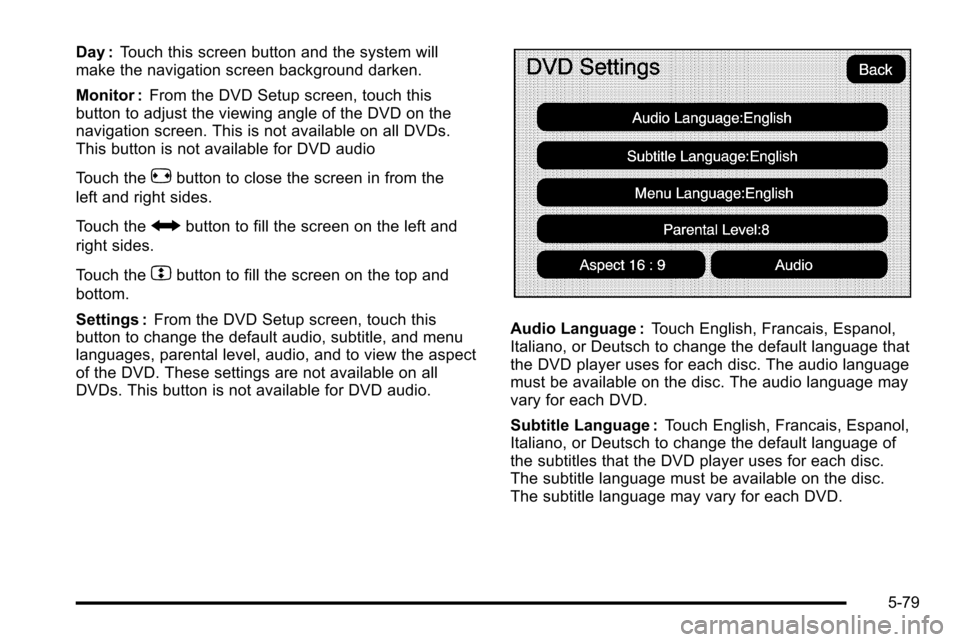
Settings : From the DVD Setup screen, touch this
button to change the default audio, subtitle, and menu
languages, parental level, audio, and to view the aspect
of the DVD. These settings are not available on all
DVDs. This button is not available for DVD audio.
Audio Language : Touch English, Francais, Espanol,
Italiano, or Deutsch to change the default language that
the DVD player uses for each disc. The audio language
must be available on the disc. The audio language may
vary for each DVD.
Subtitle Language : Touch English, Francais, Espanol,
Italiano, or Deutsch to change the default language of
the subtitles that the DVD player uses for each disc.
The subtitle language must be available on the disc.
The subtitle language may vary for each DVD.
5-79
Page 351 of 580
DVD Messages
If Disc Read Error appears on the display and/or the
DVD comes out, it could be for one of the following
reasons:
.If a disc was inserted with an invalid or unknown
format.
.If the disc is not from a correct region.
.If the map DVD disc was installed into the DVD
audio/video slot. See“Installing the Map DVD”
under Maps
on page 5‑14for more information.
.It is very hot. When the temperature returns to
normal, the DVD should play.
.You are driving on a very rough road. When the
road becomes smoother, the DVD should play.
.The DVD is dirty, scratched, wet, or upside down.
.The air is very humid. If so, wait about an hour and
try again.
.There may have been a problem while burning
the DVD.
.The label may be caught in the DVD player.
If the DVD is not playing correctly, for any other reason,
try a known good DVD.
If any error occurs repeatedly or if an error cannot be
corrected, contact your dealer/retailer.
Connecting a USB Storage Device
or iPod®
The USB Port, located in the center console, can be
used to control an iPod®or a USB storage device.
To avoid connection problems, extension cords are not
recommended. Use only the cable that came with the
device.
To connect a USB storage device, connect the device to
the USB port located in the center console.
To connect an iPod
®, connect one end of the USB cable
that came with the iPod to the iPod’ s dock connector
and connect the other end to the USB port. If the
vehicle is on and the USB connection works, “OK to
disconnect” and a GM logo may appear on the iPod and
iPod appears on the radio's display. The iPod music
appears on the radio’s display and begins playing.
The iPod charges while it is connected to the vehicle if
the vehicle is in the ACC/ACCESSORY or ON/RUN
position. When the vehicle is turned off, the iPod
automatically powers off and will not charge or draw
power from the vehicle's battery.
5-81
Page 352 of 580
USB Supported File and Folder Structure
The guidelines that must be met while using USB
supported files and folders are:
.Up to 700 folders.
.Up to 8 folders in depth.
.Up to 65,535 files.
.Folder and file names up to 64 bytes.
.Files with an .mp3 or .wma file extension.
.AAC files stored on an iPod.
.FAT16
.FAT32
Using the Navigation Audio System to
Control a USB Storage Device or iPod®
The navigation audio system can control a USB storage
device or an iPod by using the radio touch screens and
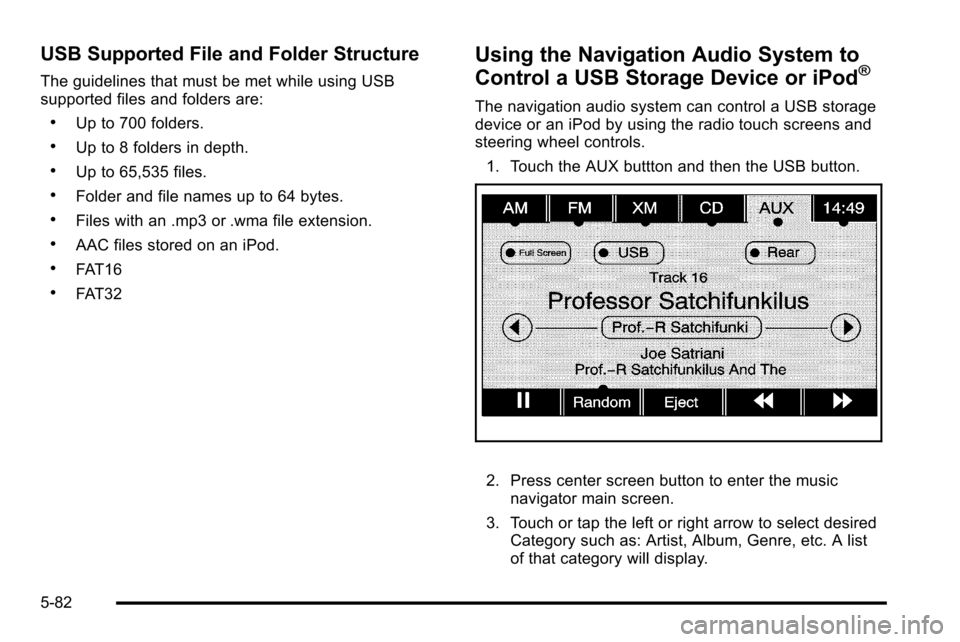
steering wheel controls.1. Touch the AUX buttton and then the USB button.
2. Press center screen button to enter the music navigator main screen.
3. Touch or tap the left or right arrow to select desired Category such as: Artist, Album, Genre, etc. A list
of that category will display.
5-82
Page 353 of 580

4. Select an Artist, Album, or Track from that list.
5. Touch the up or down arrows located on the side ofthe screen to select one item at a time, or touch
the top or bottom arrow to jump 10 percent up or
down the list.
6. Touch the Back button to go back to the previous screen.
7. Touch the Exit button to go back to the main audio screen.8. Touch the left or right arrow to select desiredCategory such as: Artist, Album, Genre, etc.
A list of that category will display.
5-83
Page 356 of 580

Auxiliary Devices
The vehicle may have a rear entertainment system
(RSE) with a second and third row screen. The RSE
has audio adapters to allow you to connect auxiliary
devices. The audio can be heard through the speakers
or through the wireless or wired headphones. See
“Audio/Video Jacks”under,Rear Seat Entertainment
(RSE) System
on page 4‑77for more information.
Drivers are encouraged to set up any auxiliary device
while the vehicle is in P (Park). See Defensive Driving
on page 6‑2for more information on driver distraction.
To switch the RSE system to use an auxiliary device:
1. Connect the auxiliary device to the RSE system, for the second or third row.
2. Press the AUDIO key then press the AUDIO key repeatedly until AUX (auxiliary) is selected or touch
the AUX screen button. An auxiliary device must
be connected for the AUX screen button to appear
as an option to select.
3. For the second row display select the Rear AUX screen button next to Rear Display 1 and for the
third row display select the Rear AUX screen
button next to Rear Display 2. Each screen works
independently of the other. The second row screen
can watch a DVD while the third row screen can
use the auxiliary device.
The rear seat passengers can also use the remote
control to change the functions of the RSE. See Rear
Seat Entertainment (RSE) System
on page 4‑77for
more information.
5-86
Page 357 of 580
Voice Recognition
The navigation system's voice recognition allows for
hands-free operation of the navigation system, audio
system, and OnStar
®features. The DVD map disc
must be installed in the navigation system for voice
recognition to work. See “Installing the DVD Map Disc”
under Maps
on page 5‑14for more information.
Voice recognition can be used when the ignition is
on or when Retained Accessory Power (RAP) is
active. See “Retained Accessory Power (RAP)”
in the Index of your vehicle's owner manual for
more information. To use voice recognition, do the following:
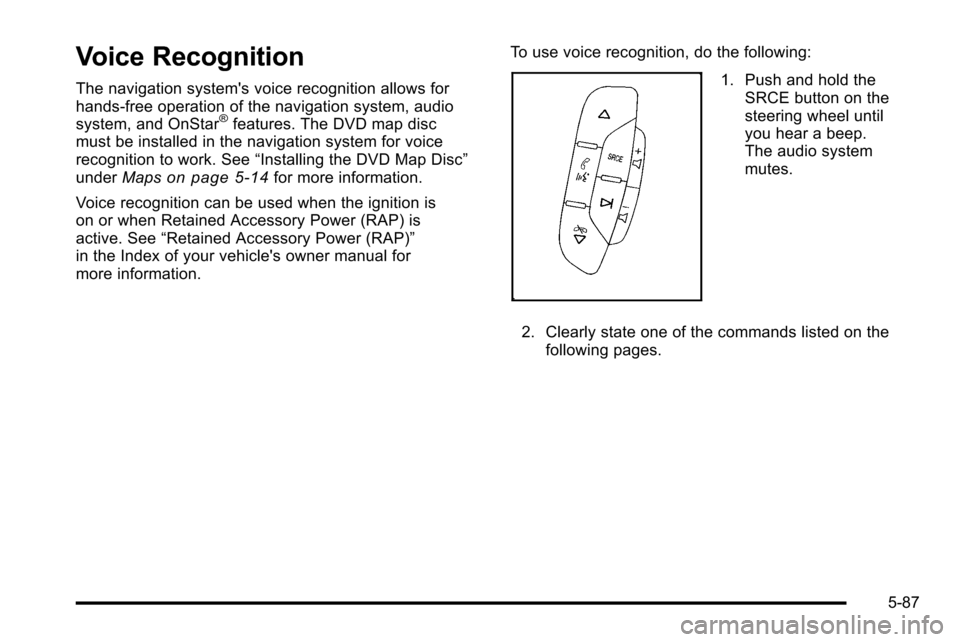
1. Push and hold the
SRCE button on the
steering wheel until
you hear a beep.
The audio system
mutes.
2. Clearly state one of the commands listed on the following pages.
5-87
Page 360 of 580
CD Commands
The following are CD, MP3, and DVD commands that
can be accessed by clearly stating the commands
exactly as they are written.
CD, DVD, Disc :Use this command to select a CD,
DVD, or disc that is currently loaded.
CD, DVD, Disc, [select] track (one, two, three, etc.) :
Instructs the system to select a specific track number.
CD, DVD, Disc select next folder : Use this command
to select the next folder on the MP3 or audio DVD.
CD, DVD, Disc select previous folder : Use this
command to select the previous folder on the MP3 or
audio DVD.
CD help, DVD help, Disc help : Instructs the system to
assist with CD and DVD commands.
Auxiliary Commands
The following auxiliary commands can be accessed by
clearly stating the commands exactly as they are
written. The commands are available when the auxiliary
source is available.
Aux, Auxiliary : Use this command to select the
auxiliary device, when a device is connected.
Voice Help
Voice help : Provides a description of help commands
that can be used.
5-90