lock CADILLAC ESCALADE EXT 2010 3.G Repair Manual
[x] Cancel search | Manufacturer: CADILLAC, Model Year: 2010, Model line: ESCALADE EXT, Model: CADILLAC ESCALADE EXT 2010 3.GPages: 580, PDF Size: 6.23 MB
Page 169 of 580
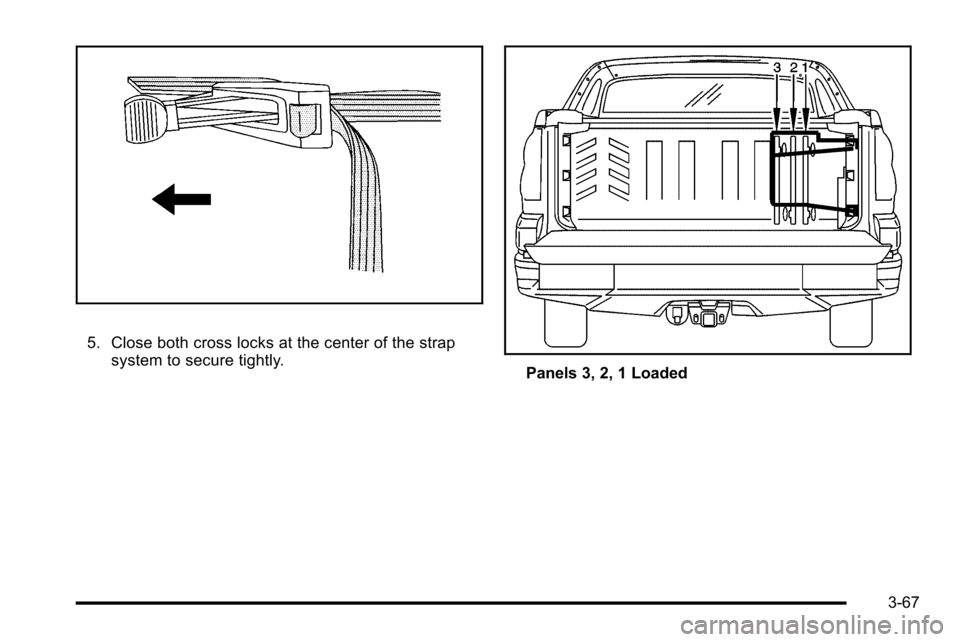
5. Close both cross locks at the center of the strapsystem to secure tightly.
Panels 3, 2, 1 Loaded
3-67
Page 170 of 580
Reinstalling the Cargo Cover Panels
The strap system can remain attached to the side of the
cargo area while it is not in use, or it can be stored
inside the top box storage compartment. SeeTop-Box
Storage
on page 3‑76for more information.
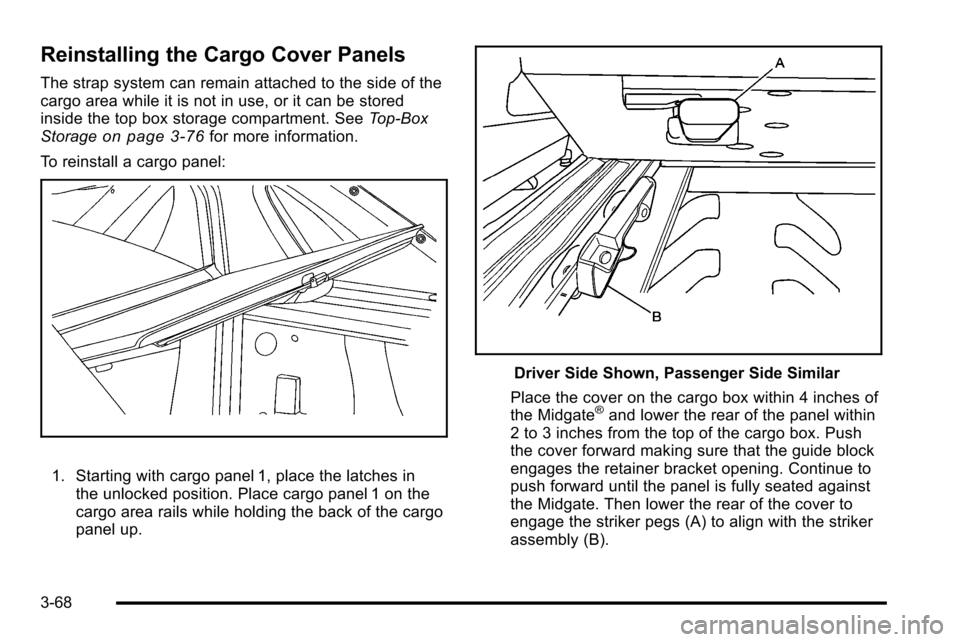
To reinstall a cargo panel:
1. Starting with cargo panel 1, place the latches in the unlocked position. Place cargo panel 1 on the
cargo area rails while holding the back of the cargo
panel up.
Driver Side Shown, Passenger Side Similar
Place the cover on the cargo box within 4 inches of
the Midgate
®and lower the rear of the panel within
2 to 3 inches from the top of the cargo box. Push
the cover forward making sure that the guide block
engages the retainer bracket opening. Continue to
push forward until the panel is fully seated against
the Midgate. Then lower the rear of the cover to
engage the striker pegs (A) to align with the striker
assembly (B).
3-68
Page 171 of 580
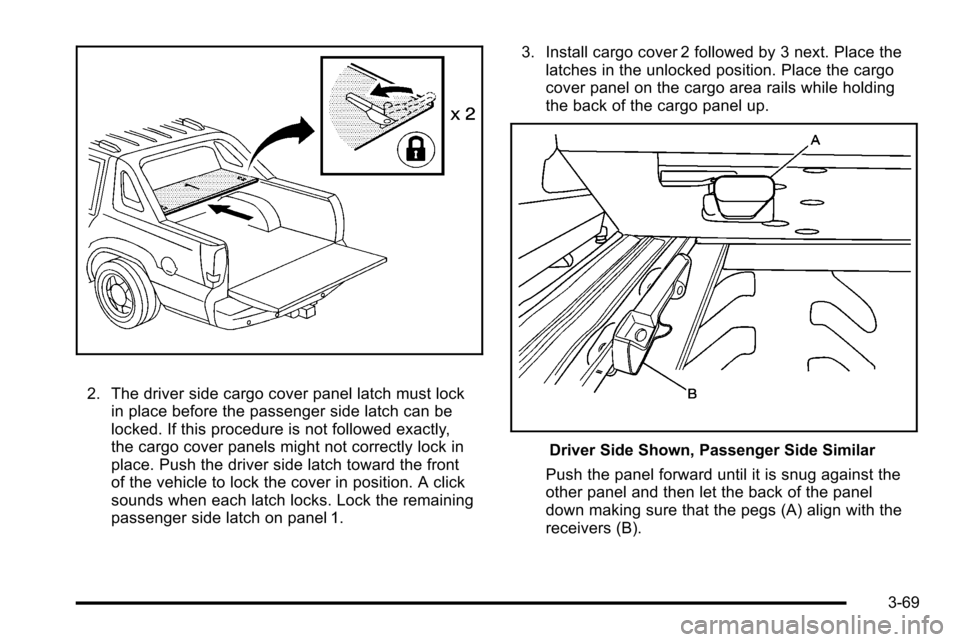
2. The driver side cargo cover panel latch must lockin place before the passenger side latch can be
locked. If this procedure is not followed exactly,
the cargo cover panels might not correctly lock in
place. Push the driver side latch toward the front
of the vehicle to lock the cover in position. A click
sounds when each latch locks. Lock the remaining
passenger side latch on panel 1. 3. Install cargo cover 2 followed by 3 next. Place the
latches in the unlocked position. Place the cargo
cover panel on the cargo area rails while holding
the back of the cargo panel up.
Driver Side Shown, Passenger Side Similar
Push the panel forward until it is snug against the
other panel and then let the back of the panel
down making sure that the pegs (A) align with the
receivers (B).
3-69
Page 172 of 580
4. Push the latches toward the front of the vehicle,starting with the driver side latch, to lock the panel
in place. A click sounds when each latch locks
correctly.
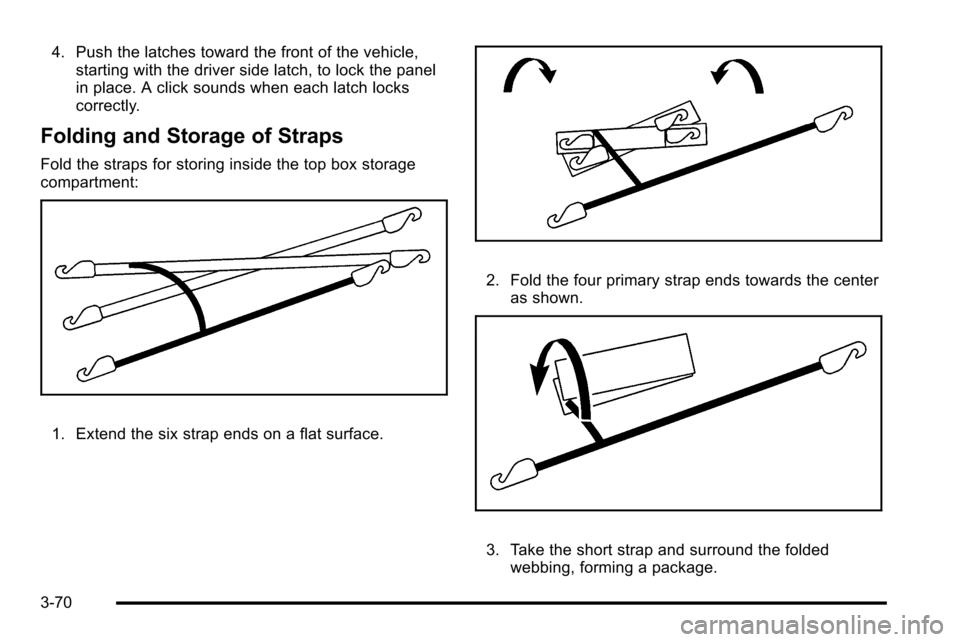
Folding and Storage of Straps
Fold the straps for storing inside the top box storage
compartment:
1. Extend the six strap ends on a flat surface.
2. Fold the four primary strap ends towards the center
as shown.
3. Take the short strap and surround the foldedwebbing, forming a package.
3-70
Page 174 of 580

Even when all of these things are working properly and
the cover system is on, there may be some instances
(heavy rains, automated car washes, etc.) when water
can collect in the following areas:
A. Top drain grates
B. Removable frontdrain grate (Midgate
®
drain grate) C. Side rail channels and
catch cups
D. Front drains E. Water drainage area
around both sides of
the cargo box and
tailgate side F. Rear drains
G. Cargo floor H. Cargo mat
Maintenance and Cleaning
To ensure that the water management system performs
properly, be sure that the Midgate®, tailgate and cover
system are fully closed and that all parts are clean and
not blocked with debris. Follow the instructions for the
proper procedures on cleaning each item.
3-72
Page 175 of 580

Top Drain Grates–Removal and
Cleaning
The top drain grates are located near the rear window
on both sides of the vehicle. Clean the grates and
drains if there is a blockage. To remove each drain grate:
1. Remove the cargo panels. See Cargo Cover
Panels
on page 3‑62for more information.
2. Grasp the edges of the grate and pull it out from the vehicle. Flush the drain with clean water.
3-73
Page 178 of 580

Cargo Area Floor Drains
The cargo mat has cut-outs for the four cargo-area floor
drains, located near the sides of the cargo area.
Flush the drains periodically through the cutouts to clear
debris and to allow water to drain from the cargo area.
If the cargo area is extremely dirty, lift up the edges of
the cargo floor mat or take the whole mat out and flush
the drains with water.
Top-Box Storage
The vehicle has top-box storage units on both sides of
the vehicle. The passenger side top box contains the
tools needed to change a flat tire.
Use the key to unlock or lock it. Press the key cylinder
button and swing the lid open. Turn on the cargo lamps,
if the vehicle has them, to light the inside of the cargo
area. SeeExterior Cargo Lamps
on page 4‑16for
more information.
3-76
Page 181 of 580

Section 4 Instrument Panel
Instrument Panel Overview. . . . . . . . . . . . . . . . . . . . . . . .4-3
Hazard Warning Flashers . . . . . . . . . . . . . . . . . . . . . . . 4-3
Horn . . . . . . . . . . . . . . . . . . . . . . . . . . . . . . . . . . . . . . . . . . . . 4-3
Tilt Wheel . . . . . . . . . . . . . . . . . . . . . . . . . . . . . . . . . . . . . . . 4-3
Heated Steering Wheel . . . . . . . . . . . . . . . . . . . . . . . . . 4-3
Turn Signal/Multifunction Lever . . . . . . . . . . . . . . . . . . 4-4
Turn and Lane-Change Signals . . . . . . . . . . . . . . . . . 4-4
Headlamp High/Low-Beam Changer . . . . . . . . . . . . 4-5
Flash-to-Pass . . . . . . . . . . . . . . . . . . . . . . . . . . . . . . . . . . . 4-5
Windshield Wipers . . . . . . . . . . . . . . . . . . . . . . . . . . . . . . 4-6
Windshield Washer . . . . . . . . . . . . . . . . . . . . . . . . . . . . . 4-6
Cruise Control . . . . . . . . . . . . . . . . . . . . . . . . . . . . . . . . . . 4-7
Exterior Lamps . . . . . . . . . . . . . . . . . . . . . . . . . . . . . . . . 4-10
Headlamps on Reminder . . . . . . . . . . . . . . . . . . . . . . 4-14
Daytime Running Lamps (DRL) . . . . . . . . . . . . . . . . 4-14
Automatic Headlamp System . . . . . . . . . . . . . . . . . . 4-15
Fog Lamps . . . . . . . . . . . . . . . . . . . . . . . . . . . . . . . . . . . . 4-16
Exterior Cargo Lamps . . . . . . . . . . . . . . . . . . . . . . . . . 4-16
Instrument Panel Brightness . . . . . . . . . . . . . . . . . . . 4-16
Dome Lamps . . . . . . . . . . . . . . . . . . . . . . . . . . . . . . . . . . 4-17
Dome Lamp Override . . . . . . . . . . . . . . . . . . . . . . . . . . 4-17 Entry/Exit Lighting . . . . . . . . . . . . . . . . . . . . . . . . . . . . . 4-17
Reading Lamps . . . . . . . . . . . . . . . . . . . . . . . . . . . . . . . . 4-17
Electric Power Management . . . . . . . . . . . . . . . . . . . 4-17
Battery Run-Down Protection . . . . . . . . . . . . . . . . . . 4-18
Accessory Power Outlet(s) . . . . . . . . . . . . . . . . . . . . . 4-18
Ashtray(s) and Cigarette Lighter . . . . . . . . . . . . . . . 4-19
Analog Clock . . . . . . . . . . . . . . . . . . . . . . . . . . . . . . . . . . 4-20
Climate Controls . . . . . . . . . . . . . . . . . . . . . . . . . . . . . . . . . . 4-20
Dual Automatic Climate Control System . . . . . . . 4-20
Outlet Adjustment . . . . . . . . . . . . . . . . . . . . . . . . . . . . . . 4-24
Warning Lights, Gages, and Indicators . . . . . . . . . .4-25
Instrument Panel Cluster . . . . . . . . . . . . . . . . . . . . . . . 4-26
Speedometer and Odometer . . . . . . . . . . . . . . . . . . . 4-27
Trip Odometer . . . . . . . . . . . . . . . . . . . . . . . . . . . . . . . . . 4-27
Tachometer . . . . . . . . . . . . . . . . . . . . . . . . . . . . . . . . . . . . 4-27
Safety Belt Reminders . . . . . . . . . . . . . . . . . . . . . . . . . 4-27
Airbag Readiness Light . . . . . . . . . . . . . . . . . . . . . . . . 4-28
Passenger Airbag Status Indicator . . . . . . . . . . . . . 4-29
Charging System Light . . . . . . . . . . . . . . . . . . . . . . . . 4-30
Brake System Warning Light . . . . . . . . . . . . . . . . . . . 4-31
4-1
Page 182 of 580
Section 4 Instrument Panel
Antilock Brake System (ABS) Warning Light . . . 4-32
StabiliTrak®Indicator Light . . . . . . . . . . . . . . . . . . . . . 4-32
Engine Coolant Temperature Gage . . . . . . . . . . . . 4-33
Tire Pressure Light . . . . . . . . . . . . . . . . . . . . . . . . . . . . 4-33
Malfunction Indicator Lamp . . . . . . . . . . . . . . . . . . . . 4-34
Oil Pressure Light . . . . . . . . . . . . . . . . . . . . . . . . . . . . . 4-37
Security Light . . . . . . . . . . . . . . . . . . . . . . . . . . . . . . . . . . 4-37
Fog Lamp Light . . . . . . . . . . . . . . . . . . . . . . . . . . . . . . . . 4-38
Lights On Reminder . . . . . . . . . . . . . . . . . . . . . . . . . . . 4-38
Cruise Control Light . . . . . . . . . . . . . . . . . . . . . . . . . . . 4-38
Highbeam On Light . . . . . . . . . . . . . . . . . . . . . . . . . . . . 4-38
Tow/Haul Mode Light . . . . . . . . . . . . . . . . . . . . . . . . . . 4-39
Fuel Gage . . . . . . . . . . . . . . . . . . . . . . . . . . . . . . . . . . . . . 4-39 Driver Information Center (DIC)
. . . . . . . . . . . . . . . . . .4-39
DIC Operation and Displays . . . . . . . . . . . . . . . . . . . 4-40
DIC Compass . . . . . . . . . . . . . . . . . . . . . . . . . . . . . . . . . . 4-46
DIC Warnings and Messages . . . . . . . . . . . . . . . . . . 4-48
DIC Vehicle Customization . . . . . . . . . . . . . . . . . . . . 4-56
Audio System(s) . . . . . . . . . . . . . . . . . . . . . . . . . . . . . . . . . . 4-66
Bluetooth
®. . . . . . . . . . . . . . . . . . . . . . . . . . . . . . . . . . . . . 4-66
Rear Seat Entertainment (RSE) System . . . . . . . 4-77
Rear Seat Audio (RSA) . . . . . . . . . . . . . . . . . . . . . . . . 4-85
Theft-Deterrent Feature . . . . . . . . . . . . . . . . . . . . . . . . 4-87
Audio Steering Wheel Controls . . . . . . . . . . . . . . . . 4-88
Radio Reception . . . . . . . . . . . . . . . . . . . . . . . . . . . . . . . 4-89
Fixed Mast Antenna . . . . . . . . . . . . . . . . . . . . . . . . . . . 4-90
XM™ Satellite Radio Antenna System . . . . . . . . . 4-90
4-2
Page 184 of 580

Turn Signal/Multifunction Lever
The lever on the left side of the steering column
includes the following:
G:Turn and Lane Change Signals
53 :Headlamp High/Low-Beam Changer
N :Windshield Wipers
L :Windshield Washer
Flash-to-Pass.
Exterior Lamps.
Information for these features is on the pages following.
Turn and Lane-Change Signals
An arrow on the
instrument panel cluster
flashes in the direction of
the turn or lane change.
Move the lever all the way up or down to signal a turn.
Raise or lower the lever until the arrow starts to flash to
signal a lane change. The turn signals automatically
flash three times. It will flash six times if the tow-haul
mode is active. Holding the turn signal lever for more
than one second causes the turn signals to flash until
the lever is released.
The lever returns to its starting position when it is
released.
If after signaling a turn or a lane change the arrows
flash rapidly or do not come on, a signal bulb may be
burned out.
Have the bulbs replaced. If the bulb is not burned out,
check the fuse. See Instrument Panel Fuse Block
on
page 7‑105and Underhood Fuse Block on page 7‑108.
4-4