buttons CADILLAC ESCALADE EXT 2011 3.G User Guide
[x] Cancel search | Manufacturer: CADILLAC, Model Year: 2011, Model line: ESCALADE EXT, Model: CADILLAC ESCALADE EXT 2011 3.GPages: 508, PDF Size: 7.6 MB
Page 77 of 508
Black plate (21,1)Cadillac Escalade EXT Owner Manual - 2011
Seats and Restraints 3-21
The adjuster can be moved up just
by pushing up on the shoulder belt
guide.
After the adjuster is set to the
desired position, try to move it down
without squeezing the buttons to
make sure it has locked into
position.
Safety Belt Pretensioners
This vehicle has safety belt
pretensioners for front outboard
occupants. Although the safety belt
pretensioners cannot be seen, they
are part of the safety belt assembly.
They can help tighten the safety
belts during the early stages of a
moderate to severe frontal, near
frontal, or rear crash if the threshold
conditions for pretensioner
activation are met. And, if the
vehicle has side impact airbags,
safety belt pretensioners can help
tighten the safety belts in a side
crash or a rollover event.Pretensioners work only once. If the
pretensioners activate in a crash,
they will need to be replaced, and
probably other new parts for the
vehicle's safety belt system. See
Replacing Safety Belt System Parts
After a Crash on page 3‑24.
Rear Safety Belt Comfort
Guides
This vehicle may have rear shoulder
belt comfort guides. If not, they are
available through your dealer. The
guides may provide added safety
belt comfort for older children who
have outgrown booster seats and
for some adults. When installed and
properly adjusted, the comfort guide
positions the belt away from the
neck and head.
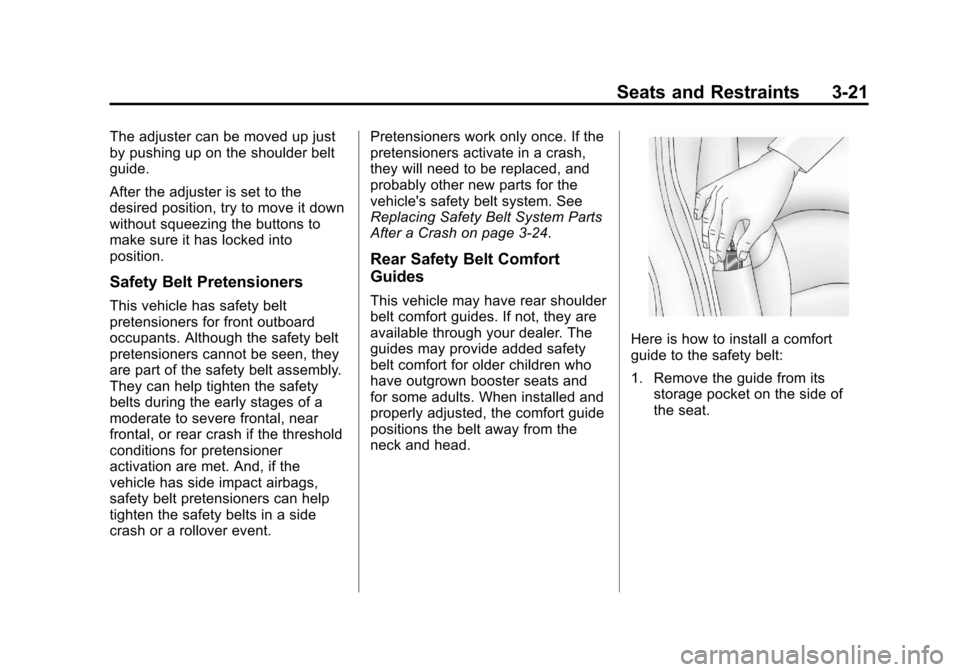
Here is how to install a comfort
guide to the safety belt:
1. Remove the guide from its
storage pocket on the side of
the seat.
Page 153 of 508
Black plate (23,1)Cadillac Escalade EXT Owner Manual - 2011
Instruments and Controls 5-23
Information Displays
Driver Information
Center (DIC)
Your vehicle has a Driver
Information Center (DIC).
The DIC displays information
about your vehicle. It also displays
warning messages if a system
problem is detected. The DIC
also allows some features to be
customized. SeeVehicle
Personalization on page 5‑35 for
more information.
All messages will appear in the DIC
display located in the center of the
instrument panel cluster.
The DIC comes on when the ignition
is on. After a short delay, the DIC
will display the information that was
last displayed before the engine
was turned off.
Operation and Displays
The DIC has different displays
which can be accessed by pressing
the DIC buttons located on the
instrument panel, next to the
steering wheel.
The DIC displays trip, fuel, and
vehicle system information, and
warning messages if a system
problem is detected. A digital
speedometer also appears at the
bottom of the DIC display. The
digital speedometer can be
enabled or disabled. See “DISPLAY
DIGITAL SPEED” underVehicle
Personalization on page 5‑35 for
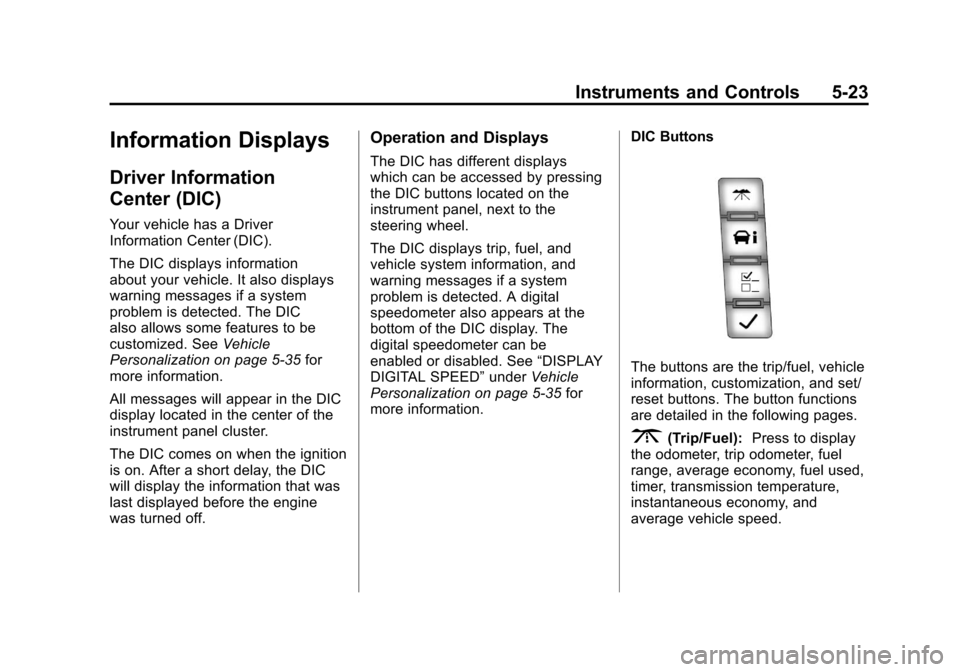
more information. DIC Buttons
The buttons are the trip/fuel, vehicle
information, customization, and set/
reset buttons. The button functions
are detailed in the following pages.
3(Trip/Fuel):
Press to display
the odometer, trip odometer, fuel
range, average economy, fuel used,
timer, transmission temperature,
instantaneous economy, and
average vehicle speed.
Page 164 of 508
Black plate (34,1)Cadillac Escalade EXT Owner Manual - 2011
5-34 Instruments and Controls
Tire Messages
SERVICE TIRE MONITOR
SYSTEM
On vehicles with the Tire Pressure
Monitor System (TPMS), this
message displays if a part on the
TPMS is not working properly. The
tire pressure light also flashes and
then remains on during the same
ignition cycle. SeeTire Pressure
Light on page 5‑20. Several
conditions may cause this message
to appear. See Tire Pressure
Monitor Operation on page 10‑58 for
more information. If the warning
comes on and stays on, there may
be a problem with the TPMS. See
your dealer.
TIRE LEARNING ACTIVE
On vehicles with the Tire Pressure
Monitor System (TPMS), this
message displays when the TPMS
is re-learning the tire positions on
your vehicle. The tire positions must be re-learned after rotating the tires
or after replacing a tire or sensor.
See
Tire Inspection on page 10‑61,
Tire Rotation on page 10‑61, Tire
Pressure Monitor System on
page 10‑56, and Tire Pressure on
page 10‑54 for more information.
TIRE LOW ADD AIR TO TIRE
On vehicles with the Tire Pressure
Monitor System (TPMS), this
message displays when the
pressure in one or more of the
vehicle's tires needs to be checked.
This message also displays LEFT
FRT (left front), RIGHT FRT
(right front), LEFT RR (left rear),
or RIGHT RR (right rear) to indicate
the location of the low tire. The low
tire pressure warning light will also
come on. See Tire Pressure Light
on page 5‑20. You can receive more
than one tire pressure message at a
time. To read the other messages
that may have been sent at the same time, press the set/reset
button or the trip odometer reset
stem. If a tire pressure message
appears on the DIC, stop as soon
as you can. Have the tire pressures
checked and set to those shown on
the Tire Loading Information label.
See
Tires on page 10‑48, Vehicle
Load Limits on page 9‑23, and Tire
Pressure on page 10‑54. The DIC
also shows the tire pressure values.
See “DIC Operation and Displays
(With DIC Buttons)” earlier in this
section.
Transmission Messages
MANUAL SHIFT
This message displays when the
automatic transmission is in manual
mode. See Manual Mode on
page 9‑41 for more information.
Page 174 of 508

Black plate (44,1)Cadillac Escalade EXT Owner Manual - 2011
5-44 Instruments and Controls
To select a setting, press the
set/reset button while the desired
setting is displayed on the DIC.
EXIT FEATURE SETTINGS
This feature allows you to exit the
feature settings menu.
Press the customization button until
PRESS
VTO EXIT FEATURE
SETTINGS appears in the DIC
display. Press the set/reset button
once to exit the menu.
If you do not exit, pressing the
customization button again will
return you to the beginning of the
feature settings menu.
Exiting the Feature
Settings Menu
The feature settings menu will be
exited when any of the following
occurs:
.The vehicle is no longer in
ON/RUN.
.The trip/fuel or vehicle
information DIC buttons are
pressed.
.The end of the feature settings
menu is reached and exited.
.A 40 second time period has
elapsed with no selection made.
Universal Remote
System
See Radio Frequency Statement on
page 13‑20 for information
regarding Part 15 of the Federal
Communications Commission (FCC)
rules and Industry Canada
Standards RSS-210/220/310.
Universal Remote System
Programming
Vehicles with the Universal Remote
System will have these buttons
located in the headliner.
Page 175 of 508
Black plate (45,1)Cadillac Escalade EXT Owner Manual - 2011
Instruments and Controls 5-45
This system provides a way to
replace up to three remote control
transmitters used to activate
devices such as garage door
openers, security systems, and
home automation devices.
Do not use this system with any
garage door opener that does not
have the stop and reverse feature.
This includes any garage door
opener model manufactured before
April 1, 1982.
Read the instructions completely
before attempting to program the
transmitter. Because of the steps
involved, it may be helpful to
have another person assist with
programming the transmitter.
Be sure to keep the original remote
control transmitter for use in other
vehicles, as well as for future
programming. Only the original
remote control transmitter is needed
for Fixed Code programming.The programmed buttons should be
erased when the vehicle is sold or
the lease ends. See
“Erasing
Universal Home Remote Buttons” in
this section.
Park the vehicle outside of the
garage when programming a garage
door. Be sure that people and
objects are clear of the garage door
or gate that is being programmed.
Programming Universal Home
Remote —Rolling Code
For questions or help programming
the Universal Home Remote
System, call 1-866-572-2728 or
go to www.learcar2u.com.
Most garage door openers sold
after 1996 are Rolling Code units.
Programming a garage door opener
involves time-sensitive actions, so
read the entire procedure before
starting. Otherwise, the device will
time out and the procedure will have
to be repeated.
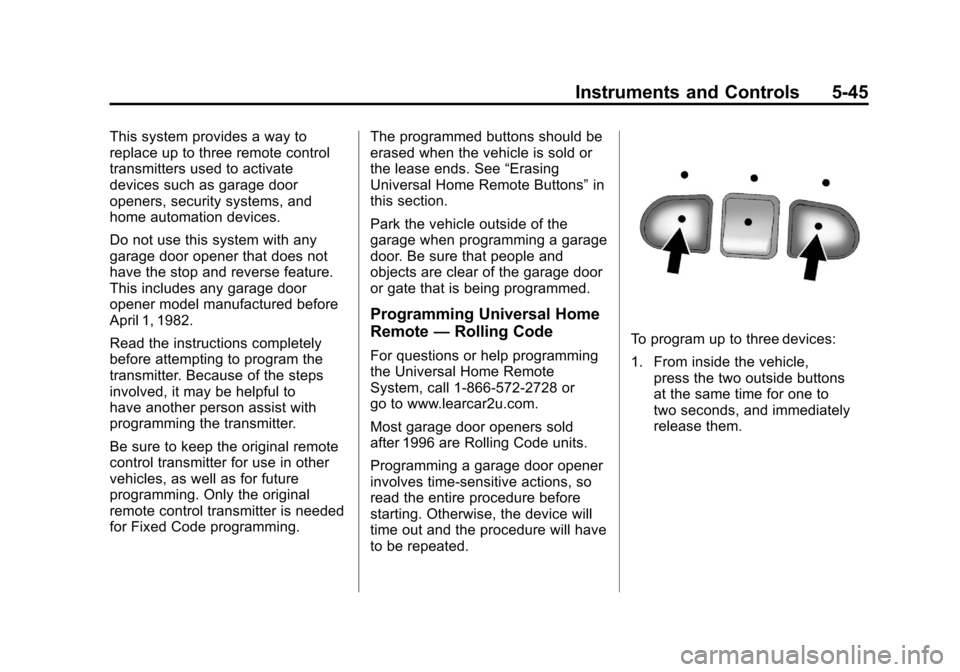
To program up to three devices:
1. From inside the vehicle,
press the two outside buttons
at the same time for one to
two seconds, and immediately
release them.
Page 178 of 508
Black plate (48,1)Cadillac Escalade EXT Owner Manual - 2011
5-48 Instruments and Controls
The switch positions on the
hand-held transmitter could be
labeled as follows:
.A switch in the up position
could be labeled as“Up,”
“+,” or“On.”
.A switch in the down
position could be labeled as
“Down,” “−,” or“Off.”
.A switch in the middle
position could be labeled as
“Middle,” “0,” or“Neutral.”
2. Write down the 8 to 12 switch settings from left to right as
follows:
.When a switch is in the up
position, write “Left.”
.When a switch is in the
down position, write “Right.”
.If a switch is set between
the up and down position,
write“Middle.”
The switch settings written
down in Step 2 now
become the button strokes
to be entered into the
Universal Home Remote in
Step 4. Be sure to enter the
switch settings written down
in Step 2, in order from left
to right, into the Universal
Home Remote, when
completing Step 4.
3. From inside your vehicle, first firmly press all three buttons
at the same time for about
three seconds. Release the
buttons to put the Universal
Home Remote into
programming mode.
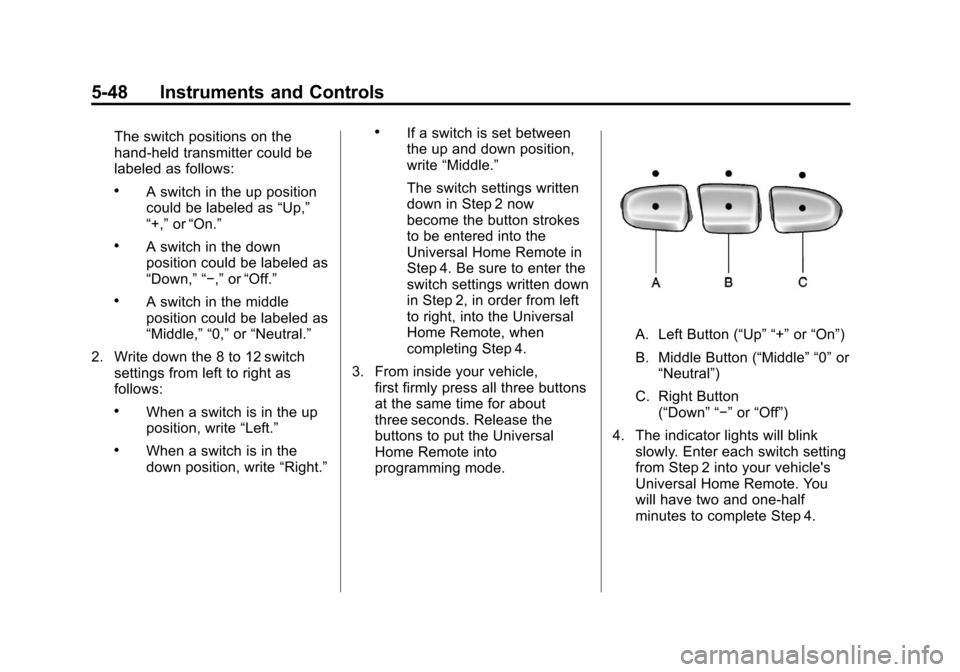
A. Left Button (“Up” “+” or“On”)
B. Middle Button (“Middle” “0” or
“Neutral”)
C. Right Button (“Down” “−” or“Off”)
4. The indicator lights will blink slowly. Enter each switch setting
from Step 2 into your vehicle's
Universal Home Remote. You
will have two and one-half
minutes to complete Step 4.
Page 179 of 508
Black plate (49,1)Cadillac Escalade EXT Owner Manual - 2011
Instruments and Controls 5-49
Now press one button on the
Universal Home Remote for
each switch setting as follows:
.If you wrote“Left,”press
the left button (A) in the
vehicle.
.If you wrote “Right,”press
the right button (C) in the
vehicle.
.If you wrote “Middle,”press
the middle button (B) in the
vehicle.
5. After entering all of the switch positions, once again firmly
press and release all three
buttons at the same time. The
indicator lights will turn on. 6. Press and hold the button that
will be used to control the
garage door until the garage
door moves. The indicator light
above the selected button
should slowly blink. This button
may need to be held for up to
55 seconds.
7. Immediately release the button when the garage door moves.
The indicator light will blink
rapidly until programming is
complete.
8. Press and release the same button again. The garage door
should move, confirming that
programming is successful and
complete. To program another Fixed Code
device such as an additional garage
door opener, a security device,
or home automation device, repeat
Steps 1-8, choosing a different
button in Step 6 than what was used
for the garage door opener.
Universal Remote System
Operation
Press and hold the appropriate
button for at least half of a second.
The indicator light will come on
while the signal is being transmitted.
Reprogramming Universal
Home Remote Buttons
Any of the three buttons can be
reprogrammed by repeating the
instructions.
Page 180 of 508
Black plate (50,1)Cadillac Escalade EXT Owner Manual - 2011
5-50 Instruments and Controls
Erasing Universal Home
Remote Buttons
The programmed buttons should be
erased when the vehicle is sold or
the lease ends.
To erase either Rolling Code or
Fixed Code settings on the
Universal Home Remote device:
1. Press and hold the two outsidebuttons at the same time for
approximately 20 seconds, until
the indicator lights, located
directly above the buttons, begin
to blink rapidly.
2. Once the indicator lights begin to blink, release both buttons. The
codes from all buttons will be
erased. For help or information on the
Universal Home Remote System,
call the customer assistance phone
number under
Customer Assistance
Offices (U.S. and Canada) on
page 13‑5 orCustomer Assistance
Offices (Mexico) on page 13‑6.
Page 192 of 508

Black plate (2,1)Cadillac Escalade EXT Owner Manual - 2011
7-2 Infotainment System
All functions are available when the
vehicle is parked. Do the following
before driving:
.Become familiar with the
navigation system operation,
control buttons on the faceplate,
and touch-sensitive screen
buttons of the navigation
system.
.Set up the audio by presetting
favorite stations, setting the
tone, and adjusting the
speakers.
.Set up the navigation features
before beginning driving, such
as entering an address or a
preset destination.
.Set up your phone numbers
in advance so they can be
called easily with the press of a
single button or a single voice
command (for navigation
systems equipped with phone
capability).
{WARNING
Taking your eyes off the road too
long or too often while using the
navigation system could cause a
crash resulting in injury or death
to you or others. Focus your
attention on driving.
{WARNING
Avoid looking too long or too
often at the moving map on the
navigation screen. This could
cause a crash and you or others
can be injured or killed. Use the
turn-by-turn voice guidance
directions whenever possible.Use the navigation system to:
.Plan a route.
.Select a destination using
various methods and choices.
.Follow turn-by-turn route and
map guidance with voice
prompts, only if permitted by
traffic laws, controls, and
conditions.
Always be alert and obey traffic
and roadway laws and instructions,
regardless of the guidance from the
navigation system. Because the
navigation system uses street map
information that does not include all
traffic restrictions or the latest road
changes, it may suggest using a
road that is now closed for
construction or a turn that is
prohibited by signs at the
intersection. Because the system
uses limited information, you must
always evaluate whether following
the system's directions is safe and
legal for the current conditions.
Page 193 of 508

Black plate (3,1)Cadillac Escalade EXT Owner Manual - 2011
Infotainment System 7-3
Theft-Deterrent Feature
TheftLock®is designed to
discourage theft of the vehicle's
radio by learning a portion of the
Vehicle Identification Number (VIN).
The radio does not operate if it is
stolen or moved to a different
vehicle.
Overview
When the navigation system is
turned on, a screen may appear
with the information below, and you
must read and acknowledge the
information it contains. After you acknowledge the start
up information you will be able to
access the NAV (navigation) and
DEST (destination) functions.
Once accessed, you can enter or
delete information in the navigation
system or access other functions.
See instructions later in this section.
Every fifty times the vehicle is
started and the navigation system
is turned on, the Caution screenappears. After reading the
caution, select OK to load the
map information. If OK is not
selected, all control buttons
except for NAV and DEST can be
accessed. You can also press the
NAV control button to have this
Caution screen appear.
When getting started, set the
navigation system to your
preference or delete information
you may have entered using various
options.