light CADILLAC ESCALADE EXT 2011 3.G Owners Manual
[x] Cancel search | Manufacturer: CADILLAC, Model Year: 2011, Model line: ESCALADE EXT, Model: CADILLAC ESCALADE EXT 2011 3.GPages: 508, PDF Size: 7.6 MB
Page 1 of 508

Black plate (1,1)Cadillac Escalade EXT Owner Manual - 2011
2011 Cadillac Escalade EXT Owner ManualM
In Brief. . . . . . . . . . . . . . . . . . . . . . . . 1-1
Instrument Panel . . . . . . . . . . . . . . 1-2
Initial Drive Information . . . . . . . . 1-4
Vehicle Features . . . . . . . . . . . . . 1-15
Performance and Maintenance . . . . . . . . . . . . . . . . 1-20
Keys, Doors and Windows . . . 2-1
Keys and Locks . . . . . . . . . . . . . . . 2-2
Doors . . . . . . . . . . . . . . . . . . . . . . . . . . 2-9
Vehicle Security . . . . . . . . . . . . . . 2-16
Exterior Mirrors . . . . . . . . . . . . . . . 2-19
Interior Mirrors . . . . . . . . . . . . . . . . 2-21
Windows . . . . . . . . . . . . . . . . . . . . . 2-22
Roof . . . . . . . . . . . . . . . . . . . . . . . . . . 2-25
Seats and Restraints . . . . . . . . . 3-1
Head Restraints . . . . . . . . . . . . . . . 3-2
Front Seats . . . . . . . . . . . . . . . . . . . . 3-3
Rear Seats . . . . . . . . . . . . . . . . . . . . 3-8
Safety Belts . . . . . . . . . . . . . . . . . . 3-10
Airbag System . . . . . . . . . . . . . . . . 3-25
Child Restraints . . . . . . . . . . . . . . 3-40 Storage
. . . . . . . . . . . . . . . . . . . . . . . 4-1
Storage Compartments . . . . . . . . 4-1
Luggage/Load Locations . . . . . . . 4-2
Additional Storage
Features . . . . . . . . . . . . . . . . . . . . . 4-6
Roof Rack System . . . . . . . . . . . 4-12
Instruments and Controls . . . . 5-1
Controls . . . . . . . . . . . . . . . . . . . . . . . 5-2
Warning Lights, Gauges, and Indicators . . . . . . . . . . . . . . . . . . . . 5-9
Information Displays . . . . . . . . . . 5-23
Vehicle Messages . . . . . . . . . . . . 5-27
Vehicle Personalization . . . . . . . 5-35
Universal Remote System . . . . 5-44
Lighting . . . . . . . . . . . . . . . . . . . . . . . 6-1
Exterior Lighting . . . . . . . . . . . . . . . 6-1
Interior Lighting . . . . . . . . . . . . . . . . 6-8
Lighting Features . . . . . . . . . . . . . 6-10
Infotainment System . . . . . . . . . 7-1
Introduction . . . . . . . . . . . . . . . . . . . . 7-1
Radio . . . . . . . . . . . . . . . . . . . . . . . . . . 7-9
Audio Players . . . . . . . . . . . . . . . . 7-17 Rear Seat Infotainment . . . . . . . 7-31
Navigation . . . . . . . . . . . . . . . . . . . . 7-42
Voice Recognition . . . . . . . . . . . . 7-80
Phone . . . . . . . . . . . . . . . . . . . . . . . . 7-83
Climate Controls . . . . . . . . . . . . . 8-1
Climate Control Systems . . . . . . 8-1
Air Vents . . . . . . . . . . . . . . . . . . . . . . . 8-6
Driving and Operating . . . . . . . . 9-1
Driving Information . . . . . . . . . . . . . 9-2
Starting and Operating . . . . . . . 9-30
Engine Exhaust . . . . . . . . . . . . . . 9-37
Automatic Transmission . . . . . . 9-38
Drive Systems . . . . . . . . . . . . . . . . 9-43
Brakes . . . . . . . . . . . . . . . . . . . . . . . 9-43
Ride Control Systems . . . . . . . . 9-45
Cruise Control . . . . . . . . . . . . . . . . 9-49
Object Detection Systems . . . . 9-52
Fuel . . . . . . . . . . . . . . . . . . . . . . . . . . 9-58
Towing . . . . . . . . . . . . . . . . . . . . . . . 9-64
Conversions and Add-Ons . . . 9-75
Page 5 of 508

Black plate (5,1)Cadillac Escalade EXT Owner Manual - 2011
Introduction v
Vehicle Symbol Chart
Here are some additional symbols
that may be found on the vehicle
and what they mean. For more
information on the symbol, refer to
the Index.
0:Adjustable Pedals
9:Airbag Readiness Light
#:Air Conditioning
!:Antilock Brake System (ABS)
g:Audio Steering Wheel Controls
or OnStar®
$: Brake System Warning Light
":Charging System
I:Cruise Control
B: Engine Coolant Temperature
O:Exterior Lamps
#:Fog Lamps
.: Fuel Gauge
+:Fuses
3: Headlamp High/Low-Beam
Changer
(: Heated Steering Wheel
j:LATCH System Child
Restraints
*: Malfunction Indicator Lamp
::Oil Pressure
g:Outside Power Foldaway
Mirrors
}: Power
/:Remote Vehicle Start
>:Safety Belt Reminders
7:Tire Pressure Monitor
_: Tow/Haul Mode
F:Traction Control
M:Windshield Washer Fluid
Page 7 of 508
Black plate (1,1)Cadillac Escalade EXT Owner Manual - 2011
In Brief 1-1
In Brief
Instrument Panel
Instrument Panel . . . . . . . . . . . . . . 1-2
Initial Drive Information
Initial Drive Information . . . . . . . . 1-4
Remote Keyless Entry (RKE)System . . . . . . . . . . . . . . . . . . . . . . 1-4
Remote Vehicle Start . . . . . . . . . 1-4
Door Locks . . . . . . . . . . . . . . . . . . . 1-5
Midgate
®. . . . . . . . . . . . . . . . . . . . . . 1-5
Tailgate . . . . . . . . . . . . . . . . . . . . . . . 1-5
Windows . . . . . . . . . . . . . . . . . . . . . . 1-6
Seat Adjustment . . . . . . . . . . . . . . 1-6
Memory Features . . . . . . . . . . . . . 1-7
Second Row Seats . . . . . . . . . . . 1-8
Heated and Ventilated Seats . . . . . . . . . . . . . . . . . . . . . . . . 1-9
Head Restraint Adjustment . . . . 1-9 Safety Belts . . . . . . . . . . . . . . . . . . . 1-9
Sensing System for
Passenger Airbag . . . . . . . . . . 1-10
Mirror Adjustment . . . . . . . . . . . . 1-10
Steering Wheel Adjustment . . . . . . . . . . . . . . . . . 1-11
Throttle and Brake Pedal Adjustment . . . . . . . . . . . . . . . . . 1-11
Interior Lighting . . . . . . . . . . . . . . 1-12
Exterior Lighting . . . . . . . . . . . . . 1-12
Windshield Wiper/Washer . . . . 1-13
Climate Controls . . . . . . . . . . . . . 1-14
Transmission . . . . . . . . . . . . . . . . 1-14
Vehicle Features
Radio(s) . . . . . . . . . . . . . . . . . . . . . 1-15
Satellite Radio . . . . . . . . . . . . . . . 1-15
Portable Audio Devices . . . . . . 1-15
Bluetooth
®. . . . . . . . . . . . . . . . . . . 1-16
Steering Wheel Controls . . . . . 1-16
Cruise Control . . . . . . . . . . . . . . . 1-17 Navigation System . . . . . . . . . . . 1-17
Driver Information
Center (DIC) . . . . . . . . . . . . . . . 1-18
Rear Vision Camera (RVC) . . . . . . . . . . . . . 1-19
Ultrasonic Parking Assist . . . . 1-19
Power Outlets . . . . . . . . . . . . . . . 1-19
Universal Remote System . . . . . . . . . . . . . . . . . . . . . 1-20
Performance and Maintenance
StabiliTrak®System . . . . . . . . . 1-20
Tire Pressure Monitor . . . . . . . . 1-21
Engine Oil Life System . . . . . . 1-21
Fuel E85 (85% Ethanol) . . . . . 1-21
Driving for Better Fuel Economy . . . . . . . . . . . . . . . . . . . 1-22
Roadside Service . . . . . . . . . . . . 1-22
OnStar
®. . . . . . . . . . . . . . . . . . . . . 1-23
Page 17 of 508
Black plate (11,1)Cadillac Escalade EXT Owner Manual - 2011
In Brief 1-11
Power Foldaway Mirrors
To fold the mirrors:
1. Press (C) to fold the mirrors outto the driving position.
2. Press (D) to fold the mirrors in to the folded position.
See Power Mirrors on page 2‑19.
Interior Mirror
The automatic dimming rearview
mirror reduces the glare of lights
from behind the vehicle. The
dimming feature comes on and the
indicator light illuminates each time
the vehicle is started.
O:Press to turn the dimming
feature on or off.
See Automatic Dimming Rearview
Mirror on page 2‑21 for more
information.
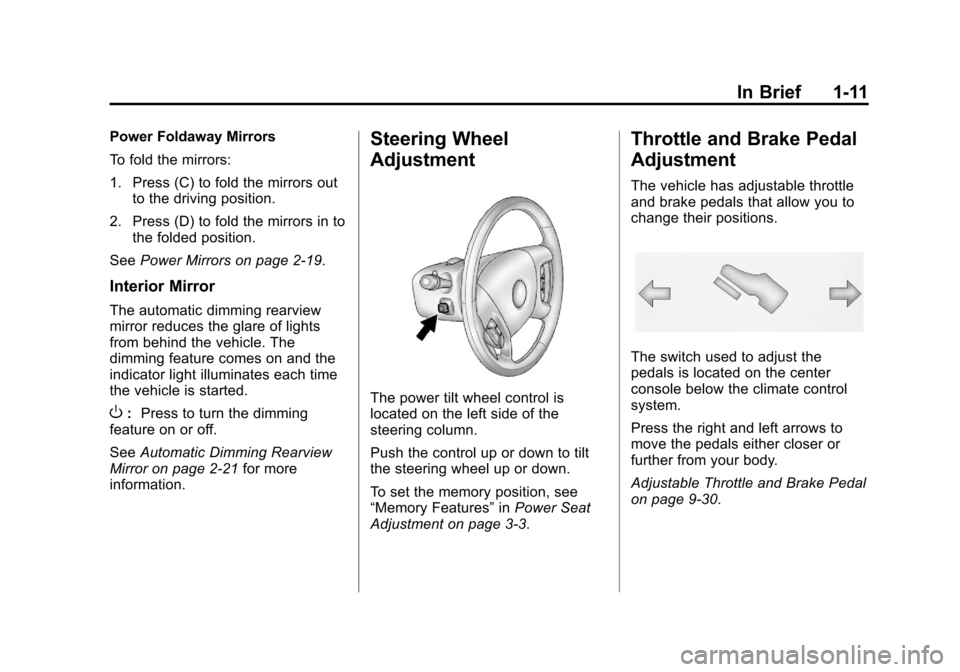
Steering Wheel
Adjustment
The power tilt wheel control is
located on the left side of the
steering column.
Push the control up or down to tilt
the steering wheel up or down.
To set the memory position, see
“Memory Features” inPower Seat
Adjustment on page 3‑3.
Throttle and Brake Pedal
Adjustment
The vehicle has adjustable throttle
and brake pedals that allow you to
change their positions.
The switch used to adjust the
pedals is located on the center
console below the climate control
system.
Press the right and left arrows to
move the pedals either closer or
further from your body.
Adjustable Throttle and Brake Pedal
on page 9‑30.
Page 18 of 508
Black plate (12,1)Cadillac Escalade EXT Owner Manual - 2011
1-12 In Brief
Interior Lighting
Dome Lamps
The dome lamps are located in the
overhead console.
They come on when any door is
opened and turn off after all the
doors are closed.
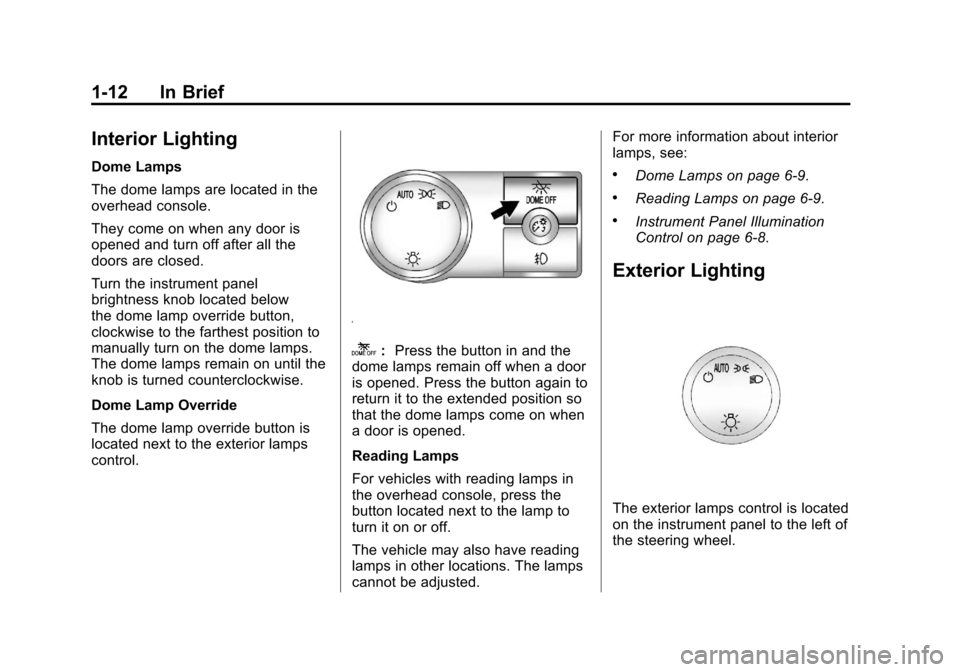
Turn the instrument panel
brightness knob located below
the dome lamp override button,
clockwise to the farthest position to
manually turn on the dome lamps.
The dome lamps remain on until the
knob is turned counterclockwise.
Dome Lamp Override
The dome lamp override button is
located next to the exterior lamps
control.
k:Press the button in and the
dome lamps remain off when a door
is opened. Press the button again to
return it to the extended position so
that the dome lamps come on when
a door is opened.
Reading Lamps
For vehicles with reading lamps in
the overhead console, press the
button located next to the lamp to
turn it on or off.
The vehicle may also have reading
lamps in other locations. The lamps
cannot be adjusted. For more information about interior
lamps, see:
.Dome Lamps on page 6‑9.
.Reading Lamps on page 6‑9.
.Instrument Panel Illumination
Control on page 6‑8.
Exterior Lighting
The exterior lamps control is located
on the instrument panel to the left of
the steering wheel.
Page 19 of 508
Black plate (13,1)Cadillac Escalade EXT Owner Manual - 2011
In Brief 1-13
P:Turns off the automatic
headlamps and Daytime Running
Lamps (DRL). Turning the headlamp
control to the off position again will
turn the automatic headlamps and
DRL back on.
For vehicles first sold in Canada,
the off position only works when the
vehicle is shifted into the P (Park)
position.
AUTO: Automatically turns on the
headlamps at normal brightness,
along with the parking lamps,
instrument panel lights, license
plate lamps, and taillamps.
;: Turns on the parking lamps,
along with the instrument panel
lights, license plate lamps, and
taillamps.
2: Turns on the headlamps,
parking lamps, instrument panel
lights, license plate lamps, and
taillamps. For more information, see:.Exterior Lamp Controls on
page 6‑1.
.Daytime Running Lamps (DRL)
on page 6‑6.
.Fog Lamps on page 6‑8.
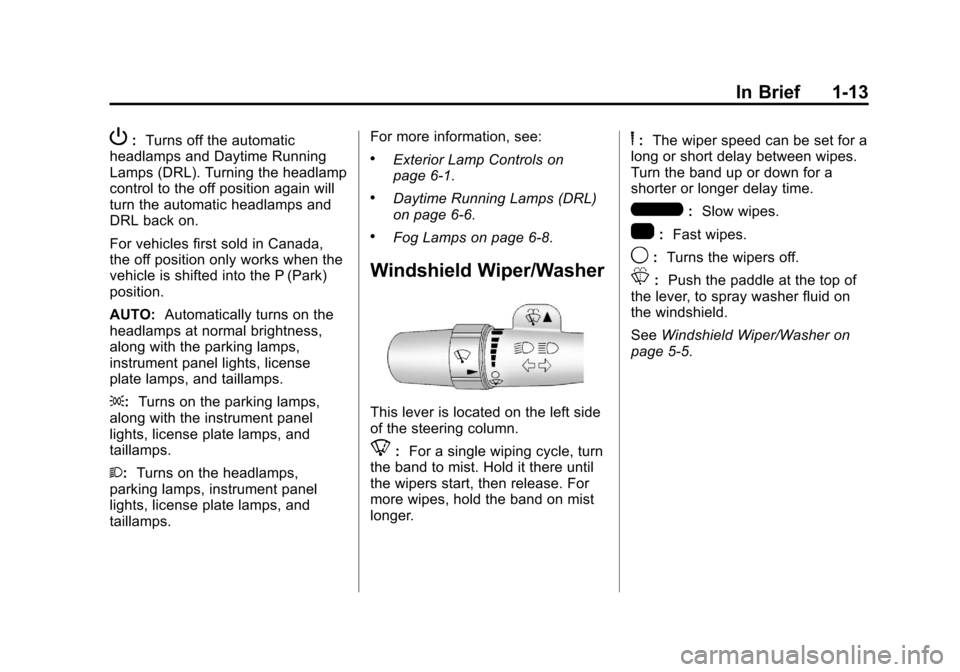
Windshield Wiper/Washer
This lever is located on the left side
of the steering column.
8:
For a single wiping cycle, turn
the band to mist. Hold it there until
the wipers start, then release. For
more wipes, hold the band on mist
longer.
6: The wiper speed can be set for a
long or short delay between wipes.
Turn the band up or down for a
shorter or longer delay time.
6: Slow wipes.
1: Fast wipes.
9:Turns the wipers off.
L: Push the paddle at the top of
the lever, to spray washer fluid on
the windshield.
See Windshield Wiper/Washer on
page 5‑5.
Page 23 of 508
Black plate (17,1)Cadillac Escalade EXT Owner Manual - 2011
In Brief 1-17
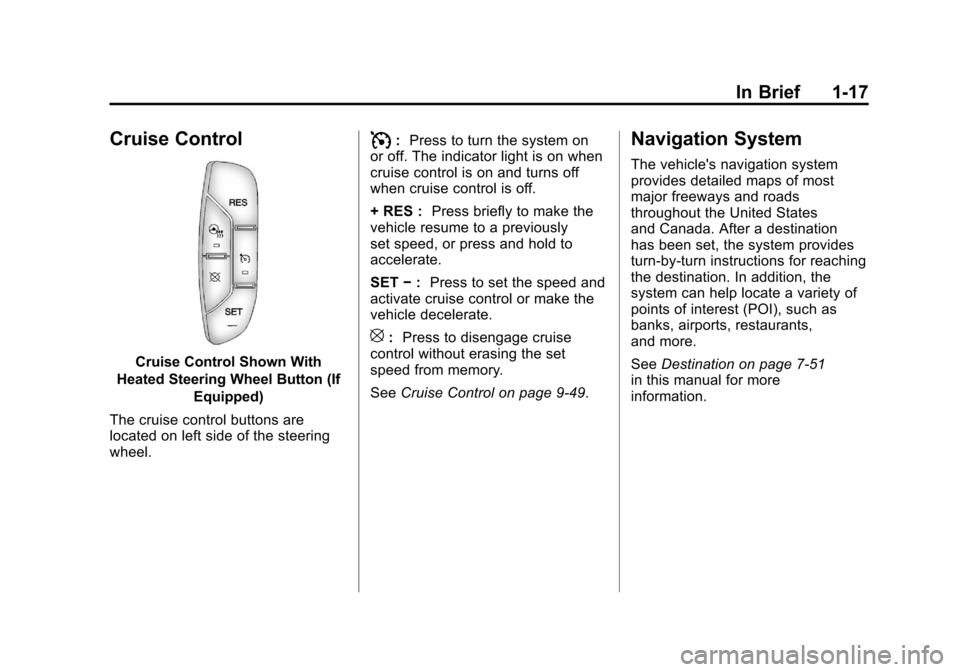
Cruise Control
Cruise Control Shown With
Heated Steering Wheel Button (If Equipped)
The cruise control buttons are
located on left side of the steering
wheel.
I: Press to turn the system on
or off. The indicator light is on when
cruise control is on and turns off
when cruise control is off.
+ RES : Press briefly to make the
vehicle resume to a previously
set speed, or press and hold to
accelerate.
SET −: Press to set the speed and
activate cruise control or make the
vehicle decelerate.
[: Press to disengage cruise
control without erasing the set
speed from memory.
See Cruise Control on page 9‑49.
Navigation System
The vehicle's navigation system
provides detailed maps of most
major freeways and roads
throughout the United States
and Canada. After a destination
has been set, the system provides
turn-by-turn instructions for reaching
the destination. In addition, the
system can help locate a variety of
points of interest (POI), such as
banks, airports, restaurants,
and more.
SeeDestination on page 7‑51
in this manual for more
information.
Page 24 of 508
Black plate (18,1)Cadillac Escalade EXT Owner Manual - 2011
1-18 In Brief
Driver Information
Center (DIC)
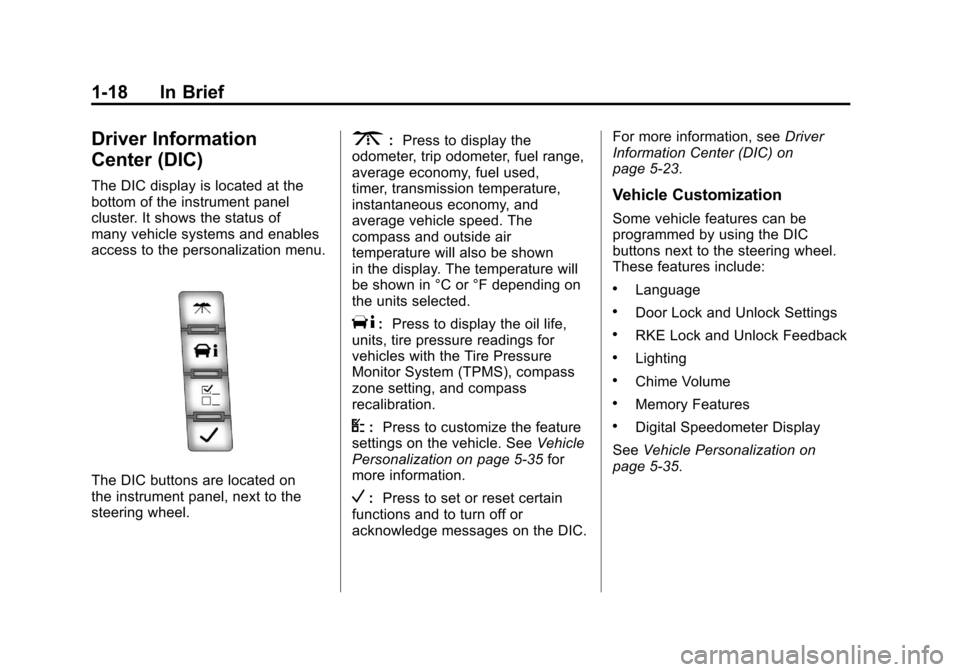
The DIC display is located at the
bottom of the instrument panel
cluster. It shows the status of
many vehicle systems and enables
access to the personalization menu.
The DIC buttons are located on
the instrument panel, next to the
steering wheel.
3:Press to display the
odometer, trip odometer, fuel range,
average economy, fuel used,
timer, transmission temperature,
instantaneous economy, and
average vehicle speed. The
compass and outside air
temperature will also be shown
in the display. The temperature will
be shown in °C or °F depending on
the units selected.
T: Press to display the oil life,
units, tire pressure readings for
vehicles with the Tire Pressure
Monitor System (TPMS), compass
zone setting, and compass
recalibration.
U: Press to customize the feature
settings on the vehicle. See Vehicle
Personalization on page 5‑35 for
more information.
V: Press to set or reset certain
functions and to turn off or
acknowledge messages on the DIC. For more information, see
Driver
Information Center (DIC) on
page 5‑23.
Vehicle Customization
Some vehicle features can be
programmed by using the DIC
buttons next to the steering wheel.
These features include:
.Language
.Door Lock and Unlock Settings
.RKE Lock and Unlock Feedback
.Lighting
.Chime Volume
.Memory Features
.Digital Speedometer Display
See Vehicle Personalization on
page 5‑35.
Page 27 of 508
Black plate (21,1)Cadillac Escalade EXT Owner Manual - 2011
In Brief 1-21
Tire Pressure Monitor
This vehicle may have a Tire
Pressure Monitor System (TPMS).
The TPMS warning light alerts you
to a significant loss in pressure of
one of the vehicle's tires. If the
warning light comes on, stop as
soon as possible and inflate the
tires to the recommended pressure
shown on the Tire and Loading
Information label. SeeVehicle Load
Limits on page 9‑23. The warning
light will remain on until the tire
pressure is corrected. During cooler conditions, the low tire
pressure warning light may appear
when the vehicle is first started and
then turn off. This may be an early
indicator that the tire pressures are
getting low and the tires need to be
inflated to the proper pressure.
The TPMS does not replace normal
monthly tire maintenance. It is the
driver
’s responsibility to maintain
correct tire pressures.
See Tire Pressure Monitor System
on page 10‑56.
Engine Oil Life System
The engine oil life system calculates
engine oil life based on vehicle use
and displays a DIC message when
it is necessary to change the engine
oil and filter. The oil life system
should be reset to 100% only
following an oil change. Resetting the Oil Life System
1. Display OIL LIFE REMAINING
on the DIC.
2. Press and hold the SET/RESET button on the DIC for more than
five seconds. The oil life will
change to 100%.
See Engine Oil Life System on
page 10‑12.
Fuel E85 (85% Ethanol)
Vehicles that have a FlexFuel badge
and a yellow fuel cap can use either
unleaded gasoline or ethanol fuel
containing up to 85% ethanol (E85).
See Fuel E85 (85% Ethanol) on
page 9‑60. For all other vehicles,
use only the unleaded gasoline
described under Recommended
Fuel on page 9‑58.
Page 30 of 508
Black plate (24,1)Cadillac Escalade EXT Owner Manual - 2011
1-24 In Brief
The OnStar system can record and
transmit vehicle information. This
information is automatically sent to
an OnStar call center when
Qis
pressed,
]is pressed, or if the
airbags or ACR system deploy. This
information usually includes the
vehicle's GPS location and, in
the event of a crash, additional
information regarding the crash that
the vehicle was involved in (e.g. the
direction from which the vehicle was
hit). When the virtual advisor feature
of OnStar hands-free calling is
used, the vehicle also sends OnStar
the vehicle's GPS location so they
can provide services where it is
located.
Location information about the
vehicle is only available if the GPS
satellite signals are unobstructed
and available. The vehicle must have a working
electrical system, including
adequate battery power, for the
OnStar equipment to operate. There
are other problems OnStar cannot
control that may prevent OnStar
from providing OnStar service at
any particular time or place. Some
examples are damage to important
parts of the vehicle in a crash, hills,
tall buildings, tunnels, weather or
wireless phone network congestion.
See
Radio Frequency Statement on
page 13‑20 for information
regarding Part 15 of the Federal
Communications Commission (FCC)
rules and Industry Canada
Standards RSS-210/220/310.
OnStar Steering Wheel
Controls
This vehicle may have a Talk/Mute
button that can be used to interact
with OnStar hands-free calling.
See Steering Wheel Controls on
page 5‑2 for more information. On some vehicles, the mute button
can be used to dial numbers into
voice mail systems, or to dial phone
extensions. See the OnStar Owner's
Guide for more information.
Your Responsibility
Increase the volume of the radio if
the OnStar advisor cannot be heard.
If the light next to the OnStar
buttons is red, the system may
not be functioning properly.
Press
Qand request a vehicle
diagnostic. If the light appears clear
(no light is appearing), your OnStar
subscription has expired and all
services have been deactivated.
Press
Qto confirm that the OnStar
equipment is active.