change time CADILLAC ESCALADE EXT 2012 3.G User Guide
[x] Cancel search | Manufacturer: CADILLAC, Model Year: 2012, Model line: ESCALADE EXT, Model: CADILLAC ESCALADE EXT 2012 3.GPages: 494, PDF Size: 7.71 MB
Page 175 of 494
Black plate (5,1)Cadillac Escalade EXT Owner Manual - 2012
Lighting 6-5
Exterior Lamps Off
Reminder
If a door is open, a reminder chime
sounds when the headlamps or
parking lamps are manually turned
on and the key is out of the ignition.
To turn off the chime, turn the
headlamp switch to off or AUTO and
then back on, or close and re-open
the door. In the AUTO mode, the
headlamps turn off once the ignition
is in LOCK/OFF or remains on until
the headlamp delay ends (if enabled
in the DIC). See“Exit Lighting”
under Vehicle Personalization on
page 5‑36.
Headlamp High/
Low-Beam Changer
5 3
(Headlamp High/Low
Beam Changer): To change the
headlamps from low to high beam,
push the lever toward the instrument
panel. To return to low-beam
headlamps, pull the multifunction
lever toward you. Then release it.
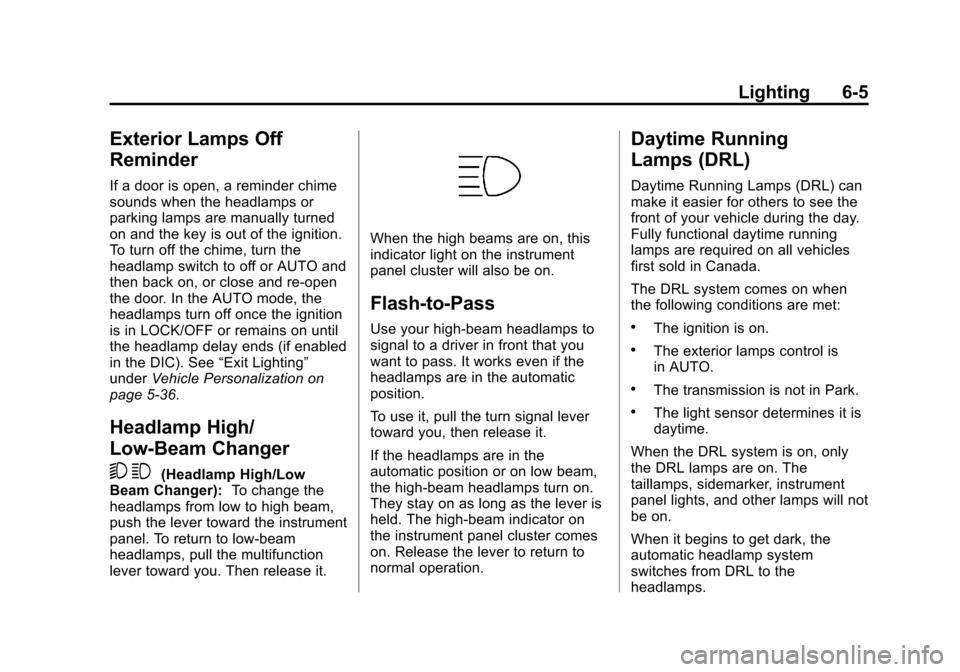
When the high beams are on, this
indicator light on the instrument
panel cluster will also be on.
Flash-to-Pass
Use your high-beam headlamps to
signal to a driver in front that you
want to pass. It works even if the
headlamps are in the automatic
position.
To use it, pull the turn signal lever
toward you, then release it.
If the headlamps are in the
automatic position or on low beam,
the high-beam headlamps turn on.
They stay on as long as the lever is
held. The high-beam indicator on
the instrument panel cluster comes
on. Release the lever to return to
normal operation.
Daytime Running
Lamps (DRL)
Daytime Running Lamps (DRL) can
make it easier for others to see the
front of your vehicle during the day.
Fully functional daytime running
lamps are required on all vehicles
first sold in Canada.
The DRL system comes on when
the following conditions are met:
.The ignition is on.
.The exterior lamps control is
in AUTO.
.The transmission is not in Park.
.The light sensor determines it is
daytime.
When the DRL system is on, only
the DRL lamps are on. The
taillamps, sidemarker, instrument
panel lights, and other lamps will not
be on.
When it begins to get dark, the
automatic headlamp system
switches from DRL to the
headlamps.
Page 176 of 494

Black plate (6,1)Cadillac Escalade EXT Owner Manual - 2012
6-6 Lighting
To turn off the DRL lamps, turn the
exterior lamps control to the OFF
position and then release. For
vehicles first sold in Canada, the
transmission must be in the P (Park)
position before the DRL lamps can
be turned off.
Automatic Headlamp
System
When it is dark enough outside and
the headlamp switch is in AUTO,
the automatic headlamp system
turns on the headlamps along with
other lamps such as the taillamps,
sidemarker, parking lamps, roof
marker lamps, and the instrument
panel lights. The radio lights will
also be dim.
To turn off the automatic headlamp
system, turn the exterior lamps
switch to the off position and then
release. For vehicles first sold in
Canada, the transmission must bein the P (Park) position, before the
automatic headlamp system can be
turned off.
The vehicle has a light sensor
located on the top of the instrument
panel. Do not cover this sensor or
the system will come on whenever
the ignition is on.
The system may also turn on the
headlamps when driving through a
parking garage, a tunnel, or while
driving in heavy overcast weather.
This is normal.
There is a delay in the transition
between the daytime and nighttime
operation of the Daytime Running
Lamps (DRL) and the automatic
headlamp systems so that driving
under bridges or bright overhead
street lights does not affect the
system. The DRL and automatic
headlamp system is only affected
when the light sensor sees a
change in lighting lasting longer
than the delay.
If the vehicle is started in a dark
garage, the automatic headlamp
system comes on immediately.
Once the vehicle leaves the garage,
it takes approximately one minute
for the automatic headlamp system
to change to DRL if it is light
outside. During that delay, the
instrument panel cluster may not be
as bright as usual. Make sure the
instrument panel brightness control
is in the full bright position. See
Instrument Panel Illumination
Control on page 6‑9.
Page 177 of 494

Black plate (7,1)Cadillac Escalade EXT Owner Manual - 2012
Lighting 6-7
Hazard Warning Flashers
|(Hazard Warning Flashers):
Press this button located on top of
the steering column, to make the
front and rear turn signal lamps
flash on and off. This warns others
that you are having trouble. Press
again to turn the flashers off.
When the hazard warning flashers
are on, the vehicle's turn signals will
not work.
Turn and Lane-Change
Signals
An arrow on the instrument panel
cluster flashes in the direction of the
turn or lane change.
Move the turn signal lever all the
way up or down to signal a turn.
Raise or lower the lever until the
arrow starts to flash to signal a lane
change. The turn signals
automatically flash three times.
It will flash six times if the tow-haul
mode is active. Holding the turn
signal lever for more than
one second causes the turn signals
to flash until the lever is released. The lever returns to its starting
position when it is released.
If after signaling a turn or a lane
change the arrows flash rapidly or
do not come on, a signal bulb may
be burned out.
Have the bulbs replaced. If the bulb
is not burned out, check the fuse.
See
Instrument Panel Fuse Block
on page 10‑41 andEngine
Compartment Fuse Block on
page 10‑36.
Turn Signal On Chime
If the turn signal is left on for more
than 1.2 km (0.75 mi), a chime
sounds at each flash of the turn
signal and the message TURN
SIGNAL ON also appears in the
DIC. See Lamp Messages on
page 5‑32. To turn the chime and
message off, move the turn signal
lever to the off position.
Page 183 of 494
Black plate (3,1)Cadillac Escalade EXT Owner Manual - 2012
Infotainment System 7-3
traffic restrictions or the latest road
changes, it may suggest using a
road that is now closed for
construction or a turn that is
prohibited by signs at the
intersection. Always evaluate
whether following the system's
directions is safe and legal for the
current conditions.
When the navigation system is
turned on, a screen may appear
with information that must be read
and acknowledged before accessing
some navigation features.After acknowledging the start up
information, the NAV (Navigation)
and DEST (Destination) functions
are accessible. Information can now
be entered or deleted, and other
functions accessed. See
instructions later in this section.
Every 50 times the vehicle is started
and the navigation system is turned
on, the Caution screen appears.
After reading the caution, select OK
to load the map DVD information.
If OK is not selected, all control
buttons except for NAV (Navigation)
and DEST (Destination) can be
accessed.When getting started, set your
preferences or delete information in
the navigation system using various
options.
Theft-Deterrent Feature
TheftLock®is designed to
discourage theft of the vehicle's
radio by learning a portion of the
Vehicle Identification Number (VIN).
The radio does not operate if it is
stolen or moved to a different
vehicle.
Page 186 of 494
Black plate (6,1)Cadillac Escalade EXT Owner Manual - 2012
7-6 Infotainment System
Setting the Clock
The navigation system time and the
analog clock operate independently.
Changing the time through the
navigation system does not change
the time on the analog clock. See
Clock on page 5‑7to change the
analog clock time.
To set the time for the navigation
system:
1. Press CONFIG to enter the
configure menu options, then
press CONFIG again, repeatedly
until the time is selected or touch
the time screen button.
2. Press the Hours and Minutes −and + to decrease or
to increase the time.
See “Setting the Clock” under
Configure Menu on page 7‑64 for
more information.
Entering an Address and Point
of Interest, and Storing Preset
Destinations
Entering an Address
Enter a destination by inputting the
city name first:
1. Press
Oto turn the system on.
2. A caution may appear. Press OK to proceed.
3. Press DEST.
4. Press
2(Address Entry).
5. Select the state/province screen button, if needed, to change the
current state or province. A list
of all of the available states and
provinces appear. Select the
state or province.
6. Once a state or province has been selected the City name
category is automatically
selected for entry. If five or fewer names are
available, a list displays. If
more than five are available, the
List screen button displays a
number. This number represents
the number of available cities.
Press this button to view the list
and select a city.
7. Once a city has been selected the Street name category is
automatically selected for entry.
If five or fewer streets are
available for the selected city,
the system displays the list of
streets. If more than five streets
are available the system
displays the alpha keyboard.
Start entering the street name.
If five or fewer names are
available, a list displays. If
more than five are available, the
List screen button displays a
number. This button represents
the number of available streets.
Select this button to view the list
and select a street.
Page 199 of 494
Black plate (19,1)Cadillac Escalade EXT Owner Manual - 2012
Infotainment System 7-19
If the ignition or radio is turned off
with a CD in the player, it stays in
the player. When the ignition or
radio is turned on, the CD starts
playing where it stopped, if it was
the last selected audio source.
As each new track starts to play, the
track number displays.
If an error appears on the display,
see“CD/DVD Messages” in this
section.
If viewing a map screen, press the
CD screen button. The display splits
between the audio screen and the
map screen. If you do not want to
view a split screen or you are not on
a map screen, press AUDIO then
press AUDIO again, repeatedly until
CD is selected or press the CD
screen button.
Z(Eject): To eject a disc:
1. Press
Z.
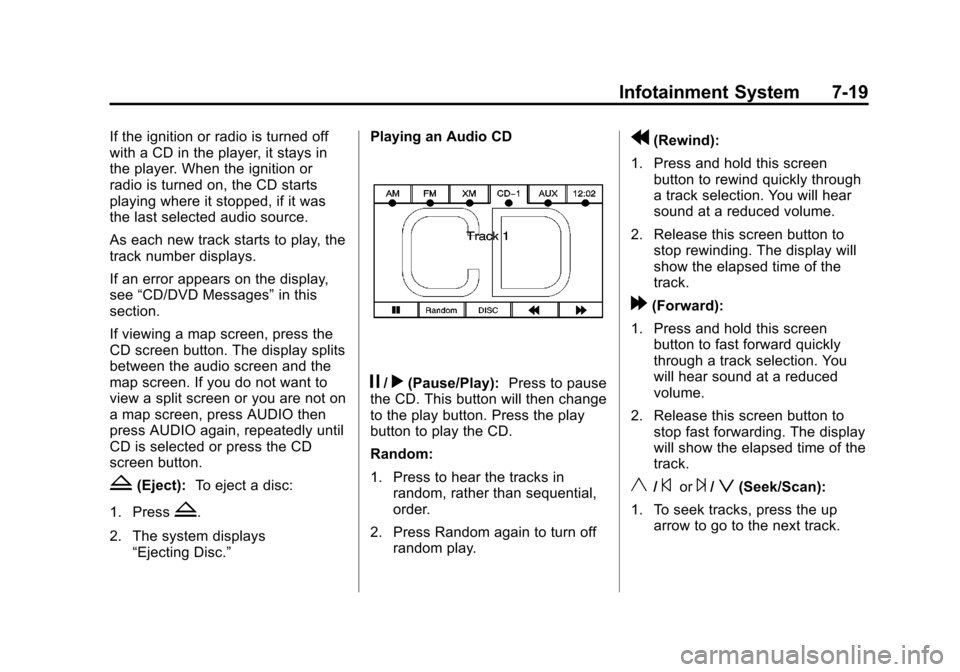
2. The system displays “Ejecting Disc.” Playing an Audio CD
j/r(Pause/Play):
Press to pause
the CD. This button will then change
to the play button. Press the play
button to play the CD.
Random:
1. Press to hear the tracks in
random, rather than sequential,
order.
2. Press Random again to turn off random play.
r(Rewind):
1. Press and hold this screen button to rewind quickly through
a track selection. You will hear
sound at a reduced volume.
2. Release this screen button to stop rewinding. The display will
show the elapsed time of the
track.
[(Forward):
1. Press and hold this screen button to fast forward quickly
through a track selection. You
will hear sound at a reduced
volume.
2. Release this screen button to stop fast forwarding. The display
will show the elapsed time of the
track.
y/©or¨/z(Seek/Scan):
1. To seek tracks, press the up arrow to go to the next track.
Page 209 of 494

Black plate (29,1)Cadillac Escalade EXT Owner Manual - 2012
Infotainment System 7-29
j/r(Pause/Play):Press to pause
the CD. This button will then change
to the play button. Press the play
button to play the CD.
Random:
1. Press to hear the tracks in random, rather than sequential,
order.
2. Press Random again to turn off random play.
r(Rewind):
1. Press and hold to rewind quickly through a track selection. You
will hear sound at a reduced
volume.
2. Release to stop rewinding. The display will show the elapsed
time of the track.
[(Forward):
1. Press and hold to fast forward quickly through a track selection.
You will hear sound at a reduced
volume.
2. Release to stop fast forwarding. The display shows the elapsed
time of the track.
q r(Folder/Artist/Album):
1. Select the left or right arrow to go to the previous or next folder,
artist, or album on the disc.
2. Press the middle screen button, with the folder, artist, or album
name, to sort the MP3 by folder, artist, or album. It may take a
few minutes for the system to
sort the MP3.
y/©or¨/z(Seek/Scan):
1. To seek tracks, press the up arrow to go to the next track.
2. Press the down arrow to go to the start of the current track,
if more than eight seconds have
played.
3. If either arrow is pressed more than once, the player continues
moving backward or forward
through the CD. The sound
mutes while seeking.
w(Tuning Knob):
1. Turn counterclockwise one notch to go to the start of the current
track, turn it again to go to the
previous track.
2. Turn clockwise to go to the next track.
Page 213 of 494

Black plate (33,1)Cadillac Escalade EXT Owner Manual - 2012
Infotainment System 7-33
move too far forward or step out of
the vehicle, the headphones lose
the audio signal.
To adjust the volume on the
headphones, use the volume control
located on the right side.
For optimal audio performance, the
headphones must be worn correctly.
Headphones should be worn with
the headband over the top of the
head for best audio reception. The
symbol L (Left) appears on the
outside bottom edge of the ear cup
and should be positioned on the left
ear. The symbol R (Right) appears
on the outside bottom edge of the
ear cup and should be positioned on
the right ear.
Notice:Do not store the
headphones in heat or direct
sunlight. This could damage the
headphones and repairs will not
be covered by the warranty.
Storage in extreme cold can
weaken the batteries. Keep the
headphones stored in a cool, dry
place. If the foam ear pads attached to the
headphones become worn or
damaged, the pads can be replaced
separately from the headphone set.
To purchase replacement ear pads,
contact your dealer.
Battery Replacement
To change the batteries on the
headphones:
1. Turn the screw to loosen the
battery door located on the left
side of the headphones. Slide
the battery door open.
2. Replace the two batteries in the compartment. Make sure that
they are installed correctly, using
the diagram on the inside of the
battery compartment.
3. Replace the battery door and tighten the door screw.
If the headphones are to be stored
for a long period of time, remove the
batteries and keep them in a cool,
dry place.Audio/Video (A/V) Jacks
A. Yellow: Video Input
B. White: Left Audio Input
C. Red: Right Audio Input
The A/V jacks are color coded to
match typical home entertainment
system equipment.
The A/V jacks, located on the rear
of the floor console, allow audio or
video signals to be connected from
an auxiliary device such as a
camcorder or a video game unit to
the RSE system. Adapter
Page 218 of 494
Black plate (38,1)Cadillac Escalade EXT Owner Manual - 2012
7-38 Infotainment System
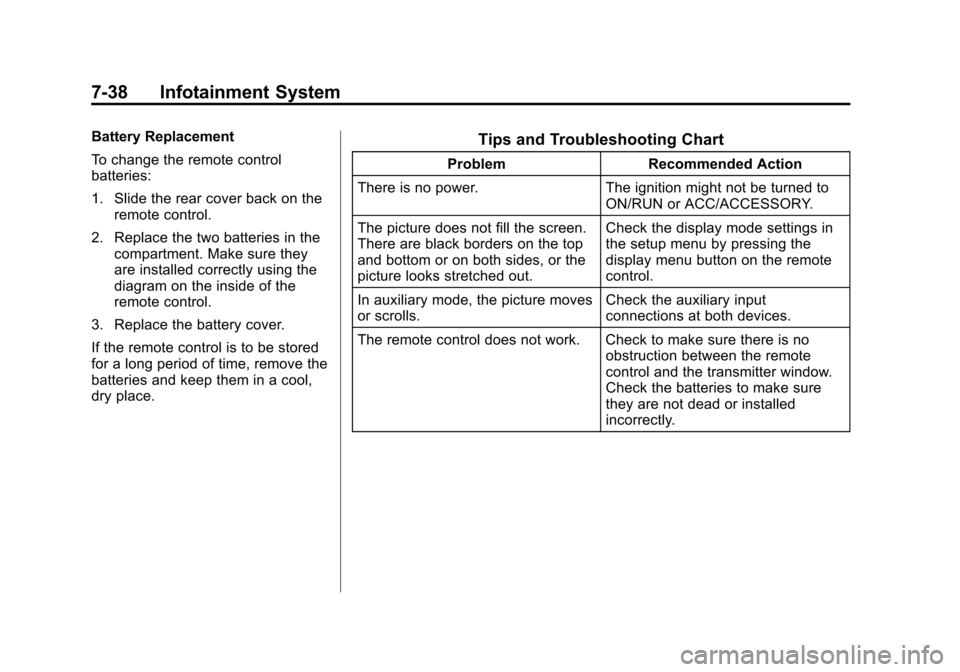
Battery Replacement
To change the remote control
batteries:
1. Slide the rear cover back on theremote control.
2. Replace the two batteries in the compartment. Make sure they
are installed correctly using the
diagram on the inside of the
remote control.
3. Replace the battery cover.
If the remote control is to be stored
for a long period of time, remove the
batteries and keep them in a cool,
dry place.Tips and Troubleshooting Chart
Problem Recommended Action
There is no power. The ignition might not be turned to
ON/RUN or ACC/ACCESSORY.
The picture does not fill the screen.
There are black borders on the top
and bottom or on both sides, or the
picture looks stretched out. Check the display mode settings in
the setup menu by pressing the
display menu button on the remote
control.
In auxiliary mode, the picture moves
or scrolls. Check the auxiliary input
connections at both devices.
The remote control does not work. Check to make sure there is no obstruction between the remote
control and the transmitter window.
Check the batteries to make sure
they are not dead or installed
incorrectly.
Page 220 of 494

Black plate (40,1)Cadillac Escalade EXT Owner Manual - 2012
7-40 Infotainment System
DVD Distortion
Video distortion can occur when
operating cellular phones, scanners,
CB radios, Global Position Systems
(GPS)*, two-way radios, mobile fax
machines, or walkie talkies.
It might be necessary to turn off the
DVD player when operating one of
these devices in or near the vehicle.
*Excludes the OnStar
®System.
Cleaning the RSE Overhead
Console
When cleaning the RSE overhead
console surface, use only a clean
cloth dampened with clean water.
Cleaning the Video Screen
When cleaning the video screen,
use only a clean cloth dampened
with clean water. Use care when
directly touching or cleaning the
screen, as damage could result.
Rear Seat Audio (RSA)
System
Vehicles with this feature allow the
rear seat passengers to listen to
and control any of the music
sources: radio, CD, DVD, or other
auxiliary sources. The rear seat
passengers can control the same
music sources the front seat
passengers are listening to (dual
control) or a different source. For
example, rear seat passengers can
control and listen to a CD through
the headphones, while the driver
listens to the radio through the
speakers. The rear seat passengers
have control of the volume for each
set of headphones.
The radio functionality is controlled
by both the RSA and the front radio.
Only one band can be tuned to at
one time. Changing the band on the
RSA or the front radio will change
the band on the other system,
if they are both sourced to the radio.The RSA functions can be used
even when the main radio is off.
Audio can be heard through wired
headphones (not included) plugged
into the jacks on the RSA. If your
vehicle has this feature, audio can
also be heard on Channel 2 of the
wireless headphones.
The front audio system allows the
rear speakers to continue playing
even when the RSA audio is active
through the headphones.
To listen to an iPod or portable
audio device through the RSA,
attach the iPod or portable audio
device to the auxiliary input (if
available), located below the RSA
system, USB port, or AUX jack.
Turn the iPod on, then choose the
front auxiliary input with the RSA
SRCE button. The iPod or portable
audio device can also be connected
to the front auxiliary jack or the
USB port.