radio CADILLAC ESCALADE EXT 2012 3.G Service Manual
[x] Cancel search | Manufacturer: CADILLAC, Model Year: 2012, Model line: ESCALADE EXT, Model: CADILLAC ESCALADE EXT 2012 3.GPages: 494, PDF Size: 7.71 MB
Page 240 of 494

Black plate (60,1)Cadillac Escalade EXT Owner Manual - 2012
7-60 Infotainment System
Important Notes regarding OnStar
Destination Download:
.If the navigation system is
turned off when the destination
download is attempted, the
navigation system will
automatically turn on and display
the OnStar Destination
Download Screen. The radio will
remain on after the download
occurs.
.If OnStar downloads a
destination and the address is
not found in the mapping disc’s
database and routing by
coordinates is not available, the
GO and Map buttons gray out
and routing will not be available.
Press the blue OnStar button for
further assistance.
.The Call button grays out when
there is no phone number
available for your destination
and while connected to OnStar.Map Destination Screen Functions
If the map screen is used to show
destination, it will have map screen
capabilities such as GO, Mark,
Zoom, Scroll, etc. The address is
shown at the top of the screen.
Destination Map Screen
Getting Started on Your Route
Once a destination has been
entered, there are several functions
that can be performed. Press DEST
to access the Route screen.
Turn List
Page 244 of 494

Black plate (64,1)Cadillac Escalade EXT Owner Manual - 2012
7-64 Infotainment System
Configure Menu
Press CONFIG to adjust several
of the system's features and
preferences. The last selected
CONFIG screen is the screen that
displays: Sound, Radio, Nav
(navigation), Display, or Time.
Sound
Press CONFIG to enter the
configure menu options, then press
CONFIG again, repeatedly until
Sound is selected or press the
Sound screen button to make
speaker and DSP (Digital Signal
Processing) adjustments. See
“Sound Menu”under,AM-FM Radio
on page 7‑9 for more information.
Radio
Press CONFIG to enter the
configure menu options, then press
CONFIG again, repeatedly until
Radio is selected or press the Radio
screen button to make changes for
radio information displayed, preset
pages, XM (if equipped) categories,
and Bose AudioPilot. See “Radio
Menu” under,AM-FM Radio on
page 7‑9 for more information.
Nav (Navigation)
Press CONFIG to enter the
configure menu options, then press
CONFIG again, repeatedly until Nav
is selected or press the Nav screen
button.
Voice Prompt
Press the Voice Prompt screen
button to change the volume of the
voice prompts or to turn voice
guidance on and off.
Page 247 of 494

Black plate (67,1)Cadillac Escalade EXT Owner Manual - 2012
Infotainment System 7-67
1. Press the Map DatabaseInformation/Remove Map Data
screen button to display the Map
Coverage Area screen.
2. Press the Remove Map Data screen button to remove the
map data. A screen showing,
“The Map can now be safely
removed” displays.
3. Press the confirmation screen button to safely remove the
map data.
If the map data is not removed, the
map database will not be available
for that ignition cycle. Map database
functionality can be restored by
cycling the ignition.
Off-Road Mode
To turn the Off-road mode on or off:
1. Press CONFIG.
2. Press the Nav screen button.
3. Press Off-Road mode. The button will be highlighted when
the feature is on. When the off-road mode is turned
on, the navigation system will show
the path being traveled by the
vehicle when not on a marked road.
This path will be a simulation since
the map database coverage will not
have these roads on the DVD. This
path will be stored in the navigation
system's memory, see
“Previous
Destination” underDestination on
page 7‑50 for more information.
See Defensive Driving on page 9‑3
for more information about off-road
driving.
Traffic Options
(US and Canada)
Read the following Options
descriptions to understand how the
XM NavTraffic™ operates.
XM NavTraffic
(USA and Canada)
Vehicles with the navigation system
have an XM NavTraffic receiver. XM
NavTraffic is a subscription service
provided via XM Satellite Radio. XM
NavTraffic provides real-time traffic information fully integrated to the
navigation system to display current
traffic conditions for a driver
’s
chosen route. XM NavTraffic allows
drivers to make the most informed,
timesaving routing decisions.
If the Traffic screen button is
pressed or if an attempt is made to
turn on the traffic display in the
Navigation Setup Menu without a
subscription, a Caution screen
displays indicating that XM traffic is
not activated.
Page 248 of 494

Black plate (68,1)Cadillac Escalade EXT Owner Manual - 2012
7-68 Infotainment System
Three types of traffic information for
major roadways are displayed on
the navigation system:
.Unscheduled traffic incident
data, such as accidents and
disabled vehicles
.Scheduled traffic incident data,
such as road construction and
road closures
.Traffic flow information (rate of
speed data)
Traffic information is delivered to the
vehicle by the XM Radio satellites.
XM NavTraffic makes it possible for
the navigation system to provide
continuously updated traffic
information personalized for a
driver ’s needs. XM NavTraffic currently broadcasts
the traffic information for many
markets nationally, and the service
may be available in more cities in
the future. Visit
www.xmnavtraffic.com for more
details on local coverage.
A service fee is required in order to
receive the XM NavTraffic service.
Turning XM NavTraffic On and Off
To turn traffic on or off:
1. Press CONFIG, then press
CONFIG repeatedly until Nav is
selected or press the Nav
screen button.
2. Press the Traffic Options button.
3. Press the Traffic button. This button is highlighted when it is
active. Selecting Alert for Approaching
Traffic Events enables the
system to show a pop-up screen
that notifies of possible traffic
issues ahead.
When this feature is highlighted,
while traveling on a route,
accidents located on the route
are indicated and can be
avoided.
Traffic Icon
The Traffic Icon appears on the
Traffic Tab, next to the word Traffic,
when traffic is found in the
local area.
Page 259 of 494
Black plate (79,1)Cadillac Escalade EXT Owner Manual - 2012
Infotainment System 7-79
Voice Recognition
The navigation system's voice
recognition allows for hands-free
operation of the navigation system,
audio system, and OnStar (if
equipped) features.
Voice recognition can be used when
the ignition is on or when Retained
Accessory Power (RAP) is active.
SeeRetained Accessory Power
(RAP) on page 9‑27 for more
information.
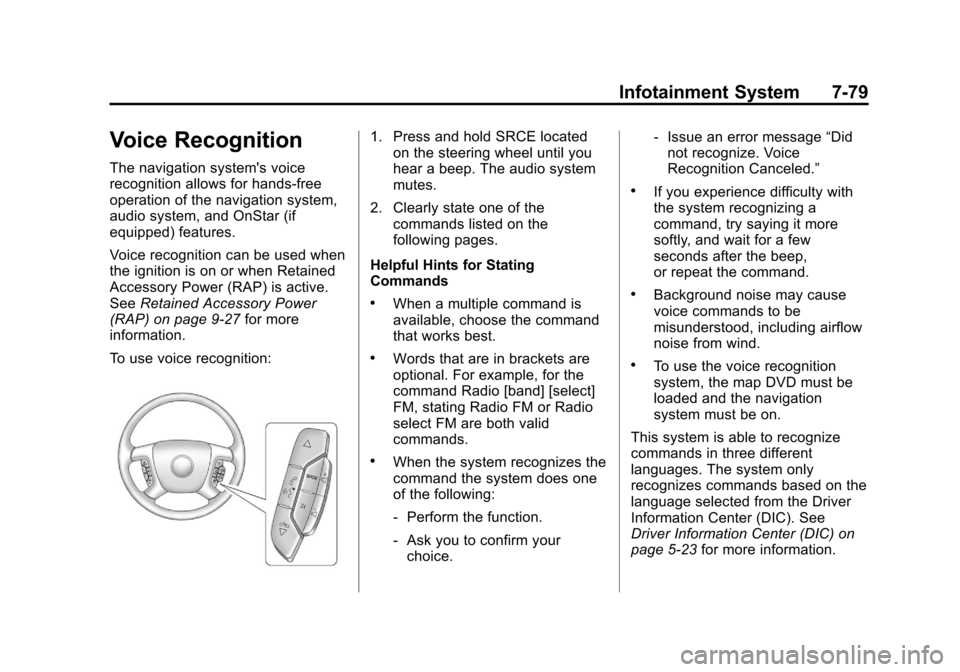
To use voice recognition:
1. Press and hold SRCE located on the steering wheel until you
hear a beep. The audio system
mutes.
2. Clearly state one of the commands listed on the
following pages.
Helpful Hints for Stating
Commands
.When a multiple command is
available, choose the command
that works best.
.Words that are in brackets are
optional. For example, for the
command Radio [band] [select]
FM, stating Radio FM or Radio
select FM are both valid
commands.
.When the system recognizes the
command the system does one
of the following:
‐ Perform the function.
‐ Ask you to confirm your
choice. ‐
Issue an error message “Did
not recognize. Voice
Recognition Canceled.”
.If you experience difficulty with
the system recognizing a
command, try saying it more
softly, and wait for a few
seconds after the beep,
or repeat the command.
.Background noise may cause
voice commands to be
misunderstood, including airflow
noise from wind.
.To use the voice recognition
system, the map DVD must be
loaded and the navigation
system must be on.
This system is able to recognize
commands in three different
languages. The system only
recognizes commands based on the
language selected from the Driver
Information Center (DIC). See
Driver Information Center (DIC) on
page 5‑23 for more information.
Page 260 of 494

Black plate (80,1)Cadillac Escalade EXT Owner Manual - 2012
7-80 Infotainment System
Voice Recognition Commands
The following list shows all of the
voice commands available for the
navigation system with a brief
description of each. The commands
are listed with the optional words in
brackets. To use the voice
commands, refer to the instructions
listed previously.
Voice Tag Commands
The following are voice tag
commands that can be accessed by
clearly stating the commands
exactly as they are written. There
are up to 40 voice tag entries for
destinations.
Navigation go to [destination],
navigation select:These
commands instruct the system to
select a destination saved under the
voice tag you have stored. The
system prompts for a destination
name then waits for you to state
the name. If not currently driving on a route,
the system automatically creates the
voice tag destination as the final
destination. If driving on a route, the
system automatically creates the
voice tag destination as a stopover.
Up to three stopovers can be
created.
Storing Voice Tags
From the address book entry
information page, press the Add
Voice tag screen button. The
system responds
“Name Please?”
and you will have four seconds to
record a name. The system asks for
confirmation of the name before
saving it as a voice tag.
Navigation Help
This command instructs the system
to assist with navigation commands.
Display Commands
Use the following display commands
to set the display mode.
Display [set] day [mode]: Sets the
display to daytime mode. Display [set] night [mode]:
Sets
the display to night mode.
Display [set] auto [mode]: Sets
the display to automatic mode. The
system changes between day and
night mode automatically.
System help: Instructs the system
to assist with display commands.
Radio Commands
The following are radio commands
that can be accessed by clearly
stating the commands exactly as
they are written.
Radio [band] [select] AM, radio
[band] [select] FM, radio [band]
[select] XM (if equipped), radio
[band] [select] satellite (if
equipped): Instructs the system to
go to either the AM, FM, or XM (if
equipped).
Radio [select] (frequency) AM,
radio [select] (frequency) FM:
Instructs the system to go to a
specific frequency on either AM
or FM.
Page 261 of 494
![CADILLAC ESCALADE EXT 2012 3.G Service Manual Black plate (81,1)Cadillac Escalade EXT Owner Manual - 2012
Infotainment System 7-81
Radio [select] (channel) XM
(if equipped), radio [select]
(channel) satellite (if equipped):
Instructs the system t](/img/23/7934/w960_7934-260.png "CADILLAC ESCALADE EXT 2012 3.G Service Manual Black plate (81,1)Cadillac Escalade EXT Owner Manual - 2012
Infotainment System 7-81
Radio [select] (channel) XM
(if equipped), radio [select]
(channel) satellite (if equipped):
Instructs the system t")
Black plate (81,1)Cadillac Escalade EXT Owner Manual - 2012
Infotainment System 7-81
Radio [select] (channel) XM
(if equipped), radio [select]
(channel) satellite (if equipped):
Instructs the system to go to a
specific channel on the XM band
(if equipped).
Radio help:Instructs the system to
assist with radio commands.
CD Commands
The following are CD, MP3, and
DVD commands that can be
accessed by clearly stating the
commands exactly as they are
written.
CD, DVD, Disc: Use this command
to select a CD, DVD, or disc that is
currently loaded.
CD, DVD, Disc, [select] track (one,
two, three, etc.): Instructs the
system to select a specific track
number. CD, DVD, Disc select next
folder:
Use this command to select
the next folder on the MP3 or
audio DVD.
CD, DVD, Disc select previous
folder: Use this command to select
the previous folder on the MP3 or
audio DVD.
CD help, DVD help, Disc help:
Instructs the system to assist with
CD and DVD commands.
Auxiliary Commands
The following auxiliary commands
can be accessed by clearly stating
the commands exactly as they are
written. The commands are
available when the auxiliary source
is available.
Aux, Auxiliary: Use this command
to select the auxiliary device, when
a device is connected.
Voice Help
Provides a description of help
commands that can be used.Phone
Bluetooth
For vehicles equipped with
Bluetooth capability, the system can
interact with many cell phones,
allowing:
.Placement and receipt of calls in
a hands-free mode.
.Sharing of the cell phone’s
address book or contact list with
the vehicle.
To minimize driver distraction,
before driving, and with the vehicle
parked:
.Become familiar with the
features of the cell phone.
Organize the phone book and
contact lists clearly and delete
duplicate or rarely used entries.
If possible, program speed dial
or other shortcuts.
.Review the controls and
operation of the infotainment
system.
Page 268 of 494
Black plate (88,1)Cadillac Escalade EXT Owner Manual - 2012
7-88 Infotainment System
Dual Tone Multi-Frequency
(DTMF) Tones
The Bluetooth system can send
numbers and the numbers stored as
name tags during a call. You can
use this feature when calling a
menu‐driven phone system.
Account numbers can also be
stored for use.
Sending a Number or Name Tag
During a Call
1. Press
b/g. The system
responds “Ready,”followed by
a tone.
2. Say “Dial.”
3. Say the number or name tag to send.
Clearing the System
Unless information is deleted out of
the in‐vehicle Bluetooth system, it
will be retained indefinitely. This
includes all saved name tags in the
phone book and phone pairing
information. For information on how
to delete this information, see the
previous section “Deleting a Paired
Phone” and the previous sections
on deleting name tags.
Other Information
The Bluetooth®word mark and
logos are owned by the Bluetooth®
SIG, Inc. and any use of such marks
by General Motors is under license.
Other trademarks and trade names
are those of their respective owners.
See Radio Frequency Statement on
page 13‑21 for information
regarding Part 15 of the Federal
Communications Commission (FCC)
rules and Industry Canada
Standards RSS-GEN/210/220/310.
Page 276 of 494
Black plate (2,1)Cadillac Escalade EXT Owner Manual - 2012
9-2 Driving and Operating
Fuel
Fuel . . . . . . . . . . . . . . . . . . . . . . . . . 9-50
Recommended Fuel . . . . . . . . . 9-51
Gasoline Specifications (U.S.and Canada Only) . . . . . . . . . . 9-51
California Fuel
Requirements . . . . . . . . . . . . . . 9-52
Fuels in Foreign Countries . . . 9-52
Fuel Additives . . . . . . . . . . . . . . . 9-52
Fuel E85 (85% Ethanol) . . . . . 9-53
Filling the Tank . . . . . . . . . . . . . . 9-54
Filling a Portable Fuel Container . . . . . . . . . . . . . . . . . . . 9-56
Towing
General TowingInformation . . . . . . . . . . . . . . . . . 9-57
Driving Characteristics and
Towing Tips . . . . . . . . . . . . . . . . 9-57
Trailer Towing . . . . . . . . . . . . . . . . 9-61
Towing Equipment . . . . . . . . . . . 9-64
Trailer Sway Control (TSC) . . . . . . . . . . . . . . 9-67
Conversions and Add-Ons
Add-On ElectricalEquipment . . . . . . . . . . . . . . . . . 9-67
Driving Information
Distracted Driving
Distraction comes in many forms
and can take your focus from the
task of driving. Exercise good
judgment and do not let other
activities divert your attention
away from the road. Many local
governments have enacted laws
regarding driver distraction. Become
familiar with the local laws in
your area.
To avoid distracted driving, always
keep your eyes on the road, hands
on the wheel, and mind on the drive.
.Do not use a phone in
demanding driving situations.
Use a hands-free method to
place or receive necessary
phone calls.
.Watch the road. Do not read,
take notes, or look up
information on phones or
other electronic devices.
.Designate a front seat
passenger to handle potential
distractions.
.Become familiar with vehicle
features before driving, such as
programming favorite radio
stations and adjusting climate
control and seat settings.
Program all trip information into
any navigation device prior to
driving.
.Wait until the vehicle is parked
to retrieve items that have fallen
to the floor.
.Stop or park the vehicle to tend
to children.
.Keep pets in an appropriate
carrier or restraint.
.Avoid stressful conversations
while driving, whether with a
passenger or on a cell phone.
Page 299 of 494

Black plate (25,1)Cadillac Escalade EXT Owner Manual - 2012
Driving and Operating 9-25
The steering may bind with the
wheels turned off center. If this
happens, move the steering wheel
from right to left while turning the
key to ACC/ACCESSORY. If this
doesn't work, then the vehicle needs
service.
Notice:Using a tool to force the
key to turn in the ignition could
cause damage to the switch or
break the key. Use the correct
key, make sure it is all the way in,
and turn it only with your hand.
If the key cannot be turned by
hand, see your dealer.
B (ACC/ACCESSORY): This
position lets things like the radio
and the windshield wipers operate
while the engine is off. Use this
position if the vehicle must be
pushed or towed.
C (ON/RUN): This position can be
used to operate the electrical
accessories and to display some
instrument panel cluster warning
and indicator lights. This position can also be used for service and
diagnostics, and to verify the proper
operation of the malfunction
indicator lamp as may be required
for emission inspection purposes.
The switch stays in this position
when the engine is running. The
transmission is also unlocked in this
position on automatic transmission
vehicles.
If you leave the key in the ACC/
ACCESSORY or ON/RUN position
with the engine off, the battery could
be drained. You may not be able to
start the vehicle if the battery is
allowed to drain for an extended
period of time.
D (START):
This is the position
that starts the engine. When the
engine starts, release the key. The
ignition switch returns to ON/RUN
for driving.
A warning tone will sound when the
driver door is opened, the ignition is
in ACC/ACCESSORY or LOCK/OFF
and the key is in the ignition.Starting the Engine
Move the shift lever to P (Park) or
N (Neutral). The engine will not start
in any other position. To restart the
engine when the vehicle is already
moving, use N (Neutral) only.
Notice: Do not try to shift to
P (Park) if the vehicle is moving.
If you do, you could damage the
transmission. Shift to P (Park)
only when the vehicle is stopped.
Starting Procedure
1. With your foot off the accelerator pedal, turn the ignition to START.
When the engine starts, let go of
the key. The idle speed will slow
down as the engine warms. Do
not race the engine immediately
after starting it. Operate the
engine and transmission gently
to allow the oil to warm up and
lubricate all moving parts.