wheel CADILLAC ESCALADE HYBRID 2011 User Guide
[x] Cancel search | Manufacturer: CADILLAC, Model Year: 2011, Model line: ESCALADE HYBRID, Model: CADILLAC ESCALADE HYBRID 2011Pages: 94, PDF Size: 1.83 MB
Page 37 of 94
Black plate (11,1)Cadillac Escalade Hybrid - 2011
Driving and Operating 9-11
Drive Systems Four-Wheel Drive If the vehicle has four-wheel drive,
you can send the engine's driving
power to all four wheels for extra
traction. Read the following before
using four-wheel drive.
Notice: Driving on clean, dry
pavement in Four-Wheel Drive
High or Four-Wheel Drive Low for
an extended period of time may
cause premature wear on the
vehicle's powertrain. Do not drive
on clean, dry pavement in
Four-Wheel Drive High or
Four-Wheel Drive Low for
extended periods of time. While driving on clean dry pavement
and during tight turns, you may
experience a vibration in the
steering system.
The vehicle has StabiliTrak. Shifting
into Four-Wheel Drive Low will turn
Traction Control and StabiliTrak off.
See “ StabiliTrak System ” in the
owner manual.
Front Axle The front axle engages and
disengages automatically when you
shift the transfer case. Some delay
for the axle to engage or disengage
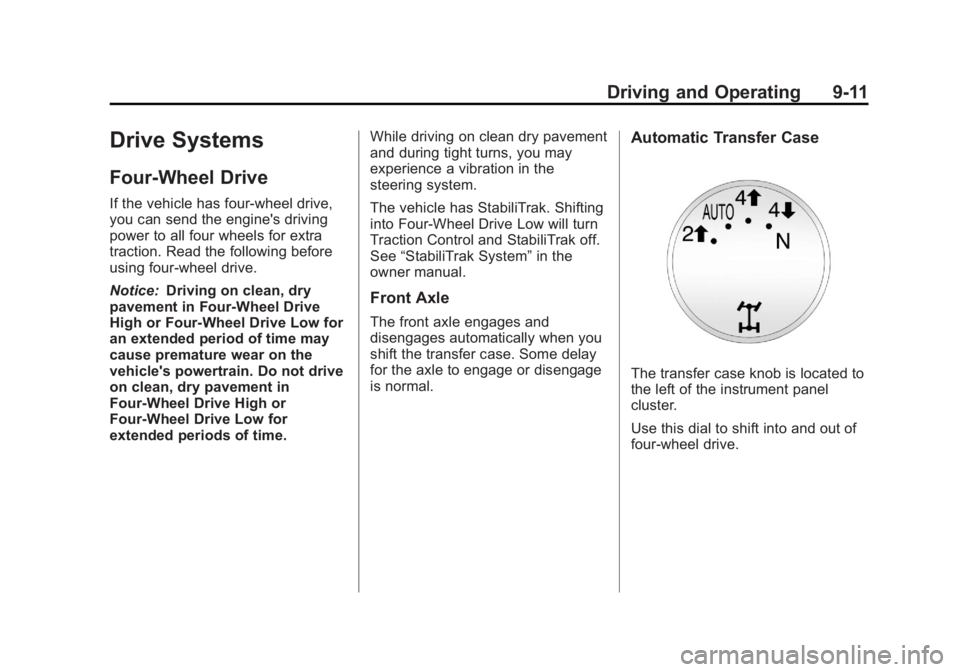
is normal. Automatic Transfer Case
The transfer case knob is located to
the left of the instrument panel
cluster.
Use this dial to shift into and out of
four-wheel drive.
Page 38 of 94
Black plate (12,1)Cadillac Escalade Hybrid - 2011
9-12 Driving and Operating You can choose among five driving
settings:
Indicator lights in the switches show
you which setting you are in. The
indicator lights will come on briefly
when you turn on the ignition and
the last chosen setting will stay on.
If the lights do not come on, you
should take the vehicle to your
dealer for service. An indicator light
will flash while shifting. It will stay on
when the shift is completed. If for
some reason the transfer case
cannot make a requested shift, it will
return to the last chosen setting.
2
m (Two-Wheel Drive High): This
setting is used for driving in most
street and highway situations. The
front axle is not engaged in
two-wheel drive. This setting also
provides the best fuel economy.
AUTO (Automatic Four-Wheel
Drive): This setting is ideal for use
when road surface traction
conditions are variable. When
driving your vehicle in AUTO, the
front axle is engaged, but the vehicle's power is primarily sent to
the rear wheels. When the vehicle's
software determines a need for
more traction, the system will
transfer more power to the front
wheels. Driving in this mode results
in slightly lower fuel economy than
Two-Wheel Drive High.
4
m (Four-Wheel Drive High): Use
the four-wheel high position when
you need extra traction, such as on
snowy or icy roads or in most
off-road situations. This setting also
engages the front axle to help drive
the vehicle. This is the best setting
to use when plowing snow.
4
n (Four-Wheel Drive Low) : This
setting also engages the front axle
and delivers extra torque. You may
never need this setting. It sends
maximum power to all four wheels.
You might choose Four-Wheel Drive
Low if you are driving off-road in
deep sand, deep mud, deep snow,
and while climbing or descending
steep hills. The vehicle has StabiliTrak. Shifting
into Four-Wheel-Drive Low will turn
Traction Control and StabiliTrak off.
See “ StabiliTrak System ” in the
owner manual.
{ WARNINGShifting the transfer case to
N (Neutral) can cause the vehicle
to roll even if the transmission is
in P (Park). You or someone else
could be seriously injured. Be
sure to set the parking brake
before placing the transfer case in
N (Neutral). See “ Parking Brake ”
in the owner manual for more
information.
N (Neutral): Shift the vehicle's
transfer case to N (Neutral) only
when towing the vehicle. See
“ Recreational Vehicle Towing ” or
“ Towing Your Vehicle ” in the owner
manual.
Page 39 of 94
Black plate (13,1)Cadillac Escalade Hybrid - 2011
Driving and Operating 9-13If the SERVICE 4 WHEEL DRIVE
message stays on, you should take
the vehicle to your dealer for
service. See Transmission
Messages on page 5 ‑ 7 .
Shifting Into Four-Wheel Drive
High or AUTO (Automatic
Four-Wheel Drive)
Turn the knob to the Four-Wheel
High or AUTO position. This can be
done at any speed, except when
shifting from Four-Wheel Drive Low.
The indicator light will flash while
shifting. It will remain on when the
shift is completed.
Shifting Into Two-Wheel
Drive High
Turn the knob to the Two-Wheel
High position. This can be done at
any speed, except when shifting
from Four-Wheel Drive Low.
See “ Shifting Out of Four-Wheel
Drive Low ” in this section for more
information. Shifting Into Four-Wheel
Drive Low
When Four-Wheel Low is engaged,
vehicle speed should be kept below
64 km/h (40 mph). Extended
high-speed operation in 4L may
damage or shorten the life of the
drivetrain.
To shift to the Four-Wheel Drive
Low position, the ignition must be in
ON/RUN and the vehicle must be
stopped or moving less than 5 km/h
(3 mph) with the transmission in
N (Neutral). The preferred method
for shifting into Four-Wheel Drive
Low is to have the vehicle moving
1.6 to 3.2 km/h (1 to 2 mph). Turn
the knob to the Four-Wheel Drive
Low position. You must wait for the
Four-Wheel Drive Low indicator light
to stop flashing and remain on
before shifting the transmission
into gear. Notice: Shifting the transmission
into gear before the Four-Wheel
Drive Low indicator light has
stopped flashing could damage
the transfer case. To help avoid
damaging the vehicle, always wait
for the Four-Wheel Drive Low
indicator light to stop flashing
before shifting the transmission
into gear.
The vehicle may have significant
engagement noise and bump when
shifting between Four-Wheel Drive
Low and Four-Wheel Drive High
ranges or from N (Neutral) while the
engine is running.
If the knob is turned to the
Four-Wheel Drive Low position
when the vehicle is in gear and/or
moving, the Four-Wheel Drive Low
indicator light will flash for
30 seconds and not complete the
shift unless the vehicle is moving
less than 5 km/h (3 mph) and the
transmission is in N (Neutral). After
30 seconds the transfer case will
shift to Four-Wheel Drive
High mode.
Page 40 of 94
Black plate (14,1)Cadillac Escalade Hybrid - 2011
9-14 Driving and Operating Shifting Out of Four-Wheel
Drive Low
To shift from Four-Wheel Drive Low
to Four-Wheel Drive High, AUTO,
or Two-Wheel Drive High, the
vehicle must be stopped or moving
less than 5 km/h (3 mph) with the
transmission in N (Neutral) and the
ignition in ON/RUN. The preferred
method for shifting out of
Four-Wheel Drive Low is to have
your vehicle moving 1.6 to 3.2 km/h
(1 to 2 mph). Turn the knob to the
Four-Wheel Drive High, AUTO,
or Two-Wheel Drive High position.
You must wait for the Four-Wheel
Drive High, AUTO, or Two-Wheel
Drive High indicator light to stop
flashing and remain on before
shifting the transmission into gear.
Notice: Shifting the transmission
into gear before the Four-Wheel
Drive Low indicator light has
stopped flashing could damage
the transfer case. To help avoid
damaging the vehicle, always wait
for the Four-Wheel Drive Low indicator light to stop flashing
before shifting the transmission
into gear.
The vehicle may have significant
engagement noise and bump when
shifting between Four-Wheel Drive
Low and Four-Wheel Drive High
ranges or from N (Neutral) while the
engine is running.
If the knob is turned to the
Four-Wheel Drive High, AUTO,
or Two-Wheel Drive High switch
position when the vehicle is in gear
and/or moving, the Four-Wheel
Drive High, AUTO or Two-Wheel
Drive High indicator light will flash
for 30 seconds but will not complete
the shift unless the vehicle is
moving less than 5 km/h (3 mph)
and the transmission is in
N (Neutral). Shifting into Neutral
To shift the transfer case into
N (Neutral):
1. Make sure the vehicle is parked
so that it will not roll.
2. Set the parking brake and apply
the regular brake pedal. See
“ Parking Brake ” in the owner
manual.
3. Start the vehicle or turn the
ignition to ON/RUN.
4. Put the transmission in
N (Neutral).
5. Shift the transfer case to
Two-Wheel Drive High.
6. Turn the transfer case dial
clockwise to N (Neutral) until it
stops and hold it there until the
N (Neutral) light starts blinking.
This will take at least
10 seconds. Then slowly release
the dial to the Four ‐ Wheel Drive
Low position. The N (Neutral)
light will come on when the
transfer case shift to N (Neutral)
is complete.
Page 41 of 94
Black plate (15,1)Cadillac Escalade Hybrid - 2011
Driving and Operating 9-157. If the engine is running, verify
that the transfer case is in
N (Neutral) by shifting the
transmission to R (Reverse) for
one second, then shift the
transmission to D (Drive) for
one second.
8. Turn the ignition to ACC/
ACCESSORY, which will turn the
engine off.
9. Place the transmission shift
lever in P (Park).
10. Release the parking brake prior
to moving the vehicle.
11. Turn the ignition to LOCK/OFF.
Shifting Out of Neutral
To shift the transfer case out of
N (Neutral):
1. Set the parking brake and apply
the regular brake pedal.
2. Turn the ignition to ON/RUN with
the engine off, and shift the
transmission to N (Neutral). 3. Turn the transfer case dial to the
desired transfer case shift
position (Two-Wheel Drive High,
Four-Wheel Drive High, AUTO).
After the transfer case has
shifted out of N (Neutral), the
N (Neutral) light will go out.
4. Release the parking brake prior
to moving the vehicle.
Notice: Shifting the transmission
into gear before the Four-Wheel
Drive Low indicator light has
stopped flashing could damage
the transfer case. To help avoid
damaging the vehicle, always wait
for the Four-Wheel Drive Low
indicator light to stop flashing
before shifting the transmission
into gear.
5. Start the engine and shift the
transmission to the desired
position. Excessively shifting the transfer
case into or out of the different
modes may cause the transfer case
to enter the shift protection mode.
This will protect the transfer case
from possible damage and will only
allow the transfer case to respond to
one shift per 10 seconds. The
transfer case may stay in this mode
for up to three minutes.
Page 45 of 94

Black plate (1,1)Cadillac Escalade Hybrid - 2011
Vehicle Care 10-1
Vehicle Care Vehicle Checks Doing Your Own
Service Work . . . . . . . . . . . . . . . 10-2
Engine Compartment
Overview . . . . . . . . . . . . . . . . . . . 10-4
Automatic Transmission
Fluid . . . . . . . . . . . . . . . . . . . . . . . 10-6
Drive Motor/Generator Control
Module (DMCM) Coolant
Surge Tank
Pressure Cap . . . . . . . . . . . . . . 10-9
Drive Motor/Generator Control
Module (DMCM) Cooling
System . . . . . . . . . . . . . . . . . . . . . 10-9
Power Steering Fluid . . . . . . . 10-13
Battery . . . . . . . . . . . . . . . . . . . . . 10-13
Four-Wheel Drive . . . . . . . . . . . 10-14
Electrical System High Voltage Devices and
Wiring . . . . . . . . . . . . . . . . . . . . . 10-15
Fuses and Circuit
Breakers . . . . . . . . . . . . . . . . . . 10-15
Engine Compartment Fuse
Block . . . . . . . . . . . . . . . . . . . . . 10-15 Wheels and Tires Tire Pressure . . . . . . . . . . . . . . . 10-17
Tire Pressure Monitor
Operation . . . . . . . . . . . . . . . . . 10-18
Tire Rotation . . . . . . . . . . . . . . . 10-22
If a Tire Goes Flat . . . . . . . . . . 10-23
Tire Sealant and
Compressor Kit . . . . . . . . . . . 10-24
Storing the Tire Sealant and
Compressor Kit . . . . . . . . . . . 10-31
Jump Starting Jump Starting . . . . . . . . . . . . . . 10-31
Towing Recreational Vehicle
Towing . . . . . . . . . . . . . . . . . . . . 10-36
Appearance Care Exterior Care . . . . . . . . . . . . . . . 10-40
Page 58 of 94
Black plate (14,1)Cadillac Escalade Hybrid - 2011
10-14 Vehicle Care Vehicle Storage
{ WARNINGBatteries have acid that can burn
you and gas that can explode.
You can be badly hurt if you are
not careful. See Jump Starting on
page 10 ‑ 31 for tips on working
around a battery without
getting hurt.
Infrequent Usage: Remove the
12 ‐ volt battery black, negative ( − )
cable from the battery to keep the
battery from running down.
Extended Storage: Remove the
12 ‐ volt battery black, negative ( − )
cable from the battery or use a
battery trickle charger.
Remember to reconnect the battery
when ready to drive the vehicle. Four-Wheel Drive Transfer Case When to Check Lubricant
Refer to the Scheduled
Maintenance on page 11 ‑ 1 to
determine how often to check the
lubricant.
How to Check Lubricant
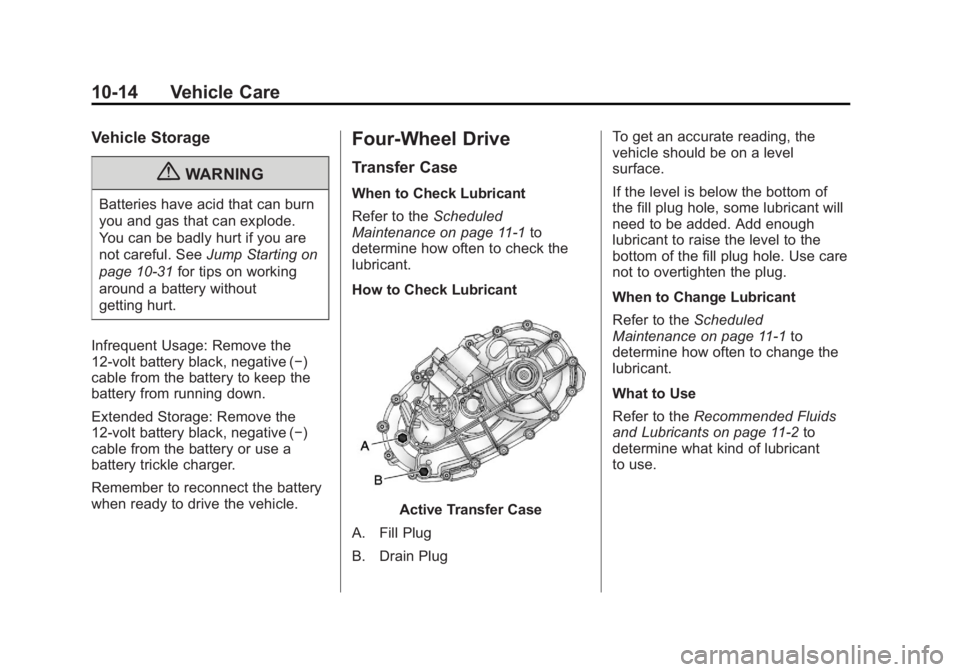
Active Transfer Case
A. Fill Plug
B. Drain Plug To get an accurate reading, the
vehicle should be on a level
surface.
If the level is below the bottom of
the fill plug hole, some lubricant will
need to be added. Add enough
lubricant to raise the level to the
bottom of the fill plug hole. Use care
not to overtighten the plug.
When to Change Lubricant
Refer to the Scheduled
Maintenance on page 11 ‑ 1 to
determine how often to change the
lubricant.
What to Use
Refer to the Recommended Fluids
and Lubricants on page 11 ‑ 2 to
determine what kind of lubricant
to use.
Page 61 of 94
Black plate (17,1)Cadillac Escalade Hybrid - 2011
Vehicle Care 10-17Relays Usage
CAB
HTR
PUMP Cabin Heater Pump
COOL
PUMP Coolant Pump
FAN LOW Cooling Fan Low
Speed Relay
FAN
MID 1 Cooling Fan Mid 1
FAN HI Cooling Fan High
Speed Relay
FAN
MID 2 Cooling Fan Mid 2
FAN
CNTRL Cooling Fan Control Wheels and Tires Tire Pressure Tires need the correct amount of air
pressure to operate effectively.
Notice: Do not let anyone tell
you that under ‐ inflation or
over ‐ inflation is all right. It is
not. If your tires do not have
enough air (under ‐ inflation),
you can get the following: .
Tire overloading and
over-heating which could
lead to a blowout. .
Premature or
irregular wear. .
Poor handling. .
Reduced fuel economy. If your tires have too much air
(over ‐ inflation), you can get
the following: .
Unusual wear. .
Poor handling. .
Rough ride. .
Needless damage from
road hazards. A vehicle specific Tire and Loading
Information label is attached to your
vehicle. This label shows your
vehicle's original equipment tires
and the correct inflation pressures
for your tires when they are cold.
The recommended cold tire inflation
pressure, shown on the label, is the
minimum amount of air pressure
needed to support your vehicle's
maximum load carrying capacity.
Page 62 of 94
Black plate (18,1)Cadillac Escalade Hybrid - 2011
10-18 Vehicle Care For additional information regarding
how much weight your vehicle can
carry, and an example of the Tire
and Loading Information label, see
“ Vehicle Load Limits ” in the owner
manual. How you load your vehicle
affects vehicle handling and ride
comfort. Never load your vehicle
with more weight than it was
designed to carry.
When to Check Check your tires once a month
or more.
How to Check Use a good quality pocket-type
gauge to check tire pressure. You
cannot tell if your tires are properly
inflated simply by looking at them.
Radial tires may look properly
inflated even when they're
underinflated. Check the tire's
inflation pressure when the tires are
cold. Cold means your vehicle has
been sitting for at least three hours
or driven no more than 1.6 km
(1 mile). Remove the valve cap from the tire
valve stem. Press the tire gauge
firmly onto the valve to get a
pressure measurement. If the cold
tire inflation pressure matches the
recommended pressure on the tire
and loading information label, no
further adjustment is necessary.
If the pressure is low, add air until
you reach the recommended
amount.
If you overfill the tire, release air by
pushing on the metal stem in the
center of the tire valve. Recheck the
tire pressure with the tire gauge.
Be sure to put the valve caps back
on the valve stems. They help
prevent leaks by keeping out dirt
and moisture. Tire Pressure Monitor
Operation This vehicle may have a Tire
Pressure Monitor System (TPMS).
The TPMS is designed to warn the
driver when a low tire pressure
condition exists. TPMS sensors are
mounted onto each tire and wheel
assembly. The TPMS sensors
monitor the air pressure in the
vehicle's tires and transmit the tire
pressure readings to a receiver
located in the vehicle.
Page 64 of 94
Black plate (20,1)Cadillac Escalade Hybrid - 2011
10-20 Vehicle Care TPMS Malfunction Light and
Message The TPMS will not function properly
if one or more of the TPMS sensors
are missing or inoperable. When the
system detects a malfunction, the
low tire warning light flashes for
about one minute and then stays on
for the remainder of the ignition
cycle. A DIC warning message is
also displayed. The low tire warning
light and DIC warning message
come on at each ignition cycle until
the problem is corrected. Some of
the conditions that can cause the
malfunction light and DIC message
to come on are: .
The TPMS sensor matching
process was started but not
completed or not completed
successfully after rotating the
vehicle's tires. The DIC message
and TPMS malfunction light
should go off once the TPMS
sensor matching process is
performed successfully. See
“ TPMS Sensor Matching
Process ” later in this section. .
One or more TPMS sensors are
missing or damaged. The DIC
message and the TPMS
malfunction light should go off
when the TPMS sensors are
installed and the sensor
matching process is performed
successfully. See your dealer for
service. .
Replacement tires or wheels do
not match your vehicle's original
equipment tires or wheels. Tires
and wheels other than those
recommended for your vehicle
could prevent the TPMS from
functioning properly. See
“ Buying New Tires ” in the owner
manual. .
Operating electronic devices or
being near facilities using radio
wave frequencies similar to the
TPMS could cause the TPMS
sensors to malfunction. If the TPMS is not functioning it
cannot detect or signal a low tire
condition. See your dealer for
service if the TPMS malfunction
light and DIC message comes on
and stays on.
TPMS Sensor Matching
Process Each TPMS sensor has a unique
identification code. Any time you
rotate your vehicle's tires or replace
one or more of the TPMS sensors,
the identification codes will need to
be matched to the new tire/wheel
position. The sensors are matched
to the tire/wheel positions in the
following order: driver side front tire,
passenger side front tire, passenger
side rear tire, and driver side rear
tire using a TPMS diagnostic tool.
See your dealer for service.